

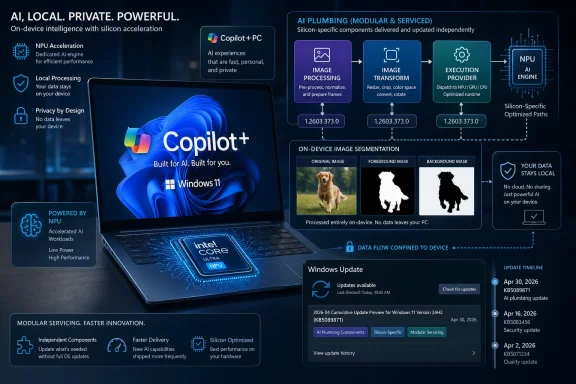
Microsoft released KB5089871 on April 30, 2026, as an automatic Windows Update package that brings the Image Processing AI component to version 1.2603.373.0 on Intel-powered Copilot+ PCs running Windows 11 version 26H1. That sentence is dry because the update is dry; the interesting part is what its dryness reveals. Microsoft is turning Windows AI into a serviced platform of small, silicon-specific components, and KB5089871 is less a feature drop than a signal that the operating system is being rebuilt around model maintenance.
For most Windows users, KB5089871 will never be a household name. It is not a Patch Tuesday headline, not a Start menu redesign, and not the sort of update that produces before-and-after screenshots. It is a narrowly scoped component update for Intel-powered Copilot+ PCs, and Microsoft describes it in the familiar language of “improvements” without exposing much of the underlying engineering.
That vagueness is the point. The Image Processing AI component is one piece of a growing Windows AI stack that handles local image understanding, segmentation, scaling, visual analysis, foreground extraction, and background separation. It exists so Windows features and apps can hand off image-related work to local machine-learning models rather than building their own pipelines from scratch.
In the old Windows model, this kind of functionality might have arrived as part of a major OS release, a Photos app update, a driver package, or a vendor utility. In the Copilot+ model, it is becoming a first-class Windows component with its own version number, release cadence, hardware targeting, and update history. That is a quiet but important architectural shift.
KB5089871 therefore matters less because version 1.2603.373.0 is obviously transformative, and more because Microsoft is normalizing the idea that Windows will update AI subsystems the way it updates security definitions, inbox apps, and hardware enablement packages. The AI PC is not just a faster laptop with an NPU. It is a Windows device whose behavior will increasingly depend on a chain of model and runtime updates that most users never see.
The component’s job is to do the early machine-vision labor: detect structures, separate subjects from backgrounds, help scale images, and produce the intermediate understanding that other tools can use. Image Transform can then modify a picture. Image Creation can generate or assist with creative output. Accessibility features can describe or interpret visual content. Editing apps can lean on shared Windows capabilities rather than shipping everything themselves.
That division of labor shows how Microsoft wants Windows AI to work. Instead of one monolithic “Copilot” feature, the platform is being split into smaller components with names that sound almost boring: Image Processing, Image Transform, Image Creation, Phi Silica, Semantic Analysis, Content Extraction, Settings Model, Execution Provider. The names are not consumer marketing. They are platform nouns.
The result is a new boundary between Windows itself and the applications that sit on top of it. If Microsoft can make these components reliable, local, performant, and developer-accessible, then Copilot+ PCs become more than machines that run AI demos. They become endpoints where Windows supplies reusable AI primitives in the same way it supplies printing, networking, graphics, and accessibility services.
That is the optimistic version. The harder version is that every one of those primitives now has to be serviced, tested, documented, rolled back when necessary, and aligned with hardware from Intel, AMD, Qualcomm, and eventually others. KB5089871 is one tile in that mosaic.
That may feel messy, but it reflects how local AI actually runs. NPUs are not generic magical accelerators. Each platform has its own drivers, execution providers, firmware assumptions, memory behavior, scheduling characteristics, and performance envelopes. The Windows AI promise depends on hiding that mess from users and developers, but Microsoft cannot ignore it underneath.
Intel’s current Copilot+ push is built around Core Ultra platforms with dedicated neural processing hardware, especially the Core Ultra 200V generation that Microsoft has identified as part of the Copilot+ ecosystem. For Intel systems, Windows must coordinate the AI component, the local runtime, the hardware execution path, and the app-facing APIs. An image segmentation model that behaves well on one NPU path cannot simply be presumed identical everywhere.
That is why KB5089871 belongs to a more fragmented Windows reality. The update may carry the same 1.2603.373.0 version number seen elsewhere in the AI component release train, but its package identity and applicability are Intel-specific. In practical terms, Microsoft is building one Windows AI platform while shipping many hardware-specific roads into it.
For enthusiasts, this means the old habit of asking “Do I have the Windows update?” becomes less useful. The better question is now: which Windows version, which Copilot+ silicon, which component family, which model version, and which execution provider? That is a lot of state for an operating system that has spent decades trying to make servicing feel invisible.
That context makes KB5089871 look odd at first glance. An Intel-powered Copilot+ PC running 26H1 sounds like something that should be mainstream, but much of the public discussion around 26H1 has centered on new hardware enablement, Arm-first availability, and platform changes that are not simply being offered as an in-place upgrade to every existing Windows 11 machine. The support note’s requirement is blunt: the device must already have the latest cumulative update for Windows 11 version 26H1 installed.
This is Microsoft’s new Windows split-screen. On one side, Windows 11 remains the familiar mass-market OS, where millions of machines move through 24H2, 25H2, and monthly cumulative updates. On the other, Copilot+ PCs are becoming a more selective class of Windows device, where some features and servicing tracks depend on NPU capability, silicon vendor, OS branch, and model package availability.
For IT admins, that distinction matters more than the component name. A machine can be “Windows 11” and still not be eligible. It can be “AI-capable” in a marketing sense and still miss a Copilot+ requirement. It can have an NPU and still be on the wrong OS branch or the wrong cumulative update. Windows servicing has always had applicability rules, but AI components make those rules more visible and more numerous.
That is the price of turning hardware acceleration into a platform promise. Microsoft wants local AI to feel seamless, but seamlessness is built on conditional logic. KB5089871 is one of those conditions made visible.
For image workflows, that matters. Background extraction, object segmentation, visual analysis, and image enhancement can involve family photos, screenshots, medical paperwork, business diagrams, whiteboards, IDs, receipts, or confidential product mockups. If Windows can do that work locally, it gives Microsoft a cleaner answer to one of the biggest objections to consumer AI: where did my data go?
But local processing only earns trust if it is both technically good and operationally legible. If foreground extraction is inaccurate, accessibility descriptions are unreliable, or an editing workflow produces inconsistent results across hardware, users will not care that the model stayed on-device. They will see a feature that feels unfinished. For businesses, the bar is higher still: privacy claims must be backed by manageability, auditability, update control, and clear documentation.
This is why small model updates carry more weight than their release notes imply. Improving the Image Processing component may mean better masks, faster analysis, fewer artifacts, lower power draw, improved runtime compatibility, or more predictable behavior for features that depend on the pipeline. Microsoft does not spell out the exact changes in KB5089871, which is frustrating. But the category itself is essential.
The local-AI promise is not delivered by a keynote. It is delivered by repeated servicing of the models and runtimes that sit between raw user data and the feature people actually touch. If those layers improve quietly, Copilot+ gets more credible. If they break quietly, the whole brand suffers.
That sounds like an enthusiast detail until something fails. Imagine a help desk ticket where two nominally identical Intel Copilot+ laptops behave differently in Photos, Paint, Recall-adjacent image analysis, accessibility image descriptions, or a third-party app using Windows AI APIs. The cause may not be the app, the driver, or the OS build in the traditional sense. It may be that one device has a newer Image Processing component than another.
This is the sort of problem Windows administrators know too well, but with a new vocabulary. Inventory systems will need to understand AI component versions. Troubleshooting scripts may need to query them. Support articles will increasingly refer not just to Windows builds but to model and runtime packages. The Windows Update history page becomes a diagnostic surface for AI capability.
There is also a communication gap here. Microsoft’s component release history is useful, but the individual KB pages remain terse. “Includes improvements” is not enough for organizations that need to decide whether to expedite deployment, block a package, validate a workflow, or explain behavioral changes to users. Security updates can be terse because the risk model is well understood. AI model updates are different; the change may be qualitative, and qualitative changes can affect user trust.
Microsoft does not need to publish model weights or proprietary implementation detail. But if Windows AI is going to be a platform, its servicing notes need to mature. Admins do not need poetry. They need enough specificity to know whether an update changes performance, quality, compatibility, privacy posture, or known issues.
In enterprise environments, automatic servicing is more complicated. Windows Update for Business, Autopatch, WSUS, Intune policies, driver approval workflows, and compliance baselines all exist because organizations do not treat endpoint changes as casual events. AI components now join that governance world whether Microsoft likes it or not.
The problem is not that the update is dangerous. The problem is that it is a new class of change. A cumulative update changes Windows. A driver update changes hardware behavior. An AI component update may change the output of a feature without changing its interface. That means an app, workflow, accessibility scenario, or compliance process could behave differently even though the user sees the same button.
For regulated businesses, that distinction matters. If an image processing model is used to support document handling, visual search, assistive descriptions, content extraction, or internal creative workflows, a model quality change can become a process change. The update may be beneficial, but it still needs a place in testing and documentation.
Microsoft’s direction is clear: AI components will be serviced continuously. The governance model around them is less clear. If Redmond wants Copilot+ PCs in serious fleets, it will need to make AI component management feel as normal as driver rings and quality update deferrals.
This cadence suggests Microsoft is no longer treating Copilot+ features as static OS features that ship once per year. Instead, the model layer is being updated at a pace closer to cloud services, except the payload lands on local hardware. That hybrid rhythm is central to the AI PC idea: cloud-style iteration, endpoint-style execution.
There is an irony here. Microsoft has spent years moving parts of Windows out of the monolithic OS update cycle and into the Store, WebView2, Edge, Defender, and app-based delivery mechanisms. Now AI pushes the company in a parallel direction, but with heavier dependencies on hardware and OS versioning. The stack is modular, but the modules are not simple.
The version number also reveals the tension between marketing and maintenance. Copilot+ is sold as a category: buy this class of PC and get advanced local AI experiences. But maintenance happens at the component level: this Intel package, that Qualcomm package, this Windows branch, that execution provider. Users buy the category; admins inherit the matrix.
If Microsoft can keep the matrix invisible, it wins. If the matrix leaks through as missing features, staggered rollouts, cryptic KBs, or uneven quality across chips, Copilot+ risks becoming another Windows compatibility story in AI clothing.
That matters because image AI is often a pipeline, not a single model invocation. Before an app can erase an object, it may need to understand object boundaries. Before a tool can place a subject onto a new background, it needs a usable mask. Before an accessibility feature can describe a visual scene, it may need structured analysis. Before a photo enhancement workflow can produce something convincing, it must identify what in the image should be preserved, transformed, sharpened, ignored, or separated.
The component Microsoft is updating in KB5089871 sits early in that chain. If it improves, multiple downstream experiences can improve without each app shipping its own bespoke update. If it regresses, those same experiences can degrade together. Platform leverage cuts both ways.
This is why Windows enthusiasts should resist the temptation to dismiss these KBs as paperwork. The consumer-facing AI feature is only as good as the shared layers beneath it. Windows has always been a pile of subsystems that users rarely name until they break. The Copilot+ era simply adds models to that pile.
For developers, the value proposition is similar. If Windows provides local AI capabilities with hardware-aware execution providers, developers can build features without becoming experts in every NPU vendor’s stack. But that only works if Microsoft maintains the components aggressively and documents behavior well enough for developers to trust them.
KB5089871 shows the category has grown beyond that simple threshold. A Copilot+ PC is now a device that participates in a servicing contract. It needs the right OS branch, cumulative update baseline, silicon-specific AI packages, execution providers, app updates, and model components. The NPU is necessary, but it is not the whole story.
That is not unusual for a new platform. Early USB, Wi-Fi, Bluetooth, TPM, DirectX, and GPU compute stories all went through periods where the logo on the box promised less than the footnotes revealed. The difference is that AI features are more subjective. Users notice not only whether a capability is present, but whether it feels smart, fast, respectful, and consistent.
The Copilot+ sticker therefore carries a heavier burden than a simple compatibility mark. It implies a future stream of improvements. It implies that local models will get better. It implies that Microsoft and silicon vendors will keep the stack aligned. It implies that the expensive NPU in the laptop will be used for more than a few launch features.
KB5089871 is part of Microsoft honoring that contract. It is not glamorous, but contracts rarely are.
AI accelerators intensify that problem. Qualcomm, Intel, and AMD do not merely offer different CPU performance profiles; they provide different local AI execution environments. Microsoft can abstract much of that through Windows ML, ONNX Runtime, and execution providers, but abstraction is never free. Bugs still happen at the seams.
The public release history already suggests a world where one component may have several KBs for the same nominal version depending on hardware. That may be technically sensible, but it makes the support story harder. A user searching for “Image Processing 1.2603.373.0” may find different KBs for different processors. An admin building a baseline may need to distinguish machines by silicon vendor before deciding whether a missing update is a problem.
There is also a feature parity risk. Copilot+ PCs launched in waves, and Windows AI features have not always arrived simultaneously across Arm, Intel, and AMD devices. If Microsoft continues to stage capabilities by silicon, users may perceive Copilot+ less as a coherent class and more as a set of overlapping promises. That perception can hurt even when the engineering reasons are valid.
The answer is not to pretend all hardware is identical. The answer is to communicate clearly, service predictably, and make the platform tooling good enough that fragmentation does not become folklore. Windows users are tolerant of complexity when it solves real problems. They are less tolerant when it hides behind branding.
That sounds bureaucratic because it is. But endpoint AI will force boring discipline onto exciting features. If a business allows local AI image workflows, it needs to know which endpoints can run them, which versions produce expected behavior, and how updates are controlled. The alternative is a support environment where users compare features across machines and nobody can explain why one laptop behaves differently from another.
The privacy angle also belongs in enterprise planning. Local processing can reduce cloud exposure, but it does not automatically answer every data governance question. Organizations still need policy around what apps can invoke local AI components, what data is processed, how outputs are used, and whether model behavior is acceptable for business decisions.
KB5089871 is modest enough that many organizations will simply let it flow through normal update rings. That is reasonable. But the category should be watched. AI component updates are going to become more frequent, more numerous, and more important to user-facing behavior.
The best time to build visibility into this layer is before a high-profile AI feature depends on it.
The larger implication is that Windows AI is becoming independently serviced infrastructure. Microsoft is building a model-update economy inside Windows, but one constrained by local hardware rather than cloud homogeneity. That is both the appeal and the risk of the AI PC.
The appeal is obvious: lower latency, better privacy, offline capability, and hardware acceleration that makes AI feel native rather than bolted on. The risk is equally obvious: more moving parts, more version mismatches, more silicon-specific packages, and more opaque release notes.
KB5089871 sits precisely at that intersection. It is a small update that tells a big story.
Source: Microsoft Support KB5089871: Image Processing AI component update (version 1.2603.373.0) for Intel-powered systems - Microsoft Support
 Microsoft’s AI PC Strategy Now Arrives as Servicing Plumbing
For most Windows users, KB5089871 will never be a household name. It is not a Patch Tuesday headline, not a Start menu redesign, and not the sort of update that produces before-and-after screenshots. It is a narrowly scoped component update for Intel-powered Copilot+ PCs, and Microsoft describes it in the familiar language of “improvements” without exposing much of the underlying engineering.That vagueness is the point. The Image Processing AI component is one piece of a growing Windows AI stack that handles local image understanding, segmentation, scaling, visual analysis, foreground extraction, and background separation. It exists so Windows features and apps can hand off image-related work to local machine-learning models rather than building their own pipelines from scratch.
In the old Windows model, this kind of functionality might have arrived as part of a major OS release, a Photos app update, a driver package, or a vendor utility. In the Copilot+ model, it is becoming a first-class Windows component with its own version number, release cadence, hardware targeting, and update history. That is a quiet but important architectural shift.
KB5089871 therefore matters less because version 1.2603.373.0 is obviously transformative, and more because Microsoft is normalizing the idea that Windows will update AI subsystems the way it updates security definitions, inbox apps, and hardware enablement packages. The AI PC is not just a faster laptop with an NPU. It is a Windows device whose behavior will increasingly depend on a chain of model and runtime updates that most users never see.
The Component Is Small, but the Boundary It Draws Is Large
Microsoft’s support language frames the Image Processing AI component as enabling on-device image understanding and image processing across Windows features and applications. That phrasing sounds broad because it is. This is not merely a background blur filter or a Photos trick; it is a reusable layer that prepares image data for downstream Windows experiences.The component’s job is to do the early machine-vision labor: detect structures, separate subjects from backgrounds, help scale images, and produce the intermediate understanding that other tools can use. Image Transform can then modify a picture. Image Creation can generate or assist with creative output. Accessibility features can describe or interpret visual content. Editing apps can lean on shared Windows capabilities rather than shipping everything themselves.
That division of labor shows how Microsoft wants Windows AI to work. Instead of one monolithic “Copilot” feature, the platform is being split into smaller components with names that sound almost boring: Image Processing, Image Transform, Image Creation, Phi Silica, Semantic Analysis, Content Extraction, Settings Model, Execution Provider. The names are not consumer marketing. They are platform nouns.
The result is a new boundary between Windows itself and the applications that sit on top of it. If Microsoft can make these components reliable, local, performant, and developer-accessible, then Copilot+ PCs become more than machines that run AI demos. They become endpoints where Windows supplies reusable AI primitives in the same way it supplies printing, networking, graphics, and accessibility services.
That is the optimistic version. The harder version is that every one of those primitives now has to be serviced, tested, documented, rolled back when necessary, and aligned with hardware from Intel, AMD, Qualcomm, and eventually others. KB5089871 is one tile in that mosaic.
Intel’s Copilot+ PCs Are Getting Their Own Lane
The “Intel-powered systems” language is not decorative. Microsoft’s AI component release history now makes clear that Copilot+ servicing is being split by silicon vendor and, in some cases, by Windows version. Intel, AMD, Qualcomm, and all-system components can receive separate KBs even when the version number looks the same.That may feel messy, but it reflects how local AI actually runs. NPUs are not generic magical accelerators. Each platform has its own drivers, execution providers, firmware assumptions, memory behavior, scheduling characteristics, and performance envelopes. The Windows AI promise depends on hiding that mess from users and developers, but Microsoft cannot ignore it underneath.
Intel’s current Copilot+ push is built around Core Ultra platforms with dedicated neural processing hardware, especially the Core Ultra 200V generation that Microsoft has identified as part of the Copilot+ ecosystem. For Intel systems, Windows must coordinate the AI component, the local runtime, the hardware execution path, and the app-facing APIs. An image segmentation model that behaves well on one NPU path cannot simply be presumed identical everywhere.
That is why KB5089871 belongs to a more fragmented Windows reality. The update may carry the same 1.2603.373.0 version number seen elsewhere in the AI component release train, but its package identity and applicability are Intel-specific. In practical terms, Microsoft is building one Windows AI platform while shipping many hardware-specific roads into it.
For enthusiasts, this means the old habit of asking “Do I have the Windows update?” becomes less useful. The better question is now: which Windows version, which Copilot+ silicon, which component family, which model version, and which execution provider? That is a lot of state for an operating system that has spent decades trying to make servicing feel invisible.
Windows 11 26H1 Makes the Targeting Even Stranger
The KB applies to Windows 11 version 26H1, which is itself a strange entry in the Windows release story. Microsoft’s recent Windows cadence has already been confusing enough, with feature updates, enablement packages, Moment-style rollouts, and staged availability. 26H1 adds another wrinkle because it has been treated less like a normal broad feature update and more like a hardware-tied platform release.That context makes KB5089871 look odd at first glance. An Intel-powered Copilot+ PC running 26H1 sounds like something that should be mainstream, but much of the public discussion around 26H1 has centered on new hardware enablement, Arm-first availability, and platform changes that are not simply being offered as an in-place upgrade to every existing Windows 11 machine. The support note’s requirement is blunt: the device must already have the latest cumulative update for Windows 11 version 26H1 installed.
This is Microsoft’s new Windows split-screen. On one side, Windows 11 remains the familiar mass-market OS, where millions of machines move through 24H2, 25H2, and monthly cumulative updates. On the other, Copilot+ PCs are becoming a more selective class of Windows device, where some features and servicing tracks depend on NPU capability, silicon vendor, OS branch, and model package availability.
For IT admins, that distinction matters more than the component name. A machine can be “Windows 11” and still not be eligible. It can be “AI-capable” in a marketing sense and still miss a Copilot+ requirement. It can have an NPU and still be on the wrong OS branch or the wrong cumulative update. Windows servicing has always had applicability rules, but AI components make those rules more visible and more numerous.
That is the price of turning hardware acceleration into a platform promise. Microsoft wants local AI to feel seamless, but seamlessness is built on conditional logic. KB5089871 is one of those conditions made visible.
The Privacy Pitch Depends on Local Models Actually Working
The most user-friendly part of Microsoft’s AI component language is the privacy claim. Image Processing runs locally on the device’s dedicated AI hardware, keeping image data on the machine rather than sending it to the cloud for basic analysis. That is the heart of the Copilot+ pitch: fast responses, lower latency, better battery behavior, and fewer sensitive files leaving the endpoint.For image workflows, that matters. Background extraction, object segmentation, visual analysis, and image enhancement can involve family photos, screenshots, medical paperwork, business diagrams, whiteboards, IDs, receipts, or confidential product mockups. If Windows can do that work locally, it gives Microsoft a cleaner answer to one of the biggest objections to consumer AI: where did my data go?
But local processing only earns trust if it is both technically good and operationally legible. If foreground extraction is inaccurate, accessibility descriptions are unreliable, or an editing workflow produces inconsistent results across hardware, users will not care that the model stayed on-device. They will see a feature that feels unfinished. For businesses, the bar is higher still: privacy claims must be backed by manageability, auditability, update control, and clear documentation.
This is why small model updates carry more weight than their release notes imply. Improving the Image Processing component may mean better masks, faster analysis, fewer artifacts, lower power draw, improved runtime compatibility, or more predictable behavior for features that depend on the pipeline. Microsoft does not spell out the exact changes in KB5089871, which is frustrating. But the category itself is essential.
The local-AI promise is not delivered by a keynote. It is delivered by repeated servicing of the models and runtimes that sit between raw user data and the feature people actually touch. If those layers improve quietly, Copilot+ gets more credible. If they break quietly, the whole brand suffers.
The Update History Page Becomes the New Device Truth
Microsoft tells users to verify KB5089871 by going to Settings, Windows Update, and Update history. That is a familiar path, but the object being verified is new. Users are no longer just checking for cumulative updates, .NET patches, drivers, or Defender intelligence. They are checking whether a local AI model component is present at a specific version.That sounds like an enthusiast detail until something fails. Imagine a help desk ticket where two nominally identical Intel Copilot+ laptops behave differently in Photos, Paint, Recall-adjacent image analysis, accessibility image descriptions, or a third-party app using Windows AI APIs. The cause may not be the app, the driver, or the OS build in the traditional sense. It may be that one device has a newer Image Processing component than another.
This is the sort of problem Windows administrators know too well, but with a new vocabulary. Inventory systems will need to understand AI component versions. Troubleshooting scripts may need to query them. Support articles will increasingly refer not just to Windows builds but to model and runtime packages. The Windows Update history page becomes a diagnostic surface for AI capability.
There is also a communication gap here. Microsoft’s component release history is useful, but the individual KB pages remain terse. “Includes improvements” is not enough for organizations that need to decide whether to expedite deployment, block a package, validate a workflow, or explain behavioral changes to users. Security updates can be terse because the risk model is well understood. AI model updates are different; the change may be qualitative, and qualitative changes can affect user trust.
Microsoft does not need to publish model weights or proprietary implementation detail. But if Windows AI is going to be a platform, its servicing notes need to mature. Admins do not need poetry. They need enough specificity to know whether an update changes performance, quality, compatibility, privacy posture, or known issues.
The Silent Install Is Convenient Until It Is Governance
KB5089871 downloads and installs automatically through Windows Update. For consumers, that is the right default. Nobody wants to manually curate model components for image segmentation, and a Copilot+ PC that never receives AI component updates would quickly become a stale demo of launch-day assumptions.In enterprise environments, automatic servicing is more complicated. Windows Update for Business, Autopatch, WSUS, Intune policies, driver approval workflows, and compliance baselines all exist because organizations do not treat endpoint changes as casual events. AI components now join that governance world whether Microsoft likes it or not.
The problem is not that the update is dangerous. The problem is that it is a new class of change. A cumulative update changes Windows. A driver update changes hardware behavior. An AI component update may change the output of a feature without changing its interface. That means an app, workflow, accessibility scenario, or compliance process could behave differently even though the user sees the same button.
For regulated businesses, that distinction matters. If an image processing model is used to support document handling, visual search, assistive descriptions, content extraction, or internal creative workflows, a model quality change can become a process change. The update may be beneficial, but it still needs a place in testing and documentation.
Microsoft’s direction is clear: AI components will be serviced continuously. The governance model around them is less clear. If Redmond wants Copilot+ PCs in serious fleets, it will need to make AI component management feel as normal as driver rings and quality update deferrals.
The Version Number Tells a Platform Story
Version 1.2603.373.0 looks inscrutable, but it is part of a broader pattern. Microsoft’s AI component release history shows multiple components moving through version trains across February, March, and April 2026, including Image Processing, Image Transform, Phi Silica, Settings Model, Semantic Analysis, Content Extraction, and Execution Provider packages. Some packages are scoped to all systems; others are split by silicon vendor.This cadence suggests Microsoft is no longer treating Copilot+ features as static OS features that ship once per year. Instead, the model layer is being updated at a pace closer to cloud services, except the payload lands on local hardware. That hybrid rhythm is central to the AI PC idea: cloud-style iteration, endpoint-style execution.
There is an irony here. Microsoft has spent years moving parts of Windows out of the monolithic OS update cycle and into the Store, WebView2, Edge, Defender, and app-based delivery mechanisms. Now AI pushes the company in a parallel direction, but with heavier dependencies on hardware and OS versioning. The stack is modular, but the modules are not simple.
The version number also reveals the tension between marketing and maintenance. Copilot+ is sold as a category: buy this class of PC and get advanced local AI experiences. But maintenance happens at the component level: this Intel package, that Qualcomm package, this Windows branch, that execution provider. Users buy the category; admins inherit the matrix.
If Microsoft can keep the matrix invisible, it wins. If the matrix leaks through as missing features, staggered rollouts, cryptic KBs, or uneven quality across chips, Copilot+ risks becoming another Windows compatibility story in AI clothing.
Image Processing Is the Boring Layer That Makes Flashy Features Possible
The most visible AI features tend to be the ones with names: Cocreator, image generation, background removal, semantic search, live captions, Recall, Click to Do, and whatever Microsoft decides to brand next. Image Processing is not one of those headline features. It is the layer that helps make them plausible.That matters because image AI is often a pipeline, not a single model invocation. Before an app can erase an object, it may need to understand object boundaries. Before a tool can place a subject onto a new background, it needs a usable mask. Before an accessibility feature can describe a visual scene, it may need structured analysis. Before a photo enhancement workflow can produce something convincing, it must identify what in the image should be preserved, transformed, sharpened, ignored, or separated.
The component Microsoft is updating in KB5089871 sits early in that chain. If it improves, multiple downstream experiences can improve without each app shipping its own bespoke update. If it regresses, those same experiences can degrade together. Platform leverage cuts both ways.
This is why Windows enthusiasts should resist the temptation to dismiss these KBs as paperwork. The consumer-facing AI feature is only as good as the shared layers beneath it. Windows has always been a pile of subsystems that users rarely name until they break. The Copilot+ era simply adds models to that pile.
For developers, the value proposition is similar. If Windows provides local AI capabilities with hardware-aware execution providers, developers can build features without becoming experts in every NPU vendor’s stack. But that only works if Microsoft maintains the components aggressively and documents behavior well enough for developers to trust them.
Copilot+ Is Becoming a Contract, Not a Sticker
When Microsoft introduced Copilot+ PCs, the most memorable requirement was the 40 TOPS NPU threshold. That number gave the category a clean hardware story. It also made for easy buying advice: if you want the advanced local Windows AI features, buy a machine with the required neural processing capability.KB5089871 shows the category has grown beyond that simple threshold. A Copilot+ PC is now a device that participates in a servicing contract. It needs the right OS branch, cumulative update baseline, silicon-specific AI packages, execution providers, app updates, and model components. The NPU is necessary, but it is not the whole story.
That is not unusual for a new platform. Early USB, Wi-Fi, Bluetooth, TPM, DirectX, and GPU compute stories all went through periods where the logo on the box promised less than the footnotes revealed. The difference is that AI features are more subjective. Users notice not only whether a capability is present, but whether it feels smart, fast, respectful, and consistent.
The Copilot+ sticker therefore carries a heavier burden than a simple compatibility mark. It implies a future stream of improvements. It implies that local models will get better. It implies that Microsoft and silicon vendors will keep the stack aligned. It implies that the expensive NPU in the laptop will be used for more than a few launch features.
KB5089871 is part of Microsoft honoring that contract. It is not glamorous, but contracts rarely are.
The Real Risk Is Fragmentation Masquerading as Innovation
The Windows ecosystem has always been broad, and breadth is both its superpower and its tax. Microsoft can support consumer laptops, gaming rigs, enterprise desktops, rugged tablets, workstations, virtual machines, and experimental form factors. But every expansion of the hardware matrix makes consistency harder.AI accelerators intensify that problem. Qualcomm, Intel, and AMD do not merely offer different CPU performance profiles; they provide different local AI execution environments. Microsoft can abstract much of that through Windows ML, ONNX Runtime, and execution providers, but abstraction is never free. Bugs still happen at the seams.
The public release history already suggests a world where one component may have several KBs for the same nominal version depending on hardware. That may be technically sensible, but it makes the support story harder. A user searching for “Image Processing 1.2603.373.0” may find different KBs for different processors. An admin building a baseline may need to distinguish machines by silicon vendor before deciding whether a missing update is a problem.
There is also a feature parity risk. Copilot+ PCs launched in waves, and Windows AI features have not always arrived simultaneously across Arm, Intel, and AMD devices. If Microsoft continues to stage capabilities by silicon, users may perceive Copilot+ less as a coherent class and more as a set of overlapping promises. That perception can hurt even when the engineering reasons are valid.
The answer is not to pretend all hardware is identical. The answer is to communicate clearly, service predictably, and make the platform tooling good enough that fragmentation does not become folklore. Windows users are tolerant of complexity when it solves real problems. They are less tolerant when it hides behind branding.
The Admin View: Inventory First, Excitement Later
For enterprise IT, KB5089871 should not trigger panic, but it should trigger inventory thinking. Which devices are Copilot+ PCs? Which are Intel-powered? Which are on Windows 11 version 26H1? Which have the latest cumulative update installed? Which AI components are present, and which versions are approved or expected?That sounds bureaucratic because it is. But endpoint AI will force boring discipline onto exciting features. If a business allows local AI image workflows, it needs to know which endpoints can run them, which versions produce expected behavior, and how updates are controlled. The alternative is a support environment where users compare features across machines and nobody can explain why one laptop behaves differently from another.
The privacy angle also belongs in enterprise planning. Local processing can reduce cloud exposure, but it does not automatically answer every data governance question. Organizations still need policy around what apps can invoke local AI components, what data is processed, how outputs are used, and whether model behavior is acceptable for business decisions.
KB5089871 is modest enough that many organizations will simply let it flow through normal update rings. That is reasonable. But the category should be watched. AI component updates are going to become more frequent, more numerous, and more important to user-facing behavior.
The best time to build visibility into this layer is before a high-profile AI feature depends on it.
The April 30 Package Is a Signpost for the Next Windows Era
The concrete facts of KB5089871 are simple. It applies only to Copilot+ PCs. It targets Intel-powered systems. It updates the Image Processing AI component to version 1.2603.373.0. It requires Windows 11 version 26H1 with the latest cumulative update. It installs automatically via Windows Update and can be verified in Update history.The larger implication is that Windows AI is becoming independently serviced infrastructure. Microsoft is building a model-update economy inside Windows, but one constrained by local hardware rather than cloud homogeneity. That is both the appeal and the risk of the AI PC.
The appeal is obvious: lower latency, better privacy, offline capability, and hardware acceleration that makes AI feel native rather than bolted on. The risk is equally obvious: more moving parts, more version mismatches, more silicon-specific packages, and more opaque release notes.
KB5089871 sits precisely at that intersection. It is a small update that tells a big story.
The KB5089871 Checklist Is Short, but the Implications Are Not
For WindowsForum readers, the practical read is straightforward: do not overhype this as a new feature release, but do not ignore it as meaningless background noise. It is the kind of servicing event that will become routine as Microsoft deepens the Copilot+ stack.- KB5089871 is for Intel-powered Copilot+ PCs running Windows 11 version 26H1, not for every Intel Windows 11 machine.
- The package updates the Image Processing AI component to version 1.2603.373.0.
- The component supports local image understanding tasks such as scaling, segmentation, visual analysis, and foreground-background extraction.
- The update requires the latest cumulative update for Windows 11 version 26H1 before it applies.
- Installation is automatic through Windows Update, and presence should be checked in Windows Update history.
- The bigger story is Microsoft’s shift toward separately serviced, hardware-aware AI components inside Windows.
Source: Microsoft Support KB5089871: Image Processing AI component update (version 1.2603.373.0) for Intel-powered systems - Microsoft Support
