

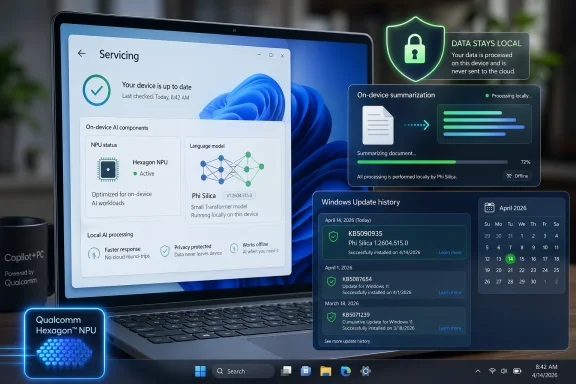
Microsoft’s KB5090935, published as a Phi Silica AI component update version 1.2604.515.0 for Qualcomm-powered Copilot+ PCs, delivers an automatic Windows Update package for Windows 11 versions 24H2 and 25H2 systems that have the latest cumulative update installed. It is, on its face, a small servicing note for a small language model. In practice, it is another sign that Windows is becoming a model-serviced operating system, where AI components sit beside drivers, security fixes, and feature enablement packages in the update machinery. The interesting part is not that Phi Silica got an update; it is that Microsoft now expects Windows users and administrators to treat an on-device language model as ordinary platform plumbing.
For decades, Windows servicing has mostly meant kernel fixes, driver revisions, .NET updates, browser changes, Defender intelligence, and the occasional feature switch hidden behind an enablement package. KB5090935 belongs to a newer category: the AI component update. It does not install a consumer app in the traditional sense. It updates a local model component that Windows itself and third-party developers can call.
That distinction matters because Phi Silica is not just another Copilot-branded flourish. Microsoft describes it as a Transformer-based small language model optimized for Qualcomm-powered Copilot+ PCs and their NPUs. It is designed to run language tasks locally, with low latency and without shipping every prompt to a cloud service.
That makes KB5090935 a servicing event for Windows’ local intelligence layer. The package applies to Windows 11 version 24H2 and version 25H2, requires the latest cumulative update, and replaces the earlier KB5084175 release. It appears in Update history as “2026-04 Phi Silica version 1.2604.515.0 for Qualcomm-powered systems,” a phrasing that tells administrators exactly what Microsoft wants this to become: visible, versioned, and routine.
The opacity is also routine. The support article says the update includes improvements to the Phi Silica AI component, but it does not enumerate model behavior changes, performance deltas, regression fixes, safety tuning, prompt-handling changes, or API compatibility notes. That is normal for many Windows component updates, but it feels more consequential when the thing being updated is a language model.
That is the hinge on which Copilot+ PCs turn. Microsoft’s first wave of Copilot+ hardware was built around the idea that modern PCs need an NPU capable of sustained AI workloads. Qualcomm’s Snapdragon X systems were first through the gate, and Phi Silica is the model that makes that silicon useful to Windows features and to developers working through Microsoft’s Windows AI APIs.
The model’s value is not that it competes head-on with the largest frontier models. It does not need to. Its value is that it is resident, available, and cheap to run in power terms. For the operating system, a local SLM is less like a chatbot and more like a new class of system service.
That framing explains why KB5090935 is worth attention even if the support note is brief. Windows is no longer merely adding AI features; it is adding updateable AI infrastructure. A Copilot+ PC becomes a moving target not only because Windows evolves, but because the models that underpin Windows experiences evolve independently inside the same servicing channel.
That creates a practical divide inside the Windows 11 installed base. Two machines can both run Windows 11 24H2 or 25H2, both receive monthly cumulative updates, and both display Copilot branding, yet only one may receive a given AI component update because the model package is tied to processor family and NPU capability. KB5090935 makes that segmentation visible.
For enthusiasts, that is an interesting hardware story. For administrators, it is an asset-management story. “Windows 11” is no longer a sufficient descriptor for predicting available AI features or update payloads. OS version, cumulative update level, processor family, NPU class, and AI component version all matter.
The irony is that Microsoft spent years trying to make Windows servicing simpler to reason about. Shared servicing branches, enablement packages, and predictable monthly releases were meant to reduce fragmentation. AI components reintroduce a different kind of fragmentation, not by edition or SKU, but by silicon capability and model availability.
What it does not say is the part many IT pros would most like to know. Did summarization quality improve? Did the model become faster? Did Microsoft change safety filtering? Did token limits move? Did the update address a bug in a specific Windows AI API? Did it change behavior for inbox Windows experiences?
Those questions matter because language models are not deterministic platform libraries in the old sense. A graphics driver update can change performance and stability, but an SLM update can change outputs. A rewrite feature may become more concise, a summarizer may emphasize different details, and an app depending on local generation may show different behavior without the app developer shipping an update.
Microsoft is not alone in struggling with this. The entire industry is still working out what a changelog for a deployed model should look like. Traditional software release notes are built around bugs, CVEs, features, and known issues. Model release notes need a vocabulary for quality, alignment, evaluation, regressions, latency, hardware utilization, and developer-facing compatibility.
The absence of that vocabulary leaves a gap. KB5090935 tells us the component changed. It does not tell us how much trust to place in continuity of behavior.
But local execution does not automatically solve governance. It changes where governance must happen. If a model is updated through Windows Update, then the compliance boundary includes not just the app, the OS, and the device policy, but also the model package and its servicing cadence.
That is a new operational habit for many organizations. Security teams already understand Defender intelligence updates, browser policy baselines, and driver rings. They may be less prepared to validate an AI model update that affects language behavior inside Windows features or apps built on Windows AI APIs. The update may be local, but it is still a changing AI dependency.
The privacy promise also depends on application design. Phi Silica can support local processing, but that does not mean every AI-assisted workflow on a PC is local end-to-end. A Windows feature or third-party app may combine local inference with cloud services, telemetry, sync, or account-based experiences. Users will need clearer UI cues, and administrators will need clearer policy controls, to know which parts of a workflow remain on device.
The industry’s reflex is to market “on-device AI” as a single clean category. In practice it is a spectrum. KB5090935 sits at the local end of that spectrum, but it does not eliminate the need to ask what each Windows feature or app does with data before and after the model is invoked.
The advantage is also strategic. If developers target Microsoft’s local AI APIs, Windows becomes the abstraction layer between their apps and a fragmented silicon market. Rather than writing separately for every NPU stack, developers can ask Windows for a capability and let the platform handle model distribution, hardware acceleration, and versioning.
But this bargain has a cost. A developer who depends on Phi Silica is depending on a Microsoft-serviced model whose behavior can change through Windows Update. That may be acceptable for many consumer features, but it complicates testing for enterprise software where output consistency matters. If a document-classification helper, note summarizer, or drafting assistant behaves differently after an AI component update, the app owner may be the first person blamed.
This does not mean developers should avoid the platform. Quite the opposite: a built-in local model may be the only practical way to make NPU-powered Windows apps mainstream. But the tooling around it needs to mature quickly. Developers will need version detection, capability negotiation, fallback behavior, and realistic guidance about whether an app can pin, require, or merely adapt to a given model version.
Microsoft’s current direction suggests adaptation will be the norm. Windows has always prized broad compatibility, but AI behavior may become less fixed than traditional APIs. The API contract can remain stable while the model behind it improves. That is both the promise and the discomfort of platform-level AI.
That visibility matters. Windows Update has too often buried important component-level changes beneath vague labels or cumulative bundles. AI components deserve their own names and versions because they affect user experience, developer assumptions, and fleet state. A visible update-history entry is not a full management story, but it is a start.
The prerequisite is equally important. KB5090935 requires the latest cumulative update for Windows 11 24H2 or 25H2. That ties AI component currency to general OS servicing health, which is sensible from Microsoft’s perspective. The model and its runtime dependencies likely assume a baseline of platform fixes.
For IT departments, however, that also means AI feature currency may lag wherever cumulative updates are delayed. Organizations that defer monthly updates for testing or compatibility reasons may also delay model improvements. In the Windows AI era, “patch compliance” and “AI capability compliance” begin to overlap.
This could become a subtle pressure mechanism. Users may ask why a Copilot+ feature behaves differently on a managed PC than on a personal device. The answer may be update rings, not hardware. That is a familiar Windows problem wearing an AI badge.
That grace period will not last. As more Windows features use local models and more third-party applications depend on them, Microsoft will face pressure to explain changes with greater precision. A line that says “includes improvements” will not satisfy teams validating accessibility workflows, legal drafting tools, medical administration apps, or offline field-service software.
The right answer is not necessarily to publish every internal evaluation detail. Model release notes can become unreadable if they drown administrators in benchmark jargon. But Microsoft can provide a middle layer: notable behavior changes, performance expectations, known issues, compatibility considerations, and guidance for developers whose apps depend on a given API.
Windows already has separate release-health pages, known-issue rollbacks, safeguard holds, driver blocks, and lifecycle documentation. AI components need a comparable public discipline. If a local model is important enough to update through Windows Update, it is important enough to document in a way that helps professionals assess risk.
The alternative is a trust deficit. Users will not fear a model update because they understand it too well; they will fear it because they cannot tell what changed. In enterprise computing, opacity rarely saves time. It usually moves the work downstream to help desks, admins, developers, and security reviewers.
That is good for early adopters. A Snapdragon X laptop purchased in the first wave can improve as Microsoft updates models, runtimes, and APIs. The NPU is not frozen at the feature set available on day one. In theory, the hardware becomes more valuable as the local AI stack matures.
It is also a lifecycle commitment. If Microsoft wants users to believe in AI PCs, it must service the AI stack for years, not months. Component updates like KB5090935 are evidence that the company is building the pipes to do that. The challenge will be maintaining consistency across Qualcomm, Intel, AMD, and future silicon families without turning Windows AI into a maze of near-identical but subtly incompatible experiences.
This is where Microsoft’s platform instincts could help. Windows has survived because it absorbs hardware diversity and presents something developers can target. If Windows AI Foundry and the Windows AI APIs do their job, Phi Silica on Qualcomm should feel like part of a coherent Windows capability rather than a one-off vendor optimization.
Still, the Qualcomm-specific nature of KB5090935 is a reminder that abstraction is not magic. Performance, availability, and feature rollout will depend on silicon readiness. AI PCs may share a brand, but under the hood they will not all move at the same speed.
Those are not spectacular scenarios. They are exactly the kinds of interactions that become valuable when they are fast, private, and always available. A local model does not have to be the smartest model in the world to save a user from a cloud wait, a subscription prompt, or a privacy review.
This is also where power efficiency matters. NPUs are not marketing decorations; they exist because running inference continuously on a CPU or GPU is often the wrong trade-off for battery life and thermals. Phi Silica’s optimization for Qualcomm NPUs is part of a broader attempt to make language intelligence feel native to a laptop rather than bolted on from a data center.
The risk is that Microsoft over-brands the experience and under-explains the mechanics. Users do not need every feature to shout “AI.” They need it to work, to be controllable, and to be predictable. Administrators need to know when the underlying component changes. Developers need contracts strong enough to build on.
KB5090935 is boring in exactly the way successful platform work is often boring. It updates a component. It leaves a version trail. It moves the installed base forward. If Microsoft can pair that machinery with better transparency, the boringness becomes a strength.
Source: Microsoft Support KB5090935: Phi Silica AI component update (version 1.2604.515.0) for Qualcomm-powered systems - Microsoft Support
 Microsoft Quietly Moves the AI Stack Into Windows Servicing
For decades, Windows servicing has mostly meant kernel fixes, driver revisions, .NET updates, browser changes, Defender intelligence, and the occasional feature switch hidden behind an enablement package. KB5090935 belongs to a newer category: the AI component update. It does not install a consumer app in the traditional sense. It updates a local model component that Windows itself and third-party developers can call.That distinction matters because Phi Silica is not just another Copilot-branded flourish. Microsoft describes it as a Transformer-based small language model optimized for Qualcomm-powered Copilot+ PCs and their NPUs. It is designed to run language tasks locally, with low latency and without shipping every prompt to a cloud service.
That makes KB5090935 a servicing event for Windows’ local intelligence layer. The package applies to Windows 11 version 24H2 and version 25H2, requires the latest cumulative update, and replaces the earlier KB5084175 release. It appears in Update history as “2026-04 Phi Silica version 1.2604.515.0 for Qualcomm-powered systems,” a phrasing that tells administrators exactly what Microsoft wants this to become: visible, versioned, and routine.
The opacity is also routine. The support article says the update includes improvements to the Phi Silica AI component, but it does not enumerate model behavior changes, performance deltas, regression fixes, safety tuning, prompt-handling changes, or API compatibility notes. That is normal for many Windows component updates, but it feels more consequential when the thing being updated is a language model.
Phi Silica Is Small Only in the Marketing Sense
The term small language model can lull people into thinking Phi Silica is a minor add-on. In architectural terms, however, it is one of the more consequential pieces of Microsoft’s AI PC strategy. It gives Windows a local language engine that can support summarization, rewriting, short-form generation, and text understanding without necessarily involving a cloud round trip.That is the hinge on which Copilot+ PCs turn. Microsoft’s first wave of Copilot+ hardware was built around the idea that modern PCs need an NPU capable of sustained AI workloads. Qualcomm’s Snapdragon X systems were first through the gate, and Phi Silica is the model that makes that silicon useful to Windows features and to developers working through Microsoft’s Windows AI APIs.
The model’s value is not that it competes head-on with the largest frontier models. It does not need to. Its value is that it is resident, available, and cheap to run in power terms. For the operating system, a local SLM is less like a chatbot and more like a new class of system service.
That framing explains why KB5090935 is worth attention even if the support note is brief. Windows is no longer merely adding AI features; it is adding updateable AI infrastructure. A Copilot+ PC becomes a moving target not only because Windows evolves, but because the models that underpin Windows experiences evolve independently inside the same servicing channel.
The Qualcomm-First Reality Has Not Gone Away
KB5090935 is specifically for Qualcomm-powered systems. That specificity reflects the uneven rollout of the AI PC era. Microsoft now talks broadly about Copilot+ PCs across silicon vendors, and Windows AI Foundry documentation points toward a wider ecosystem spanning Qualcomm, Intel, AMD, and other accelerators. But the earliest, most mature path for many of these local AI experiences remains Snapdragon X hardware.That creates a practical divide inside the Windows 11 installed base. Two machines can both run Windows 11 24H2 or 25H2, both receive monthly cumulative updates, and both display Copilot branding, yet only one may receive a given AI component update because the model package is tied to processor family and NPU capability. KB5090935 makes that segmentation visible.
For enthusiasts, that is an interesting hardware story. For administrators, it is an asset-management story. “Windows 11” is no longer a sufficient descriptor for predicting available AI features or update payloads. OS version, cumulative update level, processor family, NPU class, and AI component version all matter.
The irony is that Microsoft spent years trying to make Windows servicing simpler to reason about. Shared servicing branches, enablement packages, and predictable monthly releases were meant to reduce fragmentation. AI components reintroduce a different kind of fragmentation, not by edition or SKU, but by silicon capability and model availability.
The Support Note Says Little Because the Platform Says a Lot
KB5090935 is terse in the familiar Microsoft Support style. It says Phi Silica enables on-device language intelligence, runs on the NPU, keeps user data local for supported workflows, and is exposed through Windows AI APIs. It then moves quickly to installation mechanics: automatic Windows Update delivery, prerequisites, replacement information, and update-history detection.What it does not say is the part many IT pros would most like to know. Did summarization quality improve? Did the model become faster? Did Microsoft change safety filtering? Did token limits move? Did the update address a bug in a specific Windows AI API? Did it change behavior for inbox Windows experiences?
Those questions matter because language models are not deterministic platform libraries in the old sense. A graphics driver update can change performance and stability, but an SLM update can change outputs. A rewrite feature may become more concise, a summarizer may emphasize different details, and an app depending on local generation may show different behavior without the app developer shipping an update.
Microsoft is not alone in struggling with this. The entire industry is still working out what a changelog for a deployed model should look like. Traditional software release notes are built around bugs, CVEs, features, and known issues. Model release notes need a vocabulary for quality, alignment, evaluation, regressions, latency, hardware utilization, and developer-facing compatibility.
The absence of that vocabulary leaves a gap. KB5090935 tells us the component changed. It does not tell us how much trust to place in continuity of behavior.
Local AI Is a Privacy Argument and a Control Problem
Microsoft’s strongest argument for Phi Silica is privacy. Running language workloads on the device can keep data local, avoid unnecessary cloud transmission, and provide fast responses even when network conditions are poor. For regulated industries and privacy-conscious users, that is not a cosmetic distinction.But local execution does not automatically solve governance. It changes where governance must happen. If a model is updated through Windows Update, then the compliance boundary includes not just the app, the OS, and the device policy, but also the model package and its servicing cadence.
That is a new operational habit for many organizations. Security teams already understand Defender intelligence updates, browser policy baselines, and driver rings. They may be less prepared to validate an AI model update that affects language behavior inside Windows features or apps built on Windows AI APIs. The update may be local, but it is still a changing AI dependency.
The privacy promise also depends on application design. Phi Silica can support local processing, but that does not mean every AI-assisted workflow on a PC is local end-to-end. A Windows feature or third-party app may combine local inference with cloud services, telemetry, sync, or account-based experiences. Users will need clearer UI cues, and administrators will need clearer policy controls, to know which parts of a workflow remain on device.
The industry’s reflex is to market “on-device AI” as a single clean category. In practice it is a spectrum. KB5090935 sits at the local end of that spectrum, but it does not eliminate the need to ask what each Windows feature or app does with data before and after the model is invoked.
Developers Get a Platform, But Also a Moving Dependency
For developers, Phi Silica’s importance is straightforward. Microsoft is exposing local AI capabilities through Windows AI APIs and Microsoft Foundry on Windows, giving app makers a way to integrate language processing without bundling their own model or standing up cloud inference. That is a powerful proposition, especially for utilities, productivity tools, accessibility software, and enterprise line-of-business apps.The advantage is also strategic. If developers target Microsoft’s local AI APIs, Windows becomes the abstraction layer between their apps and a fragmented silicon market. Rather than writing separately for every NPU stack, developers can ask Windows for a capability and let the platform handle model distribution, hardware acceleration, and versioning.
But this bargain has a cost. A developer who depends on Phi Silica is depending on a Microsoft-serviced model whose behavior can change through Windows Update. That may be acceptable for many consumer features, but it complicates testing for enterprise software where output consistency matters. If a document-classification helper, note summarizer, or drafting assistant behaves differently after an AI component update, the app owner may be the first person blamed.
This does not mean developers should avoid the platform. Quite the opposite: a built-in local model may be the only practical way to make NPU-powered Windows apps mainstream. But the tooling around it needs to mature quickly. Developers will need version detection, capability negotiation, fallback behavior, and realistic guidance about whether an app can pin, require, or merely adapt to a given model version.
Microsoft’s current direction suggests adaptation will be the norm. Windows has always prized broad compatibility, but AI behavior may become less fixed than traditional APIs. The API contract can remain stable while the model behind it improves. That is both the promise and the discomfort of platform-level AI.
The Update History Entry Is a Small Gift to Administrators
One of the more useful details in KB5090935 is mundane: administrators and users can check whether the update is present in Settings, under Windows Update, then Update history. Once installed, the Qualcomm package should be listed as the April 2026 Phi Silica version 1.2604.515.0 update.That visibility matters. Windows Update has too often buried important component-level changes beneath vague labels or cumulative bundles. AI components deserve their own names and versions because they affect user experience, developer assumptions, and fleet state. A visible update-history entry is not a full management story, but it is a start.
The prerequisite is equally important. KB5090935 requires the latest cumulative update for Windows 11 24H2 or 25H2. That ties AI component currency to general OS servicing health, which is sensible from Microsoft’s perspective. The model and its runtime dependencies likely assume a baseline of platform fixes.
For IT departments, however, that also means AI feature currency may lag wherever cumulative updates are delayed. Organizations that defer monthly updates for testing or compatibility reasons may also delay model improvements. In the Windows AI era, “patch compliance” and “AI capability compliance” begin to overlap.
This could become a subtle pressure mechanism. Users may ask why a Copilot+ feature behaves differently on a managed PC than on a personal device. The answer may be update rings, not hardware. That is a familiar Windows problem wearing an AI badge.
The Changelog Gap Will Become Harder to Defend
Microsoft can get away with sparse AI component notes while the ecosystem is young. Most users are not checking Phi Silica versions. Most developers are still experimenting with local AI APIs. Most enterprises are still deciding what an AI PC fleet even means.That grace period will not last. As more Windows features use local models and more third-party applications depend on them, Microsoft will face pressure to explain changes with greater precision. A line that says “includes improvements” will not satisfy teams validating accessibility workflows, legal drafting tools, medical administration apps, or offline field-service software.
The right answer is not necessarily to publish every internal evaluation detail. Model release notes can become unreadable if they drown administrators in benchmark jargon. But Microsoft can provide a middle layer: notable behavior changes, performance expectations, known issues, compatibility considerations, and guidance for developers whose apps depend on a given API.
Windows already has separate release-health pages, known-issue rollbacks, safeguard holds, driver blocks, and lifecycle documentation. AI components need a comparable public discipline. If a local model is important enough to update through Windows Update, it is important enough to document in a way that helps professionals assess risk.
The alternative is a trust deficit. Users will not fear a model update because they understand it too well; they will fear it because they cannot tell what changed. In enterprise computing, opacity rarely saves time. It usually moves the work downstream to help desks, admins, developers, and security reviewers.
Copilot+ PCs Are Becoming a Serviced Class of Machine
The original Copilot+ PC launch sold a simple idea: buy new hardware with an NPU, and Windows will gain AI experiences that older PCs cannot run in the same way. KB5090935 shows the next stage of that idea. Copilot+ PCs are not merely devices with launch-day AI features; they are machines that receive a stream of AI component updates over time.That is good for early adopters. A Snapdragon X laptop purchased in the first wave can improve as Microsoft updates models, runtimes, and APIs. The NPU is not frozen at the feature set available on day one. In theory, the hardware becomes more valuable as the local AI stack matures.
It is also a lifecycle commitment. If Microsoft wants users to believe in AI PCs, it must service the AI stack for years, not months. Component updates like KB5090935 are evidence that the company is building the pipes to do that. The challenge will be maintaining consistency across Qualcomm, Intel, AMD, and future silicon families without turning Windows AI into a maze of near-identical but subtly incompatible experiences.
This is where Microsoft’s platform instincts could help. Windows has survived because it absorbs hardware diversity and presents something developers can target. If Windows AI Foundry and the Windows AI APIs do their job, Phi Silica on Qualcomm should feel like part of a coherent Windows capability rather than a one-off vendor optimization.
Still, the Qualcomm-specific nature of KB5090935 is a reminder that abstraction is not magic. Performance, availability, and feature rollout will depend on silicon readiness. AI PCs may share a brand, but under the hood they will not all move at the same speed.
The Real Test Is Not Chat, But Boring Work
The public imagination still treats AI on PCs as a chatbot story. That is understandable, because chat is visible and easy to demo. But Phi Silica’s more durable role may be in quieter interactions: summarizing a local document, rewriting a paragraph, extracting intent from a command, helping an accessibility feature understand context, or letting a small business app add a local drafting assistant without building an AI backend.Those are not spectacular scenarios. They are exactly the kinds of interactions that become valuable when they are fast, private, and always available. A local model does not have to be the smartest model in the world to save a user from a cloud wait, a subscription prompt, or a privacy review.
This is also where power efficiency matters. NPUs are not marketing decorations; they exist because running inference continuously on a CPU or GPU is often the wrong trade-off for battery life and thermals. Phi Silica’s optimization for Qualcomm NPUs is part of a broader attempt to make language intelligence feel native to a laptop rather than bolted on from a data center.
The risk is that Microsoft over-brands the experience and under-explains the mechanics. Users do not need every feature to shout “AI.” They need it to work, to be controllable, and to be predictable. Administrators need to know when the underlying component changes. Developers need contracts strong enough to build on.
KB5090935 is boring in exactly the way successful platform work is often boring. It updates a component. It leaves a version trail. It moves the installed base forward. If Microsoft can pair that machinery with better transparency, the boringness becomes a strength.
The April Phi Silica Package Draws the New Windows Map
The practical read of KB5090935 is simple: this is an automatic AI component update for a narrow class of Windows PCs. The strategic read is broader: Windows is being redrawn around local models, hardware acceleration, and serviceable AI capabilities that live below the app layer.- KB5090935 updates Phi Silica to version 1.2604.515.0 on Qualcomm-powered Copilot+ PCs running Windows 11 version 24H2 or 25H2.
- The update requires the latest cumulative update for the supported Windows release before it can be installed.
- The package is delivered automatically through Windows Update and replaces the earlier KB5084175 Phi Silica update.
- Users and administrators can confirm installation in Windows Update history, where it should appear as the April 2026 Phi Silica update for Qualcomm-powered systems.
- The update reinforces Microsoft’s shift toward separately serviced AI components that can affect Windows features and developer APIs outside the traditional app-update model.
- The largest unanswered question is not installation, but transparency: Microsoft still needs richer public notes for model behavior, compatibility, performance, and known issues.
Source: Microsoft Support KB5090935: Phi Silica AI component update (version 1.2604.515.0) for Qualcomm-powered systems - Microsoft Support
