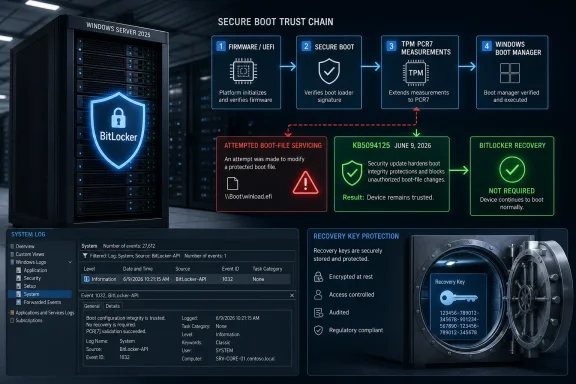
Microsoft’s June 9, 2026 cumulative update KB5094125 for Windows Server 2025 fixes a BitLocker recovery problem in managed server environments where specific TPM, PCR7, Secure Boot, Group Policy, and Windows Boot Manager signing conditions could cause machines to demand a recovery key after boot-file servicing. That is the plain answer, but it undersells the operational lesson. This was not a mass-market BitLocker meltdown or a consumer-PC encryption scare; it was a collision between Microsoft’s Secure Boot certificate transition and a narrow but very real enterprise configuration path. For administrators, the fix matters less as a one-off patch than as a reminder that boot trust is now a serviced component of Windows, not a static property set at deployment and forgotten.
KB5094125 arrives as the June cumulative update for all editions of Windows Server 2025, moving the OS to build 26100.32995 and folding in both security fixes and quality improvements from the prior optional release. Buried among the usual servicing notes is the line that matters most to BitLocker-conscious administrators: Microsoft says it has addressed a boot manager servicing issue that could send some devices into BitLocker Recovery after updating boot files.
That sentence is doing a lot of work. BitLocker Recovery is not merely an inconvenience on a server. It is the moment when a routine patch cycle can become a console-access problem, a recovery-key governance audit, and a late-night test of whether documentation is as good as everyone claimed during the last compliance review.
The affected path is narrow, but narrow does not mean harmless. Microsoft ties the condition to systems with certain TPM validation settings, including invalid PCR7 configurations, after the April 2026 security update KB5082063. In less formal terms, Windows tried to move part of the boot chain forward, BitLocker did not like what it saw, and the server responded by asking for proof before it would trust the disk.
The June fix is designed to prevent affected systems from stepping into that bad transition. If a server still has the problematic configuration, KB5094125 changes the servicing behavior so the system does not install the 2023-signed Windows Boot Manager in a way that would provoke an unexpected recovery-key prompt on restart. That makes the update both a fix and a brake pedal.
The problem appears only when those pieces are combined with a particular managed-policy choice and a boot-signing transition. That is why Microsoft can say the issue is unlikely on personal, unmanaged devices while still giving enterprise IT something very practical to worry about. The home user with a clean Windows install is not the obvious victim here; the estate with years of inherited Group Policy decisions is.
PCRs, or Platform Configuration Registers, are part of the TPM’s job of remembering what the machine looked like at boot. BitLocker can bind access to an encrypted drive to those measurements. If the boot path changes unexpectedly, BitLocker may decide that handing over the decryption key would be unsafe.
That is the intended security model, and it is usually a virtue. The same mechanism that frustrates an administrator during a botched servicing event is also what helps stop an attacker from silently modifying boot components and strolling into an encrypted system. The tension is that Windows Update itself is now responsible for changing some of the things BitLocker has been trained to distrust when they change without the proper choreography.
Windows Server 2025 sits right in the middle of that transition. The June update notes also discuss Secure Boot certificate expiration beginning in June 2026 and say Microsoft has been updating certificates over recent months, with a phased approach that depends on device signals. The company is trying to update the foundation of boot trust without turning every managed fleet into a firmware lab.
That is an inherently risky kind of servicing. Updating a text renderer, a shell component, or a DNS feature can break production in familiar ways. Updating the signed components that participate in early boot can break production before Windows is fully alive, which is where all the usual remote-management assumptions start to wobble.
The 2023-signed Windows Boot Manager is therefore not just another file in a monthly rollup. It is a participant in the trust conversation between firmware, Secure Boot, TPM measurements, and BitLocker. If the device’s policy posture makes that new participant look suspicious, the system does exactly what it was designed to do: it demands recovery.
The temptation with Windows servicing is always to frame a patch as forward motion. Install the update, close the issue, move on. But boot trust does not reward blind forward motion. If the OS knows a particular configuration could strand the server at the next restart, refusing to take that step is better engineering than taking it and documenting the recovery procedure afterward.
That also means KB5094125 is not a substitute for configuration hygiene. It prevents the bad outcome, but it does not magically resolve why the estate contains machines with a policy profile that clashes with the newer boot-signing model. Administrators still need to identify which systems match the risk profile and decide whether to correct policy, deploy the cumulative update first, or run Microsoft’s mitigation path in a controlled window.
In practical terms, Microsoft is buying administrators time. It is stopping a servicing action from becoming a recovery event while leaving the broader Secure Boot migration intact. That is a patch, but it is also a negotiation between security modernization and operational survivability.
The exposed systems are enterprise-managed devices with BitLocker enabled, TPM validation in play, Secure Boot measurement through PCR7, and a particular explicit policy configuration. That combination is not what most home users have. It is, however, exactly the kind of combination that can exist inside a mature Windows estate where security baselines, hardware generations, imaging practices, and compliance exceptions have accreted over time.
This is why administrators should resist the urge to dismiss the bug as “limited.” Limited issues can still be severe when they concentrate in the machines least convenient to touch physically. A BitLocker prompt on a laptop is annoying; a BitLocker prompt on a headless server in a remote site is a change-management incident with a keyboard-shaped punchline.
The diagnostic clue Microsoft points to is Event ID 1032 in the System event log when Windows attempts to apply the Secure Boot update for the 2023 Boot Manager and the current BitLocker configuration blocks that path. That event matters because it gives IT teams a way to separate a known servicing collision from a generic encryption panic. It also provides the raw material for fleet queries before the next maintenance window.
The prompt itself may appear only once on affected machines if the policy remains unchanged, but “only once” can still be brutal at scale. One restart across a handful of servers is a nuisance. One restart across a server fleet during a security-maintenance weekend is a queue of locked machines and a sudden dependence on whether every recovery key is where the asset database says it is.
The issue also underscores why encryption is not merely a security checkbox. BitLocker changes the operational model of a machine. It makes the boot process accountable to prior measurements, which improves protection but reduces tolerance for sloppy changes to early-boot components.
That trade-off is worth making. The alternative is pretending that encrypted disks should automatically trust any boot environment that appears next. But the trade-off must be managed as infrastructure, not treated as a mysterious blue screen that appears when Windows Update gets ambitious.
That sounds straightforward until it meets production. Removing or changing Group Policy settings can have downstream compliance implications. Temporarily suspending BitLocker may be reasonable during a tightly controlled maintenance window, but it is still a deliberate reduction in protection and must be tracked accordingly.
The workaround also assumes administrators can sequence the operation safely: suspend BitLocker, run the relevant Secure Boot update task, restart, then re-enable protection. Those are not complicated steps, but they are steps that must happen in the right order and under the right authority. On a single lab server, this is routine. Across a distributed estate, it becomes orchestration.
The deeper lesson is that boot servicing now deserves the same planning as firmware updates. It touches the pre-OS trust boundary, and that boundary is unforgiving. The systems most likely to be affected are also the systems where “we’ll just remote in after the reboot” is not a sufficient rollback plan.
That broader context matters because Server 2025 is arriving in an era when Windows servicing is doing more than patching vulnerabilities. Monthly updates now carry security hardening changes, certificate migrations, feature enablement, servicing-stack refinements, and policy additions. The June update even brings general availability for DNS over HTTPS support in Windows Server 2025 DNS Server for server-client communication, which is a meaningful security feature in its own right.
The danger is that administrators experience all of this as one big undifferentiated “Patch Tuesday.” The update that fixes a boot manager problem also changes Secure Boot service data behavior, hardens desktop.ini handling, improves File Explorer search, adjusts reliability, updates the servicing stack, and expands DNS capability. That bundling is efficient for Microsoft’s servicing pipeline but challenging for risk assessment.
The BitLocker recovery fix is therefore a case study in modern Windows administration. The practical question is no longer just “does this patch fix more than it breaks?” It is “which layer of the stack is this patch touching, and what assumptions did our environment bake into that layer years ago?”
That means administrators should not treat KB5094125 as a way to avoid the 2023 certificate world. The fix avoids a problematic transition on vulnerable configurations; it does not make the transition optional forever. Sooner or later, estates need to be compatible with the newer Secure Boot signing model.
The uncomfortable part is that security transitions increasingly look like compatibility projects. Replacing certificates, updating boot managers, and validating PCR behavior do not feel like new features to end users or business owners. They feel like invisible maintenance until something fails, at which point they become urgent.
This is where Microsoft’s phased targeting approach is both necessary and imperfect. Waiting for “high confidence device targeting data” reduces blast radius, but enterprise administrators cannot outsource all confidence to Windows Update telemetry. They need their own inventory, their own test rings, and their own understanding of which machines have unusual BitLocker policy bindings.
To be fair, Windows provides tools for inspecting much of this. Administrators can check PCR7 binding status through System Information, inspect BitLocker protectors with manage-bde, confirm Secure Boot state with PowerShell, and review event logs for servicing attempts. The pieces are there.
What is missing is an opinionated fleet-level narrative. Windows can tell you many facts about a machine, but the administrator still has to assemble those facts into the sentence that matters: this server is at risk of a BitLocker recovery prompt if the boot manager transition proceeds under the current policy. That is the kind of sentence endpoint management products should be able to generate before the maintenance window opens.
The problem is not unique to Microsoft. Modern security architecture is compositional. Failures increasingly happen at the seams between otherwise correct components. But Microsoft owns the Windows platform experience, and it should make those seams easier to see.
Secure Boot servicing pulls the pre-OS environment into the normal update rhythm. BitLocker binds the encrypted OS volume to that environment. TPM measurements provide the enforcement mechanism. Group Policy can nudge the whole system into a state that is secure but brittle.
KB5094125 shows the consequence: a cumulative update can be both the remedy and the risk boundary. It is the update administrators should deploy to avoid the unexpected prompt, but it also sits inside the same stream of servicing that is moving devices toward the 2023 boot trust model. The patch window is no longer just about whether Windows comes back up. It is about whether the machine’s measured identity survives the trip.
For server teams, that means recovery-key readiness should be part of patch readiness. So should out-of-band access. So should test machines that actually match production policy, not idealized clean installs with whatever configuration Microsoft recommends today.
 Microsoft Fixes the Reboot, Not the Larger Anxiety
KB5094125 arrives as the June cumulative update for all editions of Windows Server 2025, moving the OS to build 26100.32995 and folding in both security fixes and quality improvements from the prior optional release. Buried among the usual servicing notes is the line that matters most to BitLocker-conscious administrators: Microsoft says it has addressed a boot manager servicing issue that could send some devices into BitLocker Recovery after updating boot files.That sentence is doing a lot of work. BitLocker Recovery is not merely an inconvenience on a server. It is the moment when a routine patch cycle can become a console-access problem, a recovery-key governance audit, and a late-night test of whether documentation is as good as everyone claimed during the last compliance review.
The affected path is narrow, but narrow does not mean harmless. Microsoft ties the condition to systems with certain TPM validation settings, including invalid PCR7 configurations, after the April 2026 security update KB5082063. In less formal terms, Windows tried to move part of the boot chain forward, BitLocker did not like what it saw, and the server responded by asking for proof before it would trust the disk.
The June fix is designed to prevent affected systems from stepping into that bad transition. If a server still has the problematic configuration, KB5094125 changes the servicing behavior so the system does not install the 2023-signed Windows Boot Manager in a way that would provoke an unexpected recovery-key prompt on restart. That makes the update both a fix and a brake pedal.
The Bug Lives Where Security Features Overlap
The important thing about this incident is that none of the individual technologies involved are exotic. BitLocker is Microsoft’s standard full-volume encryption feature. TPMs are now table stakes in modern Windows deployments. Secure Boot is a baseline expectation in contemporary enterprise security. PCR7 is one of the mechanisms by which Windows measures whether the boot environment is still trustworthy.The problem appears only when those pieces are combined with a particular managed-policy choice and a boot-signing transition. That is why Microsoft can say the issue is unlikely on personal, unmanaged devices while still giving enterprise IT something very practical to worry about. The home user with a clean Windows install is not the obvious victim here; the estate with years of inherited Group Policy decisions is.
PCRs, or Platform Configuration Registers, are part of the TPM’s job of remembering what the machine looked like at boot. BitLocker can bind access to an encrypted drive to those measurements. If the boot path changes unexpectedly, BitLocker may decide that handing over the decryption key would be unsafe.
That is the intended security model, and it is usually a virtue. The same mechanism that frustrates an administrator during a botched servicing event is also what helps stop an attacker from silently modifying boot components and strolling into an encrypted system. The tension is that Windows Update itself is now responsible for changing some of the things BitLocker has been trained to distrust when they change without the proper choreography.
The 2023 Boot Manager Is the Real Main Character
The immediate trigger is tied to Microsoft’s broader Secure Boot certificate transition. Windows devices have long depended on Secure Boot certificate authorities rooted in the 2011 generation of signing infrastructure, and Microsoft has been moving the ecosystem toward newer 2023 certificates. That transition is not cosmetic. Secure Boot depends on a chain of trust, and chains of trust age, expire, and eventually need replacement.Windows Server 2025 sits right in the middle of that transition. The June update notes also discuss Secure Boot certificate expiration beginning in June 2026 and say Microsoft has been updating certificates over recent months, with a phased approach that depends on device signals. The company is trying to update the foundation of boot trust without turning every managed fleet into a firmware lab.
That is an inherently risky kind of servicing. Updating a text renderer, a shell component, or a DNS feature can break production in familiar ways. Updating the signed components that participate in early boot can break production before Windows is fully alive, which is where all the usual remote-management assumptions start to wobble.
The 2023-signed Windows Boot Manager is therefore not just another file in a monthly rollup. It is a participant in the trust conversation between firmware, Secure Boot, TPM measurements, and BitLocker. If the device’s policy posture makes that new participant look suspicious, the system does exactly what it was designed to do: it demands recovery.
Microsoft’s Fix Is Conservative by Design
The most interesting part of KB5094125 is that it does not simply force the new boot state through. Instead, Microsoft says the update prevents affected devices from installing the 2023-signed Windows Boot Manager when the current BitLocker configuration would make that transition unsafe. This is a conservative servicing fix, and that is the right instinct.The temptation with Windows servicing is always to frame a patch as forward motion. Install the update, close the issue, move on. But boot trust does not reward blind forward motion. If the OS knows a particular configuration could strand the server at the next restart, refusing to take that step is better engineering than taking it and documenting the recovery procedure afterward.
That also means KB5094125 is not a substitute for configuration hygiene. It prevents the bad outcome, but it does not magically resolve why the estate contains machines with a policy profile that clashes with the newer boot-signing model. Administrators still need to identify which systems match the risk profile and decide whether to correct policy, deploy the cumulative update first, or run Microsoft’s mitigation path in a controlled window.
In practical terms, Microsoft is buying administrators time. It is stopping a servicing action from becoming a recovery event while leaving the broader Secure Boot migration intact. That is a patch, but it is also a negotiation between security modernization and operational survivability.
Group Policy Turns a Rare Edge Case Into an Enterprise Problem
Microsoft has described the problematic setup as unrecommended, which is true but not especially comforting. Enterprises are full of unrecommended settings that once solved a real problem, worked for years, and then became undocumented dependency traps. Group Policy has always been powerful precisely because it can freeze a desired state across thousands of machines; the bill comes due when the desired state no longer matches the platform’s assumptions.The exposed systems are enterprise-managed devices with BitLocker enabled, TPM validation in play, Secure Boot measurement through PCR7, and a particular explicit policy configuration. That combination is not what most home users have. It is, however, exactly the kind of combination that can exist inside a mature Windows estate where security baselines, hardware generations, imaging practices, and compliance exceptions have accreted over time.
This is why administrators should resist the urge to dismiss the bug as “limited.” Limited issues can still be severe when they concentrate in the machines least convenient to touch physically. A BitLocker prompt on a laptop is annoying; a BitLocker prompt on a headless server in a remote site is a change-management incident with a keyboard-shaped punchline.
The diagnostic clue Microsoft points to is Event ID 1032 in the System event log when Windows attempts to apply the Secure Boot update for the 2023 Boot Manager and the current BitLocker configuration blocks that path. That event matters because it gives IT teams a way to separate a known servicing collision from a generic encryption panic. It also provides the raw material for fleet queries before the next maintenance window.
The Recovery Prompt Is a Governance Test
BitLocker Recovery is supposed to be survivable. In a well-managed environment, recovery keys are escrowed, access is logged, procedures are documented, and support teams know which systems require out-of-band console access. In the real world, a surprise recovery prompt has a way of exposing every weak link in that chain.The prompt itself may appear only once on affected machines if the policy remains unchanged, but “only once” can still be brutal at scale. One restart across a handful of servers is a nuisance. One restart across a server fleet during a security-maintenance weekend is a queue of locked machines and a sudden dependence on whether every recovery key is where the asset database says it is.
The issue also underscores why encryption is not merely a security checkbox. BitLocker changes the operational model of a machine. It makes the boot process accountable to prior measurements, which improves protection but reduces tolerance for sloppy changes to early-boot components.
That trade-off is worth making. The alternative is pretending that encrypted disks should automatically trust any boot environment that appears next. But the trade-off must be managed as infrastructure, not treated as a mysterious blue screen that appears when Windows Update gets ambitious.
The Mitigations Are Simple Only on Paper
For administrators who cannot immediately deploy KB5094125, Microsoft’s mitigation path revolves around correcting the policy configuration before installing KB5082063 or later updates, or using a controlled workaround that temporarily suspends BitLocker while the Secure Boot update task installs the newer Windows Boot Manager. The cleanest path is to remove the explicit PCR7 Group Policy setting and let BitLocker use the proper Secure Boot-aware validation profile.That sounds straightforward until it meets production. Removing or changing Group Policy settings can have downstream compliance implications. Temporarily suspending BitLocker may be reasonable during a tightly controlled maintenance window, but it is still a deliberate reduction in protection and must be tracked accordingly.
The workaround also assumes administrators can sequence the operation safely: suspend BitLocker, run the relevant Secure Boot update task, restart, then re-enable protection. Those are not complicated steps, but they are steps that must happen in the right order and under the right authority. On a single lab server, this is routine. Across a distributed estate, it becomes orchestration.
The deeper lesson is that boot servicing now deserves the same planning as firmware updates. It touches the pre-OS trust boundary, and that boundary is unforgiving. The systems most likely to be affected are also the systems where “we’ll just remote in after the reboot” is not a sufficient rollback plan.
Windows Server 2025 Is Still Maturing in Public
Windows Server 2025 is Microsoft’s current long-term servicing release, but “current” does not mean frictionless. The platform has already had its share of known issues, including update deployment problems and other servicing headaches. KB5094125 itself fixes more than the BitLocker path, including a WUSA failure involving network shares and multiple MSU files.That broader context matters because Server 2025 is arriving in an era when Windows servicing is doing more than patching vulnerabilities. Monthly updates now carry security hardening changes, certificate migrations, feature enablement, servicing-stack refinements, and policy additions. The June update even brings general availability for DNS over HTTPS support in Windows Server 2025 DNS Server for server-client communication, which is a meaningful security feature in its own right.
The danger is that administrators experience all of this as one big undifferentiated “Patch Tuesday.” The update that fixes a boot manager problem also changes Secure Boot service data behavior, hardens desktop.ini handling, improves File Explorer search, adjusts reliability, updates the servicing stack, and expands DNS capability. That bundling is efficient for Microsoft’s servicing pipeline but challenging for risk assessment.
The BitLocker recovery fix is therefore a case study in modern Windows administration. The practical question is no longer just “does this patch fix more than it breaks?” It is “which layer of the stack is this patch touching, and what assumptions did our environment bake into that layer years ago?”
The Secure Boot Certificate Clock Is Ticking
The Secure Boot certificate transition gives this issue a deadline-shaped backdrop. Microsoft has warned that Secure Boot certificates used by most Windows devices begin expiring in June 2026, and it has been rolling out newer certificates in a phased manner. Even if devices continue to start and receive standard updates, the platform cannot indefinitely sit on old trust anchors.That means administrators should not treat KB5094125 as a way to avoid the 2023 certificate world. The fix avoids a problematic transition on vulnerable configurations; it does not make the transition optional forever. Sooner or later, estates need to be compatible with the newer Secure Boot signing model.
The uncomfortable part is that security transitions increasingly look like compatibility projects. Replacing certificates, updating boot managers, and validating PCR behavior do not feel like new features to end users or business owners. They feel like invisible maintenance until something fails, at which point they become urgent.
This is where Microsoft’s phased targeting approach is both necessary and imperfect. Waiting for “high confidence device targeting data” reduces blast radius, but enterprise administrators cannot outsource all confidence to Windows Update telemetry. They need their own inventory, their own test rings, and their own understanding of which machines have unusual BitLocker policy bindings.
Server Admins Need Better Preflight Signals
Microsoft’s Event ID 1032 guidance is useful, but the ideal version of this story would have had more preflight visibility before administrators discovered the risk through update notes and recovery reports. A boot-chain transition that can trigger BitLocker should be as visible as a firmware update requiring suspension of encryption. It should show up in management dashboards as a readiness state, not merely as a post-attempt event.To be fair, Windows provides tools for inspecting much of this. Administrators can check PCR7 binding status through System Information, inspect BitLocker protectors with manage-bde, confirm Secure Boot state with PowerShell, and review event logs for servicing attempts. The pieces are there.
What is missing is an opinionated fleet-level narrative. Windows can tell you many facts about a machine, but the administrator still has to assemble those facts into the sentence that matters: this server is at risk of a BitLocker recovery prompt if the boot manager transition proceeds under the current policy. That is the kind of sentence endpoint management products should be able to generate before the maintenance window opens.
The problem is not unique to Microsoft. Modern security architecture is compositional. Failures increasingly happen at the seams between otherwise correct components. But Microsoft owns the Windows platform experience, and it should make those seams easier to see.
The Patch Window Now Extends Below Windows
For years, many Windows administrators thought about patching mostly in terms of the OS and applications. Firmware, bootloaders, certificate authorities, TPM measurements, and recovery partitions lived in a separate mental bucket. That separation is now obsolete.Secure Boot servicing pulls the pre-OS environment into the normal update rhythm. BitLocker binds the encrypted OS volume to that environment. TPM measurements provide the enforcement mechanism. Group Policy can nudge the whole system into a state that is secure but brittle.
KB5094125 shows the consequence: a cumulative update can be both the remedy and the risk boundary. It is the update administrators should deploy to avoid the unexpected prompt, but it also sits inside the same stream of servicing that is moving devices toward the 2023 boot trust model. The patch window is no longer just about whether Windows comes back up. It is about whether the machine’s measured identity survives the trip.
For server teams, that means recovery-key readiness should be part of patch readiness. So should out-of-band access. So should test machines that actually match production policy, not idealized clean installs with whatever configuration Microsoft recommends today.
This Is the Server Fleet’s June Checklist
The lesson of KB5094125 is not that BitLocker is dangerous or that Secure Boot modernization should be delayed. The lesson is that the boot chain is now a living part of Windows servicing, and administrators need to manage it with the same discipline they apply to identity, backup, and endpoint security. The June update gives Server 2025 shops a safer path, but it does not absolve them from checking whether their own policy history created the exposure.- Administrators should deploy KB5094125 to Windows Server 2025 systems through their normal update channel after validating it in rings that reflect real BitLocker and Secure Boot policy.
- Teams should search for Event ID 1032 in the System log to identify machines where the Secure Boot update path is being blocked by the current BitLocker configuration.
- Fleet owners should verify PCR7 binding and BitLocker protector profiles rather than assuming that Secure Boot and TPM presence mean the device is using the expected validation model.
- Organizations with explicit PCR7 Group Policy settings should review whether those settings are still justified or whether they are now obstructing Microsoft’s Secure Boot certificate transition.
- Recovery keys, remote console access, and maintenance-window runbooks should be treated as prerequisites for boot-chain servicing, not emergency supplies gathered after the first failed restart.
- The 2023-signed Windows Boot Manager transition should remain on the migration agenda even where KB5094125 prevents the immediate recovery prompt.
References
- Primary source: WinBuzzer
Published: Thu, 11 Jun 2026 16:14:44 GMT

Microsoft Fixes Windows Server 2025 BitLocker Recovery Bug
Microsoft has fixed a Windows Server 2025 BitLocker recovery prompt risk in KB5094125, giving IT admins mitigation paths for affected systems at restart.winbuzzer.com - Official source: support.microsoft.com
- Official source: learn.microsoft.com

Troubleshooting Windows Server Secure Boot Certificate Update issues - Windows Server | Microsoft Learn
Learn how to troubleshoot Secure Boot certificate update issues on Windows Server to maintain security before the 2026 expiration.learn.microsoft.com - Related coverage: tomshardware.com

Windows security update triggers BitLocker recovery in some systems — bug mostly impacts Intel PCs with Modern Standby support | Tom's Hardware
You'd better have your encryption key on hand, so you won't lose your data.www.tomshardware.com - Related coverage: windowscentral.com

Surprise! A Windows BitLocker bug has returned to ruin your reboot — here's how to get around it | Windows Central
Windows 11 and Windows 10 users might experience a BitLocker Recovery screen bug, which is something we've seen before.www.windowscentral.com - Related coverage: datalake.azaeo.com
post microsoft fixes bug behind windows certificate enrollment errors against invaders noticias de cybersecurity para humanos
PDF documentdatalake.azaeo.com