Microsoft Finally Closes a Year-Old Trapdoor Under the Windows Shell
For most people, the Windows shell is not a feature. It is the operating system. Start, taskbar, File Explorer, Search, Settings, consent prompts, and the desktop itself are the parts of Windows users touch before they ever think about kernels, services, or package registrations.
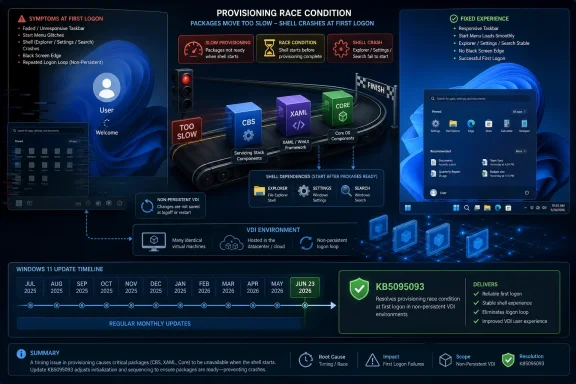
That is why the bug documented in Microsoft’s KB5072911 always looked worse than a routine servicing footnote. Microsoft described a scenario in which XAML-dependent modern apps could fail to start or close unexpectedly after provisioning PCs with Windows 11 24H2 or 25H2 cumulative updates released on or after July 2025. The symptoms were not cosmetic. In affected environments, Explorer could crash, users could land on a black screen, the taskbar might fail to appear, and Start or Settings could simply refuse to open.
Neowin’s Sayan Sen noted that Microsoft now says the issue is addressed starting with the June 23, 2026 Windows update, KB5095093. Microsoft’s support wording also makes clear that the resolution is being gradually rolled out and is expected to be fully available in the following monthly Windows update. In plain English: the fix has started shipping, but many administrators will likely treat the July Patch Tuesday payload as the real moment of operational relief.
The timing is awkward for Microsoft. Windows 11 is now deep into its post-24H2 era, 25H2 is part of the mainstream servicing story, and the company is still cleaning up a shell regression rooted in cumulative updates from the previous summer. That is not a catastrophic indictment of Windows Update by itself, but it is a useful reminder that modern Windows is not one monolith. It is a stack of legacy processes, app packages, modern UI frameworks, provisioning flows, and user-session timing assumptions — and sometimes the stack slips.
The Bug Was Small in Scope and Huge in Blast Radius
Microsoft was careful to scope KB5072911. The company said the issue primarily affected a limited number of enterprise or managed environments and was very unlikely to occur on personal devices used by individuals. That caveat is important. This was not a universal Start menu apocalypse rolling across every Windows 11 laptop in a living room.
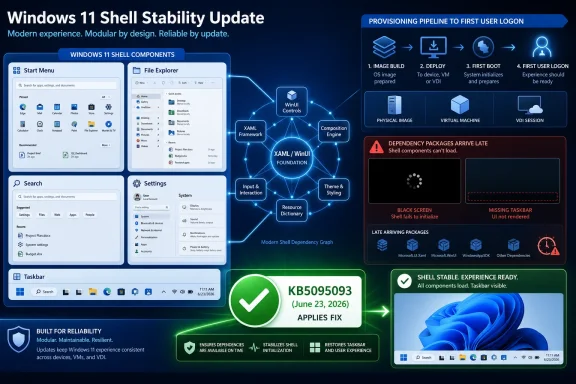
But the affected surface area was extraordinary. The components Microsoft listed sit at the center of daily Windows use: Explorer, StartMenuExperienceHost, shellhost.exe, SystemSettings, Taskbar, Windows Search, and other XAML-dependent apps. When those pieces fail, the device may still technically boot, authenticate, and run services, but the user experience has crossed from “buggy” into “not meaningfully usable.”
The most telling part of Microsoft’s explanation was the provisioning angle. The issue could occur when Windows updates were installed before the first user logon to a persistent OS installation, or during every logon in non-persistent environments such as virtual desktop infrastructure, where application packages may need to be installed each session. That is exactly the kind of scenario enterprise IT cares about: gold images, virtual desktops, Cloud PC-style deployments, lab machines, and tightly managed fleets.
This is also why the consumer framing undersells the story. A home user who never sees the bug may reasonably shrug. An administrator responsible for a VDI pool cannot. In non-persistent desktop environments, “unlikely on personal devices” is cold comfort when the failure mode is a black screen or a missing taskbar at user logon.
TechSpot and other outlets picked up the issue late last year when Microsoft’s documentation made the scope clearer, and their framing was blunt for good reason. A shell that can fail because dependency packages do not register in time is not just an update bug; it is a sequencing bug in the experience Windows presents as stable, polished, and ready for managed deployment.
XAML Became the Fault Line Between Old Windows and New Windows
The bug’s root cause, according to Microsoft, was a timing problem: applications had a dependency on XAML packages that were not registering in time after Windows updates. That sounds dry, but it cuts to the heart of Windows 11’s design compromise.
Windows 11’s interface is a layered construction. Explorer and the shell carry decades of compatibility expectations, while newer user experiences rely on modern UI frameworks and packaged components. XAML, WinUI, app packages, and “modern” shell elements allow Microsoft to move faster than if everything were welded into old Win32-era assumptions. They also create more seams.
Those seams matter because Start, Search, Settings, and File Explorer are no longer merely independent executables in the way many users imagine them. They are dependent on packages, frameworks, manifests, and registration state. If those dependencies are missing, late, or inconsistent across user sessions, the shell can behave less like a resilient desktop and more like a modern app platform with a bad deployment.
That is not inherently a mistake. Windows has to modernize somehow, and XAML-based UI components have been part of Microsoft’s route toward a more flexible and visually coherent platform. The problem is that Windows users judge the shell by a different standard than they judge an optional app. If a Store app fails because a dependency is not registered, users are annoyed. If the taskbar fails for the same reason, the machine feels broken.
This is the uncomfortable bargain of Windows modernization. Microsoft is trying to evolve the platform while preserving compatibility with everything from line-of-business tools to decades-old administrative workflows. The more the shell depends on modern package infrastructure, the more Microsoft must guarantee that infrastructure is ready before the first user session tries to draw the desktop.
Provisioning Turned a Timing Bug Into an Enterprise Problem
The most important word in KB5072911 was never XAML. It was provisioning.
Provisioning is where Windows stops being a retail operating system and becomes fleet infrastructure. Devices are imaged, updated, generalized, enrolled, customized, and handed to users under time pressure. In virtualized environments, that process may repeat constantly, with non-persistent desktops rebuilding the user experience at logon.
Microsoft’s documentation identified two especially risky moments: updates installed before first user logon on a persistent OS, and all user logons on non-persistent OS installations. In both cases, the user session can arrive before the shell’s modern dependency packages are properly registered. The result is a race condition with a very visible finish line: either the shell comes up, or the user gets a broken desktop.
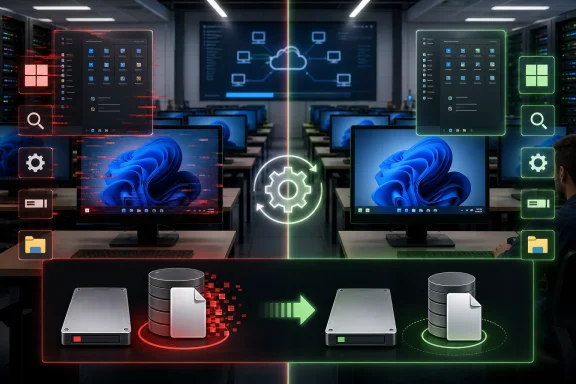
This is why the bug would have been particularly painful in VDI and managed enterprise settings. A single broken laptop is a support ticket. A broken image is a support queue. A broken non-persistent desktop pool is a morning outage dressed up as a UI issue.
Microsoft’s earlier workaround reflected the operational nature of the problem. Administrators were told to register missing packages in the user session and restart SiHost so Immersive Shell and related components could pick them up. That is a reasonable mitigation for professionals who know what they are doing, but it is not a satisfying steady state. If a working Start menu depends on a logon script or manual Appx registration choreography, the platform has already shifted complexity onto the customer.
The June 2026 resolution matters because it should move the fix back where it belongs: into servicing. Administrators can tolerate documented mitigations for narrow, temporary failures. They are much less forgiving when a workaround becomes part of the image-building ritual for months.
The C-Release Is Doing the Dirty Work Before Patch Tuesday
KB5095093 is a preview cumulative update, part of Microsoft’s optional non-security release cadence. These C-releases are where Microsoft often stages quality fixes before the broader Patch Tuesday release. That matters because the fix is technically available now, but the deployment decision is not automatic for every environment.
Preview updates sit in an uneasy place for IT. They can contain the exact fix an organization needs, but they also arrive outside the mandatory security update rhythm. Many administrators avoid optional previews on production fleets unless they are validating a specific repair or testing next month’s payload.
Microsoft’s wording is therefore doing two things at once. It says the resolution begins with KB5095093, but it also says the fix is gradually rolling out and will be fully available in the following monthly Windows update. That gives cautious organizations a path: test the preview where the bug is biting, but expect the wider fix to land through the normal monthly channel.
The June preview update was already a large release. Microsoft’s notes for KB5095093 list OS builds 26200.8737 and 26100.8737 for Windows 11 25H2 and 24H2, respectively, and include a wide spread of production-quality improvements. Neowin also pointed out related setup and recovery updates, including OOBE update KB5095189 and setup/recovery updates KB5102558 and KB5095615, shipped around the same servicing wave.
That broad servicing bundle is typical of modern Windows. A single month’s update may touch setup, recovery, AI components for Copilot+ PCs, shell reliability, storage behavior, networking, File Explorer quirks, and known application compatibility issues. The benefit is cumulative repair. The cost is that administrators are asked to absorb a lot of change even when they only want one fix.
Microsoft’s Documentation Did the Right Thing, Eventually
There is a cynical version of this story in which Microsoft gets credit only after making customers wait nearly a year. That criticism is not unfair, but it is incomplete.
The company did publish KB5072911, describe the failure modes, identify affected versions, explain the provisioning conditions, and provide workarounds. It later updated the article with more detail for IT administrators and corrected commands in the workaround section. In enterprise support terms, that matters. A documented bug is not the same as a mystery regression whispered through forum posts.
But documentation is not resolution. For affected organizations, the gap between “we know why your shell is failing” and “the shell no longer fails” is the difference between a support article and a stable image. The longer that gap persists, the more customers internalize the workaround as part of Windows administration rather than as an exception.
The January update to the workaround, which corrected quotation marks in commands, is a small but revealing detail. It shows how brittle these mitigations can be. A copied PowerShell command is not glamorous, but for an administrator trying to restore a usable desktop across a fleet, syntax is the difference between containment and more noise.
There is also a communications lesson here. Microsoft’s support articles often read like engineering notes softened for public consumption. That is fine for KB archaeology, but shell failures need more direct operational framing. If Explorer, Start, and taskbar can fail in provisioning scenarios, customers need to know not only what command to run, but whether their imaging pipeline, VDI model, or update timing is exposed.
Windows 11’s Reliability Problem Is Now a Trust Problem
Every operating system vendor ships bugs. Apple has shipped broken macOS updates. Linux distributions have pushed regressions. Microsoft’s burden is different because Windows remains the default substrate for a vast amount of business computing, including environments where the desktop is not a single machine but a mass-produced endpoint.
The Windows 11 update story has improved in some ways. Cumulative updates are more predictable than the bad old days of tangled individual patches, and Microsoft’s known-issue documentation is generally better than it once was. But the emotional memory of Windows users is shaped by the last update that broke something obvious.
A broken shell lands especially hard because it confirms the user’s worst suspicion: that Windows Update can turn a working computer into a problem before the workday begins. Even when the affected population is narrow, the symptoms sound universal. “Start menu fails to open” is not a niche phrase in the public imagination.
For administrators, the trust issue is more specific. They need to know that Microsoft’s supported deployment paths remain safe when paired with Microsoft’s own servicing model. If a monthly cumulative update can create a bad first-logon state after provisioning, IT teams will respond by adding more validation, more delays, more scripts, and more skepticism.
That skepticism has a cost. Microsoft wants enterprises to move faster: adopt new Windows 11 releases, use cloud management, embrace Windows 365 and Azure Virtual Desktop, and accept a more continuous servicing model. But continuous servicing only works when customers believe the blast radius is predictable. Bugs like KB5072911 make every “quality improvement” update feel like a negotiation.
The Home PC Escaped, but the Platform Warning Did Not
Microsoft’s note that the issue was very unlikely on personal devices should not be waved away. It means most readers probably did not need to panic, and it also suggests the bug depended on specific timing and management conditions rather than a generalized shell defect.
Still, Windows enthusiasts should pay attention. Enterprise-only bugs often reveal platform architecture more clearly than consumer bugs do. The edge cases are where assumptions break.
In this case, the assumption was that modern shell dependencies would be available when the user session needed them. That assumption held for most normal consumer flows. It did not reliably hold in some managed provisioning and non-persistent environments. The distinction is technical, but the implication is broad: the Windows shell’s reliability increasingly depends on successful orchestration across package infrastructure, servicing order, and user-session initialization.
That is also why the fix should be judged not only by whether KB5095093 stops the visible failure. The better question is whether Microsoft has hardened the underlying registration and timing path enough to prevent a similar class of bug from returning under a different KB number. A fix for this issue is good. A fix for the pattern would be better.
Windows 11’s shell has already been a long-running argument among users. Some complain about performance, others about visual inconsistency, others about Microsoft’s promotional surfaces and AI ambitions. But reliability is the non-negotiable layer beneath all of those debates. A Start menu can be unpopular and still usable. It cannot be absent.
The Real Patch Is Confidence in the Servicing Pipeline
The most practical reading of this news is straightforward. If you manage Windows 11 24H2 or 25H2 devices and have seen shell failures after provisioning, KB5095093 is the update to validate, while the next monthly update is the one to watch for broad remediation. If you run personal Windows 11 PCs, this is probably not your bug, though it is another data point in the wider reliability conversation.
The more strategic reading is that Microsoft is still paying down complexity created by the way Windows 11 blends old and new. The company wants a modern, componentized shell. Enterprises want deterministic deployment. Those goals can coexist, but only if servicing behaves with the predictability of infrastructure rather than the optimism of app delivery.
This is especially important as Microsoft pushes deeper into cloud-managed Windows, virtual desktops, and AI-assisted endpoint experiences. Those environments amplify provisioning paths. They also amplify failures. A race condition that affects a handful of individually managed PCs can become a fleet incident when desktops are stamped out from images and rebuilt on demand.
Microsoft’s gradual rollout language is sensible, but it also reflects the paradox of Windows quality in 2026. The company moves carefully because it must. Yet customers are impatient because the bug has already lasted too long. The same staged rollout that reduces risk can feel like one more delay to the administrators who have been carrying the workaround.
The June Fix Leaves Administrators With a Clearer Checklist
This is not the kind of Windows news that should send everyone rushing to install an optional preview update. It is the kind that should make IT teams revisit affected images, deployment sequences, and virtual desktop validation rings with renewed urgency.
- Organizations that experienced Start, taskbar, Explorer, Settings, or Search failures after provisioning Windows 11 24H2 or 25H2 should test KB5095093 against the affected deployment path rather than only against already-working machines.
- Administrators who avoided the June preview update can reasonably wait for the following monthly Windows update, but they should confirm that Microsoft’s KB5072911 resolution is included in their normal patch validation cycle.
- VDI and other non-persistent desktop environments deserve special attention because Microsoft specifically identified repeated user logons in such environments as one of the scenarios where package registration timing could go wrong.
- The earlier workaround involving registration of missing packages and restarting SiHost should be treated as a temporary mitigation, not as a permanent design pattern for a healthy Windows 11 image.
- Home users should not assume this was a broad consumer failure, but they should understand why enterprise shell bugs still matter: they expose the hidden dependency chain beneath the desktop everyone uses.
The fix for KB5072911 is welcome, overdue, and more important than its limited scope might suggest. Microsoft has repaired a failure mode that could make Windows 11 feel hollowed out at the exact moment a managed user needed the desktop to appear, but the larger test is whether the company can make these modern shell dependencies boring. Windows can survive controversial features, unpopular defaults, and the occasional botched optional update; what it cannot afford is for administrators to treat the Start menu as another package-registration gamble waiting for next month’s cumulative update.