

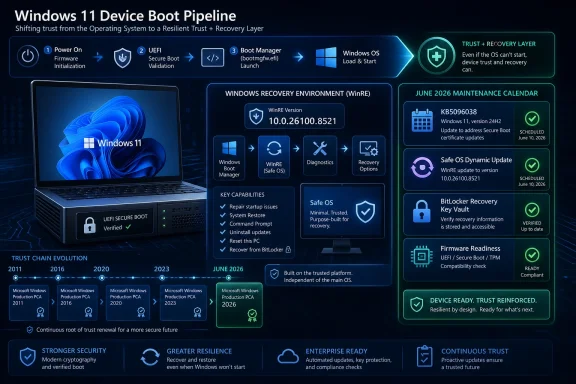
Microsoft released KB5096038 on May 26, 2026, as a Safe OS Dynamic Update for Windows 11 versions 24H2 and 25H2, improving the Windows Recovery Environment while reiterating that Secure Boot certificates used by most Windows devices begin expiring in June 2026. That pairing is not accidental. A recovery update landing days before the industry’s Secure Boot certificate deadline is Microsoft telling administrators that the next Windows servicing story starts before Windows itself loads. The uncomfortable lesson is that boot trust has become part of routine patch management, and the organizations that still treat firmware, recovery partitions, and Secure Boot databases as background plumbing are running out of calendar.
KB5096038 is a small-looking update with a large context. On paper, it makes improvements to the Windows Recovery Environment, the stripped-down recovery platform that matters most when the full operating system cannot start, repair itself, or complete a servicing operation cleanly. It applies to Windows 11 24H2 and 25H2, arrives automatically through Windows Update, has no prerequisites, does not require a restart after application, and cannot be removed once applied to a Windows image.
The verification detail is the giveaway that this is not merely another anonymous servicing payload. After installation, Microsoft says the WinRE version should be 10.0.26100.8521. That is the sort of number enterprise administrators will now have to inventory alongside build numbers, firmware revisions, BitLocker state, and Secure Boot certificate status.
Safe OS Dynamic Updates occupy an odd place in Windows servicing. They are not the flashy monthly cumulative updates that bring user-visible fixes, nor are they feature updates that change the desktop experience. They update the environment Windows relies on when setup, recovery, or rollback must operate outside the running OS.
That makes them easy to ignore until they are suddenly central. Recovery environments are where failed updates are unwound, BitLocker challenges are surfaced, broken boot chains are repaired, and administrators discover whether their emergency media is actually aligned with the systems they manage. In a year defined by Secure Boot certificate turnover, that layer deserves more attention than it usually gets.
Microsoft’s replacement path is a transition to newer 2023 certificate authorities. The old Microsoft Corporation KEK CA 2011, Microsoft Windows Production PCA 2011, and Microsoft UEFI CA 2011 are being succeeded by newer certificate chains used to sign and authorize future Secure Boot database updates, Windows boot components, third-party boot loaders, and related pre-OS code.
The danger is easy to misunderstand. The typical affected PC is not expected to stop booting the morning a certificate expires. Microsoft has repeatedly framed the risk as a degradation of future boot-level protection rather than a universal instant-brick event.
That distinction matters, but it should not comfort anyone into inaction. A machine that still starts but cannot reliably receive future Secure Boot protections, revocation updates, or boot manager trust changes is not healthy in the way administrators mean when they say “compliant.” It is a system whose security baseline is drifting away from the servicing model.
That chain has always been a supply chain. Microsoft signs Windows boot components. OEMs ship firmware that stores trust anchors and interprets updates to those trust anchors. Windows Update delivers payloads that may update the Secure Boot database or prepare the system to accept newly signed boot components. Enterprises decide how quickly those changes move through fleets that may include consumer laptops, ruggedized devices, servers, virtual machines, kiosks, lab systems, and old hardware with uncertain firmware support.
The 2026 deadline exposes that hidden machinery. For years, most users experienced Secure Boot as a checkbox required for Windows 11 eligibility or a setting that anti-cheat systems and enterprise compliance tools cared about. Now the trust roots behind that checkbox are being rotated, and rotation is one of the hardest maintenance jobs in security because it combines urgency with fragility.
A compromised certificate can be revoked. An expiring certificate can be replaced. But a poorly staged replacement can break systems before it protects them. That is why Microsoft’s guidance emphasizes phased rollout, device confidence, telemetry signals, firmware readiness, and representative testing rather than a single universal command.
WinRE is therefore not a side story. It is the insurance policy for the class of servicing work Microsoft is now asking the ecosystem to complete. When boot files change, when BitLocker notices a different path to startup, when firmware behaves inconsistently, recovery tooling becomes the last predictable interface between the administrator and the device.
That is why administrators should read “Safe OS Dynamic Update” less as a minor Windows Update category and more as a maintenance signal. Microsoft is preparing the recovery layer while it also pushes customers to prepare the trust layer. Those are different components, but they meet at the same unpleasant moment: a machine that cannot complete startup cleanly.
Home users may never notice the distinction if Windows Update, OEM firmware, and Secure Boot rollout logic all work as intended. Enterprises do not get to rely on that optimism. They have to assume some models will lag, some firmware will block or postpone updates, some BitLocker-protected systems will need careful handling, and some management reports will show ambiguous states that require hands-on investigation.
That slow rollout exists because Secure Boot certificate updates are unusually sensitive. A monthly cumulative update can patch a DLL across millions of machines with a relatively predictable rollback story. A Secure Boot trust update has to account for firmware diversity that Microsoft does not fully control.
The company has also signaled that devices may receive the new certificates only after meeting confidence criteria. In plain English, Microsoft does not want to push boot trust changes to machines that look likely to fail. That is prudent engineering, but it means administrators cannot assume that “fully patched” and “Secure Boot certificate updated” are identical states.
This is the part that will frustrate help desks. A Windows 11 24H2 or 25H2 device may be current on monthly updates and still require certificate-status validation. Another device may need an OEM firmware update before the Secure Boot transition completes. A third may be unsupported, paused, offline, enrolled in a special servicing program, or configured in a way that prevents automatic remediation.
Microsoft’s position is blunt: supported systems are the path to new Secure Boot certificates. Windows 10 systems in eligible support programs may still have a servicing route, but unsupported installations are a different risk category. They may continue running, but they will not be kept aligned with the evolving boot-security baseline.
This creates a subtle pressure point in upgrade planning. Windows 11 adoption has often been discussed in terms of CPU requirements, TPM 2.0, performance, UI changes, and application compatibility. Secure Boot certificate rotation adds a lower-level reason to modernize: the platform’s ability to keep receiving boot-chain protections.
For enthusiasts, that may mean checking an older gaming rig or dual-boot machine before the deadline. For IT departments, it means unsupported Windows 10 should no longer be described merely as “missing OS patches.” It may also be missing the next generation of pre-OS trust maintenance.
Microsoft’s server guidance has been more procedural for that reason. Administrators are being told to review certificate state, prepare firmware where required, test on representative hardware, and use supported deployment mechanisms rather than improvising. That is not bureaucracy; it is an acknowledgment that servers often live longer, boot less frequently, run with tighter maintenance windows, and carry more operational risk when firmware or boot components change.
The hardest cases will be mixed estates. Many organizations do not have a single hardware generation or a clean management plane. They have aging servers next to newer laptops, OEM images next to custom deployments, virtualized workloads next to physical appliances, and systems that were installed years ago by people who no longer work there.
Secure Boot certificate rotation will expose those inventories. If an organization cannot say which devices still rely on 2011 certificates, which firmware versions are deployed, which systems have Secure Boot enabled, and which recovery environments are current, then the problem is no longer just a Microsoft deadline. It is an asset-management failure becoming visible through cryptography.
This does not mean the Secure Boot certificate update is inherently dangerous. It means the systems involved are tightly coupled. Secure Boot, TPM measurements, boot manager signatures, firmware state, and BitLocker recovery behavior all live in the same neighborhood.
That coupling is good when it stops tampering. It is painful when legitimate maintenance changes look enough like tampering to trigger recovery workflows. A user staring at a BitLocker recovery screen does not care that the underlying security model is working as designed. They care that they cannot reach the desktop.
Administrators should therefore treat recovery-key availability as part of the Secure Boot rollout, not as an unrelated backup chore. If devices are joined to Entra ID, managed through Intune, domain-joined, or handled through another key escrow process, now is the time to verify that recovery keys are present, retrievable, and mapped to the right devices.
Some devices will need OEM firmware updates before they can accept or safely use the new Secure Boot certificates. Others may already be ready. Newer machines, especially those built with the transition in mind, should be in better shape. Older systems may be more dependent on vendor attention, BIOS updates, and the owner’s willingness to install firmware packages that many users habitually avoid.
This is where consumer advice and enterprise advice diverge. A home user should install Windows updates, check the PC maker’s support utility or website, and avoid disabling Secure Boot out of frustration. An enterprise should build model-by-model readiness reports, stage firmware updates, and test certificate deployment on hardware that actually represents the fleet.
The phrase “most devices” is doing work in Microsoft’s warning. Most devices may update automatically. Most is not all. The machines outside “most” are the ones that create tickets, outages, and weekend recovery projects.
That does not make Microsoft’s certificate refresh a Windows-only maintenance event. It is a platform event in which Windows is the dominant distribution channel for many consumer and business PCs. The practical question is whether the firmware trust store and boot components on a given machine are ready for the next generation of signatures.
Gamers may encounter the issue through anti-cheat requirements that insist on Secure Boot. Developers may hit it through test machines, bootable media, hypervisors, or custom EFI tooling. Security teams may care because bootkits and vulnerable boot managers are exactly the sort of threats Secure Boot is supposed to help contain.
There is an irony here. Secure Boot has attracted criticism for years from users who see it as vendor control disguised as security. Yet the certificate expiration shows why the machinery exists: trust anchors age, signing authorities rotate, revocations must be distributed, and platforms need a way to distrust old boot components without waiting for every user to manually rebuild a firmware policy.
KB5096038 replaces a previously released Safe OS Dynamic Update and pushes WinRE forward for Windows 11 24H2 and 25H2 systems. It is automatically delivered, lacks prerequisites, and does not require a post-install restart. Those characteristics make it look low drama, which is precisely how Microsoft wants recovery-environment maintenance to feel.
But the broader message is not low drama. Microsoft is hardening and aligning the machinery that repairs Windows while also preparing users for a certificate rollover that affects the machinery that starts Windows. Those are not the same update, but they are part of the same platform-maintenance era.
For WindowsForum readers, the useful posture is neither panic nor dismissal. Panic leads people to flip firmware settings, disable Secure Boot, or apply random scripts without understanding device state. Dismissal leads people to discover in July that their “fully patched” machine is not actually ready for future boot-chain protections.
Microsoft’s newer guidance points organizations toward Intune, registry-based approaches, Windows Configuration Service Provider paths, Group Policy, event logs, and device-status monitoring. The exact tooling matters less than the discipline. A spreadsheet of “probably fine” machines is not a control.
Pilot groups matter as well. The representative sample should include multiple OEMs, older firmware, BitLocker-enabled devices, systems with docking stations or external storage habits, and machines that have previously shown update oddities. A pilot made only of new premium laptops on current firmware is an optimism exercise, not a readiness test.
The same logic applies to recovery media. If boot components are changing, installation and recovery media should not be fossilized. Administrators should review whether their deployment images, recovery drives, task-sequence boot media, and offline servicing processes are aligned with the updated boot-manager and certificate expectations.
That model is powerful when it works. It lets Microsoft respond to boot-level vulnerabilities, retire aging trust anchors, and move the ecosystem away from stale cryptographic dependencies without requiring every user to understand UEFI internals. It is also fragile because it depends on a chain of participants doing their part: Microsoft, OEMs, enterprises, users, and occasionally third-party boot software vendors.
The Secure Boot certificate deadline is a stress test of that model. If the transition is mostly quiet, it will validate years of investment in staged rollout and device confidence. If it produces visible boot disruptions, BitLocker loops, or stranded hardware, critics will argue that the Windows servicing stack has grown too opaque and too dependent on telemetry-mediated decisions users cannot easily audit.
The likely outcome is mixed. Many current Windows 11 systems will glide through. Some older, unmanaged, or firmware-neglected systems will not. The difference between those outcomes will often be preparation rather than luck.
 Microsoft Moves the Maintenance Window Below the Operating System
KB5096038 is a small-looking update with a large context. On paper, it makes improvements to the Windows Recovery Environment, the stripped-down recovery platform that matters most when the full operating system cannot start, repair itself, or complete a servicing operation cleanly. It applies to Windows 11 24H2 and 25H2, arrives automatically through Windows Update, has no prerequisites, does not require a restart after application, and cannot be removed once applied to a Windows image.The verification detail is the giveaway that this is not merely another anonymous servicing payload. After installation, Microsoft says the WinRE version should be 10.0.26100.8521. That is the sort of number enterprise administrators will now have to inventory alongside build numbers, firmware revisions, BitLocker state, and Secure Boot certificate status.
Safe OS Dynamic Updates occupy an odd place in Windows servicing. They are not the flashy monthly cumulative updates that bring user-visible fixes, nor are they feature updates that change the desktop experience. They update the environment Windows relies on when setup, recovery, or rollback must operate outside the running OS.
That makes them easy to ignore until they are suddenly central. Recovery environments are where failed updates are unwound, BitLocker challenges are surfaced, broken boot chains are repaired, and administrators discover whether their emergency media is actually aligned with the systems they manage. In a year defined by Secure Boot certificate turnover, that layer deserves more attention than it usually gets.
The Certificate Clock Is Now a Servicing Problem
The immediate trigger is the expiration of Microsoft’s 2011-era Secure Boot certificates, which begin aging out in June 2026 and continue through later 2026 milestones. These certificates have been part of the trust fabric for modern Windows PCs since the UEFI Secure Boot era took hold. They help determine whether early boot components, third-party boot loaders, option ROMs, and related firmware-level code are trusted before Windows loads.Microsoft’s replacement path is a transition to newer 2023 certificate authorities. The old Microsoft Corporation KEK CA 2011, Microsoft Windows Production PCA 2011, and Microsoft UEFI CA 2011 are being succeeded by newer certificate chains used to sign and authorize future Secure Boot database updates, Windows boot components, third-party boot loaders, and related pre-OS code.
The danger is easy to misunderstand. The typical affected PC is not expected to stop booting the morning a certificate expires. Microsoft has repeatedly framed the risk as a degradation of future boot-level protection rather than a universal instant-brick event.
That distinction matters, but it should not comfort anyone into inaction. A machine that still starts but cannot reliably receive future Secure Boot protections, revocation updates, or boot manager trust changes is not healthy in the way administrators mean when they say “compliant.” It is a system whose security baseline is drifting away from the servicing model.
Secure Boot Was Always a Supply Chain
Secure Boot is often described as a switch in firmware setup, but the switch is the least interesting part. The real mechanism is a chain of trust built from firmware variables, allowed-signature databases, revoked-signature databases, boot managers, certificate authorities, OEM implementation choices, and operating-system servicing logic.That chain has always been a supply chain. Microsoft signs Windows boot components. OEMs ship firmware that stores trust anchors and interprets updates to those trust anchors. Windows Update delivers payloads that may update the Secure Boot database or prepare the system to accept newly signed boot components. Enterprises decide how quickly those changes move through fleets that may include consumer laptops, ruggedized devices, servers, virtual machines, kiosks, lab systems, and old hardware with uncertain firmware support.
The 2026 deadline exposes that hidden machinery. For years, most users experienced Secure Boot as a checkbox required for Windows 11 eligibility or a setting that anti-cheat systems and enterprise compliance tools cared about. Now the trust roots behind that checkbox are being rotated, and rotation is one of the hardest maintenance jobs in security because it combines urgency with fragility.
A compromised certificate can be revoked. An expiring certificate can be replaced. But a poorly staged replacement can break systems before it protects them. That is why Microsoft’s guidance emphasizes phased rollout, device confidence, telemetry signals, firmware readiness, and representative testing rather than a single universal command.
The Recovery Environment Becomes the Insurance Policy
The KB5096038 timing makes sense because Secure Boot changes are not just security updates; they are boot-path updates. Anything that touches the boot path has failure modes that ordinary application patching does not. If a browser update fails, users complain. If a boot manager, firmware database, or recovery partition update fails, the machine may not reach the point where normal management tools can help.WinRE is therefore not a side story. It is the insurance policy for the class of servicing work Microsoft is now asking the ecosystem to complete. When boot files change, when BitLocker notices a different path to startup, when firmware behaves inconsistently, recovery tooling becomes the last predictable interface between the administrator and the device.
That is why administrators should read “Safe OS Dynamic Update” less as a minor Windows Update category and more as a maintenance signal. Microsoft is preparing the recovery layer while it also pushes customers to prepare the trust layer. Those are different components, but they meet at the same unpleasant moment: a machine that cannot complete startup cleanly.
Home users may never notice the distinction if Windows Update, OEM firmware, and Secure Boot rollout logic all work as intended. Enterprises do not get to rely on that optimism. They have to assume some models will lag, some firmware will block or postpone updates, some BitLocker-protected systems will need careful handling, and some management reports will show ambiguous states that require hands-on investigation.
The June Deadline Is Not a Patch Tuesday Event
The most dangerous mental model is to treat the certificate expiration as a single Patch Tuesday issue. It is not. Microsoft has been staging the groundwork through cumulative updates, device targeting data, support articles, server guidance, Intune remediations, Group Policy options, registry controls, and OEM coordination.That slow rollout exists because Secure Boot certificate updates are unusually sensitive. A monthly cumulative update can patch a DLL across millions of machines with a relatively predictable rollback story. A Secure Boot trust update has to account for firmware diversity that Microsoft does not fully control.
The company has also signaled that devices may receive the new certificates only after meeting confidence criteria. In plain English, Microsoft does not want to push boot trust changes to machines that look likely to fail. That is prudent engineering, but it means administrators cannot assume that “fully patched” and “Secure Boot certificate updated” are identical states.
This is the part that will frustrate help desks. A Windows 11 24H2 or 25H2 device may be current on monthly updates and still require certificate-status validation. Another device may need an OEM firmware update before the Secure Boot transition completes. A third may be unsupported, paused, offline, enrolled in a special servicing program, or configured in a way that prevents automatic remediation.
Windows 10 Is the Shadow Over the Windows 11 Story
Although KB5096038 is a Windows 11 24H2 and 25H2 update, the certificate story inevitably pulls Windows 10 back into the room. Unsupported Windows versions do not get the same clean path forward, and that matters because Windows 10’s long tail remains large in homes, small businesses, labs, and industrial settings.Microsoft’s position is blunt: supported systems are the path to new Secure Boot certificates. Windows 10 systems in eligible support programs may still have a servicing route, but unsupported installations are a different risk category. They may continue running, but they will not be kept aligned with the evolving boot-security baseline.
This creates a subtle pressure point in upgrade planning. Windows 11 adoption has often been discussed in terms of CPU requirements, TPM 2.0, performance, UI changes, and application compatibility. Secure Boot certificate rotation adds a lower-level reason to modernize: the platform’s ability to keep receiving boot-chain protections.
For enthusiasts, that may mean checking an older gaming rig or dual-boot machine before the deadline. For IT departments, it means unsupported Windows 10 should no longer be described merely as “missing OS patches.” It may also be missing the next generation of pre-OS trust maintenance.
Servers Turn a PC Warning Into an Operations Program
The server side of this story is less forgiving. A desktop that requires user intervention is an annoyance. A server host, virtualization node, Azure Stack Hub system, or branch-office box that cannot complete a boot-chain update cleanly becomes an incident.Microsoft’s server guidance has been more procedural for that reason. Administrators are being told to review certificate state, prepare firmware where required, test on representative hardware, and use supported deployment mechanisms rather than improvising. That is not bureaucracy; it is an acknowledgment that servers often live longer, boot less frequently, run with tighter maintenance windows, and carry more operational risk when firmware or boot components change.
The hardest cases will be mixed estates. Many organizations do not have a single hardware generation or a clean management plane. They have aging servers next to newer laptops, OEM images next to custom deployments, virtualized workloads next to physical appliances, and systems that were installed years ago by people who no longer work there.
Secure Boot certificate rotation will expose those inventories. If an organization cannot say which devices still rely on 2011 certificates, which firmware versions are deployed, which systems have Secure Boot enabled, and which recovery environments are current, then the problem is no longer just a Microsoft deadline. It is an asset-management failure becoming visible through cryptography.
BitLocker Is Where Users Will Feel the Blast Radius
For ordinary users and many help desks, the most visible symptom may not be a certificate warning. It may be BitLocker. Any change in the early boot path can interact with BitLocker’s view of platform integrity, and Microsoft’s own guidance has treated unexpected or repeated BitLocker recovery prompts as a risk scenario to watch during Secure Boot remediation.This does not mean the Secure Boot certificate update is inherently dangerous. It means the systems involved are tightly coupled. Secure Boot, TPM measurements, boot manager signatures, firmware state, and BitLocker recovery behavior all live in the same neighborhood.
That coupling is good when it stops tampering. It is painful when legitimate maintenance changes look enough like tampering to trigger recovery workflows. A user staring at a BitLocker recovery screen does not care that the underlying security model is working as designed. They care that they cannot reach the desktop.
Administrators should therefore treat recovery-key availability as part of the Secure Boot rollout, not as an unrelated backup chore. If devices are joined to Entra ID, managed through Intune, domain-joined, or handled through another key escrow process, now is the time to verify that recovery keys are present, retrievable, and mapped to the right devices.
OEM Firmware Is the Variable Microsoft Cannot Patch Away
Microsoft can deliver Windows updates, publish guidance, expose registry signals, and improve WinRE. It cannot retroactively make every firmware implementation behave perfectly. That is the stubborn constraint beneath the whole program.Some devices will need OEM firmware updates before they can accept or safely use the new Secure Boot certificates. Others may already be ready. Newer machines, especially those built with the transition in mind, should be in better shape. Older systems may be more dependent on vendor attention, BIOS updates, and the owner’s willingness to install firmware packages that many users habitually avoid.
This is where consumer advice and enterprise advice diverge. A home user should install Windows updates, check the PC maker’s support utility or website, and avoid disabling Secure Boot out of frustration. An enterprise should build model-by-model readiness reports, stage firmware updates, and test certificate deployment on hardware that actually represents the fleet.
The phrase “most devices” is doing work in Microsoft’s warning. Most devices may update automatically. Most is not all. The machines outside “most” are the ones that create tickets, outages, and weekend recovery projects.
The Anti-Cheat and Linux Angles Are Not Side Shows
Secure Boot’s certificate chain also matters beyond Windows itself. Third-party boot loaders, EFI applications, option ROMs, and some anti-cheat scenarios intersect with the Microsoft UEFI CA. Linux dual-boot users have long understood that Secure Boot trust decisions can affect whether non-Windows boot paths load smoothly.That does not make Microsoft’s certificate refresh a Windows-only maintenance event. It is a platform event in which Windows is the dominant distribution channel for many consumer and business PCs. The practical question is whether the firmware trust store and boot components on a given machine are ready for the next generation of signatures.
Gamers may encounter the issue through anti-cheat requirements that insist on Secure Boot. Developers may hit it through test machines, bootable media, hypervisors, or custom EFI tooling. Security teams may care because bootkits and vulnerable boot managers are exactly the sort of threats Secure Boot is supposed to help contain.
There is an irony here. Secure Boot has attracted criticism for years from users who see it as vendor control disguised as security. Yet the certificate expiration shows why the machinery exists: trust anchors age, signing authorities rotate, revocations must be distributed, and platforms need a way to distrust old boot components without waiting for every user to manually rebuild a firmware policy.
KB5096038 Is Boring in the Way Infrastructure Is Boring
The update itself will not change the Start menu, Copilot, File Explorer, gaming performance, or the desktop UI. That makes it easy to underrate. Infrastructure updates are often boring until they fail, and then they become the only thing anyone wants to talk about.KB5096038 replaces a previously released Safe OS Dynamic Update and pushes WinRE forward for Windows 11 24H2 and 25H2 systems. It is automatically delivered, lacks prerequisites, and does not require a post-install restart. Those characteristics make it look low drama, which is precisely how Microsoft wants recovery-environment maintenance to feel.
But the broader message is not low drama. Microsoft is hardening and aligning the machinery that repairs Windows while also preparing users for a certificate rollover that affects the machinery that starts Windows. Those are not the same update, but they are part of the same platform-maintenance era.
For WindowsForum readers, the useful posture is neither panic nor dismissal. Panic leads people to flip firmware settings, disable Secure Boot, or apply random scripts without understanding device state. Dismissal leads people to discover in July that their “fully patched” machine is not actually ready for future boot-chain protections.
Administrators Need Evidence, Not Assumptions
The practical work begins with inventory. Administrators need to know which systems have Secure Boot enabled, which still show 2011-era certificate state, which have received the 2023 updates, which firmware versions are deployed, and which devices are blocked, deferred, or missing telemetry that would allow automatic targeting.Microsoft’s newer guidance points organizations toward Intune, registry-based approaches, Windows Configuration Service Provider paths, Group Policy, event logs, and device-status monitoring. The exact tooling matters less than the discipline. A spreadsheet of “probably fine” machines is not a control.
Pilot groups matter as well. The representative sample should include multiple OEMs, older firmware, BitLocker-enabled devices, systems with docking stations or external storage habits, and machines that have previously shown update oddities. A pilot made only of new premium laptops on current firmware is an optimism exercise, not a readiness test.
The same logic applies to recovery media. If boot components are changing, installation and recovery media should not be fossilized. Administrators should review whether their deployment images, recovery drives, task-sequence boot media, and offline servicing processes are aligned with the updated boot-manager and certificate expectations.
Microsoft’s Security Story Depends on Servicing Trust
This certificate rollover also says something broader about Microsoft’s security strategy. The company increasingly treats Windows security as an always-serviced stack rather than a static product. Kernel mitigations, vulnerable driver blocklists, firmware signals, boot manager revocations, cloud reputation, and hardware-backed identity all assume continuous maintenance.That model is powerful when it works. It lets Microsoft respond to boot-level vulnerabilities, retire aging trust anchors, and move the ecosystem away from stale cryptographic dependencies without requiring every user to understand UEFI internals. It is also fragile because it depends on a chain of participants doing their part: Microsoft, OEMs, enterprises, users, and occasionally third-party boot software vendors.
The Secure Boot certificate deadline is a stress test of that model. If the transition is mostly quiet, it will validate years of investment in staged rollout and device confidence. If it produces visible boot disruptions, BitLocker loops, or stranded hardware, critics will argue that the Windows servicing stack has grown too opaque and too dependent on telemetry-mediated decisions users cannot easily audit.
The likely outcome is mixed. Many current Windows 11 systems will glide through. Some older, unmanaged, or firmware-neglected systems will not. The difference between those outcomes will often be preparation rather than luck.
The Calendar Has Become a Security Boundary
The next few weeks should be treated as a controlled-change period, not a vague reminder to “keep Windows updated.” KB5096038 is one tile in a larger mosaic that includes Secure Boot certificate status, OEM firmware readiness, WinRE currency, BitLocker recovery planning, and support lifecycle reality.- Windows 11 24H2 and 25H2 devices should receive KB5096038 automatically, but administrators should verify that WinRE reports version 10.0.26100.8521 where the update applies.
- Secure Boot certificate expiration begins in June 2026, and devices that miss the transition may continue booting while losing access to future boot-level protections.
- Fully patched Windows status does not automatically prove that the new Secure Boot certificates have been applied successfully.
- Older firmware, unsupported Windows versions, BitLocker-protected systems, and mixed OEM fleets deserve special attention before broad deployment.
- Recovery keys, recovery media, and Windows Recovery Environment versions should be validated before boot-chain changes are allowed to surprise users.
- Disabling Secure Boot to avoid the problem trades a managed security transition for a weaker platform posture.
References
- Primary source: Microsoft Support
Published: Tue, 26 May 2026 21:02:34 Z
- Official source: learn.microsoft.com

Update Secure Boot Certificates for Windows Devices - Windows Client
Update your Windows devices to maintain Secure Boot protection with 2023 certificates before they expire in June 2026.learn.microsoft.com - Official source: microsoft.com

Prepare your servers for Secure Boot certificate updates | Microsoft Windows Server Blog
The original Secure Boot certificates introduced in 2011 are approaching the end of their planned lifecycle, with expirations beginning in late June 2026. www.microsoft.com
- Related coverage: asus.com
- Related coverage: windowscentral.com
Microsoft warns Secure Boot certificates will expire soon — what to expect
After 15 years, the original Secure Boot certificates that keep your PC secure during boot are expiring. Here's what you need to know. www.windowscentral.com
- Related coverage: pcworld.com

Windows 11's Secure Boot fix update finally rolls out to more PCs
Important security certificates for Windows 11 will soon expire for many users. In some cases, you will need to take action to prevent this from happening. Here's what you need to do and why. www.pcworld.com

- Related coverage: notebookcheck.net
Windows Secure Boot 2026: Microsoft issues final warning over expiring certificates
Microsoft warns that 2011 Secure Boot certificates expire in June 2026. Is your PC ready? We look at the OEM roadmap and how to verify your firmware status. www.notebookcheck.net
- Related coverage: tomshardware.com
Microsoft is refreshing Secure Boot certificates to plug security holes before they happen — if you bought a PC last year, you should be set
Be sure to keep Windows 11 systems updated to get refreshed security certificates.www.tomshardware.com
- Related coverage: techradar.com
- Related coverage: cisco.com
- Related coverage: pcgamer.com
- Official source: techcommunity.microsoft.com
- Official source: cdn-dynmedia-1.microsoft.com
- Related coverage: tomsguide.com