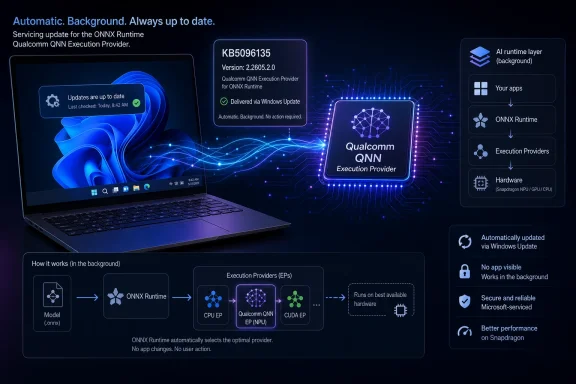
Microsoft has published KB5096135, a Qualcomm QNN Execution Provider update to version 2.2605.2.0, for Windows 11 version 24H2 and 25H2 devices that use Qualcomm chipsets and receive the required cumulative update through Windows Update. The update is small in presentation but important in direction: Microsoft is treating AI runtime plumbing as a living part of Windows, not a static driver-era dependency. For Snapdragon-powered Windows PCs, that means the operating system’s machine-learning stack is increasingly serviced like the browser, the security platform, or the graphics pipeline. The headline is not that users get a new app; it is that Windows’ on-device AI substrate keeps moving underneath them.
KB5096135 is not the kind of update that produces a desktop notification, a Start menu badge, or a redesigned Settings page. It updates the Qualcomm QNN Execution Provider, a component used by ONNX Runtime and Windows machine-learning scenarios that depend on ONNX Runtime to run models with hardware acceleration on Qualcomm silicon. In plain English, this is one of the layers that helps Windows send suitable AI workloads to Qualcomm’s neural-processing hardware instead of treating the CPU as the only realistic destination.
That makes the update easy to underestimate. A component with a name like “QNN Execution Provider” sounds like something only framework engineers and driver developers should care about. But Windows on Arm is now being sold partly on the promise that local AI workloads will become more common, more private, and more efficient than cloud-only alternatives. If that promise is going to survive contact with real software, the runtime layer has to improve continuously.
Microsoft’s support note says the update includes improvements to the Qualcomm QNN Execution Provider AI component for Windows 11 version 24H2 and Windows 11 version 25H2. It also says the package is downloaded and installed automatically from Windows Update, provided the device already has the latest cumulative update for those Windows versions. That prerequisite matters because Microsoft is not shipping this as an isolated experiment for hobbyists. It is tying the AI component servicing model to the mainstream Windows update train.
The change also replaces the previously released KB5089617, which tells us this is not a one-off patch. Microsoft is already iterating this component as part of a sequence. That cadence is the real story: Windows AI acceleration is becoming a serviced platform layer, with version numbers, replacement chains, prerequisites, and update history entries that administrators will have to recognize.
That is a lot of plumbing to say something simple: the model may be portable, but the performance is not magic. Someone still has to translate that model into instructions the device can run efficiently. On Snapdragon systems, the Qualcomm QNN Execution Provider is part of that translation path.
This distinction matters because the current AI PC conversation often treats the NPU as if it were a generic reservoir of performance waiting for software to dip into it. In practice, local acceleration depends on model format, supported operators, runtime integration, driver quality, memory behavior, and vendor SDK maturity. A laptop can have capable silicon and still deliver uneven AI performance if the software stack above it is immature.
KB5096135 sits exactly in that gap. It does not announce a new consumer feature, but it updates one of the pieces that can determine whether an AI workload actually lands on the intended accelerator. That is why a modest support page can be more revealing than a keynote demo: it shows the maintenance burden behind the pitch.
For ordinary users, the immediate effect of KB5096135 may be invisible. There is no guarantee that a particular app will suddenly run a model faster, expose a new toggle, or use less battery in a way that can be easily measured at home. The value is cumulative: better runtime behavior increases the odds that apps built on ONNX Runtime and Windows machine-learning pathways can use Qualcomm acceleration consistently.
For developers, the update is a reminder that the Windows AI target is not just “Windows 11” in the abstract. It is a moving matrix of OS version, cumulative update level, AI component version, hardware vendor, model compatibility, and runtime packaging. That may be frustrating, but it is also normal for a platform transition. Graphics APIs, media codecs, and security baselines all went through similar periods where the platform sounded unified in marketing and looked fragmented in deployment.
For IT administrators, the practical question is different. They need to know whether machines in the fleet have the update, whether it correlates with app behavior, and whether it introduces new support variables. Microsoft says the installed package should appear in Windows Update history as “Windows ML Runtime Qualcomm QNN Execution Provider Update (KB5096135).” That is a small but useful breadcrumb for help desks trying to distinguish “AI feature not supported” from “AI runtime component not current.”
But automatic delivery also moves the burden into inventory and change management. Enterprises that are beginning to evaluate Copilot+ PCs, Snapdragon-based laptops, or Windows workloads with local inference need to treat AI runtime components as managed dependencies. They may not be kernel drivers in the old sense, but they can affect performance, compatibility, and troubleshooting.
The prerequisite is also notable: devices must have the latest cumulative update for Windows 11 version 24H2 or 25H2. That effectively tells administrators that Microsoft wants the AI component layer aligned with the current servicing baseline. A system that is behind on monthly quality updates may also miss runtime improvements for local machine learning.
That will not surprise anyone who has managed Windows long enough, but it does complicate the AI PC sales pitch. “This device has an NPU” is no longer a complete sentence. The more accurate version is: this device has an NPU, a compatible runtime stack, current OS servicing, model support, and an application that knows how to use the whole chain.
That has advantages. Microsoft can update AI components faster than it could if every improvement waited for a monolithic annual Windows release. Hardware vendors can see fixes and optimizations reach users through the normal update channel. Developers can target capabilities that evolve without requiring customers to reinstall the operating system.
It also has a downside: the visible Windows version becomes less informative. Two machines may both say they run Windows 11 24H2, but their cumulative update level and AI component versions may differ. Two machines may both have Qualcomm silicon, but only one may have the current QNN provider. The more componentized Windows becomes, the more “what version are you on?” turns into a layered question.
This is not new in principle. Windows has long depended on driver versions, Store app packages, .NET runtimes, Visual C++ redistributables, and firmware revisions. What is new is that AI acceleration is joining that same messy, practical world. The magic box labeled “AI PC” is being decomposed into all the moving parts administrators already know how to distrust.
For now, the most credible local AI use cases are not necessarily the flashiest ones. Background effects, image and audio processing, summarization helpers, accessibility features, search enhancements, and app-specific inference can all benefit from efficient local execution. The larger dream — broad, fast, private local generative AI across mainstream Windows apps — requires more than raw TOPS figures. It requires stable developer abstractions.
ONNX Runtime is one of the places where that abstraction work happens. It gives developers a way to bring models across frameworks and target different execution backends without rewriting everything for each chip vendor. But the abstraction still depends on the quality of the provider underneath. A portable model is only as portable as the operators, conversions, and backend behavior allow it to be.
That is why KB5096135 is both boring and significant. It is boring because it is a component update with no consumer-facing flourish. It is significant because this is what platform maturity looks like before it becomes obvious: small revisions, automatic delivery, replacement updates, and runtime layers that slowly stop being the reason things fail.
But the existence of the provider does not eliminate engineering work. Developers still need to understand model conversion, quantization, supported operators, memory constraints, backend selection, and fallback behavior. If part of a model runs on the accelerator and another part falls back inefficiently, the user may experience little benefit or even worse latency.
The component update model can help here because fixes do not have to wait for every application to ship its own stack. If Microsoft and Qualcomm improve the platform runtime underneath, applications that depend on that pathway may benefit without each developer independently redistributing new vendor bits. That is the upside of Windows treating AI providers as serviced components.
The downside is predictability. Developers may need to test against specific component versions, especially when diagnosing performance regressions or accelerator-selection bugs. In the old Windows world, “works on my machine” often meant “different driver.” In the AI PC world, it may mean “different execution provider.”
That does not mean administrators should block it by default. In fact, for organizations testing Snapdragon Windows devices, staying current may be the only realistic way to evaluate the platform fairly. A device running stale AI runtime components is not representative of where Microsoft and Qualcomm are trying to take the stack.
Still, the update should be visible in fleet records. If a line-of-business application begins using ONNX Runtime with Qualcomm acceleration, support teams should know which Windows ML runtime components are present on affected machines. If a pilot group reports better or worse AI-related behavior after a servicing cycle, KB5096135 is the kind of package that belongs in the timeline.
The larger lesson is that AI PCs are going to create new classes of support questions. Was the model executed locally or remotely? Did it use the CPU, GPU, or NPU? Was a vendor execution provider available? Was the cumulative update level current? Did Windows Update deliver a runtime component silently before the behavior changed? These are not exotic questions for long. They are the next version of “what display driver are you on?”
That indirectness is why Microsoft has a communication challenge. AI PC marketing has been unusually front-loaded, with ambitious claims about what local neural hardware will enable. The actual platform work arrives in pieces that look like KB5096135: obscure, automatic, and difficult to tie to a single feature. Users are asked to believe in the category before the category has many unmistakable daily wins.
The most convincing evidence will come when common apps make good use of the stack without users thinking about it. A photo app that performs local enhancement quickly, a communications app that cleans audio efficiently, a developer tool that runs a local model without torching battery life, or an accessibility feature that works offline can do more for confidence than another spec-sheet comparison.
Until then, updates like this are best understood as groundwork. They do not prove the AI PC thesis. They make the thesis less implausible.
The answer is a layered model: Windows provides the update channel and OS integration, ONNX Runtime provides a common inference framework, and silicon vendors provide execution providers that map workloads to their hardware. In theory, that lets Microsoft support heterogeneous AI hardware without turning Windows development into a vendor-by-vendor maze.
In practice, the model will be judged by reliability. If developers find that runtime acceleration behaves inconsistently across machines, they will retreat to safer CPU or cloud paths. If administrators find that AI component updates are opaque and hard to manage, they will slow adoption. If users cannot see meaningful differences, the AI PC label will become another sticker.
That is why these small servicing moves matter. The platform has to become boring before it can become trusted. No one wants to think about the execution provider when clicking a button in an app. The point of KB5096135 is that, eventually, they should not have to.
The next phase of Windows AI will not be won by a single update, a single Copilot feature, or a single NPU claim. It will be won or lost in the dull middle layers where models meet runtimes, runtimes meet silicon, and Windows Update quietly decides whether the machine in front of you is ready for the software being written for it. KB5096135 is one more sign that Microsoft understands the plumbing problem; the harder test is whether developers and users eventually stop having to think about the plumbing at all.
 Microsoft Moves the AI Stack Into the Servicing Lane
KB5096135 is not the kind of update that produces a desktop notification, a Start menu badge, or a redesigned Settings page. It updates the Qualcomm QNN Execution Provider, a component used by ONNX Runtime and Windows machine-learning scenarios that depend on ONNX Runtime to run models with hardware acceleration on Qualcomm silicon. In plain English, this is one of the layers that helps Windows send suitable AI workloads to Qualcomm’s neural-processing hardware instead of treating the CPU as the only realistic destination.That makes the update easy to underestimate. A component with a name like “QNN Execution Provider” sounds like something only framework engineers and driver developers should care about. But Windows on Arm is now being sold partly on the promise that local AI workloads will become more common, more private, and more efficient than cloud-only alternatives. If that promise is going to survive contact with real software, the runtime layer has to improve continuously.
Microsoft’s support note says the update includes improvements to the Qualcomm QNN Execution Provider AI component for Windows 11 version 24H2 and Windows 11 version 25H2. It also says the package is downloaded and installed automatically from Windows Update, provided the device already has the latest cumulative update for those Windows versions. That prerequisite matters because Microsoft is not shipping this as an isolated experiment for hobbyists. It is tying the AI component servicing model to the mainstream Windows update train.
The change also replaces the previously released KB5089617, which tells us this is not a one-off patch. Microsoft is already iterating this component as part of a sequence. That cadence is the real story: Windows AI acceleration is becoming a serviced platform layer, with version numbers, replacement chains, prerequisites, and update history entries that administrators will have to recognize.
The Execution Provider Is Where the Marketing Meets the Model
The term execution provider sounds bloodless, but it describes a critical abstraction. ONNX Runtime can run machine-learning models across different kinds of hardware by using provider layers that translate model operations into work suitable for a CPU, GPU, NPU, or vendor-specific accelerator backend. Qualcomm’s QNN provider uses Qualcomm’s AI Engine Direct SDK to build a QNN graph from an ONNX model, which is then executed by a supported accelerator backend library.That is a lot of plumbing to say something simple: the model may be portable, but the performance is not magic. Someone still has to translate that model into instructions the device can run efficiently. On Snapdragon systems, the Qualcomm QNN Execution Provider is part of that translation path.
This distinction matters because the current AI PC conversation often treats the NPU as if it were a generic reservoir of performance waiting for software to dip into it. In practice, local acceleration depends on model format, supported operators, runtime integration, driver quality, memory behavior, and vendor SDK maturity. A laptop can have capable silicon and still deliver uneven AI performance if the software stack above it is immature.
KB5096135 sits exactly in that gap. It does not announce a new consumer feature, but it updates one of the pieces that can determine whether an AI workload actually lands on the intended accelerator. That is why a modest support page can be more revealing than a keynote demo: it shows the maintenance burden behind the pitch.
Windows on Arm Needs Runtime Trust, Not Just Battery-Life Slides
Qualcomm-based Windows PCs have spent years trying to escape the shadow of compatibility questions. The Snapdragon X generation gave the platform a stronger hardware argument, especially around efficiency and integrated AI acceleration, but the Windows ecosystem is still conditioned to ask whether the software path is complete. Every runtime update is part of Microsoft’s attempt to make the answer less conditional.For ordinary users, the immediate effect of KB5096135 may be invisible. There is no guarantee that a particular app will suddenly run a model faster, expose a new toggle, or use less battery in a way that can be easily measured at home. The value is cumulative: better runtime behavior increases the odds that apps built on ONNX Runtime and Windows machine-learning pathways can use Qualcomm acceleration consistently.
For developers, the update is a reminder that the Windows AI target is not just “Windows 11” in the abstract. It is a moving matrix of OS version, cumulative update level, AI component version, hardware vendor, model compatibility, and runtime packaging. That may be frustrating, but it is also normal for a platform transition. Graphics APIs, media codecs, and security baselines all went through similar periods where the platform sounded unified in marketing and looked fragmented in deployment.
For IT administrators, the practical question is different. They need to know whether machines in the fleet have the update, whether it correlates with app behavior, and whether it introduces new support variables. Microsoft says the installed package should appear in Windows Update history as “Windows ML Runtime Qualcomm QNN Execution Provider Update (KB5096135).” That is a small but useful breadcrumb for help desks trying to distinguish “AI feature not supported” from “AI runtime component not current.”
Automatic Delivery Is Convenient Until It Becomes Inventory
Microsoft is delivering KB5096135 automatically through Windows Update. That is the right default for consumers and probably the only plausible default for a component like this. If local AI acceleration depends on a runtime that only enthusiasts manually install, the ecosystem will never get broad enough for developers to rely on it.But automatic delivery also moves the burden into inventory and change management. Enterprises that are beginning to evaluate Copilot+ PCs, Snapdragon-based laptops, or Windows workloads with local inference need to treat AI runtime components as managed dependencies. They may not be kernel drivers in the old sense, but they can affect performance, compatibility, and troubleshooting.
The prerequisite is also notable: devices must have the latest cumulative update for Windows 11 version 24H2 or 25H2. That effectively tells administrators that Microsoft wants the AI component layer aligned with the current servicing baseline. A system that is behind on monthly quality updates may also miss runtime improvements for local machine learning.
That will not surprise anyone who has managed Windows long enough, but it does complicate the AI PC sales pitch. “This device has an NPU” is no longer a complete sentence. The more accurate version is: this device has an NPU, a compatible runtime stack, current OS servicing, model support, and an application that knows how to use the whole chain.
The 24H2 and 25H2 Pairing Shows the New Windows Pattern
KB5096135 targets Windows 11 version 24H2 and Windows 11 version 25H2. That pairing is important because it reflects Microsoft’s current pattern of keeping adjacent Windows 11 releases closely aligned in servicing, especially where componentized features are concerned. The OS version number still matters, but the real action increasingly happens through cumulative updates and separately serviced platform pieces.That has advantages. Microsoft can update AI components faster than it could if every improvement waited for a monolithic annual Windows release. Hardware vendors can see fixes and optimizations reach users through the normal update channel. Developers can target capabilities that evolve without requiring customers to reinstall the operating system.
It also has a downside: the visible Windows version becomes less informative. Two machines may both say they run Windows 11 24H2, but their cumulative update level and AI component versions may differ. Two machines may both have Qualcomm silicon, but only one may have the current QNN provider. The more componentized Windows becomes, the more “what version are you on?” turns into a layered question.
This is not new in principle. Windows has long depended on driver versions, Store app packages, .NET runtimes, Visual C++ redistributables, and firmware revisions. What is new is that AI acceleration is joining that same messy, practical world. The magic box labeled “AI PC” is being decomposed into all the moving parts administrators already know how to distrust.
The Update Is Quiet Because the Platform Is Still Being Built
There is an obvious reason Microsoft’s support article is terse: most users do not need to understand QNN graphs or ONNX Runtime providers. But the minimalism also reflects a broader uncertainty in the AI PC market. Microsoft, Qualcomm, Intel, AMD, Nvidia, and software developers are all still sorting out which local AI workloads are compelling, which should stay in the cloud, and which can justify the complexity of accelerator-specific optimization.For now, the most credible local AI use cases are not necessarily the flashiest ones. Background effects, image and audio processing, summarization helpers, accessibility features, search enhancements, and app-specific inference can all benefit from efficient local execution. The larger dream — broad, fast, private local generative AI across mainstream Windows apps — requires more than raw TOPS figures. It requires stable developer abstractions.
ONNX Runtime is one of the places where that abstraction work happens. It gives developers a way to bring models across frameworks and target different execution backends without rewriting everything for each chip vendor. But the abstraction still depends on the quality of the provider underneath. A portable model is only as portable as the operators, conversions, and backend behavior allow it to be.
That is why KB5096135 is both boring and significant. It is boring because it is a component update with no consumer-facing flourish. It is significant because this is what platform maturity looks like before it becomes obvious: small revisions, automatic delivery, replacement updates, and runtime layers that slowly stop being the reason things fail.
Developers Get a Promise, But Not a Free Pass
For Windows developers experimenting with local AI, Qualcomm’s QNN provider is one route into Snapdragon acceleration through ONNX Runtime. That is promising because ONNX has become a practical interchange format for many inference scenarios, and ONNX Runtime is widely used across cloud, desktop, and edge environments. A functioning QNN execution path means developers can at least imagine a route from model to accelerated Windows Arm application.But the existence of the provider does not eliminate engineering work. Developers still need to understand model conversion, quantization, supported operators, memory constraints, backend selection, and fallback behavior. If part of a model runs on the accelerator and another part falls back inefficiently, the user may experience little benefit or even worse latency.
The component update model can help here because fixes do not have to wait for every application to ship its own stack. If Microsoft and Qualcomm improve the platform runtime underneath, applications that depend on that pathway may benefit without each developer independently redistributing new vendor bits. That is the upside of Windows treating AI providers as serviced components.
The downside is predictability. Developers may need to test against specific component versions, especially when diagnosing performance regressions or accelerator-selection bugs. In the old Windows world, “works on my machine” often meant “different driver.” In the AI PC world, it may mean “different execution provider.”
Admins Should Treat AI Components Like Drivers With Better Branding
The phrase “AI component” sounds friendlier than “driver,” but in operational terms it deserves similar caution. It is a platform-level dependency that can influence hardware utilization and application behavior. It arrives through Windows Update. It has prerequisites. It can supersede earlier packages. It appears in update history.That does not mean administrators should block it by default. In fact, for organizations testing Snapdragon Windows devices, staying current may be the only realistic way to evaluate the platform fairly. A device running stale AI runtime components is not representative of where Microsoft and Qualcomm are trying to take the stack.
Still, the update should be visible in fleet records. If a line-of-business application begins using ONNX Runtime with Qualcomm acceleration, support teams should know which Windows ML runtime components are present on affected machines. If a pilot group reports better or worse AI-related behavior after a servicing cycle, KB5096135 is the kind of package that belongs in the timeline.
The larger lesson is that AI PCs are going to create new classes of support questions. Was the model executed locally or remotely? Did it use the CPU, GPU, or NPU? Was a vendor execution provider available? Was the cumulative update level current? Did Windows Update deliver a runtime component silently before the behavior changed? These are not exotic questions for long. They are the next version of “what display driver are you on?”
The Consumer Impact Will Arrive Through Apps, Not Settings
Most users will never go looking for KB5096135. Those who do will find it under Windows Update history, not in a shiny AI dashboard. That is appropriate because the update is infrastructure. Its success will be measured indirectly, through applications that feel faster, cooler, more responsive, or more capable on supported Qualcomm hardware.That indirectness is why Microsoft has a communication challenge. AI PC marketing has been unusually front-loaded, with ambitious claims about what local neural hardware will enable. The actual platform work arrives in pieces that look like KB5096135: obscure, automatic, and difficult to tie to a single feature. Users are asked to believe in the category before the category has many unmistakable daily wins.
The most convincing evidence will come when common apps make good use of the stack without users thinking about it. A photo app that performs local enhancement quickly, a communications app that cleans audio efficiently, a developer tool that runs a local model without torching battery life, or an accessibility feature that works offline can do more for confidence than another spec-sheet comparison.
Until then, updates like this are best understood as groundwork. They do not prove the AI PC thesis. They make the thesis less implausible.
The Small KB Number Carries the Larger Windows Bet
KB5096135 also reveals how Microsoft wants Windows to compete in a world where AI frameworks evolve faster than traditional operating systems. The company cannot afford to make every machine-learning improvement wait for a once-a-year Windows feature release. It also cannot let every hardware vendor define a separate, chaotic path that developers must integrate one by one.The answer is a layered model: Windows provides the update channel and OS integration, ONNX Runtime provides a common inference framework, and silicon vendors provide execution providers that map workloads to their hardware. In theory, that lets Microsoft support heterogeneous AI hardware without turning Windows development into a vendor-by-vendor maze.
In practice, the model will be judged by reliability. If developers find that runtime acceleration behaves inconsistently across machines, they will retreat to safer CPU or cloud paths. If administrators find that AI component updates are opaque and hard to manage, they will slow adoption. If users cannot see meaningful differences, the AI PC label will become another sticker.
That is why these small servicing moves matter. The platform has to become boring before it can become trusted. No one wants to think about the execution provider when clicking a button in an app. The point of KB5096135 is that, eventually, they should not have to.
KB5096135 Is the Kind of Update AI PCs Need More Of
The concrete facts are simple, but their implications are broader than the support article suggests.- KB5096135 updates the Qualcomm QNN Execution Provider to version 2.2605.2.0 for supported Windows 11 version 24H2 and 25H2 systems.
- The component helps ONNX Runtime and Windows machine-learning scenarios use hardware acceleration on Qualcomm chipsets through Qualcomm’s QNN stack.
- The update is delivered automatically through Windows Update, but it requires the latest cumulative update for the supported Windows 11 release.
- The package replaces KB5089617, showing that Microsoft is already maintaining this AI component through a revision chain.
- Administrators can verify installation in Windows Update history under the Windows ML Runtime Qualcomm QNN Execution Provider entry.
- The user-facing benefits will depend on applications and models that actually use the ONNX Runtime Qualcomm acceleration path.
The next phase of Windows AI will not be won by a single update, a single Copilot feature, or a single NPU claim. It will be won or lost in the dull middle layers where models meet runtimes, runtimes meet silicon, and Windows Update quietly decides whether the machine in front of you is ready for the software being written for it. KB5096135 is one more sign that Microsoft understands the plumbing problem; the harder test is whether developers and users eventually stop having to think about the plumbing at all.
References
- Primary source: Microsoft Support
Published: Tue, 26 May 2026 21:02:30 Z
KB5096135: Qualcomm QNN Execution Provider update (2.2605.2.0) - Microsoft Support
 support.microsoft.com
- Related coverage: edgchen1.github.io
- Related coverage: runtime.onnx.org.cn
Qualcomm - QNN | onnxruntime - ONNX 运行时
runtime.onnx.org.cn
- Related coverage: fs-eire.github.io
- Related coverage: qualcomm.com
Unlocking the power of Qualcomm QNN Execution Provider GPU backend for ONNX Runtime
We are pleased to announce the preview of the ONNX Runtime QNN Execution Provider with the Qualcomm Adreno GPU backend.www.qualcomm.com
- Official source: github.com
onnxruntime-qnn/docs/execution_providers/QNN-ExecutionProvider.md at main · onnxruntime/onnxruntime-qnn
onnxruntime-qnn is the Qualcomm AI Runtime (QAIRT) execution provider for onnxruntime. It provides onnxruntime hardware acceleration and advanced functionalities on Qualcomm devices. - onnxruntime/... github.com
- Related coverage: onnxruntime.llms.tw
Qualcomm - QNN | onnxruntime - ONNX 執行環境
onnxruntime.llms.tw
- Related coverage: docs.radxa.com
QNN Execution Provider | Radxa Docs
docs.radxa.com
- Related coverage: onnxruntime.ai
Windows - DirectML
Instructions to execute ONNX Runtime with the DirectML execution provideronnxruntime.ai
- Related coverage: windowscentral.com
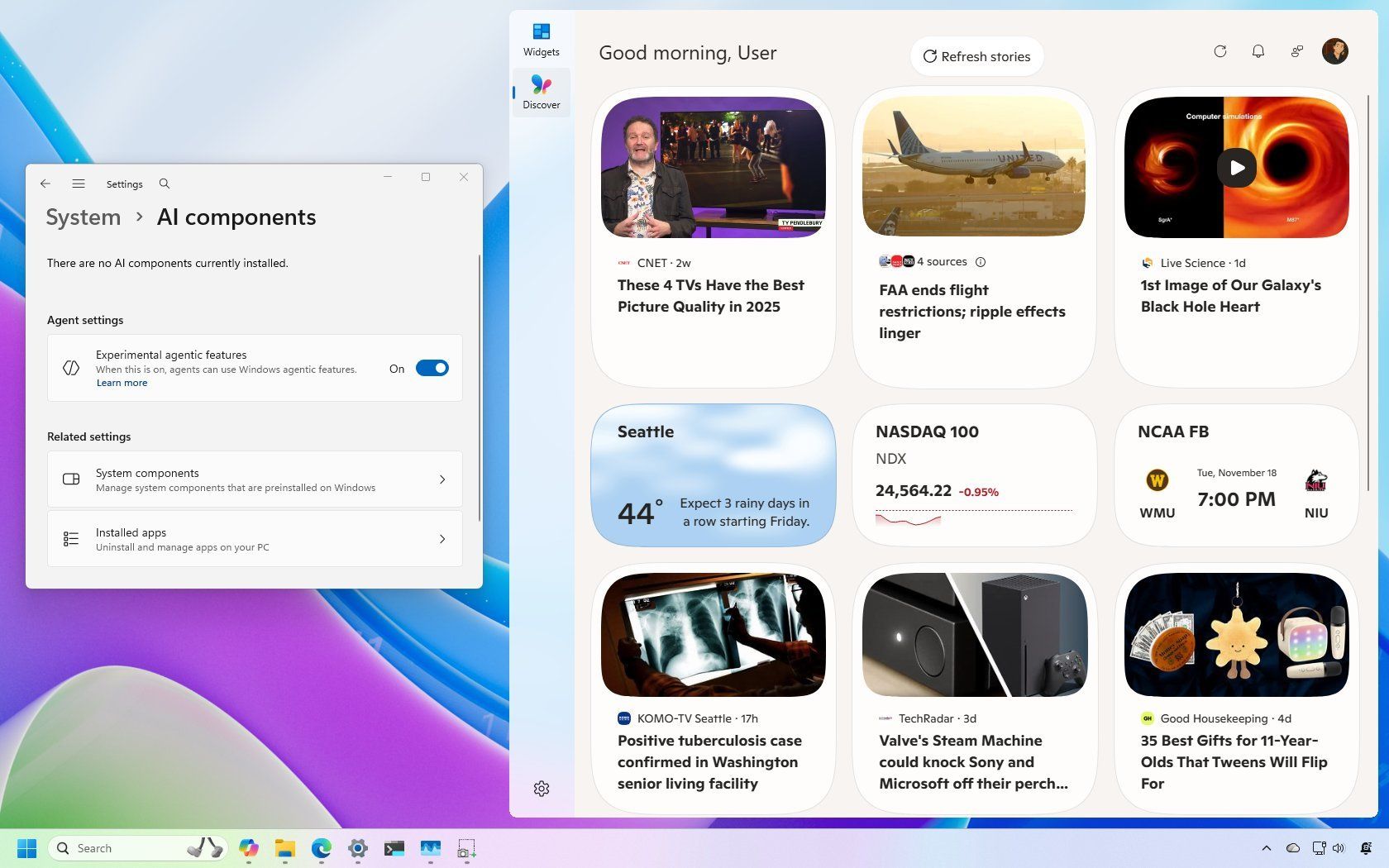
Windows 11's November Insider update brings new features and reveals a new version
Microsoft introduces new features and a new operating system version during the first half of November 2025. www.windowscentral.com
- Related coverage: docs.qualcomm.com