

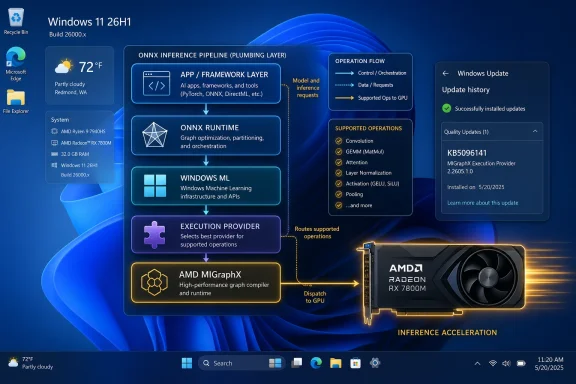
Microsoft has published KB5096141, an automatic Windows Update package for Windows 11 version 26H1 that updates the AMD MIGraphX Execution Provider to version 2.2605.1.0, improving the Windows ML component that offloads supported ONNX Runtime inference workloads to AMD GPUs. That is the factual news, but the larger story is Microsoft’s quiet conversion of AI enablement into a serviced Windows platform layer. This is not a flashy Copilot feature drop; it is plumbing. And in modern Windows, plumbing is increasingly where the strategy lives.
KB5096141 looks, at first glance, like one more small support article in the vast churn of Windows servicing. It has a KB number, a component name, a version string, a prerequisite, and the familiar instruction to check Windows Update history. There is no consumer-facing feature name attached, no demo video, and no promise that your PC will suddenly become smarter after a reboot.
That low drama is precisely what makes it interesting. The update targets the AMD MIGraphX Execution Provider, one of the execution-provider components used by Windows ML and ONNX Runtime to route machine-learning workloads to suitable hardware. In plain English, it helps Windows decide how to run supported AI models efficiently on AMD GPU hardware rather than treating the CPU as the default workhorse.
For years, Windows hardware acceleration was mostly discussed in terms of graphics, media encode, gaming, and UI composition. The AI era changes the emphasis. Now Microsoft is maintaining an abstraction layer between applications, model runtimes, silicon vendors, and Windows Update itself.
That means the future of Windows AI is not simply “Copilot gets better.” It is that inference runtimes, model components, execution providers, and hardware-specific optimizations become serviced pieces of the operating system. KB5096141 is a small tile in that mosaic, but it shows the direction clearly.
AMD’s MIGraphX sits in that bridge layer. It is a graph inference engine designed to accelerate machine-learning model inference on AMD hardware, applying hardware-specific optimizations to supported ONNX model operations. In the Windows ML context, the MIGraphX Execution Provider is the Microsoft-serviced component that lets Windows ML participate in that acceleration path.
The practical impact depends on the workload. A model must use operations supported by the provider, the device must have compatible AMD hardware and drivers, and the software stack must choose the provider at runtime. This is not a magic speed button for every AI application.
But it does matter because Windows needs a vendor-neutral way to expose vendor-specific acceleration. Microsoft cannot build the local AI future around only one chip vendor’s API, and developers do not want to rewrite their applications every time a new GPU, NPU, or runtime component arrives. Execution providers are the compromise: common model plumbing above, silicon-specific acceleration below.
That is sparse language, but Microsoft’s sparsity here is part of the servicing model. These AI component updates are not being framed like optional enthusiast driver packages. They are being pushed as Windows-managed components, with Windows Update acting as the delivery mechanism and update history serving as the user-visible audit trail.
The update also replaces a previously released package, KB5089171. That replacement relationship matters more than it may appear. It tells administrators and power users that Microsoft is treating the execution provider as a component with a versioned servicing chain, not a one-off downloadable add-on.
For Windows enthusiasts, that raises the familiar question: where does the operating system end and the vendor runtime begin? With KB5096141, Microsoft’s answer seems to be that the boundary is less important than consistency. If local AI features are to work reliably across fleets of mixed hardware, Microsoft needs a way to keep the runtime stack current without asking each user to understand ONNX graphs or AMD inference engines.
The average Windows user may never knowingly interact with MIGraphX. They may never launch an ONNX model directly, inspect execution-provider selection, or care whether a transformer block was evaluated on a CPU, GPU, or NPU. But they will care if a background photo tool responds faster, if an on-device search feature stops hammering battery life, or if an AI-assisted accessibility feature works offline with acceptable latency.
That is why these component updates matter. Microsoft’s local AI story depends on a stack that can be patched underneath applications. If the company had to wait for every app vendor to ship its own hardware-specific inference backend, Windows AI would fragment quickly.
For IT departments, the 26H1 targeting also hints at the shape of future testing. AI components will increasingly be part of OS readiness, not just application readiness. A Windows deployment plan that ignores execution providers may miss performance, compatibility, and support variables that matter once local inference becomes a normal part of productivity software.
For managed environments, automatic delivery is more complicated. AI components sit in an awkward space between drivers, runtimes, application dependencies, and OS features. They may not be security updates, but they can affect performance, workload behavior, and the stability of AI-enabled applications.
That is not an argument against automatic servicing. It is an argument for treating AI components as real infrastructure. Admins should know how to verify installation, how update rings handle these packages, and whether a given application relies on Windows ML rather than bundling its own runtime stack.
The Windows Update history entry is therefore not just a consumer troubleshooting breadcrumb. It is a small but useful inventory clue. If an app behaves differently across two ostensibly identical AMD-powered Windows 11 systems, the presence or absence of “Windows ML Runtime AMD MIGraphX Execution Provider (KB5096141)” may become part of the diagnostic path.
The AI PC market is already crowded with overlapping claims from CPU vendors, GPU vendors, NPU vendors, OEMs, and software companies. Every vendor wants to be the one whose hardware makes on-device AI practical. Microsoft, meanwhile, needs Windows to be the place where those competing hardware claims can be normalized into a developer-facing platform.
This is why execution providers are strategic. They let Microsoft support multiple acceleration paths without forcing every Windows application developer to become a silicon specialist. Developers can target Windows ML and ONNX Runtime abstractions, while the platform negotiates where supported parts of the model should run.
That abstraction will never be perfect. Some workloads will perform better on one vendor’s hardware, some providers will support different operator sets, and some models will need tuning to take full advantage of the available backend. But the direction is clear: Microsoft wants Windows to broker AI acceleration the way it has long brokered printing, graphics, input, and driver servicing.
That may be normal for this class of support article, but it is not ideal for administrators or developers trying to understand risk. If a database engine, graphics driver, or hypervisor component receives an update, technically minded users expect at least some sense of what changed. AI execution providers deserve the same discipline because they can influence workload routing and performance in ways that are difficult to observe casually.
The lack of detail also reflects a broader tension in Windows AI servicing. Microsoft is trying to make AI components invisible enough for consumers and manageable enough for enterprises. Those goals often pull in opposite directions. Invisible updates reduce friction; explicit changelogs build trust.
For now, the best reading is cautious: KB5096141 is an incremental platform component update, not a feature launch. It should improve the AMD execution-provider layer for supported Windows 11 26H1 devices, but Microsoft has not publicly described the specific technical deltas in the support note.
Windows ML is Microsoft’s answer to that mess. By providing platform APIs and runtime integration, Microsoft can give developers a way to run models locally while leaving room for hardware-specific acceleration underneath. ONNX Runtime supplies the model execution foundation; execution providers connect that foundation to available hardware.
KB5096141 fits into this model as a vendor-specific update delivered through a platform channel. It is not the whole Windows ML story, but it is a useful example of how Microsoft expects the ecosystem to work. AMD improves or updates the provider layer, Microsoft packages and services it, Windows Update distributes it, and applications benefit if they are using the supported stack correctly.
The strategic wager is that local AI becomes ordinary. Not exotic. Not a demo. Not a manually installed SDK experiment. Ordinary enough that the runtime components update in the background like any other part of Windows.
That does not mean developers can ignore testing. Execution-provider behavior can vary, and fallback paths still matter. A model that runs correctly on one backend may expose performance cliffs or unsupported operators on another. The right approach is to design for acceleration, measure actual behavior, and make graceful fallback part of the application architecture.
But the servicing model helps. If an execution provider can be improved through Windows Update, developers are not solely responsible for shipping every hardware backend improvement inside their app package. That can reduce duplication, shrink maintenance burden, and make AI-enabled applications more consistent across Windows devices.
The caution is that Microsoft’s platform abstraction will only be as useful as its documentation, diagnostics, and transparency. Developers need to know which providers are present, which model operations are supported, when a workload has fallen back, and why performance changed after an update. Without that visibility, the abstraction becomes a black box.
KB5096141’s prerequisite is the latest cumulative update for Windows 11 version 26H1. That dependency reinforces the idea that AI components are layered on top of the OS servicing baseline. If the base OS is not current enough, the AI component update is not the first thing to chase.
In practical terms, administrators should expect more of these packages. Execution providers for different vendors, model components for built-in Windows features, and runtime updates for on-device AI will likely appear with their own KB numbers and version histories. Some will matter only to Copilot+ PCs. Others may matter to a broader range of Windows 11 systems as developers adopt Windows ML more widely.
The management challenge is not that any one of these updates is alarming. It is that the category is new enough to be easy to miss. The Windows fleet of 2026 will not be judged only by OS build number and driver version. It may also be judged by which AI components are installed, current, and compatible with the workloads users actually run.
The update history check is the simplest way to verify presence. On an eligible system, go to Settings, then Windows Update, then Update history. After installation, the relevant entry should appear as “Windows ML Runtime AMD MIGraphX Execution Provider (KB5096141).”
That will not tell you whether a particular app is using the provider. It will not benchmark your model, expose operator coverage, or confirm that an AMD GPU handled a specific inference workload. But it confirms that the serviced component is present, which is the first step in any real troubleshooting path.
Power users should also resist over-reading the update. Installing KB5096141 does not mean every AI workload will accelerate on AMD hardware, nor does it mean unsupported GenAI scenarios suddenly become supported by the provider. It means the Windows ML runtime component for AMD MIGraphX has been updated to a newer version on the applicable Windows release.
The tradeoff is opacity. The more Microsoft turns AI infrastructure into background-serviced Windows plumbing, the more users and admins need better ways to see what changed. A KB number and a version string are useful, but they are not the same as a meaningful changelog.
That tension will define the next phase of Windows AI. Microsoft wants the AI PC to feel seamless, but seamless systems are often hard to audit. The company will need to prove that automatic AI component servicing can be both low-friction and accountable.
 Microsoft Is Turning Local AI Into Serviced Infrastructure
KB5096141 looks, at first glance, like one more small support article in the vast churn of Windows servicing. It has a KB number, a component name, a version string, a prerequisite, and the familiar instruction to check Windows Update history. There is no consumer-facing feature name attached, no demo video, and no promise that your PC will suddenly become smarter after a reboot.That low drama is precisely what makes it interesting. The update targets the AMD MIGraphX Execution Provider, one of the execution-provider components used by Windows ML and ONNX Runtime to route machine-learning workloads to suitable hardware. In plain English, it helps Windows decide how to run supported AI models efficiently on AMD GPU hardware rather than treating the CPU as the default workhorse.
For years, Windows hardware acceleration was mostly discussed in terms of graphics, media encode, gaming, and UI composition. The AI era changes the emphasis. Now Microsoft is maintaining an abstraction layer between applications, model runtimes, silicon vendors, and Windows Update itself.
That means the future of Windows AI is not simply “Copilot gets better.” It is that inference runtimes, model components, execution providers, and hardware-specific optimizations become serviced pieces of the operating system. KB5096141 is a small tile in that mosaic, but it shows the direction clearly.
The Execution Provider Is Where the Hardware Argument Gets Real
The term execution provider sounds like something only runtime engineers should care about, but it is one of the more important concepts in local AI on Windows. ONNX Runtime uses execution providers to map portions of a model’s computation graph onto available hardware backends. If a supported operation can run faster or more efficiently on a GPU, NPU, or specialized accelerator, the provider is the bridge that makes that possible.AMD’s MIGraphX sits in that bridge layer. It is a graph inference engine designed to accelerate machine-learning model inference on AMD hardware, applying hardware-specific optimizations to supported ONNX model operations. In the Windows ML context, the MIGraphX Execution Provider is the Microsoft-serviced component that lets Windows ML participate in that acceleration path.
The practical impact depends on the workload. A model must use operations supported by the provider, the device must have compatible AMD hardware and drivers, and the software stack must choose the provider at runtime. This is not a magic speed button for every AI application.
But it does matter because Windows needs a vendor-neutral way to expose vendor-specific acceleration. Microsoft cannot build the local AI future around only one chip vendor’s API, and developers do not want to rewrite their applications every time a new GPU, NPU, or runtime component arrives. Execution providers are the compromise: common model plumbing above, silicon-specific acceleration below.
KB5096141 Is Small Because the Platform Is Doing the Heavy Lifting
The support note for KB5096141 says the update includes improvements to the MIGraphX Execution Provider AI component for Windows 11 version 26H1. It also says the update downloads and installs automatically from Windows Update, and that devices need the latest cumulative update for Windows 11 version 26H1 installed first. After installation, users should see “Windows ML Runtime AMD MIGraphX Execution Provider (KB5096141)” in update history.That is sparse language, but Microsoft’s sparsity here is part of the servicing model. These AI component updates are not being framed like optional enthusiast driver packages. They are being pushed as Windows-managed components, with Windows Update acting as the delivery mechanism and update history serving as the user-visible audit trail.
The update also replaces a previously released package, KB5089171. That replacement relationship matters more than it may appear. It tells administrators and power users that Microsoft is treating the execution provider as a component with a versioned servicing chain, not a one-off downloadable add-on.
For Windows enthusiasts, that raises the familiar question: where does the operating system end and the vendor runtime begin? With KB5096141, Microsoft’s answer seems to be that the boundary is less important than consistency. If local AI features are to work reliably across fleets of mixed hardware, Microsoft needs a way to keep the runtime stack current without asking each user to understand ONNX graphs or AMD inference engines.
Windows 11 Version 26H1 Is the First Clue About Audience
The update applies to Windows 11 version 26H1, all editions. That version reference is important because it places KB5096141 in the next wave of Windows servicing rather than the mainstream Windows 11 24H2 world most users are still living in. In other words, this is a forward-looking component update for a platform generation where local AI is expected to be more deeply integrated.The average Windows user may never knowingly interact with MIGraphX. They may never launch an ONNX model directly, inspect execution-provider selection, or care whether a transformer block was evaluated on a CPU, GPU, or NPU. But they will care if a background photo tool responds faster, if an on-device search feature stops hammering battery life, or if an AI-assisted accessibility feature works offline with acceptable latency.
That is why these component updates matter. Microsoft’s local AI story depends on a stack that can be patched underneath applications. If the company had to wait for every app vendor to ship its own hardware-specific inference backend, Windows AI would fragment quickly.
For IT departments, the 26H1 targeting also hints at the shape of future testing. AI components will increasingly be part of OS readiness, not just application readiness. A Windows deployment plan that ignores execution providers may miss performance, compatibility, and support variables that matter once local inference becomes a normal part of productivity software.
Automatic Delivery Is Convenient Until It Becomes a Change-Control Problem
Microsoft says KB5096141 is downloaded and installed automatically from Windows Update. For consumers, that is the right default. Most users do not know what a MIGraphX Execution Provider is, and they should not have to manually curate a runtime component for hardware-accelerated inference.For managed environments, automatic delivery is more complicated. AI components sit in an awkward space between drivers, runtimes, application dependencies, and OS features. They may not be security updates, but they can affect performance, workload behavior, and the stability of AI-enabled applications.
That is not an argument against automatic servicing. It is an argument for treating AI components as real infrastructure. Admins should know how to verify installation, how update rings handle these packages, and whether a given application relies on Windows ML rather than bundling its own runtime stack.
The Windows Update history entry is therefore not just a consumer troubleshooting breadcrumb. It is a small but useful inventory clue. If an app behaves differently across two ostensibly identical AMD-powered Windows 11 systems, the presence or absence of “Windows ML Runtime AMD MIGraphX Execution Provider (KB5096141)” may become part of the diagnostic path.
The AMD Angle Is About More Than One GPU Vendor
AMD has been working to make its hardware more credible for AI inference across client and workstation scenarios, and MIGraphX is one of the pieces in that strategy. For Microsoft, supporting AMD’s execution provider through Windows Update helps keep Windows ML from looking like a platform biased toward a single accelerator ecosystem. That matters politically, technically, and commercially.The AI PC market is already crowded with overlapping claims from CPU vendors, GPU vendors, NPU vendors, OEMs, and software companies. Every vendor wants to be the one whose hardware makes on-device AI practical. Microsoft, meanwhile, needs Windows to be the place where those competing hardware claims can be normalized into a developer-facing platform.
This is why execution providers are strategic. They let Microsoft support multiple acceleration paths without forcing every Windows application developer to become a silicon specialist. Developers can target Windows ML and ONNX Runtime abstractions, while the platform negotiates where supported parts of the model should run.
That abstraction will never be perfect. Some workloads will perform better on one vendor’s hardware, some providers will support different operator sets, and some models will need tuning to take full advantage of the available backend. But the direction is clear: Microsoft wants Windows to broker AI acceleration the way it has long brokered printing, graphics, input, and driver servicing.
The Missing Details Are Also Part of the Story
KB5096141 does not provide a detailed changelog. It does not list individual bug fixes, performance gains, operator coverage changes, regression fixes, or known issues. It simply says the update includes improvements to the MIGraphX Execution Provider AI component.That may be normal for this class of support article, but it is not ideal for administrators or developers trying to understand risk. If a database engine, graphics driver, or hypervisor component receives an update, technically minded users expect at least some sense of what changed. AI execution providers deserve the same discipline because they can influence workload routing and performance in ways that are difficult to observe casually.
The lack of detail also reflects a broader tension in Windows AI servicing. Microsoft is trying to make AI components invisible enough for consumers and manageable enough for enterprises. Those goals often pull in opposite directions. Invisible updates reduce friction; explicit changelogs build trust.
For now, the best reading is cautious: KB5096141 is an incremental platform component update, not a feature launch. It should improve the AMD execution-provider layer for supported Windows 11 26H1 devices, but Microsoft has not publicly described the specific technical deltas in the support note.
Windows ML Is Becoming the Compatibility Layer for the AI PC
The phrase “AI PC” has been overused to the point of exhaustion, but the underlying technical challenge is real. A PC may have a CPU with vector extensions, an integrated GPU, a discrete GPU, an NPU, or some combination of all four. A modern AI application should not need a bespoke code path for every possible hardware permutation.Windows ML is Microsoft’s answer to that mess. By providing platform APIs and runtime integration, Microsoft can give developers a way to run models locally while leaving room for hardware-specific acceleration underneath. ONNX Runtime supplies the model execution foundation; execution providers connect that foundation to available hardware.
KB5096141 fits into this model as a vendor-specific update delivered through a platform channel. It is not the whole Windows ML story, but it is a useful example of how Microsoft expects the ecosystem to work. AMD improves or updates the provider layer, Microsoft packages and services it, Windows Update distributes it, and applications benefit if they are using the supported stack correctly.
The strategic wager is that local AI becomes ordinary. Not exotic. Not a demo. Not a manually installed SDK experiment. Ordinary enough that the runtime components update in the background like any other part of Windows.
Developers Should Read This as a Platform Signal
For developers, the obvious lesson is that Windows ML and ONNX Runtime are becoming safer bets for applications that need local inference without hard-coding around a single hardware vendor. The existence of a serviced AMD MIGraphX provider tells developers that Microsoft is investing in the middle layer where models meet devices.That does not mean developers can ignore testing. Execution-provider behavior can vary, and fallback paths still matter. A model that runs correctly on one backend may expose performance cliffs or unsupported operators on another. The right approach is to design for acceleration, measure actual behavior, and make graceful fallback part of the application architecture.
But the servicing model helps. If an execution provider can be improved through Windows Update, developers are not solely responsible for shipping every hardware backend improvement inside their app package. That can reduce duplication, shrink maintenance burden, and make AI-enabled applications more consistent across Windows devices.
The caution is that Microsoft’s platform abstraction will only be as useful as its documentation, diagnostics, and transparency. Developers need to know which providers are present, which model operations are supported, when a workload has fallen back, and why performance changed after an update. Without that visibility, the abstraction becomes a black box.
Admins Need to Add AI Components to the Patch Vocabulary
Enterprise IT has spent decades building muscle memory around Patch Tuesday, driver qualification, firmware updates, Microsoft Store apps, and feature-update deferrals. AI component servicing now adds another category to the list. It is not quite a driver, not quite a cumulative update, and not quite an application dependency.KB5096141’s prerequisite is the latest cumulative update for Windows 11 version 26H1. That dependency reinforces the idea that AI components are layered on top of the OS servicing baseline. If the base OS is not current enough, the AI component update is not the first thing to chase.
In practical terms, administrators should expect more of these packages. Execution providers for different vendors, model components for built-in Windows features, and runtime updates for on-device AI will likely appear with their own KB numbers and version histories. Some will matter only to Copilot+ PCs. Others may matter to a broader range of Windows 11 systems as developers adopt Windows ML more widely.
The management challenge is not that any one of these updates is alarming. It is that the category is new enough to be easy to miss. The Windows fleet of 2026 will not be judged only by OS build number and driver version. It may also be judged by which AI components are installed, current, and compatible with the workloads users actually run.
Enthusiasts Get a New Layer to Inspect
For WindowsForum readers, KB5096141 is also a reminder that the interesting parts of Windows are increasingly hidden below the visible shell. The Settings app may look familiar, the Start menu may change slowly, and the user-facing AI branding may come and go. Underneath, Microsoft is assembling a runtime substrate for local AI workloads.The update history check is the simplest way to verify presence. On an eligible system, go to Settings, then Windows Update, then Update history. After installation, the relevant entry should appear as “Windows ML Runtime AMD MIGraphX Execution Provider (KB5096141).”
That will not tell you whether a particular app is using the provider. It will not benchmark your model, expose operator coverage, or confirm that an AMD GPU handled a specific inference workload. But it confirms that the serviced component is present, which is the first step in any real troubleshooting path.
Power users should also resist over-reading the update. Installing KB5096141 does not mean every AI workload will accelerate on AMD hardware, nor does it mean unsupported GenAI scenarios suddenly become supported by the provider. It means the Windows ML runtime component for AMD MIGraphX has been updated to a newer version on the applicable Windows release.
The AI Stack Is Being Patched Into Normalcy
The most concrete lesson from KB5096141 is that Microsoft wants local AI to become part of ordinary Windows maintenance. That is good for users if it produces faster, more reliable, and more power-efficient on-device experiences. It is good for developers if the platform absorbs some of the complexity of hardware acceleration. It is good for silicon vendors if their optimizations can reach customers through a trusted OS channel.The tradeoff is opacity. The more Microsoft turns AI infrastructure into background-serviced Windows plumbing, the more users and admins need better ways to see what changed. A KB number and a version string are useful, but they are not the same as a meaningful changelog.
That tension will define the next phase of Windows AI. Microsoft wants the AI PC to feel seamless, but seamless systems are often hard to audit. The company will need to prove that automatic AI component servicing can be both low-friction and accountable.
KB5096141 Shows How Quiet the AI PC Transition May Be
This update is not a headline feature, but it gives us a useful snapshot of where Windows is going.- KB5096141 updates the AMD MIGraphX Execution Provider for Windows 11 version 26H1 to version 2.2605.1.0.
- The component is used with ONNX Runtime and Windows ML to offload supported inference operations to AMD GPU hardware.
- The update installs automatically through Windows Update on eligible systems that already have the latest cumulative update for Windows 11 version 26H1.
- Users can verify installation in Windows Update history by looking for “Windows ML Runtime AMD MIGraphX Execution Provider (KB5096141).”
- The package replaces the earlier KB5089171 update, indicating an ongoing servicing chain for this AI runtime component.
- The absence of a detailed changelog means administrators and developers should treat the update as important platform plumbing rather than a fully explained feature release.
References
- Primary source: Microsoft Support
Published: Tue, 26 May 2026 21:03:06 Z
- Official source: learn.microsoft.com


