

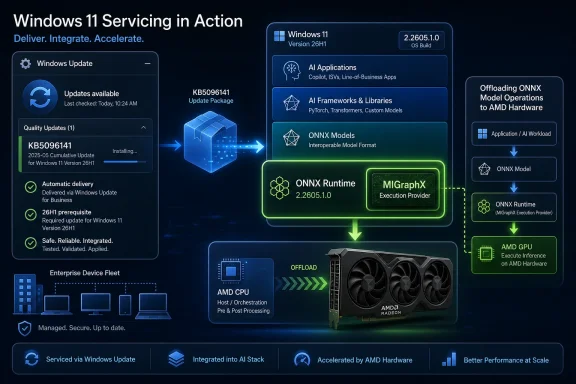
Microsoft has published KB5096141, an automatic Windows Update package for Windows 11 version 26H1 that updates the AMD MIGraphX Execution Provider to version 2.2605.1.0 for supported systems with the latest cumulative update installed. The short support note looks minor, but it points to a much larger shift in how Windows will service local AI acceleration. Microsoft is no longer treating machine-learning plumbing as something that arrives only with app updates, driver packages, or annual Windows releases. It is carving AI runtime components into the same serviced operating-system fabric that already carries security fixes, compatibility updates, and driver-adjacent reliability work.
KB5096141 is not a flashy Copilot feature, a new Settings page, or a benchmark-friendly demo. It is a component update for the AMD MIGraphX Execution Provider, the layer that lets ONNX Runtime and Windows machine-learning workloads offload supported model operations to AMD GPUs. In plain terms, it helps Windows route eligible local inference work away from the CPU and onto AMD graphics hardware where that work can run faster or more efficiently.
That makes this update easy to overlook and hard to dismiss. The consumer-facing Windows story still tends to frame AI around Copilot, Recall, image generation, semantic search, and other visible features. But the operating-system story is increasingly about execution providers: vendor-specific acceleration back ends that decide whether local AI workloads run well, run slowly, or fall back to a more generic path.
MIGraphX is AMD’s graph inference engine, designed to optimize and execute machine-learning models on AMD hardware. Microsoft’s support article describes the Windows component as an AMD execution provider used with ONNX Runtime and Windows machine-learning, which is the important architectural point. The application may ask for inference, ONNX Runtime may present a common model interface, but the execution provider is where hardware specificity enters the room.
That hardware specificity is now being serviced through Windows Update. For administrators and developers, that is the real news. Microsoft is building a world where the AI stack inside Windows changes underneath applications in a controlled, OS-managed way, rather than depending entirely on each app vendor to bundle its own inference engine and hardware acceleration libraries.
That sounds like ordinary Windows maintenance, and that is precisely why it matters. Microsoft is normalizing AI component servicing as part of the Windows lifecycle. Instead of waiting for a feature update, a GPU driver refresh, or an application-specific installer, supported devices can receive updated machine-learning components directly through the OS update channel.
This is the same broad playbook Microsoft has used elsewhere: separate fast-moving components from the monolithic Windows image, then service them independently. Edge, WebView2, Defender intelligence, Store frameworks, inbox apps, and compatibility databases all trained Windows users and IT departments to expect important system behavior to change outside the old once-or-twice-a-year feature cadence. AI acceleration is now joining that category.
There is a practical reason for that. Local AI is not stable infrastructure yet. Model formats change, frameworks evolve, silicon vendors tune their back ends, and Microsoft’s own Windows ML APIs are still settling into a developer platform. If Microsoft waited for annual Windows releases to ship every provider update, Windows would lag the AI hardware market by design.
The tradeoff is that administrators get one more moving part to track. A GPU driver version, a Windows build number, a Windows App SDK package, an ONNX Runtime behavior, and a Windows-serviced execution provider can all influence whether a local AI workload behaves as expected. KB5096141 is not just a patch; it is a reminder that “Windows AI” is a stack, not a feature.
MIGraphX gives AMD a clearer role in that Windows story. It is not the same thing as AMD’s Vitis AI path for Ryzen AI NPUs, and it is not a generic DirectML fallback. It is an AMD-specific execution provider intended to expose hardware-aware optimizations for ONNX models running on AMD GPU hardware.
That distinction matters because local AI performance is often decided below the level where most users look. A model may be “ONNX compatible,” but that does not mean every operator in the graph is accelerated by every provider. The execution provider determines which parts of a graph can run on the target device, which optimizations are applied, and when unsupported operations fall back elsewhere.
For Windows users, the visible effect may be subtle: an app feels more responsive, a battery drains less aggressively, a filter applies faster, or a background indexing job finishes sooner. For developers, the effect is less subtle. The difference between a mature provider and a fragile one can decide whether it is realistic to ship a local AI feature across a range of PCs.
AMD also benefits from having Microsoft distribute and service the provider through Windows Update. That does not remove the importance of AMD’s own driver stack, but it gives Windows a more consistent way to deliver the runtime component that applications target. In an ecosystem where Nvidia, Intel, Qualcomm, and AMD all want preferred positions in local inference, the update channel itself becomes part of the competitive terrain.
That context makes the MIGraphX update more interesting than a standalone AMD fix. Microsoft is not merely updating a library. It is demonstrating how Windows 11 26H1 systems will receive AI component improvements after the base OS is installed.
The prerequisite is also telling: the device must have the latest cumulative update for Windows 11 26H1 installed. In other words, Microsoft is anchoring the AI provider update to the health of the underlying OS servicing state. That is familiar from other Windows packages, but it underscores that these components are not floating app add-ons. They are part of the Windows-managed runtime environment.
For enterprise IT, that creates a recognizable pattern. First keep the monthly cumulative update baseline current, then let dependent component updates arrive. The benefit is coherence; Microsoft can assume a certain platform level. The risk is coupling; if an organization delays cumulative updates, it may also delay AI runtime improvements that developers or users expect to be present.
That tension will become more visible as AI features move from novelty to dependency. Today, many local AI workloads are optional enhancements. Tomorrow, they may be embedded in productivity suites, creative tools, endpoint security products, accessibility features, and line-of-business applications. Once that happens, a missing execution provider update starts to look less like trivia and more like a support ticket waiting to happen.
The support article says the provider offloads supported ONNX model operations to AMD GPUs. The word “supported” is doing a lot of work. AI acceleration is not a magic switch that moves every model, every layer, and every operation onto the fastest available hardware. It is a negotiation between the model graph, the runtime, the provider, the driver, and the device.
That negotiation is why component updates matter. A new provider can expand support for operations, improve graph optimizations, fix failures, reduce memory pressure, or improve scheduling behavior. Microsoft’s note does not enumerate specific fixes in KB5096141, describing the release only as improvements to the MIGraphX Execution Provider AI component. That vagueness is not ideal, but it is not unusual for this class of platform update.
The lack of detailed release notes leaves developers and administrators with a familiar Windows problem: the update is probably useful, possibly necessary, and insufficiently descriptive. In consumer Windows, that may be tolerable. In managed environments, it complicates change control, especially when local AI workloads touch regulated data, endpoint performance, or application compatibility.
Still, the direction is rational. The lower layers of the AI stack need to evolve quickly, and Microsoft needs a way to update them without asking every app developer to become a hardware enablement specialist. The execution provider model is Microsoft’s attempt to make local AI acceleration both vendor-specific and platform-managed.
The enterprise version is more complicated. Automatic delivery through Windows Update means the component can arrive as part of normal servicing behavior, but AI runtime changes can affect application performance and compatibility. A model that previously fell back to CPU might now run on GPU. A workload that previously used one provider path might choose another. A performance improvement in one scenario can expose a latent bug in another.
That does not mean Microsoft is wrong to use Windows Update. It means IT departments need to decide whether AI component updates belong in the same validation ring strategy as cumulative updates and drivers. For many organizations, the answer should be yes. If a business is testing monthly Windows updates on pilot devices, it should include local AI workloads in those pilots before assuming production machines will behave identically.
There is also a visibility problem. Traditional patch management tools are good at answering whether a cumulative update is installed. They are not always as good at presenting AI runtime component state in a way that application owners understand. The Settings update history entry is useful for a single PC, but fleets need inventory, reporting, and correlation with hardware and driver versions.
Microsoft’s documentation ecosystem is moving in that direction, with release information pages for AI components and execution provider tables for Windows ML. But the story is not yet as mature as Windows security update reporting. KB5096141 is a reminder that Microsoft must make AI component servicing observable, not just automatic.
But clean abstractions are not free abstractions. Developers still need to understand which execution providers exist, which devices they support, which driver versions they require, and which scenarios are not supported. Microsoft’s provider documentation for MIGraphX identifies the provider name developers use and notes hardware and driver requirements. It also indicates that MIGraphX is not currently supported for GenAI scenarios, a limitation that matters given how loosely the industry now uses the AI label.
That last point is important. Not every local AI workload is a chatbot. Image analysis, classification, segmentation, enhancement, search, ranking, and other inference tasks may benefit from GPU acceleration without being “generative AI” in the consumer sense. MIGraphX’s value is likely to be clearest in those conventional ONNX inference paths where supported graph operations map well to AMD GPU execution.
Developers should also avoid assuming that Windows Update makes testing unnecessary. Provider updates can change performance characteristics, memory behavior, and operator coverage. Applications that select providers dynamically should be built with telemetry, fallback paths, and clear diagnostics. If an app’s AI feature quietly drops from GPU acceleration to CPU fallback, the user may only notice a hot laptop and a spinning fan.
The better long-term outcome is a Windows ecosystem where apps ask for acceleration capabilities rather than hard-coding assumptions about silicon. KB5096141 nudges Windows toward that model. It does not finish the job.
AMD’s MIGraphX provider update shows a more pluralistic architecture taking shape. Qualcomm has QNN for Snapdragon NPUs. Intel has OpenVINO for CPU, GPU, and NPU paths. Nvidia has its own RTX-oriented execution provider story. AMD has both GPU and Ryzen AI-related provider work. Windows ML becomes the broker among these competing acceleration paths.
That is healthy for the platform, but it also makes Windows more complex. The PC’s old promise was that Windows software would run across a messy hardware landscape. The AI-era promise is harder: Windows software should run well across a messy hardware landscape, while selecting the right local accelerator, respecting driver constraints, preserving battery life, and maintaining privacy.
Execution providers are Microsoft’s answer to that complexity. They let vendors optimize for their silicon while Microsoft provides discovery, installation, registration, and servicing mechanisms. It is a pragmatic compromise between a single lowest-common-denominator runtime and a chaos of vendor SDKs bundled with every application.
For AMD users, the significance is straightforward. Their GPUs are not merely display devices or gaming hardware in this model. They are part of the local AI compute fabric that Windows can target and service. That may not matter to every user today, but it will matter more as AI features become ordinary parts of Windows applications.
That level of detail may be acceptable for a consumer support page, but AI component updates need better release communication as they become operationally relevant. If Microsoft wants Windows ML to be trusted by developers and enterprises, release notes should eventually look more like platform engineering notes and less like placeholder prose. “Improvements” is not a change-management category.
The ambiguity also makes it harder to separate Windows Update behavior from AMD driver behavior. If an application’s local inference performance changes after KB5096141, an administrator may need to inspect Windows update history, GPU driver versions, application logs, and provider registration state. Without clearer notes, root-cause analysis becomes guesswork.
To be fair, Microsoft is not alone here. The entire AI runtime ecosystem is moving quickly, and vendor release notes often lag behind the practical consequences of updates. But Windows is held to a different standard because it is the integration point. When Microsoft uses Windows Update to ship these components automatically, it inherits responsibility for explaining them.
The path forward is obvious. Microsoft should maintain a human-readable AI component history that lists provider versions, availability dates, supported hardware, meaningful fixes, and known limitations. The company has the pieces of that documentation already. It now needs the discipline to make those pieces useful to the people who support real machines.
The immediate action is simple for individual users: install current Windows 11 26H1 cumulative updates and confirm the MIGraphX entry in Windows Update history. For managed fleets, the better action is to identify which devices have AMD GPU hardware that could use this provider, then include those devices in update validation rings. AI runtime changes should not be discovered first by a user running a production workload.
Developers and IT teams should also be careful with assumptions about availability. A Windows 11 version number alone does not prove that a particular execution provider is installed, registered, compatible with the GPU driver, or selected by an application. Local AI readiness is a state assembled from several components.
That reality may frustrate anyone hoping for a single “AI PC” checkbox. But it is also how Windows has always absorbed hardware diversity. The difference now is that the diversity affects model execution paths and user-facing AI features, not just display adapters, storage controllers, and audio devices.
 Microsoft Is Turning AI Acceleration Into Windows Infrastructure
KB5096141 is not a flashy Copilot feature, a new Settings page, or a benchmark-friendly demo. It is a component update for the AMD MIGraphX Execution Provider, the layer that lets ONNX Runtime and Windows machine-learning workloads offload supported model operations to AMD GPUs. In plain terms, it helps Windows route eligible local inference work away from the CPU and onto AMD graphics hardware where that work can run faster or more efficiently.That makes this update easy to overlook and hard to dismiss. The consumer-facing Windows story still tends to frame AI around Copilot, Recall, image generation, semantic search, and other visible features. But the operating-system story is increasingly about execution providers: vendor-specific acceleration back ends that decide whether local AI workloads run well, run slowly, or fall back to a more generic path.
MIGraphX is AMD’s graph inference engine, designed to optimize and execute machine-learning models on AMD hardware. Microsoft’s support article describes the Windows component as an AMD execution provider used with ONNX Runtime and Windows machine-learning, which is the important architectural point. The application may ask for inference, ONNX Runtime may present a common model interface, but the execution provider is where hardware specificity enters the room.
That hardware specificity is now being serviced through Windows Update. For administrators and developers, that is the real news. Microsoft is building a world where the AI stack inside Windows changes underneath applications in a controlled, OS-managed way, rather than depending entirely on each app vendor to bundle its own inference engine and hardware acceleration libraries.
The KB Number Is Small, but the Servicing Model Is the Story
The immediate mechanics are simple. KB5096141 applies to all editions of Windows 11 version 26H1, requires the latest cumulative update for that release, and is downloaded and installed automatically from Windows Update. Users can confirm installation in Settings by checking Windows Update history, where it should appear as “Windows ML Runtime AMD MIGraphX Execution Provider (KB5096141).”That sounds like ordinary Windows maintenance, and that is precisely why it matters. Microsoft is normalizing AI component servicing as part of the Windows lifecycle. Instead of waiting for a feature update, a GPU driver refresh, or an application-specific installer, supported devices can receive updated machine-learning components directly through the OS update channel.
This is the same broad playbook Microsoft has used elsewhere: separate fast-moving components from the monolithic Windows image, then service them independently. Edge, WebView2, Defender intelligence, Store frameworks, inbox apps, and compatibility databases all trained Windows users and IT departments to expect important system behavior to change outside the old once-or-twice-a-year feature cadence. AI acceleration is now joining that category.
There is a practical reason for that. Local AI is not stable infrastructure yet. Model formats change, frameworks evolve, silicon vendors tune their back ends, and Microsoft’s own Windows ML APIs are still settling into a developer platform. If Microsoft waited for annual Windows releases to ship every provider update, Windows would lag the AI hardware market by design.
The tradeoff is that administrators get one more moving part to track. A GPU driver version, a Windows build number, a Windows App SDK package, an ONNX Runtime behavior, and a Windows-serviced execution provider can all influence whether a local AI workload behaves as expected. KB5096141 is not just a patch; it is a reminder that “Windows AI” is a stack, not a feature.
AMD Gets a Seat in the Local Inference Race
Microsoft’s AI hardware messaging has spent much of the Copilot+ PC era focused on NPUs, especially Qualcomm’s early lead with Snapdragon X systems. But Windows cannot be an AI platform if it treats acceleration as synonymous with one class of neural processor. The installed base is full of GPUs, and AMD’s presence in laptops, desktops, handhelds, and workstations makes GPU-backed inference strategically important.MIGraphX gives AMD a clearer role in that Windows story. It is not the same thing as AMD’s Vitis AI path for Ryzen AI NPUs, and it is not a generic DirectML fallback. It is an AMD-specific execution provider intended to expose hardware-aware optimizations for ONNX models running on AMD GPU hardware.
That distinction matters because local AI performance is often decided below the level where most users look. A model may be “ONNX compatible,” but that does not mean every operator in the graph is accelerated by every provider. The execution provider determines which parts of a graph can run on the target device, which optimizations are applied, and when unsupported operations fall back elsewhere.
For Windows users, the visible effect may be subtle: an app feels more responsive, a battery drains less aggressively, a filter applies faster, or a background indexing job finishes sooner. For developers, the effect is less subtle. The difference between a mature provider and a fragile one can decide whether it is realistic to ship a local AI feature across a range of PCs.
AMD also benefits from having Microsoft distribute and service the provider through Windows Update. That does not remove the importance of AMD’s own driver stack, but it gives Windows a more consistent way to deliver the runtime component that applications target. In an ecosystem where Nvidia, Intel, Qualcomm, and AMD all want preferred positions in local inference, the update channel itself becomes part of the competitive terrain.
Windows 11 26H1 Looks More Like an AI Platform Release Than a Normal Feature Update
KB5096141 applies specifically to Windows 11 version 26H1, which is already an unusual release in the Windows timeline. Microsoft’s documentation positions 26H1 as a supported Windows 11 version with its own servicing path, not merely a small enablement package layered over earlier releases. It also appears in Microsoft’s release materials as a platform tied closely to new AI-era hardware and component servicing.That context makes the MIGraphX update more interesting than a standalone AMD fix. Microsoft is not merely updating a library. It is demonstrating how Windows 11 26H1 systems will receive AI component improvements after the base OS is installed.
The prerequisite is also telling: the device must have the latest cumulative update for Windows 11 26H1 installed. In other words, Microsoft is anchoring the AI provider update to the health of the underlying OS servicing state. That is familiar from other Windows packages, but it underscores that these components are not floating app add-ons. They are part of the Windows-managed runtime environment.
For enterprise IT, that creates a recognizable pattern. First keep the monthly cumulative update baseline current, then let dependent component updates arrive. The benefit is coherence; Microsoft can assume a certain platform level. The risk is coupling; if an organization delays cumulative updates, it may also delay AI runtime improvements that developers or users expect to be present.
That tension will become more visible as AI features move from novelty to dependency. Today, many local AI workloads are optional enhancements. Tomorrow, they may be embedded in productivity suites, creative tools, endpoint security products, accessibility features, and line-of-business applications. Once that happens, a missing execution provider update starts to look less like trivia and more like a support ticket waiting to happen.
The Execution Provider Is Where the Marketing Meets the Silicon
The phrase hardware accelerated inference has become marketing wallpaper, but execution providers are where it becomes concrete. ONNX Runtime can provide a common way to run models, but the provider is the piece that knows how to translate parts of that model into efficient work for a specific back end. For AMD GPUs, that is where MIGraphX enters.The support article says the provider offloads supported ONNX model operations to AMD GPUs. The word “supported” is doing a lot of work. AI acceleration is not a magic switch that moves every model, every layer, and every operation onto the fastest available hardware. It is a negotiation between the model graph, the runtime, the provider, the driver, and the device.
That negotiation is why component updates matter. A new provider can expand support for operations, improve graph optimizations, fix failures, reduce memory pressure, or improve scheduling behavior. Microsoft’s note does not enumerate specific fixes in KB5096141, describing the release only as improvements to the MIGraphX Execution Provider AI component. That vagueness is not ideal, but it is not unusual for this class of platform update.
The lack of detailed release notes leaves developers and administrators with a familiar Windows problem: the update is probably useful, possibly necessary, and insufficiently descriptive. In consumer Windows, that may be tolerable. In managed environments, it complicates change control, especially when local AI workloads touch regulated data, endpoint performance, or application compatibility.
Still, the direction is rational. The lower layers of the AI stack need to evolve quickly, and Microsoft needs a way to update them without asking every app developer to become a hardware enablement specialist. The execution provider model is Microsoft’s attempt to make local AI acceleration both vendor-specific and platform-managed.
Automatic Delivery Solves One Problem and Creates Another
The best argument for automatic installation is simple: most users will never know what a MIGraphX execution provider is, and they should not have to. If their hardware supports it and Windows can safely update it, the operating system should keep the local inference stack current. That is the consumer-friendly version of the story.The enterprise version is more complicated. Automatic delivery through Windows Update means the component can arrive as part of normal servicing behavior, but AI runtime changes can affect application performance and compatibility. A model that previously fell back to CPU might now run on GPU. A workload that previously used one provider path might choose another. A performance improvement in one scenario can expose a latent bug in another.
That does not mean Microsoft is wrong to use Windows Update. It means IT departments need to decide whether AI component updates belong in the same validation ring strategy as cumulative updates and drivers. For many organizations, the answer should be yes. If a business is testing monthly Windows updates on pilot devices, it should include local AI workloads in those pilots before assuming production machines will behave identically.
There is also a visibility problem. Traditional patch management tools are good at answering whether a cumulative update is installed. They are not always as good at presenting AI runtime component state in a way that application owners understand. The Settings update history entry is useful for a single PC, but fleets need inventory, reporting, and correlation with hardware and driver versions.
Microsoft’s documentation ecosystem is moving in that direction, with release information pages for AI components and execution provider tables for Windows ML. But the story is not yet as mature as Windows security update reporting. KB5096141 is a reminder that Microsoft must make AI component servicing observable, not just automatic.
Developers Get a Cleaner Target, but Not a Free Abstraction
For Windows developers, the appeal of Windows ML and ONNX Runtime is obvious. Build against a common model format and runtime path, then let Windows and its execution providers handle the hardware-specific work where possible. That is a far better proposition than shipping separate acceleration stacks for every GPU, NPU, and CPU combination.But clean abstractions are not free abstractions. Developers still need to understand which execution providers exist, which devices they support, which driver versions they require, and which scenarios are not supported. Microsoft’s provider documentation for MIGraphX identifies the provider name developers use and notes hardware and driver requirements. It also indicates that MIGraphX is not currently supported for GenAI scenarios, a limitation that matters given how loosely the industry now uses the AI label.
That last point is important. Not every local AI workload is a chatbot. Image analysis, classification, segmentation, enhancement, search, ranking, and other inference tasks may benefit from GPU acceleration without being “generative AI” in the consumer sense. MIGraphX’s value is likely to be clearest in those conventional ONNX inference paths where supported graph operations map well to AMD GPU execution.
Developers should also avoid assuming that Windows Update makes testing unnecessary. Provider updates can change performance characteristics, memory behavior, and operator coverage. Applications that select providers dynamically should be built with telemetry, fallback paths, and clear diagnostics. If an app’s AI feature quietly drops from GPU acceleration to CPU fallback, the user may only notice a hot laptop and a spinning fan.
The better long-term outcome is a Windows ecosystem where apps ask for acceleration capabilities rather than hard-coding assumptions about silicon. KB5096141 nudges Windows toward that model. It does not finish the job.
The Copilot+ Era Is Becoming Less Qualcomm-Centric
The first wave of Copilot+ PC attention created an understandable impression that Windows AI was mostly an Arm-and-NPU story. Qualcomm had the launch moment, Microsoft had the marketing campaign, and the headline features leaned heavily on dedicated neural processing. But the Windows installed base is too broad for that to remain the whole story.AMD’s MIGraphX provider update shows a more pluralistic architecture taking shape. Qualcomm has QNN for Snapdragon NPUs. Intel has OpenVINO for CPU, GPU, and NPU paths. Nvidia has its own RTX-oriented execution provider story. AMD has both GPU and Ryzen AI-related provider work. Windows ML becomes the broker among these competing acceleration paths.
That is healthy for the platform, but it also makes Windows more complex. The PC’s old promise was that Windows software would run across a messy hardware landscape. The AI-era promise is harder: Windows software should run well across a messy hardware landscape, while selecting the right local accelerator, respecting driver constraints, preserving battery life, and maintaining privacy.
Execution providers are Microsoft’s answer to that complexity. They let vendors optimize for their silicon while Microsoft provides discovery, installation, registration, and servicing mechanisms. It is a pragmatic compromise between a single lowest-common-denominator runtime and a chaos of vendor SDKs bundled with every application.
For AMD users, the significance is straightforward. Their GPUs are not merely display devices or gaming hardware in this model. They are part of the local AI compute fabric that Windows can target and service. That may not matter to every user today, but it will matter more as AI features become ordinary parts of Windows applications.
The Support Note Says “Improvements,” and That Is Not Enough
Microsoft’s KB article is concise to the point of opacity. It explains what the MIGraphX execution provider is, says the update includes improvements, lists the Windows 11 26H1 prerequisite, and tells users where to find it in update history. It does not say which models benefit, which bugs were fixed, whether performance changed, whether any regressions are known, or whether administrators should expect different behavior from previous releases.That level of detail may be acceptable for a consumer support page, but AI component updates need better release communication as they become operationally relevant. If Microsoft wants Windows ML to be trusted by developers and enterprises, release notes should eventually look more like platform engineering notes and less like placeholder prose. “Improvements” is not a change-management category.
The ambiguity also makes it harder to separate Windows Update behavior from AMD driver behavior. If an application’s local inference performance changes after KB5096141, an administrator may need to inspect Windows update history, GPU driver versions, application logs, and provider registration state. Without clearer notes, root-cause analysis becomes guesswork.
To be fair, Microsoft is not alone here. The entire AI runtime ecosystem is moving quickly, and vendor release notes often lag behind the practical consequences of updates. But Windows is held to a different standard because it is the integration point. When Microsoft uses Windows Update to ship these components automatically, it inherits responsibility for explaining them.
The path forward is obvious. Microsoft should maintain a human-readable AI component history that lists provider versions, availability dates, supported hardware, meaningful fixes, and known limitations. The company has the pieces of that documentation already. It now needs the discipline to make those pieces useful to the people who support real machines.
Admins Should Treat KB5096141 Like a Driver-Adjacent Runtime Update
KB5096141 is not a graphics driver, but administrators should think about it in driver-adjacent terms. It sits near the boundary between operating system, runtime, application, and hardware. That is exactly the kind of component that can produce subtle differences across device models.The immediate action is simple for individual users: install current Windows 11 26H1 cumulative updates and confirm the MIGraphX entry in Windows Update history. For managed fleets, the better action is to identify which devices have AMD GPU hardware that could use this provider, then include those devices in update validation rings. AI runtime changes should not be discovered first by a user running a production workload.
Developers and IT teams should also be careful with assumptions about availability. A Windows 11 version number alone does not prove that a particular execution provider is installed, registered, compatible with the GPU driver, or selected by an application. Local AI readiness is a state assembled from several components.
That reality may frustrate anyone hoping for a single “AI PC” checkbox. But it is also how Windows has always absorbed hardware diversity. The difference now is that the diversity affects model execution paths and user-facing AI features, not just display adapters, storage controllers, and audio devices.
The Most Important Line Is the One About Windows Update
The practical lesson from KB5096141 is not that AMD released another AI runtime component. It is that Microsoft has made that component part of automatic Windows servicing for a specific Windows 11 release. That tells us where the platform is going.- KB5096141 updates the AMD MIGraphX Execution Provider to version 2.2605.1.0 for Windows 11 version 26H1 systems that meet the cumulative update prerequisite.
- The provider is used with ONNX Runtime and Windows machine-learning workloads to offload supported ONNX model operations to AMD GPUs.
- The update installs automatically through Windows Update and appears in update history as a Windows ML Runtime AMD MIGraphX Execution Provider entry.
- The release reinforces Microsoft’s move toward independently serviced AI components rather than waiting for annual Windows feature updates.
- Administrators should validate AI runtime updates alongside cumulative updates, GPU drivers, and applications that depend on local inference.
- Developers should continue to build fallback paths and diagnostics because execution provider availability does not guarantee every model operation will be accelerated.
References
- Primary source: Microsoft Support
Published: Tue, 26 May 2026 21:03:06 Z
