

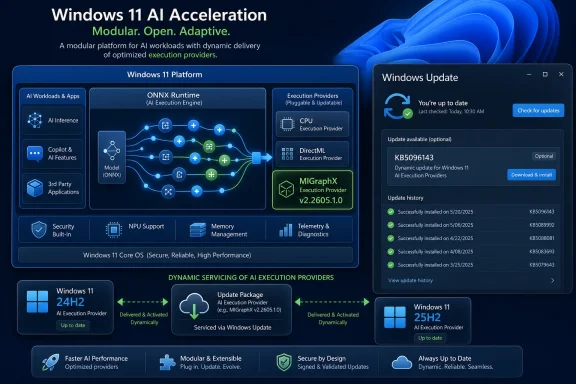
Microsoft has published KB5096143, an automatic Windows Update package for Windows 11 version 24H2 and 25H2 that updates AMD’s MIGraphX Execution Provider to version 2.2605.1.0 for ONNX Runtime and Windows machine-learning workloads on supported AMD GPU hardware. The update is small in outward appearance but unusually revealing in strategy: Windows is turning AI acceleration into a serviced platform component rather than something every app vendor must bundle, tune, and chase alone. For users, it will look like another entry in Update history. For developers and IT teams, it is a sign that the Windows AI stack is becoming more modular, more hardware-specific, and more dependent on the health of Windows Update itself.
KB5096143 is not a conventional feature update, security patch, or driver release. It updates a component that most users will never launch directly: AMD’s MIGraphX Execution Provider, a bridge that lets ONNX Runtime route suitable machine-learning model operations to AMD GPUs. In plain English, it helps Windows and applications run certain AI inference tasks on AMD graphics hardware instead of leaving everything to the CPU.
That distinction matters because Microsoft’s Windows AI architecture increasingly depends on execution providers as the translation layer between models and silicon. ONNX Runtime provides the common runtime; execution providers decide how work is mapped to CPU, GPU, NPU, or vendor-specific acceleration libraries. MIGraphX is AMD’s route into that model for GPU inference.
The result is a quiet but important shift in responsibility. Instead of every application developer shipping a separate AMD acceleration stack, Windows can dynamically obtain and update compatible providers through the operating system’s own servicing channels. That is cleaner for developers and potentially better for users, but it also places more trust in Microsoft’s update machinery.
KB5096143 is therefore best understood not as “an AMD update” in the old driver-package sense, but as a Windows platform update for the AI layer. Microsoft is servicing the connective tissue between applications, ONNX models, and AMD hardware.
That sounds simple, but it is a hard problem in practice. Machine-learning models are graphs of operations, and not every operation maps neatly to every device. An execution provider must determine what it can accelerate, what must fall back elsewhere, and how to avoid wasting more time moving data around than it saves by using specialized hardware.
MIGraphX is AMD’s graph inference engine, designed to optimize deep-learning model execution on AMD GPU hardware. In the Windows ML context, the MIGraphX Execution Provider is the packaging of that capability for ONNX Runtime-based workloads. It is not a consumer-facing app, and it is not a general guarantee that every AI feature on a Radeon-powered PC will suddenly run faster.
The more accurate reading is that Microsoft and AMD are maintaining a path for supported ONNX inference workloads to use AMD GPUs more effectively. That is narrow, but it is also foundational. Platform AI tends to arrive first as infrastructure, then as developer APIs, and only later as user-visible features.
For Windows 11 users still on older releases, KB5096143 is not a backported convenience patch. The provider architecture Microsoft is using here belongs to the 24H2-and-later era, where Windows ML and ONNX Runtime integration are more central to the OS. That also means AI component compatibility is becoming another reason Microsoft will push users and enterprises toward newer Windows 11 builds.
The update installs automatically from Windows Update, which reduces friction for consumer devices but complicates change control for managed environments. Enterprises tend to prefer predictable servicing rings, documented dependencies, and regression windows. A hardware-specific AI component that arrives through Windows Update may be welcome, but it still needs to be understood as part of the machine’s runtime surface.
The check is straightforward: Microsoft says users can verify the update under Settings, Windows Update, Update history. After installation, the relevant Windows ML Runtime AMD MIGraphX Execution Provider update should appear there. That discoverability matters, because most affected users will not know the component exists until a developer, support engineer, or troubleshooting workflow asks them to confirm it.
This is likely to frustrate enthusiasts who want benchmarks and before-and-after numbers. It may also frustrate admins who prefer to know exactly what changed before approving deployment. But AI execution providers sit in a messy layer where a change can improve one model shape, fix a fallback path, adjust compatibility with a driver version, or prepare the platform for future SDK behavior.
The absence of a big announcement does not mean the update is unimportant. If Windows applications increasingly call into shared machine-learning infrastructure, then the quality of that infrastructure matters. A broken or outdated provider could mean failed acceleration, CPU fallback, unexpected performance differences, or app-specific behavior that is difficult to diagnose.
The versioning also shows how Microsoft is moving AI plumbing onto an update cadence separate from full OS releases. That is necessary if Windows is to support a fast-moving AI ecosystem. GPU drivers, model runtimes, vendor SDKs, and application frameworks do not evolve on the same annual schedule as Windows feature updates.
MIGraphX is one part of that answer. By providing an ONNX Runtime execution provider through Windows ML, AMD gains a more standardized way for applications to discover and use its hardware. That is important because many Windows developers do not want to write separate acceleration logic for every vendor stack.
The update also matters for AMD’s broader position in AI PCs. Ryzen AI branding has emphasized NPUs, but many systems also include capable integrated or discrete AMD graphics. A GPU execution provider gives Windows another route to accelerate inference workloads, especially where model support, driver compatibility, or performance characteristics make the GPU a better fit than the CPU.
There is still a gap between platform availability and developer adoption. An execution provider can exist on the system and still be unused by most applications. Developers must build against Windows ML or ONNX Runtime in ways that allow provider discovery, testing, and fallback. The infrastructure is necessary, but it is not sufficient.
That is the consumer-friendly version of the story. The enterprise version is less tidy. Any automatically serviced runtime component can become part of an organization’s application compatibility matrix, especially if internal tools or third-party business software begin to rely on local AI inference.
The likely risk is not that KB5096143 will visibly break large numbers of PCs. The bigger issue is operational opacity. If an AI-enabled application behaves differently after a provider update, the root cause may be buried under Windows Update history, driver versions, ONNX model behavior, and hardware compatibility. That is a new troubleshooting stack for many Windows administrators.
Microsoft can reduce that pain with better release notes, clearer provider inventory tools, and policy controls that make these components visible in management platforms. Windows Update has become the distribution mechanism for many things that are not “Windows” in the traditional sense. AI execution providers are the latest example.
For support teams, that entry can become a useful first check. Is the device on Windows 11 24H2 or 25H2? Does it have the latest cumulative update? Is KB5096143 installed? Is the AMD driver stack compatible with the provider requirements? Those questions are more concrete than telling users to “update your AI runtime,” a phrase that would mean almost nothing to most Windows customers.
The harder part is that Update history does not tell the full story. A provider may be installed but not selected. A model may contain operations unsupported by the provider. A driver mismatch may prevent acceleration. An application may pin a different ONNX Runtime behavior. The presence of KB5096143 is a starting point, not proof of acceleration.
That distinction will become more important as Windows AI features proliferate. Users will increasingly ask why a model runs on one PC and crawls on another. The answer may involve hardware blocks, execution providers, model formats, OS builds, drivers, and app choices. KB5096143 is a reminder that Windows AI troubleshooting will not be as simple as checking whether a GPU exists.
Microsoft’s challenge is that Windows is not a console. It runs on countless combinations of CPUs, GPUs, NPUs, drivers, firmware versions, and OEM images. The only way to make local AI broadly useful is to abstract the hardware without flattening the performance advantages of each vendor. Execution providers are Microsoft’s compromise: common APIs above, vendor-specific acceleration below.
That model is sensible, but it requires constant maintenance. AI frameworks move quickly. Model architectures change. Hardware vendors revise their compilers and runtimes. Windows itself changes. A static AI runtime baked into one OS release would age badly.
KB5096143 therefore points to a future in which AI capability on Windows is not merely a function of the OS version printed in Settings. It will depend on a live constellation of runtime packages, provider updates, driver revisions, and application frameworks. That is powerful, but it also means Windows AI is becoming more like a serviced cloud client even when the inference runs locally.
But application developers still have to test. They need to understand which models work well on which providers, how fallback behaves, and whether the user experience remains acceptable when acceleration is unavailable. A model that performs well through one provider may not perform identically through another.
The MIGraphX update also reinforces the importance of ONNX as a practical deployment format. ONNX is not glamorous compared with model announcements, but it remains central to cross-framework inference. If Windows developers want local AI features that are not tied to one hardware vendor, ONNX Runtime is one of the most plausible paths.
There is a strategic upside here for Microsoft. If developers trust Windows to provide current execution providers, they are more likely to target Windows ML instead of bundling their own private runtime universe. That would make Windows a stronger AI application platform. The risk is that trust takes years to build and only a few opaque regressions to damage.
That means administrators should begin tracking them alongside GPU drivers, Windows builds, and application dependencies. If a legal review tool, helpdesk assistant, CAD plugin, or internal automation client uses local inference, the execution provider stack becomes part of the support boundary. It is no longer just a developer concern.
The update’s prerequisite — the latest cumulative update for Windows 11 24H2 or 25H2 — also matters for patch policy. Organizations that defer cumulative updates may indirectly defer AI provider updates. Conversely, organizations that approve cumulative updates broadly may receive AI component changes faster than their application teams expect.
This is where Microsoft’s documentation style will need to mature. “Includes improvements” is adequate for consumers and inadequate for regulated environments. If Windows AI becomes a serious enterprise platform, administrators will need clearer servicing notes, known issues, rollback guidance, and compatibility disclosures.
Execution providers are especially sensitive because they combine complex model parsing with hardware-specific optimization. That does not make them inherently unsafe, but it does mean they belong in threat modeling. Enterprises already worry about where models come from and what data they process; they should also care about the runtime components that execute them.
Automatic updates can help here by closing bugs and improving compatibility without requiring users to manually maintain obscure packages. But automatic servicing also raises trust questions. Organizations need confidence that provider packages are authenticated, controlled, observable, and recoverable.
The right posture is neither panic nor complacency. KB5096143 is a normal platform update, but the category it represents is becoming more important. AI runtime hygiene will become part of endpoint hygiene.
That may sound underwhelming, but it is how platform work usually begins. DirectX updates mattered before every game used the newest feature level. Media Foundation components mattered before users knew which codec path their streaming app selected. AI execution providers are part of the same pattern.
The timing also reflects the awkward middle stage of the AI PC era. Hardware vendors are shipping capable chips, Microsoft is building platform APIs, and developers are deciding which local AI features are worth the complexity. The installed base has to be prepared before the software ecosystem can assume the capability is there.
For AMD users, the practical advice is simple: keep Windows 11 24H2 or 25H2 current, maintain supported AMD drivers, and do not expect a universal performance boost. KB5096143 enables or improves a specific acceleration path. Whether that path matters depends on the applications and models you run.
The alternative would be fragmentation. Each app bundles its own runtime, each vendor ships its own installer, and users are left with duplicated components that may or may not be compatible. Windows has lived through versions of that story before, and it rarely ends well.
A common Windows-managed provider catalog is the better architectural answer. It lets Microsoft mediate between app developers and hardware vendors while preserving specialized acceleration. It also gives Microsoft a stronger hand in defining what “AI-ready” means on Windows.
But the approach will only work if the servicing experience is reliable. Windows Update already carries the burden of OS patches, drivers, firmware in some cases, Microsoft Store dependencies, and feature enablement. Adding AI execution providers to that pipeline is logical, but it raises the stakes. The invisible parts of Windows are becoming more consequential.
The immediate facts are concrete:
 Microsoft Is Quietly Turning AI Acceleration Into a Windows Component
KB5096143 is not a conventional feature update, security patch, or driver release. It updates a component that most users will never launch directly: AMD’s MIGraphX Execution Provider, a bridge that lets ONNX Runtime route suitable machine-learning model operations to AMD GPUs. In plain English, it helps Windows and applications run certain AI inference tasks on AMD graphics hardware instead of leaving everything to the CPU.That distinction matters because Microsoft’s Windows AI architecture increasingly depends on execution providers as the translation layer between models and silicon. ONNX Runtime provides the common runtime; execution providers decide how work is mapped to CPU, GPU, NPU, or vendor-specific acceleration libraries. MIGraphX is AMD’s route into that model for GPU inference.
The result is a quiet but important shift in responsibility. Instead of every application developer shipping a separate AMD acceleration stack, Windows can dynamically obtain and update compatible providers through the operating system’s own servicing channels. That is cleaner for developers and potentially better for users, but it also places more trust in Microsoft’s update machinery.
KB5096143 is therefore best understood not as “an AMD update” in the old driver-package sense, but as a Windows platform update for the AI layer. Microsoft is servicing the connective tissue between applications, ONNX models, and AMD hardware.
The New Windows AI Stack Is Built Around Swappable Silicon Paths
ONNX Runtime has become one of the more important invisible technologies in modern Windows AI work. It gives developers a way to run trained models without binding every application to one vendor’s toolkit. The execution provider model is what makes that abstraction useful: a model can run on the CPU, DirectML, an AMD GPU through MIGraphX, a Qualcomm accelerator through QNN, or other hardware paths depending on availability and support.That sounds simple, but it is a hard problem in practice. Machine-learning models are graphs of operations, and not every operation maps neatly to every device. An execution provider must determine what it can accelerate, what must fall back elsewhere, and how to avoid wasting more time moving data around than it saves by using specialized hardware.
MIGraphX is AMD’s graph inference engine, designed to optimize deep-learning model execution on AMD GPU hardware. In the Windows ML context, the MIGraphX Execution Provider is the packaging of that capability for ONNX Runtime-based workloads. It is not a consumer-facing app, and it is not a general guarantee that every AI feature on a Radeon-powered PC will suddenly run faster.
The more accurate reading is that Microsoft and AMD are maintaining a path for supported ONNX inference workloads to use AMD GPUs more effectively. That is narrow, but it is also foundational. Platform AI tends to arrive first as infrastructure, then as developer APIs, and only later as user-visible features.
KB5096143 Draws a Bright Line Around Windows 11 24H2 and 25H2
Microsoft’s support note makes the eligibility boundary explicit: this update applies to Windows 11 version 24H2 and Windows 11 version 25H2, and the device must have the latest cumulative update installed. That requirement is not incidental. It tells administrators that this provider update depends on the newer Windows ML stack present in the current Windows 11 servicing baseline.For Windows 11 users still on older releases, KB5096143 is not a backported convenience patch. The provider architecture Microsoft is using here belongs to the 24H2-and-later era, where Windows ML and ONNX Runtime integration are more central to the OS. That also means AI component compatibility is becoming another reason Microsoft will push users and enterprises toward newer Windows 11 builds.
The update installs automatically from Windows Update, which reduces friction for consumer devices but complicates change control for managed environments. Enterprises tend to prefer predictable servicing rings, documented dependencies, and regression windows. A hardware-specific AI component that arrives through Windows Update may be welcome, but it still needs to be understood as part of the machine’s runtime surface.
The check is straightforward: Microsoft says users can verify the update under Settings, Windows Update, Update history. After installation, the relevant Windows ML Runtime AMD MIGraphX Execution Provider update should appear there. That discoverability matters, because most affected users will not know the component exists until a developer, support engineer, or troubleshooting workflow asks them to confirm it.
The Version Number Says This Is Servicing, Not Spectacle
Version 2.2605.1.0 does not come with a dramatic consumer-facing changelog. Microsoft describes the release as including improvements to the MIGraphX Execution Provider AI component for Windows 11 24H2 and 25H2. That phrasing is sparse, but it is consistent with how platform components are often serviced: compatibility, reliability, enablement, and performance work may not translate into a neat list of visible features.This is likely to frustrate enthusiasts who want benchmarks and before-and-after numbers. It may also frustrate admins who prefer to know exactly what changed before approving deployment. But AI execution providers sit in a messy layer where a change can improve one model shape, fix a fallback path, adjust compatibility with a driver version, or prepare the platform for future SDK behavior.
The absence of a big announcement does not mean the update is unimportant. If Windows applications increasingly call into shared machine-learning infrastructure, then the quality of that infrastructure matters. A broken or outdated provider could mean failed acceleration, CPU fallback, unexpected performance differences, or app-specific behavior that is difficult to diagnose.
The versioning also shows how Microsoft is moving AI plumbing onto an update cadence separate from full OS releases. That is necessary if Windows is to support a fast-moving AI ecosystem. GPU drivers, model runtimes, vendor SDKs, and application frameworks do not evolve on the same annual schedule as Windows feature updates.
AMD Gets a More Native Seat at the Windows AI Table
For years, Windows GPU acceleration was often discussed through gaming, media, and graphics APIs. AI acceleration changes the competitive frame. Nvidia has CUDA and a large developer ecosystem; Qualcomm has made NPUs central to the Copilot+ PC pitch; Intel has been promoting its own NPU and GPU acceleration paths; AMD needs its Windows AI story to be more than raw silicon specifications.MIGraphX is one part of that answer. By providing an ONNX Runtime execution provider through Windows ML, AMD gains a more standardized way for applications to discover and use its hardware. That is important because many Windows developers do not want to write separate acceleration logic for every vendor stack.
The update also matters for AMD’s broader position in AI PCs. Ryzen AI branding has emphasized NPUs, but many systems also include capable integrated or discrete AMD graphics. A GPU execution provider gives Windows another route to accelerate inference workloads, especially where model support, driver compatibility, or performance characteristics make the GPU a better fit than the CPU.
There is still a gap between platform availability and developer adoption. An execution provider can exist on the system and still be unused by most applications. Developers must build against Windows ML or ONNX Runtime in ways that allow provider discovery, testing, and fallback. The infrastructure is necessary, but it is not sufficient.
Automatic Installation Solves One Problem and Creates Another
Automatic delivery through Windows Update is the right answer for the average user. If an application depends on Windows ML and can benefit from AMD GPU acceleration, the user should not have to hunt down a separate runtime, match package versions, and manually wire an execution provider into place. The system should acquire compatible components and keep them current.That is the consumer-friendly version of the story. The enterprise version is less tidy. Any automatically serviced runtime component can become part of an organization’s application compatibility matrix, especially if internal tools or third-party business software begin to rely on local AI inference.
The likely risk is not that KB5096143 will visibly break large numbers of PCs. The bigger issue is operational opacity. If an AI-enabled application behaves differently after a provider update, the root cause may be buried under Windows Update history, driver versions, ONNX model behavior, and hardware compatibility. That is a new troubleshooting stack for many Windows administrators.
Microsoft can reduce that pain with better release notes, clearer provider inventory tools, and policy controls that make these components visible in management platforms. Windows Update has become the distribution mechanism for many things that are not “Windows” in the traditional sense. AI execution providers are the latest example.
The Update History Entry Becomes a Diagnostic Clue
Microsoft’s instruction to check Update history may seem mundane, but it is the practical hinge of the whole release. If an app vendor says it requires the AMD MIGraphX provider version 2.2605.1.0 or later, users need a way to verify whether the component is present. Update history is not elegant, but it is at least familiar.For support teams, that entry can become a useful first check. Is the device on Windows 11 24H2 or 25H2? Does it have the latest cumulative update? Is KB5096143 installed? Is the AMD driver stack compatible with the provider requirements? Those questions are more concrete than telling users to “update your AI runtime,” a phrase that would mean almost nothing to most Windows customers.
The harder part is that Update history does not tell the full story. A provider may be installed but not selected. A model may contain operations unsupported by the provider. A driver mismatch may prevent acceleration. An application may pin a different ONNX Runtime behavior. The presence of KB5096143 is a starting point, not proof of acceleration.
That distinction will become more important as Windows AI features proliferate. Users will increasingly ask why a model runs on one PC and crawls on another. The answer may involve hardware blocks, execution providers, model formats, OS builds, drivers, and app choices. KB5096143 is a reminder that Windows AI troubleshooting will not be as simple as checking whether a GPU exists.
This Is the Unflashy Side of the AI PC Push
The AI PC market has been marketed through demos: image generation, background effects, summarization, Recall-style memory features, and local assistants. But the durable work is happening lower in the stack. Someone has to make models run reliably across a chaotic hardware ecosystem, and that work looks more like KB5096143 than a keynote demo.Microsoft’s challenge is that Windows is not a console. It runs on countless combinations of CPUs, GPUs, NPUs, drivers, firmware versions, and OEM images. The only way to make local AI broadly useful is to abstract the hardware without flattening the performance advantages of each vendor. Execution providers are Microsoft’s compromise: common APIs above, vendor-specific acceleration below.
That model is sensible, but it requires constant maintenance. AI frameworks move quickly. Model architectures change. Hardware vendors revise their compilers and runtimes. Windows itself changes. A static AI runtime baked into one OS release would age badly.
KB5096143 therefore points to a future in which AI capability on Windows is not merely a function of the OS version printed in Settings. It will depend on a live constellation of runtime packages, provider updates, driver revisions, and application frameworks. That is powerful, but it also means Windows AI is becoming more like a serviced cloud client even when the inference runs locally.
Developers Should See a Platform Promise, Not a Free Lunch
For developers, the appeal of Windows ML and ONNX Runtime is obvious. Build against a common runtime, allow the system to discover acceleration providers, and reduce the burden of shipping every vendor’s stack yourself. That is the promise Microsoft is making with dynamic provider delivery.But application developers still have to test. They need to understand which models work well on which providers, how fallback behaves, and whether the user experience remains acceptable when acceleration is unavailable. A model that performs well through one provider may not perform identically through another.
The MIGraphX update also reinforces the importance of ONNX as a practical deployment format. ONNX is not glamorous compared with model announcements, but it remains central to cross-framework inference. If Windows developers want local AI features that are not tied to one hardware vendor, ONNX Runtime is one of the most plausible paths.
There is a strategic upside here for Microsoft. If developers trust Windows to provide current execution providers, they are more likely to target Windows ML instead of bundling their own private runtime universe. That would make Windows a stronger AI application platform. The risk is that trust takes years to build and only a few opaque regressions to damage.
Administrators Need to Treat AI Components Like Runtime Dependencies
The enterprise impact of KB5096143 is not immediate drama; it is category creep. AI execution providers are not drivers in the familiar sense, but they are also not ordinary applications. They sit in the runtime path of software that may soon become business-critical.That means administrators should begin tracking them alongside GPU drivers, Windows builds, and application dependencies. If a legal review tool, helpdesk assistant, CAD plugin, or internal automation client uses local inference, the execution provider stack becomes part of the support boundary. It is no longer just a developer concern.
The update’s prerequisite — the latest cumulative update for Windows 11 24H2 or 25H2 — also matters for patch policy. Organizations that defer cumulative updates may indirectly defer AI provider updates. Conversely, organizations that approve cumulative updates broadly may receive AI component changes faster than their application teams expect.
This is where Microsoft’s documentation style will need to mature. “Includes improvements” is adequate for consumers and inadequate for regulated environments. If Windows AI becomes a serious enterprise platform, administrators will need clearer servicing notes, known issues, rollback guidance, and compatibility disclosures.
The Security Story Is About Surface Area as Much as Speed
Machine-learning runtimes are code, and code that parses models, compiles graphs, and talks to GPU stacks deserves security attention. KB5096143 is not presented as a security update, but the broader category should not be ignored. As local AI becomes more common, model execution paths will become more attractive targets for malicious input, supply-chain attacks, and privilege-boundary mistakes.Execution providers are especially sensitive because they combine complex model parsing with hardware-specific optimization. That does not make them inherently unsafe, but it does mean they belong in threat modeling. Enterprises already worry about where models come from and what data they process; they should also care about the runtime components that execute them.
Automatic updates can help here by closing bugs and improving compatibility without requiring users to manually maintain obscure packages. But automatic servicing also raises trust questions. Organizations need confidence that provider packages are authenticated, controlled, observable, and recoverable.
The right posture is neither panic nor complacency. KB5096143 is a normal platform update, but the category it represents is becoming more important. AI runtime hygiene will become part of endpoint hygiene.
The Consumer Benefit Will Be Indirect Until Apps Catch Up
Most Windows users will not notice KB5096143 after it installs. There is no new Start menu icon, no AMD-branded control panel, and no obvious “AI acceleration is on” banner. The value appears only when software uses the relevant Windows ML and ONNX Runtime paths on compatible AMD hardware.That may sound underwhelming, but it is how platform work usually begins. DirectX updates mattered before every game used the newest feature level. Media Foundation components mattered before users knew which codec path their streaming app selected. AI execution providers are part of the same pattern.
The timing also reflects the awkward middle stage of the AI PC era. Hardware vendors are shipping capable chips, Microsoft is building platform APIs, and developers are deciding which local AI features are worth the complexity. The installed base has to be prepared before the software ecosystem can assume the capability is there.
For AMD users, the practical advice is simple: keep Windows 11 24H2 or 25H2 current, maintain supported AMD drivers, and do not expect a universal performance boost. KB5096143 enables or improves a specific acceleration path. Whether that path matters depends on the applications and models you run.
Microsoft’s Multi-Vendor AI Strategy Depends on These Boring Updates
The most interesting part of KB5096143 is that it is not alone in concept. Microsoft is building a Windows ML world where execution providers from multiple hardware vendors can be delivered and updated separately. That is the only plausible strategy for an operating system that must support AMD, Intel, Nvidia, Qualcomm, and a long tail of OEM configurations.The alternative would be fragmentation. Each app bundles its own runtime, each vendor ships its own installer, and users are left with duplicated components that may or may not be compatible. Windows has lived through versions of that story before, and it rarely ends well.
A common Windows-managed provider catalog is the better architectural answer. It lets Microsoft mediate between app developers and hardware vendors while preserving specialized acceleration. It also gives Microsoft a stronger hand in defining what “AI-ready” means on Windows.
But the approach will only work if the servicing experience is reliable. Windows Update already carries the burden of OS patches, drivers, firmware in some cases, Microsoft Store dependencies, and feature enablement. Adding AI execution providers to that pipeline is logical, but it raises the stakes. The invisible parts of Windows are becoming more consequential.
The Small KB That Shows Where Windows AI Is Headed
KB5096143 is easy to underestimate because it does not sell a new feature. Its significance is that it shows how Microsoft wants AI capability to arrive on PCs: incrementally, automatically, and through modular runtime components tied to the hardware underneath. That is less exciting than a Copilot demo, but far more important to whether local AI becomes dependable.The immediate facts are concrete:
- Microsoft has released KB5096143 to update the AMD MIGraphX Execution Provider to version 2.2605.1.0.
- The update applies to Windows 11 version 24H2 and Windows 11 version 25H2 devices that have the latest cumulative update installed.
- The component is used with ONNX Runtime and Windows machine-learning workloads to offload supported model operations to AMD GPUs.
- The update is delivered automatically through Windows Update rather than as a separate manual download.
- Users can verify installation in Settings under Windows Update and Update history.
- The practical impact depends on compatible hardware, drivers, applications, and ONNX models that actually use the MIGraphX provider.
References
- Primary source: Microsoft Support
Published: Tue, 26 May 2026 21:03:08 Z
- Official source: learn.microsoft.com

Windows ML execution providers
Learn which ONNX Runtime execution providers are available in Windows ML for accelerating local AI models across Windows PCs, and see their release history.learn.microsoft.com - Related coverage: onnxruntime.ai
AMD - MIGraphX
Instructions to execute ONNX Runtime with the AMD MIGraphX execution provideronnxruntime.ai
- Related coverage: shalvamist.github.io
AMD - MIGraphX
Instructions to execute ONNX Runtime with the AMD MIGraphX execution providershalvamist.github.io
