

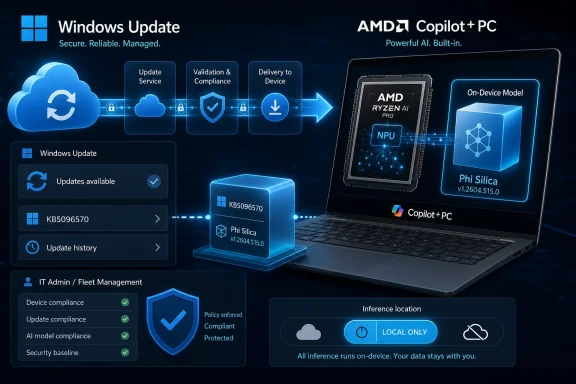
Microsoft has published KB5096570, an automatic Windows Update package that installs Phi Silica AI component version 1.2604.515.0 on eligible AMD-powered Copilot+ PCs running Windows 11 version 26H1 after the latest cumulative update is already in place. The update is small in wording but large in implication: Microsoft is treating local AI models as serviced Windows components, not optional app features. That changes how administrators should think about patching, compliance, privacy, and the long tail of Windows hardware fragmentation. Phi Silica is no longer just a demo of on-device intelligence; it is becoming part of the Windows servicing machine.
KB5096570 does not arrive with the drama of a feature update, a redesigned Start menu, or a security emergency. It is the kind of support article that looks procedural: a version number, a processor family, a Windows release requirement, and a note that Windows Update will handle the installation automatically. But that plainness is precisely the point.
Microsoft is signaling that its Windows AI stack will be maintained like the rest of the platform. Phi Silica, the company’s small language model for on-device language tasks, is not being treated as a one-time payload baked into a factory image. It has a component identity, a Knowledge Base entry, a version number, and a place in Update history.
That matters because the industry has spent the last two years talking about AI PCs mostly in terms of silicon and slogans. TOPS numbers, NPUs, Copilot branding, and launch-stage demos have dominated the conversation. KB5096570 is less flashy but more operationally important: it shows what happens after the laptop is sold.
For AMD-powered Copilot+ PCs, Phi Silica version 1.2604.515.0 is now part of that post-sale lifecycle. Microsoft says the update improves the Phi Silica AI component for Windows 11 version 26H1 and requires the latest cumulative update before installation. In other words, the AI layer is tied to the ordinary Windows maintenance chain, not floating above it.
That design choice is not merely technical. It is Microsoft’s answer to a tension at the center of consumer and enterprise AI adoption: users want smarter software, but organizations do not want every snippet of text, meeting fragment, or document excerpt shipped to a remote inference endpoint. Local models offer a middle path, even if they do not eliminate all governance questions.
Phi Silica is compact compared with frontier cloud models, but compact does not mean trivial. It can support text understanding, summarization, rewriting, and short-form generation. Developers can also reach it through Windows AI APIs, giving apps a way to perform language tasks locally without building or bundling their own model stack.
The obvious tradeoff is that local models are constrained by device hardware and Microsoft’s model packaging decisions. A small language model running on an NPU will not behave like a large hosted model with far more parameters and server-class resources. But for many Windows tasks, good enough, fast enough, and local enough may be the more important threshold.
That is sensible from an engineering perspective. NPUs differ. Driver stacks differ. Power-management behavior differs. The path from a language model to a responsive user-facing feature depends on firmware, silicon, runtime components, and OS plumbing working together. A model update that behaves well on one NPU platform may not be identical to what ships for another.
But it also exposes the complexity underneath the Copilot+ PC brand. Microsoft wants buyers to see a category: a modern Windows PC with enough local AI horsepower to unlock new features. Administrators, developers, and support teams see something messier: AMD systems, Intel systems, Qualcomm systems, different Windows branches, different component versions, and different update availability.
That fragmentation is not inherently fatal. Windows has always been a hardware ecosystem rather than a vertically controlled appliance. But AI components make the fragmentation more visible because model behavior is part of the user experience. When summarization quality, response speed, or feature availability varies by device class, the “same Windows” promise becomes harder to explain.
KB5096570 is therefore both reassuring and cautionary. It proves Microsoft is servicing AMD AI components directly. It also reminds us that the Windows AI platform is already a matrix of silicon-specific dependencies.
Microsoft has positioned 26H1 as a targeted Windows release associated with specific new silicon rather than a conventional feature update for all existing PCs. That means many users who see “Windows 11” and “Phi Silica” in the same sentence may still never encounter this particular update. It is not a general-purpose AI patch for every AMD laptop.
For IT teams, that distinction matters. Inventory systems that simply record “Windows 11” are no longer detailed enough for understanding AI component exposure. Version, hardware class, processor family, NPU capability, and cumulative update level all affect whether a device can receive a package like KB5096570.
The prerequisite also says something about sequencing. Microsoft requires the latest cumulative update before the Phi Silica component update can be applied. That suggests the AI component expects the current OS servicing baseline, likely because the runtime, drivers, APIs, or policy hooks it depends on are being updated through the normal cumulative channel.
In practice, this makes local AI less like installing a Store app and more like maintaining a subsystem. The feature may appear to users as a rewrite button, a summary action, or an app capability. Underneath, it is chained to OS servicing discipline.
For enterprise administrators, automatic installation is more complicated. AI components sit at an awkward boundary between productivity enhancement, platform dependency, and governance concern. A model update can change quality, behavior, performance, and potentially the set of scenarios in which applications rely on local language processing.
This does not mean every Phi Silica update should be treated as a high-risk deployment. The support language for KB5096570 is modest, describing improvements rather than dramatic new capabilities. Still, the category deserves attention because model updates are not like printer driver fixes. They can alter outputs in ways that are harder to test deterministically.
Traditional patch validation asks whether the machine boots, whether applications launch, whether security baselines remain intact, and whether known workflows still work. AI validation adds fuzzier questions. Does summarization still preserve meaning? Does rewriting behave consistently with policy? Does a local model produce different results after a servicing event in a regulated workflow?
That is where Microsoft’s componentization is both helpful and incomplete. A KB number and version string give administrators something to track. But organizations will still need their own rules for when AI component changes require pilot testing, user communication, or documentation.
It is not enough for a fleet. Enterprises will want this data in endpoint management tools, compliance reports, and support scripts. If Phi Silica becomes a dependency for Windows features and third-party applications, knowing whether version 1.2604.515.0 is present becomes more than trivia.
The broader point is that AI component versioning is about to become part of endpoint state. Administrators already track OS builds, Defender platform versions, browser versions, firmware levels, and driver packages. On Copilot+ PCs, they will increasingly track model and AI runtime components as well.
That raises a cultural issue for Windows support. Users may report that a summarization feature is missing, slow, or producing different results than a colleague’s machine. The answer may not be “reinstall the app.” It may be “check the Windows AI component version, the NPU driver, the cumulative update level, and whether the device is on the right Windows branch.”
That kind of troubleshooting is manageable, but only if Microsoft keeps the metadata visible and consistent. KB5096570 is a start because it gives the component a name and version. The next test is whether management tooling keeps pace with the new category.
For many everyday Windows tasks, local inference is the right architecture. A user asking for a rewrite of a paragraph, a summary of selected text, or a short generated snippet may not need a cloud-scale model. If the task can be performed on the device with acceptable quality, the privacy and latency benefits are obvious.
But privacy claims require operational trust. It is not enough to say that a model runs locally. Users and administrators need confidence that the component is updated predictably, documented clearly, and bounded by policy. A local model that changes silently and opaquely will still make security teams nervous.
This is why the dry mechanics of KB5096570 matter. The update’s existence as a Windows component package helps normalize the idea that local AI should be serviced, audited, and checked like other platform elements. That does not solve every privacy question, but it moves the conversation from marketing to maintenance.
There is also a security dimension. Any local component that processes user content and exposes developer-facing APIs becomes part of the attack surface in a broad sense. Microsoft does not describe KB5096570 as a security update, and there is no reason to treat it as one based on the published wording. But over time, model runtimes, API brokers, and AI integration layers will need the same maturity that Windows has built around browsers, scripting engines, and document parsers.
That is a powerful proposition. It lowers the barrier to adding AI-assisted workflows in productivity tools, note-taking apps, developer utilities, education software, and line-of-business applications. It also gives Microsoft a way to make Copilot+ PCs more useful beyond first-party demos.
The catch is that platform APIs inherit platform variability. A developer targeting Phi Silica must think about which Windows versions expose the right interfaces, which devices have compatible NPUs, and which model component versions are present. The moment an application relies on local AI, hardware eligibility becomes part of the app’s real-world behavior.
This is not new in computing. Graphics APIs, camera features, biometric hardware, and media acceleration have all forced developers to code against optional capabilities. What is new is the user expectation around AI. If an app says it can summarize, rewrite, or generate text, users may not understand why the feature behaves differently on two Windows 11 PCs bought in the same year.
Microsoft’s challenge is to make the developer abstraction stable while the hardware underneath remains diverse. KB5096570 does not answer that challenge by itself. It simply shows the servicing layer that will have to support it.
This is a familiar move. Microsoft has often turned once-separate capabilities into platform services when they became strategically important. Networking, browser components, media frameworks, security engines, and identity integrations all followed some version of this path. AI is now joining that list.
The benefit for users is coherence. If Microsoft controls the local model, the runtime, the OS integration, and the developer APIs, features can be more consistent than a patchwork of vendor-specific tools. The benefit for developers is a standard target. The benefit for Microsoft is obvious: Windows becomes the distribution channel for AI capability.
The risk is dependency. Once apps begin relying on Microsoft’s local model, changes in Microsoft’s servicing strategy ripple outward. If a component update improves performance, everyone benefits. If a regression appears, everyone inherits it. If availability is restricted to certain device classes, the ecosystem fragments around that boundary.
That is why KB5096570 deserves more attention than its short support text invites. It is a small update in the service of a very large platform strategy.
KB5096570 shows the second phase of that story. It is no longer enough to ship a machine with an NPU and a Copilot+ badge. The platform has to be maintained, and the AI component has to be tuned for the hardware it runs on.
That is particularly important for AMD systems because buyers often choose them for a mix of performance, battery life, integrated graphics, and enterprise familiarity. If local AI features become part of the value proposition, those features need to remain current across the device lifecycle. A stale AI component would weaken the promise of the hardware.
The update also suggests that Microsoft and silicon vendors are in a more continuous relationship than the old driver model implied. AI performance depends on models, runtimes, schedulers, firmware, and OS updates lining up correctly. The value is not contained in the chip alone.
For customers, the practical question is simple: does the device keep receiving the components that make its advertised AI features work well? KB5096570 is one answer for a specific AMD-powered 26H1 population.
That restraint is probably intentional. Microsoft does not want every AI component update to become a news event. It wants these packages to be boring, routine, and trusted. The more AI becomes part of Windows, the less Microsoft can afford to frame every model update as a dramatic new feature drop.
But boring updates still need transparent documentation. “Improvements” is a broad word. It may cover performance tuning, reliability fixes, compatibility changes, quality adjustments, or servicing infrastructure. Without more detail, administrators can record that a version changed but not always explain what changed.
There is a balance to strike. Microsoft may not want to expose model internals or overwhelm users with technical notes. Still, enterprise customers will eventually ask for richer change information, especially if local AI features enter regulated workflows or business-critical applications.
The Windows ecosystem has seen this pattern before. Consumer-friendly update language tends to be terse. Enterprise reality demands specificity. AI components will push that tension harder because output behavior matters as much as binary health.
KB5096570 belongs to the infrastructure view. It is about how the platform carries, updates, and verifies the model components that make those features possible. This view is less exciting, but it is where Windows succeeds or fails as an AI operating system.
If AI remains a novelty layer, update details like this will matter only to enthusiasts. If AI becomes a normal part of Windows application behavior, these details will matter to everyone responsible for reliability. The local model becomes another dependency in the software supply chain.
That phrase may sound heavy for a small language model on a laptop, but it is accurate. The model has a version. It is distributed through a trusted channel. It affects application behavior. It depends on platform prerequisites. It is scoped to hardware. That is infrastructure.
Microsoft’s decision to service Phi Silica through Windows Update is therefore the right architectural move. The open question is whether the company can make the surrounding documentation, policy controls, and management visibility mature fast enough for enterprise adoption.
That is a major shift in what operating system servicing means. Models are not static code in the traditional sense. They embody behavior learned during training and adjusted through optimization. Updating them can improve quality, reduce failures, or change edge-case responses in ways that are not always captured by conventional release notes.
This does not make model updates unsafe. It makes them different. A driver either recognizes a device or it does not. A cumulative update either fixes a known issue or introduces a regression. A language model update can be more ambiguous: better in common cases, different in rare cases, and difficult to validate exhaustively.
For Windows, the answer cannot be to freeze AI components. Local models will need updates as Microsoft improves efficiency, quality, compatibility, and safety behavior. The answer is to give administrators the right level of visibility and control without turning every consumer laptop into a lab environment.
KB5096570 is a useful marker because it shows Microsoft is already moving down that road. The model delivery network is not theoretical. It is operating now, one scoped component package at a time.
KB5096570 will not be remembered as a blockbuster update, and that may be exactly what Microsoft wants. The future of Windows AI will not arrive only through keynote demos or branded Copilot moments; it will arrive through quiet component updates that make local models part of the operating system’s ordinary maintenance rhythm. For AMD-powered Copilot+ PCs on Windows 11 version 26H1, that future now has a version number, and the next test is whether Microsoft can make the servicing of AI feel as dependable as the servicing of Windows itself.
 Microsoft Turns the Local Model Into a Serviced Windows Part
KB5096570 does not arrive with the drama of a feature update, a redesigned Start menu, or a security emergency. It is the kind of support article that looks procedural: a version number, a processor family, a Windows release requirement, and a note that Windows Update will handle the installation automatically. But that plainness is precisely the point.Microsoft is signaling that its Windows AI stack will be maintained like the rest of the platform. Phi Silica, the company’s small language model for on-device language tasks, is not being treated as a one-time payload baked into a factory image. It has a component identity, a Knowledge Base entry, a version number, and a place in Update history.
That matters because the industry has spent the last two years talking about AI PCs mostly in terms of silicon and slogans. TOPS numbers, NPUs, Copilot branding, and launch-stage demos have dominated the conversation. KB5096570 is less flashy but more operationally important: it shows what happens after the laptop is sold.
For AMD-powered Copilot+ PCs, Phi Silica version 1.2604.515.0 is now part of that post-sale lifecycle. Microsoft says the update improves the Phi Silica AI component for Windows 11 version 26H1 and requires the latest cumulative update before installation. In other words, the AI layer is tied to the ordinary Windows maintenance chain, not floating above it.
Phi Silica Is Microsoft’s Bet That AI Should Run Close to the User
Phi Silica is Microsoft’s on-device small language model for Windows AI features and apps. It is designed to run locally on Copilot+ PC hardware, using the neural processing unit rather than round-tripping every request to a cloud model. The goal is lower latency, less dependency on connectivity, and a stronger privacy story for certain classes of language processing.That design choice is not merely technical. It is Microsoft’s answer to a tension at the center of consumer and enterprise AI adoption: users want smarter software, but organizations do not want every snippet of text, meeting fragment, or document excerpt shipped to a remote inference endpoint. Local models offer a middle path, even if they do not eliminate all governance questions.
Phi Silica is compact compared with frontier cloud models, but compact does not mean trivial. It can support text understanding, summarization, rewriting, and short-form generation. Developers can also reach it through Windows AI APIs, giving apps a way to perform language tasks locally without building or bundling their own model stack.
The obvious tradeoff is that local models are constrained by device hardware and Microsoft’s model packaging decisions. A small language model running on an NPU will not behave like a large hosted model with far more parameters and server-class resources. But for many Windows tasks, good enough, fast enough, and local enough may be the more important threshold.
The AMD-Specific Package Shows the AI PC Is Not One Platform Yet
The most revealing word in KB5096570 may be “AMD.” Microsoft is not simply shipping one universal Phi Silica update for every Windows 11 device. It is publishing component updates scoped by processor family, Windows version, and Copilot+ eligibility.That is sensible from an engineering perspective. NPUs differ. Driver stacks differ. Power-management behavior differs. The path from a language model to a responsive user-facing feature depends on firmware, silicon, runtime components, and OS plumbing working together. A model update that behaves well on one NPU platform may not be identical to what ships for another.
But it also exposes the complexity underneath the Copilot+ PC brand. Microsoft wants buyers to see a category: a modern Windows PC with enough local AI horsepower to unlock new features. Administrators, developers, and support teams see something messier: AMD systems, Intel systems, Qualcomm systems, different Windows branches, different component versions, and different update availability.
That fragmentation is not inherently fatal. Windows has always been a hardware ecosystem rather than a vertically controlled appliance. But AI components make the fragmentation more visible because model behavior is part of the user experience. When summarization quality, response speed, or feature availability varies by device class, the “same Windows” promise becomes harder to explain.
KB5096570 is therefore both reassuring and cautionary. It proves Microsoft is servicing AMD AI components directly. It also reminds us that the Windows AI platform is already a matrix of silicon-specific dependencies.
Windows 11 Version 26H1 Makes This More Complicated Than a Normal Patch
The Windows version requirement is just as important as the processor requirement. KB5096570 applies to Windows 11 version 26H1, not the broad installed base of Windows 11 24H2 or 25H2 machines. That immediately narrows the audience and complicates the message.Microsoft has positioned 26H1 as a targeted Windows release associated with specific new silicon rather than a conventional feature update for all existing PCs. That means many users who see “Windows 11” and “Phi Silica” in the same sentence may still never encounter this particular update. It is not a general-purpose AI patch for every AMD laptop.
For IT teams, that distinction matters. Inventory systems that simply record “Windows 11” are no longer detailed enough for understanding AI component exposure. Version, hardware class, processor family, NPU capability, and cumulative update level all affect whether a device can receive a package like KB5096570.
The prerequisite also says something about sequencing. Microsoft requires the latest cumulative update before the Phi Silica component update can be applied. That suggests the AI component expects the current OS servicing baseline, likely because the runtime, drivers, APIs, or policy hooks it depends on are being updated through the normal cumulative channel.
In practice, this makes local AI less like installing a Store app and more like maintaining a subsystem. The feature may appear to users as a rewrite button, a summary action, or an app capability. Underneath, it is chained to OS servicing discipline.
Automatic Installation Is Convenient Until Governance Enters the Room
Microsoft says KB5096570 will be downloaded and installed automatically from Windows Update. For consumers, that is the right default. If a Copilot+ PC has an on-device AI component, most users will expect it to improve without manual hunting through support pages.For enterprise administrators, automatic installation is more complicated. AI components sit at an awkward boundary between productivity enhancement, platform dependency, and governance concern. A model update can change quality, behavior, performance, and potentially the set of scenarios in which applications rely on local language processing.
This does not mean every Phi Silica update should be treated as a high-risk deployment. The support language for KB5096570 is modest, describing improvements rather than dramatic new capabilities. Still, the category deserves attention because model updates are not like printer driver fixes. They can alter outputs in ways that are harder to test deterministically.
Traditional patch validation asks whether the machine boots, whether applications launch, whether security baselines remain intact, and whether known workflows still work. AI validation adds fuzzier questions. Does summarization still preserve meaning? Does rewriting behave consistently with policy? Does a local model produce different results after a servicing event in a regulated workflow?
That is where Microsoft’s componentization is both helpful and incomplete. A KB number and version string give administrators something to track. But organizations will still need their own rules for when AI component changes require pilot testing, user communication, or documentation.
Update History Becomes the New AI Inventory Screen
Microsoft’s instruction for verifying KB5096570 is simple: go to Settings, then Windows Update, then Update history. After installation, the update should appear there, depending on the processor type in the device. That is enough for a single user checking one machine.It is not enough for a fleet. Enterprises will want this data in endpoint management tools, compliance reports, and support scripts. If Phi Silica becomes a dependency for Windows features and third-party applications, knowing whether version 1.2604.515.0 is present becomes more than trivia.
The broader point is that AI component versioning is about to become part of endpoint state. Administrators already track OS builds, Defender platform versions, browser versions, firmware levels, and driver packages. On Copilot+ PCs, they will increasingly track model and AI runtime components as well.
That raises a cultural issue for Windows support. Users may report that a summarization feature is missing, slow, or producing different results than a colleague’s machine. The answer may not be “reinstall the app.” It may be “check the Windows AI component version, the NPU driver, the cumulative update level, and whether the device is on the right Windows branch.”
That kind of troubleshooting is manageable, but only if Microsoft keeps the metadata visible and consistent. KB5096570 is a start because it gives the component a name and version. The next test is whether management tooling keeps pace with the new category.
The Privacy Pitch Is Strongest When the Servicing Story Is Boring
The best argument for Phi Silica is not that it will outperform cloud models. It will not, at least not in general-purpose reasoning or long-form generation. Its advantage is locality.For many everyday Windows tasks, local inference is the right architecture. A user asking for a rewrite of a paragraph, a summary of selected text, or a short generated snippet may not need a cloud-scale model. If the task can be performed on the device with acceptable quality, the privacy and latency benefits are obvious.
But privacy claims require operational trust. It is not enough to say that a model runs locally. Users and administrators need confidence that the component is updated predictably, documented clearly, and bounded by policy. A local model that changes silently and opaquely will still make security teams nervous.
This is why the dry mechanics of KB5096570 matter. The update’s existence as a Windows component package helps normalize the idea that local AI should be serviced, audited, and checked like other platform elements. That does not solve every privacy question, but it moves the conversation from marketing to maintenance.
There is also a security dimension. Any local component that processes user content and exposes developer-facing APIs becomes part of the attack surface in a broad sense. Microsoft does not describe KB5096570 as a security update, and there is no reason to treat it as one based on the published wording. But over time, model runtimes, API brokers, and AI integration layers will need the same maturity that Windows has built around browsers, scripting engines, and document parsers.
Developers Get a Platform, But Not a Free Abstraction
For developers, Phi Silica is attractive because it promises local language capabilities without each app carrying its own model distribution problem. If Windows exposes a supported API for local summarization, rewriting, or language understanding, developers can build AI features that feel native to the device.That is a powerful proposition. It lowers the barrier to adding AI-assisted workflows in productivity tools, note-taking apps, developer utilities, education software, and line-of-business applications. It also gives Microsoft a way to make Copilot+ PCs more useful beyond first-party demos.
The catch is that platform APIs inherit platform variability. A developer targeting Phi Silica must think about which Windows versions expose the right interfaces, which devices have compatible NPUs, and which model component versions are present. The moment an application relies on local AI, hardware eligibility becomes part of the app’s real-world behavior.
This is not new in computing. Graphics APIs, camera features, biometric hardware, and media acceleration have all forced developers to code against optional capabilities. What is new is the user expectation around AI. If an app says it can summarize, rewrite, or generate text, users may not understand why the feature behaves differently on two Windows 11 PCs bought in the same year.
Microsoft’s challenge is to make the developer abstraction stable while the hardware underneath remains diverse. KB5096570 does not answer that challenge by itself. It simply shows the servicing layer that will have to support it.
The Quiet Update Is Really About Microsoft Owning the AI Stack
The most important strategic fact about Phi Silica is that it is Microsoft-developed. Windows is not merely providing hooks for third-party AI engines; it is shipping its own local language model as a system component. That gives Microsoft control over quality, integration, API behavior, and update cadence.This is a familiar move. Microsoft has often turned once-separate capabilities into platform services when they became strategically important. Networking, browser components, media frameworks, security engines, and identity integrations all followed some version of this path. AI is now joining that list.
The benefit for users is coherence. If Microsoft controls the local model, the runtime, the OS integration, and the developer APIs, features can be more consistent than a patchwork of vendor-specific tools. The benefit for developers is a standard target. The benefit for Microsoft is obvious: Windows becomes the distribution channel for AI capability.
The risk is dependency. Once apps begin relying on Microsoft’s local model, changes in Microsoft’s servicing strategy ripple outward. If a component update improves performance, everyone benefits. If a regression appears, everyone inherits it. If availability is restricted to certain device classes, the ecosystem fragments around that boundary.
That is why KB5096570 deserves more attention than its short support text invites. It is a small update in the service of a very large platform strategy.
AMD’s Copilot+ Moment Moves From Launch Claims to Maintenance Reality
AMD’s role in the Copilot+ PC story has always been about proving that x86 laptops can compete in the AI PC era without ceding the narrative to Arm. Ryzen AI systems brought NPUs into mainstream Windows machines, giving OEMs a path to sell AI-capable laptops with familiar compatibility expectations.KB5096570 shows the second phase of that story. It is no longer enough to ship a machine with an NPU and a Copilot+ badge. The platform has to be maintained, and the AI component has to be tuned for the hardware it runs on.
That is particularly important for AMD systems because buyers often choose them for a mix of performance, battery life, integrated graphics, and enterprise familiarity. If local AI features become part of the value proposition, those features need to remain current across the device lifecycle. A stale AI component would weaken the promise of the hardware.
The update also suggests that Microsoft and silicon vendors are in a more continuous relationship than the old driver model implied. AI performance depends on models, runtimes, schedulers, firmware, and OS updates lining up correctly. The value is not contained in the chip alone.
For customers, the practical question is simple: does the device keep receiving the components that make its advertised AI features work well? KB5096570 is one answer for a specific AMD-powered 26H1 population.
The Support Article Says Little Because Microsoft Wants This to Feel Normal
There is a kind of deliberate understatement in Microsoft’s support language. The company does not present KB5096570 as a landmark AI release. It says the update includes improvements, requires the latest cumulative update, installs automatically, and can be checked in Update history.That restraint is probably intentional. Microsoft does not want every AI component update to become a news event. It wants these packages to be boring, routine, and trusted. The more AI becomes part of Windows, the less Microsoft can afford to frame every model update as a dramatic new feature drop.
But boring updates still need transparent documentation. “Improvements” is a broad word. It may cover performance tuning, reliability fixes, compatibility changes, quality adjustments, or servicing infrastructure. Without more detail, administrators can record that a version changed but not always explain what changed.
There is a balance to strike. Microsoft may not want to expose model internals or overwhelm users with technical notes. Still, enterprise customers will eventually ask for richer change information, especially if local AI features enter regulated workflows or business-critical applications.
The Windows ecosystem has seen this pattern before. Consumer-friendly update language tends to be terse. Enterprise reality demands specificity. AI components will push that tension harder because output behavior matters as much as binary health.
The Real Divide Is Between AI as Feature and AI as Infrastructure
Most public discussion of Copilot+ PCs still treats AI as a set of visible features. Users ask whether a machine can summarize text, generate images, blur backgrounds, translate audio, or search memories. That is the feature view.KB5096570 belongs to the infrastructure view. It is about how the platform carries, updates, and verifies the model components that make those features possible. This view is less exciting, but it is where Windows succeeds or fails as an AI operating system.
If AI remains a novelty layer, update details like this will matter only to enthusiasts. If AI becomes a normal part of Windows application behavior, these details will matter to everyone responsible for reliability. The local model becomes another dependency in the software supply chain.
That phrase may sound heavy for a small language model on a laptop, but it is accurate. The model has a version. It is distributed through a trusted channel. It affects application behavior. It depends on platform prerequisites. It is scoped to hardware. That is infrastructure.
Microsoft’s decision to service Phi Silica through Windows Update is therefore the right architectural move. The open question is whether the company can make the surrounding documentation, policy controls, and management visibility mature fast enough for enterprise adoption.
Windows Update Is Becoming a Model Delivery Network
Windows Update has long delivered operating system fixes, drivers, Defender intelligence, firmware in some cases, and feature enablement packages. With Phi Silica updates, it is also becoming a delivery mechanism for local AI model components.That is a major shift in what operating system servicing means. Models are not static code in the traditional sense. They embody behavior learned during training and adjusted through optimization. Updating them can improve quality, reduce failures, or change edge-case responses in ways that are not always captured by conventional release notes.
This does not make model updates unsafe. It makes them different. A driver either recognizes a device or it does not. A cumulative update either fixes a known issue or introduces a regression. A language model update can be more ambiguous: better in common cases, different in rare cases, and difficult to validate exhaustively.
For Windows, the answer cannot be to freeze AI components. Local models will need updates as Microsoft improves efficiency, quality, compatibility, and safety behavior. The answer is to give administrators the right level of visibility and control without turning every consumer laptop into a lab environment.
KB5096570 is a useful marker because it shows Microsoft is already moving down that road. The model delivery network is not theoretical. It is operating now, one scoped component package at a time.
A Small KB Number Draws the New Windows Map
The concrete facts of KB5096570 are narrow, but they tell a broader story about where Windows is going.- KB5096570 installs Phi Silica AI component version 1.2604.515.0 on eligible AMD-powered Copilot+ PCs running Windows 11 version 26H1.
- The update requires the latest cumulative update for Windows 11 version 26H1 before it can be installed.
- Microsoft delivers the package automatically through Windows Update rather than asking users to download it manually.
- Users can verify installation in Windows Update history, where the entry should appear according to the device’s processor type.
- The update reinforces that Windows AI features will depend on serviced, hardware-aware components rather than one universal AI payload.
- For administrators and developers, Phi Silica versioning is becoming part of the practical Windows support surface.
KB5096570 will not be remembered as a blockbuster update, and that may be exactly what Microsoft wants. The future of Windows AI will not arrive only through keynote demos or branded Copilot moments; it will arrive through quiet component updates that make local models part of the operating system’s ordinary maintenance rhythm. For AMD-powered Copilot+ PCs on Windows 11 version 26H1, that future now has a version number, and the next test is whether Microsoft can make the servicing of AI feel as dependable as the servicing of Windows itself.
References
- Primary source: Microsoft Support
Published: Tue, 26 May 2026 21:03:05 Z
- Official source: learn.microsoft.com

- Related coverage: windowsforum.com

KB5096570 Update: Phi Silica Local AI Component Gets Version 1.2604.515.0
Microsoft has published KB5096570, a May 2026 Phi Silica AI component update that installs version 1.2604.515.0 on AMD-powered Copilot+ PCs running Windows 11 version 26H1, provided the device already has the latest cumulative update installed. The update is small in presentation but large in... windowsforum.com
- Related coverage: windowscentral.com
- Related coverage: windowslatest.com
Microsoft releases Windows 11 26H1, but it's not for existing PCs. Windows 11 26H2 is coming for all PCs
Microsoft reached out to Windows Latest to confirm Windows 11 26H1 is real and rolling out. Existing PCs get version 26H2. www.windowslatest.com
- Related coverage: techradar.com

- Related coverage: tomshardware.com
Microsoft confirms Windows 11 26H1 will be for Arm devices only at launch — Snapdragon X2-powered devices officially shipping with 26H1
It's 24H2 all over again, but with the caveat that 26H1 will only support specific hardware for its entire lifecycle. Devices running 26H1 will not be able to upgrade to 26H2.www.tomshardware.com
- Related coverage: na.ingrammicro.com
- Official source: download.microsoft.com
