

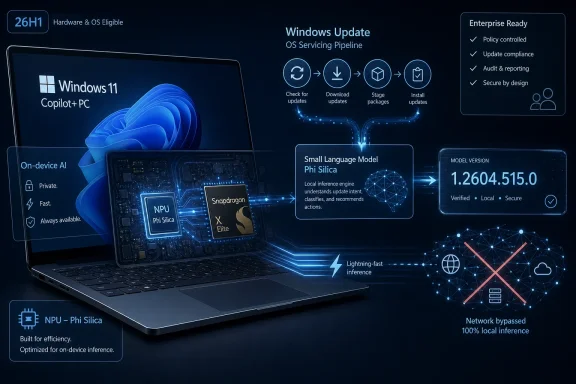
Microsoft’s KB5096573 ships Phi Silica version 1.2604.515.0 through Windows Update for Qualcomm-powered Copilot+ PCs running Windows 11 version 26H1, updating Microsoft’s on-device small language model used by Windows AI features and developer APIs. The narrow hardware target is the story: this is not a general Windows AI update so much as a sign that Microsoft is treating AI models as serviced operating-system components. For users, it means the intelligence inside Windows is becoming something that changes quietly in the background. For administrators and developers, it means the old boundary between driver, feature update, app runtime, and model package is getting harder to see.
For most of Windows history, a component update meant something legible: a driver, a security fix, a .NET runtime patch, a servicing stack update, or a new inbox app. KB5096573 belongs to a newer category. It updates Phi Silica, Microsoft’s small language model designed to run locally on Copilot+ PC hardware, specifically on Qualcomm systems running Windows 11 version 26H1.
That sounds modest until you follow the implication. Microsoft is no longer merely adding AI-powered apps to Windows; it is maintaining a model layer inside the platform itself. Phi Silica is not just another executable with a friendly icon. It is infrastructure for text understanding, summarization, rewriting, and short-form generation across Windows features and third-party applications that call the Windows AI APIs.
The update’s distribution mechanism matters as much as the version number. KB5096573 arrives automatically through Windows Update, and Microsoft tells users to verify it through Settings > Windows Update > Update history. That places a local language model into the same operational channel as firmware, drivers, cumulative updates, and platform components.
This is the quiet normalization of AI servicing. Instead of asking users to install a chatbot, Microsoft is updating the model that may sit beneath multiple experiences. The AI layer is becoming part of Windows’ serviced surface area, and the servicing machinery is doing what it has always done: moving code onto PCs at scale.
Windows 11 version 26H1 has been framed as a targeted release for new silicon rather than a broad feature update for existing PCs. In practical terms, that means many users running Windows 11 24H2 or 25H2 on Intel, AMD, or older Arm hardware should not expect this specific update to appear. The operating system branch, the processor family, and the model package are bound together.
That is a big change from the old Windows compatibility bargain. Historically, Microsoft’s strongest platform pitch was that one Windows release could stretch across a wide range of machines, with hardware-specific differences hidden behind drivers and feature flags. The Copilot+ era is less universal. Features increasingly depend on whether the machine has the right NPU, the right silicon partner integration, and the right Windows platform build.
Qualcomm sits at the center of this particular update because Snapdragon-powered Copilot+ PCs were Microsoft’s first major showcase for local AI workloads in Windows. Phi Silica was introduced as a small language model optimized for NPUs, not as a cloud endpoint disguised as an app. The local execution promise depends on hardware that can run inference quickly enough without leaning on the CPU, GPU, or remote servers for every request.
That hardware dependency creates a new kind of Windows fragmentation. Two PCs may both say “Windows 11,” both be fully patched, and both appear modern to a normal buyer. Yet one may receive a serviced local language model and expose AI APIs that the other cannot use in the same way. The difference is no longer just performance; it is platform capability.
The phrase small language model undersells the ambition. A model like Phi Silica does not need to win benchmark theater against the largest frontier systems to be useful inside Windows. It needs to summarize a selection, rewrite a paragraph, extract intent, classify text, generate a concise response, or help an application understand natural language without shipping user data to a remote service.
That last part is the selling point Microsoft will keep returning to. Local AI lets the company argue that certain workloads can stay on the device, reducing latency and improving privacy. A request does not have to traverse the internet, wait for a remote model, and return through a service boundary if the local NPU can do the job.
But local execution is not a magic shield. The privacy story depends on how Windows features and applications use the API, what data is passed into the model, whether logs or telemetry are retained, and how developers communicate those behaviors to users. Keeping inference on-device is meaningful, but it is not the same as saying every AI-powered experience is automatically private.
The more important platform claim is that Microsoft wants developers to treat local AI as a normal Windows capability. If Phi Silica is available through Windows AI APIs, a developer can build features around language processing without bundling a separate model, maintaining a cloud inference bill, or negotiating directly with each silicon vendor. That is the attractive version of the story: Windows becomes the abstraction layer for on-device intelligence.
That has consequences. If a model improves summarization quality or reduces hallucinated output, the change can arrive silently through the same channel that users already trust for patches. If a model has a safety, reliability, localization, or performance issue, Microsoft can revise it without waiting for a major Windows feature release. The model becomes part of the living system.
That also means model behavior may change underneath applications. Developers who build against Phi Silica need to assume that version 1.2604.515.0 will not be the last word. Output quality, latency, supported scenarios, and edge-case behavior may shift over time, even if the application code does not.
This is familiar territory for web developers, who have long lived with cloud services that change behind stable APIs. It is less familiar for traditional Windows developers accustomed to local components behaving consistently for years. The AI runtime world brings cloud-style mutability onto the client device.
For IT departments, this raises a practical governance issue. A local model update may not look as risky as a cumulative update, but it can affect user-facing behavior in productivity workflows. If an application uses Phi Silica to summarize internal documents, rewrite support responses, or classify text, a model update could alter outputs in ways that are hard to capture with ordinary patch testing.
That framing matters because it separates two ideas that used to travel together: the Windows version number and the mass-market feature wave. In the old rhythm, a new Windows release suggested a broad rollout, a set of user-visible changes, and months of enterprise evaluation. In the 26H1 rhythm, the version can exist primarily to support new hardware.
KB5096573 fits that model neatly. It is not trying to bring Phi Silica 1.2604.515.0 to every capable-looking Windows 11 installation. It is targeting the systems where Microsoft, Qualcomm, and OEMs can assume a specific hardware and platform foundation. The model update rides on a narrower base.
There are advantages to that approach. Microsoft can tune more aggressively for known NPUs, known drivers, and known power-management behavior. It can avoid promising identical AI performance across machines that are technically Windows PCs but architecturally very different. It can use Windows Update to maintain a fast-moving AI stack without dragging the whole installed base through the same cycle.
There are also costs. Consumers already struggle to understand the difference between Windows 11 Home, Pro, 23H2, 24H2, 25H2, Copilot, Copilot+ PC, and whatever AI features are available in their market. Adding hardware-specific model servicing into the mix makes the Windows capability map even harder to explain. A feature that “runs on Windows” may really mean “runs on a subset of Windows builds on a subset of AI PCs with a sufficiently current model package.”
A developer building a note-taking app, mail client, local knowledge tool, writing assistant, or accessibility feature may not want to manage model downloads, quantization, acceleration, GPU compatibility, NPU runtimes, or privacy disclosures for cloud inference. If Windows exposes a supported local model through stable APIs, that developer can focus on the experience. Microsoft handles the model, the hardware abstraction, and servicing.
That is the optimistic reading, and it is not imaginary. Platform-owned capabilities have made Windows development easier before. Developers do not ship their own font rendering stack, networking stack, accessibility framework, or window manager because the platform provides them. A local language model could become another shared primitive.
The conditional part is availability. If Phi Silica is present only on Copilot+ PCs with suitable NPUs, and if this specific update is tied to Qualcomm systems on 26H1, then developers must design for absence. The API may be there on one machine and unavailable or differently capable on another. Applications need graceful fallback paths, clear feature detection, and user interfaces that do not imply universal support.
That creates a split incentive. Developers want reach, so they will hesitate to build core workflows around a capability that only a fraction of Windows users have. Microsoft wants adoption, so it must make the capability attractive enough that developers add it anyway. The bridge between those goals is not marketing; it is predictable behavior, good documentation, stable APIs, and enough shipped hardware to make the effort worthwhile.
But the trust problem moves rather than disappears. Users still need to know when AI is involved, what information is being processed, and whether outputs should be treated as suggestions or facts. Administrators still need policy controls, auditability, and clarity about telemetry. Developers still need to avoid turning a local model into an unreviewed decision engine.
Small models also have limitations. They may be fast, efficient, and useful, but they can still produce inaccurate, generic, or overconfident text. A local summarizer that mangles a legal clause or a support ticket is not safer simply because it ran on an NPU. The compute location changes the risk profile; it does not abolish the risk.
That distinction is especially important in Windows, where AI features may appear close to the operating system and therefore inherit a sense of authority. A hallucinated answer in a browser chatbot feels like a web-service failure. A misleading suggestion inside a system feature can feel like Windows itself has spoken. Microsoft will need to design these experiences with visible humility.
That means inventory matters. Organizations adopting Qualcomm-powered Copilot+ PCs on Windows 11 26H1 need to know which devices have the Phi Silica component, which version is installed, and which applications depend on it. Update history is useful for an individual machine, but fleet management will require more systematic reporting through whatever tooling Microsoft exposes or administrators script around.
Testing also becomes more subtle. A model update may not break installation, boot, VPN connectivity, or line-of-business apps in the traditional sense. Instead, it may change the quality or behavior of outputs in AI-assisted workflows. That is harder to evaluate with ordinary smoke tests.
The risk is not that every Phi Silica update should be treated as a crisis. The risk is that organizations treat model updates as invisible and then discover that a business process quietly depended on the previous behavior. If a help desk tool uses local summarization, or a document workflow uses rewriting, or an internal app uses language classification, administrators will need to know when the underlying model changes.
This is where Microsoft’s enterprise story needs to mature quickly. If AI components are serviced through Windows Update, enterprises will want rings, deferrals, reporting, rollback clarity, and compatibility notes that explain more than “improvements.” The Windows servicing system is capable of discipline. The question is whether AI component updates will receive the same operational transparency as the components they increasingly resemble.
The user-facing promise is simpler: the PC should feel more capable. Text features should respond faster. Some AI functions should work locally. Battery life should not collapse every time a model is invoked. Apps should be able to offer language tools without sending every request to a server.
That quietness is useful, but it also makes accountability harder. If an AI-powered Windows feature improves after KB5096573, few users will connect the improvement to the update. If behavior worsens, they may not know what changed. The abstraction that makes the platform friendly can also make troubleshooting opaque.
Windows enthusiasts will notice the version number because enthusiasts always notice version numbers. The broader market will judge the feature by whether it works. That puts pressure on Microsoft to make local AI feel less like a technology preview and more like an appliance: present when needed, invisible when not, and boringly reliable.
KB5096573 helps answer that. The AI PC is not a fixed appliance whose model capabilities are frozen at purchase. It is a serviced device whose local intelligence can receive component updates through the operating system. That is essential if Microsoft wants buyers to believe that AI hardware bought today will remain useful as software evolves.
The maintenance story is also a competitive necessity. Apple controls its silicon, operating system, and on-device model integrations tightly. Google has spent years normalizing device-side AI features on phones and Chromebooks. Microsoft’s challenge is harder because the Windows ecosystem spans many OEMs, chip vendors, drivers, enterprise policies, and user expectations.
A Windows Update-delivered Phi Silica package is one piece of Microsoft’s answer. Rather than asking each application or OEM utility to maintain its own AI stack, Microsoft can update a shared component. Rather than making every developer negotiate acceleration details, Windows can present a platform API. Rather than treating local AI as a one-off feature, the company can service it as infrastructure.
The catch is that infrastructure must be dependable. If AI components become another source of mystery regressions, users will not care that the architecture is elegant. If APIs are inconsistent across hardware, developers will route around them. If administrators cannot govern the updates, enterprises will disable what they can.
That supply-chain framing is useful because it avoids two bad extremes. The first is treating AI as magic dust sprinkled on Windows. The second is treating every AI feature as a standalone app. In reality, the Windows AI stack is becoming layered, versioned, and hardware-aware.
That creates more places for improvement and more places for failure. A model update can improve latency. A driver issue can degrade inference. A Windows build requirement can prevent a feature from appearing. A developer can call the wrong API pattern and get poor results. A policy setting can disable functionality in managed environments.
For WindowsForum readers, this is the part worth watching. The interesting story is not merely that Phi Silica has a new version number. The interesting story is how Microsoft documents the dependencies, how clearly it communicates eligibility, and how much control it gives users and administrators over the AI layer as it becomes more deeply embedded.
The practical reading is straightforward. If you own or manage a Qualcomm-powered Copilot+ PC running Windows 11 version 26H1, this update should arrive through Windows Update after the latest cumulative update is installed. You can confirm it in Windows Update history. If you are on older Windows 11 releases or non-eligible hardware, this particular package is not meant for you.
The strategic reading is more important. Microsoft is building a world in which Windows includes local AI models that are updated like platform components. That can be good for privacy, latency, developer productivity, and feature consistency across supported hardware. It can also complicate compatibility, governance, and user understanding.
The burden now falls on Microsoft to make the invisible visible enough. Users do not need a machine-learning lecture in Settings, but they do need confidence that AI features are local when advertised as local. Developers do not need to manage model internals, but they do need stable contracts. Administrators do not need panic over every model revision, but they do need inventory and control.
 Microsoft Turns a Language Model Into Windows Plumbing
For most of Windows history, a component update meant something legible: a driver, a security fix, a .NET runtime patch, a servicing stack update, or a new inbox app. KB5096573 belongs to a newer category. It updates Phi Silica, Microsoft’s small language model designed to run locally on Copilot+ PC hardware, specifically on Qualcomm systems running Windows 11 version 26H1.That sounds modest until you follow the implication. Microsoft is no longer merely adding AI-powered apps to Windows; it is maintaining a model layer inside the platform itself. Phi Silica is not just another executable with a friendly icon. It is infrastructure for text understanding, summarization, rewriting, and short-form generation across Windows features and third-party applications that call the Windows AI APIs.
The update’s distribution mechanism matters as much as the version number. KB5096573 arrives automatically through Windows Update, and Microsoft tells users to verify it through Settings > Windows Update > Update history. That places a local language model into the same operational channel as firmware, drivers, cumulative updates, and platform components.
This is the quiet normalization of AI servicing. Instead of asking users to install a chatbot, Microsoft is updating the model that may sit beneath multiple experiences. The AI layer is becoming part of Windows’ serviced surface area, and the servicing machinery is doing what it has always done: moving code onto PCs at scale.
The Qualcomm-Only Footnote Is Actually the Headline
KB5096573 is not for every Windows 11 machine. It is aimed at Qualcomm-powered systems on Windows 11 version 26H1, and it requires the latest cumulative update for that Windows release. That constraint is easy to treat as a temporary compatibility note, but it reflects the deeper direction of Microsoft’s AI PC strategy.Windows 11 version 26H1 has been framed as a targeted release for new silicon rather than a broad feature update for existing PCs. In practical terms, that means many users running Windows 11 24H2 or 25H2 on Intel, AMD, or older Arm hardware should not expect this specific update to appear. The operating system branch, the processor family, and the model package are bound together.
That is a big change from the old Windows compatibility bargain. Historically, Microsoft’s strongest platform pitch was that one Windows release could stretch across a wide range of machines, with hardware-specific differences hidden behind drivers and feature flags. The Copilot+ era is less universal. Features increasingly depend on whether the machine has the right NPU, the right silicon partner integration, and the right Windows platform build.
Qualcomm sits at the center of this particular update because Snapdragon-powered Copilot+ PCs were Microsoft’s first major showcase for local AI workloads in Windows. Phi Silica was introduced as a small language model optimized for NPUs, not as a cloud endpoint disguised as an app. The local execution promise depends on hardware that can run inference quickly enough without leaning on the CPU, GPU, or remote servers for every request.
That hardware dependency creates a new kind of Windows fragmentation. Two PCs may both say “Windows 11,” both be fully patched, and both appear modern to a normal buyer. Yet one may receive a serviced local language model and expose AI APIs that the other cannot use in the same way. The difference is no longer just performance; it is platform capability.
The Small Model Carries a Large Platform Bet
Phi Silica is best understood as Microsoft’s attempt to make local language intelligence boring enough to be dependable. The model is smaller than the cloud-scale systems that power high-end chatbots, but that is the point. A small language model can be tuned for latency, power, privacy, and repeatable system integration in a way that giant cloud models cannot.The phrase small language model undersells the ambition. A model like Phi Silica does not need to win benchmark theater against the largest frontier systems to be useful inside Windows. It needs to summarize a selection, rewrite a paragraph, extract intent, classify text, generate a concise response, or help an application understand natural language without shipping user data to a remote service.
That last part is the selling point Microsoft will keep returning to. Local AI lets the company argue that certain workloads can stay on the device, reducing latency and improving privacy. A request does not have to traverse the internet, wait for a remote model, and return through a service boundary if the local NPU can do the job.
But local execution is not a magic shield. The privacy story depends on how Windows features and applications use the API, what data is passed into the model, whether logs or telemetry are retained, and how developers communicate those behaviors to users. Keeping inference on-device is meaningful, but it is not the same as saying every AI-powered experience is automatically private.
The more important platform claim is that Microsoft wants developers to treat local AI as a normal Windows capability. If Phi Silica is available through Windows AI APIs, a developer can build features around language processing without bundling a separate model, maintaining a cloud inference bill, or negotiating directly with each silicon vendor. That is the attractive version of the story: Windows becomes the abstraction layer for on-device intelligence.
Windows Update Becomes a Model Delivery Network
The industry has spent the last two years talking about AI models as if they were products. KB5096573 shows that, on Windows, models may be better understood as serviced dependencies. They will be versioned, updated, replaced, fixed, and sometimes constrained by operating-system build and processor type.That has consequences. If a model improves summarization quality or reduces hallucinated output, the change can arrive silently through the same channel that users already trust for patches. If a model has a safety, reliability, localization, or performance issue, Microsoft can revise it without waiting for a major Windows feature release. The model becomes part of the living system.
That also means model behavior may change underneath applications. Developers who build against Phi Silica need to assume that version 1.2604.515.0 will not be the last word. Output quality, latency, supported scenarios, and edge-case behavior may shift over time, even if the application code does not.
This is familiar territory for web developers, who have long lived with cloud services that change behind stable APIs. It is less familiar for traditional Windows developers accustomed to local components behaving consistently for years. The AI runtime world brings cloud-style mutability onto the client device.
For IT departments, this raises a practical governance issue. A local model update may not look as risky as a cumulative update, but it can affect user-facing behavior in productivity workflows. If an application uses Phi Silica to summarize internal documents, rewrite support responses, or classify text, a model update could alter outputs in ways that are hard to capture with ordinary patch testing.
26H1 Shows the New Windows Release Model in Miniature
Windows 11 version 26H1 is not just a version label in this story. It is the staging ground for a more silicon-aware Windows. Microsoft has signaled that 26H1 is not a normal broad release for existing PCs, but a targeted platform release meant to support new device innovations.That framing matters because it separates two ideas that used to travel together: the Windows version number and the mass-market feature wave. In the old rhythm, a new Windows release suggested a broad rollout, a set of user-visible changes, and months of enterprise evaluation. In the 26H1 rhythm, the version can exist primarily to support new hardware.
KB5096573 fits that model neatly. It is not trying to bring Phi Silica 1.2604.515.0 to every capable-looking Windows 11 installation. It is targeting the systems where Microsoft, Qualcomm, and OEMs can assume a specific hardware and platform foundation. The model update rides on a narrower base.
There are advantages to that approach. Microsoft can tune more aggressively for known NPUs, known drivers, and known power-management behavior. It can avoid promising identical AI performance across machines that are technically Windows PCs but architecturally very different. It can use Windows Update to maintain a fast-moving AI stack without dragging the whole installed base through the same cycle.
There are also costs. Consumers already struggle to understand the difference between Windows 11 Home, Pro, 23H2, 24H2, 25H2, Copilot, Copilot+ PC, and whatever AI features are available in their market. Adding hardware-specific model servicing into the mix makes the Windows capability map even harder to explain. A feature that “runs on Windows” may really mean “runs on a subset of Windows builds on a subset of AI PCs with a sufficiently current model package.”
The Developer Promise Is Real, but Conditional
For developers, Phi Silica is potentially more interesting than another demo of a chatbot in the taskbar. A Windows-provided local language model could simplify a common problem: adding natural-language features without becoming an AI infrastructure company.A developer building a note-taking app, mail client, local knowledge tool, writing assistant, or accessibility feature may not want to manage model downloads, quantization, acceleration, GPU compatibility, NPU runtimes, or privacy disclosures for cloud inference. If Windows exposes a supported local model through stable APIs, that developer can focus on the experience. Microsoft handles the model, the hardware abstraction, and servicing.
That is the optimistic reading, and it is not imaginary. Platform-owned capabilities have made Windows development easier before. Developers do not ship their own font rendering stack, networking stack, accessibility framework, or window manager because the platform provides them. A local language model could become another shared primitive.
The conditional part is availability. If Phi Silica is present only on Copilot+ PCs with suitable NPUs, and if this specific update is tied to Qualcomm systems on 26H1, then developers must design for absence. The API may be there on one machine and unavailable or differently capable on another. Applications need graceful fallback paths, clear feature detection, and user interfaces that do not imply universal support.
That creates a split incentive. Developers want reach, so they will hesitate to build core workflows around a capability that only a fraction of Windows users have. Microsoft wants adoption, so it must make the capability attractive enough that developers add it anyway. The bridge between those goals is not marketing; it is predictable behavior, good documentation, stable APIs, and enough shipped hardware to make the effort worthwhile.
Local AI Does Not Eliminate Trust Problems
Microsoft’s pitch for on-device AI leans heavily on speed and privacy, and both are legitimate advantages. A local model can respond quickly, work offline for supported tasks, and avoid sending every prompt to a cloud service. On a laptop, that can mean lower latency and more resilient features when connectivity is poor.But the trust problem moves rather than disappears. Users still need to know when AI is involved, what information is being processed, and whether outputs should be treated as suggestions or facts. Administrators still need policy controls, auditability, and clarity about telemetry. Developers still need to avoid turning a local model into an unreviewed decision engine.
Small models also have limitations. They may be fast, efficient, and useful, but they can still produce inaccurate, generic, or overconfident text. A local summarizer that mangles a legal clause or a support ticket is not safer simply because it ran on an NPU. The compute location changes the risk profile; it does not abolish the risk.
That distinction is especially important in Windows, where AI features may appear close to the operating system and therefore inherit a sense of authority. A hallucinated answer in a browser chatbot feels like a web-service failure. A misleading suggestion inside a system feature can feel like Windows itself has spoken. Microsoft will need to design these experiences with visible humility.
Administrators Need a New Patch-Testing Vocabulary
For sysadmins, KB5096573 is the sort of update that may not trip old alarm bells but should still be understood. It is not a conventional security patch. It is not a full feature update. It is not merely an app update from the Microsoft Store. It is an AI component update delivered by Windows Update to a defined hardware and OS population.That means inventory matters. Organizations adopting Qualcomm-powered Copilot+ PCs on Windows 11 26H1 need to know which devices have the Phi Silica component, which version is installed, and which applications depend on it. Update history is useful for an individual machine, but fleet management will require more systematic reporting through whatever tooling Microsoft exposes or administrators script around.
Testing also becomes more subtle. A model update may not break installation, boot, VPN connectivity, or line-of-business apps in the traditional sense. Instead, it may change the quality or behavior of outputs in AI-assisted workflows. That is harder to evaluate with ordinary smoke tests.
The risk is not that every Phi Silica update should be treated as a crisis. The risk is that organizations treat model updates as invisible and then discover that a business process quietly depended on the previous behavior. If a help desk tool uses local summarization, or a document workflow uses rewriting, or an internal app uses language classification, administrators will need to know when the underlying model changes.
This is where Microsoft’s enterprise story needs to mature quickly. If AI components are serviced through Windows Update, enterprises will want rings, deferrals, reporting, rollback clarity, and compatibility notes that explain more than “improvements.” The Windows servicing system is capable of discipline. The question is whether AI component updates will receive the same operational transparency as the components they increasingly resemble.
The Consumer Experience Will Be Quiet by Design
Most consumers will never see “Phi Silica” unless they go looking in update history or read developer documentation. That is probably intentional. Microsoft does not want ordinary users thinking about model packages any more than they think about DirectX shader compiler updates or camera extension drivers.The user-facing promise is simpler: the PC should feel more capable. Text features should respond faster. Some AI functions should work locally. Battery life should not collapse every time a model is invoked. Apps should be able to offer language tools without sending every request to a server.
That quietness is useful, but it also makes accountability harder. If an AI-powered Windows feature improves after KB5096573, few users will connect the improvement to the update. If behavior worsens, they may not know what changed. The abstraction that makes the platform friendly can also make troubleshooting opaque.
Windows enthusiasts will notice the version number because enthusiasts always notice version numbers. The broader market will judge the feature by whether it works. That puts pressure on Microsoft to make local AI feel less like a technology preview and more like an appliance: present when needed, invisible when not, and boringly reliable.
The AI PC Finally Gets a Maintenance Story
The first wave of Copilot+ PC marketing focused on potential. NPUs were described in TOPS, demos showed real-time effects, and Microsoft positioned the hardware as a new class of Windows machine. What was less clear was how the AI portion of the PC would age.KB5096573 helps answer that. The AI PC is not a fixed appliance whose model capabilities are frozen at purchase. It is a serviced device whose local intelligence can receive component updates through the operating system. That is essential if Microsoft wants buyers to believe that AI hardware bought today will remain useful as software evolves.
The maintenance story is also a competitive necessity. Apple controls its silicon, operating system, and on-device model integrations tightly. Google has spent years normalizing device-side AI features on phones and Chromebooks. Microsoft’s challenge is harder because the Windows ecosystem spans many OEMs, chip vendors, drivers, enterprise policies, and user expectations.
A Windows Update-delivered Phi Silica package is one piece of Microsoft’s answer. Rather than asking each application or OEM utility to maintain its own AI stack, Microsoft can update a shared component. Rather than making every developer negotiate acceleration details, Windows can present a platform API. Rather than treating local AI as a one-off feature, the company can service it as infrastructure.
The catch is that infrastructure must be dependable. If AI components become another source of mystery regressions, users will not care that the architecture is elegant. If APIs are inconsistent across hardware, developers will route around them. If administrators cannot govern the updates, enterprises will disable what they can.
The Windows AI Stack Is Becoming a Supply Chain
A modern Windows AI feature now depends on a chain that can include the OS build, the cumulative update level, the processor, the NPU driver, the AI runtime, the model package, the application, and Microsoft’s policy decisions about where a feature is allowed to appear. KB5096573 exposes one link in that chain because it names the model and version explicitly.That supply-chain framing is useful because it avoids two bad extremes. The first is treating AI as magic dust sprinkled on Windows. The second is treating every AI feature as a standalone app. In reality, the Windows AI stack is becoming layered, versioned, and hardware-aware.
That creates more places for improvement and more places for failure. A model update can improve latency. A driver issue can degrade inference. A Windows build requirement can prevent a feature from appearing. A developer can call the wrong API pattern and get poor results. A policy setting can disable functionality in managed environments.
For WindowsForum readers, this is the part worth watching. The interesting story is not merely that Phi Silica has a new version number. The interesting story is how Microsoft documents the dependencies, how clearly it communicates eligibility, and how much control it gives users and administrators over the AI layer as it becomes more deeply embedded.
The Real Test Comes After the Version Number
KB5096573 is not a blockbuster update in the classic sense. Microsoft’s description points to improvements rather than a dramatic new feature, and the installation path is automatic for eligible systems. But small servicing notices can reveal large platform shifts.The practical reading is straightforward. If you own or manage a Qualcomm-powered Copilot+ PC running Windows 11 version 26H1, this update should arrive through Windows Update after the latest cumulative update is installed. You can confirm it in Windows Update history. If you are on older Windows 11 releases or non-eligible hardware, this particular package is not meant for you.
The strategic reading is more important. Microsoft is building a world in which Windows includes local AI models that are updated like platform components. That can be good for privacy, latency, developer productivity, and feature consistency across supported hardware. It can also complicate compatibility, governance, and user understanding.
The burden now falls on Microsoft to make the invisible visible enough. Users do not need a machine-learning lecture in Settings, but they do need confidence that AI features are local when advertised as local. Developers do not need to manage model internals, but they do need stable contracts. Administrators do not need panic over every model revision, but they do need inventory and control.
The Phi Silica Update Draws the Map for Copilot+ PCs
The immediate lesson from KB5096573 is that Microsoft’s AI PC vision is being delivered through ordinary servicing rather than occasional spectacle. That may be less exciting than a keynote demo, but it is more important for whether the strategy survives daily use.- Phi Silica version 1.2604.515.0 is an AI component update for Qualcomm-powered systems running Windows 11 version 26H1.
- The update is distributed automatically through Windows Update and can be checked in Windows Update history.
- The package reinforces that Copilot+ PC features are increasingly tied to specific silicon, NPUs, Windows builds, and serviced AI components.
- Developers should treat Phi Silica as a useful local capability but design applications that handle systems where it is unavailable or different.
- Administrators should start tracking AI component versions with the same seriousness they apply to drivers, runtimes, and feature dependencies.
- Users should understand that on-device AI can improve privacy and latency, but it still requires scrutiny, transparency, and realistic expectations.
References
- Primary source: Microsoft Support
Published: Tue, 26 May 2026 21:02:46 Z
- Related coverage: windowscentral.com
Loading…
www.windowscentral.com - Related coverage: pcworld.com

Microsoft debuts Phi Silica, AI specifically for Copilot+ PCs
Microsoft is moving from big, powerful AI LLM chatbots to SLMs, or AI that can squeeze into the constraints of a PC. Its first effort is Phi Silica for Copilot+ PCs. www.pcworld.com
- Official source: learn.microsoft.com
Loading…
learn.microsoft.com - Official source: developer.microsoft.com
Loading…
developer.microsoft.com - Related coverage: qualcomm.com
Windows AI Foundry & Windows ML on Qualcomm NPU
Starting early 2025, Qualcomm Technologies has collaborated closely with Microsoft to develop and optimize WCR based AI models and applications on Qualcomm NPU using Qualcomm Neural Network Execution Provider (NNEP).www.qualcomm.com

- Related coverage: windowslatest.com
Microsoft releases Windows 11 26H1, but it's not for existing PCs. Windows 11 26H2 is coming for all PCs
Microsoft reached out to Windows Latest to confirm Windows 11 26H1 is real and rolling out. Existing PCs get version 26H2. www.windowslatest.com
- Official source: microsoft.com
Loading…
www.microsoft.com - Related coverage: windowsforum.com
Loading…
windowsforum.com - Related coverage: tomshardware.com
Microsoft confirms Windows 11 26H1 will be for Arm devices only at launch — Snapdragon X2-powered devices officially shipping with 26H1
It's 24H2 all over again, but with the caveat that 26H1 will only support specific hardware for its entire lifecycle. Devices running 26H1 will not be able to upgrade to 26H2.www.tomshardware.com
- Related coverage: techradar.com
Loading…
www.techradar.com - Related coverage: axios.com
Loading…
www.axios.com