

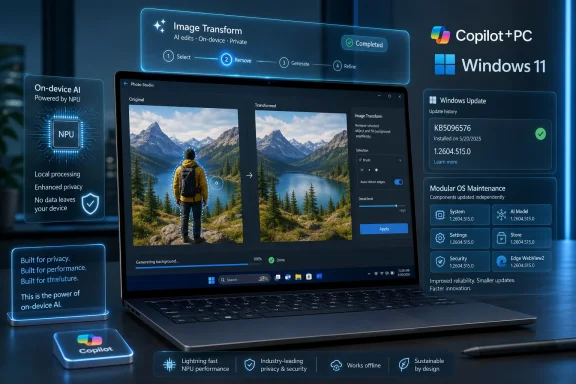
Microsoft’s KB5096576 is an automatic Windows Update package for Copilot+ PCs running Windows 11 version 26H1, updating the Image Transform AI component to version 1.2604.515.0 for on-device image editing and object-removal workloads. That sounds like a small servicing note, and in the old Windows world it would be. In the Copilot+ era, however, it is another sign that Microsoft is turning AI models into first-class Windows components, serviced separately, tracked separately, and increasingly expected to behave like drivers, codecs, and security definitions. The real story is not one image-editing update; it is the quiet normalization of model maintenance as part of the Windows platform.
KB5096576 applies only to Copilot+ PCs, and that limitation matters. Microsoft is not shipping this component as a general-purpose Photos app plug-in or a cloud feature toggle for every Windows 11 machine. It is targeting the new class of PCs with neural processing units powerful enough to run local inference without turning every edit into a trip through a remote server.
The component in question, Image Transform, sits in the Windows AI stack and supports image editing and visual transformation across Windows features and apps. Microsoft describes its job in practical terms: it provides the machine-learning models and runtime needed to remove selected foreground objects and generate background content to fill the cleared area. In plainer English, this is the plumbing behind the kind of generative object removal users now expect from modern photo editors.
That framing is important because it separates the visible feature from the underlying capability. The user may experience this as “erase that person from the background” in an app. Windows sees it as a local AI component with a version number, update history entry, prerequisites, and a servicing channel.
This is the Windows model asserting itself over the AI model. Microsoft is not merely adding intelligence to apps; it is packaging inference capabilities as OS-maintained parts. That gives the company more control, but it also gives administrators a new category of moving part to track.
The same version number has also appeared across other Windows AI components in Microsoft’s support material, suggesting coordinated servicing of the Copilot+ AI substrate rather than one-off app updates. That does not mean every component does the same job or lands on every device in the same way. It does mean Windows is developing an AI-component cadence that looks much more like platform maintenance than novelty feature delivery.
For enthusiasts, this is a useful breadcrumb trail. For administrators, it is an audit surface. If a feature behaves differently across two machines, the answer may no longer be only “different app version” or “different Windows build.” It may be “different AI component revision,” possibly gated by hardware, Windows release, cumulative update level, regional rollout, or silicon vendor.
This is where KB5096576 becomes more than another support page. Microsoft is documenting an AI model update in the same sober language it uses for ordinary Windows servicing. The banality is the point. AI is being absorbed into the maintenance machinery.
Image Transform is one of the clearer examples of why Microsoft wants that local hardware. Object removal and background fill are latency-sensitive, image-heavy workloads that benefit from local acceleration. Nobody wants a basic edit to feel like uploading a document to a cloud service, waiting for moderation, and downloading the result.
Running locally also gives Microsoft a privacy argument it badly needs. The company can say image data stays on the device for this class of transformation, which is a cleaner message than “your content may be processed somewhere in our AI infrastructure.” After the controversy around Windows Recall and the broader skepticism toward AI features embedded at the OS level, local processing is not just a technical advantage. It is a trust strategy.
But local does not mean static. The component still updates through Windows Update, and the machine still depends on Microsoft’s model pipeline. The inference may happen on your desk, but the capability is still governed by Redmond’s servicing decisions.
This matters because Copilot+ PCs are already fragmented across Windows versions, processor families, feature waves, and staged rollouts. A user may own a qualifying machine and still not see the same AI behavior as another Copilot+ owner. The cumulative update requirement gives Microsoft a way to avoid deploying component updates onto unsupported or inconsistent OS foundations.
From a reliability perspective, that is sensible. These components depend on runtime interfaces, drivers, app integrations, and NPU execution paths. Shipping a newer model onto an older host can create subtle failures that are harder to diagnose than a missing DLL or broken driver.
From an administrator’s perspective, it creates a dependency chain. To know whether a Copilot+ feature is current, you need to check not only the app, not only Windows Update, and not only the OS build. You need to know whether the cumulative update is present and whether the AI component has actually installed.
For enterprises, automatic installation is more complicated. AI components affect user-visible behavior, generate content, process potentially sensitive material, and may have policy implications. Even if the images never leave the device, the organization still has to decide whether local generative editing is allowed, logged, governed, or disabled in certain roles.
The industry has spent decades learning to inventory operating systems, Office builds, browser versions, endpoint security engines, and firmware. AI model inventory is newer and murkier. A component update may improve quality, reduce latency, change output characteristics, fix safety behavior, or alter compatibility with apps that call into the Windows AI stack.
Microsoft’s update-history guidance is therefore more than a convenience. Telling users to check Settings, Windows Update, and Update history is the consumer-facing version of a larger administrative need: prove what model-bearing components are present on which devices. If Microsoft expects Windows AI to become a platform, it will need platform-grade observability.
Image Transform works alongside other Windows AI components, including Image Processing and Image Creation. That suggests a layered pipeline: one component may understand or segment an image, another may transform it, another may generate new content. Apps can then expose those capabilities without each shipping an entire bespoke AI stack.
That is efficient, but it changes the competitive terrain. If Microsoft provides OS-level image transformation primitives, Windows apps can become thinner clients over shared local AI capabilities. Smaller developers may benefit from not having to build or license their own models. Larger developers may worry that Microsoft is moving the floor upward in a way that privileges native Windows experiences.
The old Windows API story was about files, windows, input, graphics, networking, and identity. The new one adds local intelligence as an operating-system service. Once that happens, the line between “Windows feature” and “app feature” starts to blur.
But privacy is not only about where inference happens. It is also about what applications can invoke the component, how user consent is presented, whether generated edits are labeled or recoverable, how temporary data is handled, and whether enterprise policy can restrict use. Local processing narrows one risk pathway while leaving others intact.
There is also the question of user expectation. When a Windows feature removes an object and fills in the background, it is generating plausible visual information. That may be harmless for vacation photos and product mockups, but it is less trivial in evidentiary, medical, journalistic, legal, or regulated contexts.
The platform needs controls that reflect those differences. A local model is not automatically an acceptable model. It is simply a model that runs closer to the user.
Component updates such as KB5096576 are quieter, and that may be their strength. They improve the machinery without demanding that users reorganize their workflows around a chatbot. Object removal, image enhancement, local description, and semantic search are the kinds of features that can become useful without becoming theatrical.
The danger is that quiet servicing also makes change less visible. If a model update improves background fill, most users will only notice that the feature seems better. If it worsens output, changes a workflow, or introduces an artifact, users may have no intuitive way to connect the problem to a background AI component update.
Windows Update has always carried this tension. Automatic servicing keeps machines safer and more consistent, but it can also make cause and effect difficult to trace. AI components add a new layer because their outputs are probabilistic. A driver either crashes or it does not; a generative model may simply become subtly different.
Organizations will need to know which Copilot+ devices are eligible, which Windows 11 releases they run, which cumulative updates are installed, which AI components are present, and whether policy allows the feature surface to be used. They will also need to understand how these updates appear in reporting tools and whether existing patch workflows treat them as first-class updates or as oddities outside the usual compliance dashboards.
There is an echo here of the early days of firmware and driver servicing through Windows Update. What began as convenience became an operational domain. Administrators learned that hardware-specific updates could fix serious problems or introduce new ones, and that “automatic” did not mean “irrelevant.”
AI component servicing is likely to follow the same path. At first, it will look like a curiosity for a narrow class of premium PCs. Then Copilot+ hardware will spread through refresh cycles, and the question will become mundane: are the local AI components current, compliant, and behaving as expected?
That is the only practical way to keep local AI competitive. Models improve quickly, optimization techniques change, and silicon vendors expose new capabilities through drivers and execution providers. A fixed model baked into a Windows image would age badly.
The modular approach also lets Microsoft target devices more precisely. A component might apply only to Copilot+ PCs, only to Windows 11 version 26H1, or only after a cumulative update. Other components may differ for AMD, Intel, or Arm systems depending on NPU support and validation status.
This is not elegant from a messaging standpoint. Consumers do not want to parse which AI component applies to which machine. But it is realistic engineering. The Windows ecosystem is too broad for a single AI payload to fit every device equally.
The company does not need to publish model weights, proprietary evaluation data, or exploit-level detail. But administrators and power users would benefit from clearer categories of change. Was this update primarily about quality? Performance? Reliability? Safety? Compatibility? Hardware enablement? A one-word bucket would still be better than “improvements.”
The lack of detail is especially noticeable because generative features can change user output in visible ways. If object removal becomes cleaner around hair, glass, or shadows, that is a meaningful improvement. If it changes behavior around faces, text, logos, or sensitive imagery, that is also meaningful.
Microsoft’s support language remains too thin for the world it is entering. AI components are not just libraries. They encode behavior.
Users edit images constantly: screenshots, receipts, family photos, marketplace listings, work documents, presentation assets, and social posts. Removing unwanted objects and reconstructing backgrounds used to require a dedicated editor or a cloud-backed service. Making that capability local and broadly available across Windows features is a genuine quality-of-life improvement.
The best AI features disappear into the task. They do not ask the user to chat, prompt-engineer, or subscribe to a worldview. They remove a distraction from a photo, describe an image to someone who cannot see it clearly, find a document by meaning rather than filename, or translate speech when the network is poor.
KB5096576 sits in that more plausible category. It is not the grand AI assistant future. It is a narrow capability made faster and more private by local hardware.
That may frustrate users who want the same features on older PCs or older Windows releases. Microsoft’s answer is likely to be that local AI depends on modern hardware and current platform bits. There is truth in that, but it also creates a new form of Windows segmentation.
The PC market is already divided by CPU generation, TPM support, Windows 11 eligibility, and OEM driver quality. Copilot+ adds another axis: NPU capability and AI component eligibility. Over time, users may find that two Windows 11 PCs with similar everyday performance have very different feature lives.
Microsoft will argue that this is the natural result of new hardware acceleration. That is fair. But it also means buyers need to pay attention not just to RAM and storage, but to whether a machine belongs to the Windows AI servicing future or the conventional Windows maintenance track.
The bigger implication is cumulative. Each of these updates makes the Copilot+ architecture more real. The platform becomes less about launch demos and more about maintained local capabilities that apps can depend on.
That is how operating-system shifts usually happen. Not through one keynote, but through boring update entries that slowly become infrastructure.
 Microsoft Turns the AI Model Into a Windows Component
KB5096576 applies only to Copilot+ PCs, and that limitation matters. Microsoft is not shipping this component as a general-purpose Photos app plug-in or a cloud feature toggle for every Windows 11 machine. It is targeting the new class of PCs with neural processing units powerful enough to run local inference without turning every edit into a trip through a remote server.The component in question, Image Transform, sits in the Windows AI stack and supports image editing and visual transformation across Windows features and apps. Microsoft describes its job in practical terms: it provides the machine-learning models and runtime needed to remove selected foreground objects and generate background content to fill the cleared area. In plainer English, this is the plumbing behind the kind of generative object removal users now expect from modern photo editors.
That framing is important because it separates the visible feature from the underlying capability. The user may experience this as “erase that person from the background” in an app. Windows sees it as a local AI component with a version number, update history entry, prerequisites, and a servicing channel.
This is the Windows model asserting itself over the AI model. Microsoft is not merely adding intelligence to apps; it is packaging inference capabilities as OS-maintained parts. That gives the company more control, but it also gives administrators a new category of moving part to track.
The Version Number Is the News
The update installs Image Transform version 1.2604.515.0. That is not a consumer-friendly detail, but it is the detail that tells IT what Microsoft is building. AI features are no longer just branded experiences such as Cocreator, Restyle Image, Click to Do, or Recall-adjacent search. They are a chain of component versions underneath the shell.The same version number has also appeared across other Windows AI components in Microsoft’s support material, suggesting coordinated servicing of the Copilot+ AI substrate rather than one-off app updates. That does not mean every component does the same job or lands on every device in the same way. It does mean Windows is developing an AI-component cadence that looks much more like platform maintenance than novelty feature delivery.
For enthusiasts, this is a useful breadcrumb trail. For administrators, it is an audit surface. If a feature behaves differently across two machines, the answer may no longer be only “different app version” or “different Windows build.” It may be “different AI component revision,” possibly gated by hardware, Windows release, cumulative update level, regional rollout, or silicon vendor.
This is where KB5096576 becomes more than another support page. Microsoft is documenting an AI model update in the same sober language it uses for ordinary Windows servicing. The banality is the point. AI is being absorbed into the maintenance machinery.
Copilot+ PCs Are Becoming the Test Bed for Local Windows AI
Microsoft’s Copilot+ PC pitch has always depended on the NPU becoming useful enough to justify its presence. The company set the baseline at more than 40 TOPS of neural processing performance, but silicon specifications do not sell the everyday value of a PC. Features do.Image Transform is one of the clearer examples of why Microsoft wants that local hardware. Object removal and background fill are latency-sensitive, image-heavy workloads that benefit from local acceleration. Nobody wants a basic edit to feel like uploading a document to a cloud service, waiting for moderation, and downloading the result.
Running locally also gives Microsoft a privacy argument it badly needs. The company can say image data stays on the device for this class of transformation, which is a cleaner message than “your content may be processed somewhere in our AI infrastructure.” After the controversy around Windows Recall and the broader skepticism toward AI features embedded at the OS level, local processing is not just a technical advantage. It is a trust strategy.
But local does not mean static. The component still updates through Windows Update, and the machine still depends on Microsoft’s model pipeline. The inference may happen on your desk, but the capability is still governed by Redmond’s servicing decisions.
Windows 11 Version 26H1 Gives the Update Its Real Shape
KB5096576 is specifically described as an update for Windows 11 version 26H1, with the latest cumulative update required before installation. That prerequisite is easy to gloss over, but it reflects how Microsoft is tying AI component delivery to the wider Windows servicing baseline. The model update is not floating freely; it lands only when the OS is ready to host it.This matters because Copilot+ PCs are already fragmented across Windows versions, processor families, feature waves, and staged rollouts. A user may own a qualifying machine and still not see the same AI behavior as another Copilot+ owner. The cumulative update requirement gives Microsoft a way to avoid deploying component updates onto unsupported or inconsistent OS foundations.
From a reliability perspective, that is sensible. These components depend on runtime interfaces, drivers, app integrations, and NPU execution paths. Shipping a newer model onto an older host can create subtle failures that are harder to diagnose than a missing DLL or broken driver.
From an administrator’s perspective, it creates a dependency chain. To know whether a Copilot+ feature is current, you need to check not only the app, not only Windows Update, and not only the OS build. You need to know whether the cumulative update is present and whether the AI component has actually installed.
Automatic Installation Is Convenient Until It Becomes Inventory
Microsoft says the KB5096576 update will be downloaded and installed automatically from Windows Update. For consumers, that is the right default. Most users will never care which Image Transform version they have, and they should not have to.For enterprises, automatic installation is more complicated. AI components affect user-visible behavior, generate content, process potentially sensitive material, and may have policy implications. Even if the images never leave the device, the organization still has to decide whether local generative editing is allowed, logged, governed, or disabled in certain roles.
The industry has spent decades learning to inventory operating systems, Office builds, browser versions, endpoint security engines, and firmware. AI model inventory is newer and murkier. A component update may improve quality, reduce latency, change output characteristics, fix safety behavior, or alter compatibility with apps that call into the Windows AI stack.
Microsoft’s update-history guidance is therefore more than a convenience. Telling users to check Settings, Windows Update, and Update history is the consumer-facing version of a larger administrative need: prove what model-bearing components are present on which devices. If Microsoft expects Windows AI to become a platform, it will need platform-grade observability.
The App Is No Longer the Boundary
Historically, Windows users thought of photo editing as an app-level feature. Paint did one thing, Photos did another, third-party editors did something else, and the OS mostly stayed out of the creative pipeline. Copilot+ changes that boundary.Image Transform works alongside other Windows AI components, including Image Processing and Image Creation. That suggests a layered pipeline: one component may understand or segment an image, another may transform it, another may generate new content. Apps can then expose those capabilities without each shipping an entire bespoke AI stack.
That is efficient, but it changes the competitive terrain. If Microsoft provides OS-level image transformation primitives, Windows apps can become thinner clients over shared local AI capabilities. Smaller developers may benefit from not having to build or license their own models. Larger developers may worry that Microsoft is moving the floor upward in a way that privileges native Windows experiences.
The old Windows API story was about files, windows, input, graphics, networking, and identity. The new one adds local intelligence as an operating-system service. Once that happens, the line between “Windows feature” and “app feature” starts to blur.
Privacy Is the Selling Point, Not the Whole Risk Model
Microsoft’s claim that Image Transform runs locally on dedicated AI hardware and keeps image data on the device is meaningful. For many editing tasks, local inference is preferable to cloud processing. It reduces network exposure, can work with lower latency, and may allow users to edit private material without uploading it to an external service.But privacy is not only about where inference happens. It is also about what applications can invoke the component, how user consent is presented, whether generated edits are labeled or recoverable, how temporary data is handled, and whether enterprise policy can restrict use. Local processing narrows one risk pathway while leaving others intact.
There is also the question of user expectation. When a Windows feature removes an object and fills in the background, it is generating plausible visual information. That may be harmless for vacation photos and product mockups, but it is less trivial in evidentiary, medical, journalistic, legal, or regulated contexts.
The platform needs controls that reflect those differences. A local model is not automatically an acceptable model. It is simply a model that runs closer to the user.
The Quiet Update Cadence May Be Microsoft’s Smartest AI Move
Microsoft’s loudest AI announcements tend to attract the most skepticism. Recall became a flashpoint because it touched deep user anxieties about surveillance, retention, and control. Copilot branding, meanwhile, has often felt broader than the actual usefulness of the feature beneath it.Component updates such as KB5096576 are quieter, and that may be their strength. They improve the machinery without demanding that users reorganize their workflows around a chatbot. Object removal, image enhancement, local description, and semantic search are the kinds of features that can become useful without becoming theatrical.
The danger is that quiet servicing also makes change less visible. If a model update improves background fill, most users will only notice that the feature seems better. If it worsens output, changes a workflow, or introduces an artifact, users may have no intuitive way to connect the problem to a background AI component update.
Windows Update has always carried this tension. Automatic servicing keeps machines safer and more consistent, but it can also make cause and effect difficult to trace. AI components add a new layer because their outputs are probabilistic. A driver either crashes or it does not; a generative model may simply become subtly different.
The Sysadmin Problem Is Not the Feature, It Is the Fleet
On a single Copilot+ PC, KB5096576 is straightforward. Install the latest cumulative update, let Windows Update do its work, and verify the entry in update history. Across a fleet, the picture gets more interesting.Organizations will need to know which Copilot+ devices are eligible, which Windows 11 releases they run, which cumulative updates are installed, which AI components are present, and whether policy allows the feature surface to be used. They will also need to understand how these updates appear in reporting tools and whether existing patch workflows treat them as first-class updates or as oddities outside the usual compliance dashboards.
There is an echo here of the early days of firmware and driver servicing through Windows Update. What began as convenience became an operational domain. Administrators learned that hardware-specific updates could fix serious problems or introduce new ones, and that “automatic” did not mean “irrelevant.”
AI component servicing is likely to follow the same path. At first, it will look like a curiosity for a narrow class of premium PCs. Then Copilot+ hardware will spread through refresh cycles, and the question will become mundane: are the local AI components current, compliant, and behaving as expected?
Microsoft Is Building a Modular AI Operating System One KB at a Time
The interesting strategic move is modularity. Microsoft is not waiting for a monolithic annual Windows release to update every AI capability. It is splitting the system into components that can be revised as models, runtimes, and hardware support evolve.That is the only practical way to keep local AI competitive. Models improve quickly, optimization techniques change, and silicon vendors expose new capabilities through drivers and execution providers. A fixed model baked into a Windows image would age badly.
The modular approach also lets Microsoft target devices more precisely. A component might apply only to Copilot+ PCs, only to Windows 11 version 26H1, or only after a cumulative update. Other components may differ for AMD, Intel, or Arm systems depending on NPU support and validation status.
This is not elegant from a messaging standpoint. Consumers do not want to parse which AI component applies to which machine. But it is realistic engineering. The Windows ecosystem is too broad for a single AI payload to fit every device equally.
The Support Page Says Little Because the Platform Says Plenty
KB5096576 does not provide a dramatic changelog. It says the update includes improvements to the Image Transform AI component. That phrase is frustratingly vague, and Microsoft should do better if it wants professionals to trust AI servicing in managed environments.The company does not need to publish model weights, proprietary evaluation data, or exploit-level detail. But administrators and power users would benefit from clearer categories of change. Was this update primarily about quality? Performance? Reliability? Safety? Compatibility? Hardware enablement? A one-word bucket would still be better than “improvements.”
The lack of detail is especially noticeable because generative features can change user output in visible ways. If object removal becomes cleaner around hair, glass, or shadows, that is a meaningful improvement. If it changes behavior around faces, text, logos, or sensitive imagery, that is also meaningful.
Microsoft’s support language remains too thin for the world it is entering. AI components are not just libraries. They encode behavior.
The Consumer Benefit Is Real, Even If the Branding Is Exhausting
It is easy to roll one’s eyes at yet another Copilot+ component update, particularly after two years of AI branding saturating every Microsoft product surface. But local image transformation is one of the more defensible uses of this hardware. It is immediate, understandable, and practical.Users edit images constantly: screenshots, receipts, family photos, marketplace listings, work documents, presentation assets, and social posts. Removing unwanted objects and reconstructing backgrounds used to require a dedicated editor or a cloud-backed service. Making that capability local and broadly available across Windows features is a genuine quality-of-life improvement.
The best AI features disappear into the task. They do not ask the user to chat, prompt-engineer, or subscribe to a worldview. They remove a distraction from a photo, describe an image to someone who cannot see it clearly, find a document by meaning rather than filename, or translate speech when the network is poor.
KB5096576 sits in that more plausible category. It is not the grand AI assistant future. It is a narrow capability made faster and more private by local hardware.
The 26H1 Detail Hints at a Faster Windows AI Cycle
Windows 11 version 26H1 appearing in this support context is notable because it keeps AI servicing tied to the forward edge of Windows development. Microsoft has been moving toward a world where Windows features arrive continuously, but AI components intensify that pattern. The OS version is no longer merely a compatibility badge; it becomes part of the model-delivery contract.That may frustrate users who want the same features on older PCs or older Windows releases. Microsoft’s answer is likely to be that local AI depends on modern hardware and current platform bits. There is truth in that, but it also creates a new form of Windows segmentation.
The PC market is already divided by CPU generation, TPM support, Windows 11 eligibility, and OEM driver quality. Copilot+ adds another axis: NPU capability and AI component eligibility. Over time, users may find that two Windows 11 PCs with similar everyday performance have very different feature lives.
Microsoft will argue that this is the natural result of new hardware acceleration. That is fair. But it also means buyers need to pay attention not just to RAM and storage, but to whether a machine belongs to the Windows AI servicing future or the conventional Windows maintenance track.
Where the Update Leaves Windows Users Right Now
For now, KB5096576 is narrow and practical. It is not a reason to buy a new PC by itself, and it is not a sign that every Windows machine is suddenly running generative image models in the background. It is a component update for a defined class of devices.The bigger implication is cumulative. Each of these updates makes the Copilot+ architecture more real. The platform becomes less about launch demos and more about maintained local capabilities that apps can depend on.
That is how operating-system shifts usually happen. Not through one keynote, but through boring update entries that slowly become infrastructure.
The KB5096576 Signal Buried in Windows Update
KB5096576 is small enough to miss and specific enough to matter. If you manage, test, or simply care about Copilot+ PCs, the update is worth treating as another data point in Microsoft’s emerging AI servicing model rather than as a standalone photo-editing patch.- KB5096576 updates the Image Transform AI component for Copilot+ PCs to version 1.2604.515.0.
- The update applies to Windows 11 version 26H1 and requires the latest cumulative update before installation.
- The component supports local image transformation tasks such as object removal and generated background fill.
- Microsoft is distributing the update automatically through Windows Update rather than as a manual app download.
- Users can verify installation through Windows Update history in the Settings app.
- The update reinforces that Windows AI features are becoming modular OS components with their own servicing trail.
References
- Primary source: Microsoft Support
Published: Tue, 26 May 2026 21:02:51 Z
- Official source: microsoft.com
Shop Copilot+ PCs: Windows AI PCs and Laptop Devices | Microsoft Windows
Shop Copilot+ PCs, the fastest, most intelligent Windows PCs ever. Explore Windows AI tools and features built into the latest PCs, desktops, and laptop devices.www.microsoft.com
- Related coverage: windowsforum.com

KB5096570 Update: Phi Silica Local AI Component Gets Version 1.2604.515.0
Microsoft has published KB5096570, a May 2026 Phi Silica AI component update that installs version 1.2604.515.0 on AMD-powered Copilot+ PCs running Windows 11 version 26H1, provided the device already has the latest cumulative update installed. The update is small in presentation but large in... windowsforum.com
- Related coverage: windowslatest.com

Windows 11 AI components are getting their own changelogs (release history), as Microsoft plans model updates
Windows Latest today found a new support document called "Release information for AI components." This lists all AI model updates. www.windowslatest.com
- Official source: learn.microsoft.com

Use local AI with Microsoft Foundry on Windows
Learn about how you can use local AI models and APIs in your Windows applications using Microsoft Foundry on Windows - Windows AI APIs, Foundry Local, and Windows ML.learn.microsoft.com - Related coverage: windowscentral.com
The first Windows 11 preview build of 2026 brings more Copilot features to all
Microsoft's first new preview build of Windows 11 for 2026 is packing a handful of Copilot additions, along with a new mobile Resume feature and more. www.windowscentral.com

- Related coverage: tomsguide.com
- Official source: news.microsoft.com
- Official source: info.microsoft.com
- Official source: cdn-dynmedia-1.microsoft.com