

KB5096577 is Microsoft’s Image Processing AI component update to version 1.2604.515.0 for AMD-powered Copilot+ PCs running Windows 11 version 26H1, delivered automatically through Windows Update after the latest 26H1 cumulative update is installed. That sentence sounds narrow because the update is narrow, but its implications are wider than the usual “quality improvements” language suggests. Microsoft is now servicing AI models and local inference plumbing as first-class Windows components, and KB5096577 is another small brick in that much larger wall.
The old Windows update story was mostly about kernels, drivers, browsers, and security fixes. The new one increasingly includes model packages, execution providers, image understanding components, and silicon-specific AI runtime updates. For AMD Copilot+ PCs, this particular patch is less a marquee feature drop than a reminder that Windows 11’s AI era will be maintained component by component, processor family by processor family, and sometimes KB article by KB article.
KB5096577 targets the Image Processing AI component, not the Photos app, not Paint, and not a single user-facing Copilot button. Microsoft describes the component as enabling on-device image understanding and processing across Windows features and apps. In plainer English: this is part of the machinery that lets Windows analyze, segment, scale, extract, and manipulate visual content locally on supported AI hardware.
That distinction matters. The AI feature a user sees may be a background blur, a cutout, a visual search result, a creative edit, or an accessibility enhancement. The thing Microsoft must service underneath is a chain of models, runtimes, and hardware-specific execution layers that make the experience feel instant instead of like a cloud round trip.
KB5096577 is explicitly for AMD-powered Copilot+ PCs. Microsoft’s AI component release history shows that the 1.2604.515.0 generation landed across multiple AI components around the same late-April 2026 wave, including Image Processing, Image Transform, Phi Silica, Settings Model, Image Search, Semantic Analysis, and Content Extraction. That does not mean all devices receive the same package. It means Microsoft is aligning a family of local AI components while still splitting delivery by role and, in many cases, by silicon vendor.
This is the update model Windows had to grow into once Microsoft decided that Copilot+ PCs would not merely be “Windows laptops with faster NPUs.” A local AI platform is not a single feature; it is a stack. If one layer improves and the other lags behind, the feature either degrades, disappears, or behaves differently across machines that are all marketed under the same Copilot+ umbrella.
That creates a servicing problem Microsoft cannot solve with a single generic AI blob. Local inference is intimately tied to hardware. The models may be conceptually similar across devices, but the performance, scheduling, acceleration path, and power behavior depend on the NPU, drivers, runtime providers, and operating system integration. An image segmentation task that looks identical to a user is not necessarily identical to Windows when the silicon underneath changes.
This is why KB5096577 should not be read as an isolated support article. It is part of Microsoft’s effort to make heterogeneous AI hardware look boring. If Windows can quietly update the right model and runtime pieces for AMD, Intel, and Qualcomm machines without asking users to understand the stack, Copilot+ PCs become a platform. If it cannot, they become a compatibility matrix with better marketing.
AMD owners should not expect a new Start menu badge or a celebratory animation after this update installs. The practical goal is subtler: keep local image processing experiences current, performant, and aligned with the rest of Windows 11 version 26H1. The win, if Microsoft gets it right, is that nobody has to think about whether an AI-assisted image edit is running on an AMD NPU, a Qualcomm NPU, or some future accelerator generation.
That is a meaningful departure from the older rhythm of Windows feature delivery. Historically, a capability either arrived in a feature update, a monthly cumulative update, a Store app update, or a driver package. Copilot+ PCs blur those categories. A single user-facing experience may depend on a Windows build, a Store app, an AI model package, a runtime component, a vendor driver, and a cloud-side rollout flag.
Windows 11 version 26H1 itself is also unusual in the broader Windows cadence. Microsoft has positioned it as a version tied to new hardware rather than a conventional feature update meant for every existing PC. That makes these AI component KBs doubly niche: they sit on a release that is already limited, then narrow further to Copilot+ PCs, then narrow again by silicon family.
For enthusiasts, that fragmentation is annoying but fascinating. For administrators, it is a deployment reality. The update history page is no longer just a place to confirm that Patch Tuesday landed. It is becoming a ledger of whether the local AI substrate on a machine matches the expected component level for its hardware class.
Microsoft’s advice for verification is correspondingly simple: open Settings, go to Windows Update, check Update history, and look for the installed entry. That workflow is fine for one laptop. It is not enough for a managed fleet, and it hints at the pressure Microsoft will face to make AI component inventory as visible and scriptable as driver, firmware, and cumulative update compliance.
But privacy in this context is not a slogan; it is a system design. If image understanding, segmentation, foreground extraction, and visual analysis are happening locally, Windows must maintain the local components that perform those tasks. A stale or broken model is not merely a performance problem. It can affect feature quality, accessibility behavior, app compatibility, and user trust.
The Recall controversy taught Microsoft that “on-device” is not automatically synonymous with “trusted.” Users and administrators care about what is stored, what is indexed, what is sent, what can be disabled, and who controls the policy surface. KB5096577 is not a Recall update, and it should not be treated as one. Still, it belongs to the same strategic move: Microsoft wants more intelligence to live inside Windows itself.
That move has advantages. Local processing can reduce latency, lower cloud dependency, and make AI features usable offline or in constrained network environments. It can also give developers a predictable platform target if Microsoft keeps the APIs and model behavior stable enough.
The risk is that Windows becomes more opaque. Users have long tolerated background updates to Defender definitions and device drivers because the purpose was legible. AI component updates are newer, less familiar, and often described in broad terms. “Improvements to the Image Processing AI component” may be accurate, but it does not tell an IT department whether behavior changed in a way that affects regulated workflows.
There is no detailed bug list. There are no benchmark claims. There is no table of changed models, no known issues section of consequence in the supplied text, and no administrator-facing breakdown of exactly which scenarios are improved. In the old Windows world, that kind of vagueness would be frustrating but unsurprising. In the AI model world, it is more consequential.
Model updates can change outputs. A segmentation model may cut hair, glass, shadows, text edges, or foreground objects differently after an update. A scaling pipeline may sharpen one class of image better and another worse. A visual analysis component may improve accessibility descriptions in one context while introducing edge-case regressions in another.
Microsoft does not need to expose every internal detail, and in some cases it cannot. But if Windows AI components become relied upon by third-party apps, enterprise workflows, or accessibility tools, the industry will need a better vocabulary than “improvements.” Developers and admins do not necessarily need model weights, but they do need expectations.
This is where Microsoft’s new AI component release history is useful but incomplete. The release history establishes chronology and versioning. It tells us that Image Processing has moved through a sequence of versions over 2025 and 2026, and that the 1.2604.515.0 wave is part of a broader synchronized set. What it does not yet provide is a clear behavioral contract.
That is not inherently bad. In fact, it is probably necessary. AI workloads are evolving faster than traditional desktop features, and Microsoft cannot wait for annual Windows releases to refine local models. Shipping component updates lets the company improve feature quality, fix bugs, and tune performance more frequently.
The challenge is expectation management. When a user buys a Copilot+ PC, they are not just buying a faster laptop; they are buying into a servicing channel for local intelligence. The same image-editing workflow may behave differently in June than it did in March. That is normal for cloud AI services, but it is still new for core Windows experiences that run locally.
For enthusiasts, this means update history becomes more interesting. For enterprises, it means testing matrices get wider. A fleet of AMD Copilot+ PCs on Windows 11 26H1 may need validation not only against OS build numbers and driver revisions, but also against Image Processing, Image Transform, Phi Silica, and Execution Provider versions.
Microsoft has spent decades teaching administrators to think in terms of cumulative updates. AI components complicate that habit. The cumulative update may be installed and the machine may still be missing a relevant AI component update, or a component may have updated automatically after the OS baseline was reached. That is manageable, but only if Microsoft gives IT pros the inventory and policy tools to manage it.
That makes the Image Processing component strategically important. It is a bridge between showy consumer demos and practical platform value. A Copilot+ PC that can manipulate images locally gives Microsoft a story for creators, students, office workers, and users with accessibility needs without requiring every feature to be branded as “Copilot.”
The component also matters because image workflows are messy. Real-world photos contain reflections, hands, hair, text, screens, pets, documents, medical images, workplace diagrams, faces, and private spaces. A local model that handles those cases well can make AI feel like a native OS capability rather than a web service bolted to the desktop.
The update’s language about scaling, segmentation, foreground and background extraction, and visual analysis suggests a foundational layer used by multiple experiences rather than a single app feature. That is where the long-term platform play sits. Microsoft does not want every app developer to ship a separate image understanding stack for Copilot+ PCs. It wants Windows to provide shared capabilities that apps can call into.
If that works, Windows becomes more valuable to developers building local AI experiences. If it does not, the Copilot+ ecosystem risks becoming a patchwork of vendor SDKs, app-specific models, and uneven hardware acceleration. KB5096577 is small, but it points directly at that fork in the road.
For managed environments, automatic delivery raises the familiar question: who decides when a component that can change AI behavior is allowed into production? Traditional patch governance is built around severity, exploitability, stability, and business impact. AI component governance will need to include behavior drift, output consistency, and app dependency risk.
The stakes are not necessarily dramatic. Most organizations will not block an image processing component update unless it causes a clear regression. But certain environments may care deeply about predictable local analysis, especially if AI-assisted image handling becomes embedded in line-of-business apps, accessibility workflows, or document processing.
There is also the matter of support. When a user reports that an AI image feature changed behavior, help desks will need to know what changed on the machine. Was it the app? The Windows build? The AMD driver? The NPU runtime? The Image Processing component? The Image Transform component? The answer may be “some combination of the above,” which is accurate but not comforting.
Microsoft has made progress by publishing AI component release information as a separate history. The next step is making that history operational. IT pros will want reporting, deferral, compliance baselines, and clear mapping between user-visible features and component dependencies. Otherwise, the support surface will grow faster than the documentation culture around it.
Parity does not mean identical internals. It means users should not have to memorize which local AI features work best on which processor unless the difference is unavoidable. If a Windows feature is marketed as part of the Copilot+ experience, it should be reliable across supported Copilot+ silicon.
That is harder than it sounds. The PC ecosystem’s strength has always been diversity; its weakness has always been diversity. Microsoft can define the platform requirements, but execution depends on silicon vendors, OEM firmware, drivers, runtime layers, and Windows servicing. A component update for AMD-powered systems is an acknowledgment that the diversity has to be managed continuously.
KB5096577 also lands in a moment when AI PC marketing is still ahead of everyday necessity. Many users with Copilot+ PCs may not yet rely heavily on local AI features. But Microsoft is clearly building for a future in which these components are not optional curiosities. The more Windows features assume local inference, the more important it becomes that AMD systems receive timely, well-integrated component updates.
The risk for Microsoft is not that one Image Processing update disappoints. The risk is that the Copilot+ brand becomes fragmented in users’ minds: Qualcomm gets one experience, AMD another, Intel another, and older Windows PCs yet another. Separate KBs are technically sensible, but the user experience has to remain coherent.
The naming also suggests the cadence. The 1.2604 branch lines up with an April 2026 component wave, while earlier Image Processing releases moved through 1.2603, 1.2602, 1.2601, and earlier 2025-era versions. Microsoft is treating these components as living software, not as static models baked into a Windows image and forgotten.
That has implications for OS imaging. Organizations that build gold images or provision devices through Autopilot-style workflows will need to understand which AI components arrive at install time, which arrive after first update, and which depend on the latest cumulative update. A newly deployed AMD Copilot+ PC may not be fully representative until Windows Update has finished pulling the relevant AI stack.
It also affects troubleshooting culture. A support article that says “check Update history” is adequate for consumer confirmation, but advanced users will want deeper inspection. If a local AI feature depends on Image Processing 1.2604.515.0, then the ability to query that component cleanly becomes part of serious diagnostics.
The Windows community has been here before. DirectX versions, .NET runtimes, Visual C++ redistributables, GPU drivers, and WebView2 all became invisible until something broke. AI components are following the same path, except they are arriving with more ambiguity about what changed and more public sensitivity around what they do.
The concrete points are straightforward:
KB5096577 will not be remembered as a landmark Windows update, and that is exactly why it is worth noticing. The future of Windows AI will arrive through many small, automatic, silicon-aware updates like this one, each barely visible on its own but collectively turning the operating system into a locally intelligent platform. For AMD-powered Copilot+ PCs, version 1.2604.515.0 is simply the latest checkpoint; the real story is that Windows servicing now has to maintain not just the computer, but the machine learning behavior of the computer.
The old Windows update story was mostly about kernels, drivers, browsers, and security fixes. The new one increasingly includes model packages, execution providers, image understanding components, and silicon-specific AI runtime updates. For AMD Copilot+ PCs, this particular patch is less a marquee feature drop than a reminder that Windows 11’s AI era will be maintained component by component, processor family by processor family, and sometimes KB article by KB article.
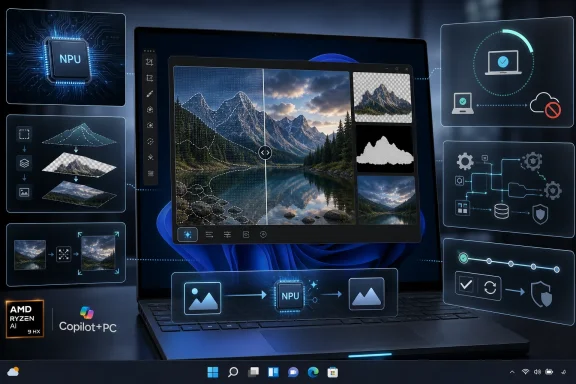 Microsoft Turns Image Processing Into a Serviced Windows Subsystem
KB5096577 targets the Image Processing AI component, not the Photos app, not Paint, and not a single user-facing Copilot button. Microsoft describes the component as enabling on-device image understanding and processing across Windows features and apps. In plainer English: this is part of the machinery that lets Windows analyze, segment, scale, extract, and manipulate visual content locally on supported AI hardware.That distinction matters. The AI feature a user sees may be a background blur, a cutout, a visual search result, a creative edit, or an accessibility enhancement. The thing Microsoft must service underneath is a chain of models, runtimes, and hardware-specific execution layers that make the experience feel instant instead of like a cloud round trip.
KB5096577 is explicitly for AMD-powered Copilot+ PCs. Microsoft’s AI component release history shows that the 1.2604.515.0 generation landed across multiple AI components around the same late-April 2026 wave, including Image Processing, Image Transform, Phi Silica, Settings Model, Image Search, Semantic Analysis, and Content Extraction. That does not mean all devices receive the same package. It means Microsoft is aligning a family of local AI components while still splitting delivery by role and, in many cases, by silicon vendor.
This is the update model Windows had to grow into once Microsoft decided that Copilot+ PCs would not merely be “Windows laptops with faster NPUs.” A local AI platform is not a single feature; it is a stack. If one layer improves and the other lags behind, the feature either degrades, disappears, or behaves differently across machines that are all marketed under the same Copilot+ umbrella.
The AMD Label Is the Point, Not a Footnote
The most important word in KB5096577 may be “AMD.” Copilot+ PCs began as a Qualcomm-first story, largely because Snapdragon X systems arrived with the NPU performance Microsoft wanted to define the category. But the long-term Windows PC market was never going to be Arm-only, and AMD’s Ryzen AI systems are now part of the mainstream Copilot+ conversation.That creates a servicing problem Microsoft cannot solve with a single generic AI blob. Local inference is intimately tied to hardware. The models may be conceptually similar across devices, but the performance, scheduling, acceleration path, and power behavior depend on the NPU, drivers, runtime providers, and operating system integration. An image segmentation task that looks identical to a user is not necessarily identical to Windows when the silicon underneath changes.
This is why KB5096577 should not be read as an isolated support article. It is part of Microsoft’s effort to make heterogeneous AI hardware look boring. If Windows can quietly update the right model and runtime pieces for AMD, Intel, and Qualcomm machines without asking users to understand the stack, Copilot+ PCs become a platform. If it cannot, they become a compatibility matrix with better marketing.
AMD owners should not expect a new Start menu badge or a celebratory animation after this update installs. The practical goal is subtler: keep local image processing experiences current, performant, and aligned with the rest of Windows 11 version 26H1. The win, if Microsoft gets it right, is that nobody has to think about whether an AI-assisted image edit is running on an AMD NPU, a Qualcomm NPU, or some future accelerator generation.
Windows 11 26H1 Makes the AI Stack More Modular Than the OS Around It
The requirement that the latest cumulative update for Windows 11 version 26H1 be installed is easy to skim past, but it tells us how Microsoft is sequencing this new layer of Windows. The base OS still receives cumulative updates. The AI components then ride on top, delivered automatically when the device is eligible and current enough to support them.That is a meaningful departure from the older rhythm of Windows feature delivery. Historically, a capability either arrived in a feature update, a monthly cumulative update, a Store app update, or a driver package. Copilot+ PCs blur those categories. A single user-facing experience may depend on a Windows build, a Store app, an AI model package, a runtime component, a vendor driver, and a cloud-side rollout flag.
Windows 11 version 26H1 itself is also unusual in the broader Windows cadence. Microsoft has positioned it as a version tied to new hardware rather than a conventional feature update meant for every existing PC. That makes these AI component KBs doubly niche: they sit on a release that is already limited, then narrow further to Copilot+ PCs, then narrow again by silicon family.
For enthusiasts, that fragmentation is annoying but fascinating. For administrators, it is a deployment reality. The update history page is no longer just a place to confirm that Patch Tuesday landed. It is becoming a ledger of whether the local AI substrate on a machine matches the expected component level for its hardware class.
Microsoft’s advice for verification is correspondingly simple: open Settings, go to Windows Update, check Update history, and look for the installed entry. That workflow is fine for one laptop. It is not enough for a managed fleet, and it hints at the pressure Microsoft will face to make AI component inventory as visible and scriptable as driver, firmware, and cumulative update compliance.
The Privacy Pitch Depends on Boring Plumbing
Microsoft’s description of the Image Processing AI component leans on two promises: fast, low-latency performance and keeping image data on the device. Those are the two pillars of the Copilot+ PC sales pitch. Local AI should feel immediate, and it should avoid sending sensitive material to a remote service unless the user or app deliberately chooses that path.But privacy in this context is not a slogan; it is a system design. If image understanding, segmentation, foreground extraction, and visual analysis are happening locally, Windows must maintain the local components that perform those tasks. A stale or broken model is not merely a performance problem. It can affect feature quality, accessibility behavior, app compatibility, and user trust.
The Recall controversy taught Microsoft that “on-device” is not automatically synonymous with “trusted.” Users and administrators care about what is stored, what is indexed, what is sent, what can be disabled, and who controls the policy surface. KB5096577 is not a Recall update, and it should not be treated as one. Still, it belongs to the same strategic move: Microsoft wants more intelligence to live inside Windows itself.
That move has advantages. Local processing can reduce latency, lower cloud dependency, and make AI features usable offline or in constrained network environments. It can also give developers a predictable platform target if Microsoft keeps the APIs and model behavior stable enough.
The risk is that Windows becomes more opaque. Users have long tolerated background updates to Defender definitions and device drivers because the purpose was legible. AI component updates are newer, less familiar, and often described in broad terms. “Improvements to the Image Processing AI component” may be accurate, but it does not tell an IT department whether behavior changed in a way that affects regulated workflows.
The Changelog Is Short Because the Strategy Is Long
KB5096577’s support text is terse. It says the update includes improvements to the Image Processing AI component for Windows 11, version 26H1. It says the update applies to Copilot+ PCs only. It says it installs automatically from Windows Update and requires the latest cumulative update first.There is no detailed bug list. There are no benchmark claims. There is no table of changed models, no known issues section of consequence in the supplied text, and no administrator-facing breakdown of exactly which scenarios are improved. In the old Windows world, that kind of vagueness would be frustrating but unsurprising. In the AI model world, it is more consequential.
Model updates can change outputs. A segmentation model may cut hair, glass, shadows, text edges, or foreground objects differently after an update. A scaling pipeline may sharpen one class of image better and another worse. A visual analysis component may improve accessibility descriptions in one context while introducing edge-case regressions in another.
Microsoft does not need to expose every internal detail, and in some cases it cannot. But if Windows AI components become relied upon by third-party apps, enterprise workflows, or accessibility tools, the industry will need a better vocabulary than “improvements.” Developers and admins do not necessarily need model weights, but they do need expectations.
This is where Microsoft’s new AI component release history is useful but incomplete. The release history establishes chronology and versioning. It tells us that Image Processing has moved through a sequence of versions over 2025 and 2026, and that the 1.2604.515.0 wave is part of a broader synchronized set. What it does not yet provide is a clear behavioral contract.
Copilot+ PCs Are Becoming a Moving Target
The Copilot+ PC logo was meant to simplify buying decisions. It tells consumers and businesses that a machine has a high-performance NPU and supports a class of Windows AI experiences. But as KB5096577 shows, the category is not static after purchase. A Copilot+ PC is a device whose AI personality will keep changing through Windows Update.That is not inherently bad. In fact, it is probably necessary. AI workloads are evolving faster than traditional desktop features, and Microsoft cannot wait for annual Windows releases to refine local models. Shipping component updates lets the company improve feature quality, fix bugs, and tune performance more frequently.
The challenge is expectation management. When a user buys a Copilot+ PC, they are not just buying a faster laptop; they are buying into a servicing channel for local intelligence. The same image-editing workflow may behave differently in June than it did in March. That is normal for cloud AI services, but it is still new for core Windows experiences that run locally.
For enthusiasts, this means update history becomes more interesting. For enterprises, it means testing matrices get wider. A fleet of AMD Copilot+ PCs on Windows 11 26H1 may need validation not only against OS build numbers and driver revisions, but also against Image Processing, Image Transform, Phi Silica, and Execution Provider versions.
Microsoft has spent decades teaching administrators to think in terms of cumulative updates. AI components complicate that habit. The cumulative update may be installed and the machine may still be missing a relevant AI component update, or a component may have updated automatically after the OS baseline was reached. That is manageable, but only if Microsoft gives IT pros the inventory and policy tools to manage it.
The User-Facing Feature Is Only the Surface Tension
Image processing is one of the most natural homes for local AI. Users understand the value immediately: remove a background, improve a photo, isolate a subject, upscale an image, apply an effect, interpret a visual scene, or make content more accessible. These are tasks where latency matters and where sending images to the cloud can feel invasive.That makes the Image Processing component strategically important. It is a bridge between showy consumer demos and practical platform value. A Copilot+ PC that can manipulate images locally gives Microsoft a story for creators, students, office workers, and users with accessibility needs without requiring every feature to be branded as “Copilot.”
The component also matters because image workflows are messy. Real-world photos contain reflections, hands, hair, text, screens, pets, documents, medical images, workplace diagrams, faces, and private spaces. A local model that handles those cases well can make AI feel like a native OS capability rather than a web service bolted to the desktop.
The update’s language about scaling, segmentation, foreground and background extraction, and visual analysis suggests a foundational layer used by multiple experiences rather than a single app feature. That is where the long-term platform play sits. Microsoft does not want every app developer to ship a separate image understanding stack for Copilot+ PCs. It wants Windows to provide shared capabilities that apps can call into.
If that works, Windows becomes more valuable to developers building local AI experiences. If it does not, the Copilot+ ecosystem risks becoming a patchwork of vendor SDKs, app-specific models, and uneven hardware acceleration. KB5096577 is small, but it points directly at that fork in the road.
Automatic Installation Is Convenient Until It Becomes Governance
Microsoft says KB5096577 downloads and installs automatically from Windows Update. For consumers, that is the right default. Nobody should have to hunt down an AI image processing component to make Windows features work correctly on a new AMD laptop.For managed environments, automatic delivery raises the familiar question: who decides when a component that can change AI behavior is allowed into production? Traditional patch governance is built around severity, exploitability, stability, and business impact. AI component governance will need to include behavior drift, output consistency, and app dependency risk.
The stakes are not necessarily dramatic. Most organizations will not block an image processing component update unless it causes a clear regression. But certain environments may care deeply about predictable local analysis, especially if AI-assisted image handling becomes embedded in line-of-business apps, accessibility workflows, or document processing.
There is also the matter of support. When a user reports that an AI image feature changed behavior, help desks will need to know what changed on the machine. Was it the app? The Windows build? The AMD driver? The NPU runtime? The Image Processing component? The Image Transform component? The answer may be “some combination of the above,” which is accurate but not comforting.
Microsoft has made progress by publishing AI component release information as a separate history. The next step is making that history operational. IT pros will want reporting, deferral, compliance baselines, and clear mapping between user-visible features and component dependencies. Otherwise, the support surface will grow faster than the documentation culture around it.
AMD Copilot+ PCs Need Parity, Not Just Eligibility
For AMD, updates like KB5096577 are part of the credibility test for x86 Copilot+ PCs. Qualcomm proved that Windows could run a new generation of AI-first laptops with impressive battery life and NPU capability. AMD and Intel must prove that the familiar x86 ecosystem can participate without making the Copilot+ experience feel second-class.Parity does not mean identical internals. It means users should not have to memorize which local AI features work best on which processor unless the difference is unavoidable. If a Windows feature is marketed as part of the Copilot+ experience, it should be reliable across supported Copilot+ silicon.
That is harder than it sounds. The PC ecosystem’s strength has always been diversity; its weakness has always been diversity. Microsoft can define the platform requirements, but execution depends on silicon vendors, OEM firmware, drivers, runtime layers, and Windows servicing. A component update for AMD-powered systems is an acknowledgment that the diversity has to be managed continuously.
KB5096577 also lands in a moment when AI PC marketing is still ahead of everyday necessity. Many users with Copilot+ PCs may not yet rely heavily on local AI features. But Microsoft is clearly building for a future in which these components are not optional curiosities. The more Windows features assume local inference, the more important it becomes that AMD systems receive timely, well-integrated component updates.
The risk for Microsoft is not that one Image Processing update disappoints. The risk is that the Copilot+ brand becomes fragmented in users’ minds: Qualcomm gets one experience, AMD another, Intel another, and older Windows PCs yet another. Separate KBs are technically sensible, but the user experience has to remain coherent.
Version Numbers Become the New Driver Revisions
Version 1.2604.515.0 looks like a minor detail, but it is now part of the Windows support vocabulary. In the same way GPU driver versions matter to gamers and firmware revisions matter to enterprise device stability, AI component versions will matter when Copilot+ features misbehave.The naming also suggests the cadence. The 1.2604 branch lines up with an April 2026 component wave, while earlier Image Processing releases moved through 1.2603, 1.2602, 1.2601, and earlier 2025-era versions. Microsoft is treating these components as living software, not as static models baked into a Windows image and forgotten.
That has implications for OS imaging. Organizations that build gold images or provision devices through Autopilot-style workflows will need to understand which AI components arrive at install time, which arrive after first update, and which depend on the latest cumulative update. A newly deployed AMD Copilot+ PC may not be fully representative until Windows Update has finished pulling the relevant AI stack.
It also affects troubleshooting culture. A support article that says “check Update history” is adequate for consumer confirmation, but advanced users will want deeper inspection. If a local AI feature depends on Image Processing 1.2604.515.0, then the ability to query that component cleanly becomes part of serious diagnostics.
The Windows community has been here before. DirectX versions, .NET runtimes, Visual C++ redistributables, GPU drivers, and WebView2 all became invisible until something broke. AI components are following the same path, except they are arriving with more ambiguity about what changed and more public sensitivity around what they do.
The Quiet KB That Explains the Copilot+ Maintenance Burden
KB5096577 does not demand action from most users, but it does clarify the maintenance model Microsoft is building. The headline is not “new feature.” The headline is that Windows now has a growing catalog of AI components that must be versioned, delivered, audited, and explained.The concrete points are straightforward:
- KB5096577 updates the Image Processing AI component to version 1.2604.515.0 on AMD-powered Copilot+ PCs running Windows 11 version 26H1.
- The update is limited to Copilot+ PCs and requires the latest cumulative update for Windows 11 version 26H1 before installation.
- Microsoft delivers the package automatically through Windows Update, and users can verify it under Settings, Windows Update, and Update history.
- The component supports local image tasks such as scaling, segmentation, foreground and background extraction, and visual analysis across Windows features and apps.
- The update belongs to a broader pattern in which Microsoft services AI models and runtimes separately from the traditional Windows feature-update story.
- Administrators should start treating AI component versions as part of device compliance, especially on managed Copilot+ PC fleets.
KB5096577 will not be remembered as a landmark Windows update, and that is exactly why it is worth noticing. The future of Windows AI will arrive through many small, automatic, silicon-aware updates like this one, each barely visible on its own but collectively turning the operating system into a locally intelligent platform. For AMD-powered Copilot+ PCs, version 1.2604.515.0 is simply the latest checkpoint; the real story is that Windows servicing now has to maintain not just the computer, but the machine learning behavior of the computer.
References
- Primary source: Microsoft Support
Published: Tue, 26 May 2026 21:02:47 Z
- Official source: learn.microsoft.com

- Related coverage: windowslatest.com

Windows 11 AI components are getting their own changelogs (release history), as Microsoft plans model updates
Windows Latest today found a new support document called "Release information for AI components." This lists all AI model updates. www.windowslatest.com
- Official source: techcommunity.microsoft.com
What to know about Windows 11, version 26H1 - Windows IT Pro Blog
Explore this specialized Windows release designed to support the next generation of hardware innovation. techcommunity.microsoft.com
- Related coverage: windowsforum.com

KB5096579: May 2026 Qualcomm AI Image Processing Update for Windows 11 26H1
Microsoft has published KB5096579, a May 2026 Image Processing AI component update that moves Qualcomm-powered Copilot+ PCs on Windows 11 version 26H1 to version 1.2604.515.0 and installs automatically through Windows Update after the latest 26H1 cumulative update is present. That sounds like a... windowsforum.com
- Related coverage: na.ingrammicro.com

- Official source: cdn-dynmedia-1.microsoft.com