

Windows 11 KB5099414 is now rolling out to supported Windows 11 version 23H2 devices, advancing the operating system to OS Build 22631.7376. Released on July 14, 2026, the mandatory cumulative update delivers July’s security fixes, Secure Boot certificate work, networking hardening, and repairs for several regressions introduced in June.
The update is narrower than some early reports suggest. Microsoft’s official release notes do not assign the new Screen Tint, quieter Widgets, File Explorer quick actions, Bluetooth accessory improvements, or revised Phone Link calling behavior to KB5099414. Those features were documented for Windows 11 versions 24H2 and 25H2 in the June 23 preview update KB5095093, not for version 23H2.
That distinction matters because Windows 11 23H2 is late in its support lifecycle. Home and Pro reached end of servicing on November 11, 2025, leaving Enterprise and Education as the principal supported editions until November 10, 2026.
Microsoft describes KB5099414 as a cumulative security update containing the latest protections and the quality improvements from KB5093998, released on June 9. It is distributed automatically through Windows Update and Microsoft Update, while organizations can deploy it through Windows Update for Business or Windows Server Update Services.
July’s broader Patch Tuesday release is unusually large. BleepingComputer counted 570 corrected vulnerabilities across Microsoft’s product portfolio, including three zero-days, two of which were reportedly being exploited in attacks. That portfolio-wide figure should not be read as 570 vulnerabilities specific to KB5099414 or Windows 11 23H2.
For administrators, the practical response remains the same: prioritize testing and deployment rather than treating this as an optional feature update. The package is classified as a security update, and supported devices will install it according to their configured Windows Update policies.
Microsoft says it is not currently aware of any issues specifically affecting KB5099414. That status can change as deployment expands, so managed environments should continue monitoring Windows release health and their own application telemetry after rollout.
File Explorer receives a targeted OneDrive repair rather than the broader redesign described in reports about KB5095093. Microsoft says the OneDrive shortcut could stop working when File Explorer was launched with administrative privileges after the June update. July’s cumulative package resolves that behavior.
The update also fixes a confusing Recycle Bin problem. When users permanently deleted a file, the confirmation dialog could display an internal Recycle Bin filename instead of the file’s original name. Although largely cosmetic, that defect made it harder to verify what was about to be erased.
Microsoft has additionally changed hotkey unregistering and cleanup behavior. The company warns that, in rare cases, built-in Windows experiences depending on the old hotkey lifecycle may temporarily stop responding to certain shortcuts. Restarting the affected application should normally restore them; persistent cases should be reported through Feedback Hub.
TDI is a legacy networking interface, but older security agents, network filters, communications products, and specialized enterprise software can retain dependencies long after mainstream applications have moved on. Administrators should therefore include networking and endpoint tooling in their validation rings, particularly where vendors supply kernel-level components.
Microsoft also upgrades the version of curl shipped with Windows to 8.21.0. Because curl is used directly by administrators, scripts, developer tooling, and software distribution workflows, the bundled update reduces exposure to issues in older builds without requiring users to maintain a separate copy.
Remote Desktop security receives a forward-looking change as well. Windows now supports SHA-2 certificate thumbprints for trusted RDP publishers, while SHA-1 remains available only for backward compatibility and is planned for removal.
Organizations that sign or distribute
Microsoft says computers that have not yet received the newer certificates should continue to boot and install ordinary Windows updates. The additional targeting data is meant to broaden the population that can safely receive updated certificates automatically rather than forcing an immediate manual migration across every PC.
Deployment teams servicing Windows installation media have an extra requirement to watch. Microsoft says dynamically updated images must include the appropriate
If that file is omitted, a device may fail to start from the updated installation media and report error
That warning is especially relevant for organizations maintaining custom Windows images, offline media, task sequences, or recovery environments. It is not a typical concern for an individual PC receiving KB5099414 directly through Windows Update.
Those additions are expected to feed into the July cumulative update for the newer Windows branches, but they are not documented as part of the Windows 11 23H2 package. Users on Build 22631.7376 should therefore not assume that installing KB5099414 will add Screen Tint or an “Ask Copilot” action to File Explorer.
This is more than a release-note technicality. Windows 11 versions 23H2, 24H2, 25H2, and 26H1 now receive different cumulative packages and do not necessarily gain features on the same schedule. A KB number, OS build, and supported version must be considered together before determining what changed.
Users can verify installation under Settings > Windows Update > Update history, or by running
For the remaining supported Windows 11 23H2 estate, KB5099414 is primarily a security and reliability release—not a late feature expansion. Enterprise and Education administrators now have less than four months before version 23H2 reaches end of updates on November 10, 2026, making migration planning just as important as deploying July’s patch.
The update is narrower than some early reports suggest. Microsoft’s official release notes do not assign the new Screen Tint, quieter Widgets, File Explorer quick actions, Bluetooth accessory improvements, or revised Phone Link calling behavior to KB5099414. Those features were documented for Windows 11 versions 24H2 and 25H2 in the June 23 preview update KB5095093, not for version 23H2.
That distinction matters because Windows 11 23H2 is late in its support lifecycle. Home and Pro reached end of servicing on November 11, 2025, leaving Enterprise and Education as the principal supported editions until November 10, 2026.
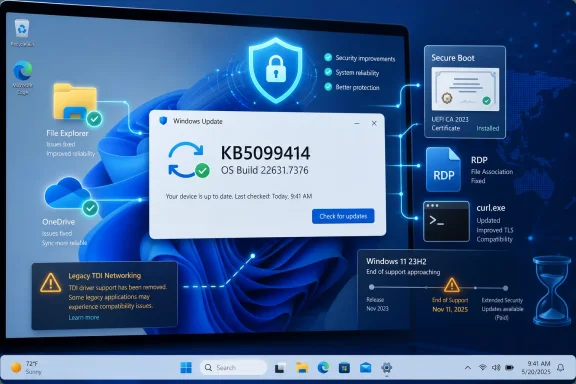 July’s Patch Is About Security and Regression Repair
Microsoft describes KB5099414 as a cumulative security update containing the latest protections and the quality improvements from KB5093998, released on June 9. It is distributed automatically through Windows Update and Microsoft Update, while organizations can deploy it through Windows Update for Business or Windows Server Update Services.July’s broader Patch Tuesday release is unusually large. BleepingComputer counted 570 corrected vulnerabilities across Microsoft’s product portfolio, including three zero-days, two of which were reportedly being exploited in attacks. That portfolio-wide figure should not be read as 570 vulnerabilities specific to KB5099414 or Windows 11 23H2.
For administrators, the practical response remains the same: prioritize testing and deployment rather than treating this as an optional feature update. The package is classified as a security update, and supported devices will install it according to their configured Windows Update policies.
Microsoft says it is not currently aware of any issues specifically affecting KB5099414. That status can change as deployment expands, so managed environments should continue monitoring Windows release health and their own application telemetry after rollout.
Microsoft Fixes June’s Office and Explorer Regressions
Several of the most visible changes repair problems caused by KB5093998, the June 2026 security update. One affected third-party applications that use OLE Automation to launch Microsoft Office or open documents. KB5099414 corrects that failure, potentially restoring document workflows used by line-of-business software and legacy integrations.File Explorer receives a targeted OneDrive repair rather than the broader redesign described in reports about KB5095093. Microsoft says the OneDrive shortcut could stop working when File Explorer was launched with administrative privileges after the June update. July’s cumulative package resolves that behavior.
The update also fixes a confusing Recycle Bin problem. When users permanently deleted a file, the confirmation dialog could display an internal Recycle Bin filename instead of the file’s original name. Although largely cosmetic, that defect made it harder to verify what was about to be erased.
Microsoft has additionally changed hotkey unregistering and cleanup behavior. The company warns that, in rare cases, built-in Windows experiences depending on the old hotkey lifecycle may temporarily stop responding to certain shortcuts. Restarting the affected application should normally restore them; persistent cases should be reported through Feedback Hub.
Networking Hardening May Expose Legacy Software
The most consequential compatibility change may be new enforcement around Transport Driver Interface, or TDI, registration. After KB5099414 is installed, applications using sockets over unregistered third-party TDI transports may stop working. Properly registered transports are unaffected.TDI is a legacy networking interface, but older security agents, network filters, communications products, and specialized enterprise software can retain dependencies long after mainstream applications have moved on. Administrators should therefore include networking and endpoint tooling in their validation rings, particularly where vendors supply kernel-level components.
Microsoft also upgrades the version of curl shipped with Windows to 8.21.0. Because curl is used directly by administrators, scripts, developer tooling, and software distribution workflows, the bundled update reduces exposure to issues in older builds without requiring users to maintain a separate copy.
Remote Desktop security receives a forward-looking change as well. Windows now supports SHA-2 certificate thumbprints for trusted RDP publishers, while SHA-1 remains available only for backward compatibility and is planned for removal.
Organizations that sign or distribute
.rdp files should begin moving trusted publisher configurations to SHA-256 or stronger algorithms. Microsoft has also published Group Policy guidance intended to help administrators control which RDP files users can open, reducing the opportunity for phishing campaigns to weaponize untrusted connection files.Secure Boot Certificate Replacement Continues
KB5099414 adds more device-targeting data for Microsoft’s ongoing Secure Boot certificate transition. Certificates used by many Windows systems began reaching expiration milestones in June 2026, prompting Microsoft to distribute replacements gradually to eligible consumer PCs and non-managed business devices.Microsoft says computers that have not yet received the newer certificates should continue to boot and install ordinary Windows updates. The additional targeting data is meant to broaden the population that can safely receive updated certificates automatically rather than forcing an immediate manual migration across every PC.
Deployment teams servicing Windows installation media have an extra requirement to watch. Microsoft says dynamically updated images must include the appropriate
boot.stl file, which participates in Secure Boot validation and must match the Windows version and architecture being deployed.If that file is omitted, a device may fail to start from the updated installation media and report error
0xc0430001. Microsoft recommends using its Update WinPE script; the alternative is to copy boot.stl manually from the corresponding Windows\Boot\EFI directory into the installation media.That warning is especially relevant for organizations maintaining custom Windows images, offline media, task sequences, or recovery environments. It is not a typical concern for an individual PC receiving KB5099414 directly through Windows Update.
The Headline Features Belong to Newer Windows Releases
The feature list circulating alongside KB5099414 closely matches Microsoft’s notes for KB5095093, the June 23 preview for Windows 11 versions 24H2 and 25H2. That package includes the Widgets behavior changes, Screen Tint accessibility option, direct Magnifier zoom controls, File Explorer hover actions, Bluetooth accessory fixes, and Phone Link call-routing improvements.Those additions are expected to feed into the July cumulative update for the newer Windows branches, but they are not documented as part of the Windows 11 23H2 package. Users on Build 22631.7376 should therefore not assume that installing KB5099414 will add Screen Tint or an “Ask Copilot” action to File Explorer.
This is more than a release-note technicality. Windows 11 versions 23H2, 24H2, 25H2, and 26H1 now receive different cumulative packages and do not necessarily gain features on the same schedule. A KB number, OS build, and supported version must be considered together before determining what changed.
Users can verify installation under Settings > Windows Update > Update history, or by running
winver and checking for Build 22631.7376. The standalone package is also available from the Microsoft Update Catalog.For the remaining supported Windows 11 23H2 estate, KB5099414 is primarily a security and reliability release—not a late feature expansion. Enterprise and Education administrators now have less than four months before version 23H2 reaches end of updates on November 10, 2026, making migration planning just as important as deploying July’s patch.
References
- Primary source: thewincentral.com
Published: 2026-07-15T05:10:47+00:00
Windows 11 KB5099414 Update Rolls Out for Version 23H2 - WinCentral
Windows 11 KB5099414 (OS Build 22631.7376) is rolling out with new Widgets, File Explorer improvements, Bluetooth enhancements, accessibility features, and July 2026 security fixes. - Read in Windows 11 News on WinCentral thewincentral.com
- Official source: support.microsoft.com
July 14, 2026—KB5099414 (OS Build 22631.7376) | Microsoft Support
July 14, 2026—KB5099414 (OS Build 22631.7376)support.microsoft.com - Related coverage: radar.offseq.com
Windows 11 KB5101650 & KB5099414 cumulative updates released - Live Threat Intelligence - Threat Radar | OffSeq.com
Detailed information about Windows 11 KB5101650 & KB5099414 cumulative updates released. Get real-time updates, technical details, and mitigation strategies.radar.offseq.com - Related coverage: bleepingcomputer.com
- Related coverage: techradar.com
Microsoft breaks Patch Tuesday record with fixes for over 200 security flaws | TechRadar
AI use is really starting to showwww.techradar.com - Related coverage: tomsguide.com
Over 1 billion Windows users at risk after disgruntled security researcher leaks Defender zero-days | Tom's Guide
The BlueHammer, RedSun and UnDefend flaws put all Windows users at risk since they turn the operating system’s antivirus against it.www.tomsguide.com
