

Background
Patch Tuesday has anchored Microsoft’s security calendar since 2003, giving consumers, administrators, and software vendors a predictable monthly window for installing coordinated fixes. The model reduced the disruption caused by frequent standalone patches, but it also created a recurring race in which attackers analyze newly released updates and search for organizations that have not yet deployed them.
That race has accelerated as Windows has expanded from a desktop operating system into a foundation for cloud services, identity systems, development platforms, collaboration tools, and enterprise infrastructure. A vulnerability disclosed through Microsoft’s monthly release may affect Windows itself, Office, SharePoint Server, SQL Server, Azure-related components, Visual Studio, or another supported product.
Why the number is unusually difficult to interpret
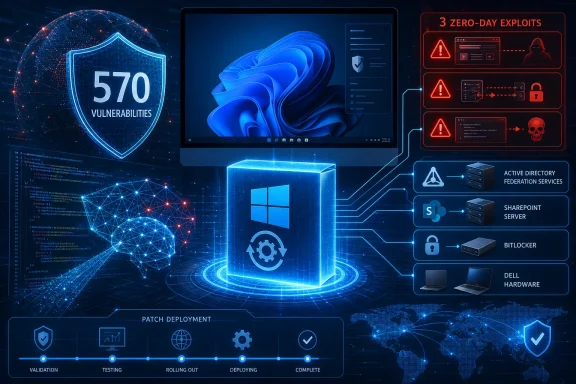
The widely reported figure of 570 vulnerabilities refers to one method of counting newly addressed flaws in Microsoft’s July release. Other security companies reported totals around 622 because they included additional vulnerabilities that Microsoft had fixed earlier, documented during July, republished, or assigned through related components.
Neither figure means that KB5101650 contains 570 independent Windows 11 fixes. The monthly total covers Microsoft’s broader product lineup, and many vulnerabilities affect server or developer products that are not present on an ordinary home computer.
This distinction matters because raw CVE totals can mislead both casual users and enterprise dashboards. A consumer should not assume that every vulnerability applies to one laptop, while an administrator should not dismiss the record number simply because many of the flaws fall outside the Windows desktop.
A sharp increase over July 2025
Microsoft addressed 137 vulnerabilities in July 2025 under a commonly used counting method. The increase to 570 represents a rise of approximately 316 percent, making July 2026 an extraordinary month even by the expanding standards of Patch Tuesday.
The jump does not necessarily indicate that Microsoft’s software became four times less secure in one year. It reflects a combination of broader disclosure practices, increasingly automated code analysis, accumulated research, expanded product coverage, and Microsoft’s growing use of AI-assisted vulnerability discovery.
The Windows 11 Update in Detail
For supported Windows 11 installations, the July security update arrives as KB5101650. It moves Windows 11 version 25H2 to OS build 26200.8875 and version 24H2 to build 26100.8875.
As a cumulative update, KB5101650 includes not only the latest security corrections but also previously released quality improvements for the relevant Windows branch. A PC that skipped an earlier monthly update generally receives the superseding fixes through the current cumulative package.
What KB5101650 actually contains
The update incorporates security changes documented through Microsoft’s July 2026 Security Update Guide, alongside operating-system reliability and servicing work. It also includes improvements previously tested through June’s optional preview channel.
Among the documented Windows changes are refinements involving Secure Boot certificate deployment and a correction for certain third-party applications that use OLE Automation to communicate with Microsoft Office. These details may appear unrelated to the headline vulnerability total, but they illustrate why cumulative updates require broader testing than individual security patches.
Windows servicing packages modify interconnected components rather than replacing one isolated executable. Kernel code, authentication libraries, networking functions, certificates, application compatibility layers, and management interfaces may all change within the same installation event.
Security improvements are often invisible
Most users will not notice a new interface after installing KB5101650. The most important changes operate below the desktop, hardening code paths that applications and attackers can reach without exposing a visible feature.
Security updates may add bounds checks, correct object-lifetime errors, strengthen validation, change default permissions, or prevent untrusted input from reaching privileged services. The absence of a visible feature does not reduce the update’s importance; it often indicates that the work is occurring in precisely the components users should not have to manage manually.
How consumers can verify installation
Windows 11 users can confirm the update through the Settings application:
- Open Settings and select Windows Update.
- Choose Check for updates if Windows has not already started downloading the package.
- Allow KB5101650 to install and restart the computer when prompted.
- Open Settings > System > About and check the operating-system build.
- Confirm build 26200.8875 for Windows 11 25H2 or 26100.8875 for Windows 11 24H2.
Users should save active work before restarting. A cumulative update may require more than one installation phase, and interrupting the system during servicing can lead to rollback attempts or recovery procedures.
Three Zero-Days Change the Risk Calculation
July’s three zero-days require more attention than the record aggregate count. A zero-day, in Microsoft’s Patch Tuesday terminology, is generally a vulnerability that was publicly disclosed or exploited before customers had a broadly available official fix.
Two of the July flaws were reportedly under active exploitation when Microsoft released the updates. The third had been publicly disclosed, making technical knowledge of the weakness available before patching was complete.
CVE-2026-56155: Active Directory Federation Services
CVE-2026-56155 affects Active Directory Federation Services, or AD FS, and was observed in active attacks. AD FS remains important in organizations that use federated identity, legacy authentication architectures, hybrid environments, or applications connected to on-premises identity infrastructure.
An identity-system vulnerability deserves priority because authentication services sit near the center of enterprise trust. A successful attacker may use an identity weakness not merely to compromise one server but to gain access to applications, impersonate users, or establish a path into connected resources.
Organizations running AD FS should identify every exposed or reachable instance rather than assuming that a cloud migration eliminated the service. Forgotten federation servers, test systems, and partially decommissioned infrastructure can remain connected long after administrators believe they are no longer operationally important.
CVE-2026-56164: SharePoint Server
CVE-2026-56164 affects on-premises Microsoft SharePoint Server and was also associated with exploitation in the wild. Its Microsoft severity score may appear modest compared with some critical vulnerabilities, but active exploitation and the strategic value of SharePoint make the flaw operationally urgent.
SharePoint servers often contain sensitive documents, internal communications, workflow data, credentials embedded in configuration files, and integrations with other business systems. They may also be internet-facing, which gives attackers a direct route to an enterprise application without first compromising a workstation.
Risk teams should therefore avoid prioritizing the vulnerability solely by its numerical severity score. Observed exploitation, external exposure, business importance, and the potential for attack chaining can outweigh a lower base score.
CVE-2026-50661: BitLocker security bypass
The third zero-day, CVE-2026-50661, is a publicly disclosed BitLocker security-feature bypass. Exploitation requires physical access under the conditions described for the flaw, limiting its usefulness in broad remote attacks but making it relevant to stolen, lost, intercepted, or otherwise accessible devices.
BitLocker remains one of Windows’ most important protections for data at rest. A bypass does not automatically expose every encrypted drive, but any weakness that reduces confidence in pre-boot or recovery protections deserves attention from organizations handling regulated or sensitive information.
Laptop fleets, executive systems, field devices, kiosks, and computers used in hostile or uncontrolled locations should receive particular scrutiny. Physical-access requirements reduce attack scale, not necessarily impact.
The 570-Vulnerability Breakdown
The July release includes vulnerabilities spanning elevation of privilege, remote code execution, information disclosure, denial of service, security-feature bypass, and spoofing. Elevation-of-privilege flaws form the largest category, followed by remote-code-execution and information-disclosure vulnerabilities.
Approximately 254 flaws were classified as elevation of privilege, 145 as remote code execution, 102 as information disclosure, 35 as denial of service, 17 as security-feature bypass, and 16 as spoofing. Small differences between category totals and headline figures can result from counting rules, overlaps, or revisions to Microsoft’s published data.
Elevation of privilege dominates
An elevation-of-privilege vulnerability usually requires an attacker to gain some initial access before reaching higher permissions. That requirement can make the flaw appear less dangerous than an unauthenticated remote-code-execution bug, but modern attacks frequently combine vulnerabilities rather than relying on one defect.
A malicious document, stolen password, browser compromise, or exposed service may provide an initial foothold. An elevation-of-privilege flaw can then allow the attacker to escape a restricted account, obtain SYSTEM-level permissions, disable protections, or move deeper into the environment.
The presence of more than 250 such flaws reinforces the importance of layered defense. Endpoint detection, application control, least privilege, credential isolation, and patching all help prevent a limited compromise from becoming complete system control.
Remote code execution remains the critical category
The July release contains roughly 145 remote-code-execution vulnerabilities, with dozens rated Critical. These flaws can allow attacker-controlled code to run through a vulnerable service, application, protocol, file parser, or network component.
Not every remote-code-execution issue is remotely exploitable over the public internet. Some require user interaction, local network access, authentication, or a specially configured feature.
Administrators must therefore assess reachability, not merely vulnerability presence. A critical flaw in a disabled component may be less urgent than an Important-rated vulnerability already being exploited against an internet-facing server.
Information disclosure supports attack chains
Information-disclosure flaws rarely receive the same attention as code-execution bugs, yet leaked data can neutralize security controls. Memory addresses, authentication material, file contents, cryptographic information, or configuration details may help an attacker prepare a more reliable second-stage exploit.
This is particularly relevant to side-channel and memory-safety attacks. Modern operating systems rely on randomization, isolation, and secrecy to make exploitation difficult; information leakage can remove those barriers.
The July release should consequently be evaluated as a collection of possible attack-chain components. A lower-severity disclosure flaw can become much more serious when paired with privilege escalation or code execution.
AI Is Reshaping Vulnerability Discovery
Microsoft has been preparing customers for higher vulnerability counts as artificial intelligence becomes more capable of reviewing large codebases. The company’s own work includes codename MDASH, a multi-model agentic scanning system built to discover, debate, validate, and prove exploitable security defects.
MDASH coordinates more than 100 specialized agents across multiple models rather than asking one general-purpose model to review an entire codebase. Different agents can examine suspicious code, challenge findings, eliminate duplicates, and attempt to construct proof-of-concept conditions.
From pattern matching to agentic investigation
Traditional static-analysis systems are effective at identifying known classes of dangerous behavior, but they can generate large numbers of theoretical warnings. Human researchers must then determine whether those warnings represent reachable and exploitable flaws.
Agentic systems attempt to automate more of that investigative process. One agent may identify a potential use-after-free condition, another may trace whether untrusted input reaches it, and a third may test whether the state can be triggered reliably.
That workflow can reduce false positives and help researchers concentrate on validated problems. It can also examine code continuously, which gives defenders a scale advantage that manual review alone cannot provide.
MDASH has already contributed Windows fixes
Microsoft said MDASH helped its researchers discover 16 vulnerabilities in Windows networking and authentication components that were fixed in May 2026. Four were Critical remote-code-execution flaws involving security-sensitive areas such as TCP/IP and IKEv2 processing.
Those earlier results establish that MDASH is more than a research demonstration. It has participated in production security work, although Microsoft has not attributed all 570 July vulnerabilities to the system.
The July surge should therefore be treated as evidence of a wider transition rather than proof that one AI scanner found every flaw. Microsoft’s security teams, external researchers, bug-bounty participants, automated tools, and product engineers all contribute to the monthly pipeline.
More findings can indicate better security
A higher vulnerability count may look like evidence of declining software quality. In isolation, however, the number says little about when the bugs were introduced, who discovered them, whether they were reachable, or whether attackers knew about them.
Finding and fixing a dormant vulnerability before exploitation improves security even though it increases the published CVE count. AI-assisted discovery may temporarily make products appear less secure because it reveals defects that previously remained invisible.
The more meaningful metrics are the proportion found internally, the time required to remediate them, the number exploited before patches become available, and the reliability of the resulting updates. Discovery volume is useful, but prevention and response quality matter more.
AI Also Accelerates the Attacker
The same general capabilities that help Microsoft inspect Windows code can help offensive researchers analyze patches, generate test cases, translate vulnerability descriptions into exploit hypotheses, and search for similar mistakes elsewhere.
AI does not automatically turn every disclosed defect into a working exploit. Attackers still face technical barriers involving memory layout, mitigations, authentication, environmental requirements, and reliable delivery.
Patch diffing at machine speed
Once Microsoft releases a security update, attackers can compare patched and unpatched binaries to identify what changed. This practice, known as patch diffing, existed long before generative AI, but automated reasoning can speed up the classification of modified functions and suggest likely exploitation paths.
The result is an increasingly narrow interval between disclosure and broad malicious scanning. Organizations that once waited a week or more for informal community testing may now spend much of that period exposed to automated reconnaissance.
Microsoft’s updated deployment recommendations reflect that pressure. The company has recommended a quality-update deferral of less than three days, a deadline of zero or one day after deferral, and a restart grace period no longer than two days for managed Windows environments.
Speed cannot replace testing
A shorter deployment window does not eliminate the need for compatibility checks. July demonstrates why: Microsoft withheld KB5101650 from a limited set of Dell devices after incompatibility reports involving unexpected shutdowns, increased heat, reduced performance, and battery drain.
Enterprises therefore face two simultaneous risks. Installing too slowly can leave exploitable weaknesses open, while installing blindly can disrupt critical systems.
The practical answer is not universal same-hour deployment but rapid, automated testing through representative update rings. Organizations need enough telemetry to detect failures quickly and enough automation to move successful updates from pilot groups into broad production without manual delay.
The Dell Compatibility Block
Microsoft has blocked KB5101650 from being offered to a limited number of Dell PCs with Intel processors. The safeguard followed reported compatibility problems connected to changes that had appeared during the preview-update cycle.
Symptoms reportedly included unexpected shutdowns, higher operating temperatures, poor performance, and increased battery consumption. Those are serious enough that forcing installation would create more risk than temporarily leaving the affected devices on the previous build.
Why safeguard holds matter
Windows Update uses safeguard holds to prevent an update from reaching systems with known hardware, driver, firmware, or application conflicts. This approach reduces large-scale failures, but it creates a difficult security gap when the withheld package also contains fixes for actively exploited vulnerabilities.
Affected systems do not become safe merely because Microsoft blocks the update. They remain subject to the vulnerabilities applicable to their configuration until Microsoft, Dell, or Intel resolves the compatibility problem and the cumulative package becomes available.
Administrators should identify devices under the hold and apply compensating controls. These can include restricting network exposure, enforcing strong endpoint protection, limiting administrative rights, monitoring authentication activity, and ensuring browsers and third-party applications remain fully updated.
Consumers should not force the package
Owners of affected Dell systems may be tempted to download the standalone package and bypass Windows Update. That is unwise unless Microsoft or Dell publishes specific instructions confirming that the compatibility issue has been resolved.
A safeguard hold is not a cosmetic rollout delay. It indicates that Microsoft has enough evidence of a problem to stop automatic delivery to identified configurations.
Users should continue checking Windows Update and install relevant firmware or driver updates supplied through trusted channels. Once the underlying incompatibility is corrected, Microsoft can remove the hold and resume normal deployment.
Enterprise Deployment Priorities
The July release is too broad for an enterprise to manage through one undifferentiated “patch everything” ticket. Security teams should combine exploit status, product exposure, business criticality, and available mitigations to determine deployment order.
The two actively exploited zero-days should take precedence over flaws selected solely by CVSS score. Internet-facing AD FS and SharePoint Server installations require immediate attention because they combine known attacker interest with access to valuable identity and collaboration data.
A practical rollout sequence
A risk-based July deployment can follow this order:
- Inventory AD FS and on-premises SharePoint Server instances, including forgotten, test, standby, and disaster-recovery systems.
- Patch or isolate internet-facing affected servers immediately, prioritizing the two actively exploited zero-days.
- Identify systems affected by the BitLocker bypass, especially mobile and physically exposed devices.
- Deploy KB5101650 to a representative Windows 11 pilot group, covering key hardware models, security agents, VPN clients, and business applications.
- Review pilot telemetry for installation failures, crashes, battery anomalies, and application regressions.
- Expand deployment through production rings within the shortened deferral window where testing succeeds.
- Track safeguard-held Dell systems separately and apply compensating controls until an approved fix becomes available.
- Verify installation by build number and vulnerability state, rather than trusting that a management platform merely issued the command.
This sequence separates urgent server exposure from routine endpoint rollout while preserving a fast response. It also prevents incompatible devices from disappearing into a generic compliance report.
Update rings must become faster
Many organizations still operate update rings designed for a slower threat environment. A pilot group may receive patches on release day, while broad deployment begins seven, 14, or even 30 days later.
That model becomes increasingly difficult to justify when active exploitation is confirmed. The pilot stage should focus on hours and a small number of days, not weeks.
A mature ring design includes representative hardware, critical applications, remote workers, virtual desktops, security tools, and multiple network conditions. The goal is to generate trustworthy evidence quickly enough that successful updates can move forward automatically.
Verification is part of patching
An update is not complete when a deployment system reports “installed.” Devices may remain pending a restart, fall back to an earlier build, miss the package because of detection problems, or sit behind a compatibility hold.
Administrators should validate the resulting OS build, restart state, servicing logs, endpoint health, and vulnerability-management results. High-risk servers may also require post-installation checks to confirm that services started correctly and external exposure has not changed.
This verification step is essential during a release as large as July’s. More patches mean more opportunities for detection mistakes, supersedence confusion, and reporting inconsistencies.
Consumer Impact
For most home users, the correct response is straightforward: allow Windows Update to install KB5101650, restart promptly, and avoid disabling the update service. The majority of consumers do not need to investigate hundreds of CVEs individually.
Windows 11 Home installations receive cumulative security updates automatically, although active hours, metered connections, low disk space, or repeated restart deferrals can delay completion. A PC that has downloaded the package but has not restarted may still lack important protections.
What home users should do now
Consumers should take several basic actions:
- Install pending Windows updates and restart the PC, rather than leaving the update in a “restart required” state.
- Confirm that Microsoft Defender security intelligence is current, particularly on systems that do not use another antivirus product.
- Update browsers, productivity applications, drivers, and firmware, because Patch Tuesday does not cover every application on the computer.
- Keep BitLocker or Device Encryption enabled, since the existence of a bypass does not make full-disk encryption ineffective.
- Avoid manually forcing KB5101650 onto a Dell device covered by Microsoft’s safeguard hold.
- Back up important files before major servicing events, using storage that is not permanently exposed to the same Windows account.
Users should also be skeptical of emails or pop-ups claiming that a special tool is required to install the July fixes. Windows security updates should come through Windows Update, approved enterprise management systems, or Microsoft’s official update catalog.
Performance expectations
A large CVE count does not necessarily translate into a proportionally larger download or slower PC. Many vulnerabilities can be corrected through changes to the same set of system files, and cumulative packages replace components rather than delivering one separate installer per CVE.
Temporary increases in CPU, disk, or memory activity are normal while Windows stages and commits an update. Persistent overheating, repeated shutdowns, severe battery drain, or substantial performance loss are not normal and should be investigated, especially on a Dell system potentially affected by the known issue.
What the Update Means for Windows Security
July 2026 illustrates a paradox that will become increasingly familiar. Better vulnerability-discovery technology can produce more alarming security bulletins even as it reduces the number of undiscovered flaws available to attackers.
This transition resembles earlier changes in software testing, when fuzzing and static analysis exposed classes of defects that manual review had missed. AI expands the process by reasoning across functions, proposing exploit conditions, and coordinating specialized analysis at greater scale.
Patch volume may remain elevated
Microsoft has explicitly warned that AI-assisted research can discover a greater volume and diversity of vulnerabilities. Customers should therefore prepare for larger monthly releases rather than treating July as an isolated statistical anomaly.
That preparation involves more than increasing maintenance windows. Enterprises need scalable testing, accurate asset inventories, better rollback planning, and automated prioritization that prevents analysts from drowning in hundreds of alerts.
Consumer expectations must change as well. Monthly security updates may grow more complex even when Windows itself appears visually unchanged.
Secure development remains the long-term test
Finding more bugs after software ships is valuable, but the ultimate objective is to identify them during design, coding, and pre-release testing. MDASH and similar systems will have their greatest impact if developers can use them before vulnerable code reaches production.
Microsoft says it is integrating AI-led discovery and remediation into the software-development lifecycle while retaining human oversight. That human role remains important because a plausible AI finding is not automatically a real vulnerability, and an apparently correct patch can introduce functional regressions.
The long-term measure of success will be whether externally discovered and actively exploited flaws decline. A permanently rising patch count without a reduction in attacker success would suggest that discovery has improved faster than prevention.
Strengths and Opportunities
The July release exposes operational challenges, but it also demonstrates meaningful progress in Microsoft’s security program.
- Microsoft fixed hundreds of vulnerabilities in one coordinated release, reducing the pool of known weaknesses available for future exploitation.
- AI-assisted discovery can inspect more code than human teams alone, potentially exposing deep defects before criminals encounter them.
- MDASH attempts to validate exploitability rather than merely generating warnings, which can improve the signal delivered to engineering teams.
- Cumulative servicing simplifies consumer protection, because one supported Windows package incorporates earlier fixes.
- Safeguard holds can prevent known compatibility failures from spreading, as shown by the restricted deployment to affected Dell systems.
- Higher vulnerability counts may reflect greater visibility, not simply deterioration in product quality.
- Shorter deployment recommendations can reduce attacker dwell time, particularly when exploitation begins before Patch Tuesday.
- Risk-based prioritization gives enterprises a better model than raw CVSS sorting, emphasizing exposure, attack activity, and business importance.
The opportunity extends beyond Microsoft. If AI-based code auditing becomes broadly available through enterprise security platforms, smaller development teams may gain access to analysis capabilities previously limited to major vendors and specialized research groups.
Risks and Concerns
The same release highlights unresolved weaknesses in modern patch management and AI-assisted security.
- Two zero-days were already being exploited, showing that defenders did not discover or remediate every high-value flaw before attackers acted.
- A record CVE count can overwhelm security teams, causing urgent vulnerabilities to disappear inside a large compliance queue.
- AI can accelerate offensive research as well as defensive discovery, shortening the period between patch publication and mass exploitation.
- Faster deployment can increase operational disruption if organizations lack representative testing and reliable rollback procedures.
- The Dell compatibility hold leaves some systems temporarily exposed, even though withholding the update is necessary to prevent stability problems.
- Different vulnerability-counting methods create confusion, with totals ranging from roughly 570 to more than 620.
- AI benchmark results do not guarantee equivalent performance in every codebase, especially where build environments, dependencies, and proprietary protocols differ.
- A larger volume of generated findings can create false confidence if validation, prioritization, and remediation capacity do not expand at the same pace.
- Cumulative updates increase the blast radius of a regression, because security and quality changes arrive together.
- Organizations with weak inventories may not know they still operate exposed AD FS or SharePoint systems, leaving high-risk infrastructure unpatched.
These concerns do not justify delaying all updates. They show why patching must function as an engineering discipline supported by inventory, testing, telemetry, isolation, and incident response.
What to Watch Next
The immediate question is how quickly Microsoft and Dell resolve the compatibility problem affecting the blocked devices. Administrators should watch for a revised update, driver package, firmware release, or removal of the safeguard hold rather than attempting unsupported installation methods.
Microsoft may also publish additional known-issue information as KB5101650 reaches a wider range of hardware. Early Patch Tuesday documentation often evolves as telemetry reveals failures that did not appear during preview testing.
Exploitation of the July zero-days
Security teams should expect continued activity around the AD FS and SharePoint vulnerabilities. Once patches are public, more attackers can analyze the corrected components and develop techniques against organizations that have not updated.
Evidence of compromise may predate patch installation. Updating a server closes the vulnerability, but it does not remove persistence, stolen credentials, web shells, or malicious configuration changes established before remediation.
Organizations with exposed affected services should combine patching with log review, endpoint investigation, identity auditing, and threat hunting. A clean installation report is not proof that an attacker never reached the system.
Whether AI increases Patch Tuesday permanently
Future monthly totals will show whether July represents a one-time release backlog or the beginning of consistently larger security updates. Microsoft’s own statements suggest that elevated volume is likely as AI-led discovery expands across more products and development workflows.
The more important trend will be the ratio of internally discovered vulnerabilities to exploited zero-days. If Microsoft can find substantially more flaws while reducing pre-patch exploitation, higher numbers will represent a defensive advantage.
Update reliability under tighter deadlines
Microsoft’s sub-three-day deployment recommendation raises the standard for both Windows servicing and enterprise operations. Customers cannot safely deploy that quickly if updates repeatedly cause hardware failures, while Microsoft cannot expect rapid adoption without dependable safeguard detection and transparent known-issue reporting.
July’s Dell hold will therefore serve as a test case. A fast, clearly communicated resolution would support the new deployment model; a prolonged gap would demonstrate the practical limits of accelerated patching.
July 2026 marks a turning point for Windows security because it combines record-scale remediation, active zero-day exploitation, AI-assisted vulnerability research, and real-world update compatibility problems in one release. The lesson is not simply that Windows contained 570 flaws, nor that every organization must install every patch without testing. It is that vulnerability management now operates at machine speed: defenders must identify exposed products, prioritize known exploitation, validate updates rapidly, and verify deployment with far greater precision than the traditional monthly routine demanded. AI may help Microsoft uncover more weaknesses before attackers do, but its value will ultimately depend on whether Windows customers can convert a growing stream of fixes into reliable protection before the shrinking exploitation window closes.
References
- support.microsoft.com support.microsoft.com