
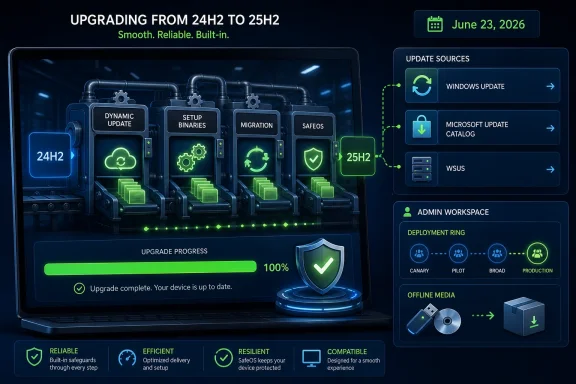
Microsoft released KB5102558 on June 23, 2026, as a Setup Dynamic Update for Windows 11 versions 24H2 and 25H2, delivering updated Windows Setup binaries and related files used during feature updates through Windows Update, Microsoft Update Catalog, and WSUS.
That sounds like the kind of footnote only deployment engineers could love. But in the Windows 11 era, these quiet Setup Dynamic Updates are where Microsoft increasingly does the unglamorous work of keeping upgrades from collapsing before the operating system even has a chance to boot. KB5102558 is not a new feature drop, not a security cumulative update, and not a reason for consumers to go hunting through the Update Catalog. It is infrastructure — and infrastructure is where Windows 11’s upgrade story is now being won or lost.
KB5102558 makes improvements to the binaries and files Windows Setup uses when moving a device through a feature update on Windows 11 24H2 and 25H2. That is the entire public payload, at least in Microsoft’s typically spare support language. There are no flashy release notes, no list of user-visible changes, and no bug-by-bug explanation of what was fixed.
That brevity is the point. Setup Dynamic Updates exist because the thing that installs Windows must itself be serviced. If the installer has outdated compatibility logic, older setup binaries, stale manifests, or migration code that does not understand the current servicing state of the OS, the upgrade can fail before any monthly cumulative update gets a chance to help.
For home users, this update will generally arrive automatically when needed. For administrators, it also synchronizes through WSUS when Windows 11 and the relevant update classification are configured. Microsoft says there are no prerequisites, and a restart may not be required after applying it.
The more interesting line is the replacement note: KB5102558 supersedes KB5092765. That tells us this is not a one-off patch but the latest rung in a ladder of Setup Dynamic Updates Microsoft has been steadily issuing for the 24H2 and 25H2 servicing generation.
This mechanism matters most during in-place upgrades, where Windows must preserve installed apps, languages, Features on Demand, user data, device drivers, recovery components, and management state. A clean install can be ruthless. An in-place upgrade has to be diplomatic.
Microsoft’s deployment guidance describes Dynamic Update as a way to ensure devices have the latest feature update packages while preserving language packs and Features on Demand. It can also reduce the need to install a separate quality update immediately after a feature upgrade. That is not cosmetic. In a fleet environment, every avoided post-upgrade repair cycle is fewer help desk tickets, fewer reboots, and fewer machines stuck between policy compliance and user productivity.
KB5102558 sits specifically in the Setup Dynamic Update bucket. That distinguishes it from SafeOS Dynamic Updates, recovery environment updates, cumulative updates, and servicing stack work. It is about the setup machinery: the files and executables that decide whether a device can move forward, how it migrates, and how it recovers when something goes wrong.
That architecture has advantages. It lets Microsoft ship dormant or staged functionality over time and then activate it through a smaller version transition. It also gives enterprises a more predictable path when moving from 24H2 to 25H2 than they had when crossing from older Windows 11 branches into 24H2.
But there is a catch: shared servicing means shared fragility. If the setup layer has a blind spot, it can affect both versions. If the migration path needs newer compatibility data, both versions may need the same Setup Dynamic Update. KB5102558’s combined applicability to 24H2 and 25H2 is a sign that Microsoft is treating the two as neighbors in the same servicing neighborhood rather than as entirely separate operating systems.
That may make life easier for endpoint teams in the long run. It also means the maintenance burden shifts from giant annual upgrade packages to a rolling stream of smaller, quieter plumbing updates that administrators must not ignore.
These updates are normally consumed by Windows Setup or deployment workflows, not treated as general-purpose desktop enhancements. If Windows Update needs KB5102558 during a feature update, it can fetch it automatically. If an administrator is refreshing installation media, building deployment shares, or servicing offline images, the Catalog package becomes useful. If a consumer PC is sitting happily on 24H2 or 25H2, manually installing setup components may accomplish little that is visible.
The Catalog matters because not every environment lets Windows Setup reach Microsoft’s endpoints during upgrade. Air-gapped networks, tightly filtered enterprise environments, lab images, regulated systems, and staged deployment rings often require administrators to acquire Dynamic Update packages and apply them deliberately. For those shops, KB5102558 is not trivia. It is a new ingredient in the media-refresh recipe.
The mistake is treating every Catalog entry as a fix for every Windows problem. Setup Dynamic Updates are targeted tools. They can help upgrade reliability; they are not a universal cure for Windows Update failures, driver problems, app crashes, or post-install performance complaints.
Setup Dynamic Updates can be awkward in these environments because they live between traditional patching and feature deployment. They are updates, but they do not behave like the monthly cumulative update that users recognize. They matter most at the moment of transition, which is exactly when administrators want the fewest surprises.
If WSUS is not configured for the right product and classification, the update may never appear where the deployment process expects it. If the update is not present in an offline media workflow, Windows Setup may proceed with older logic. That does not guarantee failure, but it increases the odds that a known setup-side improvement is missing from the upgrade path.
This is the kind of issue that rarely shows up in executive dashboards. It appears instead as a stubborn percentage of devices that fail an in-place upgrade at the same phase, or as a deployment ring that looks healthy until one hardware model, one language pack combination, or one security configuration exposes the weak seam.
Microsoft has reasons for being terse. Setup components touch sensitive parts of the OS installation process, and some changes may be too granular, conditional, or security-adjacent to document usefully. But the cumulative effect is a servicing culture in which IT pros must infer significance from release timing, replacement chains, affected versions, and observed behavior in test rings.
That is not ideal. A Setup Dynamic Update can be operationally important even when it lacks a CVE, a build number headline, or a consumer-facing feature. The more Microsoft compresses Windows feature releases into enablement packages and monthly servicing, the more these minor-sounding updates carry major deployment consequences.
In practice, administrators should treat KB5102558 as part of the June 2026 servicing baseline for any 24H2 or 25H2 upgrade media or in-place feature update workflow. That does not mean panic-installing it everywhere. It means making sure the setup path has access to it before broad deployment begins.
That related-topic placement is not the same as saying KB5102558 is a Secure Boot certificate update. It is not presented that way. But the timing is hard to ignore: Windows servicing in mid-2026 is happening against a backdrop of firmware trust, boot-chain continuity, and setup reliability.
Feature updates are where Windows crosses several sensitive boundaries at once. Setup has to assess compatibility, stage files, manage rollback, interact with recovery components, preserve encryption and boot configuration, and leave the machine in a trusted, bootable state. When Secure Boot certificate renewal is also in the air, administrators have even less tolerance for opaque setup behavior.
The lesson is not that KB5102558 should be feared. It is that the old habit of dismissing setup updates as mere installer housekeeping is outdated. In a world where boot trust, servicing checkpoints, and enablement packages intersect, housekeeping is part of the security and reliability model.
When an organization updates installation media, it may need to apply not just the latest cumulative update but also the relevant checkpoint updates, depending on the state of the image and whether languages or features are being added. Microsoft’s own deployment guidance warns that the order and package set matter. Get it wrong, and image servicing can become a maze of failed DISM operations, pending actions, or inconsistent component states.
Setup Dynamic Updates occupy a different lane from checkpoint cumulative updates, but they meet in the same deployment garage. A properly refreshed Windows 11 24H2 or 25H2 image is no longer a simple ISO plus latest monthly patch. It may involve WinRE, WinPE, install.wim, language packs, Features on Demand, cumulative updates, checkpoints, SafeOS updates, and setup file replacement.
KB5102558 is therefore one small artifact in a much larger process. Its significance is magnified by the complexity around it. If the Windows image pipeline is now more modular, then every module has to be current enough to trust.
That invisibility is a successful outcome. The best setup update is one that prevents a rollback the user never has to see. A feature update that completes cleanly is rarely credited to the preparatory plumbing that made it possible.
Still, enthusiasts should understand what not to expect. Installing KB5102558 is unlikely to fix a broken printer, improve gaming performance, resolve a graphics driver timeout, or repair a corrupted component store. If Windows Update itself is failing to scan or install ordinary cumulative updates, the right troubleshooting path is still logs, servicing health, policy inspection, driver review, and Microsoft’s standard repair tooling.
The update’s purpose is narrower and more important: make Windows Setup better at doing Windows Setup. That is mundane until the machine you care about is the one rolling back at 85 percent.
The highest-risk posture is not refusing the update. It is forgetting that Setup Dynamic Updates exist while troubleshooting upgrade failures with an outdated mental model. If a feature update fails, many teams immediately suspect drivers, BIOS, endpoint security, disk encryption, or application compatibility. Those are valid suspects. But setup media freshness belongs on the same list.
For organizations still moving devices from older Windows 11 versions into 24H2 or 25H2, the setup layer is especially important. Crossing a platform boundary exposes old assumptions. Machines that accumulated years of language packs, recovery modifications, vendor utilities, security agents, and policy residue are precisely the machines where newer setup logic can make the difference between a clean migration and a rollback.
The right testing pattern is boring but effective. Refresh media, validate Dynamic Update availability, test representative hardware, capture setup logs, and compare failure phases before and after the updated setup package is included. KB5102558 is not a guarantee, but excluding it from the experiment weakens the experiment.
That model can be more efficient than the old world. It can reduce upgrade size, smooth adoption, and let Microsoft correct deployment problems without waiting for a new ISO or a new feature release. But it also makes the boundary between “the OS” and “the updater” harder to see.
Administrators have historically prized stable baselines. Microsoft is offering more fluid baselines instead. The tradeoff is manageable only if organizations invest in observability and process: knowing which update types matter, when they apply, and how they move through management tools.
For Windows enthusiasts, this is less romantic than a new build with a visible feature list. For IT pros, it is where the real action is. A reliable Windows estate depends less on any single release milestone and more on whether the servicing chain is intact from firmware trust through setup binaries to the final cumulative update.
That sounds like the kind of footnote only deployment engineers could love. But in the Windows 11 era, these quiet Setup Dynamic Updates are where Microsoft increasingly does the unglamorous work of keeping upgrades from collapsing before the operating system even has a chance to boot. KB5102558 is not a new feature drop, not a security cumulative update, and not a reason for consumers to go hunting through the Update Catalog. It is infrastructure — and infrastructure is where Windows 11’s upgrade story is now being won or lost.
 Microsoft Ships Another Small Fix for the Biggest Part of Windows Servicing
KB5102558 makes improvements to the binaries and files Windows Setup uses when moving a device through a feature update on Windows 11 24H2 and 25H2. That is the entire public payload, at least in Microsoft’s typically spare support language. There are no flashy release notes, no list of user-visible changes, and no bug-by-bug explanation of what was fixed.That brevity is the point. Setup Dynamic Updates exist because the thing that installs Windows must itself be serviced. If the installer has outdated compatibility logic, older setup binaries, stale manifests, or migration code that does not understand the current servicing state of the OS, the upgrade can fail before any monthly cumulative update gets a chance to help.
For home users, this update will generally arrive automatically when needed. For administrators, it also synchronizes through WSUS when Windows 11 and the relevant update classification are configured. Microsoft says there are no prerequisites, and a restart may not be required after applying it.
The more interesting line is the replacement note: KB5102558 supersedes KB5092765. That tells us this is not a one-off patch but the latest rung in a ladder of Setup Dynamic Updates Microsoft has been steadily issuing for the 24H2 and 25H2 servicing generation.
Dynamic Update Is the Upgrade Before the Upgrade
Windows Setup does not simply copy a new OS image over the old one and hope for the best. Early in a feature update, Dynamic Update can retrieve newer setup components, SafeOS updates, servicing stack updates, cumulative updates, and relevant drivers. In plain English: Windows tries to update the updater before letting the updater update Windows.This mechanism matters most during in-place upgrades, where Windows must preserve installed apps, languages, Features on Demand, user data, device drivers, recovery components, and management state. A clean install can be ruthless. An in-place upgrade has to be diplomatic.
Microsoft’s deployment guidance describes Dynamic Update as a way to ensure devices have the latest feature update packages while preserving language packs and Features on Demand. It can also reduce the need to install a separate quality update immediately after a feature upgrade. That is not cosmetic. In a fleet environment, every avoided post-upgrade repair cycle is fewer help desk tickets, fewer reboots, and fewer machines stuck between policy compliance and user productivity.
KB5102558 sits specifically in the Setup Dynamic Update bucket. That distinguishes it from SafeOS Dynamic Updates, recovery environment updates, cumulative updates, and servicing stack work. It is about the setup machinery: the files and executables that decide whether a device can move forward, how it migrates, and how it recovers when something goes wrong.
Windows 11 24H2 Changed the Servicing Ground Under Everyone’s Feet
The pairing of 24H2 and 25H2 in this update is not incidental. Windows 11 version 24H2 represented a larger platform transition than the small yearly version bump might suggest, while 25H2 rides on the same broader servicing base. Microsoft’s 25H2 model relies heavily on the idea that many devices already running current 24H2 code can move to 25H2 through a comparatively small enablement package.That architecture has advantages. It lets Microsoft ship dormant or staged functionality over time and then activate it through a smaller version transition. It also gives enterprises a more predictable path when moving from 24H2 to 25H2 than they had when crossing from older Windows 11 branches into 24H2.
But there is a catch: shared servicing means shared fragility. If the setup layer has a blind spot, it can affect both versions. If the migration path needs newer compatibility data, both versions may need the same Setup Dynamic Update. KB5102558’s combined applicability to 24H2 and 25H2 is a sign that Microsoft is treating the two as neighbors in the same servicing neighborhood rather than as entirely separate operating systems.
That may make life easier for endpoint teams in the long run. It also means the maintenance burden shifts from giant annual upgrade packages to a rolling stream of smaller, quieter plumbing updates that administrators must not ignore.
The Update Catalog Is There, but Most Users Should Not Go Shopping
The support note says the standalone package is available through the Microsoft Update Catalog. That sentence tends to trigger a familiar reflex among power users: search the KB number, download the package, double-click the MSU, and feel in control. With Setup Dynamic Updates, that instinct is often misplaced.These updates are normally consumed by Windows Setup or deployment workflows, not treated as general-purpose desktop enhancements. If Windows Update needs KB5102558 during a feature update, it can fetch it automatically. If an administrator is refreshing installation media, building deployment shares, or servicing offline images, the Catalog package becomes useful. If a consumer PC is sitting happily on 24H2 or 25H2, manually installing setup components may accomplish little that is visible.
The Catalog matters because not every environment lets Windows Setup reach Microsoft’s endpoints during upgrade. Air-gapped networks, tightly filtered enterprise environments, lab images, regulated systems, and staged deployment rings often require administrators to acquire Dynamic Update packages and apply them deliberately. For those shops, KB5102558 is not trivia. It is a new ingredient in the media-refresh recipe.
The mistake is treating every Catalog entry as a fix for every Windows problem. Setup Dynamic Updates are targeted tools. They can help upgrade reliability; they are not a universal cure for Windows Update failures, driver problems, app crashes, or post-install performance complaints.
WSUS Still Matters Because the Cloud Does Not Reach Every Desk
Microsoft’s note that KB5102558 synchronizes with WSUS is more than administrative boilerplate. In 2026, Microsoft’s preferred Windows management story leans heavily toward cloud policy, Windows Update for Business, Intune, Autopatch, and analytics-driven deployment rings. Yet WSUS remains embedded in real organizations for reasons that are not going away quickly: bandwidth control, auditability, change windows, disconnected networks, and legacy Configuration Manager workflows.Setup Dynamic Updates can be awkward in these environments because they live between traditional patching and feature deployment. They are updates, but they do not behave like the monthly cumulative update that users recognize. They matter most at the moment of transition, which is exactly when administrators want the fewest surprises.
If WSUS is not configured for the right product and classification, the update may never appear where the deployment process expects it. If the update is not present in an offline media workflow, Windows Setup may proceed with older logic. That does not guarantee failure, but it increases the odds that a known setup-side improvement is missing from the upgrade path.
This is the kind of issue that rarely shows up in executive dashboards. It appears instead as a stubborn percentage of devices that fail an in-place upgrade at the same phase, or as a deployment ring that looks healthy until one hardware model, one language pack combination, or one security configuration exposes the weak seam.
Microsoft’s Sparse Notes Force Administrators to Read Between the Lines
The frustrating thing about KB5102558 is not that it is small. The frustrating thing is that Microsoft’s public description gives administrators almost no insight into what changed. “Improvements to Windows setup binaries” is accurate, but it does not help a deployment lead decide whether the update addresses a specific failure code, compatibility block, rollback phase, or migration bug.Microsoft has reasons for being terse. Setup components touch sensitive parts of the OS installation process, and some changes may be too granular, conditional, or security-adjacent to document usefully. But the cumulative effect is a servicing culture in which IT pros must infer significance from release timing, replacement chains, affected versions, and observed behavior in test rings.
That is not ideal. A Setup Dynamic Update can be operationally important even when it lacks a CVE, a build number headline, or a consumer-facing feature. The more Microsoft compresses Windows feature releases into enablement packages and monthly servicing, the more these minor-sounding updates carry major deployment consequences.
In practice, administrators should treat KB5102558 as part of the June 2026 servicing baseline for any 24H2 or 25H2 upgrade media or in-place feature update workflow. That does not mean panic-installing it everywhere. It means making sure the setup path has access to it before broad deployment begins.
The Secure Boot Clock Makes Setup Reliability Less Academic
Microsoft’s support page also points readers toward the broader Secure Boot certificate expiration issue, noting that certificates used by most Windows devices begin expiring starting in June 2026. Microsoft says it has been updating certificates on consumer and unmanaged business devices over recent months, and that devices without the newer certificates will continue to start and receive standard Windows updates while the newer certificates continue rolling out.That related-topic placement is not the same as saying KB5102558 is a Secure Boot certificate update. It is not presented that way. But the timing is hard to ignore: Windows servicing in mid-2026 is happening against a backdrop of firmware trust, boot-chain continuity, and setup reliability.
Feature updates are where Windows crosses several sensitive boundaries at once. Setup has to assess compatibility, stage files, manage rollback, interact with recovery components, preserve encryption and boot configuration, and leave the machine in a trusted, bootable state. When Secure Boot certificate renewal is also in the air, administrators have even less tolerance for opaque setup behavior.
The lesson is not that KB5102558 should be feared. It is that the old habit of dismissing setup updates as mere installer housekeeping is outdated. In a world where boot trust, servicing checkpoints, and enablement packages intersect, housekeeping is part of the security and reliability model.
Checkpoint Cumulative Updates Made the Media Story More Complicated
Windows 11 24H2 introduced another wrinkle administrators cannot ignore: checkpoint cumulative updates. These are designed to reduce package size and installation overhead by allowing later cumulative updates to depend on previous checkpoint baselines rather than always diffing against the original release. That is sensible engineering, but it complicates offline servicing and media maintenance.When an organization updates installation media, it may need to apply not just the latest cumulative update but also the relevant checkpoint updates, depending on the state of the image and whether languages or features are being added. Microsoft’s own deployment guidance warns that the order and package set matter. Get it wrong, and image servicing can become a maze of failed DISM operations, pending actions, or inconsistent component states.
Setup Dynamic Updates occupy a different lane from checkpoint cumulative updates, but they meet in the same deployment garage. A properly refreshed Windows 11 24H2 or 25H2 image is no longer a simple ISO plus latest monthly patch. It may involve WinRE, WinPE, install.wim, language packs, Features on Demand, cumulative updates, checkpoints, SafeOS updates, and setup file replacement.
KB5102558 is therefore one small artifact in a much larger process. Its significance is magnified by the complexity around it. If the Windows image pipeline is now more modular, then every module has to be current enough to trust.
The Consumer Story Is Boring, and That Is Good
For most Windows 11 users, KB5102558 should be invisible. It may download automatically when Windows needs it. It may never appear as a meaningful event in daily use. It does not add a new Start menu behavior, change Copilot, alter File Explorer, or bring a new Settings page.That invisibility is a successful outcome. The best setup update is one that prevents a rollback the user never has to see. A feature update that completes cleanly is rarely credited to the preparatory plumbing that made it possible.
Still, enthusiasts should understand what not to expect. Installing KB5102558 is unlikely to fix a broken printer, improve gaming performance, resolve a graphics driver timeout, or repair a corrupted component store. If Windows Update itself is failing to scan or install ordinary cumulative updates, the right troubleshooting path is still logs, servicing health, policy inspection, driver review, and Microsoft’s standard repair tooling.
The update’s purpose is narrower and more important: make Windows Setup better at doing Windows Setup. That is mundane until the machine you care about is the one rolling back at 85 percent.
Enterprise IT Should Treat This as a Deployment Input, Not a News Alert
The practical response to KB5102558 depends on how an organization moves Windows versions. Shops using Windows Update for Business may simply need to ensure policy does not block Dynamic Update acquisition during feature updates. Environments using Configuration Manager, WSUS, or offline media should verify that the update is synchronized, approved where appropriate, and incorporated into refreshed deployment sources.The highest-risk posture is not refusing the update. It is forgetting that Setup Dynamic Updates exist while troubleshooting upgrade failures with an outdated mental model. If a feature update fails, many teams immediately suspect drivers, BIOS, endpoint security, disk encryption, or application compatibility. Those are valid suspects. But setup media freshness belongs on the same list.
For organizations still moving devices from older Windows 11 versions into 24H2 or 25H2, the setup layer is especially important. Crossing a platform boundary exposes old assumptions. Machines that accumulated years of language packs, recovery modifications, vendor utilities, security agents, and policy residue are precisely the machines where newer setup logic can make the difference between a clean migration and a rollback.
The right testing pattern is boring but effective. Refresh media, validate Dynamic Update availability, test representative hardware, capture setup logs, and compare failure phases before and after the updated setup package is included. KB5102558 is not a guarantee, but excluding it from the experiment weakens the experiment.
The Real Patch Is Microsoft’s Servicing Model
KB5102558 is also a reminder that Windows 11 is no longer best understood as a sequence of big releases interrupted by monthly patches. It is a servicing system in constant motion. Features are staged. Enablement packages flip version states. Cumulative updates carry both fixes and feature pieces. Dynamic Updates prepare the installer. Recovery and SafeOS components have their own servicing needs.That model can be more efficient than the old world. It can reduce upgrade size, smooth adoption, and let Microsoft correct deployment problems without waiting for a new ISO or a new feature release. But it also makes the boundary between “the OS” and “the updater” harder to see.
Administrators have historically prized stable baselines. Microsoft is offering more fluid baselines instead. The tradeoff is manageable only if organizations invest in observability and process: knowing which update types matter, when they apply, and how they move through management tools.
For Windows enthusiasts, this is less romantic than a new build with a visible feature list. For IT pros, it is where the real action is. A reliable Windows estate depends less on any single release milestone and more on whether the servicing chain is intact from firmware trust through setup binaries to the final cumulative update.
The Quiet June Package Belongs in the Upgrade Checklist
KB5102558 does not demand drama, but it deserves a place in the operational memory of anyone responsible for Windows 11 upgrades this summer. Treat it as a small package with a narrow job and a potentially large blast radius when omitted from the wrong workflow.- KB5102558 was released on June 23, 2026, for Windows 11 versions 24H2 and 25H2.
- The update improves Windows Setup binaries and related files used during feature updates.
- Microsoft says the update is available through Windows Update, the Microsoft Update Catalog, and WSUS.
- The package has no listed prerequisites and replaces the earlier KB5092765 Setup Dynamic Update.
- Most consumers should let Windows obtain this update automatically rather than manually installing Catalog packages.
- Administrators maintaining offline media, WSUS deployments, or Configuration Manager task sequences should verify that their setup sources can consume the latest Dynamic Update components.
References
- Primary source: Microsoft Support
Published: Tue, 23 Jun 2026 17:02:12 Z
- Official source: learn.microsoft.com
Update Windows installation media with Dynamic Update | Microsoft Learn
Learn how to acquire and apply Dynamic Update packages to existing Windows images prior to deploymentlearn.microsoft.com - Official source: catalog.update.microsoft.com
- Official source: answers.microsoft.com
Installation Processes for Windows 11 24H2 Cumulative Updates - Microsoft Q&A
I am currently running Windows 11 23H2 and preparing to upgrade to Windows 11 24H2 in time. As part of the preparation, I have been looking into how to manage the monthly Cumulative Updates. With 24H2, I have seen that Microsoft now provide two MSU…answers.microsoft.com - Official source: techcommunity.microsoft.com
