

How To Keep Your Chats Private On ChatGPT, Gemini And Copilot is no longer a niche privacy tip story; it is a basic digital-hygiene guide for the AI era. As ChatGPT, Google Gemini, and Microsoft Copilot become more capable, they also become more opinionated about what they remember, what they retain, and what they may use to improve their models. The good news is that all three platforms now offer meaningful privacy controls, but the burden is still on users to find them, understand them, and switch them on or off correctly.
The core issue is simple: modern AI chatbots are designed to be helpful, and that often means they learn from context. In practice, that context can include your prompts, your uploaded files, your chat history, your preferences, and, in some cases, signals that feed personalization or model improvement. OpenAI says Temporary Chats do not appear in history, do not create memories, and are not used to train models, while standard chats can still be retained unless you change your settings.
Google has moved Gemini in a more personalized direction as well. Its privacy hub says Gemini may use past chats to personalize responses if the relevant setting is enabled, and Temporary Chats are specifically designed to avoid appearing in recent chats or Gemini Apps Activity. Google also states that temporary sessions are not used to personalize the experience or train its AI models, though they are retained for up to 72 hours for safety and processing.
Microsoft’s Copilot story is slightly different because it sits inside a broader ecosystem that includes the Microsoft account, Bing, and Windows. Microsoft’s privacy pages say Copilot conversation history can be retained for 18 months, and users can delete individual conversations or the entire history. Microsoft also separates personalization from model training, which matters because a chat may influence your experience without necessarily being used to train the model.
That distinction is important. Many users assume “private” means invisible, but in AI products privacy often means something more limited: not used for training, not saved to a visible history, or not used to personalize future responses. Those are related but not identical promises, and the best privacy posture comes from turning off all three wherever possible.
The broader trend is clear. AI companies are racing to make assistants more sticky by giving them memory, long-tail context, and cross-session personalization. At the same time, they are being forced to offer more controls because users are increasingly uneasy about feeding intimate, work-related, or legally sensitive material into systems that may retain it longer than expected.
That makes the privacy controls not just a convenience feature but a risk-management feature. If you treat an AI assistant like a scratchpad, you should understand whether the scratchpad is stored, reviewed, remembered, or used to improve the system. The answer differs across products and settings.
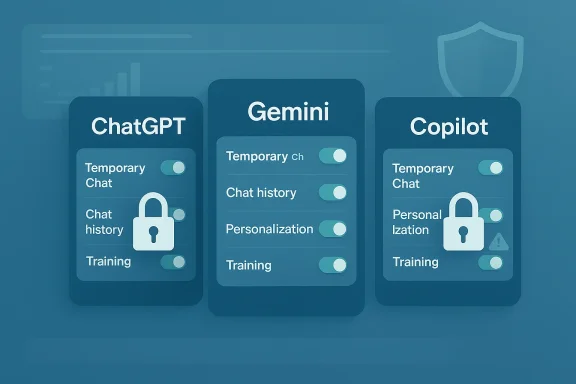
The practical rule is straightforward: if you want maximum privacy, you should reduce exposure in all three layers, not just one. Turning off training alone does not always stop personalization, and deleting a visible chat does not necessarily undo what was already used for service improvement or safety review. That nuance is where many users get tripped up.
The biggest practical decision is whether you want ChatGPT to use your content for model training. OpenAI says users can opt out through Data Controls, and once turned off, new conversations will not be used to train the models. That is a strong step for privacy-minded users, but it is not the same thing as removing chats from your visible history.
It is also worth knowing that memory and training are separate. OpenAI says ChatGPT can reference saved memories and past chats for future helpfulness, but you can turn off memory-related features or use Temporary Chat to avoid updating memory. That separation matters because a user can mistakenly disable one feature while leaving another intact.
The real-world implication is that privacy controls reduce exposure, but they do not make your conversation vanish from every operational system the moment you hit send. For enterprise and compliance contexts, OpenAI also notes that additional data controls exist for Team, Enterprise, and Edu plans.
That said, the product still rewards people who are comfortable with personalization. If you use ChatGPT for daily work, travel planning, or writing, memory can be a genuine convenience. The tradeoff is that convenience comes with a greater need to actively manage what the system remembers. Convenience is never free in privacy terms.
The company has also introduced Temporary Chat, which is meant for one-off conversations that should not shape future personalization or show up in recent chat history. Google says these chats are not used to personalize the Gemini experience or train its AI models, though they can still be kept for up to 72 hours for safety and service processing.
Google’s own language is revealing: it does not present this as a hidden backend process, but as a feature. That means users who like customization may not realize that personalization is being powered by prior chats, not just by account basics. In other words, the model may feel “smarter” because it is remembering you.
For privacy-conscious users, the most important step is to make sure Gemini is not drawing on old conversations without your awareness. Google says you can stop personalization by turning off “Your past chats with Gemini,” and you can also delete specific chats if you want them removed from your account activity.
This is why Gemini users should read “temporary” and “activity” separately. A temporary conversation is not the same as a fully private account posture, and turning off activity is not the same as deleting old material that has already shaped personalization. The order of operations matters.
At the same time, Microsoft distinguishes between using data for personalization and using it for training. Its privacy pages say you can control whether Copilot uses your conversations to personalize responses, and turning off personalization makes Copilot forget its memories.
Microsoft also provides controls for training on conversation activity and training on voice conversations in Copilot for Windows or macOS. That matters because voice and text are not always treated identically, and users should not assume that disabling one form automatically disables the other.
That distinction matters especially for consumers who use Copilot casually and assume it behaves like a disposable chatbot. Microsoft’s own wording suggests a longer-lived relationship: chats can be retained, memories can influence responses, and settings can also affect ad personalization in certain contexts. This is not a throwaway product experience.
In practical terms, enterprise users should treat Copilot like a corporate productivity layer rather than a personal notebook. Sensitive customer information, HR data, contract drafts, and security details need a higher standard of review before they ever reach the prompt box. The safest chat is still the one you never type.
That ambiguity creates confusion, especially when users compare features across ChatGPT, Gemini, and Copilot. A temporary session in one product may not match the privacy effect of an incognito-like session in another product. Users should therefore evaluate the exact promise, not the label.
That is why “my chats are encrypted” is not the same as “my chats are never used.” The former is about protection in transit or at rest; the latter is about policy and product design. Users need both answers before trusting a chatbot with sensitive information. Encryption is not a substitute for restraint.
The industry is clearly moving toward richer memory and more adaptive assistants. The privacy challenge is that these improvements are deeply appealing to users, which makes opt-outs feel like a loss even when they are sensible. That tension is the whole story of consumer AI right now.
For enterprises, the problem is broader and more operational. A single employee using an AI assistant with confidential data can create retention, compliance, and governance issues for the whole organization. In that world, privacy settings are only one part of the equation; policy, training, and acceptable-use rules matter just as much.
This is why privacy education matters. Users need to know that deleting a message, turning off one toggle, or starting a temporary chat each solves a different problem. There is no universal privacy button.
That is why companies should treat AI intake the same way they treat email or cloud storage. If employees can paste sensitive material into a chatbot without guardrails, the organization is effectively outsourcing risk to a product design team it does not control. That is a bad bargain for any serious business.
That sounds obvious, but it is exactly where most users fail. People use the same assistant for harmless brainstorming and highly sensitive personal questions, then forget that the default account settings apply to both. Context switching is where privacy breaks down.
The safest universal habit is to assume that anything typed into a chatbot could persist longer than you expect. If the information would be awkward in a work email, a public document, or a subpoena, it probably does not belong in a general-purpose AI prompt. That is the new baseline for digital caution.
We should also expect regulators, enterprises, and privacy-conscious consumers to keep pushing back against opaque retention practices. The companies that win long term will likely be the ones that make privacy legible instead of merely legal. Trust will become a product feature, not just a policy section.
Source: Times Now How To Keep Your Chats Private On ChatGPT, Gemini And Copilot
 Overview
The core issue is simple: modern AI chatbots are designed to be helpful, and that often means they learn from context. In practice, that context can include your prompts, your uploaded files, your chat history, your preferences, and, in some cases, signals that feed personalization or model improvement. OpenAI says Temporary Chats do not appear in history, do not create memories, and are not used to train models, while standard chats can still be retained unless you change your settings.Google has moved Gemini in a more personalized direction as well. Its privacy hub says Gemini may use past chats to personalize responses if the relevant setting is enabled, and Temporary Chats are specifically designed to avoid appearing in recent chats or Gemini Apps Activity. Google also states that temporary sessions are not used to personalize the experience or train its AI models, though they are retained for up to 72 hours for safety and processing.
Microsoft’s Copilot story is slightly different because it sits inside a broader ecosystem that includes the Microsoft account, Bing, and Windows. Microsoft’s privacy pages say Copilot conversation history can be retained for 18 months, and users can delete individual conversations or the entire history. Microsoft also separates personalization from model training, which matters because a chat may influence your experience without necessarily being used to train the model.
That distinction is important. Many users assume “private” means invisible, but in AI products privacy often means something more limited: not used for training, not saved to a visible history, or not used to personalize future responses. Those are related but not identical promises, and the best privacy posture comes from turning off all three wherever possible.
The broader trend is clear. AI companies are racing to make assistants more sticky by giving them memory, long-tail context, and cross-session personalization. At the same time, they are being forced to offer more controls because users are increasingly uneasy about feeding intimate, work-related, or legally sensitive material into systems that may retain it longer than expected.
Why privacy settings now matter more
A chatbot conversation can reveal far more than a search query. People use these tools to draft legal letters, plan finances, compare medical symptoms, discuss workplace issues, or simply think out loud in a way they never would on social media.That makes the privacy controls not just a convenience feature but a risk-management feature. If you treat an AI assistant like a scratchpad, you should understand whether the scratchpad is stored, reviewed, remembered, or used to improve the system. The answer differs across products and settings.
The three privacy layers to watch
There are really three separate layers to think about. First is history, which determines whether chats remain visible in your account. Second is memory or personalization, which affects whether the assistant uses earlier conversations to tailor future replies. Third is training, which determines whether your content may help improve the underlying model.The practical rule is straightforward: if you want maximum privacy, you should reduce exposure in all three layers, not just one. Turning off training alone does not always stop personalization, and deleting a visible chat does not necessarily undo what was already used for service improvement or safety review. That nuance is where many users get tripped up.
ChatGPT: What To Change
OpenAI gives ChatGPT users several privacy tools, but they are spread across different sections and not always obvious on first use. The company’s help center says Temporary Chats do not appear in history, do not create memories, and are not used to train models, while ordinary chats can still be retained and may be used depending on your data controls.The biggest practical decision is whether you want ChatGPT to use your content for model training. OpenAI says users can opt out through Data Controls, and once turned off, new conversations will not be used to train the models. That is a strong step for privacy-minded users, but it is not the same thing as removing chats from your visible history.
How to reduce exposure in ChatGPT
If you want to keep chats private, the cleanest workflow is to use Temporary Chat for sensitive sessions and to disable training in Data Controls. OpenAI says Temporary Chats are automatically deleted from its systems within 30 days and are not used to improve models.It is also worth knowing that memory and training are separate. OpenAI says ChatGPT can reference saved memories and past chats for future helpfulness, but you can turn off memory-related features or use Temporary Chat to avoid updating memory. That separation matters because a user can mistakenly disable one feature while leaving another intact.
- Open Settings in ChatGPT.
- Go to Data Controls.
- Turn off chat history & training if you do not want new chats used for improvement.
- Use Temporary Chat for sensitive or one-off conversations.
- Review Memory and disable it if you do not want ChatGPT to remember preferences across sessions.
What ChatGPT still retains
Even with privacy controls enabled, users should not assume absolute erasure in the immediate sense. OpenAI says Temporary Chats can still be retained for up to 30 days for safety purposes, and deleted chats may also be retained for a limited period before permanent removal.The real-world implication is that privacy controls reduce exposure, but they do not make your conversation vanish from every operational system the moment you hit send. For enterprise and compliance contexts, OpenAI also notes that additional data controls exist for Team, Enterprise, and Edu plans.
Where ChatGPT is strongest
ChatGPT’s privacy framework is strongest when users know what to switch off. OpenAI’s docs are unusually explicit that Temporary Chat avoids history, memory creation, and model training, which gives users a clear private mode for sensitive queries.That said, the product still rewards people who are comfortable with personalization. If you use ChatGPT for daily work, travel planning, or writing, memory can be a genuine convenience. The tradeoff is that convenience comes with a greater need to actively manage what the system remembers. Convenience is never free in privacy terms.
Gemini: The New Personal Context Problem
Google has recently pushed Gemini toward deeper personalization, which makes privacy settings more important than ever. According to Google, Gemini can use past chats to tailor responses, and users can stop that behavior by turning off the relevant setting or by deleting past chats.The company has also introduced Temporary Chat, which is meant for one-off conversations that should not shape future personalization or show up in recent chat history. Google says these chats are not used to personalize the Gemini experience or train its AI models, though they can still be kept for up to 72 hours for safety and service processing.
How Gemini handles retention
Gemini’s privacy model depends heavily on whether Keep Activity is on. Google says that, outside certain regions, Gemini can reference past chats in Gemini Apps Activity to generate personalized responses if that setting is enabled. If you want to stop that, you can turn off the feature and delete old activity.Google’s own language is revealing: it does not present this as a hidden backend process, but as a feature. That means users who like customization may not realize that personalization is being powered by prior chats, not just by account basics. In other words, the model may feel “smarter” because it is remembering you.
How to make Gemini more private
The safest approach is to check three things: Keep Activity, past chat personalization, and Temporary Chat. If you turn off Keep Activity, you reduce future retention; if you turn off the past-chat personalization setting, you reduce cross-chat tailoring; and if you use Temporary Chat, you create a one-off session with narrower reuse.For privacy-conscious users, the most important step is to make sure Gemini is not drawing on old conversations without your awareness. Google says you can stop personalization by turning off “Your past chats with Gemini,” and you can also delete specific chats if you want them removed from your account activity.
A key Gemini caveat
Gemini’s convenience features come with a subtle but important caveat: if you keep personalization on, Google says the assistant may use sensitive information you shared in chats to tailor your experience. That does not necessarily mean your chats are public or broadly shared, but it does mean they are being operationalized in ways that users may not expect.This is why Gemini users should read “temporary” and “activity” separately. A temporary conversation is not the same as a fully private account posture, and turning off activity is not the same as deleting old material that has already shaped personalization. The order of operations matters.
Copilot: Personalization Versus Model Training
Microsoft’s Copilot privacy setup is different again because it is tied closely to Microsoft account features and, in some cases, the Windows ecosystem. Microsoft says Copilot conversation history can be retained for 18 months, and users can delete one conversation or all conversation history at any time.At the same time, Microsoft distinguishes between using data for personalization and using it for training. Its privacy pages say you can control whether Copilot uses your conversations to personalize responses, and turning off personalization makes Copilot forget its memories.
How Copilot’s controls work
Copilot users should look for the Personalization setting first. Microsoft says that on the web, in Windows/macOS, and in the mobile app, you can navigate to privacy settings and manage personalization directly. If personalization is off, Copilot will no longer tailor future experiences based on past conversation memory.Microsoft also provides controls for training on conversation activity and training on voice conversations in Copilot for Windows or macOS. That matters because voice and text are not always treated identically, and users should not assume that disabling one form automatically disables the other.
Deleting history versus disabling use
The privacy trap in Copilot is similar to the one in other assistants: deleting visible history does not always equal disabling all downstream uses. Microsoft says you can delete prior conversations from chat history, and you can also manage personalized ads that may be based on Copilot conversation history.That distinction matters especially for consumers who use Copilot casually and assume it behaves like a disposable chatbot. Microsoft’s own wording suggests a longer-lived relationship: chats can be retained, memories can influence responses, and settings can also affect ad personalization in certain contexts. This is not a throwaway product experience.
Enterprise users should think differently
For business users, Copilot becomes a governance issue, not just a privacy issue. Enterprise deployments often come with separate retention, compliance, and admin rules, which means individual users may not control all data paths on their own. That is why organizations need clear internal guidance on what can be entered into Copilot and how data is stored or retained.In practical terms, enterprise users should treat Copilot like a corporate productivity layer rather than a personal notebook. Sensitive customer information, HR data, contract drafts, and security details need a higher standard of review before they ever reach the prompt box. The safest chat is still the one you never type.
What “Private” Really Means
The word “private” is doing a lot of work in AI marketing, but the implementation varies by platform. Sometimes it means the chat does not appear in a visible history. Sometimes it means the chat is not used for model training. Sometimes it means the chat is not used to personalize future replies. Very often, it means only one of those things.That ambiguity creates confusion, especially when users compare features across ChatGPT, Gemini, and Copilot. A temporary session in one product may not match the privacy effect of an incognito-like session in another product. Users should therefore evaluate the exact promise, not the label.
The difference between privacy and security
Privacy is about how data is used, retained, and shared. Security is about how well that data is protected from unauthorized access. An AI platform can be secure enough while still retaining your chats for later review or improvement purposes.That is why “my chats are encrypted” is not the same as “my chats are never used.” The former is about protection in transit or at rest; the latter is about policy and product design. Users need both answers before trusting a chatbot with sensitive information. Encryption is not a substitute for restraint.
Why the default matters
Default settings shape behavior more than any privacy blog post ever will. If a setting is on by default, many users will never change it, and the product effectively becomes a data-collection system for casual users. That is why toggles like Keep Activity, chat history & training, and personalization matter so much.The industry is clearly moving toward richer memory and more adaptive assistants. The privacy challenge is that these improvements are deeply appealing to users, which makes opt-outs feel like a loss even when they are sensible. That tension is the whole story of consumer AI right now.
Consumer Versus Enterprise Risk
For consumers, the biggest risk is accidental oversharing. People talk to AI tools as if they were private journals, even though the platform may retain the conversation, learn from it, or use it to personalize later interactions. That is especially risky when the subject involves relationships, health, money, or identity.For enterprises, the problem is broader and more operational. A single employee using an AI assistant with confidential data can create retention, compliance, and governance issues for the whole organization. In that world, privacy settings are only one part of the equation; policy, training, and acceptable-use rules matter just as much.
The consumer mindset problem
Consumers often think in terms of convenience. If the chatbot remembers their preferences, that feels useful. If the chatbot saves the conversation, that feels harmless. But the cumulative effect is a growing archive of personal data inside a commercial AI system.This is why privacy education matters. Users need to know that deleting a message, turning off one toggle, or starting a temporary chat each solves a different problem. There is no universal privacy button.
The enterprise governance problem
Enterprises need more than user-level toggles because they need consistent enforcement. Microsoft, OpenAI, and Google all offer business or enterprise variants that add data controls, but those controls still require administrators to understand what is happening to the content their workers submit.That is why companies should treat AI intake the same way they treat email or cloud storage. If employees can paste sensitive material into a chatbot without guardrails, the organization is effectively outsourcing risk to a product design team it does not control. That is a bad bargain for any serious business.
Practical Privacy Checklist
The simplest way to think about AI privacy is to use a repeatable checklist every time you open a chatbot. First decide whether the conversation is sensitive. Then decide whether the platform should remember it. Finally, decide whether you are comfortable with the content contributing to training or personalization.That sounds obvious, but it is exactly where most users fail. People use the same assistant for harmless brainstorming and highly sensitive personal questions, then forget that the default account settings apply to both. Context switching is where privacy breaks down.
A simple step-by-step routine
- Use Temporary Chat for anything private or one-off.
- Turn off training where the option exists.
- Disable memory or personalization if you do not want future tailoring.
- Review and delete old chats that may still be sitting in history.
- Avoid uploading sensitive files unless absolutely necessary.
Best practices across the three platforms
ChatGPT is the easiest to segment if you consistently use Temporary Chat and Data Controls. Gemini is the most likely to surprise users because of its expanding “personal context” model and the way activity settings are tied to personalization. Copilot is the most enterprise-entangled, which means its privacy meaning can shift depending on whether you are using a personal or managed account.The safest universal habit is to assume that anything typed into a chatbot could persist longer than you expect. If the information would be awkward in a work email, a public document, or a subpoena, it probably does not belong in a general-purpose AI prompt. That is the new baseline for digital caution.
Strengths and Opportunities
The good news is that the major AI platforms are no longer ignoring privacy by default. They now offer more granular controls, clearer documentation, and in some cases explicit private-session modes that reduce the chance of accidental retention. For users, that creates a real opportunity to keep the benefits of AI while shrinking the privacy footprint.- Temporary Chat features give users a cleaner way to ask sensitive questions without building long-term memory.
- Training opt-outs now exist on ChatGPT and Copilot, which helps users separate convenience from data contribution.
- Personalization toggles let users decide whether assistants should remember their style and preferences.
- Deletion tools make it easier to remove old chats that no longer belong in your account.
- Enterprise controls offer organizations a stronger governance path than consumer accounts.
- Clearer documentation makes it easier to understand the difference between retention, memory, and model training.
- Safety retention windows such as 30 hours or 30 days can help providers handle abuse detection without permanently storing every private exchange.
Risks and Concerns
Even with better privacy controls, the overall direction of the market still raises concerns. The push toward memory and personalization can make assistants more useful, but it can also make them more invasive, especially when users do not understand what is being stored or reused.- Default-on personalization can create data retention that users never intended.
- Ambiguous terminology like “activity,” “memory,” and “training” can hide important distinctions.
- Short private-mode retention windows still mean some data may persist temporarily.
- Enterprise users may not realize how much visibility administrators or compliance systems have.
- Deleted chats are not always instantly removed from all backend systems.
- Sensitive prompts can still be exposed through third-party actions or integrations.
- Ad personalization links may use conversation history in ways users do not expect.
Looking Ahead
The next phase of AI assistants will almost certainly involve more memory, not less. That means privacy controls will need to become more visible, more standardized, and easier to audit. The competitive pressure is obvious: each platform wants to feel more personal than the last, but every step toward personalization also increases the importance of informed consent.We should also expect regulators, enterprises, and privacy-conscious consumers to keep pushing back against opaque retention practices. The companies that win long term will likely be the ones that make privacy legible instead of merely legal. Trust will become a product feature, not just a policy section.
What to watch next
- More visible incognito-style modes across AI assistants.
- Better separation between history, memory, and training settings.
- Stronger controls for file uploads and connected apps.
- New enterprise policy tools for retention and compliance.
- Ongoing changes to default behavior as vendors compete on personalization.
Source: Times Now How To Keep Your Chats Private On ChatGPT, Gemini And Copilot
