
Keeper Security launched the Keeper Teams App for Microsoft Teams on June 25, 2026, bringing privileged access request and approval workflows into Teams for organizations using Keeper Vault, Keeper Endpoint Privilege Manager, Keeper Secrets Manager, or KeeperPAM. The move is not just another integration checkbox. It is a bet that the place where employees already ask for help should also become the place where sensitive access is requested, justified, approved, time-limited, and audited. For Windows-heavy enterprises that live in Teams all day, that is a meaningful shift in how identity governance is supposed to feel.
The central idea behind Keeper’s Teams app is simple: access workflows break down when they live somewhere employees do not naturally work. If a developer needs a secret, an administrator needs endpoint elevation, or a user needs a shared vault record, the approved path often means opening a ticket, finding the right portal, waiting for a manager, and then copying the result back into the workstream. That friction is exactly where shadow IT grows.
Keeper is trying to collapse that distance. The new app lets users request and approve access actions inside Microsoft Teams, while Keeper remains the system that stores records, enforces permissions, and governs secrets. In practice, Teams becomes the front door; Keeper remains the lock, vault, and audit trail.
That distinction matters. A Teams-native button is not security by itself. The security claim rests on whether the approval workflow still preserves least privilege, time limits, credential rotation, and traceability. Keeper’s pitch is that the integration does not replace those controls with chat convenience; it exposes them where users are already making operational decisions.
The launch also reflects a broader enterprise software trend: security vendors are no longer assuming that users will willingly leave their collaboration tools to perform governance tasks. The workflow has to come to the user, or the user will invent a faster workflow outside the system.
Developers touch cloud credentials. Contractors need temporary access to shared folders. Support staff may need short-lived local elevation. Security teams increasingly manage not only human accounts but also service accounts, machine identities, API tokens, and secrets buried inside automation pipelines.
The result is that access requests have become ordinary work, not exceptional work. But many organizations still process them through tools designed for slower, more centralized IT operations. Email chains, help desk tickets, and one-off portal requests can preserve a record, but they often do so at the cost of speed and clarity.
That is the gap Keeper is targeting. Its Teams app supports requests for vault records and shared folders, one-time shares for passwords or secrets, endpoint privilege elevation approvals, SSO Cloud device approvals, and the creation of new login records with automatically generated passwords. Those are not exotic edge cases. They are the daily access frictions that make employees choose between waiting and improvising.
The interesting part is not that Keeper added Teams support. The interesting part is that the workflows are specific enough to suggest Keeper understands where access governance commonly leaks.
A well-designed access request should answer three questions before the approver even clicks: what does the user need, why do they need it, and when should that access disappear? If those answers are missing, approvals become rubber stamps. If they are embedded in the workflow, managers and administrators have at least a fighting chance of making a real decision.
Keeper adds another useful control for PAM User records and folders: auto-rotation is enabled by default after the access window ends. That is a significant design choice. Temporary access without credential rotation can still leave residue, especially when credentials are copied, cached, or used in scripts. Rotation after the window closes helps make the temporary nature of access more than a calendar promise.
This is where the integration moves beyond convenience. If a Teams-based workflow simply made it easier to distribute secrets, it would be a liability. By pairing access windows with post-use credential rotation, Keeper is trying to make fast access less likely to become permanent access by accident.
That architecture will matter to security teams that instinctively distrust chat integrations with sensitive systems. Teams is a powerful collaboration hub, but it is also a noisy place full of bots, plugins, files, guest users, and notification overload. The idea of connecting privileged access workflows to Teams will make some administrators understandably cautious.
Keeper’s answer is to keep Teams as the interaction layer rather than the storage layer. The app initiates and routes requests, but Keeper Vault and related Keeper services remain the control plane for records, permissions, secrets, and enforcement. That separation is the only way this kind of integration can be credible in regulated or security-conscious environments.
Even so, organizations will need to treat deployment as a security project, not a casual Teams app rollout. The Teams channel structure, app permissions, approver groups, logging configuration, and operational ownership all become part of the risk model. A bad implementation could still turn a good workflow into a new attack surface.
Anyone who has managed Windows fleets knows the pattern. A user needs to install a driver, update a tool, run a legacy application, or perform a support task that trips over local privilege boundaries. If the official process takes too long, people find workarounds: shared admin credentials, overbroad local admin rights, remote control sessions, or exceptions that never get cleaned up.
Putting the approval prompt in Teams does not solve endpoint privilege management by itself. But it can reduce the temptation to maintain standing privileges because “the approval process is too slow.” In that sense, the integration supports a more realistic least-privilege model: users do not permanently hold powerful rights, but they can request them quickly when needed.
There is a subtle governance tradeoff here. Chat-based approvals can feel lightweight, which is good for adoption but potentially dangerous for scrutiny. Security teams will need to make sure that Teams convenience does not degrade approval quality. The justification, requester identity, target device, requested privilege, and audit trail have to remain visible enough that approvers do more than click through.
The best version of this model is not “approve from chat because chat is easy.” It is “approve from chat because the workflow brings the right context into the place where the responsible people already are.”
Keeper says search results identify which type of item is involved, while the approval screen presents the relevant permission model. Classic items use standard permissions. Nested Shared Folder records expose role-based options such as viewer, share-manager, content-manager, and full-manager.
That is a smart usability decision. Access governance breaks when users and approvers cannot understand what a permission actually means. If the app flattened different record types into a generic approval prompt, it would create confusion and overgranting. By surfacing the applicable permission model, Keeper is acknowledging that vault architecture matters at approval time.
It also hints at the challenge Keeper faces as it expands into broader PAM and workflow territory. Password managers that grow into privileged access platforms inherit complexity. The product has to serve small teams that want quick sharing, enterprises that need granular controls, and security teams that demand auditability across both.
The Teams app is therefore not just an add-on. It is a user-interface layer over Keeper’s larger attempt to unify vault management, privileged access, endpoint elevation, and secrets governance.
That makes the Teams app relevant far beyond chat. In many companies, Teams is where incidents are coordinated, support decisions are made, change windows are discussed, and managers respond fastest. By entering that surface, Keeper is competing for a place in the operational nervous system of the enterprise.
This is also where vendor positioning deserves scrutiny. Every security vendor now wants to be “where work happens.” That phrase can become a cliché. The real test is whether the integration reduces risk or merely increases the number of places where sensitive actions can begin.
Keeper’s workflow list suggests it is aiming at concrete governance pain points rather than generic notifications. Access to vault records, one-time shares, endpoint elevation, device approvals, and record creation are all areas where informal processes can produce lasting security debt. If Teams becomes the controlled intake mechanism for those actions, the integration has a plausible security argument.
But the burden shifts to implementation discipline. A Teams-native workflow will only be as good as the approver model behind it. If every request goes to an overloaded channel, or if approval responsibility is unclear, the organization has simply moved the bottleneck into chat.
But one-time sharing always walks a narrow line. It is safer than sending a password in email or pasting a secret into chat, but it still represents a moment when a credential leaves its normal access structure. The self-destructing link reduces exposure, yet it does not eliminate the need to know why the secret was shared, who received it, and what happened afterward.
The Teams integration may help by keeping the request and approval path inside a governed workflow rather than a side conversation. Still, security teams should avoid treating one-time shares as a harmless convenience feature. They are exceptions, and exceptions need visibility.
The better pattern is to pair one-time shares with rotation, expiration, and review. Keeper’s broader PAM model gives it some tools in that direction, but organizations will have to decide how permissive they want this workflow to be. A feature that saves time during an incident can become a shortcut for routine access if nobody watches the logs.
That makes Teams integrations unusually influential. A useful Teams app can become part of the daily muscle memory of administrators and managers. A poorly governed one can quietly become an unplanned control plane.
Keeper’s app intersects with several Microsoft-world realities. Windows endpoint privilege remains a persistent problem. Microsoft 365 has trained users to expect work to happen inside collaborative surfaces. Security teams are trying to reduce standing privilege while not becoming the department of “no.” And hybrid environments still require credentials, secrets, and shared records that do not fit neatly into identity-provider policy alone.
The app’s SSO Cloud device approval workflow is another example of this. Keeper says it covers device approvals for administrators when the Keeper Automator service is not deployed. That is a niche-sounding workflow, but it reflects the messy middle ground where identity, devices, and access policy do not always line up cleanly.
Enterprise IT rarely operates in the ideal state described in product diagrams. It operates in partial deployments, mixed licensing, staggered migrations, and exception-heavy environments. Integrations like this succeed when they respect that reality.
If the secure path is slower, less visible, and more confusing than the insecure path, employees will eventually route around it. They may not think of themselves as bypassing security. They may think they are getting their job done.
The Keeper Teams App is best understood as an attempt to make the approved path competitive. It does not remove the need for policy, approver discipline, logging, or periodic review. It does make those controls more likely to be used because the workflow starts in a familiar place.
That is a modest claim, but it is more credible than the grander promises often attached to identity security announcements. The app will not fix bad vault hygiene. It will not decide who should own approval rights. It will not prevent every malicious insider or compromised account from abusing a workflow. But it can reduce the everyday drag that causes well-meaning employees to invent unmanaged alternatives.
The security industry sometimes overstates automation and understates ergonomics. This launch is a reminder that usable governance can be a real security control.
The Keeper Teams App is not a revolution in privileged access management, but it is a telling sign of where enterprise security is headed: away from isolated portals and toward governed workflows embedded in the tools people refuse to leave. For Microsoft-centric organizations, that means Teams will keep accumulating security-adjacent responsibilities, and the winners will be the vendors that can make access faster without making it looser.
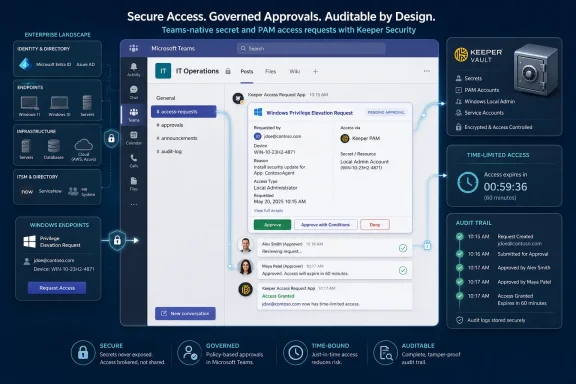 Keeper Moves the Approval Gate Into the Conversation
The central idea behind Keeper’s Teams app is simple: access workflows break down when they live somewhere employees do not naturally work. If a developer needs a secret, an administrator needs endpoint elevation, or a user needs a shared vault record, the approved path often means opening a ticket, finding the right portal, waiting for a manager, and then copying the result back into the workstream. That friction is exactly where shadow IT grows.Keeper is trying to collapse that distance. The new app lets users request and approve access actions inside Microsoft Teams, while Keeper remains the system that stores records, enforces permissions, and governs secrets. In practice, Teams becomes the front door; Keeper remains the lock, vault, and audit trail.
That distinction matters. A Teams-native button is not security by itself. The security claim rests on whether the approval workflow still preserves least privilege, time limits, credential rotation, and traceability. Keeper’s pitch is that the integration does not replace those controls with chat convenience; it exposes them where users are already making operational decisions.
The launch also reflects a broader enterprise software trend: security vendors are no longer assuming that users will willingly leave their collaboration tools to perform governance tasks. The workflow has to come to the user, or the user will invent a faster workflow outside the system.
The Old Access Request Model Was Built for a Slower Workplace
For years, privileged access management lived in a separate administrative universe. That made sense when privileged access was mostly about domain admins, database operators, and a small number of infrastructure specialists. The modern environment is messier.Developers touch cloud credentials. Contractors need temporary access to shared folders. Support staff may need short-lived local elevation. Security teams increasingly manage not only human accounts but also service accounts, machine identities, API tokens, and secrets buried inside automation pipelines.
The result is that access requests have become ordinary work, not exceptional work. But many organizations still process them through tools designed for slower, more centralized IT operations. Email chains, help desk tickets, and one-off portal requests can preserve a record, but they often do so at the cost of speed and clarity.
That is the gap Keeper is targeting. Its Teams app supports requests for vault records and shared folders, one-time shares for passwords or secrets, endpoint privilege elevation approvals, SSO Cloud device approvals, and the creation of new login records with automatically generated passwords. Those are not exotic edge cases. They are the daily access frictions that make employees choose between waiting and improvising.
The interesting part is not that Keeper added Teams support. The interesting part is that the workflows are specific enough to suggest Keeper understands where access governance commonly leaks.
Just-in-Time Access Gets a Friendlier Front End
The strongest part of Keeper’s announcement is its emphasis on time-limited access. For record and folder requests, users can submit a justification, specify the permissions they need, and define an access window. That turns the request into more than a vague “please grant access” message.A well-designed access request should answer three questions before the approver even clicks: what does the user need, why do they need it, and when should that access disappear? If those answers are missing, approvals become rubber stamps. If they are embedded in the workflow, managers and administrators have at least a fighting chance of making a real decision.
Keeper adds another useful control for PAM User records and folders: auto-rotation is enabled by default after the access window ends. That is a significant design choice. Temporary access without credential rotation can still leave residue, especially when credentials are copied, cached, or used in scripts. Rotation after the window closes helps make the temporary nature of access more than a calendar promise.
This is where the integration moves beyond convenience. If a Teams-based workflow simply made it easier to distribute secrets, it would be a liability. By pairing access windows with post-use credential rotation, Keeper is trying to make fast access less likely to become permanent access by accident.
Teams Becomes the Lobby, Not the Vault
Keeper is also careful to frame the deployment model around customer-hosted infrastructure. Organizations deploy the app through Docker alongside Keeper Commander Service Mode, with configuration secured and retrieved through Keeper Secrets Manager. Keeper says credentials and secrets do not pass through Keeper’s cloud environment as part of this model.That architecture will matter to security teams that instinctively distrust chat integrations with sensitive systems. Teams is a powerful collaboration hub, but it is also a noisy place full of bots, plugins, files, guest users, and notification overload. The idea of connecting privileged access workflows to Teams will make some administrators understandably cautious.
Keeper’s answer is to keep Teams as the interaction layer rather than the storage layer. The app initiates and routes requests, but Keeper Vault and related Keeper services remain the control plane for records, permissions, secrets, and enforcement. That separation is the only way this kind of integration can be credible in regulated or security-conscious environments.
Even so, organizations will need to treat deployment as a security project, not a casual Teams app rollout. The Teams channel structure, app permissions, approver groups, logging configuration, and operational ownership all become part of the risk model. A bad implementation could still turn a good workflow into a new attack surface.
The Approval Channel Is Now Part of the Security Boundary
One of the more practical workflows in the new app is endpoint privilege elevation approval. Keeper Endpoint Privilege Manager can route just-in-time elevation requests to approvers through a dedicated Teams channel. That is useful because endpoint elevation requests are often urgent, repetitive, and vulnerable to informal bypasses.Anyone who has managed Windows fleets knows the pattern. A user needs to install a driver, update a tool, run a legacy application, or perform a support task that trips over local privilege boundaries. If the official process takes too long, people find workarounds: shared admin credentials, overbroad local admin rights, remote control sessions, or exceptions that never get cleaned up.
Putting the approval prompt in Teams does not solve endpoint privilege management by itself. But it can reduce the temptation to maintain standing privileges because “the approval process is too slow.” In that sense, the integration supports a more realistic least-privilege model: users do not permanently hold powerful rights, but they can request them quickly when needed.
There is a subtle governance tradeoff here. Chat-based approvals can feel lightweight, which is good for adoption but potentially dangerous for scrutiny. Security teams will need to make sure that Teams convenience does not degrade approval quality. The justification, requester identity, target device, requested privilege, and audit trail have to remain visible enough that approvers do more than click through.
The best version of this model is not “approve from chat because chat is easy.” It is “approve from chat because the workflow brings the right context into the place where the responsible people already are.”
Keeper’s Mixed Record Model Shows the Messy Reality of Enterprise Vaults
The app is designed for environments using both Classic shared records and Nested Shared Folder records. That detail may sound like inside baseball, but it matters because real enterprise vaults are rarely pristine. They evolve over years, through migrations, acquisitions, team reorganizations, and policy changes.Keeper says search results identify which type of item is involved, while the approval screen presents the relevant permission model. Classic items use standard permissions. Nested Shared Folder records expose role-based options such as viewer, share-manager, content-manager, and full-manager.
That is a smart usability decision. Access governance breaks when users and approvers cannot understand what a permission actually means. If the app flattened different record types into a generic approval prompt, it would create confusion and overgranting. By surfacing the applicable permission model, Keeper is acknowledging that vault architecture matters at approval time.
It also hints at the challenge Keeper faces as it expands into broader PAM and workflow territory. Password managers that grow into privileged access platforms inherit complexity. The product has to serve small teams that want quick sharing, enterprises that need granular controls, and security teams that demand auditability across both.
The Teams app is therefore not just an add-on. It is a user-interface layer over Keeper’s larger attempt to unify vault management, privileged access, endpoint elevation, and secrets governance.
Slack, ServiceNow, Jira, and Teams Are Becoming the New PAM Surface
Keeper already has workflow integrations with tools such as Slack, Jira, and ServiceNow. Adding Teams is not surprising, but it is strategically important. Teams is deeply embedded in Microsoft 365 environments, especially among organizations already standardized on Windows, Entra ID, SharePoint, and the broader Microsoft admin stack.That makes the Teams app relevant far beyond chat. In many companies, Teams is where incidents are coordinated, support decisions are made, change windows are discussed, and managers respond fastest. By entering that surface, Keeper is competing for a place in the operational nervous system of the enterprise.
This is also where vendor positioning deserves scrutiny. Every security vendor now wants to be “where work happens.” That phrase can become a cliché. The real test is whether the integration reduces risk or merely increases the number of places where sensitive actions can begin.
Keeper’s workflow list suggests it is aiming at concrete governance pain points rather than generic notifications. Access to vault records, one-time shares, endpoint elevation, device approvals, and record creation are all areas where informal processes can produce lasting security debt. If Teams becomes the controlled intake mechanism for those actions, the integration has a plausible security argument.
But the burden shifts to implementation discipline. A Teams-native workflow will only be as good as the approver model behind it. If every request goes to an overloaded channel, or if approval responsibility is unclear, the organization has simply moved the bottleneck into chat.
One-Time Sharing Remains Powerful and Dangerous
The one-time share workflow deserves special attention. Keeper says the Teams app can generate self-destructing links for passwords or secrets. That is a useful capability when organizations need to share sensitive data with someone who should not receive persistent vault access.But one-time sharing always walks a narrow line. It is safer than sending a password in email or pasting a secret into chat, but it still represents a moment when a credential leaves its normal access structure. The self-destructing link reduces exposure, yet it does not eliminate the need to know why the secret was shared, who received it, and what happened afterward.
The Teams integration may help by keeping the request and approval path inside a governed workflow rather than a side conversation. Still, security teams should avoid treating one-time shares as a harmless convenience feature. They are exceptions, and exceptions need visibility.
The better pattern is to pair one-time shares with rotation, expiration, and review. Keeper’s broader PAM model gives it some tools in that direction, but organizations will have to decide how permissive they want this workflow to be. A feature that saves time during an incident can become a shortcut for routine access if nobody watches the logs.
The Microsoft Angle Is Bigger Than Teams
For WindowsForum readers, the Microsoft angle is not just that the app runs in Teams. It is that Teams has become a de facto administrative front end for many Microsoft-centric organizations. Even when formal administration happens in Intune, Entra, Defender, Azure, or third-party consoles, the coordination happens in Teams.That makes Teams integrations unusually influential. A useful Teams app can become part of the daily muscle memory of administrators and managers. A poorly governed one can quietly become an unplanned control plane.
Keeper’s app intersects with several Microsoft-world realities. Windows endpoint privilege remains a persistent problem. Microsoft 365 has trained users to expect work to happen inside collaborative surfaces. Security teams are trying to reduce standing privilege while not becoming the department of “no.” And hybrid environments still require credentials, secrets, and shared records that do not fit neatly into identity-provider policy alone.
The app’s SSO Cloud device approval workflow is another example of this. Keeper says it covers device approvals for administrators when the Keeper Automator service is not deployed. That is a niche-sounding workflow, but it reflects the messy middle ground where identity, devices, and access policy do not always line up cleanly.
Enterprise IT rarely operates in the ideal state described in product diagrams. It operates in partial deployments, mixed licensing, staggered migrations, and exception-heavy environments. Integrations like this succeed when they respect that reality.
The Security Win Is Friction Reduction, Not Magic
Craig Lurey, Keeper’s CTO and co-founder, framed the launch around the idea that users work around access controls when approved processes are too cumbersome or slow. That is the right thesis. Security programs often treat user friction as a training problem, when it is really a systems design problem.If the secure path is slower, less visible, and more confusing than the insecure path, employees will eventually route around it. They may not think of themselves as bypassing security. They may think they are getting their job done.
The Keeper Teams App is best understood as an attempt to make the approved path competitive. It does not remove the need for policy, approver discipline, logging, or periodic review. It does make those controls more likely to be used because the workflow starts in a familiar place.
That is a modest claim, but it is more credible than the grander promises often attached to identity security announcements. The app will not fix bad vault hygiene. It will not decide who should own approval rights. It will not prevent every malicious insider or compromised account from abusing a workflow. But it can reduce the everyday drag that causes well-meaning employees to invent unmanaged alternatives.
The security industry sometimes overstates automation and understates ergonomics. This launch is a reminder that usable governance can be a real security control.
The Keeper Teams App Turns a Chat Window Into an Audit Test
The practical readout for IT teams is straightforward: this is an integration worth evaluating if Teams is already where access requests informally happen. The danger is assuming that putting the workflow in Teams automatically makes it governed. The opportunity is using Teams as a cleaner intake layer while preserving Keeper as the enforcement and audit system.- Organizations using email or ad hoc Teams messages for vault access requests now have a more formal path that still meets users inside Teams.
- Time-limited record and folder access becomes more useful when paired with default credential rotation after privileged access windows close.
- Endpoint privilege elevation approvals may become less painful for Windows support teams trying to reduce permanent local admin rights.
- Customer-hosted deployment will appeal to security teams that do not want credentials or secrets routed through an additional vendor cloud path.
- Mixed Keeper environments will need careful testing because Classic shared records and Nested Shared Folder records expose different permission models.
- The integration’s value will depend less on installation and more on approver design, channel hygiene, logging, and periodic access review.
The Keeper Teams App is not a revolution in privileged access management, but it is a telling sign of where enterprise security is headed: away from isolated portals and toward governed workflows embedded in the tools people refuse to leave. For Microsoft-centric organizations, that means Teams will keep accumulating security-adjacent responsibilities, and the winners will be the vendors that can make access faster without making it looser.
References
- Primary source: securitybrief.asia
Published: 2026-06-25T06:42:08.064214
Loading…
securitybrief.asia - Related coverage: keepersecurity.com
Loading…
www.keepersecurity.com - Related coverage: docs.keeper.io
Teams App | KeeperPAM and Secrets Manager | Keeper Documentation Portal
Teams Approval Workflow Integration with the Keeper Vault and Endpoint Privilege Managerdocs.keeper.io - Related coverage: natlawreview.com
Loading…
natlawreview.com - Related coverage: help.keeper.io
Loading…
help.keeper.io - Related coverage: prnewswire.com
Loading…
www.prnewswire.com
