

AWS’s Compute Blog is pitching a Kiro CLI and EC2 Image Builder workflow for automating Amazon Machine Image creation, testing, distribution, and lifecycle management across AWS environments, with examples covering EKS-optimized Linux nodes and Windows Server 2025 golden images. The interesting part is not that AWS can build AMIs on a schedule; it has been able to do that for years. The news is that AWS is now framing image automation as an AI-assisted infrastructure authoring problem, where natural-language prompts become the scaffolding for CloudFormation, Image Builder recipes, IAM roles, KMS keys, notifications, and distribution rules. That is useful, but it also shifts the risk from “did an engineer forget a patch?” to “did the generated infrastructure match the organization’s security model?”
The golden image has always been one of cloud operations’ least glamorous control points. It is also one of the most consequential. Every EC2 fleet, EKS node group, Windows workload, and compliance-sensitive application inherits assumptions from the machine image it boots from: patch level, agent set, hardening baseline, logging defaults, encryption posture, and sometimes a decade of accumulated tribal knowledge.
AWS’s proposed pairing of Kiro CLI with EC2 Image Builder is an attempt to move that work out of ad hoc scripts, wiki pages, and manual console sessions. EC2 Image Builder supplies the managed pipeline: recipes, components, tests, distribution settings, lifecycle policies, and integrations with services such as Systems Manager, SNS, KMS, and Inspector. Kiro CLI is positioned as the assistant that helps operators describe the desired pipeline in ordinary language and then generate the infrastructure-as-code or API sequence needed to create it.
That distinction matters. EC2 Image Builder is the system of record; Kiro is not a magical new AMI engine. If the workflow succeeds, it succeeds because the generated configuration is reviewable, repeatable, and checked into the same change-control process as any other production infrastructure. If it fails, it will probably fail in the familiar ways: excessive IAM permissions, ambiguous defaults, broken assumptions about target accounts, or a generated template that looks plausible until the first cross-region distribution fails at 2 a.m.
The promise, then, is not that AI eliminates infrastructure expertise. It is that AI may compress the distance between an operational requirement and a first workable implementation. For teams that already understand Image Builder, CloudFormation, IAM, and Systems Manager, that can be a productivity win. For teams that do not, it can be a very confident shortcut into a complex AWS dependency graph.
This problem is especially acute for Windows Server fleets. Windows images tend to carry heavier operational baggage than minimal Linux images: domain-join logic, endpoint security agents, monitoring tools, PowerShell modules, Windows Update behavior, local policy settings, and sometimes application runtime dependencies that are tedious to reproduce. When those details live inside a hand-maintained image, the image becomes both a deployment accelerator and an undocumented artifact.
Linux and container-heavy environments have their own version of the same problem. EKS node images must keep pace with Kubernetes expectations, container runtimes, kubelet versions, CloudWatch agents, kernel updates, and security hardening. If a node group relies on stale AMIs, the cluster may continue running until an upgrade, autoscaling event, or security audit exposes the gap.
The operational pattern AWS is advocating is straightforward: build images as disposable outputs of a controlled pipeline, not as handcrafted heirlooms. The recipe defines the base image and components. Tests validate the result. Distribution copies or shares the AMI where it is needed. Lifecycle rules retire old images. That is the part of the story that should be boring, and in infrastructure, boring is usually a compliment.
That is a sensible use case for a coding agent. Image Builder pipelines are verbose. CloudFormation templates for multi-account, multi-region image distribution can become long and fussy. IAM trust policies, instance profiles, KMS key policies, distribution settings, lifecycle rules, Systems Manager parameters, and SNS notifications all need to line up. A tool that can assemble a first draft from a detailed prompt can save real time.
But the word draft is doing a lot of work here. A generated CloudFormation template is not safer because it was generated quickly. It is safer only if the organization reviews it against least-privilege IAM requirements, naming standards, logging expectations, encryption policy, account boundaries, and rollback behavior. AWS’s own Windows example repeatedly instructs Kiro not to use “FullAccess” policies, not to create Lambda custom resources for SSM parameter updates, and not to create multiple regional stacks. Those constraints are not incidental; they are the guardrails that make the output less dangerous.
That is the bigger lesson for IT pros: prompt quality becomes infrastructure quality. A vague prompt invites defaults. A production prompt needs to be explicit about accounts, regions, IAM policy boundaries, KMS behavior, lifecycle retention, notification channels, and which AWS-managed components are acceptable. The operator is still designing the system; Kiro is accelerating the typing and connecting some documentation dots.
The AWS post’s Windows Server 2025 example shows how much modern AMI automation has moved beyond “install some software and snapshot the box.” The requested pipeline includes a monthly cron schedule, the latest public Windows Server 2025 AMI, AWS-managed components for CloudWatch Agent and AWS CLI, Windows Updates, STIG build and validation components, KMS encryption, Amazon Inspector scanning, cross-account and cross-region distribution, SSM parameter publication, SNS notifications, and lifecycle expiration.
That is not merely convenience plumbing. For a Windows-heavy enterprise, those details map directly to real control objectives. The current AMI ID needs to be discoverable by deployment tools. Images must be encrypted. Receiving accounts need launch permissions. Vulnerability scanning must happen before broad distribution. Old images must not linger forever as easy rollback targets that quietly become unsupported security liabilities.
The EKS example is similarly pragmatic. A custom node AMI pipeline can track base image changes, include container runtime and kubelet components, install CloudWatch Agent, and update launch templates for managed node groups. Kubernetes administrators already live with version skew and node lifecycle headaches; baking the node baseline into a repeatable image pipeline reduces one class of surprise.
The prompt in the AWS post is unusually prescriptive, and that is a feature. It asks for Windows Updates, STIG hardening, STIG validation, Amazon Inspector vulnerability scanning, and a lifecycle policy that disables AMIs after 180 days and deletes them after 360 days. It also asks for a multi-region KMS primary key, cross-account grants, output parameters in Systems Manager, and distribution to three accounts in two regions.
This is exactly the kind of infrastructure request that tends to sprawl when written manually. One engineer creates the Image Builder recipe. Another adds KMS. Someone later adds SNS notifications. A security review demands Inspector. A separate automation updates SSM parameters. Months later, nobody is certain which part owns cleanup. Collapsing those requirements into a single generated CloudFormation template is attractive because it forces the system to be described as a whole.
Still, Windows image pipelines are unforgiving. Windows Update can extend build times and trigger reboots. Security baselines can break legacy workloads. Endpoint agents may require enrollment steps that do not belong in a reusable image. Sysprep assumptions matter. A generated pipeline can create the skeleton, but enterprise Windows teams will still need test stages that reflect actual application behavior, domain policy interactions, and operational recovery procedures.
This is where AI-assisted infrastructure generation can become uncomfortable. Developers like tools that produce working templates. Security teams like templates that are explainable. Those goals are not always aligned, especially when a model resolves ambiguity by choosing broad permissions. A generated pipeline that works in a demo account may be unacceptable in a regulated production organization.
The better pattern is visible inside the prompt itself: specify allowed managed policies, name required KMS actions, define target account IDs as parameters, require unique resource names, and reject unnecessary custom resources. That level of specificity gives the assistant less room to improvise. It also makes the generated output easier to review because the reviewer can compare the template against the stated constraints.
Administrators should treat Kiro’s output the same way they would treat a pull request from a new engineer who is fast, helpful, and not yet trusted with production. The code may be good. The architecture may be sound. But the review still has to happen, and the dangerous parts are exactly where the tool will appear most productive: IAM, encryption, cross-account access, lifecycle deletion, and automation that updates running fleet dependencies.
AMI IDs are regional, frequently replaced, and easy to miscopy. A launch template, Auto Scaling group, Terraform module, CDK app, or deployment script that points to an old AMI can silently bypass the latest security baseline. Publishing the current image ID to a stable SSM parameter path gives other automation a consistent lookup point.
The Windows example uses a path such as
There is a governance implication here. Once an SSM parameter becomes the pointer to the approved image, access to update that parameter becomes part of the release process. Teams need to know who can change it, how changes are audited, what happens when an image fails validation, and whether consuming systems pin to a versioned path or always follow “latest.” Convenience is useful; invisible mutation is not.
That distinction matters for cost and security. Deregistering an AMI does not automatically mean every associated snapshot has been deleted in every account and region. Shared AMIs may remain usable by receiving accounts. KMS replicas may need separate deletion scheduling. Parameters can outlive the pipeline that last wrote to them. Inspector configuration may continue scanning resources if it was enabled for the experiment.
The AWS post’s cleanup guidance is a useful reminder that image automation is a lifecycle system, not just a build system. The same teams that ask “how do we publish a golden image?” need an equally crisp answer to “how do we retire one?” If that second answer is manual, the organization has only automated half the problem.
There is a cultural wrinkle, too. Old AMIs are emotionally useful. They feel like rollback insurance. But a year-old Windows Server image with old agents, outdated patches, and unknown exceptions is not a safety net; it is technical debt with a launch button. Lifecycle policies that disable and eventually delete old images are not housekeeping. They are part of the security boundary.
AWS’s EKS-oriented example focuses on an Amazon Linux 2023 image optimized for custom node groups, with weekly builds triggered by base AMI updates. It includes containerd, kubelet, CloudWatch Agent, and automatic launch template updates. That is the kind of workflow that reduces the operational drag of keeping node fleets current without asking administrators to manually track every upstream AMI change.
There is still risk in automating node image promotion too aggressively. A new image can break workloads because of kernel behavior, runtime changes, agent regressions, or configuration differences. Updating a launch template is not the same as safely rolling a node group. Teams need canaries, staged rollouts, and the ability to halt promotion when validation fails.
The underlying point is that even in containerized infrastructure, immutable images remain part of the trust chain. Containers did not make operating systems irrelevant; they made it easier to forget how much still depends on them.
But the best results will likely come from organizations that already have strong standards. If the platform team knows the required naming convention, KMS model, account topology, IAM boundaries, SSM parameter paths, notification mechanism, lifecycle retention period, and validation components, Kiro can turn that into a working artifact faster. If the team does not know those things, Kiro may produce something that looks complete while encoding decisions nobody consciously made.
This is the uncomfortable truth about AI infrastructure tooling: it rewards clarity and punishes vagueness. A human engineer who receives an ambiguous request may ask follow-up questions. A command-line assistant may generate. That output can be useful, but it can also create the illusion that architecture happened because a template exists.
The AWS post implicitly acknowledges this by showing a much more detailed second prompt after the shorter EKS example. The detailed prompt is not just “better prompt engineering.” It is architecture written in prose. The AI is useful because the human supplied constraints that reflect operational reality.
That is a healthy shift. Console-built AMI pipelines are better than manually patched instances, but they can still become opaque if nobody exports, versions, and reviews the configuration. A CloudFormation or CDK representation gives teams something to diff, test, approve, and redeploy. It also lets the organization reproduce the pipeline in a new account instead of reconstructing it from memory.
The AWS post still tells users to navigate to the Image Builder console after execution and confirm that the pipeline is enabled. That is sensible, but it should not be mistaken for the control plane. The more mature workflow is prompt, generate, review, commit, deploy, observe. The console is where you confirm and troubleshoot; Git is where the system’s memory belongs.
This matters for Windows administrators moving deeper into cloud operations. The familiar GUI-first model does not disappear, but it becomes secondary in environments where reproducibility and auditability matter. Golden images built through a point-and-click wizard may solve today’s deployment need. Golden images built from reviewed templates solve tomorrow’s audit question.
Every component in the image recipe becomes part of the trusted supply chain. Every AWS-managed component has a versioning and behavior model. Every custom component needs source control and review. Every validation test must be meaningful enough to catch failures before distribution. Every output parameter must point to an image that actually passed the expected gates. Every lifecycle policy must be monitored so it does not delete something still in use.
This is where organizations often underinvest. They automate the build but not the evidence. They distribute images but do not verify consumption. They scan for vulnerabilities but do not define promotion criteria. They publish a “latest” parameter but do not track which workloads use it. AI assistance does not fix those gaps; it may simply help create them faster if the initial design is incomplete.
The strongest version of AWS’s proposal is not “let Kiro build your AMI pipeline.” It is “use Kiro to accelerate the creation of a pipeline whose controls you already understand and can continuously verify.” That is a narrower claim, but a much more credible one.
The danger is that convenience becomes authority. If Kiro says a template is production-ready, that does not make it production-ready for your environment. “Production-ready” depends on network controls, identity boundaries, compliance requirements, backup and rollback strategy, patch cadence, account structure, logging, and incident response expectations.
A good team will use Kiro as an accelerator and Image Builder as the controlled automation substrate. A reckless team will use Kiro as a substitute for design review. The same tool can support either outcome.
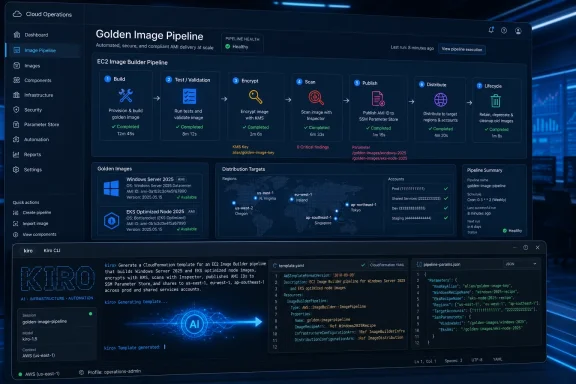 AWS Wants the Golden Image to Become a Conversation
The golden image has always been one of cloud operations’ least glamorous control points. It is also one of the most consequential. Every EC2 fleet, EKS node group, Windows workload, and compliance-sensitive application inherits assumptions from the machine image it boots from: patch level, agent set, hardening baseline, logging defaults, encryption posture, and sometimes a decade of accumulated tribal knowledge.AWS’s proposed pairing of Kiro CLI with EC2 Image Builder is an attempt to move that work out of ad hoc scripts, wiki pages, and manual console sessions. EC2 Image Builder supplies the managed pipeline: recipes, components, tests, distribution settings, lifecycle policies, and integrations with services such as Systems Manager, SNS, KMS, and Inspector. Kiro CLI is positioned as the assistant that helps operators describe the desired pipeline in ordinary language and then generate the infrastructure-as-code or API sequence needed to create it.
That distinction matters. EC2 Image Builder is the system of record; Kiro is not a magical new AMI engine. If the workflow succeeds, it succeeds because the generated configuration is reviewable, repeatable, and checked into the same change-control process as any other production infrastructure. If it fails, it will probably fail in the familiar ways: excessive IAM permissions, ambiguous defaults, broken assumptions about target accounts, or a generated template that looks plausible until the first cross-region distribution fails at 2 a.m.
The promise, then, is not that AI eliminates infrastructure expertise. It is that AI may compress the distance between an operational requirement and a first workable implementation. For teams that already understand Image Builder, CloudFormation, IAM, and Systems Manager, that can be a productivity win. For teams that do not, it can be a very confident shortcut into a complex AWS dependency graph.
Manual AMI Management Was Already a Security Problem
The AWS post begins from a premise most sysadmins will recognize: hand-built images do not age gracefully. A manually created AMI may be clean on the day it is captured, but it immediately begins drifting away from current patch baselines, updated agents, revised compliance controls, and the configuration expected by newer deployment tooling. The more accounts, regions, and environments an organization runs, the faster that drift becomes invisible.This problem is especially acute for Windows Server fleets. Windows images tend to carry heavier operational baggage than minimal Linux images: domain-join logic, endpoint security agents, monitoring tools, PowerShell modules, Windows Update behavior, local policy settings, and sometimes application runtime dependencies that are tedious to reproduce. When those details live inside a hand-maintained image, the image becomes both a deployment accelerator and an undocumented artifact.
Linux and container-heavy environments have their own version of the same problem. EKS node images must keep pace with Kubernetes expectations, container runtimes, kubelet versions, CloudWatch agents, kernel updates, and security hardening. If a node group relies on stale AMIs, the cluster may continue running until an upgrade, autoscaling event, or security audit exposes the gap.
The operational pattern AWS is advocating is straightforward: build images as disposable outputs of a controlled pipeline, not as handcrafted heirlooms. The recipe defines the base image and components. Tests validate the result. Distribution copies or shares the AMI where it is needed. Lifecycle rules retire old images. That is the part of the story that should be boring, and in infrastructure, boring is usually a compliment.
Kiro CLI Moves the Complexity, Not the Accountability
Kiro CLI’s role in the AWS walkthrough is to turn prompts into working infrastructure. In the examples, the operator describes a desired AMI pipeline and Kiro generates either direct API calls or a CloudFormation template. The post emphasizes natural-language commands, context-aware help through Model Context Protocol integrations, and troubleshooting assistance when CloudFormation or Image Builder emits errors.That is a sensible use case for a coding agent. Image Builder pipelines are verbose. CloudFormation templates for multi-account, multi-region image distribution can become long and fussy. IAM trust policies, instance profiles, KMS key policies, distribution settings, lifecycle rules, Systems Manager parameters, and SNS notifications all need to line up. A tool that can assemble a first draft from a detailed prompt can save real time.
But the word draft is doing a lot of work here. A generated CloudFormation template is not safer because it was generated quickly. It is safer only if the organization reviews it against least-privilege IAM requirements, naming standards, logging expectations, encryption policy, account boundaries, and rollback behavior. AWS’s own Windows example repeatedly instructs Kiro not to use “FullAccess” policies, not to create Lambda custom resources for SSM parameter updates, and not to create multiple regional stacks. Those constraints are not incidental; they are the guardrails that make the output less dangerous.
That is the bigger lesson for IT pros: prompt quality becomes infrastructure quality. A vague prompt invites defaults. A production prompt needs to be explicit about accounts, regions, IAM policy boundaries, KMS behavior, lifecycle retention, notification channels, and which AWS-managed components are acceptable. The operator is still designing the system; Kiro is accelerating the typing and connecting some documentation dots.
Image Builder Is the Unfashionable Workhorse Underneath the AI Pitch
The AI framing will get the attention, but EC2 Image Builder remains the important machinery. It is the component that actually builds, tests, and distributes AMIs. It can run on a schedule, react to dependency changes, use recipes and components, write output AMI IDs to Systems Manager Parameter Store, copy images across regions, share them with accounts, and enforce lifecycle policies that disable or delete aging images.The AWS post’s Windows Server 2025 example shows how much modern AMI automation has moved beyond “install some software and snapshot the box.” The requested pipeline includes a monthly cron schedule, the latest public Windows Server 2025 AMI, AWS-managed components for CloudWatch Agent and AWS CLI, Windows Updates, STIG build and validation components, KMS encryption, Amazon Inspector scanning, cross-account and cross-region distribution, SSM parameter publication, SNS notifications, and lifecycle expiration.
That is not merely convenience plumbing. For a Windows-heavy enterprise, those details map directly to real control objectives. The current AMI ID needs to be discoverable by deployment tools. Images must be encrypted. Receiving accounts need launch permissions. Vulnerability scanning must happen before broad distribution. Old images must not linger forever as easy rollback targets that quietly become unsupported security liabilities.
The EKS example is similarly pragmatic. A custom node AMI pipeline can track base image changes, include container runtime and kubelet components, install CloudWatch Agent, and update launch templates for managed node groups. Kubernetes administrators already live with version skew and node lifecycle headaches; baking the node baseline into a repeatable image pipeline reduces one class of surprise.
The Windows Server 2025 Example Is Where the Stakes Get Real
For WindowsForum readers, the Windows Server golden image scenario is the more revealing of the two. It reflects a familiar enterprise pattern: a central platform team publishes a hardened base image, application teams consume it, and security expects evidence that the image was patched, validated, encrypted, and distributed through controlled channels. That model predates AWS, but cloud scale makes the weak points harder to ignore.The prompt in the AWS post is unusually prescriptive, and that is a feature. It asks for Windows Updates, STIG hardening, STIG validation, Amazon Inspector vulnerability scanning, and a lifecycle policy that disables AMIs after 180 days and deletes them after 360 days. It also asks for a multi-region KMS primary key, cross-account grants, output parameters in Systems Manager, and distribution to three accounts in two regions.
This is exactly the kind of infrastructure request that tends to sprawl when written manually. One engineer creates the Image Builder recipe. Another adds KMS. Someone later adds SNS notifications. A security review demands Inspector. A separate automation updates SSM parameters. Months later, nobody is certain which part owns cleanup. Collapsing those requirements into a single generated CloudFormation template is attractive because it forces the system to be described as a whole.
Still, Windows image pipelines are unforgiving. Windows Update can extend build times and trigger reboots. Security baselines can break legacy workloads. Endpoint agents may require enrollment steps that do not belong in a reusable image. Sysprep assumptions matter. A generated pipeline can create the skeleton, but enterprise Windows teams will still need test stages that reflect actual application behavior, domain policy interactions, and operational recovery procedures.
Least Privilege Is the Line Between Automation and Blast Radius
The AWS example’s insistence on avoiding “FullAccess” policies is more than a best-practice flourish. Image pipelines touch powerful resources. They launch EC2 instances, create AMIs and snapshots, write SSM parameters, use KMS keys, publish notifications, distribute artifacts to other accounts, and potentially update launch templates. A sloppy role attached to that process becomes an attractive escalation path.This is where AI-assisted infrastructure generation can become uncomfortable. Developers like tools that produce working templates. Security teams like templates that are explainable. Those goals are not always aligned, especially when a model resolves ambiguity by choosing broad permissions. A generated pipeline that works in a demo account may be unacceptable in a regulated production organization.
The better pattern is visible inside the prompt itself: specify allowed managed policies, name required KMS actions, define target account IDs as parameters, require unique resource names, and reject unnecessary custom resources. That level of specificity gives the assistant less room to improvise. It also makes the generated output easier to review because the reviewer can compare the template against the stated constraints.
Administrators should treat Kiro’s output the same way they would treat a pull request from a new engineer who is fast, helpful, and not yet trusted with production. The code may be good. The architecture may be sound. But the review still has to happen, and the dangerous parts are exactly where the tool will appear most productive: IAM, encryption, cross-account access, lifecycle deletion, and automation that updates running fleet dependencies.
Systems Manager Parameter Store Becomes the Quiet Control Plane
One of the more practical details in the AWS walkthrough is the use of Image Builder distribution settings to write the latest AMI ID into Systems Manager Parameter Store. That sounds minor, but it solves a recurring deployment problem: how do downstream systems reliably discover the current approved image without hard-coding AMI IDs?AMI IDs are regional, frequently replaced, and easy to miscopy. A launch template, Auto Scaling group, Terraform module, CDK app, or deployment script that points to an old AMI can silently bypass the latest security baseline. Publishing the current image ID to a stable SSM parameter path gives other automation a consistent lookup point.
The Windows example uses a path such as
/golden-image/windows-server-2025/latest, written in each distribution region. That pattern is simple enough to understand and powerful enough to standardize. It also removes the need for a Lambda function or custom resource whose only job is to update a parameter after a build.There is a governance implication here. Once an SSM parameter becomes the pointer to the approved image, access to update that parameter becomes part of the release process. Teams need to know who can change it, how changes are audited, what happens when an image fails validation, and whether consuming systems pin to a versioned path or always follow “latest.” Convenience is useful; invisible mutation is not.
Multi-Region Distribution Is Easy Until Cleanup Starts
AWS’s post correctly spends time on cleanup, which is where many cloud tutorials become dangerously vague. AMI distribution creates artifacts in multiple places: source accounts, target accounts, target regions, EBS snapshots, SSM parameters, KMS keys, grants, lifecycle policies, and sometimes launch templates. Deleting the CloudFormation stack that created the pipeline is not the same as erasing every image it produced.That distinction matters for cost and security. Deregistering an AMI does not automatically mean every associated snapshot has been deleted in every account and region. Shared AMIs may remain usable by receiving accounts. KMS replicas may need separate deletion scheduling. Parameters can outlive the pipeline that last wrote to them. Inspector configuration may continue scanning resources if it was enabled for the experiment.
The AWS post’s cleanup guidance is a useful reminder that image automation is a lifecycle system, not just a build system. The same teams that ask “how do we publish a golden image?” need an equally crisp answer to “how do we retire one?” If that second answer is manual, the organization has only automated half the problem.
There is a cultural wrinkle, too. Old AMIs are emotionally useful. They feel like rollback insurance. But a year-old Windows Server image with old agents, outdated patches, and unknown exceptions is not a safety net; it is technical debt with a launch button. Lifecycle policies that disable and eventually delete old images are not housekeeping. They are part of the security boundary.
The EKS Example Shows Why Image Pipelines Still Matter in a Container World
It is tempting to think AMI pipelines are less important in a Kubernetes environment because containers carry the application payload. That is only partly true. The node image still controls the kernel, container runtime, kubelet, node-level agents, OS patches, and the baseline on which every pod depends. A cluster can be modern at the control plane and stale at the node layer.AWS’s EKS-oriented example focuses on an Amazon Linux 2023 image optimized for custom node groups, with weekly builds triggered by base AMI updates. It includes containerd, kubelet, CloudWatch Agent, and automatic launch template updates. That is the kind of workflow that reduces the operational drag of keeping node fleets current without asking administrators to manually track every upstream AMI change.
There is still risk in automating node image promotion too aggressively. A new image can break workloads because of kernel behavior, runtime changes, agent regressions, or configuration differences. Updating a launch template is not the same as safely rolling a node group. Teams need canaries, staged rollouts, and the ability to halt promotion when validation fails.
The underlying point is that even in containerized infrastructure, immutable images remain part of the trust chain. Containers did not make operating systems irrelevant; they made it easier to forget how much still depends on them.
AI Help Is Most Valuable When the Organization Already Knows Its Standards
Kiro CLI’s appeal is obvious: instead of hunting through AWS documentation and stitching together CloudFormation by hand, an operator can ask for a production-ready pipeline and refine the output. That can be especially helpful for teams building their first Image Builder implementation or trying to remember the exact property names for a distribution configuration.But the best results will likely come from organizations that already have strong standards. If the platform team knows the required naming convention, KMS model, account topology, IAM boundaries, SSM parameter paths, notification mechanism, lifecycle retention period, and validation components, Kiro can turn that into a working artifact faster. If the team does not know those things, Kiro may produce something that looks complete while encoding decisions nobody consciously made.
This is the uncomfortable truth about AI infrastructure tooling: it rewards clarity and punishes vagueness. A human engineer who receives an ambiguous request may ask follow-up questions. A command-line assistant may generate. That output can be useful, but it can also create the illusion that architecture happened because a template exists.
The AWS post implicitly acknowledges this by showing a much more detailed second prompt after the shorter EKS example. The detailed prompt is not just “better prompt engineering.” It is architecture written in prose. The AI is useful because the human supplied constraints that reflect operational reality.
The Console Is No Longer the Center of Gravity
For years, AWS tutorials often treated the console as the primary place where users learned a service. That made sense for discovery, screenshots, and one-off walkthroughs. But the Kiro-plus-Image-Builder workflow points in a different direction: the console becomes a verification surface, while the desired state lives in generated infrastructure-as-code.That is a healthy shift. Console-built AMI pipelines are better than manually patched instances, but they can still become opaque if nobody exports, versions, and reviews the configuration. A CloudFormation or CDK representation gives teams something to diff, test, approve, and redeploy. It also lets the organization reproduce the pipeline in a new account instead of reconstructing it from memory.
The AWS post still tells users to navigate to the Image Builder console after execution and confirm that the pipeline is enabled. That is sensible, but it should not be mistaken for the control plane. The more mature workflow is prompt, generate, review, commit, deploy, observe. The console is where you confirm and troubleshoot; Git is where the system’s memory belongs.
This matters for Windows administrators moving deeper into cloud operations. The familiar GUI-first model does not disappear, but it becomes secondary in environments where reproducibility and auditability matter. Golden images built through a point-and-click wizard may solve today’s deployment need. Golden images built from reviewed templates solve tomorrow’s audit question.
The Hidden Cost Is Not the Build; It Is the Trust Chain
AWS emphasizes reduced operational overhead, faster onboarding, improved security posture, consistent deployments, and faster troubleshooting. Those are fair benefits. But the hidden cost of this model is the effort required to maintain trust in the pipeline itself.Every component in the image recipe becomes part of the trusted supply chain. Every AWS-managed component has a versioning and behavior model. Every custom component needs source control and review. Every validation test must be meaningful enough to catch failures before distribution. Every output parameter must point to an image that actually passed the expected gates. Every lifecycle policy must be monitored so it does not delete something still in use.
This is where organizations often underinvest. They automate the build but not the evidence. They distribute images but do not verify consumption. They scan for vulnerabilities but do not define promotion criteria. They publish a “latest” parameter but do not track which workloads use it. AI assistance does not fix those gaps; it may simply help create them faster if the initial design is incomplete.
The strongest version of AWS’s proposal is not “let Kiro build your AMI pipeline.” It is “use Kiro to accelerate the creation of a pipeline whose controls you already understand and can continuously verify.” That is a narrower claim, but a much more credible one.
The Practical Wins Are Real, but So Are the Review Requirements
For IT teams, the immediate value is not philosophical. It is practical. A generated Image Builder template can reduce the boilerplate needed to stand up a hardened Windows Server image pipeline. It can remind an engineer to include SSM output parameters, SNS notifications, lifecycle policy, KMS encryption, and Inspector scanning. It can explain CloudFormation failures in plain English instead of leaving someone to decode nested stack errors under deadline pressure.The danger is that convenience becomes authority. If Kiro says a template is production-ready, that does not make it production-ready for your environment. “Production-ready” depends on network controls, identity boundaries, compliance requirements, backup and rollback strategy, patch cadence, account structure, logging, and incident response expectations.
A good team will use Kiro as an accelerator and Image Builder as the controlled automation substrate. A reckless team will use Kiro as a substitute for design review. The same tool can support either outcome.
AWS’s AMI Automation Pitch Comes Down to Five Operational Tests
The Kiro and EC2 Image Builder workflow is worth attention because it compresses a lot of tedious infrastructure work into a prompt-driven process. But before treating it as a production pattern, teams should judge it by concrete operating tests rather than demo speed.- The generated template should be committed to version control and reviewed like any other infrastructure change.
- The Image Builder pipeline should use explicit IAM permissions, encryption settings, validation steps, notification paths, and lifecycle rules rather than broad defaults.
- The output AMI ID should be published through a stable discovery mechanism such as Systems Manager Parameter Store, with clear ownership over who can update it.
- Cross-account and cross-region distribution should include cleanup procedures for AMIs, snapshots, KMS keys, SSM parameters, and receiving accounts.
- Windows Server and EKS node image promotion should include staged rollout and rollback plans, because a valid image build is not the same as a safe fleet deployment.
- Kiro CLI should be treated as an assistant that drafts and troubleshoots infrastructure, not as the authority that approves it.
References
- Primary source: Amazon Web Services (AWS)
Published: 2026-05-22T21:40:08.792469
Streamline your infrastructure: Automating AMI creation with Kiro CLI and EC2 Image Builder | AWS Compute Blog
Managing infrastructure at scale requires robust automation tools that reduce manual effort while maintaining consistency and security. The combination of Kiro CLI and AWS EC2 Image Builder offers a powerful solution for automating the creation, testing, and deployment of...aws.amazon.com - Related coverage: docs.aws.amazon.com
Create and update AMI distribution configurations - EC2 Image Builder
Create and update distribution configurations for EC2 Image Builder AMIs.docs.aws.amazon.com
- Related coverage: blog.swiftsoftwaregroup.com

Create an Amazon Machine Image (AMI) using EC2 Image Builder and AWS CLI - Swift Software Group Blog
Create an Amazon Machine Image (AMI) using EC2 Image Builder and AWS CLI
blog.swiftsoftwaregroup.com
- Related coverage: kiro.dev
Configuration - CLI - Docs - Kiro
Configure Model Context Protocol (MCP) servers with Kiro CLI, including configuration file structure, server setup, and management.kiro.dev - Related coverage: builder.aws.com
AWS Builder Center
Connect with builders who understand your journey. Share solutions, influence AWS product development, and access useful content that accelerates your growth. Your community starts here. builder.aws.com
- Related coverage: techradar.com
AWS launches Kiro, an agentic AI IDE, to end the chaos of vibe coding | TechRadar
Kiro looks to use agentic AI to boost developerswww.techradar.com
