

On May 2, 2026, the open-source Lap photo manager released version 0.2.1 for Windows 10, Windows 11, macOS, and Linux, offering a local-first alternative to Microsoft Photos for users who keep large image libraries on their own drives. That timing matters because the Windows desktop has quietly become inhospitable to the kind of person who still thinks of a photo collection as a folder tree rather than a service subscription. Lap is not interesting because it does everything; it is interesting because it refuses to do the one thing modern consumer software keeps trying to normalize: turn your files into somebody else’s platform. For Windows users with big local archives, that refusal feels almost radical.
The modern photo app is usually designed around a bargain. You get convenience, automatic organization, cross-device access, and machine-learning tricks, but you pay with account dependency, background sync, storage limits, and a steadily growing sense that your own media library is no longer quite yours.
Microsoft Photos has improved over the years, and for casual users it is perfectly serviceable. It opens images, connects to OneDrive, does basic edits, and fits into the broader Windows 11 visual language. But its center of gravity is unmistakably Microsoft’s ecosystem, not the local disk.
Lap starts from the opposite premise. Your photos are already where they belong: on your computer, NAS, external drive, or carefully maintained folder hierarchy. The app does not ask you to import them into a proprietary catalog before you can begin. It points at folders and works from there.
That sounds mundane until you remember how many desktop apps have spent the last decade treating local storage as a legacy edge case. Lap’s argument is that the local library is not an anachronism. It is still the primary archive for photographers, families, hobbyists, sysadmins, archivists, and anyone who has learned not to entrust decades of personal media to a product manager’s next pricing memo.
The trouble begins when the collection becomes historical. Ten years of DSLR exports, scanned family albums, phone backups from multiple devices, RAW files, video clips, edited copies, renamed folders, duplicate dumps, travel sets, and camera-specific directories are not a stream. They are an archive.
Archives need different software values. They need speed at scale, predictable navigation, respect for existing structure, rich filtering, format breadth, and a cleanup workflow that does not feel like punishment. Most of all, they need trust.
Lap’s appeal is that it treats a large local library as the default case rather than a stress test. Its developer describes support for libraries above 100,000 files, and the app’s architecture points in that direction: Tauri and Rust for the desktop shell and core, SQLite for local data, LibRaw for RAW decoding, FFmpeg for video handling, and ONNX Runtime for local machine-learning inference. That is not a magical recipe, but it is a coherent one.
This is why the comparison with Microsoft Photos is less about a checkbox war and more about intent. Photos is a Windows accessory with cloud-era assumptions. Lap is a desktop photo manager with archivist instincts.
That matters because photo-management software has a long history of becoming a velvet cage. A managed library can be wonderful until you want to leave, move machines, recover from corruption, or reconcile the app’s database with the file system. Power users have scars from this genre.
Lap’s folder-first model gives it a humility that many modern apps lack. It does not need to own the archive in order to help you navigate it. The files remain intelligible in Explorer, scriptable with PowerShell, backup-friendly with normal tools, and portable across machines.
For IT pros, this distinction is not sentimental. It is operational. A folder-first application fits into backup strategies, robocopy jobs, NAS shares, external drives, and cold-storage routines. A cloud-first or opaque-library application often has to be accommodated as a special case.
This is also why Lap feels more like a successor to the old Windows utility tradition than another polished app-store appliance. It is not merely showing you photos. It is sitting alongside your file system rather than trying to replace it.
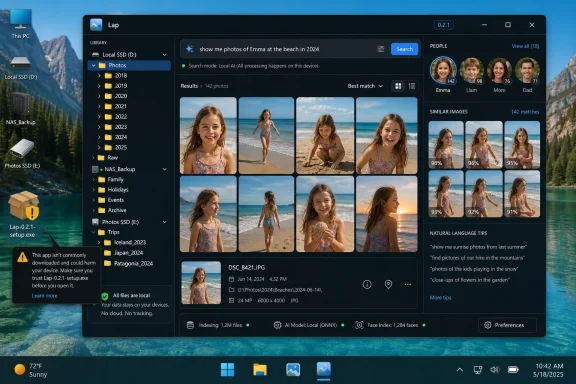
Lap’s more interesting claim is not that it uses AI, but that it uses it locally. Its search features include natural-language image lookup, similar-image discovery, smart tags, and beta face recognition. Under the hood, the project lists ONNX Runtime as its inference engine, CLIP for image-text similarity, and InsightFace for face detection and recognition.
That combination is telling. CLIP-style search is what allows a user to type a phrase like “dog at the beach” or “red car in snow” and retrieve plausible images without manually tagging every file. Face recognition helps group people across years of family photos. Similar-image search can expose near-duplicates, burst shots, and alternate edits.
The crucial difference is the execution boundary. If the processing happens on-device, the user gets some of the organizational magic associated with cloud photo services without automatically turning the library into training fodder, sync payload, or remote index. Local AI is not a privacy guarantee by itself, but it is a much better starting point than remote AI by default.
There are trade-offs. Local models consume CPU, GPU, storage, and time. They may be less polished than the systems operated by trillion-dollar cloud providers. Face recognition is especially sensitive and, in Lap’s case, still labeled beta. But the principle is right: if AI is going to organize personal media, the burden should be on the app to justify leaving the machine, not on the user to opt out after the fact.
That is why local-first software has a different moral weight in this category. A private-by-default photo app is not merely appealing to paranoia. It is acknowledging the obvious: image collections deserve more restraint than a productivity app’s recent-files list.
Lap’s no-account, no-forced-upload posture directly addresses the anxiety many users now bring to consumer software. People have watched services change names, alter storage terms, discontinue features, add AI scanning, remove unlimited tiers, and push subscriptions into once-simple workflows. Even when companies act reasonably, the user has learned that the relationship is conditional.
Microsoft is not uniquely guilty here. Apple, Google, Adobe, and countless smaller vendors have all pushed photo management toward service ecosystems. The reason Lap resonates is that it arrives after years of quiet fatigue with that model.
There is, however, an important distinction between local-first and professionally hardened. Lap is open source and distributed through GitHub releases, but Windows builds are currently unsigned, which means SmartScreen warnings may appear. That does not make the app malicious, but it does mean users should treat installation with the same caution they would apply to any young open-source desktop project.
Lap’s Windows packages include MSI builds for x64 and ARM64, but the project notes that they are currently unsigned. In practical terms, that means Windows may warn users during installation, not necessarily because it has found malware, but because the app has not accumulated the trust signals associated with signed, widely distributed software.
This is a familiar problem for open-source Windows applications. Code-signing certificates cost money, reputation takes time, and early projects often reach users before their distribution machinery looks corporate. Enthusiasts can understand that. A family member trying to replace Photos may not.
The correct response is neither panic nor blind trust. Users should download only from the official project release page, verify they are getting the intended package, keep Windows security enabled, and understand that a young app can be promising without yet having the polish of a mature commercial product.
For WindowsForum readers, this is probably acceptable. Many of us have installed unsigned utilities, nightly builds, niche drivers, and GitHub-hosted tools when the value was clear. But it does define Lap’s current audience: confident users first, mainstream users later.
This is not just spec-sheet padding. Windows users increasingly encounter HEIC from iPhones, WebP from the web, AVIF from modern pipelines, RAW from older and newer cameras, and video clips mixed into the same folder structures as still images. A manager that stumbles over half the archive is not a manager; it is a preview pane with ambitions.
Lap also supports broad video playback and thumbnail generation through FFmpeg-backed processing. That is important because real photo libraries are no longer photo libraries in the narrow sense. They are media libraries with short clips, phone videos, camera MOV files, screen recordings, and exported edits all intermingled.
Microsoft Photos can handle many everyday formats, especially when the right Windows extensions are installed, but Lap’s orientation is more explicit. It is trying to be the place where the whole local archive can be browsed, filtered, searched, cleaned, and lightly edited.
The inclusion of RAW support is especially important for the audience most likely to care about local-first management. Photographers and hobbyists often have terabytes of source material they do not want flattened into a phone-style timeline. They need contact-sheet speed, metadata awareness, and a way to move through folders quickly without launching a full editing suite.
That restraint is welcome. The Windows desktop already has heavyweight editors, RAW processors, cataloging tools, and cloud subscription suites. What it lacks is a modern, fast, local manager that respects folders and still brings enough intelligence to find things.
The best comparison may be the emotional gap left by Google’s Picasa and the long-running affection for FastStone Image Viewer. Picasa made consumer photo organization feel approachable before Google abandoned it. FastStone remains beloved because it is fast, practical, and unpretentious. But neither represents the full shape of what a modern local-first manager could be in 2026.
Lap borrows from that lineage while updating the toolkit. It brings a cleaner interface, cross-platform packaging, local AI, duplicate detection, multiple libraries, modern format support, and a privacy argument that feels newly urgent. It is less a replacement for professional photo software than a replacement for the default assumption that local photo management no longer deserves ambitious design.
That distinction matters because software succeeds when it knows what job it is hired to do. Lap’s job is not to turn every Windows user into a professional editor. Its job is to make a large local collection feel navigable again.
Duplicate cleanup is one of those chores that users postpone because the stakes are weirdly high. Delete too aggressively and you lose memories. Do nothing and the archive grows slower, messier, and more expensive to back up.
Lap’s duplicate-finding workflow fits its broader philosophy. It is not primarily about beautifying the interface. It is about reducing friction in the unglamorous maintenance work that real libraries require.
For sysadmins and enthusiasts, this is where a photo app begins crossing from consumer toy into utility. Storage is cheaper than it used to be, but backup windows, NAS capacity, cloud backup costs, and restore complexity still matter. A tool that helps identify redundant media without forcing the archive into a cloud service earns its place.
The value compounds when duplicate detection sits alongside filtering by date, camera, lens, tags, favorites, ratings, faces, and location. A large library becomes less like a landfill and more like a set of recoverable decisions.
Tauri-based apps like Lap suggest another path. They can ship cross-platform, use web technologies for the interface, rely on Rust for performance-sensitive work, and still behave like desktop software rather than browser tabs with a title bar. That stack will not solve every problem, but it gives small teams a credible way to build polished native-adjacent tools without maintaining three entirely separate applications.
For Windows enthusiasts, this is encouraging. The platform’s vitality has always depended on independent software filling gaps that Microsoft either ignores or addresses only for the broadest possible user. PowerToys, image viewers, file managers, terminal tools, launchers, backup utilities, and media apps all exist because the defaults cannot satisfy every workflow.
Lap belongs to that tradition. It does not need to defeat Microsoft Photos for everyone. It only needs to be much better for a specific and underserved group: users with large local media libraries who want speed, privacy, and control.
That is how healthy desktop ecosystems work. The default app handles the default user. Independent tools handle the users who know exactly why the default is not enough.
Lap is still young. Version 0.2.1 is not a maturity badge; it is a reminder that the project is evolving quickly. Some features will be rough, beta labels should be taken seriously, and users should not treat it as the sole custodian of irreplaceable media without a proper backup strategy.
The local-first model reduces certain risks but does not eliminate ordinary software risk. Databases can corrupt. Metadata handling can have bugs. Edits can be destructive if applied in place. Duplicate cleanup can go wrong if the user is careless. Anyone testing Lap on a treasured archive should do so with backups, not vibes.
There is also the governance question. Open source is not a magic trust machine. It allows inspection, contribution, forking, and transparency, but most users will never audit the code. They still depend on maintainers, release practices, community review, and distribution hygiene.
None of this undercuts Lap’s promise. It simply places that promise in the real world. The app is exciting precisely because it is useful now and unfinished enough to matter later.
Microsoft often talks about meeting users where they are. For photo management, that should include the user whose files are on a workstation, a NAS, a USB drive, or a carefully backed-up folder tree. It should include the photographer who wants RAW browsing without ceremony. It should include the family archivist who wants face grouping without uploading decades of private images. It should include the IT pro who wants predictable behavior more than ecosystem integration.
The company has the resources to make Photos excellent for both cloud-first and local-first users. The problem is prioritization. Defaults tend to optimize for growth loops, service attachment, and median simplicity. Local power workflows rarely win those internal fights.
Lap’s challenge to Microsoft is therefore not merely feature parity. It is philosophical. Can the default Windows experience respect local ownership as a first-class path, or will that work continue to fall to independent developers?
For now, Lap’s answer is clear: if Microsoft will not build the local photo manager enthusiasts want, somebody else will.
Source: Windows Central https://www.windowscentral.com/micr...ndows-11-is-it-better-than-photos-i-think-so/
 Lap Is a Rejection of the Cloud-First Photo Assumption
The modern photo app is usually designed around a bargain. You get convenience, automatic organization, cross-device access, and machine-learning tricks, but you pay with account dependency, background sync, storage limits, and a steadily growing sense that your own media library is no longer quite yours.Microsoft Photos has improved over the years, and for casual users it is perfectly serviceable. It opens images, connects to OneDrive, does basic edits, and fits into the broader Windows 11 visual language. But its center of gravity is unmistakably Microsoft’s ecosystem, not the local disk.
Lap starts from the opposite premise. Your photos are already where they belong: on your computer, NAS, external drive, or carefully maintained folder hierarchy. The app does not ask you to import them into a proprietary catalog before you can begin. It points at folders and works from there.
That sounds mundane until you remember how many desktop apps have spent the last decade treating local storage as a legacy edge case. Lap’s argument is that the local library is not an anachronism. It is still the primary archive for photographers, families, hobbyists, sysadmins, archivists, and anyone who has learned not to entrust decades of personal media to a product manager’s next pricing memo.
Microsoft Photos Is Fine Until Your Library Becomes a Library
The default Photos app is built for the median Windows user, and that is both its strength and its ceiling. If your photo life consists of phone pictures synced through OneDrive, a few screenshots, and the occasional downloaded image, Microsoft’s app is good enough. It is already installed, it looks familiar, and it does not require much thought.The trouble begins when the collection becomes historical. Ten years of DSLR exports, scanned family albums, phone backups from multiple devices, RAW files, video clips, edited copies, renamed folders, duplicate dumps, travel sets, and camera-specific directories are not a stream. They are an archive.
Archives need different software values. They need speed at scale, predictable navigation, respect for existing structure, rich filtering, format breadth, and a cleanup workflow that does not feel like punishment. Most of all, they need trust.
Lap’s appeal is that it treats a large local library as the default case rather than a stress test. Its developer describes support for libraries above 100,000 files, and the app’s architecture points in that direction: Tauri and Rust for the desktop shell and core, SQLite for local data, LibRaw for RAW decoding, FFmpeg for video handling, and ONNX Runtime for local machine-learning inference. That is not a magical recipe, but it is a coherent one.
This is why the comparison with Microsoft Photos is less about a checkbox war and more about intent. Photos is a Windows accessory with cloud-era assumptions. Lap is a desktop photo manager with archivist instincts.
The Folder-First Workflow Is the Feature Hiding in Plain Sight
The most important Lap feature may be the least glamorous: it works directly with existing folders. There is no mandatory import step, no expectation that you will surrender your organization scheme, and no need to let the app become the sole source of truth for where your files live.That matters because photo-management software has a long history of becoming a velvet cage. A managed library can be wonderful until you want to leave, move machines, recover from corruption, or reconcile the app’s database with the file system. Power users have scars from this genre.
Lap’s folder-first model gives it a humility that many modern apps lack. It does not need to own the archive in order to help you navigate it. The files remain intelligible in Explorer, scriptable with PowerShell, backup-friendly with normal tools, and portable across machines.
For IT pros, this distinction is not sentimental. It is operational. A folder-first application fits into backup strategies, robocopy jobs, NAS shares, external drives, and cold-storage routines. A cloud-first or opaque-library application often has to be accommodated as a special case.
This is also why Lap feels more like a successor to the old Windows utility tradition than another polished app-store appliance. It is not merely showing you photos. It is sitting alongside your file system rather than trying to replace it.
Local AI Is the Compromise Windows Users Were Waiting For
The phrase AI-powered photo manager usually deserves suspicion. In consumer software, it often means the app wants permission to analyze intimate images somewhere else, under terms most users will never read and settings they may not fully understand.Lap’s more interesting claim is not that it uses AI, but that it uses it locally. Its search features include natural-language image lookup, similar-image discovery, smart tags, and beta face recognition. Under the hood, the project lists ONNX Runtime as its inference engine, CLIP for image-text similarity, and InsightFace for face detection and recognition.
That combination is telling. CLIP-style search is what allows a user to type a phrase like “dog at the beach” or “red car in snow” and retrieve plausible images without manually tagging every file. Face recognition helps group people across years of family photos. Similar-image search can expose near-duplicates, burst shots, and alternate edits.
The crucial difference is the execution boundary. If the processing happens on-device, the user gets some of the organizational magic associated with cloud photo services without automatically turning the library into training fodder, sync payload, or remote index. Local AI is not a privacy guarantee by itself, but it is a much better starting point than remote AI by default.
There are trade-offs. Local models consume CPU, GPU, storage, and time. They may be less polished than the systems operated by trillion-dollar cloud providers. Face recognition is especially sensitive and, in Lap’s case, still labeled beta. But the principle is right: if AI is going to organize personal media, the burden should be on the app to justify leaving the machine, not on the user to opt out after the fact.
Privacy Is Not a Feature Toggle When the Data Is This Personal
Photo libraries are among the most sensitive datasets ordinary users possess. They contain children, homes, license plates, medical moments, travel patterns, documents, whiteboards, location metadata, and years of social context. A password manager may hold the keys, but a photo library often holds the life.That is why local-first software has a different moral weight in this category. A private-by-default photo app is not merely appealing to paranoia. It is acknowledging the obvious: image collections deserve more restraint than a productivity app’s recent-files list.
Lap’s no-account, no-forced-upload posture directly addresses the anxiety many users now bring to consumer software. People have watched services change names, alter storage terms, discontinue features, add AI scanning, remove unlimited tiers, and push subscriptions into once-simple workflows. Even when companies act reasonably, the user has learned that the relationship is conditional.
Microsoft is not uniquely guilty here. Apple, Google, Adobe, and countless smaller vendors have all pushed photo management toward service ecosystems. The reason Lap resonates is that it arrives after years of quiet fatigue with that model.
There is, however, an important distinction between local-first and professionally hardened. Lap is open source and distributed through GitHub releases, but Windows builds are currently unsigned, which means SmartScreen warnings may appear. That does not make the app malicious, but it does mean users should treat installation with the same caution they would apply to any young open-source desktop project.
The Unsigned Installer Is the Price of Early Open Source
The SmartScreen warning is likely to be the first moment when less technical users hesitate. On Windows, reputation and code signing are not cosmetic. They are part of the trust path that separates mainstream desktop software from the long tail of unknown installers.Lap’s Windows packages include MSI builds for x64 and ARM64, but the project notes that they are currently unsigned. In practical terms, that means Windows may warn users during installation, not necessarily because it has found malware, but because the app has not accumulated the trust signals associated with signed, widely distributed software.
This is a familiar problem for open-source Windows applications. Code-signing certificates cost money, reputation takes time, and early projects often reach users before their distribution machinery looks corporate. Enthusiasts can understand that. A family member trying to replace Photos may not.
The correct response is neither panic nor blind trust. Users should download only from the official project release page, verify they are getting the intended package, keep Windows security enabled, and understand that a young app can be promising without yet having the polish of a mature commercial product.
For WindowsForum readers, this is probably acceptable. Many of us have installed unsigned utilities, nightly builds, niche drivers, and GitHub-hosted tools when the value was clear. But it does define Lap’s current audience: confident users first, mainstream users later.
Format Support Is Where Lap Starts Looking Like a Serious Tool
A photo manager lives or dies by the formats it can handle without drama. Lap’s supported list is broad enough to matter: common image formats such as JPEG, PNG, GIF, BMP, and TIFF; modern formats including WebP, HEIC/HEIF/HIF, AVIF, and JPEG XL; and a long list of RAW formats including CR2, CR3, NEF, ARW, RAF, RW2, ORF, DNG, and others.This is not just spec-sheet padding. Windows users increasingly encounter HEIC from iPhones, WebP from the web, AVIF from modern pipelines, RAW from older and newer cameras, and video clips mixed into the same folder structures as still images. A manager that stumbles over half the archive is not a manager; it is a preview pane with ambitions.
Lap also supports broad video playback and thumbnail generation through FFmpeg-backed processing. That is important because real photo libraries are no longer photo libraries in the narrow sense. They are media libraries with short clips, phone videos, camera MOV files, screen recordings, and exported edits all intermingled.
Microsoft Photos can handle many everyday formats, especially when the right Windows extensions are installed, but Lap’s orientation is more explicit. It is trying to be the place where the whole local archive can be browsed, filtered, searched, cleaned, and lightly edited.
The inclusion of RAW support is especially important for the audience most likely to care about local-first management. Photographers and hobbyists often have terabytes of source material they do not want flattened into a phone-style timeline. They need contact-sheet speed, metadata awareness, and a way to move through folders quickly without launching a full editing suite.
Lap Does Not Replace Lightroom, and That Is a Strength
It would be a mistake to frame Lap as a Lightroom killer. It is not trying to be a professional non-destructive editing environment, a color-grading workstation, or a commercial digital asset management system for studios. Its editing tools are intentionally modest: crop, rotate, flip, resize, and basic adjustments.That restraint is welcome. The Windows desktop already has heavyweight editors, RAW processors, cataloging tools, and cloud subscription suites. What it lacks is a modern, fast, local manager that respects folders and still brings enough intelligence to find things.
The best comparison may be the emotional gap left by Google’s Picasa and the long-running affection for FastStone Image Viewer. Picasa made consumer photo organization feel approachable before Google abandoned it. FastStone remains beloved because it is fast, practical, and unpretentious. But neither represents the full shape of what a modern local-first manager could be in 2026.
Lap borrows from that lineage while updating the toolkit. It brings a cleaner interface, cross-platform packaging, local AI, duplicate detection, multiple libraries, modern format support, and a privacy argument that feels newly urgent. It is less a replacement for professional photo software than a replacement for the default assumption that local photo management no longer deserves ambitious design.
That distinction matters because software succeeds when it knows what job it is hired to do. Lap’s job is not to turn every Windows user into a professional editor. Its job is to make a large local collection feel navigable again.
Duplicate Detection Is Not Glamorous Until It Saves a Drive
Among Lap’s practical tools, duplicate detection deserves more attention than it will probably get. Everyone with a long-running photo archive eventually ends up with duplicates: phone imports copied twice, WhatsApp exports, camera-card dumps, edited versions next to originals, backup restores, and folders named “sort later” that somehow survive for a decade.Duplicate cleanup is one of those chores that users postpone because the stakes are weirdly high. Delete too aggressively and you lose memories. Do nothing and the archive grows slower, messier, and more expensive to back up.
Lap’s duplicate-finding workflow fits its broader philosophy. It is not primarily about beautifying the interface. It is about reducing friction in the unglamorous maintenance work that real libraries require.
For sysadmins and enthusiasts, this is where a photo app begins crossing from consumer toy into utility. Storage is cheaper than it used to be, but backup windows, NAS capacity, cloud backup costs, and restore complexity still matter. A tool that helps identify redundant media without forcing the archive into a cloud service earns its place.
The value compounds when duplicate detection sits alongside filtering by date, camera, lens, tags, favorites, ratings, faces, and location. A large library becomes less like a landfill and more like a set of recoverable decisions.
The Windows Desktop Still Needs Independent Apps
Lap also says something larger about the state of Windows software. For years, the desktop has been pulled between two unsatisfying poles: legacy Win32 utilities that remain powerful but visually frozen, and modern apps that look nice but often feel constrained, service-driven, or underpowered.Tauri-based apps like Lap suggest another path. They can ship cross-platform, use web technologies for the interface, rely on Rust for performance-sensitive work, and still behave like desktop software rather than browser tabs with a title bar. That stack will not solve every problem, but it gives small teams a credible way to build polished native-adjacent tools without maintaining three entirely separate applications.
For Windows enthusiasts, this is encouraging. The platform’s vitality has always depended on independent software filling gaps that Microsoft either ignores or addresses only for the broadest possible user. PowerToys, image viewers, file managers, terminal tools, launchers, backup utilities, and media apps all exist because the defaults cannot satisfy every workflow.
Lap belongs to that tradition. It does not need to defeat Microsoft Photos for everyone. It only needs to be much better for a specific and underserved group: users with large local media libraries who want speed, privacy, and control.
That is how healthy desktop ecosystems work. The default app handles the default user. Independent tools handle the users who know exactly why the default is not enough.
The Risk Is Not That Lap Is Too Small, but That Expectations Get Too Big
Early enthusiasm can be dangerous for open-source apps. A project gets attention, users arrive with demands, issue trackers fill, edge cases multiply, and suddenly a focused tool is expected to become a full commercial suite without commercial resources.Lap is still young. Version 0.2.1 is not a maturity badge; it is a reminder that the project is evolving quickly. Some features will be rough, beta labels should be taken seriously, and users should not treat it as the sole custodian of irreplaceable media without a proper backup strategy.
The local-first model reduces certain risks but does not eliminate ordinary software risk. Databases can corrupt. Metadata handling can have bugs. Edits can be destructive if applied in place. Duplicate cleanup can go wrong if the user is careless. Anyone testing Lap on a treasured archive should do so with backups, not vibes.
There is also the governance question. Open source is not a magic trust machine. It allows inspection, contribution, forking, and transparency, but most users will never audit the code. They still depend on maintainers, release practices, community review, and distribution hygiene.
None of this undercuts Lap’s promise. It simply places that promise in the real world. The app is exciting precisely because it is useful now and unfinished enough to matter later.
Microsoft Should Notice the Shape of This Complaint
The existence of Lap is not a crisis for Microsoft Photos, but the enthusiasm around it is a signal. Some Windows users do not want every media workflow routed through cloud accounts, subscription nudges, background services, or simplified interfaces. They want local software that is fast, capable, and respectful.Microsoft often talks about meeting users where they are. For photo management, that should include the user whose files are on a workstation, a NAS, a USB drive, or a carefully backed-up folder tree. It should include the photographer who wants RAW browsing without ceremony. It should include the family archivist who wants face grouping without uploading decades of private images. It should include the IT pro who wants predictable behavior more than ecosystem integration.
The company has the resources to make Photos excellent for both cloud-first and local-first users. The problem is prioritization. Defaults tend to optimize for growth loops, service attachment, and median simplicity. Local power workflows rarely win those internal fights.
Lap’s challenge to Microsoft is therefore not merely feature parity. It is philosophical. Can the default Windows experience respect local ownership as a first-class path, or will that work continue to fall to independent developers?
For now, Lap’s answer is clear: if Microsoft will not build the local photo manager enthusiasts want, somebody else will.
The Lap Test for Windows Photo Diehards
Lap is worth trying not because every Windows user needs it, but because it clarifies what kind of photo user you are. If your archive is small, cloud-synced, and phone-centric, Microsoft Photos may remain the path of least resistance. If your library is large, local, messy, private, and accumulated over years, Lap is aimed directly at you.- Lap is a free, GPL-licensed, open-source desktop photo manager for Windows 10, Windows 11, macOS, and Linux.
- Lap works directly with existing folders instead of requiring a mandatory import into a managed library.
- Lap’s local AI features include natural-language search, similar-image search, smart tags, and beta face recognition powered by on-device inference.
- Lap supports large libraries, modern image formats, many RAW formats, broad video playback, duplicate detection, multiple libraries, and basic editing.
- Lap’s Windows installer is currently unsigned, so users should expect possible SmartScreen warnings and download only from the official project releases.
- Lap is best treated as a promising local-first manager, not as a replacement for professional editing suites or a substitute for a proper backup strategy.
Source: Windows Central https://www.windowscentral.com/micr...ndows-11-is-it-better-than-photos-i-think-so/
