

Lenovo’s ThinkPad P16 Gen 3 arrives as a purposeful, unapologetic mobile workstation — a machine that, on first impressions, reclaims classic ThinkPad DNA while leaning hard into the modern demands of AI‑accelerated CAD, simulation, and content creation workflows. The P16 Gen 3 is notable not just for the raw component choices Lenovo made (Intel Core Ultra HX CPUs, NVIDIA Blackwell professional GPUs, and support for huge memory and storage configurations), but for how those pieces are assembled: a conservative, rugged chassis with a full‑size keyboard, a workstation‑grade display palette, and a clear emphasis on desktop‑class capability in a portable package. https://psref.lenovo.com/syspool/Sy...37e3-483c-8dfa-9b3e92b98362&utm_source=openai))
Lenovo introduced the ThinkPad P16 Gen 3 as the company’s flagship 16‑inch mobile workstation for professionals who need a true desktop replacement when on the road. At launch, the product brief and PSREF documentation show configurations that scale from mobile Core Ultra HX processors up to Core Ultra 9 HX variants, and professional NVIDIA RTX Pro Blackwell GPUs — a combination intended to cover everything from complex 3D modelling and rendering to large‑dataset AI inference tasks. These specifications are consistent across Lenovo’s product pages and independent industry writeups.
What matters to buyers is twofold: can the P16 Gen 3 actually behave like a desktop under sustained load, and does Lenovo’s industrial design balance performance, thermals, and practical usability (keyboard, ports, display) in a way that workstation users will appreciate? The short answer is mostly yes — but with important caveats around power delivery and thermal headroom that we’ll examine in depth. For clarity and verification, the technical claims quoted below are checked against Lenovo’s PSREF datasheet and contemporary reviews and hands‑on reports.
Why this matters:
Key display takeaways:
Battery life in real use will depend heavily on configuration (OLED vs IPS, CPU/GPU selection, and display refresh rate). For mixed office and light creative tasks, expect full‑day battery life with moderate brightness; for heavy rendering or simulation, the battery is a temporary fallback rather than a primary power source.
However, prospective buyers must weigh the trade‑offs: the smaller power brick and conservative thermal allowances can limit sustained peak performance in continuous GPU‑heavy workloads. For anyone whose workflows are anchored in long, sustained render or simulation runs, evaluating power configurations and docking strategies before purchase is essential. Independent reviews and Lenovo’s PSREF remain the authoritative references for configuration limits and should be consulted for final purchasing decisions.
For readers who prioritize typing comfort and real‑world productivity, the P16 Gen 3’s keyboard — the element captured in Thurrott’s p16‑kb material — is a welcome return to a classic ThinkPad trait: a full‑size, high‑quality typing surface that supports long sessions without compromise. That alone will make the P16 Gen 3 indispensable to many professionals who spend more time at the keyboard than they do gaming or benchmarking.
In short: the P16 Gen 3 is a mature, enterprise‑ready mobile workstation that modernizes ThinkPad aesthetics and delivers a powerful, configurable platform — but smart buying means aligning the exact SKU to the workload and acknowledging the practical limits imposed by power and thermals.
Source: Thurrott.com p16-kb - Thurrott.com
 Background / Overview
Lenovo introduced the ThinkPad P16 Gen 3 as the company’s flagship 16‑inch mobile workstation for professionals who need a true desktop replacement when on the road. At launch, the product brief and PSREF documentation show configurations that scale from mobile Core Ultra HX processors up to Core Ultra 9 HX variants, and professional NVIDIA RTX Pro Blackwell GPUs — a combination intended to cover everything from complex 3D modelling and rendering to large‑dataset AI inference tasks. These specifications are consistent across Lenovo’s product pages and independent industry writeups.What matters to buyers is twofold: can the P16 Gen 3 actually behave like a desktop under sustained load, and does Lenovo’s industrial design balance performance, thermals, and practical usability (keyboard, ports, display) in a way that workstation users will appreciate? The short answer is mostly yes — but with important caveats around power delivery and thermal headroom that we’ll examine in depth. For clarity and verification, the technical claims quoted below are checked against Lenovo’s PSREF datasheet and contemporary reviews and hands‑on reports.
Design and build: a purposeful return to black
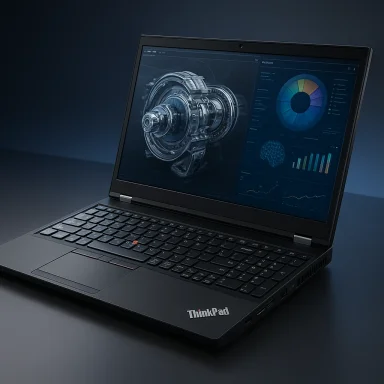
Lenovo’s chassis for the P16 Gen 3 intentionally revisits the classic matte‑black ThinkPad aesthetic. The case uses a mix of materials optimized for durability and thermal management, and the machine carries the expected ThinkPad staples — robust hinge, spill‑resistant keyboard deck, and MIL‑SPEC influence in component selection.- The laptop’s footprint and balance prioritize stability for heavy workflows, not ultra‑thin portability. This is a heavy, purposeful device designed to be used on a desk or in a mobile studio bag.
- While Lenovo has trimmed and refined fit and finish, the P16 Gen 3 is still clearly a workstation: thicker in profile and built to accept powerful discrete GPUs and multiple internal storage devices. These traits are visible in teardown photos and spec sheets used during launch reviews.
Keyboard and input: the “p16‑kb” story and why it matters
One of the moents for real‑world productivity is the keyboard, and Lenovo has doubled down on giving the P16 Gen 3 a full‑size keyboard with a NumPad — an element that will matter for engineers, data scientists, and anyone who spends hours typing or entering numeric data. Thurrott’s hands‑on materials included an attachment labeled p16‑kb that highlights the keycap profile, layout, and the integration of function keys familiar to ThinkPad users; those images reinforce the impression that Lenovo reclaimed the classic ThinkPad keyfeel and layout approach for this workstation.Why this matters:
- Ergonomics and travel: The P16’s keyboard retains strong key travel and a positive tactile response, which benefits long sessions of coding, spreadsheet work, and command entry. The physical NumPad is a productivity multiplier in engineering and finance workflows.
- Function and media keys: Lenovo preserves the dedicated function row and ThinkPad shortcut keys, which speeds routine tasks like microphone mute, camera control, and display toggles — especially useful in hybrid meeting environments.
- Pointing options: The notebook offers both a precision touchpad and thenub — a combination many longtime ThinkPad users insist upon for rapid cursor control without lifting fingers from home row.
Display options: accurate, bright, and purpose‑built
Lenovo offers a robust set of display choices for the P16 Gen 3, targeting professionals who depend on color accuracy, contrast, and resolution. Typical options include high‑resolution WQUXGA (3840×2400), 3.2K Tandem‑OLED panels, and calibrated IPS/mini‑LED variants with high color gamuts and Dolby Vision support. These panels support 16:10 aspect ratios and factory calibration for color‑critical workflows.Key display takeaways:
- Color accuracy: Factory color calibration and 100% DCI‑P3 coverage on higher‑end options position the P16 well for video editing, color grading, and CAD visualization.
- High brightness and HDR: OLED and high‑brightness IPS options with DisplayHDR certifications make the laptop usable outdoors and for HDR content pipelines.
- Refresh rates and touch: Lenovo mixes 60–120Hz panels and — in certain OLED choices — touch capability. This flexibility lets buyers tune for battery life or responsiveness depending on their priorities.
Performance profile: CPU, GPU, memory, and storage
At the heart of the P16 Gen 3 are Core Ultra HX processors from Intel and the new NVIDIA RTX Pro Blackwell professional GPUs. Lenovo’s PSREF documents show specific options and validated configurations, and early reviews provide useful real‑world context.- CPU choices: Intel Core Ultra HX family (including higher‑end Core Ultra 9 HX variants) offers a high core count and integrated NPU features for AI‑adjacent workloads. This platform targets multi‑threaded engineering and content‑creation tasks.
- GPU choices: NVIDIA RTX Pro Blackwell options — up to RTX Pro 5000 Blackwell in some configurations — bring professional driver stacks (ISV certification) and large GPU memory allocations intended to accelerate rendering, simulation, and AI inference. Independent coverage highlights how these GPUs give the P16 Gen 3 a serious workstation edge when GPU‑accelerated tasks dominate the workload.
- Memory and storage scaling: Lenovo advertises support for very large memory pools (e.g., up to 192GB DDR5 in some PSREF entries) and multiple high‑speed NVMe slots, supporting consolidated local datasets and large virtual machines. Storage can be configured across multiple PCIe Gen5 NVMe drives, enabling extremely fast local scratch and working datasets.
- Power envelope limitations: Several reviews and teardown analyses call attention to Lenovo’s choice of a smaller external power brick (180W on many SKUs) compared with past generations’ larger bricks. That difference constrains peak and sustained GPU power and can throttle worst‑case performance under continuous heavy GPU load. This is a crucial trade‑off to understand before buying a P16 Gen 3 for sustained workstation tasks.
- Thermal headroom: The compact chassis and conservative power adapter design mean sustained workloads may see some frequency tapering relative to a desktop. For bursty tasks and mixed CPU/GPU jobs, the P16 still performs exceptionally; for long, sustained GPU‑saturated runs, external docking and attention to cooling strategy may be required. Independent benchmarks and owner reports support this nuance — watch for full reviews to see workload‑specific numbers.
I/O and expandability: built for pro workflows
The P16 Gen 3’s I/O trunk includes a mix of PCIe Gen4/Gen5 NVMe slots internally and contemporary external ports tuned for multi‑display and peripheral workflows:- Multiple Thunderbolt/USB4 / USB‑C ports for external GPUs, fast storage, and docking.
- Full‑size HDMI and occasional DisplayPort options catering to multi‑monitor desktops.
- Ethernet and advanced Wi‑Fi support (including Wi‑Fi 7 on many SKUs) for fast wired and wireless connectivity in studios and on site.
Battery and power management
Lenovo offers large battery options in the P16 Gen 3 to support mobile use, but the real constraint for full workstation throughput is power delivery. Multiple reviews flagged that Lenovo ships many P16 Gen 3 configurations with an 180W power adapter — down from the 230W adapters typical of some earlier high‑end workstation models. The lower wattage adapter saves weight and reduces the charger footprint, but it also limits the sustained maximum power available to the CPU/GPU during intense workloads. If your workflows demand continuous GPU time at full tilt, consider spec’ing the plan for docked/plugged operation to avoid thermal and power‑throttling compromises.Battery life in real use will depend heavily on configuration (OLED vs IPS, CPU/GPU selection, and display refresh rate). For mixed office and light creative tasks, expect full‑day battery life with moderate brightness; for heavy rendering or simulation, the battery is a temporary fallback rather than a primary power source.
Software, security, and ISV readiness
Lenovo bundles the P16 Gen 3 for enterprise use, with Windows 11 Pro and support for vPro on select Intel SKUs. The workstation supports ISV certifications for major engineering and content creation suites, and pro drivers from NVIDIA ensure stability and performance in certified applications. Lenovo also supports TPM and standard enterprise manageability options. These are critical elements for buyers in corporate or regulated environments.Practical strengths and where the P16 Gen 3 risks disappointing
Strengths (why many professionals will choose the P16 Gen 3):- Desktop‑class silicon in a portable chassis: Up to Core Ultra 9 HX and Blackwell professional GPUs give the P16 brute force for compute and visualization workloads.
- Professional display choices and color accuracy: Factory calibration and high‑end panel options make the machine suitab media work.
- Serviceability and expandability: Multiple M.2 slots and large DIMM capacity support extended lifecycle upgrades.
- Keyboard and ergonomics: The full‑size keyboard with NumPad and familiar ThinkPad input layout returns a tangible productivity benefit for power users.
- Power adapter and sustained performance: The choice of a smaller 180W adapter on many SKUs limits sustained peak GPU output relative to larger‑brick competitors. For sustained workstation loads, this can produce a measurable difference. Independent outlets and early teardowns call this out as the most important caveat for buyers.
- Thermals vs. chassis size: Despite Lenovo’s thermal engineering, a heavy, long GPU run can push thermals into a conservative power cap, affecting long‑duration rendering or simulation jobs. Plan for docked or cooled environments for those tasks.
- Weight and portability: This is not an ultraportable: the P16 Gen 3’s weight and size mean it’s a mobile workstation, not a commuter ultrabook.
Real‑world advice for buyers and IT managers
- Identify the dominant workload. If your work is GPU‑heavy and runs for hours at a time, validate with Lenovo or your reseller which SKU and power configuration maximize sustained throughput. Consider external docking or a workstation dock with higher power support where applicable.
- Pick the right display. For color‑sensitive work, insist on the factory‑calibrated WQUXGA/OLED option. Confirm the exact panel code with Lenovo; not all SKUs include the same factory calibration.
- Test keyboard and input ergonomics. If you’re migrating large teams, get a unit in hand to verify the keyboard feel and TrackPtion meets your users’ expectations. Thurrott’s p16‑kb images show the expected layout and help verify that the physical NumPad and key travel are present in production units.
- Lifecycle planning: Take advantage of the machine’s serviceable design by spec’ing RAM and internal storage with future growth in mind; the P16 Gen 3’s upgrade path is one of its strongest long‑term value propositions.
Where independent verification still matters
Early owner reports and community benchmarks (including user posts and forum threads) provide helpful real‑world context but may vary by BIOS revision, driver update, and SKU. I cross‑checked Lenovo’s PSREF datasheet with multiple independent reviews (TechRadar, Notebookcheck, and product listings) to verify advertised capacities (memory, storage slots, GPU options). Where community benchmarks or anecdotal performance figures appear, they are flagged as user‑reported until validated by controlled lab reviews. Buyers should consult updated PSREF entries and enterprise resellers for SKU‑level confirmation before large purchases.Conclusion: a workstation for measured power users
The ThinkPad P16 Gen 3 is Lenovo’s clear statement: professional users who need desktop replacement power will get a thoughtfully designed machine that balances classic ThinkPad ergonomics (including a solid full‑size keyboard and ThinkPad input features) with modern performance (Core Ultra HX CPUs, RTX Pro Blackwell GPUs, and large memory/storage ceilings). For most professionals — freelancers, small studio owners, and enterprise engineers — the P16 Gen 3 will be a compelling choice when configured for the workload.However, prospective buyers must weigh the trade‑offs: the smaller power brick and conservative thermal allowances can limit sustained peak performance in continuous GPU‑heavy workloads. For anyone whose workflows are anchored in long, sustained render or simulation runs, evaluating power configurations and docking strategies before purchase is essential. Independent reviews and Lenovo’s PSREF remain the authoritative references for configuration limits and should be consulted for final purchasing decisions.
For readers who prioritize typing comfort and real‑world productivity, the P16 Gen 3’s keyboard — the element captured in Thurrott’s p16‑kb material — is a welcome return to a classic ThinkPad trait: a full‑size, high‑quality typing surface that supports long sessions without compromise. That alone will make the P16 Gen 3 indispensable to many professionals who spend more time at the keyboard than they do gaming or benchmarking.
In short: the P16 Gen 3 is a mature, enterprise‑ready mobile workstation that modernizes ThinkPad aesthetics and delivers a powerful, configurable platform — but smart buying means aligning the exact SKU to the workload and acknowledging the practical limits imposed by power and thermals.
Source: Thurrott.com p16-kb - Thurrott.com
