

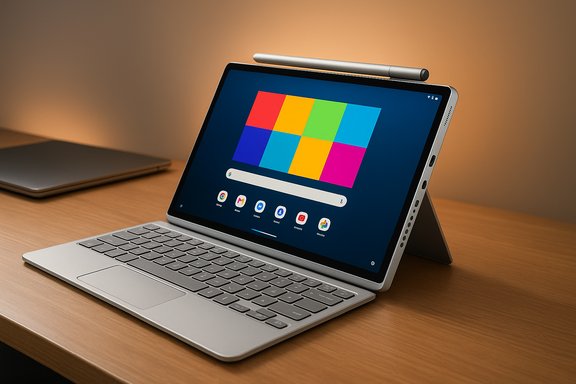
Lenovo’s Yoga Tab Plus (Gen 1) tries to be an everything‑tablet — a 12.7‑inch, kickstand‑equipped Android device that bundles a keyboard, stylus, and a loud six‑speaker system — and on hardware alone it largely succeeds; in practice, its great display, solid performance, and excellent bundled accessories are still held back by Android’s limits as a laptop replacement.
Lenovo launched the Yoga Tab Plus as a premium Android tablet positioned against high‑end rivals such as Apple’s iPad Pro and Samsung’s Galaxy Tab S series. Its headline specs — a 12.7‑inch 3K (2944×1840) PureSight Pro LTPS display at up to 144 Hz, a Qualcomm Snapdragon 8 Gen 3 platform, 16 GB of LPDDR5x, and a 10,200 mAh battery — were engineered to deliver strong multimedia, creative, and multitasking capability while undercutting some rival price points by including the keyboard and stylus in the box. Retail listings and hands‑on reviews confirm Lenovo’s SKU and accessory strategy. Lenovo also pitched the Yoga Tab Plus as part of its push toward “AI‑aware” tablets — preloading software utilities and touting an on‑device NPU for lightweight local inference — but real‑world AI feature rollout and long‑term update behavior are both areas buyers should watch closely. Independent reportage and early user threads show feature promises that depend heavily on firmware and regional rollouts.
Lenovo shipped the Yoga Tab Plus with Android 14 and promised a multi‑year update policy (typically advertised as 3 major OS updates and 4 years of security updates in many product listings). That policy is competitive for Android tablets but still short of what many laptop buyers expect from Windows or Apple’s longer support windows; vendor update cadence and timing also varies by region and SKU. Independent spec pages and retailer notices reiterate Lenovo’s support promise but make clear the actual delivery schedule depends on firmware rollouts. More importantly, Android’s application ecosystem and UI paradigms were designed for phones first. Even with Lenovo’s thoughtful tablet tweaks — improved keyboard shortcuts, a desktop‑like mode, and some multitasking affordances — many apps still lack robust tablet‑optimized interfaces, and certain interactions (file management, complex multi‑window app workflows, developer or legacy enterprise software) remain clumsier than on Windows or macOS. This is a structural software limitation rather than poor execution by Lenovo. Independent commentary and user threads across the web note the same friction: Android can be made much more productive with a keyboard and trackpad, but it’s not a drop‑in Windows replacement for power users.
Conclusion
The Yoga Tab Plus (Gen 1) is a thoughtful, well‑priced attempt to push Android tablets closer to laptop‑like utility: excellent screen, great audio, solid silicon, and meaningful accessories included. For many users — students, media consumers, casual creators — it’s an outstanding tablet package that will satisfy both entertainment and light productivity needs. For those whose daily work requires full desktop apps, deep multi‑window workflows, or long guaranteed OS support, the Yoga Tab Plus is a polished compromise rather than a true replacement for a laptop. Verify the exact SKU, confirm the current firmware/update timeline for your region, and factor in real‑world battery and storage needs before you buy.
Source: Windows Central https://www.windowscentral.com/hardware/lenovo/lenovo-yoga-tab-plus-gen-1-review/
 Background / Overview
Lenovo launched the Yoga Tab Plus as a premium Android tablet positioned against high‑end rivals such as Apple’s iPad Pro and Samsung’s Galaxy Tab S series. Its headline specs — a 12.7‑inch 3K (2944×1840) PureSight Pro LTPS display at up to 144 Hz, a Qualcomm Snapdragon 8 Gen 3 platform, 16 GB of LPDDR5x, and a 10,200 mAh battery — were engineered to deliver strong multimedia, creative, and multitasking capability while undercutting some rival price points by including the keyboard and stylus in the box. Retail listings and hands‑on reviews confirm Lenovo’s SKU and accessory strategy. Lenovo also pitched the Yoga Tab Plus as part of its push toward “AI‑aware” tablets — preloading software utilities and touting an on‑device NPU for lightweight local inference — but real‑world AI feature rollout and long‑term update behavior are both areas buyers should watch closely. Independent reportage and early user threads show feature promises that depend heavily on firmware and regional rollouts. Design and build: practical premium
Lenovo’s industrial design language for the Yoga Tab Plus emphasizes function first: an aluminum frame, a rounded spine to house speakers and magnets, and a magnetic kickstand that detaches and reattaches cleanly. The tablet weighs roughly 640 g and measures about 290.9 × 188.3 × 8.52 mm — a size and weight that put it squarely in the premium large‑tablet class without feeling unwieldy. Retail spec sheets and press pages confirm these measurements. Key physical features:- Integrated kickstand with magnetic attachment so you can use the tablet on a desk or lap without a bulky folio.
- Side‑mounted power button with fingerprint sensor for fast unlock.
- Single USB‑C port (charging, DP‑out, PD) and a pogo connector for the keyboard in tablet mode.
- Six‑speaker Harman Kardon system tuned for loud, full audio that pairs well with the bright display.
Display and audio: standout multimedia hardware
The Yoga Tab Plus’s 12.7‑inch PureSight Pro LTPS display is the tablet’s strongest single hardware asset. Specifications reported by Lenovo and confirmed by independent outlets list the panel at 3K resolution (2944×1840), a 144 Hz refresh rate, up to ~900 nits peak brightness, and full DCI‑P3 coverage with Dolby Vision HDR support. That combination yields very sharp text, smooth UI motion at higher refresh, and bright, punchy HDR video when available. If you value color fidelity for photo previewing or content consumption, the panel is excellent for the price. The six‑driver Harman Kardon speaker array (two tweeters and four larger drivers, per vendor materials) delivers a far fuller stereo image than most tablets of this size; Dolby Atmos support adds processing that broadens the perceived soundstage for movies and games. Hands‑on reviews uniformly praised the speaker system for playback and video conferencing use.Practical takeaways
- The display is bright, accurate, and smooth — excellent for media, creativity, and general productivity.
- Speakers are high quality for tablet class; this is a device that replaces a dedicated Bluetooth speaker in many casual use cases.
Performance: more than enough for Android multitasking
Under the hood Lenovo ships the Yoga Tab Plus with Qualcomm’s Snapdragon 8 Gen 3 platform (QCM8650 variant in many retail regions), paired with 16 GB LPDDR5x and 256 GB UFS 4.0 storage in the common SKU. That hardware combination is fast in Android terms: app load times, multi‑window behavior, and GPU‑accelerated tasks feel snappy, and heavier browser workloads with many tabs are handled without the severe sluggishness seen on lower‑tier tablets. Retail specifications and independent reviews corroborate these performance claims. Lenovo also advertises an NPU (vendor marketing shows ~20 TOPS) for on‑device inference; that capability underpins the company’s AI features. Real‑world utility depends on firmware, app integration, and the specific AI workloads you care about — marketing TOPS numbers are useful indicators but not a substitute for application‑level measurements.Battery life and charging: respectable, not best‑in‑class
Lenovo equipped the tablet with a 10,200 mAh battery and a 45 W USB‑C charger in the box. Those are solid, sensible choices that yield good all‑day use for mixed media and productivity sessions, but they don’t push past class leaders in endurance benchmarks. Independent reviews and retail listings report real‑world endurance that’s “good” but not best‑in‑class — expect variable runtime depending on screen brightness, refresh rate (144 Hz is power‑hungry), and speaker use. If you frequently use the tablet at peak brightness and 144 Hz for long sessions, battery life will look closer to average. Practical notes:- Reducing refresh rate and brightness will meaningfully extend runtime.
- The included 45 W charger provides quick top‑ups, but the tablet’s single USB‑C port means you’ll need a hub for any multi‑accessory docking.
Storage, ports, and expandability: small compromises
The Yoga Tab Plus ships with 256 GB UFS 4.0 in most markets; some earlier briefings suggested a 512 GB SKU would be available, but at launch and in many storefronts the 256 GB configuration is the predominant option. There is no microSD slot, and the single USB‑C port is rated for 5 Gbps in many retail specs, which limits raw wired transfer speed and docking flexibility compared with tablets that include a faster host port or multiple ports. If large local media libraries are important, plan for cloud sync or external storage solutions.Accessories and productivity extras: the box is generous
Lenovo’s decision to bundle the Tab Pen Pro, a magnetic kickstand, a full‑sized keyboard, and a 45 W charger is a key selling point. The Tab Pen Pro charges wirelessly when magnetically attached, has good feel and latency for note‑taking and sketching, and although its capacitive shortcut surface can be finicky, it works well for general creative workflows. The detachable slim kickstand is elegant: it lets the tablet stand for video or gaming while leaving the keyboard stowed away. The keyboard is comfortable for typing though it lacks backlighting — still, including these items for the price dramatically improves the out‑of‑box productivity value proposition. Retail and hands‑on reporting confirm the inclusion and quality of these accessories.Software, updates, and the elephant in the room: Android vs. Windows
Here is where the Yoga Tab Plus’s strongest weakness becomes clear: Android, for all its polish on phones and media devices, still lags the desktop OS experience most people rely on for sustained productivity workflows.Lenovo shipped the Yoga Tab Plus with Android 14 and promised a multi‑year update policy (typically advertised as 3 major OS updates and 4 years of security updates in many product listings). That policy is competitive for Android tablets but still short of what many laptop buyers expect from Windows or Apple’s longer support windows; vendor update cadence and timing also varies by region and SKU. Independent spec pages and retailer notices reiterate Lenovo’s support promise but make clear the actual delivery schedule depends on firmware rollouts. More importantly, Android’s application ecosystem and UI paradigms were designed for phones first. Even with Lenovo’s thoughtful tablet tweaks — improved keyboard shortcuts, a desktop‑like mode, and some multitasking affordances — many apps still lack robust tablet‑optimized interfaces, and certain interactions (file management, complex multi‑window app workflows, developer or legacy enterprise software) remain clumsier than on Windows or macOS. This is a structural software limitation rather than poor execution by Lenovo. Independent commentary and user threads across the web note the same friction: Android can be made much more productive with a keyboard and trackpad, but it’s not a drop‑in Windows replacement for power users.
Update status and caution
- Some reviews and spec pages (and a handful of vendor/press materials) indicate the Yoga Tab Plus is upgradable to Android 15 and in some communications up to Android 16, but that status is time‑sensitive and region‑dependent; users should verify the current firmware and update roadmap for their specific SKU and country. Claims that a particular retail unit “is now on Android 16” should be treated as date‑sensitive and confirmed against Lenovo’s official update history or the device’s OTA updater. If long OS support is a priority, check the exact update promise for the SKU you’re buying.
Real‑world productivity: where the Yoga Tab Plus shines — and where it doesn’t
Strengths for productivity:- Excellent display and pen support for note‑taking, sketching, and light photo editing.
- Comfortable keyboard and physical kickstand that support laptop‑style positioning with a small footprint.
- Strong speakers for conferencing and video playback.
- Android’s app ecosystem means some productivity workflows will be slower or more awkward (complex local file workflows, multi‑app window tiling, and enterprise legacy apps).
- Limited port selection and a single Type‑C port that tops out at ~5 Gbps in many specs reduces external dock versatility.
- No microSD for cheap local expansion; storage is fixed.
Comparisons: iPad Pro and Surface Pro
- Compared with the iPad Pro: Apple still has an advantage in tablet‑first productivity thanks to iPadOS’s better‑optimized tablet apps (for many pro apps), a richer ecosystem for creative software, and longer software support. For creatives who rely on pro apps that are iPad‑native, the iPad Pro remains the stronger choice despite Lenovo’s excellent hardware value.
- Compared with the Surface Pro: If your workflow depends on legacy Windows applications or full desktop multitasking, a Surface Pro (or other Windows 2‑in‑1) will offer a more reliable laptop replacement experience. Lenovo’s Yoga Tab Plus is more of a hybrid media/creativity tablet with occasional laptop utility than a full Windows‑class 2‑in‑1.
Pricing and value
Street pricing has fluctuated since launch. Lenovo and retailer promotions have pushed the Yoga Tab Plus into attractive price tiers (early discounts and bundles have been reported that drop the price significantly below MSRP), and retailers such as Best Buy commonly list the tablet in the $599–$739 range depending on sales and open‑box deals. Including the pen and keyboard in the box makes the tablet’s effective value compelling for buyers who want those extras without paying accessory premiums. As with any consumer electronics purchase, watch for periodic discounts and confirm the exact SKU.Risks, caveats and what to watch for
- Software maturity and updates: vendor promises of OS upgrades are valuable, but timing and regional rollouts vary. Monitor Lenovo’s official update notes for your SKU and install firmware updates carefully; community threads indicate some update rollouts have produced issues (for example, DRM/Widevine variations or isolated crashes) that were later fixed but underlined the need to check update logs.
- SKU and regional fragmentation: confirm the retail SKU you’re buying — display brightness, storage options, and even available accessories can differ by market. Independent reviewers urge buyers to verify the exact configuration before purchase.
- Port and expandability limits: a single USB‑C port and no microSD slot mean that heavy local media users should plan for cloud workflow or external storage solutions.
- Android app limitations: if you rely on complex desktop apps or multi‑window heavy workflows, representational desktop modes and keyboard shortcuts can only go so far.
Final verdict — who should buy it
You should buy the Lenovo Yoga Tab Plus (Gen 1) if:- You want a premium Android tablet with a best‑in‑class display for the price.
- You value bundled accessories (pen, keyboard, kickstand) and want good out‑of‑box productivity without extra purchases.
- Your workflow is web‑centric or uses mobile‑first creative apps that run well on Android.
- You need a tablet to be your primary full‑time laptop for legacy desktop applications.
- You require long guaranteed OS support beyond the vendor’s typical Android update window or strict enterprise patch cadences.
- You need lots of local expandability or multiple fast ports for external drives and docking.
Conclusion
The Yoga Tab Plus (Gen 1) is a thoughtful, well‑priced attempt to push Android tablets closer to laptop‑like utility: excellent screen, great audio, solid silicon, and meaningful accessories included. For many users — students, media consumers, casual creators — it’s an outstanding tablet package that will satisfy both entertainment and light productivity needs. For those whose daily work requires full desktop apps, deep multi‑window workflows, or long guaranteed OS support, the Yoga Tab Plus is a polished compromise rather than a true replacement for a laptop. Verify the exact SKU, confirm the current firmware/update timeline for your region, and factor in real‑world battery and storage needs before you buy.
Source: Windows Central https://www.windowscentral.com/hardware/lenovo/lenovo-yoga-tab-plus-gen-1-review/
