

Leostream said on May 19, 2026, that it has updated the Microsoft Marketplace edition of its Remote Desktop Access Platform with support for Azure NCv6 GPU virtual machines, automated Linux desktop deployment, regional Azure center creation, and improved Managed Identity integration. The announcement is not just another marketplace refresh; it is a small but telling sign of where cloud desktops are going. The Windows desktop story is increasingly entangled with Linux workstations, GPU partitioning, AI infrastructure, and the mundane but decisive question of who can turn expensive compute off when nobody is using it.
The easy reading of Leostream’s update is that it gives Azure customers a cleaner way to run remote desktops and workstations. That is true, but too modest. The more interesting reading is that Leostream is positioning itself as the control plane for a category Microsoft has made powerful but operationally awkward: high-performance, GPU-backed virtual workstations that live in Azure but behave like serious production machines.
For years, virtual desktop infrastructure had a fairly familiar shape. Users needed Windows apps, admins needed policy enforcement, and the infrastructure team needed to keep session hosts patched, available, and cheap enough to justify. Azure Virtual Desktop and Windows 365 have pulled much of that market into Microsoft’s orbit, especially for mainstream productivity workloads.
But the Leostream announcement is aimed at a different slice of the market. These are not just pooled desktops for Office, Teams, and a browser. They are workstations for rendering, simulation, media production, scientific visualization, software development, financial modeling, and AI-adjacent workloads where the GPU is not an accessory but the reason the VM exists.
That distinction matters because a GPU-backed cloud workstation is a cost center with a login prompt attached. The compute can be spectacular, but the bill can also be spectacular if organizations treat these machines like ordinary desktops. A traditional VDI stack that focuses mostly on brokering sessions is not enough when the workstation may be running on premium GPU infrastructure and needs to be assigned, powered, secured, and reclaimed with precision.
Leostream’s pitch is that it can make those machines usable without forcing enterprises into clunky VPN models or bespoke administrator rituals. The update adds more Azure-specific automation, and that is the real story. In the cloud workstation market, product value increasingly comes from removing the operational tax around the machine, not merely making the remote display protocol work.
That workload list is revealing. Microsoft is not talking about the GPU desktop as a niche convenience for designers who need a better viewport. It is presenting the GPU VM as a converged endpoint for AI, graphics, simulation, and visualization.
That convergence is exactly where remote access platforms have to evolve. A workstation used for CAD, video finishing, or simulation used to be a very expensive box under someone’s desk or in a machine room. Now it can be an Azure resource spun up for a contractor, a project team, or a short production run. The user still wants the experience of a workstation; the business wants cloud elasticity; security wants strong identity boundaries; finance wants the GPU powered down the moment it stops earning its keep.
Leostream’s support for NCv6 therefore lands at an important moment. Blackwell-class infrastructure is being marketed heavily for AI, but enterprises will not consume it only through notebooks, APIs, or training clusters. Some of it will be consumed through interactive sessions where a human needs to manipulate a model, inspect a visualization, review frames, run a simulation, or debug a pipeline.
That is where the old distinction between “desktop virtualization” and “high-performance computing” starts to blur. The same GPU family that can support AI inference or simulation can also host a remote visual workstation. The platform that brokers access to it has to understand not only users and sessions, but machine state, entitlement, region, identity, and cost.
A full GPU assigned to a single user is simple to understand and often wasteful. Fractional GPU models can improve utilization by letting organizations right-size access for users whose workloads do not require an entire accelerator. But fractionalization also raises the stakes for placement, policy, performance expectations, and lifecycle management.
If a studio, research team, or engineering department can give users slices of GPU-backed infrastructure, the access broker becomes part of the resource-allocation story. Who gets which tier? Which users are allowed to consume the expensive profiles? What happens when demand spikes before a deadline? How do you avoid orphaned capacity sitting powered on because nobody owns the cleanup task?
This is why Leostream’s emphasis on capacity utilization and power-state control is not just marketing boilerplate. GPU capacity is scarce, regionally constrained, and expensive. The platform that can connect users to the right machine and then shut it down, suspend it, or reclaim it when no longer needed is doing the unglamorous work that makes cloud GPU economics survivable.
Microsoft benefits from customers consuming more Azure infrastructure. Leostream benefits if those customers discover that raw infrastructure is not enough. The customer benefits only if the combination does not turn into a sprawling set of manually tended workstations with luxury hourly rates.
That matters because the high-performance workstation market is not Windows-only, even when the procurement channel is Microsoft’s cloud. Many engineering, media, scientific, and AI workflows are either Linux-native or Linux-first. Developers, researchers, and technical artists often expect a Linux desktop environment, not just SSH access to a headless box.
Microsoft has spent years making Azure a credible Linux platform, but remote desktop access to Linux workstations still tends to feel more handcrafted than equivalent Windows workflows. Admins may need to choose display servers, configure desktop environments, install agents, tune GPU drivers, validate remote protocols, and wire authentication into the rest of the enterprise. Each step is manageable; together they are enough to slow adoption.
Leostream’s Linux automation is therefore less about ideology and more about reducing deployment drag. If a customer can deploy a production-ready access platform from the marketplace and include Linux desktops without a separate round of manual configuration, the path from “we should try cloud workstations” to “a user can log in and work” gets shorter.
This is especially important in mixed estates. The organizations most likely to need GPU-backed cloud desktops are often the same ones with Windows users, Linux users, contractors, privileged users, and application-specific access rules all colliding in the same environment. A broker that treats Linux as a first-class deployment target is more useful than one that treats it as a lab exception.
The announcement notes that eligible marketplace purchases can count toward a customer’s Microsoft Azure Consumption Commitment. In plain English, that means some organizations can buy a third-party platform through Microsoft’s commercial channel and have it help burn down committed Azure spend. That changes the sales motion.
For IT leaders, the appeal is obvious. A remote access platform deployed through the marketplace can be easier to approve than a separately negotiated infrastructure product. It may fit existing procurement controls, billing relationships, and cloud governance processes. It can also make the product feel like part of the Azure solution rather than an external bolt-on.
For Microsoft, this is a familiar ecosystem play. Azure becomes more valuable when third-party vendors fill gaps around specialized use cases. Microsoft does not need to build every vertical workstation broker or every bespoke access workflow if partners can make Azure infrastructure easier to consume.
For Leostream, the marketplace is a distribution accelerant and a credibility signal. The company is not asking customers to choose between Azure and Leostream. It is arguing that serious Azure workstation deployments need an access layer that Microsoft’s infrastructure alone does not provide.
The phrase “power-state management” undersells the issue. In GPU-backed cloud desktops, power management is cost management. A VM left running overnight is not merely untidy; it can represent a direct and avoidable charge. Multiply that by teams, regions, and high-end GPU SKUs, and the difference between disciplined automation and casual operations becomes material.
Automatic creation of an Azure center also reduces one of the classic failure modes of enterprise tooling: the product works well once configured, but too much tribal knowledge is required to configure it correctly. If the marketplace deployment now creates the necessary regional control object automatically, Leostream is turning a manual post-deployment chore into expected behavior.
That is the right direction for cloud software. The more specialized the workload, the more dangerous it is to rely on administrators remembering a checklist. GPU cloud desktops already involve quota, region availability, VM family selection, image management, drivers, identity, networking, and session brokering. Any step that can be safely automated should be.
The regional nature of the Azure center is also important. Azure capacity is not abstract; it lives in places. GPU VM availability can vary by region, and data gravity, latency, compliance, and user geography all affect placement. A control plane that inventories and manages resources in the region where it is deployed is better aligned with how Azure actually behaves.
Managed Identities allow Azure resources to authenticate to other Azure services without administrators embedding long-lived credentials or managing secrets manually. In an access platform that needs to inventory, control, and manage virtual machines, reducing dependency on stored credentials is a serious design improvement.
The zero-trust language in Leostream’s positioning can sound like the usual vendor chorus, but Managed Identity support gives that claim more substance. A broker that controls who can access which resource is already security-sensitive. If that broker also has broad Azure permissions and those permissions are tied to secrets sitting somewhere in configuration files, the architecture becomes harder to defend.
Better Managed Identity support does not automatically make a deployment secure. Administrators still need least-privilege roles, conditional access policies, logging, lifecycle controls, and sane network design. But it does move the integration toward modern Azure practice, where services authenticate as themselves and permissions can be scoped more cleanly.
This is the pattern IT pros should watch. The next generation of remote access platforms will be judged not only by frame rate and convenience, but by how well they fit into cloud-native identity and governance models. If a product wants to broker access to expensive and sensitive compute, it cannot behave like a legacy appliance with a cloud connector stapled on.
Traditional VPNs often place a user “on the network,” even if segmentation and firewalling later restrict what that user can reach. That model has been under pressure for years because remote work, contractors, cloud infrastructure, and identity-driven security make network-level trust look increasingly blunt. A remote desktop broker can offer a cleaner model: authenticate the user, evaluate entitlement, connect them to a defined resource, and avoid broader network exposure.
For high-performance Azure workstations, that matters. These machines may sit near sensitive data, proprietary designs, media assets, simulation outputs, or regulated workloads. Giving a user a full network tunnel just to reach a remote workstation is not ideal if the access broker can provide a narrower path.
There is also an operational benefit. VPN troubleshooting is a genre of enterprise pain: split tunneling, client versions, local networks, DNS, conditional access, posture checks, and routing weirdness. Remote access gateways do not eliminate all troubleshooting, but they shift the access model toward application and resource brokering rather than network extension.
The catch is that “no VPN” should not become “no architecture.” Organizations still need to decide where gateways live, how sessions are logged, how privileged actions are controlled, how devices are trusted or not trusted, and how emergency access works. Leostream can provide the machinery, but policy discipline remains the customer’s job.
Azure Virtual Desktop is a powerful platform for Windows desktop and app virtualization. Windows 365 is a cleaner Cloud PC service for many business users. But GPU-intensive, mixed-OS, high-performance, specialty-application environments often accumulate requirements that do not fit neatly into mainstream desktop-as-a-service patterns.
Leostream’s market lives in those edges. The company emphasizes hosted desktops and workstations, hybrid environments, Linux support, high-performance compute, media and entertainment, energy and science, financial services, government, and defense. Those are markets where the remote desktop is not merely a convenience; it is often the governed front door to expensive tools and sensitive datasets.
This is also why the Microsoft Marketplace update is strategically useful for both sides. Microsoft does not have to concede weakness to acknowledge that partner tools can make Azure more attractive for specialized deployments. Leostream does not have to displace Microsoft’s native services to win; it can occupy the orchestration and access layer around workloads that need more granular control.
The likely future is not one remote desktop platform to rule them all. It is a layered ecosystem where Microsoft owns the cloud substrate and identity gravity, while partners compete to tame specialized workflows. In that world, integrations with Azure regions, Managed Identities, marketplace procurement, and GPU VM families are not minor checkboxes. They are the terms of admission.
Leostream is explicitly telling Azure customers to look at capacity utilization and power states. That is the correct focus because the cloud workstation value proposition depends on elasticity. If a company moves from physical workstations to cloud workstations but leaves expensive VMs running continuously, it may gain flexibility while losing the economic argument.
The cloud can be cheaper when capacity is matched to use. It can be dramatically more expensive when idle capacity is normalized. GPU workstations sharpen that divide because the baseline cost is higher than ordinary compute, and because users may request more performance than they consistently need.
A good broker can help by assigning users to machines based on policy, powering machines on when needed, powering them down when sessions end, and giving administrators a central view of what exists. A bad or underconfigured process turns the environment into a haunted garage of forgotten workstations.
This is where forum readers should be especially skeptical of vendor framing. “Cloud workstations reduce cost” is not a law of physics. It is an outcome produced by automation, governance, scheduling, right-sizing, and user behavior. Leostream’s update adds tools that can support that outcome, but customers still have to design around it.
Leostream’s new Azure integration is useful because it acknowledges that shift. Automatic regional Azure center creation is not glamorous, but it removes friction from inventory and control. Linux desktop deployment is not a moonshot, but it reduces a set of manual steps that can derail pilots. Managed Identity support is not a screenshot feature, but it aligns the product with how Azure security teams prefer services to authenticate.
These are stack-level improvements. They do not promise that every user will feel a magical performance increase. They promise that administrators will spend less time stitching the environment together and more time operating it as a controlled service.
For sysadmins, that is probably the right benchmark. The question is not whether Leostream makes Azure GPUs fast. Microsoft and NVIDIA are responsible for the hardware story. The question is whether Leostream makes the environment governable enough for real users, real budgets, and real audits.
This is especially important for organizations with hybrid estates. Many enterprises will not move every workstation to Azure, nor should they. A practical remote access platform has to bridge on-premises resources, cloud-hosted machines, Windows systems, Linux systems, and specialized protocols without forcing a single architectural religion.
That changes how IT should think about desktop access. The important question is no longer simply “can the user connect?” It is “should this user receive this class of compute, in this region, for this application, under this identity context, for this amount of time?”
Once framed that way, remote access platforms start to look less like convenience software and more like governance infrastructure. The broker becomes the point where human demand meets cloud capacity. It is where entitlement becomes a running machine and where a forgotten session becomes a cost problem.
This also explains why Linux support, GPU support, Managed Identity support, and power control belong in the same announcement. They are not random features. They are pieces of the same operating model: give the right user the right remote environment, reduce manual setup, enforce identity boundaries, and control the expensive parts of the lifecycle.
For WindowsForum readers, the irony is worth noting. Microsoft’s cloud desktop ecosystem may be branded around Windows, but the serious workstation conversation is increasingly cross-platform. Windows remains central, especially for enterprise apps and managed desktop fleets, but Azure’s workstation opportunity depends heavily on Linux, GPUs, and specialized software stacks.
Microsoft is racing to make Azure a default home for AI infrastructure and GPU-heavy workloads. NVIDIA’s Blackwell generation is pushing more organizations to think about what workloads they can move into accelerated cloud environments. Meanwhile, hybrid work has normalized remote access as a permanent enterprise concern rather than a temporary pandemic-era workaround.
Those trends collide at the cloud workstation. Users want high-performance environments from wherever they are. Administrators want identity-aware access without broad network exposure. Finance wants idle machines powered off. Security wants fewer secrets and better scoping. Procurement wants purchases to fit existing cloud commitments.
Leostream’s update speaks to all of those pressures. It does not solve them universally, and it does not remove the need for careful architecture. But it shows how the market is maturing: the differentiator is less about whether a vendor can connect a user to a desktop and more about whether it can make the full lifecycle of that desktop manageable in a cloud-native way.
That is why this announcement deserves more attention than a routine partner press release. The interesting part is not that Leostream supports another Azure VM family. The interesting part is that the remote workstation is being rebuilt around GPU allocation, Linux automation, marketplace procurement, cloud identity, and cost control.
Leostream’s update will not by itself decide the future of remote workstations on Azure, but it points in the right direction: toward desktops that are created automatically, assigned precisely, secured through cloud identity, powered according to actual use, and capable of serving Windows and Linux users on the same high-performance substrate. As Azure’s GPU catalog expands and Blackwell-class infrastructure moves from announcement slides into customer environments, the winners will be the tools that make extraordinary compute feel ordinary to use and impossible to forget on.
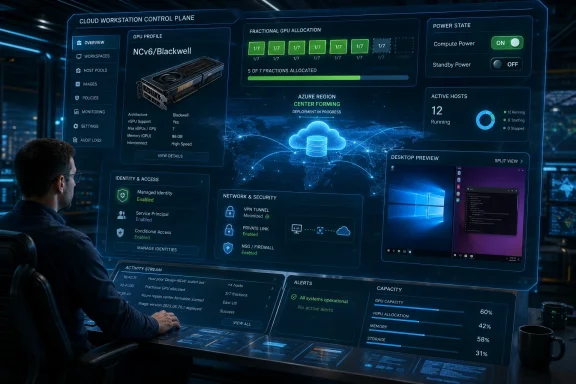 Leostream Is Selling Control Over the Cloud Workstation Mess
The easy reading of Leostream’s update is that it gives Azure customers a cleaner way to run remote desktops and workstations. That is true, but too modest. The more interesting reading is that Leostream is positioning itself as the control plane for a category Microsoft has made powerful but operationally awkward: high-performance, GPU-backed virtual workstations that live in Azure but behave like serious production machines.For years, virtual desktop infrastructure had a fairly familiar shape. Users needed Windows apps, admins needed policy enforcement, and the infrastructure team needed to keep session hosts patched, available, and cheap enough to justify. Azure Virtual Desktop and Windows 365 have pulled much of that market into Microsoft’s orbit, especially for mainstream productivity workloads.
But the Leostream announcement is aimed at a different slice of the market. These are not just pooled desktops for Office, Teams, and a browser. They are workstations for rendering, simulation, media production, scientific visualization, software development, financial modeling, and AI-adjacent workloads where the GPU is not an accessory but the reason the VM exists.
That distinction matters because a GPU-backed cloud workstation is a cost center with a login prompt attached. The compute can be spectacular, but the bill can also be spectacular if organizations treat these machines like ordinary desktops. A traditional VDI stack that focuses mostly on brokering sessions is not enough when the workstation may be running on premium GPU infrastructure and needs to be assigned, powered, secured, and reclaimed with precision.
Leostream’s pitch is that it can make those machines usable without forcing enterprises into clunky VPN models or bespoke administrator rituals. The update adds more Azure-specific automation, and that is the real story. In the cloud workstation market, product value increasingly comes from removing the operational tax around the machine, not merely making the remote display protocol work.
Azure NCv6 Turns The Desktop Into An AI-Era Compute Endpoint
The headline feature is support for Azure NCv6, Microsoft’s upcoming GPU-based VM platform based on NVIDIA’s Blackwell architecture. Microsoft’s own documentation for the NC RTX PRO 6000 Blackwell Server Edition v6 family describes systems powered by NVIDIA RTX PRO 6000 Blackwell Server Edition GPUs, with 96GB of GDDR7 memory per GPU, aimed at multimodal AI, physical AI, high-fidelity graphics, rendering, streaming, scientific visualization, HPC, and GPU-accelerated desktop virtualization.That workload list is revealing. Microsoft is not talking about the GPU desktop as a niche convenience for designers who need a better viewport. It is presenting the GPU VM as a converged endpoint for AI, graphics, simulation, and visualization.
That convergence is exactly where remote access platforms have to evolve. A workstation used for CAD, video finishing, or simulation used to be a very expensive box under someone’s desk or in a machine room. Now it can be an Azure resource spun up for a contractor, a project team, or a short production run. The user still wants the experience of a workstation; the business wants cloud elasticity; security wants strong identity boundaries; finance wants the GPU powered down the moment it stops earning its keep.
Leostream’s support for NCv6 therefore lands at an important moment. Blackwell-class infrastructure is being marketed heavily for AI, but enterprises will not consume it only through notebooks, APIs, or training clusters. Some of it will be consumed through interactive sessions where a human needs to manipulate a model, inspect a visualization, review frames, run a simulation, or debug a pipeline.
That is where the old distinction between “desktop virtualization” and “high-performance computing” starts to blur. The same GPU family that can support AI inference or simulation can also host a remote visual workstation. The platform that brokers access to it has to understand not only users and sessions, but machine state, entitlement, region, identity, and cost.
Fractional GPUs Make Brokering More Important, Not Less
Leostream’s announcement specifically calls out fractional GPU options for NCv6-backed virtual desktops and workstations. This is one of those details that sounds minor until you think like an administrator.A full GPU assigned to a single user is simple to understand and often wasteful. Fractional GPU models can improve utilization by letting organizations right-size access for users whose workloads do not require an entire accelerator. But fractionalization also raises the stakes for placement, policy, performance expectations, and lifecycle management.
If a studio, research team, or engineering department can give users slices of GPU-backed infrastructure, the access broker becomes part of the resource-allocation story. Who gets which tier? Which users are allowed to consume the expensive profiles? What happens when demand spikes before a deadline? How do you avoid orphaned capacity sitting powered on because nobody owns the cleanup task?
This is why Leostream’s emphasis on capacity utilization and power-state control is not just marketing boilerplate. GPU capacity is scarce, regionally constrained, and expensive. The platform that can connect users to the right machine and then shut it down, suspend it, or reclaim it when no longer needed is doing the unglamorous work that makes cloud GPU economics survivable.
Microsoft benefits from customers consuming more Azure infrastructure. Leostream benefits if those customers discover that raw infrastructure is not enough. The customer benefits only if the combination does not turn into a sprawling set of manually tended workstations with luxury hourly rates.
Linux Desktop Automation Is The Quiet Enterprise Feature
The new ability to launch and deploy a Linux desktop directly from the Microsoft Marketplace offering may be the most practically important change in the release. Previous Linux environments required manual configuration steps. The updated offering removes that friction by making Linux desktop deployment part of the marketplace workflow.That matters because the high-performance workstation market is not Windows-only, even when the procurement channel is Microsoft’s cloud. Many engineering, media, scientific, and AI workflows are either Linux-native or Linux-first. Developers, researchers, and technical artists often expect a Linux desktop environment, not just SSH access to a headless box.
Microsoft has spent years making Azure a credible Linux platform, but remote desktop access to Linux workstations still tends to feel more handcrafted than equivalent Windows workflows. Admins may need to choose display servers, configure desktop environments, install agents, tune GPU drivers, validate remote protocols, and wire authentication into the rest of the enterprise. Each step is manageable; together they are enough to slow adoption.
Leostream’s Linux automation is therefore less about ideology and more about reducing deployment drag. If a customer can deploy a production-ready access platform from the marketplace and include Linux desktops without a separate round of manual configuration, the path from “we should try cloud workstations” to “a user can log in and work” gets shorter.
This is especially important in mixed estates. The organizations most likely to need GPU-backed cloud desktops are often the same ones with Windows users, Linux users, contractors, privileged users, and application-specific access rules all colliding in the same environment. A broker that treats Linux as a first-class deployment target is more useful than one that treats it as a lab exception.
Marketplace Convenience Is Also A Procurement Strategy
Leostream’s update is tied specifically to the Microsoft Marketplace edition of its platform. That is not incidental. For many enterprises, the marketplace is no longer merely a discovery catalog; it is a procurement mechanism, a compliance shortcut, and a way to route software spend through existing Azure commitments.The announcement notes that eligible marketplace purchases can count toward a customer’s Microsoft Azure Consumption Commitment. In plain English, that means some organizations can buy a third-party platform through Microsoft’s commercial channel and have it help burn down committed Azure spend. That changes the sales motion.
For IT leaders, the appeal is obvious. A remote access platform deployed through the marketplace can be easier to approve than a separately negotiated infrastructure product. It may fit existing procurement controls, billing relationships, and cloud governance processes. It can also make the product feel like part of the Azure solution rather than an external bolt-on.
For Microsoft, this is a familiar ecosystem play. Azure becomes more valuable when third-party vendors fill gaps around specialized use cases. Microsoft does not need to build every vertical workstation broker or every bespoke access workflow if partners can make Azure infrastructure easier to consume.
For Leostream, the marketplace is a distribution accelerant and a credibility signal. The company is not asking customers to choose between Azure and Leostream. It is arguing that serious Azure workstation deployments need an access layer that Microsoft’s infrastructure alone does not provide.
The New Azure Center Is About Power, Not Just Inventory
Another meaningful change is that the Marketplace offering now automatically creates an Azure center for the region where the platform was deployed. That Azure center allows Leostream to inventory and control virtual desktops and workstations in that region, improving power-state management for deployed VMs.The phrase “power-state management” undersells the issue. In GPU-backed cloud desktops, power management is cost management. A VM left running overnight is not merely untidy; it can represent a direct and avoidable charge. Multiply that by teams, regions, and high-end GPU SKUs, and the difference between disciplined automation and casual operations becomes material.
Automatic creation of an Azure center also reduces one of the classic failure modes of enterprise tooling: the product works well once configured, but too much tribal knowledge is required to configure it correctly. If the marketplace deployment now creates the necessary regional control object automatically, Leostream is turning a manual post-deployment chore into expected behavior.
That is the right direction for cloud software. The more specialized the workload, the more dangerous it is to rely on administrators remembering a checklist. GPU cloud desktops already involve quota, region availability, VM family selection, image management, drivers, identity, networking, and session brokering. Any step that can be safely automated should be.
The regional nature of the Azure center is also important. Azure capacity is not abstract; it lives in places. GPU VM availability can vary by region, and data gravity, latency, compliance, and user geography all affect placement. A control plane that inventories and manages resources in the region where it is deployed is better aligned with how Azure actually behaves.
Managed Identities Move The Integration Away From Shared Secrets
The update also improves support for Azure Managed Identities. This is the kind of feature that rarely makes headlines but often determines whether security teams bless a deployment.Managed Identities allow Azure resources to authenticate to other Azure services without administrators embedding long-lived credentials or managing secrets manually. In an access platform that needs to inventory, control, and manage virtual machines, reducing dependency on stored credentials is a serious design improvement.
The zero-trust language in Leostream’s positioning can sound like the usual vendor chorus, but Managed Identity support gives that claim more substance. A broker that controls who can access which resource is already security-sensitive. If that broker also has broad Azure permissions and those permissions are tied to secrets sitting somewhere in configuration files, the architecture becomes harder to defend.
Better Managed Identity support does not automatically make a deployment secure. Administrators still need least-privilege roles, conditional access policies, logging, lifecycle controls, and sane network design. But it does move the integration toward modern Azure practice, where services authenticate as themselves and permissions can be scoped more cleanly.
This is the pattern IT pros should watch. The next generation of remote access platforms will be judged not only by frame rate and convenience, but by how well they fit into cloud-native identity and governance models. If a product wants to broker access to expensive and sensitive compute, it cannot behave like a legacy appliance with a cloud connector stapled on.
The VPN Replacement Pitch Is Really A Least-Privilege Pitch
Leostream says its gateway can eliminate clunky corporate VPNs by giving users access only to the specific resources they are authorized to use, regardless of location or device. The anti-VPN message is familiar, but the more interesting claim is about narrowing access.Traditional VPNs often place a user “on the network,” even if segmentation and firewalling later restrict what that user can reach. That model has been under pressure for years because remote work, contractors, cloud infrastructure, and identity-driven security make network-level trust look increasingly blunt. A remote desktop broker can offer a cleaner model: authenticate the user, evaluate entitlement, connect them to a defined resource, and avoid broader network exposure.
For high-performance Azure workstations, that matters. These machines may sit near sensitive data, proprietary designs, media assets, simulation outputs, or regulated workloads. Giving a user a full network tunnel just to reach a remote workstation is not ideal if the access broker can provide a narrower path.
There is also an operational benefit. VPN troubleshooting is a genre of enterprise pain: split tunneling, client versions, local networks, DNS, conditional access, posture checks, and routing weirdness. Remote access gateways do not eliminate all troubleshooting, but they shift the access model toward application and resource brokering rather than network extension.
The catch is that “no VPN” should not become “no architecture.” Organizations still need to decide where gateways live, how sessions are logged, how privileged actions are controlled, how devices are trusted or not trusted, and how emergency access works. Leostream can provide the machinery, but policy discipline remains the customer’s job.
Microsoft’s Own Desktop Stack Leaves Room For Specialists
It would be easy to ask why a third-party broker matters in an Azure world that already includes Azure Virtual Desktop, Windows 365, Entra ID, Intune, and the Windows App. The answer is that Microsoft’s stack is broad, but broad is not the same as specialized.Azure Virtual Desktop is a powerful platform for Windows desktop and app virtualization. Windows 365 is a cleaner Cloud PC service for many business users. But GPU-intensive, mixed-OS, high-performance, specialty-application environments often accumulate requirements that do not fit neatly into mainstream desktop-as-a-service patterns.
Leostream’s market lives in those edges. The company emphasizes hosted desktops and workstations, hybrid environments, Linux support, high-performance compute, media and entertainment, energy and science, financial services, government, and defense. Those are markets where the remote desktop is not merely a convenience; it is often the governed front door to expensive tools and sensitive datasets.
This is also why the Microsoft Marketplace update is strategically useful for both sides. Microsoft does not have to concede weakness to acknowledge that partner tools can make Azure more attractive for specialized deployments. Leostream does not have to displace Microsoft’s native services to win; it can occupy the orchestration and access layer around workloads that need more granular control.
The likely future is not one remote desktop platform to rule them all. It is a layered ecosystem where Microsoft owns the cloud substrate and identity gravity, while partners compete to tame specialized workflows. In that world, integrations with Azure regions, Managed Identities, marketplace procurement, and GPU VM families are not minor checkboxes. They are the terms of admission.
The Cost Story Is Where The Announcement Becomes Real
Every cloud GPU announcement eventually runs into the same reality: the bill. A high-end GPU VM is seductive in a demo and unforgiving on an invoice. Remote workstation platforms that do not address utilization are incomplete.Leostream is explicitly telling Azure customers to look at capacity utilization and power states. That is the correct focus because the cloud workstation value proposition depends on elasticity. If a company moves from physical workstations to cloud workstations but leaves expensive VMs running continuously, it may gain flexibility while losing the economic argument.
The cloud can be cheaper when capacity is matched to use. It can be dramatically more expensive when idle capacity is normalized. GPU workstations sharpen that divide because the baseline cost is higher than ordinary compute, and because users may request more performance than they consistently need.
A good broker can help by assigning users to machines based on policy, powering machines on when needed, powering them down when sessions end, and giving administrators a central view of what exists. A bad or underconfigured process turns the environment into a haunted garage of forgotten workstations.
This is where forum readers should be especially skeptical of vendor framing. “Cloud workstations reduce cost” is not a law of physics. It is an outcome produced by automation, governance, scheduling, right-sizing, and user behavior. Leostream’s update adds tools that can support that outcome, but customers still have to design around it.
The Admin Burden Moves Up The Stack
One of the recurring myths of cloud migration is that infrastructure complexity disappears. In reality, it often moves. Physical workstation problems become image, identity, quota, region, driver, protocol, and cost-management problems.Leostream’s new Azure integration is useful because it acknowledges that shift. Automatic regional Azure center creation is not glamorous, but it removes friction from inventory and control. Linux desktop deployment is not a moonshot, but it reduces a set of manual steps that can derail pilots. Managed Identity support is not a screenshot feature, but it aligns the product with how Azure security teams prefer services to authenticate.
These are stack-level improvements. They do not promise that every user will feel a magical performance increase. They promise that administrators will spend less time stitching the environment together and more time operating it as a controlled service.
For sysadmins, that is probably the right benchmark. The question is not whether Leostream makes Azure GPUs fast. Microsoft and NVIDIA are responsible for the hardware story. The question is whether Leostream makes the environment governable enough for real users, real budgets, and real audits.
This is especially important for organizations with hybrid estates. Many enterprises will not move every workstation to Azure, nor should they. A practical remote access platform has to bridge on-premises resources, cloud-hosted machines, Windows systems, Linux systems, and specialized protocols without forcing a single architectural religion.
The Workstation Is Becoming A Policy Object
The deeper trend behind Leostream’s announcement is that the workstation is turning into a policy object. In the old model, a workstation was a purchased asset assigned to a person. In the emerging cloud model, it is a resource profile assembled from image, region, GPU type, identity, entitlement, network path, power state, and budget policy.That changes how IT should think about desktop access. The important question is no longer simply “can the user connect?” It is “should this user receive this class of compute, in this region, for this application, under this identity context, for this amount of time?”
Once framed that way, remote access platforms start to look less like convenience software and more like governance infrastructure. The broker becomes the point where human demand meets cloud capacity. It is where entitlement becomes a running machine and where a forgotten session becomes a cost problem.
This also explains why Linux support, GPU support, Managed Identity support, and power control belong in the same announcement. They are not random features. They are pieces of the same operating model: give the right user the right remote environment, reduce manual setup, enforce identity boundaries, and control the expensive parts of the lifecycle.
For WindowsForum readers, the irony is worth noting. Microsoft’s cloud desktop ecosystem may be branded around Windows, but the serious workstation conversation is increasingly cross-platform. Windows remains central, especially for enterprise apps and managed desktop fleets, but Azure’s workstation opportunity depends heavily on Linux, GPUs, and specialized software stacks.
The Marketplace Update Is Small News With A Large Shadow
Leostream is not announcing a new cloud region, a new GPU, or a new Microsoft desktop service. It is announcing an update to a marketplace-deployed access platform. That sounds small until you place it against the direction of enterprise computing.Microsoft is racing to make Azure a default home for AI infrastructure and GPU-heavy workloads. NVIDIA’s Blackwell generation is pushing more organizations to think about what workloads they can move into accelerated cloud environments. Meanwhile, hybrid work has normalized remote access as a permanent enterprise concern rather than a temporary pandemic-era workaround.
Those trends collide at the cloud workstation. Users want high-performance environments from wherever they are. Administrators want identity-aware access without broad network exposure. Finance wants idle machines powered off. Security wants fewer secrets and better scoping. Procurement wants purchases to fit existing cloud commitments.
Leostream’s update speaks to all of those pressures. It does not solve them universally, and it does not remove the need for careful architecture. But it shows how the market is maturing: the differentiator is less about whether a vendor can connect a user to a desktop and more about whether it can make the full lifecycle of that desktop manageable in a cloud-native way.
That is why this announcement deserves more attention than a routine partner press release. The interesting part is not that Leostream supports another Azure VM family. The interesting part is that the remote workstation is being rebuilt around GPU allocation, Linux automation, marketplace procurement, cloud identity, and cost control.
The NCv6 Update Gives IT Buyers A Checklist With Teeth
Leostream’s Azure update is best read as a practical signal for teams evaluating cloud workstation projects in 2026. The details are concrete enough to turn into buying criteria, especially for organizations that expect Azure GPUs to support real production work rather than a limited proof of concept.- Azure NCv6 support matters because Blackwell-backed GPU workstations will be part of the next wave of AI, visualization, rendering, and simulation deployments.
- Automated Linux desktop deployment matters because many high-performance users do not live entirely inside Windows, even when their infrastructure budget runs through Azure.
- Automatic Azure center creation matters because regional inventory and power-state control are essential to keeping GPU-backed desktops from becoming unmanaged cost traps.
- Improved Managed Identity support matters because access brokers should integrate with Azure security models without relying on brittle shared-secret patterns.
- Marketplace availability matters because procurement, billing, and Azure consumption commitments can determine whether a technically sound platform is easy or painful to adopt.
- The anti-VPN positioning matters only if customers use it to enforce narrower, identity-driven access rather than simply replacing one remote access tunnel with another.
Leostream’s update will not by itself decide the future of remote workstations on Azure, but it points in the right direction: toward desktops that are created automatically, assigned precisely, secured through cloud identity, powered according to actual use, and capable of serving Windows and Linux users on the same high-performance substrate. As Azure’s GPU catalog expands and Blackwell-class infrastructure moves from announcement slides into customer environments, the winners will be the tools that make extraordinary compute feel ordinary to use and impossible to forget on.
References
- Primary source: AiThority
Published: Wed, 20 May 2026 07:27:27 GMT
Leostream Updates Remote Access Platform for Microsoft Azure
Leostream Corporation announced updates to the Microsoft Marketplace edition of the world-leading Leostream® Remote Desktop Access Platform that add even more features for customers using GPU-accelerated virtual machines in Azure environments, support for the upcoming Azure NCv6, new options for... aithority.com
- Official source: learn.microsoft.com
NC_RTXPRO6000BSE_v6 size series - Azure Virtual Machines | Microsoft Learn
Information on and specifications of the NC_RTXPRO6000BSE_v6-series sizeslearn.microsoft.com - Related coverage: streetinsider.com
Leostream Updates Remote Access Platform for Microsoft Azure
Continued development results in new features for Linux desktops, high-performance computing environments, support for Azure NCv6 BOSTON--(BUSINESS...www.streetinsider.com - Related coverage: leostream.com
Leostream + Microsoft - Leostream
Secure, Scalable Digital Workspace Management for Azure-Hosted Desktops and High-Performance Workloads.leostream.com - Official source: techcommunity.microsoft.com
Azure ND GB300 v6 now Generally Available - Hyper-optimized for Generative and Agentic AI workloads | Microsoft Community Hub
We are pleased to announce the General Availability (GA) of ND GB300 v6 virtual machines, delivering the next leap in AI infrastructure. On 10/09, we shared... techcommunity.microsoft.com
- Related coverage: blogs.nvidia.com
Microsoft Azure Unveils World’s First NVIDIA GB300 NVL72 Supercomputing Cluster for OpenAI | NVIDIA Blog
New state-of-the-art platform enables next-generation AI model development and deployment while furthering American leadership in AI.blogs.nvidia.com
- Related coverage: weeklyvoice.com
Leostream Unveils Desktop/Workstation Platform for Amazon WorkSpaces Core Managed Instances – Weekly Voice
BOSTON--(BUSINESS WIRE)--Leostream Corporation, creator of the world-leading Leostream® Remote Desktop Access Platform, today unveiled a desktop and workstation solution for Amazon WorkSpaces Core Managed Instances (CMI) that is built for all end-user computing needs, from productivity...weeklyvoice.com - Related coverage: tomshardware.com
- Related coverage: docs.nvidia.com
- Related coverage: signal65.com
- Related coverage: docs.leostream.com
- Related coverage: nvidia.cn
