

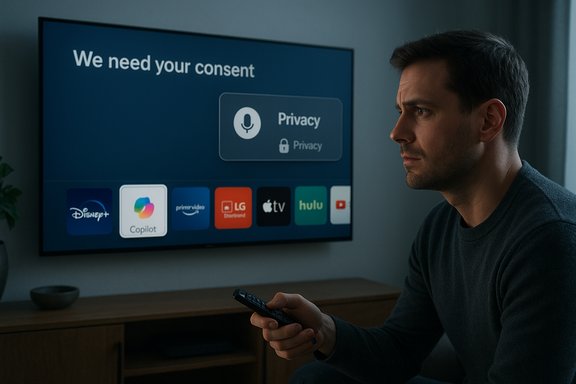
LG’s about-face on the Copilot icon marks a rare — and instructive — retreat: after a wave of online outrage over a supposedly “unremovable” Microsoft Copilot shortcut that appeared on newer LG TVs following a webOS update, the company told reporters it will add a true delete option for the Copilot shortcut, while emphasizing the shortcut currently launches a web-based Copilot page and that microphone features require explicit consent.
In 2025 several major TV makers publicly signaled an intent to put conversational AI on the living-room screen, and Microsoft’s Copilot became a central partner in that push. Samsung and LG both previewed Copilot integrations during CES and product roadmaps, touting capabilities such as contextual show recaps, voice-first discovery, and on-screen cards optimized for large displays. Samsung published staged rollout notes for its 2025 models and a QR-based sign-in path; LG framed Copilot as part of an “AI TV” strategy built into webOS. What changed this month was not the idea — but how the feature landed on customer devices. A routine webOS firmware-over-the-air update placed a Microsoft Copilot tile on some LG TVs’ home screens. Owners discovered that, in many reported cases, the tile could be hidden but lacked a standard uninstall/delete affordance; some users found the tile reappeared after factory resets. Those technical behaviors strongly suggest the Copilot entry was provisioned as a privileged system asset or baked into the firmware image rather than installed as a removable, user-downloaded app. The discovery set off a fast-moving consumer backlash that culminated in LG promising to add a deletion option (timing unspecified).
The real lesson for the industry: AI features can offer genuine, measurable benefits on the big screen, but those benefits are fragile. They require consent-first design, clear telemetry disclosures, and respectful update mechanics. When any one of those elements is missing — when an AI is pinned to a device without a durable opt-out — even valuable features become triggers for distrust.
For LG owners the immediate victory is straightforward: the company has said it will let you delete the Copilot shortcut. For the broader audience, the incident should be a prompt to demand clear deletion semantics, better update transparency, and plain-English privacy explanations whenever AI is added to the devices we already own.
Source: The Tech Buzz https://www.techbuzz.ai/articles/lg-backs-down-on-copilot-tv-app-after-user-outcry/
 Background
In 2025 several major TV makers publicly signaled an intent to put conversational AI on the living-room screen, and Microsoft’s Copilot became a central partner in that push. Samsung and LG both previewed Copilot integrations during CES and product roadmaps, touting capabilities such as contextual show recaps, voice-first discovery, and on-screen cards optimized for large displays. Samsung published staged rollout notes for its 2025 models and a QR-based sign-in path; LG framed Copilot as part of an “AI TV” strategy built into webOS. What changed this month was not the idea — but how the feature landed on customer devices. A routine webOS firmware-over-the-air update placed a Microsoft Copilot tile on some LG TVs’ home screens. Owners discovered that, in many reported cases, the tile could be hidden but lacked a standard uninstall/delete affordance; some users found the tile reappeared after factory resets. Those technical behaviors strongly suggest the Copilot entry was provisioned as a privileged system asset or baked into the firmware image rather than installed as a removable, user-downloaded app. The discovery set off a fast-moving consumer backlash that culminated in LG promising to add a deletion option (timing unspecified). What actually happened on LG TVs
The viral ignition
The story broke into public view after a Reddit post in r/mildlyinfuriating showed a screenshot with a Copilot tile pinned to a webOS home ribbon and the poster noting it “cannot be deleted.” The thread quickly accumulated tens of thousands of votes and thousands of comments as owners shared similar experiences and screenshots. Mainstream outlets picked up the thread and reproduced the image and workflows, turning a single user report into an industry story.The technical behavior reported by users
Affected owners described the same observable pattern:- The TV applied a webOS update and rebooted.
- A Copilot tile or shortcut appeared on the home screen or app row.
- The Edit/App Manager UI often offered hide or disable, but not delete.
- A factory reset in some cases restored the tile, which is a classic sign of a firmware-baked or privileged system package rather than a store app.
LG’s response and what it actually said
LG’s spokesperson Chris De Maria told reporters, “We respect consumer choice and will take steps to allow users to delete the shortcut icon if they wish.” The company also clarified the Copilot tile is a shortcut that opens Microsoft Copilot in the TV’s browser, not “an application-based service embedded in the TV,” and that microphone features are activated only with explicit user consent. LG did not provide a firm timeline for when the deletion option will appear. That statement is important because it addresses two separate concerns: (1) whether Copilot runs as a deeply embedded, always-on service, and (2) whether LG will correct the lack of a user-level uninstall mechanism. LG’s clarification reduces one fear — that a stealthy, always-listening Copilot was surreptitiously embedded in firmware — but it does not solve the user-control issue until the promised delete option ships.Why the implementation triggered such anger
1) The default rule of platform placement
Home-screen real estate functions as attention currency. Pinning a partner service as a privileged tile effectively guarantees exposure and can steer user behavior. For consumers who expect their purchased hardware to behave like an appliance, a non-removable partner tile feels like a loss of ownership. The initial reaction was therefore less about the usefulness of Copilot and more about the manner in which it was imposed.2) Privacy anxiety in shared spaces
Smart TVs live in private rooms and collect a wide array of metadata: Automatic Content Recognition (ACR, marketed by some vendors as “Live Plus”), viewing history, and optional voice data from remotes or microphones. Adding a conversational assistant to that environment raises plausible new telemetry pathways, even if LG’s current Copilot entry is a browser shortcut. Users see the tile and jump to worst-case scenarios: constant listening, cross-device profiling, or expanded ad personalization. Those scenarios are plausible vectors and therefore triggered legitimate concern until vendors supply full transparency.3) The precedent of immutable bloatware
Smart TVs have long carried preinstalled apps and promotional tiles; owners have learned to tolerate or hide them. But the perceived step-up in risk with an AI assistant — one that could access audio or context signals — made this incident feel qualitatively different from past bloatware controversies. The combination of a non-removable tile plus the AI label felt like a one-two punch.Technical anatomy: web shortcut vs native integration
Not all “apps” on a TV are created equal. There are three packaging patterns to understand:- Content-store (user-installed) apps: sandboxed, downloadable, and typically removable through the Edit/App Manager UI.
- System/preinstalled packages: included in firmware images or installed with elevated privileges; often only hideable, not deletable.
- Web wrappers/shortcuts: home-screen tiles that open a remote web page inside the TV’s browser shell.
Privacy: what’s verified and what isn’t
- Verified technical facts:
- Copilot tiles appeared on many LG TVs after a webOS firmware update.
- The tile often lacks a delete option in the Edit/App Manager UI and can sometimes be hidden instead.
- LG described the tile as a browser-based shortcut and said microphone features are activated only with explicit consent.
- Plausible but unverified claims:
- That Copilot expands the classes of telemetry collected by webOS beyond existing flows (for example, automatically enabling ambient microphones or sharing new contextual signals with third parties) has not been independently audited or confirmed by vendor technical documentation. That remains an open question until either LG/Microsoft publish detailed telemetry notes or independent forensic analysts examine the traffic. Treat such telemetry escalation claims as plausible but unverified.
- Confirmed concerns about defaults and related features:
- Several outlets flagged the presence of LG features like Live Plus (ACR-style recognition) that can be enabled by default and raise privacy concerns when combined with new assistants. Whether Copilot was explicitly wired into Live Plus on the affected TVs is not publicly documented and should be treated cautiously until vendors disclose technical details.
Practical steps owners can take right now
If the Copilot shortcut has appeared on your LG TV and you want to reduce visibility and telemetry exposure, these are the practical options — ordered from least to most disruptive:- Use the Edit/App List to hide the Copilot tile if hide is available — it removes daily visual clutter without risking other features.
- Turn off Live Plus / Automatic Content Recognition in Settings to reduce contextual content signals. Menu labels vary; look under General → System → Additional Settings or the privacy section.
- Avoid signing in with a Microsoft account on the TV. Without account linkage, cloud personalization and memory features are limited.
- Place the TV on a guest SSID or isolated network to reduce its access to local devices and home network resources.
- Use router-level DNS or firewall filtering (Pi-hole, DNS blocklists) to restrict known telemetry and ad domains — advanced and potentially breaky, but effective for those who are technically comfortable.
- As a last resort, disconnect the TV from the internet. This will prevent cloud calls and future forced pushes — but it will also disable streaming apps, automatic updates, and voice features.
The broader industry takeaways
- Vendors are racing to surface AI features across every screen. That commercial logic — differentiation, ecosystem lock-in, and data monetization — is predictable. The problem is execution: default-on or non-removable placements provoke consumer backlash and undermine trust.
- Samsung’s rollout contrasts with LG’s current execution: Samsung documented a clearer sign-in flow, remote-activated voice path, and a staged, model-based availability for Copilot, which reduced surprise. Clear communications and opt-in UX matter.
- This incident resurrects long-standing regulatory and consumer-rights questions: When firmware updates change device behavior post-sale, what disclosure and consent obligations should apply? Are there transparency provisions for telemetry tied to new AI features? Expect consumer advocates and regulators to watch closely if vendors normalize non-removable AI services.
Strengths and benefits of Copilot on TVs — and where they can be real value
There are legitimate, positive use cases for a conversational assistant on a TV:- Accessibility: voice-driven navigation and spoken responses can help owners with mobility or visual impairments.
- Speed and convenience: quick show recaps, cast/director lookups, and context-aware recommendations reduce friction while watching.
- Unified discovery: a single conversational entry point can reduce friction across multiple streaming apps and the built-in guide.
Risks and failure modes
- Forced distribution erodes trust: non-removable tiles convey vendor-first priorities and reduce the perceived value of ownership.
- Telemetry expansion: without detailed telemetry disclosures, adding assistants increases plausible data collection pathways — the perception of risk can be as damaging as the reality.
- Update trade-offs: owners who disconnect to avoid forced additions sacrifice security updates and new features, creating a perverse incentive structure.
What LG should do next — and what reasonable consumer expectations look like
A credible remediation plan would include the following, in order of priority:- Ship an update that provides a durable delete option for the Copilot shortcut and publish the rollout schedule and supported models. LG has promised deletion but offered no timeline; concrete dates and build numbers are essential to rebuild trust.
- Publish a plain-English telemetry FAQ that explains:
- What data Copilot collects in the TV context.
- Whether Copilot leverages ACR/Live Plus or microphone-invoked signals, and under what consent model.
- How long conversational data is retained and where it is stored.
Without this detail users will remain skeptical even if the tile becomes removable. - Offer an explicit opt-in for Copilot functionality during initial setup or post-update, with a clear consent flow for microphone and personalization features.
- Provide a rollback or recovery path for owners who want to revert to pre-update behavior without disconnecting from the internet entirely.
- Commit to a transparent developer note that distinguishes between a web shortcut and a native Copilot integration so users and third-party auditors understand the technical surface.
Conclusion
The episode’s most notable outcome is procedural: a large vendor bunched by public backlash and promising to restore a basic control. That will not, on its own, erase trust damage. But it does demonstrate the power of visible consumer pressure in an era when firmware changes can revise device behavior post-sale.The real lesson for the industry: AI features can offer genuine, measurable benefits on the big screen, but those benefits are fragile. They require consent-first design, clear telemetry disclosures, and respectful update mechanics. When any one of those elements is missing — when an AI is pinned to a device without a durable opt-out — even valuable features become triggers for distrust.
For LG owners the immediate victory is straightforward: the company has said it will let you delete the Copilot shortcut. For the broader audience, the incident should be a prompt to demand clear deletion semantics, better update transparency, and plain-English privacy explanations whenever AI is added to the devices we already own.
Source: The Tech Buzz https://www.techbuzz.ai/articles/lg-backs-down-on-copilot-tv-app-after-user-outcry/
