

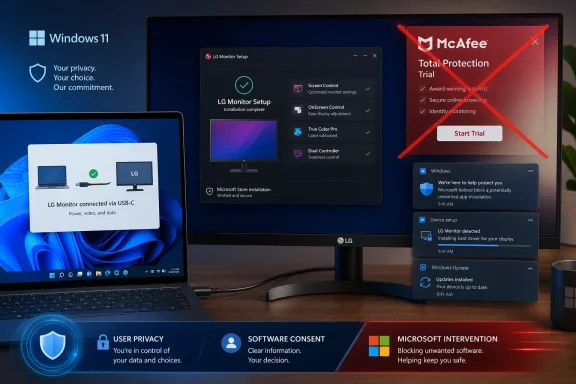
Microsoft has stepped in after LG monitor users reported an unsettling Windows 11 experience: connecting a display could trigger the automatic delivery of LG’s monitor utility and then surface prominent McAfee trial advertisements that users never expected from a peripheral setup process. LG has now agreed to disable the McAfee pop-up in its LG Monitor App Installer, a rapid concession that resolves the most visible symptom—but leaves larger questions about software delivered through Windows driver channels, consent, and the steadily shrinking line between device support and advertising.
A monitor should be one of the simplest devices to connect to a Windows PC. Attach a DisplayPort, HDMI, or USB-C cable, select the desired refresh rate and resolution if necessary, and get to work. Modern monitors may offer optional companion utilities for color profiles, on-screen control, firmware updates, split-screen layouts, or input switching, but those tools should remain exactly that: optional.
The LG incident challenged that basic expectation. Reports indicated that Windows could fetch LG-related software when certain LG monitors were connected, presenting the process as part of the hardware support experience. The resulting LG Monitor App Installer then displayed advertisements for a McAfee trial as well as prompts associated with LG software.
That distinction matters. According to LG’s public position, McAfee itself was not automatically installed; users would need to actively proceed and consent before the security product was installed. Yet the practical complaint was not limited to silent McAfee installation. It was about an unwanted app delivery path and an intrusive promotional notification appearing after a user connected a monitor.
Microsoft Windows chief Pavan Davuluri confirmed that Microsoft contacted LG and that LG agreed to immediately disable the McAfee pop-up from the LG Monitor App Installer. It is an unusually visible example of Microsoft intervening in an OEM and accessory-maker software practice that many Windows users would recognize as bloatware-adjacent behavior.
The immediate McAfee ad may be gone, but the episode deserves closer scrutiny. It exposes an uncomfortable weakness in the Windows hardware ecosystem: a driver-related installation mechanism can become a route for promotional software, turning a routine peripheral connection into a monetization opportunity.
The concern was that the installation journey appeared to begin automatically, using a channel users generally associate with compatibility, reliability, and security. Windows Update and driver delivery are expected to make a monitor work correctly—not to introduce marketing messages for unrelated trial software.
However, that does not mean the user experience was acceptable.
A pop-up promoting McAfee can still be disruptive when it is launched by an app that arrived after connecting a monitor. To many users, the distinction between a program being installed automatically and an automatically delivered program aggressively asking them to install another program is a narrow one. Neither outcome aligns with the expectation of plug-and-play hardware.
The better standard is simpler: a monitor connection should not generate unsolicited advertising. If a companion application is useful, Windows and the manufacturer should make it transparent, optional, and narrowly focused on the device’s functionality.
Still, the label gained traction because the visible behavior looked like adware to affected users:
That makes the decision to engage LG directly significant. Microsoft was effectively acknowledging that the behavior had crossed a line that could harm trust in Windows 11 driver updates and the wider Windows hardware experience.
More importantly, Microsoft’s intervention sends a message to the rest of the ecosystem. The Windows driver pipeline is not supposed to be treated as a broad marketing distribution platform. Hardware support software needs a credible relationship to the hardware being installed, and promotional content must not overwhelm that purpose.
The message is particularly timely because accessories have become more software-dependent. A monitor can now include USB hubs, KVM switching, webcams, speakers, charging controls, color-management tools, smart features, and firmware services. As hardware gains software features, manufacturers gain more opportunities to place companion utilities on a PC.
Without clear boundaries, every connected device could become a new doorway for trials, notifications, storefronts, account prompts, telemetry requests, and partner advertising.
That context does not excuse an LG monitor utility advertising McAfee. Instead, it explains why this incident resonated so strongly. Users already feel that the modern PC experience contains too many prompts competing for their attention. A third-party monitor app promoting antivirus software can feel like one more intrusion in a system that should be focused on work, games, or creative tasks.
Microsoft’s most constructive role here is not simply to react when an incident becomes public. It is to establish clearer platform rules that apply consistently to its own products and to the companies that distribute software through Windows-supported channels.
That trust is fragile.
But a McAfee trial advertisement does not improve display output, USB connectivity, color accuracy, or monitor stability. It is commercially adjacent to the device at best, not technically necessary.
This creates three risks:
PC makers have long shipped trial antivirus products, cloud-storage offers, office-suite trials, game launchers, and vendor-branded utilities. Some preinstalled applications provide genuine value. Others exist primarily because a vendor receives payment for placement or wants to build a direct relationship with the customer after the sale.
The difference here is the hardware category. A new laptop contains an operating system and a storage drive, so consumers have reluctantly come to expect some bundled software. A monitor, however, is generally viewed as a passive display device. Users do not expect it to modify the software state of their computer.
A modern utility can ask users to:
The LG monitor McAfee pop-up became a flashpoint because it made this trend obvious. There is a fundamental difference between downloading a monitor-control app because you need it and receiving a sales prompt simply because you plugged in a display.
Software is not meaningfully free if it costs attention, creates repeated prompts, introduces background services, complicates removal, or pushes users to make decisions they did not intend to make. In an enterprise environment, unsolicited add-ons can also introduce compliance, licensing, support, and security-management complications.
The cleanest approach is not complicated: if software is optional, it should be opt-in and it should be presented outside a driver-installation workflow.
But several important questions remain.
The durable solution should include a stronger set of principles:
For unfamiliar McAfee components, confirm that you are not removing security software you intentionally installed or that is managed by an employer. Personal Windows PCs using Microsoft Defender generally do not need a second antivirus product simply because a peripheral installer recommended one.
Open Task Manager, select Startup apps, and look for unfamiliar LG or McAfee entries. Disable items that are not needed at sign-in, particularly if they are only intended to surface notifications.
Then open Settings > System > Notifications and review which apps are permitted to show banners. This will not remove software, but it can prevent an unnecessary utility from interrupting your desktop while you decide whether to keep it.
The target should be the optional utility or promotional component—not the fundamental driver functionality that makes the display work properly. If a display is functioning normally, there is rarely a reason to force-remove its core driver.
Professional displays may require calibration controls, USB hub management, hardware color-profile handling, firmware updates, or advanced layout tools. Gaming monitors may expose performance modes, crosshair overlays, lighting controls, black equalizer settings, and input configuration.
The problem is not the existence of the application. It is the delivery and behavior of the application.
The most compelling features are practical:
The episode also illustrates why the Windows bloatware debate has expanded beyond preloaded laptop software. As more accessories use companion apps and online services, the same commercial pressures can reach the PC through monitors, docks, headsets, and other hardware that users once considered passive.
A monitor should deliver pixels, ports, and reliable performance—not surprise advertising. Microsoft has taken a useful first step by pushing LG to remove the McAfee prompt. The more important next step is for Microsoft and its hardware partners to make opt-in software, transparent installation, and ad-free device support the expected standard across the Windows ecosystem.
 Overview
A monitor should be one of the simplest devices to connect to a Windows PC. Attach a DisplayPort, HDMI, or USB-C cable, select the desired refresh rate and resolution if necessary, and get to work. Modern monitors may offer optional companion utilities for color profiles, on-screen control, firmware updates, split-screen layouts, or input switching, but those tools should remain exactly that: optional.The LG incident challenged that basic expectation. Reports indicated that Windows could fetch LG-related software when certain LG monitors were connected, presenting the process as part of the hardware support experience. The resulting LG Monitor App Installer then displayed advertisements for a McAfee trial as well as prompts associated with LG software.
That distinction matters. According to LG’s public position, McAfee itself was not automatically installed; users would need to actively proceed and consent before the security product was installed. Yet the practical complaint was not limited to silent McAfee installation. It was about an unwanted app delivery path and an intrusive promotional notification appearing after a user connected a monitor.
Microsoft Windows chief Pavan Davuluri confirmed that Microsoft contacted LG and that LG agreed to immediately disable the McAfee pop-up from the LG Monitor App Installer. It is an unusually visible example of Microsoft intervening in an OEM and accessory-maker software practice that many Windows users would recognize as bloatware-adjacent behavior.
The immediate McAfee ad may be gone, but the episode deserves closer scrutiny. It exposes an uncomfortable weakness in the Windows hardware ecosystem: a driver-related installation mechanism can become a route for promotional software, turning a routine peripheral connection into a monetization opportunity.
What Happened When Users Connected LG Monitors
The core sequence reported by affected users was straightforward:- An LG monitor was connected to a Windows 11 PC.
- Windows obtained LG-related driver or support components through its normal update mechanisms.
- The LG Monitor App Installer appeared on the PC.
- The installer displayed a large McAfee promotional pop-up, alongside LG software promotions.
- Users had to dismiss the prompt, despite not seeking an antivirus trial or a monitor utility.
The concern was that the installation journey appeared to begin automatically, using a channel users generally associate with compatibility, reliability, and security. Windows Update and driver delivery are expected to make a monitor work correctly—not to introduce marketing messages for unrelated trial software.
The Difference Between “Installed” and “Advertised”
LG’s statement draws a technical line that is important but not fully reassuring. If McAfee was only installed after a user approved the installation, then describing the outcome as an automatic antivirus installation would be imprecise.However, that does not mean the user experience was acceptable.
A pop-up promoting McAfee can still be disruptive when it is launched by an app that arrived after connecting a monitor. To many users, the distinction between a program being installed automatically and an automatically delivered program aggressively asking them to install another program is a narrow one. Neither outcome aligns with the expectation of plug-and-play hardware.
The better standard is simpler: a monitor connection should not generate unsolicited advertising. If a companion application is useful, Windows and the manufacturer should make it transparent, optional, and narrowly focused on the device’s functionality.
Why the “Adware” Label Took Hold
“Adware” is an emotionally charged term, and it can cover a wide spectrum of behavior. It often implies software whose primary role is displaying advertising, potentially with questionable consent practices or data collection. In the LG case, the reported installer also had a legitimate device-support purpose.Still, the label gained traction because the visible behavior looked like adware to affected users:
- Software arrived without a clearly requested download.
- A large promotional prompt appeared.
- The promotion concerned an unrelated McAfee trial.
- The prompt had to be dismissed before the user could move on.
- The event followed the connection of a physical monitor, not the voluntary launch of an app store or software installer.
Microsoft’s Intervention Is More Significant Than It Looks
Microsoft’s response deserves attention because it is not business as usual. Windows depends on an enormous ecosystem of PC builders, component makers, peripheral vendors, driver publishers, and software partners. Microsoft has every incentive to preserve those relationships.That makes the decision to engage LG directly significant. Microsoft was effectively acknowledging that the behavior had crossed a line that could harm trust in Windows 11 driver updates and the wider Windows hardware experience.
A Signal to Hardware Partners
The practical result is limited but meaningful: LG agreed to disable the McAfee pop-up from the LG Monitor App Installer. This addresses the immediate source of anger and should stop the most obvious unwanted advertising experience for users receiving the updated behavior.More importantly, Microsoft’s intervention sends a message to the rest of the ecosystem. The Windows driver pipeline is not supposed to be treated as a broad marketing distribution platform. Hardware support software needs a credible relationship to the hardware being installed, and promotional content must not overwhelm that purpose.
The message is particularly timely because accessories have become more software-dependent. A monitor can now include USB hubs, KVM switching, webcams, speakers, charging controls, color-management tools, smart features, and firmware services. As hardware gains software features, manufacturers gain more opportunities to place companion utilities on a PC.
Without clear boundaries, every connected device could become a new doorway for trials, notifications, storefronts, account prompts, telemetry requests, and partner advertising.
Microsoft Also Has a Credibility Challenge
The intervention is welcome, but Microsoft cannot credibly present itself as a fully neutral guardian of the clean Windows experience. Windows 11 has its own history of promotional surfaces, recommendations, subscription nudges, Microsoft service prompts, and app suggestions.That context does not excuse an LG monitor utility advertising McAfee. Instead, it explains why this incident resonated so strongly. Users already feel that the modern PC experience contains too many prompts competing for their attention. A third-party monitor app promoting antivirus software can feel like one more intrusion in a system that should be focused on work, games, or creative tasks.
Microsoft’s most constructive role here is not simply to react when an incident becomes public. It is to establish clearer platform rules that apply consistently to its own products and to the companies that distribute software through Windows-supported channels.
The Windows Update Trust Problem
Windows Update is one of the most important trust relationships in personal computing. Users allow it to install operating-system updates, security fixes, drivers, compatibility components, and sometimes vendor-provided utilities because the alternative is a more fragmented, error-prone support process.That trust is fragile.
Drivers Should Solve Hardware Problems
The expected purpose of a driver is clear:- Enable communication between Windows and hardware.
- Deliver correct display capabilities, audio functions, USB functionality, or monitor identification.
- Address bugs and compatibility issues.
- Improve stability, security, or performance where applicable.
- Support firmware updates only when the user understands what is happening.
But a McAfee trial advertisement does not improve display output, USB connectivity, color accuracy, or monitor stability. It is commercially adjacent to the device at best, not technically necessary.
The Risk of “Official” Distribution
The difficult part is that unwanted software feels more credible—and therefore more concerning—when it reaches a PC through a trusted channel. Many users have learned to avoid random installers from unfamiliar websites. They may be far less prepared for a device-related application that appears after Windows detects new hardware.This creates three risks:
- Consent erosion: Users may click through prompts simply because they assume Windows initiated them for a necessary reason.
- Security confusion: A security-product offer displayed through a driver-related process can make it harder to distinguish legitimate Windows prompts from deceptive software.
- Platform distrust: Once users suspect a peripheral connection can install promotional software, they may become more hesitant to accept legitimate driver updates.
Why This Is Bigger Than LG and McAfee
LG is the company at the center of this incident, and McAfee was the advertised product. But the underlying issue is broader than either brand.PC makers have long shipped trial antivirus products, cloud-storage offers, office-suite trials, game launchers, and vendor-branded utilities. Some preinstalled applications provide genuine value. Others exist primarily because a vendor receives payment for placement or wants to build a direct relationship with the customer after the sale.
The difference here is the hardware category. A new laptop contains an operating system and a storage drive, so consumers have reluctantly come to expect some bundled software. A monitor, however, is generally viewed as a passive display device. Users do not expect it to modify the software state of their computer.
Peripheral Software Is Becoming More Aggressive
This is not a problem unique to monitors. Mice, keyboards, headsets, webcams, docking stations, printers, GPUs, network adapters, and storage devices increasingly offer companion applications. These tools can be useful, but they can also become sprawling control centers.A modern utility can ask users to:
- Create an account.
- Accept analytics collection.
- Enable background services.
- Permit automatic updates.
- Subscribe to notifications.
- Install optional modules.
- Add an overlay or shortcut.
- Consider a trial, upgrade, or partner offer.
The LG monitor McAfee pop-up became a flashpoint because it made this trend obvious. There is a fundamental difference between downloading a monitor-control app because you need it and receiving a sales prompt simply because you plugged in a display.
“Free” Software Often Has a Hidden Cost
Bundled trialware is sometimes framed as a benefit: users receive a limited period of antivirus protection or access to a premium feature. In reality, the value proposition depends entirely on whether users freely chose the offer.Software is not meaningfully free if it costs attention, creates repeated prompts, introduces background services, complicates removal, or pushes users to make decisions they did not intend to make. In an enterprise environment, unsolicited add-ons can also introduce compliance, licensing, support, and security-management complications.
The cleanest approach is not complicated: if software is optional, it should be opt-in and it should be presented outside a driver-installation workflow.
What LG’s Change Does—and Does Not—Resolve
LG’s agreement to disable the McAfee pop-up is a concrete improvement. Users should no longer encounter that particular trial offer through the LG Monitor App Installer, and that is the immediate outcome most affected people wanted.But several important questions remain.
The Immediate Win
The change provides clear benefits:- It removes the most intrusive element of the reported experience.
- It reduces pressure on users to dismiss unrelated security-product promotions.
- It lowers the chance that users will mistake advertising for a required setup step.
- It restores some confidence that connecting an LG monitor will remain a normal hardware event.
- It demonstrates that public criticism and platform oversight can produce a rapid adjustment.
The Unresolved Questions
The larger uncertainty concerns the future role of the LG Monitor App Installer. Disabling a particular McAfee pop-up does not necessarily answer whether the app will continue to arrive automatically, whether it will advertise other LG products, or whether it will present new third-party promotions later.The durable solution should include a stronger set of principles:
- No unrelated advertising in device-support apps delivered through Windows.
- Clear disclosure before any companion app is downloaded.
- An explicit opt-in for optional monitor software.
- Simple removal through Windows Settings.
- No recurring promotional notifications unless a user has specifically enabled them.
- Clear data-use disclosures for any app that communicates with online services.
How Windows 11 Users Can Check Their PCs
Users who connected an LG monitor and want to confirm that no unwanted utility remains can review their installed applications. This is sensible housekeeping, not an indication that every LG monitor owner has a problem.Review Installed Applications
On Windows 11:- Open Settings.
- Select Apps.
- Choose Installed apps.
- Search for terms such as
LG,LG Monitor,McAfee, orWebAdvisor. - Review the publisher and installation date before uninstalling anything.
For unfamiliar McAfee components, confirm that you are not removing security software you intentionally installed or that is managed by an employer. Personal Windows PCs using Microsoft Defender generally do not need a second antivirus product simply because a peripheral installer recommended one.
Check Startup and Notifications
Removing an app is only part of the cleanup process. It is also worth checking whether any unwanted component is configured to launch automatically.Open Task Manager, select Startup apps, and look for unfamiliar LG or McAfee entries. Disable items that are not needed at sign-in, particularly if they are only intended to surface notifications.
Then open Settings > System > Notifications and review which apps are permitted to show banners. This will not remove software, but it can prevent an unnecessary utility from interrupting your desktop while you decide whether to keep it.
Be Careful With Driver Removal
Do not remove a monitor driver indiscriminately. Windows often uses generic display-monitor drivers, and the monitor’s identification data can help Windows apply the correct resolution, refresh-rate, and color options.The target should be the optional utility or promotional component—not the fundamental driver functionality that makes the display work properly. If a display is functioning normally, there is rarely a reason to force-remove its core driver.
A Better Model for Monitor Companion Apps
There is nothing inherently wrong with monitor software. In fact, a well-designed utility can improve the ownership experience considerably.Professional displays may require calibration controls, USB hub management, hardware color-profile handling, firmware updates, or advanced layout tools. Gaming monitors may expose performance modes, crosshair overlays, lighting controls, black equalizer settings, and input configuration.
The problem is not the existence of the application. It is the delivery and behavior of the application.
The Standard Manufacturers Should Meet
A customer-friendly monitor software model would work like this:- Windows recognizes the monitor and applies basic display functionality without installing a promotional app.
- If advanced functionality is available, Windows shows a small, non-promotional notice explaining that an optional utility exists.
- The user chooses whether to install it.
- The utility explains its permissions, update behavior, and data practices in plain language.
- The utility remains focused on hardware control, without unrelated ads or third-party trial offers.
- It can be removed completely using the normal Windows uninstall process.
Make Utility Value Obvious
If manufacturers want users to install a monitor app, they should earn that installation with real functionality. Useful tools do not need to rely on pop-up advertising.The most compelling features are practical:
- Easy firmware updates with clear safeguards.
- Per-input color and brightness profiles.
- Desktop controls for monitor settings that would otherwise require physical buttons.
- USB-C power and hub status information.
- KVM switching controls.
- Reliable picture-by-picture and split-screen configuration.
- Accessible support resources tied to the connected model.
The Bottom Line for Windows Users
Microsoft’s intervention over the LG monitor McAfee ads is a welcome, user-focused result. LG’s agreement to disable the promotional pop-up removes the most visible and objectionable part of the experience, while reinforcing that a Windows 11 driver-related process should not become a conduit for unrelated trialware.The episode also illustrates why the Windows bloatware debate has expanded beyond preloaded laptop software. As more accessories use companion apps and online services, the same commercial pressures can reach the PC through monitors, docks, headsets, and other hardware that users once considered passive.
A monitor should deliver pixels, ports, and reliable performance—not surprise advertising. Microsoft has taken a useful first step by pushing LG to remove the McAfee prompt. The more important next step is for Microsoft and its hardware partners to make opt-in software, transparent installation, and ad-free device support the expected standard across the Windows ecosystem.