

I spent nine months falling in love with my desktop again — not because of a single feature, but because Linux let me make the operating system feel like something I wanted to use, not something that used me.
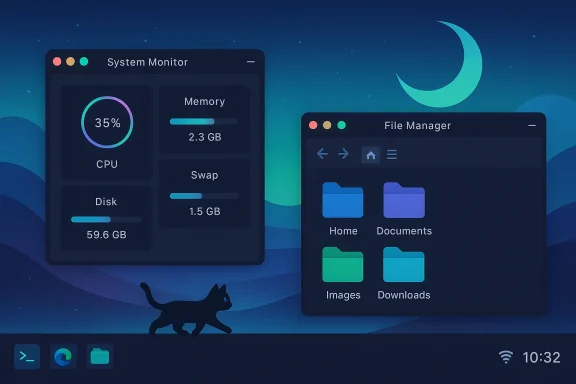
The impulse that started it all was tiny: a little animated cat running across my taskbar when I booted a KaOS live image. The cat — CatWalk — sped up when the CPU worked harder, and clicking it revealed a compact CPU-percentage display. It was frivolous, yes, but it landed like a charm: an example of how modern Linux desktops can be playful without sacrificing utility. The CatWalk plugin is a real, maintained plugin for Noctalia’s bar, and its README lists CPU-based animation and a small popup panel for stats as core features.
That moment — adding a small animation to an otherwise practical Fedora Kinoite setup — crystallized something many of us in the desktop community already feel: an operating system can be more than a tool. It can be enjoyable, personal, and even whimsical. The XDA piece that set this idea rolling for me captured that exact tension between Windows’ sober, enterprise-first approach and Linux’s broad spectrum of personality. Community chatter about switching to Linux and tailoring the desktop experience has only increased in recent years, with many users recommending friendly onboarding distros like Zorin or Mint as stepping stones.
Windows once leaned into delight. Minesweeper, Solitaire, and other bundled games offered a shared shorthand for fun. Microsoft began stripping those games from default images and moving game packages to the Store around the Windows 8 transition, which signaled a shift in philosophy: the OS would be a platform for services and distribution, not a trove of small pleasures by default. Evidence of that shift shows up in multiple guides and historical summaries of Windows 8 onwards.
At the same time, the enterprise and cloud world needed Windows to be a stable, manageable, and secure foundation, pushing product decisions toward consistency and governance. The result: Windows increasingly looks — and feels — like a controlled environment built to serve institutional needs. For many users, that tradeoff has been a loss of playfulness.
Contrast that with a one-size-fits-all OS that channels changes through staged enterprise channels, centralised feature flags, and monetised services. Both models have merits — but they satisfy different appetites.
Enterprises generally reward homogeneity and predictability. For an OS vendor, that tilts priorities toward predictable APIs, signed drivers, and controlled feature rollouts. The resulting tradeoff is less room for left-field novelty that a hobbyist might celebrate.
At the same time, Windows is not broken. It still excels where scale, compatibility, and vendor support matter. The corporate weight Microsoft carries is the reason the product has gradually traded early-era playfulness for a more formal, managed posture. That tradeoff has costs for users who crave delight, and it’s worth noting Microsoft has been forced to recalibrate some choices (for example, the Copilot rollout and admin controls) after community feedback and real-world fallout.
If you value control, experimentation, and the joy of personalising your computing environment, the Linux desktop today is not only viable — it’s actively exciting. If you need closed-source application compatibility, mainstream gaming support, or enterprise-grade management today, Windows remains the pragmatic choice. Both paths are valid; the right one depends on how much risk, time, and curiosity you can invest.
Switching operating systems is often framed as an either/or decision, but more useful is to view it as a spectrum of choices. The modern Linux desktop is a vibrant ecosystem where play and polish coexist with technical competence. If you’ve not dipped a toe in recently, the cost of experimentation is low and the rewards — a machine that feels like yours — can be surprisingly large. In a world where software increasingly treats users as telemetry points, rediscovering delight matters. The little animated cat on my toolbar taught me that.
Source: XDA After decades of Windows, Linux made me love using an OS again
 Background
The impulse that started it all was tiny: a little animated cat running across my taskbar when I booted a KaOS live image. The cat — CatWalk — sped up when the CPU worked harder, and clicking it revealed a compact CPU-percentage display. It was frivolous, yes, but it landed like a charm: an example of how modern Linux desktops can be playful without sacrificing utility. The CatWalk plugin is a real, maintained plugin for Noctalia’s bar, and its README lists CPU-based animation and a small popup panel for stats as core features.That moment — adding a small animation to an otherwise practical Fedora Kinoite setup — crystallized something many of us in the desktop community already feel: an operating system can be more than a tool. It can be enjoyable, personal, and even whimsical. The XDA piece that set this idea rolling for me captured that exact tension between Windows’ sober, enterprise-first approach and Linux’s broad spectrum of personality. Community chatter about switching to Linux and tailoring the desktop experience has only increased in recent years, with many users recommending friendly onboarding distros like Zorin or Mint as stepping stones.
Overview: Why “fun” matters in an OS
Computing is both work and leisure. When an OS makes routine tasks pleasant, the friction that turns simple jobs into grudges disappears. Small design choices — an animated icon, a responsive system tray app, or a cohesive theme — can change how willing people are to explore, learn, and tweak. That’s not nostalgia for nostalgia’s sake; it’s about user engagement, emotional design, and the long tail of small satisfactions that make a machine feel like an ally instead of an appliance.Windows once leaned into delight. Minesweeper, Solitaire, and other bundled games offered a shared shorthand for fun. Microsoft began stripping those games from default images and moving game packages to the Store around the Windows 8 transition, which signaled a shift in philosophy: the OS would be a platform for services and distribution, not a trove of small pleasures by default. Evidence of that shift shows up in multiple guides and historical summaries of Windows 8 onwards.
At the same time, the enterprise and cloud world needed Windows to be a stable, manageable, and secure foundation, pushing product decisions toward consistency and governance. The result: Windows increasingly looks — and feels — like a controlled environment built to serve institutional needs. For many users, that tradeoff has been a loss of playfulness.
Linux’s greatest strength: choice, not chaos
A distribution for every temperament
Linux’s most obvious competitive advantage in the desktop space is also its least sexy on a press release: variety. The distro ecosystem does something proprietary competitors cannot at scale — it lets multiple distinct operating-system personalities exist simultaneously.- Want to hand-craft every piece of the stack? Arch Linux and similar rolling-release distributions grant that low-level control.
- Want reproducible, declarative package management? NixOS gives you configuration-as-code package manifests.
- Want a “it-just-works” desktop with sensible defaults? Fedora, Linux Mint, and Ubuntu remain solid choices.
Tinkering as a creative outlet
For many, Linux is a hobby — a sandbox where the system responds to curiosity. Installing a new window manager, composing a custom dotfiles repo, building packages from source, or adjusting compositor settings can be intrinsically rewarding. That loop of tweak → immediate visual or behavioral feedback → deeper tweak is part of why some people report falling in love with their desktop again.Contrast that with a one-size-fits-all OS that channels changes through staged enterprise channels, centralised feature flags, and monetised services. Both models have merits — but they satisfy different appetites.
Recent distro news that illustrates the divergence
Two recent developments by contrast show how differently the Linux and Windows ecosystems evolve.- KaOS — a distro historically associated with KDE Plasma — released an ISO snapshot that replaced its Plasma-centric defaults with a Niri/Noctalia stack, a move widely reported by independent outlets and distribution news aggregators. KaOS 2026.02 shipped the Niri Wayland compositor and Noctalia shell by default, a significant architectural and aesthetic pivot for a project long associated with KDE. Independent reporting and the distro’s release notes confirm the change.
- Noctalia’s plugin ecosystem includes playful widgets such as CatWalk, a tiny animated cat that reacts to CPU usage — the exact sort of small delightful module that can make a daily environment feel alive. The plugin’s documentation and plugin listing describe the CPU-driven animations, theme support, and popup stats panel.
Where Windows went — and where it still excels
The institutional imperative
Microsoft’s stewardship of Windows is not just about design; it’s also about scale. Windows powers massive enterprise fleets, clinical systems, point-of-sale appliances, and bespoke industrial setups. That responsibility makes decision-making risk-averse and governance-heavy. The upcoming (now-past) Windows 10 end-of-support deadline on October 14, 2025 — and the ongoing migration path to Windows 11 — crystallises Microsoft’s need to prioritise stability, security, and backwards compatibility for businesses and governments. The end-of-support milestone was widely publicised and shaped upgrade plans across organizations.Enterprises generally reward homogeneity and predictability. For an OS vendor, that tilts priorities toward predictable APIs, signed drivers, and controlled feature rollouts. The resulting tradeoff is less room for left-field novelty that a hobbyist might celebrate.
Windows’ strengths remain significant
It’s important to be explicit about what Windows still does better:- Compatibility: Legacy commercial applications and many proprietary drivers achieve their best supported scenario on Windows.
- Gaming: Anti-cheat systems, Game Pass integration, and native support for a huge catalog of AAA titles keep Windows dominant for many gamers.
- Enterprise tooling: Group Policy, Intune, Active Directory/Entra, and vendor support for Windows clients make corporate deployments tractable.
The “serving vs. using” argument: the Copilot effect
For those who feel Windows is using them instead of serving them, Microsoft’s recent AI rollout strategy provides a focal point.- Microsoft positioned Copilot as a central, branded layer across Windows, Office, and a range of apps — an attempt to make AI a first-class surface on the desktop. That strategy was accompanied by visible UI placements, new Copilot-branded apps, and hardware tie-ins such as “Copilot+ PCs.” At the height of the rollout, criticism mounted that the OS felt cluttered by AI signposts and that the brand was being inserted into disparate places. Multiple tech outlets and community forums covered user and admin pushback on Copilot’s pervasiveness and privacy surface area. Microsoft has since walked back certain elements, introduced controls for admins, and adjusted rollout plans.
- Administrators and power users have called for clearer removal paths and for Copilot to be less intrusive by default. Recent insider releases have added policies for admins to remove Copilot, reflecting an ongoing negotiation between default visibility and user choice.
The real tradeoffs: security, support, and ecosystem friction
Switching to Linux or adopting it as a primary desktop is not an ideological purity test. It’s a pragmatic decision with tradeoffs.Strengths of Linux desktops
- Customisation and control: granular theming, compositors, window managers, and plugin ecosystems.
- Openness and auditability: access to source code and the ability to debug or change behavior.
- Rapid innovation in UI and tooling thanks to multiple independent projects pushing different ideas.
Risks and friction points
- Application compatibility: certain proprietary software, industry-specific apps, and some commercial AV/DRM/anti-cheat systems remain Windows-first.
- Hardware support: while driver support has improved vastly, some vendors still offer better out-of-the-box drivers for Windows.
- Enterprise management: sysadmins who rely on Active Directory, Group Policy, or vendor-supplied management tooling may find Linux a harder fit at scale.
Practical pathways for different users
If you’re considering a move or just want to experiment, here are pragmatic paths that map to commitment and risk tolerance.- Try in a VM or live USB (low risk)
- Benefits: no disk changes, full reversal possible.
- Use case: curiosity, testing drivers, trying desktop environments.
- Dual-boot or repurpose an old machine (low-medium risk)
- Benefits: full local hardware, you keep Windows for critical apps.
- Use case: gradual migration, gaming on one partition, daily driver experiments.
- Install on a secondary machine or replace Windows on a personal laptop (medium risk)
- Benefits: daily use under real conditions, faster feedback loop for adjustments.
- Use case: confident switcher, comfortable hunting for drivers and fixes.
- Enterprise/production migration (high risk)
- Steps: thorough app inventory, pilot groups, vendor engagement, security posture review, and staged rollouts.
- Note: Enterprises often prefer longer testing windows and may use long-term support distributions or containerized app strategies.
How to keep the “fun” without breaking your workflow
If you like the idea of a livelier desktop but can’t abandon Windows, there are pragmatic ways to reclaim small delights:- Use launcher tools and widgets that restore lost convenience (Open-Source PowerToys equivalents exist).
- Add playful, low-overhead utilities that don’t conflict with enterprise policies.
- Maintain a small Linux VM for tinkering so that the joy of discovery remains separate from your production environment.
Risks to watch as Linux desktop adoption grows
The blossoming variety of desktops and shells is a net positive, but it introduces new considerations.- Fragmentation: divergent defaults mean troubleshooting often requires distro-specific knowledge. The support community is vibrant, but not every vendor documents each distro variant.
- Security assumptions: the smaller user base for some niche distros can reduce third-party vendor support for vetted enterprise tooling.
- Sustainability: hobby-led projects can be excellent but sometimes lack the resources for long-term maintenance. Evaluate the activity level and release cadence of projects you rely on.
A balanced verdict
The single most important takeaway is this: Operating systems are user experiences as much as they are software stacks. The renewed joy I found on Linux didn’t come from escaping Windows’ technical constraints alone; it came from being able to tailor the machine’s personality to my mood — whether that meant a cute animated cat in the taskbar, an ultra-minimal Wayland shell, or a full-blown developer environment.At the same time, Windows is not broken. It still excels where scale, compatibility, and vendor support matter. The corporate weight Microsoft carries is the reason the product has gradually traded early-era playfulness for a more formal, managed posture. That tradeoff has costs for users who crave delight, and it’s worth noting Microsoft has been forced to recalibrate some choices (for example, the Copilot rollout and admin controls) after community feedback and real-world fallout.
If you value control, experimentation, and the joy of personalising your computing environment, the Linux desktop today is not only viable — it’s actively exciting. If you need closed-source application compatibility, mainstream gaming support, or enterprise-grade management today, Windows remains the pragmatic choice. Both paths are valid; the right one depends on how much risk, time, and curiosity you can invest.
Final practical checklist for readers
- If you’re curious and cautious:
- Create a live USB and boot a friendly distro (Ubuntu, Fedora, Zorin) to test hardware.
- Try a VM first; use snapshots to avoid accidental breakage.
- If you want to experiment with joy:
- Explore lightweight shells and plugin ecosystems (Noctalia, CatWalk, and similar plugins highlight how small components can transform daily use).
- If you must remain on Windows for specific apps:
- Keep a small Linux environment (VM, test machine, or secondary laptop) for tinkering so you preserve the joy without risking workflows.
- Use administrative controls and privacy settings to tame overly aggressive defaults like bundled AI assistants; Microsoft’s admin policies and controls have evolved in response to feedback.
- If you’re responsible for many endpoints:
- Inventory software and dependencies, pilot a small user group, and plan a migration window well before any end-of-support deadlines. The Windows 10 end-of-support date on October 14, 2025, is a recent example of how lifecycle milestones force large-scale planning.
Switching operating systems is often framed as an either/or decision, but more useful is to view it as a spectrum of choices. The modern Linux desktop is a vibrant ecosystem where play and polish coexist with technical competence. If you’ve not dipped a toe in recently, the cost of experimentation is low and the rewards — a machine that feels like yours — can be surprisingly large. In a world where software increasingly treats users as telemetry points, rediscovering delight matters. The little animated cat on my toolbar taught me that.
Source: XDA After decades of Windows, Linux made me love using an OS again
