

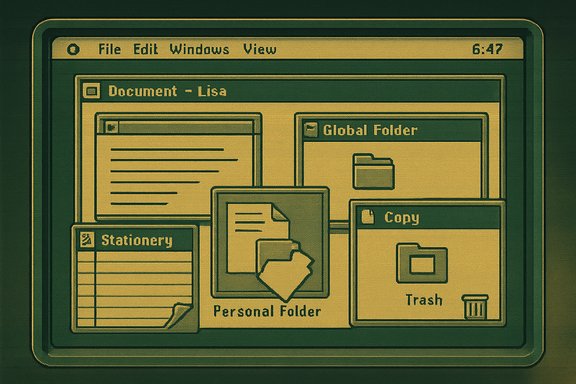
A meticulously recreated Apple Lisa desktop is now playable in any modern browser, and the project—called LisaGUI—does more than nostalgia: it’s a thoughtful reimagining of a document‑centric user experience that helped define what graphical computing would become. Built from scratch in JavaScript by developer and artist Andrew Yaros, LisaGUI reconstructs the behavior, look, and quirks of the Lisa Office System (LOS) while adapting the experience for the realities of running inside a web page. For Windows power users, designers, and anyone curious about the roots of the graphical desktop, LisaGUI is an accessible, hands‑on way to study a massively influential but commercially unsuccessful machine without tracking down rare hardware or wrestling with emulators.
The Lisa’s ambitions were broad: it sought a document‑centric workflow rather than the program‑centric approach that dominated then. The system expected users to think in terms of stationery templates and documents, not discrete applications with explicit save/load steps. That conceptual leap is central to why the Lisa remains a subject of study among UX historians and interface designers.
Despite its innovations, the Lisa’s high retail price and engineering trade‑offs hindered commercial success. The original machine cost nearly $10,000 at launch; hardware limitations (early floppy designs, limited CPU headroom for LOS’s multitasking) and market timing left it on the shelf compared with cheaper personal computers. Apple eventually folded much of Lisa’s technology into the Macintosh, which took a different, more pragmatic path toward mainstream adoption.
This design choice has practical advantages for a browser project. Emulators rely on accurate CPU and peripheral behavior and typically port or reinterpret original machine code. Recreating the interface in JS makes the system more resilient to browser constraints and lets the author optimize for responsiveness and features that make sense in 2025 browsers (for example, sticky menus and theme options). It also reduces dependencies: the project avoids bundling legacy binaries or non‑open toolchains.
LisaGUI deliberately avoids using historic code and instead reconstructs the experience. That difference is meaningful: emulators let you run original binaries and reproduce low‑level behavior, while reimplementations like LisaGUI let designers and developers study interaction flows and aesthetics without wrestling with legacy binaries.
From a preservation standpoint, both emulation and faithful reimplementation are valuable: emulators preserve code and behavior, while projects like LisaGUI preserve the feel and make historical interfaces accessible to a broader audience.
For contemporary designers, re‑examining the Lisa’s document focus offers a counterpoint to today’s increasingly app‑centric ecosystems. Many modern workflows (collaboration platforms, document editors, creative suites) could benefit from reimagining the relationship between users, artifacts, and the tools that manipulate them. More pragmatically, LisaGUI shows that the web is a practical platform for interface preservation—if creators are thoughtful about licensing, data handling, and accessibility.
For Windows users and designers, LisaGUI is a practical, low‑friction way to explore the document‑centric ideas that informed early GUI thinking—and to mine those ideas for modern product design. It also serves as a reminder that historical computing projects benefit from a blend of authenticity, practical adaptation, and careful stewardship: fidelity where it counts, modernization where it helps, and transparency about limitations. If you want a hands‑on lesson in UI history without the cost or rarity of original hardware, LisaGUI is a living exhibit that invites you to sit down, create a document, and experience why the Lisa still earns the attention of designers and historians more than four decades later.
Source: theregister.com LisaGUI recreates Apple’s Lisa interface in your browser
 Background
Why the Lisa still matters
The Apple Lisa, introduced in January 1983, was one of the first commercial machines to ship with a true graphical user interface and a mouse. It bundled an integrated suite of office tools and pioneered user interface patterns—pull‑down menus, drag‑and‑drop, icons and movable windows, cut/copy/paste, modeless interaction—that would later appear in the Macintosh and influence GUIs across the industry.The Lisa’s ambitions were broad: it sought a document‑centric workflow rather than the program‑centric approach that dominated then. The system expected users to think in terms of stationery templates and documents, not discrete applications with explicit save/load steps. That conceptual leap is central to why the Lisa remains a subject of study among UX historians and interface designers.
Despite its innovations, the Lisa’s high retail price and engineering trade‑offs hindered commercial success. The original machine cost nearly $10,000 at launch; hardware limitations (early floppy designs, limited CPU headroom for LOS’s multitasking) and market timing left it on the shelf compared with cheaper personal computers. Apple eventually folded much of Lisa’s technology into the Macintosh, which took a different, more pragmatic path toward mainstream adoption.
Document‑centric vs application‑centric
A core Lisa concept was the notion of stationery pads: templates that sat on the desktop. Double‑clicking a stationery pad “tore off” a new document rather than launching a program. The desktop itself was treated as a short‑term workspace rather than a single folder within a file hierarchy. These choices eliminated many of the program dialog boxes and explicit save flows that users of early microcomputers had to learn. For designers, the Lisa remains instructive because it attempted to realign user attention onto artifacts (documents) rather than the tools that produced them.What LisaGUI is — and what it isn't
A faithful reconstruction, not an emulator
LisaGUI is a reimplementation of the Lisa Office System’s interface written in vanilla JavaScript and rendered to a single HTML canvas element. It reproduces the behaviors, visual elements, and interaction quirks of LOS—including stationery pads, document workflows, and Lisa’s unique UI aesthetics—without reusing Apple’s original source code or emulating Lisa hardware. In short: it behaves like the Lisa, but it isn’t a hardware emulator.This design choice has practical advantages for a browser project. Emulators rely on accurate CPU and peripheral behavior and typically port or reinterpret original machine code. Recreating the interface in JS makes the system more resilient to browser constraints and lets the author optimize for responsiveness and features that make sense in 2025 browsers (for example, sticky menus and theme options). It also reduces dependencies: the project avoids bundling legacy binaries or non‑open toolchains.
Technical underpinnings (brief)
- Rendering: the UI is drawn onto a single canvas, mimicking Lisa’s 1‑bit display and its visual idiosyncrasies.
- Storage: files and virtual disks are persisted in the browser using IndexedDB, creating a simple per‑browser filesystem.
- Stack: no large frameworks—LisaGUI is built with minimal build tooling (the author cites Gulp as a build helper) and no heavy third‑party UI libraries.
- UX tweaks: the project intentionally adds modern conveniences such as sticky menus and optional enhancements while preserving the original interaction model.
What you’ll find inside LisaGUI
The recreated Lisa experience
- A desktop with the Lisa Office “7/7” feel: tools, stationery pads, and example documents.
- The stationery workflow: double‑click a pad to create a new document instance and drag it to folders or the desktop.
- Lisa‑style window behavior: overlap, title bar icons that collapse windows, and the “set aside” desktop mechanics where a desktop view is neither purely local nor a conventional directory.
- A built‑in word processor inspired by LisaWrite (often labeled “LisaType” in the recreation).
- Icon and desktop customization: the recreation includes features not present in the original LOS, such as custom icon labels, a palette selector that mimics different CRT tints, and the ability to draw 1‑bit desktop patterns.
Modern additions and conveniences
The author layered in user‑friendly improvements that preserve the historical feel while reducing friction:- Sticky menus (menus stay open after a click until the user selects or clicks away).
- Custom icon labeling (hand‑drawn labels on files/folders).
- Optional dark/inverted rendering and alternate color palettes to mimic CRT warmth or modern flat displays.
- A menubar clock and customizable time formats (features that did not exist on the original Lisa but are convenient for modern users).
- IndexedDB persistence for offline continuity via a service worker (the project can be installed as a progressive web app).
Preservation, copyright, and the emulation landscape
Lisa source and emulators
The Lisa’s source code was made publicly available through archival efforts a few years ago, enabling authenticity‑minded emulation projects to run original system code. Those projects—true emulators—offer an authentic runtime for historic software but need raw machine code and precise hardware behavior.LisaGUI deliberately avoids using historic code and instead reconstructs the experience. That difference is meaningful: emulators let you run original binaries and reproduce low‑level behavior, while reimplementations like LisaGUI let designers and developers study interaction flows and aesthetics without wrestling with legacy binaries.
Licensing and reuse
The project’s public information states the minified JS powering the site is copyright the author and the unminified code is not currently public. The author places limits on reuse outside of personal, non‑commercial play. That means the recreation is available to explore in the browser, but commercial reuse or code copying isn’t permitted by the author at this time.From a preservation standpoint, both emulation and faithful reimplementation are valuable: emulators preserve code and behavior, while projects like LisaGUI preserve the feel and make historical interfaces accessible to a broader audience.
Why LisaGUI matters to Windows users, designers, and developers
A living UX museum
LisaGUI is more than retroplay: it’s a working museum exhibit. For software designers and product teams, interactive exposure to Lisa’s document‑oriented metaphors provides a different perspective on desktop workflows that are rarely taught. Concepts such as modeless document manipulation, visual stationery, and a desktop that’s a workspace rather than a folder hierarchy can still influence modern app design—particularly in applications that want to foreground artifacts over tools (note‑taking apps, creative suites, and modern “workbench” UIs).Educational value
- UI students can experience firsthand how interface decisions feel when used, not just viewed in screenshots.
- Engineers can study the constraints and trade‑offs that shaped early GUI decisions: memory limits, rendering strategies, and the need for responsiveness on limited CPUs.
- Historians and archivists can offer a playable interpretation to the public without requiring access to rare hardware.
Inspiration for modern features
Several Lisa ideas remain relevant:- Document templates as first‑class citizens (stationery pads).
- Background saving and less intrusive concurrency between documents and the desktop.
- The idea of a transient desktop workspace that reflects in‑progress items rather than a fixed directory.
Critical analysis — strengths, shortcomings, and risks
Strengths
- Accessibility: Running in a browser removes the need for vintage hardware or specialized emulation setups.
- Educational clarity: The recreation captures interaction patterns that are hard to convey with screenshots or videos.
- Polish and fidelity: The project recreates visual nuances (screen proportions, type quirks) and operational behavior thoughtfully, making the experience convincing.
- Extensibility potential: A pure‑JS approach could make future features—like collaborative modes, export to PDF, or in‑browser printing—easier to add than in a binary emulator.
Shortcomings and limitations
- Not bit‑for‑bit accurate: Because it’s a reimplementation, LisaGUI does not run original Lisa binaries; low‑level quirks tied to hardware or original code paths won’t be present.
- Alpha status: The project is described as an alpha release. Features such as printing, advanced disk utilities, or complex applications may be incomplete or missing.
- Platform limitations: LisaGUI is optimized for desktop browsers with mouse and keyboard. Touch support and small screens are poorly supported.
- Proprietary site code: The author has not open‑sourced the unminified code, which limits community auditing, forks, and long‑term archival unless the author releases it later.
Security, privacy, and data persistence risks
- IndexedDB persistence: Documents are stored locally in your browser’s IndexedDB. That means they will persist on the device unless the user clears site data. Users should be aware that sensitive content saved inside the virtual Lisa can remain accessible to anyone with access to that browser profile.
- Service worker and offline caches: Installing as a PWA creates additional local caches and storage that a user must manage if they want to remove traces.
- No warranty / no official support: The author explicitly offers the project as‑is; there is no formal support or guarantee. Users should not rely on it for critical work or long‑term storage.
Legal considerations
- Trademarks and fair use: The recreation emulates the look and feel of a historical product. While historical recreations are commonly tolerated, the use of Apple trademarks, logos, and design elements can raise licensing questions—especially if the project’s scope or monetization changes.
- Code reuse restrictions: Because the project’s unminified code is not public and the minified code is restricted, third parties cannot legally repackage or redistribute the internals if they want to remain compliant with the author’s stated terms.
Hands‑on: how to try LisaGUI safely from Windows
- Use a modern desktop browser: Chrome, Firefox, or Edge (Chromium) are recommended. Safari is suggested for Mac users, but Windows users should stick to Chromium or Firefox families for best compatibility.
- Use a mouse or trackpad: LisaGUI’s interaction model assumes pointer precision. Touch devices and small screens are not recommended.
- Ensure JavaScript is enabled: LisaGUI is a full JavaScript app; it won’t run if JS is blocked.
- Grant IndexedDB permission when prompted: LisaGUI stores files locally; granting permission installs a local database and (optionally) a service worker for offline use.
- Create and explore stationery: double‑click stationery pads to tear off documents, set files aside on the desktop, and try dragging and dropping between windows.
- Backup if needed: If you plan to keep important content created inside LisaGUI, manually export it (copy/paste into a modern editor or take screenshots). The project is not intended as a production document store.
Implementation trade‑offs: emulator vs reimplementation
- Emulators (run original binaries)
- Pros: highest fidelity, runs original code, preserves low‑level behavior.
- Cons: complex to ship in a browser, can be resource‑heavy, may require legal clearance for original ROMs or binaries.
- Reimplementations (LisaGUI approach)
- Pros: adaptable for the web, easier to extend with modern conveniences, lower legal complexity for code reuse because original binaries aren’t used.
- Cons: cannot reproduce some hardware‑dependent behaviors; authenticity is interpretive rather than literal.
Broader implications: what LisaGUI suggests about UI archaeology
LisaGUI is part of a larger movement to bring historic user interfaces to life on the web. Projects that reconstruct older environments—whether authentically running original binaries or recreating the UI from scratch—allow designers, students, and the public to play with concepts that predate modern conventions. That interactivity is crucial: seeing an old UI in motion teaches different lessons than reading a museum caption.For contemporary designers, re‑examining the Lisa’s document focus offers a counterpoint to today’s increasingly app‑centric ecosystems. Many modern workflows (collaboration platforms, document editors, creative suites) could benefit from reimagining the relationship between users, artifacts, and the tools that manipulate them. More pragmatically, LisaGUI shows that the web is a practical platform for interface preservation—if creators are thoughtful about licensing, data handling, and accessibility.
What to watch next
- Feature growth: the author has signalled plans to add a paint program, printing output (PDF/image), disk utilities, and possibly a rewrite of the rendering stack to use WebGL for better performance.
- Community contributions: because the unminified code is not public today, community involvement will likely focus on documentation, tutorials, and user feedback unless the author opens the source later.
- Interop with emulators: expect experimental bridges where users can compare LisaGUI’s reimplementation with emulator runs of original LOS binaries to examine differences and learn how code and UI interact.
- Preservation pressure: projects like LisaGUI add public pressure for long‑term archival of artifacts and source code; they also highlight the need for clear licensing to allow derivative educational projects.
Conclusion
LisaGUI is an impressive demonstration of how thoughtful reimplementation can make a pivotal, under‑seen piece of UI history accessible to anyone with a browser. It doesn’t replace emulators or archival work, but it complements them by translating the Lisa Office System into a playable format that emphasizes interaction and pedagogy.For Windows users and designers, LisaGUI is a practical, low‑friction way to explore the document‑centric ideas that informed early GUI thinking—and to mine those ideas for modern product design. It also serves as a reminder that historical computing projects benefit from a blend of authenticity, practical adaptation, and careful stewardship: fidelity where it counts, modernization where it helps, and transparency about limitations. If you want a hands‑on lesson in UI history without the cost or rarity of original hardware, LisaGUI is a living exhibit that invites you to sit down, create a document, and experience why the Lisa still earns the attention of designers and historians more than four decades later.
Source: theregister.com LisaGUI recreates Apple’s Lisa interface in your browser
