

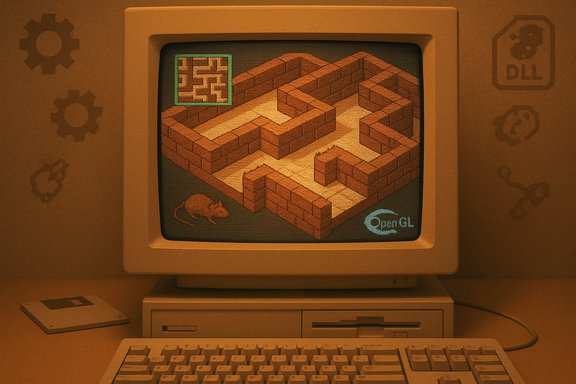
The sound of a low-resolution brick texture sliding by, the sudden tilt when the world inverted, and that inexplicable brown rat scuttling out of nowhere—those idiosyncratic moments of Windows 95’s old 3D Maze screensaver are now something you can actually steer yourself through. A preservation-minded reverse‑engineering hobbyist has turned ssmaze.scr from a passive demonstration of early 3D rendering into a playable, keyboard‑driven experience that reads like a short, perfect time machine for anyone who learned to hate sitting still at a family PC.
The project, published publicly in mid‑February 2025, wraps a small amount of injected glue around the original screensaver binary and exposes user input and an on‑demand map. Instead of the screensaver’s automatic walker exploring the maze and solving it for you, the modified build accepts arrow keys for movement, a map toggle, and a loader program that launches the patched saver. The author describes the work as a “pointless weekend project” — but the mechanics are relatively compact because the original screensaver already contained the rendering and maze logic; what was missing was user‑facing control. This is not a fan‑art reimplementation with fresh assets and a modern engine; it’s a small binary‑level intervention into an old Microsoft module. That makes the experience unusually authentic — you’re seeing the same maze geometry, the same textures, and the same odd objects — but it also brings the technical and security trade‑offs of working with legacy binaries and DLL injection. Multiple community write‑ups picked up the project the weekend it appeared, and it spread quickly through forums and security roundups as an example of nostalgia meeting low‑level tinkering.
If the goal is to remember exactly what the original did, this reverse‑engineered loader is arguably the best option short of booting a genuine 1995 machine. If the goal is to play a quick, safe, and shareable retro maze, a WebGL or engine reimplementation will be faster and lower‑risk.
Practical parting advice: treat the project like an antique car—delightful to drive, but you wouldn’t take it to the grocery store. Run it in a VM, verify the bits, and enjoy the uncanny sensation of steering a piece of 1995 nostalgia that somehow still knows how to startle with a rat and an upside‑down corridor.
Source: PC Gamer I just discovered you can control the 3D Maze screensaver from Windows 95 and it's tickling the nostalgia center of my brain so hard I might pass out
 Overview
The project, published publicly in mid‑February 2025, wraps a small amount of injected glue around the original screensaver binary and exposes user input and an on‑demand map. Instead of the screensaver’s automatic walker exploring the maze and solving it for you, the modified build accepts arrow keys for movement, a map toggle, and a loader program that launches the patched saver. The author describes the work as a “pointless weekend project” — but the mechanics are relatively compact because the original screensaver already contained the rendering and maze logic; what was missing was user‑facing control. This is not a fan‑art reimplementation with fresh assets and a modern engine; it’s a small binary‑level intervention into an old Microsoft module. That makes the experience unusually authentic — you’re seeing the same maze geometry, the same textures, and the same odd objects — but it also brings the technical and security trade‑offs of working with legacy binaries and DLL injection. Multiple community write‑ups picked up the project the weekend it appeared, and it spread quickly through forums and security roundups as an example of nostalgia meeting low‑level tinkering. Background: the odd little icon of Windows 95 nostalgia
Where the maze came from
The 3D Maze screensaver (ssmaze.scr) was one of several novelty screensavers bundled with Windows 95 and later Windows 9x builds. It was designed to show off simple 3D rendering on consumer hardware: an auto‑navigating first‑person walk through a randomly generated brick maze, with a handful of hallmarks like a top‑down mini‑map in the settings, occasional animated textures, and a handful of odd environmental props—the brown rat sprite, OpenGL logos, and angular polyhedra that flip the scene when collided with. These little quirks are part of why it lodged itself in people’s memories. The saver was small, platform‑specific, and efficient for the era, which made it ideal as a bundled demo of what consumer PCs could render. Over the years it became an object of fascination and imitation. Developers and hobbyists have both recreated it in modern engines and offered browser and WebGL versions that evoke the look and feel, but those projects either reimplemented the rendering or reproduced the aesthetic rather than operate on Microsoft’s original binary.Why the maze sticks with people
The maze yields odd sensory memories because of the specific mix of early 3D rendering conventions (low‑resolution textures, blocky geometry), kinetic camera behavior (sudden flips and rotations), and small surprises (rats, smiley face exits, and black polyhedra). The result is a liminal, slightly uncanny first‑person environment that’s perfect for nostalgia and for creative reinterpretation by modern designers. Community archives and retrospective write‑ups often highlight the rat and the flip effect as the screensaver’s defining emotional beats.What the playable version actually does — technical anatomy
The approach: reverse engineering + injection
Instead of rebuilding the maze in a new engine, the project author reverse‑engineered the original ssmaze.scr executable and added user control by injecting a bespoke DLL at runtime that hooks (or patches) the input and control paths. A small loader executable starts the original screensaver process and then maps the new DLL into that process so keyboard events can be processed as player inputs rather than ignored or converted into the screensaver’s automatic navigation. That lets the original maze logic and rendering remain untouched while adding the interactive layer. The developer documented the approach succinctly as “reverse‑engineered the original screensaver binary and added user‑input functionality.” Important technical notes about this approach:- The rendering, maze generation, and environmental assets remain the original code’s responsibility; the modification is largely an input and state‑control shim.
- The loader performs process creation and DLL injection at startup; the injected DLL handles keyboard input and exposes a mapping toggle (commonly Tab) and movement via arrow keys.
- Some minor bugs in the original binary were reportedly adjusted at the binary level for stability. The author warns that because the technique uses code injection, antivirus heuristics may flag the loader or injected components.
What you can expect to control
- Movement: arrow keys move the “player” through the maze in standard first‑person increments.
- Map: a top‑down overlay or map view that can be toggled on demand (often via Tab).
- Persistence: the project distributes a small set of files that must be placed beside the original ssmaze.scr or the loader — the mod does not appear to replace system files unless the user explicitly installs the modified saver.
What remains the same
Because the original code still draws the world, the little tricks and idiosyncracies are preserved: the rat’s movement, the smiley face exit behavior, and the sudden level flips when encountering particular objects are all part of the original binary and therefore remain intact. That is the main reason this method feels so authentic compared to a reimplementation. Community documentation and existing WebGL recreations of 3D Maze corroborate the list of props and quirks that users recall.Preservation vs. recreation: two valid approaches
Reimplementation (WebGL, engines)
Many hobbyists and developers have recreated the 3D Maze look in WebGL, JavaScript, and modern engines so the effect runs in browsers and modern OSes without touching legacy binaries. Those projects prioritize safety, portability, and ease of use; they avoid legal gray areas by replacing or reauthoring assets or by using clean‑room reimplementations. An example is a public WebGL recreation that reproduces the experience for browsers.Binary‑level preservation (this project)
The reverse‑engineering route preserves the exact original logic because it runs the original code, which matters to purists. It’s also the approach most likely to reproduce subtle behaviors and bugs that made the original memorable. The trade‑offs are practical: working with legacy code invites compatibility, security, and legal questions, and requires care to run safely. The new playable project sits squarely in this camp. Both approaches have value: reimplementations prioritize access and safety; binary‑level work preserves historical artifacts and behavior for accurate archival play.Security and safety: practical cautions
Turning a screensaver into an interactive experience using DLL injection is a technically neat trick, but it triggers several well‑known security and operational concerns.- Antivirus heuristics: tools that inject DLLs or modify running processes are frequently flagged by antivirus engines because those same techniques are used by malware families to run code in memory without dropping files to disk. That means the loader or injected module may be flagged as suspicious or malicious even if the content is benign. The detection is not a sign of inevitable compromise, but it is a real friction point — and sometimes a legitimate warning if the binary wasn’t downloaded from a trusted source.
- DLL injection risks: injecting code into another process creates a surface for instability and misuse. An injected DLL runs with the process’ privileges and can inherit elevated capabilities, or create memory corruption and crashes if it mismanages threads or resources. In forensic and security communities, process injection is treated as a high‑value detection target because it frequently indicates post‑compromise activity.
- Supply‑chain and provenance: downloading a binary loader and a DLL from a public GitHub repo requires trust in the author and the distribution channel. If the code is closed‑source or not reproducible locally, there’s an elevated risk that a later build could be tampered with. Prefer open builds, checksums, and reproducible sources where possible. Community posts and security roundups picked up the Playable3DMaze release quickly, which helps with early scrutiny, but that’s not a guarantee of long‑term safety.
- Legal/IP considerations: extracting assets from Microsoft’s original ssmaze.scr and redistributing them can be a copyright question. Some indie projects have used assets extracted from the original screensaver for creative reinterpretations; others replace or relicense assets to avoid potential trademark or copyright friction. If distribution includes Microsoft’s original textures or logos, users should be mindful of licensing constraints.
- Prefer running the loader and original screensaver in a disposable VM or a non‑critical test machine.
- If the repo is open source, inspect the code or build from source locally; if the author publishes checksums, verify them before running.
- Do not disable antivirus on a primary machine to force the loader to run — use an isolated environment instead.
- If a loader is flagged by AV and the project is essential, submit the binary as a potential false positive to your AV vendor rather than permanently disabling protection.
How to try it — a cautious playbook
The steps below are for technically comfortable readers who want to experiment safely.- Acquire an authentic ssmaze.scr from a trustworthy archive or from a machine/image you own; avoid random mirrors that might bundle junk.
- Clone the project repository and inspect the source if it’s available. If the project publishes build scripts, prefer building locally to downloading a compiled loader.
- Prepare a disposable environment (virtual machine) and snapshot it before running anything.
- Run static checks: compute SHA‑256 checksums and scan files with a multi‑engine scanner.
- Launch the loader in the VM, test controls, and observe for unexpected outbound network activity or crashes.
- If everything looks normal, enjoy the maze — but keep the VM isolated and revert the snapshot when done.
The experience: what playing it feels like
Because the original code drives the rendering and logic, the playable version keeps the same sensory profile: the slow crawl of brick walls, the occasional gallop when the screensaver’s path logic chooses a route, the unnervingly jaunty rat, and the simple but effective level transitions. For those who remember running the original on older hardware, the playable mod can be simultaneously charming and disorienting—the faster CPU and modern GPUs remove some of the original’s hardware‑driven cadence, making speed feel a little off compared to late‑’90s machines. Community notes on preserved versions and recreations mention this same timing mismatch. There’s also a cultural overlay: the playable mod forcibly reframes the passive screensaver into a small game, turning a ritual of idle display into an exploratory loop. That shift is part of the emotional impact — the maze stops being background spectacle and becomes a place to get lost in, intentionally. Several indie projects and retrospectives demonstrating or reusing these assets have leaned into that playful reinterpretation.Risks, benefits, and why this matters to preservationists
Benefits
- Authenticity: running the original binary preserves micro‑behaviors that reimplementations miss.
- Accessibility: a small community project lets people experience a historical artifact without digging out decade‑old hardware.
- Learning: the project showcases practical reverse‑engineering techniques and the pragmatic trade‑offs of binary patching versus full reimplementation.
Risks
- Security friction: DLL injection triggers detection heuristics and can encourage dangerous practices if users bypass protections.
- Compatibility: legacy binaries assume old runtimes and drivers; odd crashes and rendering glitches are possible on modern systems.
- Legal ambiguity: using original assets without a clear license can be problematic for public redistribution.
Why it matters
This small project sits at the crossroads of software preservation and playful tinkering. It highlights a broader question: how should artifacts of user experience—screensavers, demo apps, and other ephemeral software—be preserved and made accessible? Reimplementations make artifacts available without the security baggage; binary‑level interventions preserve the experience at the cost of complexity. Both are valid in the preservation toolkit, and projects like Playable3DMaze underline the value of multiple strategies.Final assessment
The playable 3D Maze project is a tidy, affectionate piece of digital archaeology: small in scope, generous in nostalgia, and clear about its limitations. For retro enthusiasts and engineers who prefer authenticity, running the original code with a light user‑input shim is a satisfying way to experience a tiny corner of Windows history. For everyone else, browser‑based reimplementations offer a safer and more convenient trip down memory lane.If the goal is to remember exactly what the original did, this reverse‑engineered loader is arguably the best option short of booting a genuine 1995 machine. If the goal is to play a quick, safe, and shareable retro maze, a WebGL or engine reimplementation will be faster and lower‑risk.
Practical parting advice: treat the project like an antique car—delightful to drive, but you wouldn’t take it to the grocery store. Run it in a VM, verify the bits, and enjoy the uncanny sensation of steering a piece of 1995 nostalgia that somehow still knows how to startle with a rat and an upside‑down corridor.
Quick reference — relevant links and keywords to search locally
- Playable3DMaze (GitHub) — repository name and project loader.
- ssmaze.scr — original Windows 9x screensaver module.
- 3D Maze screensaver, Windows 95 — history and original behavior.
- WebGL 3D Maze recreations — browser reimplementations for safe play.
- “DLL injection” and “process injection” — security and detection context.
Source: PC Gamer I just discovered you can control the 3D Maze screensaver from Windows 95 and it's tickling the nostalgia center of my brain so hard I might pass out

