

Microsoft appears to be widening the canvas for Windows 11’s visual language and smoothing a long-standing friction point for hybrid web apps: the Acrylic “frosted glass” material will be usable in smaller, targeted regions of WinUI apps, and WebView2-based apps are receiving drag‑and‑drop reliability and performance improvements that make web apps behave far more like native Windows 11 programs.
Windows 11 introduced a distinct visual toolkit—Fluent Design—that blends subtle translucency, depth, and motion. Two of the most-discussed materials in that toolkit are Mica and Acrylic. For years Microsoft has positioned Mica as the foundation-layer material that draws on wallpaper and system theme to create depth, while Acrylic supplies the translucent, frosted-glass look for ephemeral surfaces such as flyouts and context menus.
Historically, Acrylic in the Windows App SDK and WinUI has been applied at coarse-grain targets: whole windows, flyouts, and a few light‑dismiss surfaces. That meant developers who wanted localized blur—say a translucent toolbar, a blurred region behind a tooltip, or an in-app popover with a frosted backdrop—had to rely on workarounds or accept full-window backdrops. At the same time, modern Windows apps increasingly embed web content via WebView2, and the integration between native and web surfaces has been hampered by inconsistent drag‑and‑drop behavior, cursor responsiveness, and data transfer reliability.
Recent changes from Microsoft’s platform teams promise to address both of these UX pain points: a proposed control pattern that lets developers host Acrylic in arbitrary regions of a WinUI app, and WebView2 updates that standardize drag initiation and packaging, fixing long-standing issues when dragging text, files, or media between web content and native surfaces.
Key characteristics of the proposed approach:
Caveat and status: publicly available platform documentation already enumerates elements where SystemBackdrop properties exist (Window, FlyoutBase, Popup and a handful of presenters). The new host control idea appears to be an evolution, not a wholesale rework, and is being discussed in developer channels and community calls. At the time of writing the concrete control spec is in proposal form and the implementation timeline remains subject to the Windows App SDK release cadence. This should be treated as a planned enhancement rather than a fully released API until it appears in the official WinUI/Windows App SDK reference.
These updates are evolutionary rather than revolutionary: the platform still expects developers to be mindful of performance, accessibility, and support matrices. For organizations and developers shipping hybrid apps, the combination of localized Acrylic and more reliable WebView2 drag semantics means better visual fidelity and more trustworthy interactions—if the new APIs are adopted cautiously and tested across the broad span of Windows hardware and settings. Where specifics are still in proposal or preview, they should be treated as improvements in progress; close attention to the official Windows App SDK documentation and WebView2 release notes will be required to adopt the changes safely and effectively.
Source: Windows Latest Windows 11 UI update: Acrylic blur is coming to every corner, web apps to feel more native
 Background
Windows 11 introduced a distinct visual toolkit—Fluent Design—that blends subtle translucency, depth, and motion. Two of the most-discussed materials in that toolkit are Mica and Acrylic. For years Microsoft has positioned Mica as the foundation-layer material that draws on wallpaper and system theme to create depth, while Acrylic supplies the translucent, frosted-glass look for ephemeral surfaces such as flyouts and context menus.Historically, Acrylic in the Windows App SDK and WinUI has been applied at coarse-grain targets: whole windows, flyouts, and a few light‑dismiss surfaces. That meant developers who wanted localized blur—say a translucent toolbar, a blurred region behind a tooltip, or an in-app popover with a frosted backdrop—had to rely on workarounds or accept full-window backdrops. At the same time, modern Windows apps increasingly embed web content via WebView2, and the integration between native and web surfaces has been hampered by inconsistent drag‑and‑drop behavior, cursor responsiveness, and data transfer reliability.
Recent changes from Microsoft’s platform teams promise to address both of these UX pain points: a proposed control pattern that lets developers host Acrylic in arbitrary regions of a WinUI app, and WebView2 updates that standardize drag initiation and packaging, fixing long-standing issues when dragging text, files, or media between web content and native surfaces.
What Acrylic and Mica actually do (and why it matters)
Acrylic: the frosted glass effect
- Acrylic is a semi‑transparent material that blurs and tints whatever sits behind it to create a frosted glass effect.
- It’s optimized for transient, light‑dismiss surfaces—think context menus, flyouts, and other short-lived overlays where legibility and focus are crucial.
- Because Acrylic samples the underlying composition and applies blur/tint, it communicates depth and context without shouting attention away from primary content.
Mica: wallpaper-aware, performant foundation
- Mica is opaque and uses the user’s wallpaper and theme to form a subtle, personalized background for primary windows, especially in the title bar and chrome.
- Mica is intentionally more performance-friendly: it avoids continuous sampling and instead creates a stable, low-cost visual foundation.
The change: Acrylic in any region (what Microsoft is proposing)
Microsoft’s WinUI/Windows App SDK documentation and recent developer communications indicate a shift from applying Acrylic only to whole windows or system flyouts, toward a localized backdrop host control pattern that developers can drop into any region.Key characteristics of the proposed approach:
- A small, composable control (referred to in developer chatter as a backdrop host) that renders Acrylic in the control’s bounds rather than forcing the entire Window or Flyout to be the backdrop target.
- A design that integrates with the SystemBackdrop APIs so backdrops remain consistent with system theme, contrast settings, and accessibility preferences.
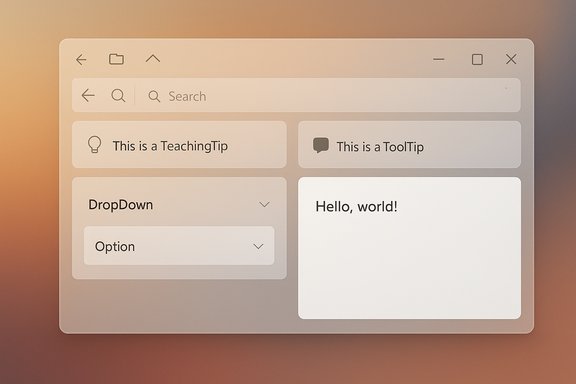
- The capability to apply Acrylic to elements like TeachingTip, ToolTip, CommandBar, SecondaryCommands, ComboBox popups, and other UI micro‑surfaces—without requiring awkward window-level hacks.
Caveat and status: publicly available platform documentation already enumerates elements where SystemBackdrop properties exist (Window, FlyoutBase, Popup and a handful of presenters). The new host control idea appears to be an evolution, not a wholesale rework, and is being discussed in developer channels and community calls. At the time of writing the concrete control spec is in proposal form and the implementation timeline remains subject to the Windows App SDK release cadence. This should be treated as a planned enhancement rather than a fully released API until it appears in the official WinUI/Windows App SDK reference.
Why targeted Acrylic matters for UX and design consistency
1. Visual hierarchy and focus
Localized Acrylic enables designers to create clearer visual hierarchies. A translucent overlay behind a dialog or popover separates it from the app content without removing context entirely—users still see what is behind the overlay, but their attention is guided to the foreground.2. Consistency between native and web-wrapped content
As more apps ship as hybrids—native chrome wrapping web content—making web UI components adopt the same backdrop treatment as native UI reduces the jarring “two-app” feeling. Local Acrylic makes wrappers and embedded web content feel native.3. Reduced workaround surface area
Previously, to get a localized blur some developers layered additional windows, used composition APIs manually, or applied full-window Acrylic and masked content, complicating layout, input, and accessibility. A host control simplifies implementation and reduces bugs.4. Performance and accessibility trade-offs
Acrylic isn’t free. It samples the desktop/composition and performs graphical work. The platform maintains feature gates (IsSupported checks) to avoid enabling Acrylic on unsupported hardware or battery-critical modes. Microsoft’s current guidance treats acrylic as a transient material for light‑dismiss surfaces, and recommends Mica for heavy-use foundation layers.The WinUI developer perspective: how this will change development
For WinUI 3 developers the proposed pattern presents several practical changes:- A single, self-contained host control reduces plumbing. Developers will be able to place a backdrop host in XAML or create it programmatically where needed.
- SystemBackdrop configuration will remain important: controllers still need to honor themes, high contrast, and performance policies.
- Migration path: apps that already use Window.SystemBackdrop and flyout SystemBackdrop will likely be able to combine host-backed Acrylic regions with existing Mica windows.
- Testing: developers must test across hardware tiers, multi-monitor setups, high-DPI configurations, and with Accessibility options (high contrast, reduced motion, battery saver) to ensure fallback behavior is correct.
- Verify DesktopAcrylicController.IsSupported before enabling Acrylic.
- Provide clear fallbacks (solid color or Mica) for unsupported hardware or power-saving modes.
- Avoid heavy use of Acrylic on content that updates frequently (animations or video) to minimize GPU cost.
- Test input focus flows: overlays must not trap input or break expected tab order.
WebView2: finally a smoother drag-and-drop story
One of the biggest integration gaps for web-wrapped apps on Windows has been drag‑and‑drop. Web content expects browser-like drag semantics: responsive cursors, immediate drag images, and reliable transfer of files, URLs, and text. When embedded in native hosts using older WebView2 stacks or WinUI hosting configurations, drag operations sometimes suffered from:- Unresponsive mouse pointer during a drag operation originating inside WebView2.
- Partial or failed transfer of file handles and large items.
- Inconsistent behavior across visual hosting modes and WinUI hosting scenarios.
- A DragStarting API that allows host apps to intercept and override default drag logic when running in composition/visual hosting mode.
- Runtime fixes that re-enable interactive dragging and address corner-case failures when passing file or media handles across process boundaries.
- Standardized packaging and event semantics so multi-item and large-file drags are reliable and perform well.
- Dragging text, images, and files from a WebView2 canvas into native Windows apps (Word, Explorer, Mail, etc. should be smooth and responsive.
- Developers of hybrid apps do not need to rebuild containers to benefit from runtime fixes—newer WebView2 runtime updates can deliver improvements to deployed apps.
- For apps that used JavaScript polyfills or fragile workarounds to emulate drag behavior, many of those stopgap solutions may become unnecessary.
Real-world impact: WhatsApp and other WebView2-based apps
Major applications are already pivoting to WebView2 wrappers for Windows, and the drag/drop fixes are consequential for them.- Messaging apps that moved from native to WebView2 wrappers (for maintainability) previously faced criticism for laggy drag-and-drop and higher memory usage. The improved drag model directly addresses one of the most-reported usability regressions—copying or dragging attachments, images, or text between apps.
- Productivity suites that embed web modules or rely on embedded editors will benefit from consistent data transfer, especially for large files or multi-item drags.
- Hybrid desktop apps will feel more coherent: clipboard and drag behaviors will match user expectations from the browser world without compromising native interoperability.
Performance, security, and accessibility considerations
Performance
- Acrylic is graphics‑intensive when used frequently or over large areas. It’s intended for transient surfaces. Developers should prefer Mica or solid fills for primary content to minimize GPU load.
- WebView2 relies on the Edge (Chromium) runtime; wrapped apps can increase memory use versus native implementations. Improved drag handling doesn’t reduce the baseline runtime cost of embedding Chromium.
Security
- Dragging file handles and large content across provider boundaries must respect security and sandbox boundaries. Platforms standardize how file handles and file system handles are packaged; developers should avoid trusting unvalidated drag payloads.
- When WebView2 receives IDropTarget events from the OS, host apps must forward and sanitize those events to avoid attack surface expansion.
Accessibility
- Acrylic and Mica must respect high-contrast modes and reduce-motion preferences. The platform’s SystemBackdrop and controller APIs provide theme and policy hooks; developers must honor those.
- For assistive tech, ensure that translucent regions do not hide focus outlines or reduce contrast for text and controls.
Risks and unknowns — what to watch for
- Implementation timing: the localized acrylic host control is discussed in community channels and proposals; the final API name, surface area, and availability in the stable Windows App SDK release cycle could shift. Treat early demos as previews.
- Platform fragmentation: different Windows 11 builds and OEM drivers may show variation in acrylic behavior. Testing on a matrix of GPU drivers and Windows builds is essential before shipping wide.
- Memory/CPU trade-offs: adding Acrylic widely across an app could push already heavy WebView2-based wrappers into poor performance territory on lower-end machines.
- WebView2 runtime dependency: apps using WebView2 improvements may rely on runtime updates (Edge runtime) that are not immediately present on end-user machines. Coordinate distribution/upgrade strategies, or ship a bundled runtime if necessary.
- Incomplete migration path for older frameworks: non‑WinUI hosts (WinForms, traditional Win32) may need extra work to expose the new backdrop host pattern cleanly.
Practical guidance for users and administrators
- End users: don’t expect system-wide changes to arrive overnight. Visual changes will be gradual, rolled out as apps update to target the new WinUI/Windows App SDK versions and as the WebView2 runtime receives updates.
- IT admins: if your organization uses WebView2-wrapped apps for productivity, plan for possible increases in memory usage and test app responsiveness before wide deployment. Coordinate Edge/WebView2 runtime updates through your update channels to ensure improvements reach managed machines.
- Power users: if you value battery life on laptops, be mindful of apps that heavily use composition effects and WebView2 wrappers—test battery and thermals when those apps are in active use.
For developers: actionable checklist to adopt new backdrops and WebView2 improvements
- Audit UI surfaces: identify flyouts, popovers, tooltips, and overlays where a localized Acrylic backdrop would improve clarity.
- Implement feature-gates:
- Call the backdrop controller IsSupported API before enabling Acrylic.
- Respect system theme and high-contrast modes.
- Profile GPU and memory costs:
- Test on low‑end hardware and integrated GPUs.
- Use performance tools to measure composition cost when multiple Acrylic regions are active.
- WebView2 readiness:
- Target the latest stable WebView2 SDK and ensure the runtime is updatable in your deployment model.
- If you already implemented JavaScript polyfills for drag behavior, re-evaluate once your target runtime includes the drag fixes.
- Regression testing:
- Validate drag-and-drop flows across typical target apps (Explorer, Office, Mail) and with multi-item and large-file drags.
- Validate accessibility flows and keyboard focus in overlay regions.
- Fallback behavior:
- Define graceful fallbacks (Mica or solid color) for battery saver, remote desktop sessions, or when Acrylic is not supported.
What remains tentative and should be watched closely
- The exact API surface and control name for the proposed localized backdrop host may change during the Windows App SDK review and shipping process.
- Timelines for shipping runtime-level WebView2 drag fixes vary by release windows for the Edge runtime and the Windows App SDK. Some fixes are delivered by runtime updates that do not require rebuilding host apps, while others may require SDK updates.
- Microsoft’s guidance around when to pick Acrylic vs Mica continues to emphasize transient use for Acrylic; developers should expect that recommendation to hold.
Conclusion
Microsoft’s push to let Acrylic live in targeted regions of WinUI apps and the WebView2 drag-and-drop fixes together represent a practical step toward a more coherent Windows 11 experience. Granular acrylic backdrops give designers and developers finer control over depth and focus, aligning embedded and native interfaces; improved WebView2 interoperability solves a real-world annoyance that made web‑wrapped apps feel less native.These updates are evolutionary rather than revolutionary: the platform still expects developers to be mindful of performance, accessibility, and support matrices. For organizations and developers shipping hybrid apps, the combination of localized Acrylic and more reliable WebView2 drag semantics means better visual fidelity and more trustworthy interactions—if the new APIs are adopted cautiously and tested across the broad span of Windows hardware and settings. Where specifics are still in proposal or preview, they should be treated as improvements in progress; close attention to the official Windows App SDK documentation and WebView2 release notes will be required to adopt the changes safely and effectively.
Source: Windows Latest Windows 11 UI update: Acrylic blur is coming to every corner, web apps to feel more native
