

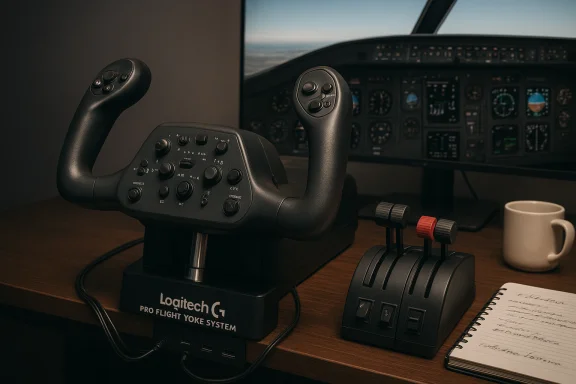
Logitech’s relaunch of the Saitek-branded Pro Flight Yoke System is back in the deals spotlight — presented as a pro-grade, plug-and-play yoke and throttle bundle with a stainless steel shaft, precision bearings, 25 physical inputs and a three‑position mode switch that multiplies programmable profiles to 75 — but the real story for Windows pilots is more complex: the hardware’s spec sheet reads well on paper, yet long-running driver quirks, firmware gaps, and mixed real‑world build quality mean this is a purchase that rewards due diligence and platform testing before you commit.
Source: eTeknix Logitech G Saitek PRO Flight Yoke System
 Background
From Saitek to Logitech: a short history
The Pro Flight Yoke system traces its lineage to Saitek, a long‑standing maker of flight‑simulation peripherals that was acquired by Logitech. The current retail product is marketed under the Logitech G banner while keeping the Saitek design DNA and model numbering familiar to sim communities. Logitech positions the unit as a modular, entry‑to‑mid level yoke and throttle solution that can act as the centerpiece of a fuller Saitek/Logitech flight deck.Why this matters to Windows users
Flight sim peripherals aren’t plug‑and‑play in the way mice and keyboards are; they interact with simulator APIs, OS HID stacks, and often depend on manufacturer drivers or third‑party bridge software for advanced features. That makes compatibility and driver support essential for a clean experience on Windows — especially with rolling Windows 11 feature updates and multiple active simulator platforms (MSFS, X‑Plane, Prepar3D, FSX and their successors). The Pro Flight Yoke sits at the intersection of spec promise and real‑world caveats.What Logitech (and eTeknix) are selling
Core specifications and headline features
- Five total axes (yoke pitch/roll plus throttle/quadrant axes).
- Stainless steel elevator/aileron shaft with precision bearings for smoother feel.
- 25 built‑in buttons and switches on the yoke and quadrant, plus a three‑position mode switch, yielding up to 75 programmable commands when you use the built‑in profile switching.
- Detachable throttle knobs on a pro‑grade throttle quadrant (configurable for throttle, mixture, prop pitch or other uses).
- Desk clamps for mounting and an integrated USB hub to tidy cables.
- Advertised compatibility with legacy sims including FSX, X‑Plane 10 and Prepar3D 2.2; system requirements list Windows 7 / 8.1 / 10 (vendor copy mentions Windows 10 in marketing).
What the marketing omits or downplays
- The throttle quadrant relies on the yoke’s USB hub for some wiring/logic in many SKUs (older Saitek designs used the yoke as the USB device host for the quadrant), which can affect whether the quadrant works when plugged directly to a PC. That wiring detail is rarely visible in a short deal post. Community reports confirm the throttle sometimes appears inactive or needs to be plugged into the yoke to function.
Build quality, ergonomics and real‑world handling
Materials and mechanical feel
Logitech lists a stainless steel shaft and precision bearings as differentiators intended to elevate the yoke above cheaper plastic alternatives. The metal shaft reduces flex and adds inertia where required, and the bearings theoretically yield smoother control around the pitch and roll axes. Retail spec pages and the Logitech product page support these hardware claims.The community verdict on feel and longevity
User feedback — especially on community forums and Reddit threads — is mixed and leans toward caution. Reported problems fall into two camps:- Mechanical/fit‑and‑finish complaints: many users describe creaks, inconsistent bushing tolerances, limited axis travel, or plastic clamps that lose clamping torque over time — issues that affect precision flying and the permanent desk mounting reliability many pilots expect. Several long‑term users and buyers who tried upgrading to Honeycomb or higher‑tier hardware do so precisely because of these tactile complaints.
- Variable unit quality and out‑of‑box calibration: some units work “fine” out of the box and plug straight into Windows as a generic HID device; others arrive with wide dead zones, axes pegged, or throttle range limited to ~95% without aggressive calibration. This variance suggests manufacturing QC or aging stock issues — important considerations when buying new or used.
Compatibility and drivers — the practical sticking point
Official stance vs. modern simulators
Logitech’s marketing emphasizes broad sim compatibility historically (FSX, X‑Plane, Prepar3D), and advertises plug‑and‑play behavior. However, compatibility with modern titles — notably Microsoft Flight Simulator (the 2020/2024 family) and the latest Windows 11 builds — has been inconsistent in the field. The official product page insists on a straightforward setup, but users and forums have repeatedly documented gaps that go beyond marketing copy.The Windows 11 problem and driver fragility
Multiple community threads and forum reports point to the same pattern: after Windows 11 feature updates (including 24H2 and other patches), Saitek/Logitech flight peripherals — including the yoke, rudder pedals and panels — can stop being correctly enumerated, show HID driver errors, or require older Windows 10 drivers installed in compatibility mode to regain functionality. In some cases, Microsoft’s memory integrity / core isolation features prevent legacy drivers from installing without changing security settings. Those problems are not universal, but they are frequent enough to be notable.Microsoft Flight Simulator specifics
- Early launches of Microsoft Flight Simulator required third‑party plugin workarounds for full panel support; Logitech and the sim developers worked on plugin bridges and community utilities. Community tools such as SPAD.next are commonly recommended to map legacy Saitek/Logitech panels into MSFS when native support lags. That means even if the hardware is physically connected and visible to Windows, you may need additional software to expose full panel functionality in MSFS.
Practical troubleshooting checklist
- Confirm physical wiring: the throttle quadrant may need to be plugged into the yoke rather than directly into the PC. Some units use the yoke as the USB host for attached modules.
- Check Windows Game Controllers and Device Manager for proper enumeration and HID errors.
- Try the official Logitech downloads page for “Flight” devices; if drivers are unavailable for your exact Windows version, try Windows 10 drivers in compatibility mode and/or run installers as Administrator. Several users reported success with this route. Be cautious: compatibility mode and driver installers may require security setting changes.
- Use SPAD.next or third‑party utilities as a bridge for panels and switches when sims don’t natively read them. Community guides frequently recommend SPAD.next for MSFS scenarios.
- If the device is dead on arrival (no LED, no enumeration on multiple machines), pursue returns/replacement — the hardware failure rate, while not quantified publicly, is a recurring theme in community threads.
Software and programmability
Profile switching and programmable controls
The unit’s three‑position profile switch is a useful hardware convenience: it lets you toggle between three saved mappings on the fly, which is valuable for switching between aircraft types, camera views and complex checklists without opening a simulator menu. Logitech claims 75 programmable options by multiplying the 25 physical inputs by the three modes; that arithmetic is straightforward and accurate as a capability statement. Programmability beyond that base level usually requires the vendor software or sim input mapping tools.Vendor software and ecosystem
Logitech provides configuration downloads, but the extent of advanced features depends on the software and simulator integrations available at the time of use. The reality of Windows updates and sim patches means users often pair official drivers with community tools for the most stable mapping experience. If you rely on third‑party mapping, check community resources and recent forum posts for updated guides.Alternatives and who should buy this
Where the Pro Flight Yoke makes sense
- Beginners and budget‑conscious simmers who want an integrated yoke + throttle solution without stepping up to premium metal cockpit systems. The package gives a realistic, yoke‑style control layout that’s tactilely closer to a Cessna/airliner experience than a joystick.
- Modular shoppers who want to add components over time — the throttle quadrant is detachable and additional modules (switch, instrument, rudder pedals) have historically been sold as separate accessories.
Who should probably look elsewhere
- Buyers who demand rock‑solid, out‑of‑box reliability and minimal tinkering. The Honeycomb Alpha/Bravo series and higher‑end metal cockpit vendors (VKB, Virpil, WinWing, Redbird for professional use) are more expensive but deliver better consistency and support for serious setups. Community comparisons and long‑term ownership threads frequently recommend those alternatives once budget allows.
Quick alternatives checklist
- Honeycomb Alpha/Bravo: superior build and calibration, better community reputation.
- Standalone high‑end quadrants and rudder solutions (VKB/Virpil/WinWing): premium tactile quality for enthusiasts.
- Used Redbird/industrial gear: often overkill but the most robust.
Price, deals and value proposition
Deal posts (like the eTeknix piece that surfaced the offer) position the Pro Flight Yoke as a value buy during promotions; historically it has been discounted strongly at retail and outlet channels, which is attractive for first‑time yoke buyers. However, value depends on what you include in the purchase calculus: the cost of potential replacement or upgrade, the time you must spend troubleshooting drivers, and whether you’ll need third‑party utilities for full simulator integration. On a tight budget, a discounted Logitech G Saitek Pro Flight Yoke is a defensible entry point; for a worry‑free experience that minimizes post‑purchase time sunk on fixes, stretching to Honeycomb or higher is often recommended by the community.Risks, red flags and final checklist before buying
Key risks to accept or mitigate
- Driver fragility with Windows 11: feature updates and security hardening have, in many cases, disrupted Saitek/Logitech legacy drivers. Expect possible compatibility workarounds.
- Inconsistent build quality: some units are perfectly fine; others show premature looseness, plastic clamping failures or axis binding. If buying used, inspect carefully and insist on returns.
- Throttle quadrant wiring: many models require the quadrant to be plugged into the yoke to function; that limits modular placement and must be verified if you plan a custom cockpit layout.
Pre‑purchase checklist
- Confirm return policy and warranty terms with the retailer — long trial windows matter here.
- Check recent forum search results for reports on the exact Windows version and simulator build you use (e.g., Windows 11 24H2, MSFS 2024) — compatibility can change quickly after OS updates.
- Prefer new stock from reputable retailers if possible; used units can hide calibration or wear issues.
- If you plan to use MSFS, have a plan for SPAD.next or similar bridging software and know how to install Windows 10 drivers in compatibility mode if necessary.
Conclusion — who the Logitech G Saitek Pro Flight Yoke System is for in 2025
The Logitech G Saitek Pro Flight Yoke System is still one of the most accessible yoke‑and‑throttle bundles you can buy, and deal prices make it tempting for newcomers. Its hardware spec — stainless steel shaft, precision bearings, detachable throttle knobs and a wealth of programmable inputs — reads like a sensible, modular value proposition. However, the product lives in a messy, rapidly changing ecosystem: Windows security updates, evolving simulator APIs and uneven manufacturing quality mean many buyers face a short series of practical hurdles after checkout.- Buy it if you want a budget‑friendly, modular yoke/quadrant that you’re prepared to calibrate, patch and possibly pair with third‑party software.
- Be cautious (and consider alternatives) if you want turn‑key reliability, zero driver hassle on Windows 11, or the highest build fidelity for serious procedural flying. Community experience repeatedly points to Honeycomb and higher‑end manufacturers for those needs.
Source: eTeknix Logitech G Saitek PRO Flight Yoke System
