

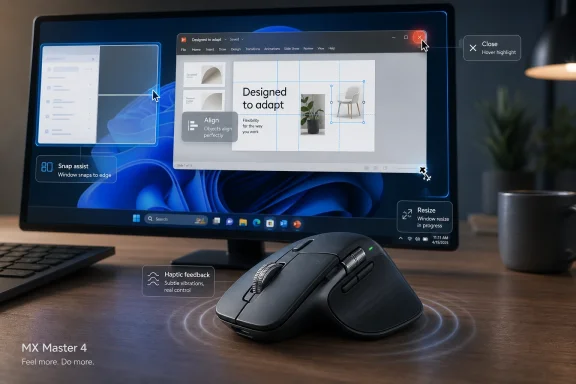
Logitech’s MX Master 4 gained Windows 11 Advanced Haptics support through recent Logitech firmware updates, letting compatible Insider and preview builds send tactile feedback to the mouse during actions such as snapping, resizing, PowerPoint alignment, and Close-button hover. That makes a productivity mouse feel less like a peripheral bolted onto Windows and more like a surface through which the operating system can speak. The change is small in physical sensation and large in platform meaning. Microsoft is testing whether Windows can become a tactile environment, not merely a visual one.
For decades, Windows has treated the mouse as a pointer, a clicker, and occasionally a scroll wheel with ambitions. The relationship has been almost entirely one-way: the hand tells the computer what to do, and the computer answers with pixels, sounds, or delays. Haptics changes that bargain by allowing the operating system to push information back into the hand.
The Logitech MX Master 4 is not the first device with a vibration motor, and Windows is not the first platform to experiment with tactile feedback. Phones made haptics mainstream, game controllers made them expressive, and premium laptop touchpads turned them into a way to fake mechanical motion without moving parts. What is notable here is that Windows 11 is beginning to expose haptics as an operating-system behavior for everyday desktop actions.
That matters because desktop computing has always been oddly conservative about touch. Windows itself supports touchscreens, pens, precision touchpads, mice, keyboards, gamepads, and accessibility devices, but the classic pointer workflow remains overwhelmingly visual. A window edge lights up, a snap outline appears, a button changes color, and the user is expected to notice. Haptic feedback adds another channel, one that is subtle enough to avoid becoming a gimmick but direct enough to change how a gesture feels.
The MX Master 4’s update therefore lands in a bigger story than “a mouse now buzzes.” It is an early sign that Microsoft and hardware partners are trying to make the Windows desktop embodied again. The operating system is no longer just drawing affordances; it is beginning to texture them.
At launch, the mouse’s tactile feedback was largely bound to Logitech’s own software experience. The most visible use was the Actions Ring, summoned from the thumb area and populated with shortcuts. Moving across those shortcuts could produce a distinct haptic cue, giving the ring a little physical punctuation rather than leaving it as another radial menu floating on top of the desktop.
That was clever, but also contained. It was Logitech saying, in effect, “Inside our software, this mouse can feel different.” The new firmware support changes the premise. Now Windows can ask the mouse to respond during system-level actions, which moves haptics out of the accessory demo zone and into the operating system’s interaction model.
This distinction is easy to miss because the user experience may be modest: a bump when snapping a window, a nudge when resizing, a tactile cue when hovering over the Close button, a small confirmation while aligning objects in PowerPoint. But platform features rarely begin as spectacles. They begin as hooks, APIs, firmware paths, and compatibility notes. The important thing is not that every Windows user will immediately feel the desktop through an MX Master 4; it is that Windows now has a place to send that feeling.
That chain explains why this feature will not arrive like a normal Windows toggle for most users. It is not just a setting hidden under Bluetooth or Accessibility. It depends on the hardware vendor exposing the right capability, Microsoft providing the right OS behavior, and the user having all of the pieces updated at the same time. For administrators, that means the haptic future begins with the same old problem: firmware inventory.
The Logi Bolt receiver update to version 5.5.30 is especially telling. The mouse may contain the haptic motor, but the receiver is part of the path by which the system and device reliably communicate. In an enterprise context, that makes the receiver less like a passive dongle and more like a component with its own support lifecycle.
This is the unglamorous reality behind modern peripherals. The “mouse” is now a device, a receiver, a driver path, a configuration app, a cloud-adjacent utility layer in some cases, and an operating-system integration point. Haptics simply makes that stack easier to feel.
Window snapping is an obvious candidate because it is spatial and threshold-based. Dragging a window to an edge already has a visual snap preview, but a tactile response can tell the hand, “You have crossed the boundary.” Resizing windows is similar; the pointer may be tiny, the edge target can be finicky, and the user’s attention is often on the content, not the frame.
PowerPoint alignment hints at a different ambition. Microsoft is not merely adding buzzes to shell chrome. It is letting application-level workflows participate in a tactile vocabulary, starting with one of Office’s most visual and alignment-heavy tools. If that grows, designers, spreadsheet users, video editors, CAD workers, and developers could all benefit from haptic cues that mark gridlines, drop zones, invalid targets, or completed operations.
The Close-button hover example is the strangest and perhaps the most revealing. Nobody needs a vibration to discover that the X button exists. But a subtle cue over a destructive or session-ending control could become part of a broader affordance system, especially for users who work quickly across many windows. It suggests Microsoft is experimenting not only with confirmation but with intent friction — a tiny tactile pause before an action that might matter.
Haptics offers Microsoft a way to move a few of those signals out of the visual channel. A good tactile cue does not require the user to look at a pop-up, parse an icon, or wait for an animation. It simply confirms that a boundary has been reached or an action has registered. Used well, it can make the interface quieter.
Used badly, it can become another notification layer, only more annoying because it invades the hand. That is the central risk. The Windows desktop does not need novelty vibrations any more than it needed more blinking tray icons. It needs a disciplined tactile language that is predictable, sparse, and optional.
The MX Master 4 update is encouraging precisely because the initial use cases are utilitarian. Snapping, resizing, alignment, and hover cues are not social engagement tricks. They are mechanics of work. If haptics remains anchored to spatial precision and state confirmation, it has a chance to become genuinely useful.
That changes how we should think about premium peripherals. The old spec sheet asked about DPI, polling rate, buttons, battery life, ergonomics, and wireless reliability. The new one will increasingly ask whether a device can participate in operating-system feedback loops. In that world, firmware support becomes a user experience feature, not just a maintenance chore.
This also gives Microsoft a new kind of hardware ecosystem lever. Windows cannot make every mouse haptic, but it can define system behaviors that reward devices capable of supporting them. Hardware makers then have an incentive to add motors, expose APIs, and compete on tactile quality. The same dynamic helped precision touchpads become a meaningful class of Windows hardware after years of terrible laptop pointing devices.
The difference is that mice are modular and widely replaced. A user can add haptics to a desktop without buying a new PC. That makes the MX Master 4 an unusually interesting test vehicle: premium enough to contain the hardware, common enough among productivity users to matter, and separate enough from the PC that Microsoft can learn without waiting for a full laptop refresh cycle.
That lesson matters for mice because haptics is most successful when it disappears into expectation. Nobody wants to admire the motor every time they snap a window. They want the window to feel like it has landed. The best haptic feedback is not “vibration” as a feature but texture as part of the interface.
Apple has long understood this in trackpads, phones, and watches. Microsoft has been more uneven, partly because the Windows hardware ecosystem is broader and less vertically controlled. A feature like Advanced Haptics is Microsoft trying to create a common layer without owning every device that implements it.
The MX Master 4 shows both the promise and the constraint of that approach. Microsoft can define the signals, but Logitech controls the motor, firmware, tuning, and software bridge. The final feel is the product of cooperation rather than command.
The first practical issue is consistency. If some users feel snap cues and others do not, help desks may receive strange reports that are hard to reproduce. One machine may have the right Windows build but an older receiver firmware. Another may have the right mouse firmware but connect over a path that does not expose the same behavior. A third may have Logitech’s utility configured differently.
The second issue is appropriateness. Haptic feedback can help some users by providing confirmation without requiring constant visual focus. It can distract others, especially in quiet office environments or for users sensitive to vibration. Enterprises that standardize on premium Logitech hardware may eventually need policy guidance for enabling, disabling, or documenting these behaviors.
The third issue is procurement. Peripheral buying has often been treated as a commodity decision except for specialized roles. If haptics becomes part of Windows productivity, purchasing teams may need to distinguish between “works as a mouse” and “works as a Windows haptic device.” That sounds minor until executives, designers, analysts, or accessibility-focused deployments begin asking why a feature works on one desk and not another.
None of this means organizations should rush to deploy haptic mice. It means they should recognize the category forming. Today it is the MX Master 4; tomorrow it could be a broader class of input hardware with firmware-dependent Windows features.
That said, accessibility only works if it is configurable. Some users will need stronger feedback, others weaker, and some none at all. A one-size-fits-all buzz would repeat the mistakes of early notification systems that assumed more signaling automatically meant better usability.
Microsoft’s challenge is to make haptics discoverable without making it mandatory. The feature should live in a place where users can understand which devices support it, which system actions trigger it, and how to tune or disable it. If the controls are scattered among Windows Settings, Logitech Options+, firmware tools, and app-specific preferences, the experience will feel fragile no matter how good the motor is.
There is also a language problem. Most users do not think in terms of “Advanced Haptics.” They think, “My mouse vibrates when I snap a window.” The operating system needs to translate the technology into understandable behavior, especially if haptics expands beyond a few preview actions.
The better model is semantic feedback. Haptics should mark boundaries, completions, errors, alignments, physical metaphors, or actions that benefit from proprioceptive confirmation. It should not decorate every hover state. The difference between useful haptics and gimmick haptics is whether the cue reduces cognitive work.
PowerPoint alignment is a promising example because the action has a clear physical analogy. Objects line up; the hand feels the lock. A file upload finishing might warrant a gentle confirmation. A destructive drag target might warrant a different pulse. A random toolbar hover does not.
Developers will also need to consider hardware variation. A cue that feels crisp on a premium mouse may feel muddy on another device or nonexistent on unsupported hardware. That means haptics cannot be the only signal. It must complement visual and accessibility-friendly feedback, not replace it.
Advanced Haptics could fall into the same trap. If support depends on specific builds, specific firmware, specific receivers, specific vendor utilities, and vague compatibility language, users will experience it as luck rather than platform capability. Enthusiasts will figure it out. Normal users will not.
Logitech’s update helps because it attaches the feature to a known, high-end device. But one mouse does not create a standard. Microsoft will need visible settings, clear compatibility reporting, and enough hardware partners to prevent the feature from becoming a trivia item in Insider build notes.
There is also a naming problem. “Advanced Haptics” sounds like a developer feature or a marketing phrase, not something a user would search for after feeling a bump while snapping a window. Microsoft has struggled before when powerful features were buried behind terms that meant more to engineers than to customers. If haptics is going to matter, Windows has to explain it plainly.
But novelty is not enough. The mainstream case depends on whether haptics makes common actions faster, more confident, or less visually demanding. If the user forgets about the feature because it simply makes window management feel better, that is success. If the user opens settings to turn it off after an hour, it is a failure.
The MX Master 4 is well positioned because its audience already values small workflow improvements. People buy this class of mouse because they care about the feel of scrolling, the placement of buttons, the speed of switching between machines, and the cumulative effect of tiny ergonomic advantages. Haptics fits that culture better than it would on a bargain office mouse.
Casual gaming is a side note here, not the center. Logitech has separate gaming hardware for latency-obsessed players, and the MX Master identity remains productivity-first. The more interesting crossover is that gaming normalized tactile feedback decades ago, and now the desktop is borrowing that expectation for work.
Advanced Haptics belongs to the second category. It does not sell a new PC by itself. It does not change the Start menu. It does not produce a keynote moment as dramatic as an AI assistant. Yet it may matter more in day-to-day computing than many louder features if it makes common interactions feel more precise.
This is also a way for Microsoft to differentiate Windows at the edge of the hardware ecosystem. The company cannot rely only on AI branding to make Windows feel modern. Users judge an operating system by the texture of everyday actions: opening, moving, snapping, closing, selecting, aligning, switching. Haptics touches exactly those moments.
That is why the Logitech update is more than a peripheral note. It is a reminder that the future of Windows is not only cloud models and neural processors. It is also the humble physical interface between hand and machine.
Source: Windows Central https://www.windowscentral.com/micr...ate-lets-you-feel-windows-11-through-haptics/
 Windows Finally Reaches Beyond the Screen
For decades, Windows has treated the mouse as a pointer, a clicker, and occasionally a scroll wheel with ambitions. The relationship has been almost entirely one-way: the hand tells the computer what to do, and the computer answers with pixels, sounds, or delays. Haptics changes that bargain by allowing the operating system to push information back into the hand.The Logitech MX Master 4 is not the first device with a vibration motor, and Windows is not the first platform to experiment with tactile feedback. Phones made haptics mainstream, game controllers made them expressive, and premium laptop touchpads turned them into a way to fake mechanical motion without moving parts. What is notable here is that Windows 11 is beginning to expose haptics as an operating-system behavior for everyday desktop actions.
That matters because desktop computing has always been oddly conservative about touch. Windows itself supports touchscreens, pens, precision touchpads, mice, keyboards, gamepads, and accessibility devices, but the classic pointer workflow remains overwhelmingly visual. A window edge lights up, a snap outline appears, a button changes color, and the user is expected to notice. Haptic feedback adds another channel, one that is subtle enough to avoid becoming a gimmick but direct enough to change how a gesture feels.
The MX Master 4’s update therefore lands in a bigger story than “a mouse now buzzes.” It is an early sign that Microsoft and hardware partners are trying to make the Windows desktop embodied again. The operating system is no longer just drawing affordances; it is beginning to texture them.
Logitech Turns a Productivity Trick Into a Platform Signal
The MX Master line has long been Logitech’s argument that a mouse can be an instrument rather than a commodity. Its appeal is not raw gaming speed or flashy lighting but the accumulation of small productivity advantages: the thumb wheel, the gesture button, app-specific profiles, multi-device switching, and the comfort of a shape that assumes the user will live with it all day. The MX Master 4 added haptics to that formula before Windows itself was ready to make much use of them.At launch, the mouse’s tactile feedback was largely bound to Logitech’s own software experience. The most visible use was the Actions Ring, summoned from the thumb area and populated with shortcuts. Moving across those shortcuts could produce a distinct haptic cue, giving the ring a little physical punctuation rather than leaving it as another radial menu floating on top of the desktop.
That was clever, but also contained. It was Logitech saying, in effect, “Inside our software, this mouse can feel different.” The new firmware support changes the premise. Now Windows can ask the mouse to respond during system-level actions, which moves haptics out of the accessory demo zone and into the operating system’s interaction model.
This distinction is easy to miss because the user experience may be modest: a bump when snapping a window, a nudge when resizing, a tactile cue when hovering over the Close button, a small confirmation while aligning objects in PowerPoint. But platform features rarely begin as spectacles. They begin as hooks, APIs, firmware paths, and compatibility notes. The important thing is not that every Windows user will immediately feel the desktop through an MX Master 4; it is that Windows now has a place to send that feeling.
The Firmware Update Is the Real Handshake
The consumer story sounds simple: update the mouse stack, run a supported Windows 11 build, and feel supported actions. Underneath that is a more complicated chain of trust. The Logitech MX Master 4 needs current device firmware, the Logi Bolt receiver needs firmware support, Logi Options+ remains part of Logitech’s management layer, and Windows 11 must be on a build that includes Advanced Haptics support.That chain explains why this feature will not arrive like a normal Windows toggle for most users. It is not just a setting hidden under Bluetooth or Accessibility. It depends on the hardware vendor exposing the right capability, Microsoft providing the right OS behavior, and the user having all of the pieces updated at the same time. For administrators, that means the haptic future begins with the same old problem: firmware inventory.
The Logi Bolt receiver update to version 5.5.30 is especially telling. The mouse may contain the haptic motor, but the receiver is part of the path by which the system and device reliably communicate. In an enterprise context, that makes the receiver less like a passive dongle and more like a component with its own support lifecycle.
This is the unglamorous reality behind modern peripherals. The “mouse” is now a device, a receiver, a driver path, a configuration app, a cloud-adjacent utility layer in some cases, and an operating-system integration point. Haptics simply makes that stack easier to feel.
Microsoft’s Advanced Haptics Push Is Bigger Than One Mouse
Microsoft’s Windows 11 preview notes describe haptic feedback for compatible input devices during actions such as aligning objects in PowerPoint, snapping or resizing windows, and hovering over the Close button. Those examples are narrow, but they are not random. Each one maps to a moment when the user benefits from a confirmation that is more immediate than a visual cue.Window snapping is an obvious candidate because it is spatial and threshold-based. Dragging a window to an edge already has a visual snap preview, but a tactile response can tell the hand, “You have crossed the boundary.” Resizing windows is similar; the pointer may be tiny, the edge target can be finicky, and the user’s attention is often on the content, not the frame.
PowerPoint alignment hints at a different ambition. Microsoft is not merely adding buzzes to shell chrome. It is letting application-level workflows participate in a tactile vocabulary, starting with one of Office’s most visual and alignment-heavy tools. If that grows, designers, spreadsheet users, video editors, CAD workers, and developers could all benefit from haptic cues that mark gridlines, drop zones, invalid targets, or completed operations.
The Close-button hover example is the strangest and perhaps the most revealing. Nobody needs a vibration to discover that the X button exists. But a subtle cue over a destructive or session-ending control could become part of a broader affordance system, especially for users who work quickly across many windows. It suggests Microsoft is experimenting not only with confirmation but with intent friction — a tiny tactile pause before an action that might matter.
The Desktop Has Been Visually Overloaded for Years
Windows has spent the past decade adding more visible states to an already dense interface. Snap layouts, hover cards, widgets, notification badges, context menus, virtual desktops, Copilot surfaces, Teams hooks, OneDrive indicators, and system tray behaviors all compete for attention. Even when each feature is defensible on its own, the cumulative result is a desktop that constantly asks the eye to sort signal from decoration.Haptics offers Microsoft a way to move a few of those signals out of the visual channel. A good tactile cue does not require the user to look at a pop-up, parse an icon, or wait for an animation. It simply confirms that a boundary has been reached or an action has registered. Used well, it can make the interface quieter.
Used badly, it can become another notification layer, only more annoying because it invades the hand. That is the central risk. The Windows desktop does not need novelty vibrations any more than it needed more blinking tray icons. It needs a disciplined tactile language that is predictable, sparse, and optional.
The MX Master 4 update is encouraging precisely because the initial use cases are utilitarian. Snapping, resizing, alignment, and hover cues are not social engagement tricks. They are mechanics of work. If haptics remains anchored to spatial precision and state confirmation, it has a chance to become genuinely useful.
The Mouse Becomes a First-Class Output Device
A mouse has traditionally been an input device, while monitors, speakers, and printers were output devices. Haptics collapses that neat separation. The MX Master 4 still sends motion and clicks into Windows, but Windows can now send carefully timed feedback back through the same hand that initiated the action.That changes how we should think about premium peripherals. The old spec sheet asked about DPI, polling rate, buttons, battery life, ergonomics, and wireless reliability. The new one will increasingly ask whether a device can participate in operating-system feedback loops. In that world, firmware support becomes a user experience feature, not just a maintenance chore.
This also gives Microsoft a new kind of hardware ecosystem lever. Windows cannot make every mouse haptic, but it can define system behaviors that reward devices capable of supporting them. Hardware makers then have an incentive to add motors, expose APIs, and compete on tactile quality. The same dynamic helped precision touchpads become a meaningful class of Windows hardware after years of terrible laptop pointing devices.
The difference is that mice are modular and widely replaced. A user can add haptics to a desktop without buying a new PC. That makes the MX Master 4 an unusually interesting test vehicle: premium enough to contain the hardware, common enough among productivity users to matter, and separate enough from the PC that Microsoft can learn without waiting for a full laptop refresh cycle.
The Laptop Touchpad Already Pointed the Way
Premium touchpads have been quietly preparing users for this moment. Mechanical diving-board touchpads were once a source of flex, rattle, uneven clicks, and long-term wear. Haptic touchpads solved that by replacing physical depression with a controlled vibration that simulates a click. Once tuned correctly, the illusion is good enough that many users stop thinking about it.That lesson matters for mice because haptics is most successful when it disappears into expectation. Nobody wants to admire the motor every time they snap a window. They want the window to feel like it has landed. The best haptic feedback is not “vibration” as a feature but texture as part of the interface.
Apple has long understood this in trackpads, phones, and watches. Microsoft has been more uneven, partly because the Windows hardware ecosystem is broader and less vertically controlled. A feature like Advanced Haptics is Microsoft trying to create a common layer without owning every device that implements it.
The MX Master 4 shows both the promise and the constraint of that approach. Microsoft can define the signals, but Logitech controls the motor, firmware, tuning, and software bridge. The final feel is the product of cooperation rather than command.
The Enterprise Angle Is Firmware, Fleet Control, and User Tolerance
For IT departments, haptics will initially look like a consumer flourish. That would be a mistake. The feature touches firmware management, peripheral standardization, user settings, accessibility preferences, and potentially application behavior. Anything that changes the physical feedback of a workstation deserves at least mild administrative attention.The first practical issue is consistency. If some users feel snap cues and others do not, help desks may receive strange reports that are hard to reproduce. One machine may have the right Windows build but an older receiver firmware. Another may have the right mouse firmware but connect over a path that does not expose the same behavior. A third may have Logitech’s utility configured differently.
The second issue is appropriateness. Haptic feedback can help some users by providing confirmation without requiring constant visual focus. It can distract others, especially in quiet office environments or for users sensitive to vibration. Enterprises that standardize on premium Logitech hardware may eventually need policy guidance for enabling, disabling, or documenting these behaviors.
The third issue is procurement. Peripheral buying has often been treated as a commodity decision except for specialized roles. If haptics becomes part of Windows productivity, purchasing teams may need to distinguish between “works as a mouse” and “works as a Windows haptic device.” That sounds minor until executives, designers, analysts, or accessibility-focused deployments begin asking why a feature works on one desk and not another.
None of this means organizations should rush to deploy haptic mice. It means they should recognize the category forming. Today it is the MX Master 4; tomorrow it could be a broader class of input hardware with firmware-dependent Windows features.
Accessibility Is the Quiet Opportunity
The most compelling argument for Windows haptics is not immersion. It is accessibility and attention management. A tactile cue can help users who miss visual changes, work across multiple monitors, keep focus on content, or benefit from non-auditory confirmation. Unlike sound, haptics does not disturb coworkers or leak information into a room.That said, accessibility only works if it is configurable. Some users will need stronger feedback, others weaker, and some none at all. A one-size-fits-all buzz would repeat the mistakes of early notification systems that assumed more signaling automatically meant better usability.
Microsoft’s challenge is to make haptics discoverable without making it mandatory. The feature should live in a place where users can understand which devices support it, which system actions trigger it, and how to tune or disable it. If the controls are scattered among Windows Settings, Logitech Options+, firmware tools, and app-specific preferences, the experience will feel fragile no matter how good the motor is.
There is also a language problem. Most users do not think in terms of “Advanced Haptics.” They think, “My mouse vibrates when I snap a window.” The operating system needs to translate the technology into understandable behavior, especially if haptics expands beyond a few preview actions.
The Developer Story Starts With Restraint
If Windows exposes more haptic capability to applications, developers will be tempted to overuse it. That is what developers do with new output channels. The early web blinked, autoplayed, popped over, and abused notifications until browsers and users fought back. Desktop haptics could follow the same path if every app decides its buttons deserve a tactile flourish.The better model is semantic feedback. Haptics should mark boundaries, completions, errors, alignments, physical metaphors, or actions that benefit from proprioceptive confirmation. It should not decorate every hover state. The difference between useful haptics and gimmick haptics is whether the cue reduces cognitive work.
PowerPoint alignment is a promising example because the action has a clear physical analogy. Objects line up; the hand feels the lock. A file upload finishing might warrant a gentle confirmation. A destructive drag target might warrant a different pulse. A random toolbar hover does not.
Developers will also need to consider hardware variation. A cue that feels crisp on a premium mouse may feel muddy on another device or nonexistent on unsupported hardware. That means haptics cannot be the only signal. It must complement visual and accessibility-friendly feedback, not replace it.
The Risk Is Another Half-Standard
Windows has a long history of promising richer hardware experiences that arrive unevenly. Precision touchpads improved the situation because Microsoft created certification pressure and a better driver model. Pen support advanced, but quality still varies widely by device. RGB, biometrics, presence sensing, docks, and audio enhancements have all suffered from fragmentation.Advanced Haptics could fall into the same trap. If support depends on specific builds, specific firmware, specific receivers, specific vendor utilities, and vague compatibility language, users will experience it as luck rather than platform capability. Enthusiasts will figure it out. Normal users will not.
Logitech’s update helps because it attaches the feature to a known, high-end device. But one mouse does not create a standard. Microsoft will need visible settings, clear compatibility reporting, and enough hardware partners to prevent the feature from becoming a trivia item in Insider build notes.
There is also a naming problem. “Advanced Haptics” sounds like a developer feature or a marketing phrase, not something a user would search for after feeling a bump while snapping a window. Microsoft has struggled before when powerful features were buried behind terms that meant more to engineers than to customers. If haptics is going to matter, Windows has to explain it plainly.
The Enthusiast Appeal Is Real, but the Mainstream Case Is Practical
Windows enthusiasts will understandably enjoy the novelty. There is something satisfying about an operating system gaining a new sense. The first time a mouse gives tactile confirmation for a snap action, the desktop feels a little less abstract.But novelty is not enough. The mainstream case depends on whether haptics makes common actions faster, more confident, or less visually demanding. If the user forgets about the feature because it simply makes window management feel better, that is success. If the user opens settings to turn it off after an hour, it is a failure.
The MX Master 4 is well positioned because its audience already values small workflow improvements. People buy this class of mouse because they care about the feel of scrolling, the placement of buttons, the speed of switching between machines, and the cumulative effect of tiny ergonomic advantages. Haptics fits that culture better than it would on a bargain office mouse.
Casual gaming is a side note here, not the center. Logitech has separate gaming hardware for latency-obsessed players, and the MX Master identity remains productivity-first. The more interesting crossover is that gaming normalized tactile feedback decades ago, and now the desktop is borrowing that expectation for work.
The Timing Fits Microsoft’s Larger Windows 11 Strategy
Microsoft has spent the Windows 11 era trying to modernize the desktop without breaking its enormous installed base. Some efforts have been conspicuous, such as the centered taskbar, redesigned Settings app, Copilot integration, and new shell surfaces. Others are quieter platform changes that only become visible when hardware catches up.Advanced Haptics belongs to the second category. It does not sell a new PC by itself. It does not change the Start menu. It does not produce a keynote moment as dramatic as an AI assistant. Yet it may matter more in day-to-day computing than many louder features if it makes common interactions feel more precise.
This is also a way for Microsoft to differentiate Windows at the edge of the hardware ecosystem. The company cannot rely only on AI branding to make Windows feel modern. Users judge an operating system by the texture of everyday actions: opening, moving, snapping, closing, selecting, aligning, switching. Haptics touches exactly those moments.
That is why the Logitech update is more than a peripheral note. It is a reminder that the future of Windows is not only cloud models and neural processors. It is also the humble physical interface between hand and machine.
The Mouse Buzzes, but the Platform Message Is Louder
The immediate user checklist is short, but the implications are broader. This is an early adopter feature today, and it should be treated as one: useful to test, interesting to experience, but not yet universal enough to assume across a fleet or household.- Logitech’s MX Master 4 can now participate in Windows 11 Advanced Haptics when the mouse, receiver, software stack, and Windows build all support the feature.
- The first Windows haptic scenarios focus on practical desktop actions, including snapping, resizing, PowerPoint alignment, and Close-button hover feedback.
- The Logi Bolt receiver firmware matters because the haptic path is not only inside the mouse; it depends on the connection and device stack.
- The feature is most valuable when it reduces visual attention, confirms spatial thresholds, or improves accessibility rather than merely adding sensation.
- Enterprises should watch the category as a firmware and support issue, not dismiss it as a consumer novelty.
- Microsoft’s success will depend on clear settings, broad device support, and restraint from app developers who may be tempted to over-vibrate the desktop.
Source: Windows Central https://www.windowscentral.com/micr...ate-lets-you-feel-windows-11-through-haptics/

