

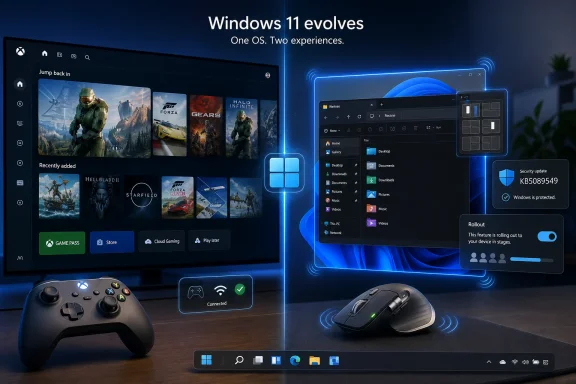
Microsoft’s May 12, 2026 Patch Tuesday update for Windows 11 versions 24H2 and 25H2 rolls the April KB5083631 preview into the mandatory KB5089549 cumulative release, bringing Xbox mode, broader haptic feedback support, File Explorer fixes, security patches, and other quality-of-life changes to supported PCs. The flashy story is that Windows can now look more like a console. The more interesting story is that Microsoft is quietly teaching the PC to feel like a modern device. That matters because haptics are not just decoration; they are a new input language for Windows.
Xbox mode is the feature that Microsoft clearly expected to carry the news cycle. It is easy to understand, easy to demonstrate, and tied to the company’s long-running effort to make Windows less awkward on handheld gaming PCs. For years, Windows has been the most powerful PC gaming platform and one of the least graceful interfaces to use from a couch, a controller, or a seven-inch handheld screen.
The new mode is meant to close that gap. It gives Windows 11 a controller-friendly, full-screen Xbox-style experience that can be launched from the Xbox app, Game Bar settings, or with the Windows key plus F11. The idea is straightforward: reduce desktop clutter, prioritize gaming, and let users browse and launch games without first wrestling with the taskbar, notification center, or a mouse cursor.
That is not a trivial improvement. SteamOS and the Steam Deck exposed how ungainly Windows can feel when it leaves the desk. Microsoft has watched OEMs ship Windows handhelds that are technically capable but often ergonomically compromised, with third-party launchers papering over the fact that Windows still thinks it is running on a laptop.
Xbox mode is Microsoft’s answer to that embarrassment. It is also a strategic bridge to whatever comes next from Xbox hardware, especially as Microsoft continues blurring the line between console, PC, cloud, Game Pass, and storefront aggregation. If Windows is going to be the operating system beneath future Xbox-branded devices, it needs a front end that does not feel like someone taped a controller to a spreadsheet machine.
But Xbox mode is also familiar in the way platform strategy often is. It is Microsoft rationalizing a market it already owns: PC gaming on Windows. The feature may be useful, but its logic is defensive. Haptics, by contrast, suggest a more expansive idea of what Windows interaction could become.
That makes the feature sound niche. Most users do not own a mouse with haptics. Many admins will not immediately care whether a user can feel a window edge. Even enthusiasts may be tempted to file this beside RGB lighting, dynamic wallpapers, and other interface embellishments that look nice in a demo and vanish from muscle memory a week later.
That would be a mistake. Haptics are not simply another feedback channel; they are a way for the operating system to make invisible boundaries tangible. Windows has spent decades using pixels, sounds, and cursors to tell users what is happening. A haptic bump turns an interface state into a physical cue.
Anyone who has used a modern smartphone already understands this instinctively. The best haptic feedback does not call attention to itself. It makes a virtual keyboard feel less like glass, gives a scroll wheel a sense of detent, or confirms that a gesture has crossed a threshold. When it works, it disappears into the action.
Windows has long lacked that layer. The PC’s traditional feedback loop is visual and occasionally audible. Haptics give the desktop a third channel, and that channel is particularly valuable precisely because modern Windows is visually crowded.
Microsoft has imported pieces of that world before. Windows 8 tried to bring touch-first assumptions to the PC too aggressively and paid for it. Windows 10 walked some of that back. Windows 11 has been more cautious, smoothing visuals, centering the taskbar, modernizing context menus, and pushing the system toward a calmer design language without fully abandoning the desktop.
Haptics fit that slower, more practical modernization. They do not require Microsoft to reinvent the Start menu or ask enterprise users to relearn file management. They simply add a new sensation to existing actions. Snap a window and feel the edge. Resize something and feel the boundary. Hover over a destructive or decisive control and get a subtle confirmation from the hardware in your hand.
The important point is not that every one of those examples is transformative. The important point is that Microsoft is building the plumbing for tactile UI conventions across Windows. Once the OS has a common haptics layer, device makers can target it, app developers can rely on it, and users can begin to expect it.
That is how small interface changes become platform changes. The first mouse wheel was not a new computing paradigm in a press-release sense. It was just a better way to move through documents. Over time, it became inseparable from how people use computers. Haptics have a similar possibility if Microsoft and hardware partners avoid turning them into a gimmick.
That is the Windows ecosystem in miniature. The PC’s strength is diversity; its weakness is diversity. Apple can tune trackpad haptics across a narrow set of Mac hardware and software assumptions. Microsoft has to build for mice, pens, touchpads, tablets, convertibles, desktops, gaming handhelds, accessibility devices, and peripherals that may or may not get timely firmware updates.
The payoff, though, is larger if Microsoft gets it right. A haptic-capable Windows input stack could support premium mice, creative pens, accessibility hardware, gaming controllers, touchpads, and specialized enterprise devices. A designer aligning objects in PowerPoint, a developer dragging panes in an IDE, and a gamer navigating a full-screen launcher are not the same user, but they all benefit from an OS that can communicate state without adding more visual noise.
This is why the haptics story is more exciting than the Xbox mode story. Xbox mode mostly serves a defined scenario: make Windows better for gaming-first, controller-first use. Haptics can spread across the entire operating system. They can make mundane desktop interactions more precise, more accessible, and less dependent on staring at pixels.
The risk is that Microsoft treats the feature as a novelty instead of an interaction model. A vibration for every hover would be maddening. Heavy-handed feedback would make a premium mouse feel like a cheap phone from 2012. The art is restraint, and restraint has not always been Windows’ default setting.
Today’s Windows cumulative updates are something else: security bundle, feature drop, bug-fix rollup, platform experiment, and marketing vehicle. The May 2026 update includes security fixes, but it also carries forward the April 30 optional preview’s visible changes. That means a mandatory security update is also the delivery mechanism for Xbox mode, haptic feedback, File Explorer improvements, and other user-facing adjustments.
This has advantages. Users do not have to wait for a monolithic annual feature update to get meaningful improvements. Microsoft can iterate faster. Hardware support can arrive when the hardware is ready rather than being locked to a yearly Windows release train.
But it also complicates trust. When a user installs a security update, they may also receive new UI behavior, new app integration, and new controlled rollout flags. When an administrator approves a cumulative update, they are not merely accepting vulnerability fixes; they may also be accepting changes to workflows, shell behavior, and user expectations.
Controlled Feature Rollout makes this even murkier. Two PCs with the same KB installed may not expose the same features at the same time. That is rational from Microsoft’s telemetry-driven engineering perspective, but it is maddening for support desks and enthusiasts who want a clear answer to the simplest possible question: “Do I have the feature or not?”
Xbox mode is already demonstrating the problem. Microsoft can say the feature is rolling out. Users can install the update. Some still may not see the toggle. That gap between installed bits and enabled experience is now a defining characteristic of Windows servicing.
A user may ask why their home PC has Xbox mode and their work laptop does not. A creator may wonder why haptic feedback appears on one device but not another. A gamer may read that Windows now supports a console-style experience and assume something is broken when the setting is absent after update installation.
The answer may be hardware support, region, gradual rollout, edition, policy, driver state, firmware, or Microsoft-side enablement. That is a lot of caveats for a consumer-facing feature. It is also the normal state of Windows in 2026.
This is where Microsoft’s ambitions collide with its installed base. The company wants Windows to feel fresh, adaptive, and service-delivered. Enterprises want predictability. Enthusiasts want immediate access. OEMs want differentiation. Peripheral makers want hooks that make new devices worth buying. Patch Tuesday is now where all of those priorities meet.
The haptics feature may be easier for IT to tolerate than Xbox mode because it is hardware-gated and less likely to alter the entire user shell. But it still belongs in the same governance conversation. Sensory feedback can affect accessibility, user comfort, and device standardization. Some users will love it. Others will turn it off. Organizations with strict workstation images will want to know where the settings live and whether they can be managed consistently.
That is especially important because Windows 11’s reputation has often suffered less from one catastrophic flaw than from accumulated friction. A flash of white in dark mode, a laggy Explorer launch, a context menu that takes too long to reveal the option you need, a tray interaction that feels sticky — none of these alone defines the OS. Together, they create the background irritation that makes users receptive to alternatives.
Microsoft appears to understand this. The company has spent recent Windows 11 updates smoothing rough edges, improving recovery options, refining Settings pages, and moving more legacy surfaces into modern UI patterns. Progress has been uneven, but the direction is clear.
The haptics layer belongs in that same category if viewed correctly. It is not a toy for people with expensive mice. It is part of making the shell feel more deliberate. Windows does not just need new features; it needs feedback that confirms the features users already rely on.
This is why small sensory cues can matter. Window snapping is already one of Windows’ best productivity features. Making snap boundaries more physically legible strengthens a core desktop behavior rather than distracting from it. The best version of haptics would not be a new thing users think about. It would be a way existing Windows actions feel more certain.
Microsoft’s challenge is to modernize the interaction model without breaking the compatibility model. That is much harder than designing a clean new OS for a narrow class of devices. Windows must remain the place where a 15-year-old Win32 utility, a current AAA game, a corporate VPN client, a Store app, and a web app can coexist.
Xbox mode solves that by adding a layer rather than replacing the desktop. Haptics solve it by adding a signal rather than replacing the pointer. Both are additive strategies, and additive strategies are how Windows usually survives transitions.
The danger is layering without coherence. Windows already has too many overlapping surfaces: Settings and Control Panel remnants, classic and modern context menus, taskbar affordances, widgets, Copilot surfaces, Game Bar, Xbox app, notification center, system tray, and OEM utilities. If haptics become one more inconsistent layer, they will add texture without clarity.
But if Microsoft uses haptics to reinforce system-wide rules, the payoff is real. Boundaries, confirmations, alignments, limits, and mode switches are exactly the kinds of events that benefit from tactile feedback. They are also the kinds of events users currently infer visually, sometimes poorly.
That does not automatically make haptics accessible. Poorly implemented feedback can be distracting or physically uncomfortable. Users need control over intensity and the ability to disable effects. Microsoft’s settings path for haptic signals is therefore not a footnote; it is part of whether the feature can mature responsibly.
The better accessibility story is choice. Windows should let users combine visual, auditory, and tactile feedback in ways that fit their hardware and bodies. A pen user may want alignment feedback while drawing. A mouse user may want window snapping cues. Another user may want no haptics at all. The operating system should not assume one sensory model for everyone.
This is also where enterprise procurement could matter. If haptic-capable peripherals become part of mainstream premium workstation bundles, software vendors may begin treating tactile feedback as a real design surface. If the feature remains trapped in a handful of enthusiast devices, it will be a curiosity.
The valuable version is quieter. Haptics should help users understand edges, states, and completion. They should not become another notification channel. A calendar reminder does not need to shake your mouse. A subscription upsell certainly does not need to shake your mouse. The moment haptics become promotional, users will disable them and never look back.
Microsoft should define strong system conventions early. Snapping, resizing, alignment, crossing a threshold, confirming a mode switch, and reaching a limit are sensible haptic events. Advertising, engagement prompts, and arbitrary app attention grabs are not. If this becomes a free-for-all, the platform will poison its own feedback loop.
This is not hypothetical. The web already taught users to distrust notification prompts because too many sites abused them. Mobile platforms had to clamp down on background alerts, permission requests, and vibration misuse. Windows should learn from that history before haptic feedback becomes another setting power users hunt down after a fresh install.
The company also needs to keep latency low. Bad haptics are worse than no haptics because mistimed feedback breaks the illusion of direct manipulation. A bump that arrives after the window has snapped is not confirmation; it is lag made physical.
From gaming, it borrows the full-screen launcher and controller-first shell. From mobile, it borrows tactile feedback and subtle sensory confirmation. From enterprise operations, it borrows staged deployment and policy-driven management. From modern app platforms, it borrows continuous feature delivery. The result is a Windows that changes more frequently and more quietly than the old boxed-product model ever allowed.
That makes Windows more adaptable, but also harder to explain. A feature can be “available” without being visible. A KB can be installed without a user seeing the same experience as someone else. A peripheral can be compatible in theory but require firmware, software, and OS alignment in practice.
For enthusiasts, this is frustrating but familiar. For sysadmins, it is another reason to test cumulative updates beyond the security bulletin. For everyday users, it means Windows may surprise them more often — sometimes pleasantly, sometimes not.
The haptics feature is exciting because it points toward a Windows that feels less inert. The risk is that Microsoft’s rollout machinery makes even delightful features feel arbitrary. The company can build the future of PC interaction, but it still has to ship it in a way humans can understand.
Source: Windows Central https://www.windowscentral.com/micr...indows-11-in-the-latest-patch-tuesday-update/
 Microsoft’s Console Pitch Was Supposed to Own This Update
Xbox mode is the feature that Microsoft clearly expected to carry the news cycle. It is easy to understand, easy to demonstrate, and tied to the company’s long-running effort to make Windows less awkward on handheld gaming PCs. For years, Windows has been the most powerful PC gaming platform and one of the least graceful interfaces to use from a couch, a controller, or a seven-inch handheld screen.The new mode is meant to close that gap. It gives Windows 11 a controller-friendly, full-screen Xbox-style experience that can be launched from the Xbox app, Game Bar settings, or with the Windows key plus F11. The idea is straightforward: reduce desktop clutter, prioritize gaming, and let users browse and launch games without first wrestling with the taskbar, notification center, or a mouse cursor.
That is not a trivial improvement. SteamOS and the Steam Deck exposed how ungainly Windows can feel when it leaves the desk. Microsoft has watched OEMs ship Windows handhelds that are technically capable but often ergonomically compromised, with third-party launchers papering over the fact that Windows still thinks it is running on a laptop.
Xbox mode is Microsoft’s answer to that embarrassment. It is also a strategic bridge to whatever comes next from Xbox hardware, especially as Microsoft continues blurring the line between console, PC, cloud, Game Pass, and storefront aggregation. If Windows is going to be the operating system beneath future Xbox-branded devices, it needs a front end that does not feel like someone taped a controller to a spreadsheet machine.
But Xbox mode is also familiar in the way platform strategy often is. It is Microsoft rationalizing a market it already owns: PC gaming on Windows. The feature may be useful, but its logic is defensive. Haptics, by contrast, suggest a more expansive idea of what Windows interaction could become.
The Small Bump Is the Bigger Interface Story
The haptics update is easy to underestimate because it is tied to limited hardware today. Windows 11 can now provide haptic feedback effects on compatible input devices during actions such as snapping or resizing windows, aligning objects in PowerPoint, or hovering over the Close button. Logitech’s MX Master 4 has become the attention-grabbing example because it is one of the first mainstream mice positioned to expose this capability beyond pens and touch-first hardware.That makes the feature sound niche. Most users do not own a mouse with haptics. Many admins will not immediately care whether a user can feel a window edge. Even enthusiasts may be tempted to file this beside RGB lighting, dynamic wallpapers, and other interface embellishments that look nice in a demo and vanish from muscle memory a week later.
That would be a mistake. Haptics are not simply another feedback channel; they are a way for the operating system to make invisible boundaries tangible. Windows has spent decades using pixels, sounds, and cursors to tell users what is happening. A haptic bump turns an interface state into a physical cue.
Anyone who has used a modern smartphone already understands this instinctively. The best haptic feedback does not call attention to itself. It makes a virtual keyboard feel less like glass, gives a scroll wheel a sense of detent, or confirms that a gesture has crossed a threshold. When it works, it disappears into the action.
Windows has long lacked that layer. The PC’s traditional feedback loop is visual and occasionally audible. Haptics give the desktop a third channel, and that channel is particularly valuable precisely because modern Windows is visually crowded.
Windows Is Finally Borrowing From the Devices That Replaced It
For much of its history, Windows set the terms of personal computing. Mobile platforms later inverted that relationship. iOS and Android trained users to expect direct manipulation, fluid animation, and subtle physical feedback from software that has no physical moving parts.Microsoft has imported pieces of that world before. Windows 8 tried to bring touch-first assumptions to the PC too aggressively and paid for it. Windows 10 walked some of that back. Windows 11 has been more cautious, smoothing visuals, centering the taskbar, modernizing context menus, and pushing the system toward a calmer design language without fully abandoning the desktop.
Haptics fit that slower, more practical modernization. They do not require Microsoft to reinvent the Start menu or ask enterprise users to relearn file management. They simply add a new sensation to existing actions. Snap a window and feel the edge. Resize something and feel the boundary. Hover over a destructive or decisive control and get a subtle confirmation from the hardware in your hand.
The important point is not that every one of those examples is transformative. The important point is that Microsoft is building the plumbing for tactile UI conventions across Windows. Once the OS has a common haptics layer, device makers can target it, app developers can rely on it, and users can begin to expect it.
That is how small interface changes become platform changes. The first mouse wheel was not a new computing paradigm in a press-release sense. It was just a better way to move through documents. Over time, it became inseparable from how people use computers. Haptics have a similar possibility if Microsoft and hardware partners avoid turning them into a gimmick.
The Logitech Moment Shows Why Hardware Ecosystems Still Matter
The Logitech MX Master 4 example is instructive because it shows both the promise and the fragility of this feature. Users need the Windows update and updated Logitech software support through Logi Bolt+. That means the experience depends on Microsoft, the device manufacturer, firmware, companion software, and the user’s update state all lining up.That is the Windows ecosystem in miniature. The PC’s strength is diversity; its weakness is diversity. Apple can tune trackpad haptics across a narrow set of Mac hardware and software assumptions. Microsoft has to build for mice, pens, touchpads, tablets, convertibles, desktops, gaming handhelds, accessibility devices, and peripherals that may or may not get timely firmware updates.
The payoff, though, is larger if Microsoft gets it right. A haptic-capable Windows input stack could support premium mice, creative pens, accessibility hardware, gaming controllers, touchpads, and specialized enterprise devices. A designer aligning objects in PowerPoint, a developer dragging panes in an IDE, and a gamer navigating a full-screen launcher are not the same user, but they all benefit from an OS that can communicate state without adding more visual noise.
This is why the haptics story is more exciting than the Xbox mode story. Xbox mode mostly serves a defined scenario: make Windows better for gaming-first, controller-first use. Haptics can spread across the entire operating system. They can make mundane desktop interactions more precise, more accessible, and less dependent on staring at pixels.
The risk is that Microsoft treats the feature as a novelty instead of an interaction model. A vibration for every hover would be maddening. Heavy-handed feedback would make a premium mouse feel like a cheap phone from 2012. The art is restraint, and restraint has not always been Windows’ default setting.
Patch Tuesday Has Become Microsoft’s Feature Delivery Truck
This update also illustrates a larger shift in how Windows changes now. Patch Tuesday used to be understood primarily as a security ritual. Admins tested, deferred, deployed, cursed, and documented. Consumers mostly ignored the details until a restart appeared at the wrong time.Today’s Windows cumulative updates are something else: security bundle, feature drop, bug-fix rollup, platform experiment, and marketing vehicle. The May 2026 update includes security fixes, but it also carries forward the April 30 optional preview’s visible changes. That means a mandatory security update is also the delivery mechanism for Xbox mode, haptic feedback, File Explorer improvements, and other user-facing adjustments.
This has advantages. Users do not have to wait for a monolithic annual feature update to get meaningful improvements. Microsoft can iterate faster. Hardware support can arrive when the hardware is ready rather than being locked to a yearly Windows release train.
But it also complicates trust. When a user installs a security update, they may also receive new UI behavior, new app integration, and new controlled rollout flags. When an administrator approves a cumulative update, they are not merely accepting vulnerability fixes; they may also be accepting changes to workflows, shell behavior, and user expectations.
Controlled Feature Rollout makes this even murkier. Two PCs with the same KB installed may not expose the same features at the same time. That is rational from Microsoft’s telemetry-driven engineering perspective, but it is maddening for support desks and enthusiasts who want a clear answer to the simplest possible question: “Do I have the feature or not?”
Xbox mode is already demonstrating the problem. Microsoft can say the feature is rolling out. Users can install the update. Some still may not see the toggle. That gap between installed bits and enabled experience is now a defining characteristic of Windows servicing.
Admins Will See a Feature Drop; Users Will See Inconsistency
For IT departments, the May update is not just a fun feature story. It is another reminder that Windows client management increasingly requires policy literacy, rollout awareness, and user communication. The security fixes matter first, but the visible features are what generate tickets.A user may ask why their home PC has Xbox mode and their work laptop does not. A creator may wonder why haptic feedback appears on one device but not another. A gamer may read that Windows now supports a console-style experience and assume something is broken when the setting is absent after update installation.
The answer may be hardware support, region, gradual rollout, edition, policy, driver state, firmware, or Microsoft-side enablement. That is a lot of caveats for a consumer-facing feature. It is also the normal state of Windows in 2026.
This is where Microsoft’s ambitions collide with its installed base. The company wants Windows to feel fresh, adaptive, and service-delivered. Enterprises want predictability. Enthusiasts want immediate access. OEMs want differentiation. Peripheral makers want hooks that make new devices worth buying. Patch Tuesday is now where all of those priorities meet.
The haptics feature may be easier for IT to tolerate than Xbox mode because it is hardware-gated and less likely to alter the entire user shell. But it still belongs in the same governance conversation. Sensory feedback can affect accessibility, user comfort, and device standardization. Some users will love it. Others will turn it off. Organizations with strict workstation images will want to know where the settings live and whether they can be managed consistently.
File Explorer Fixes Are the Quiet Proof That Microsoft Knows the Basics Still Matter
It would be wrong to frame the May update only around Xbox mode and haptics. The cumulative release also carries quality improvements that matter more to daily Windows use than either headline feature. File Explorer reliability, shell polish, archive support, and taskbar responsiveness are the kinds of changes that do not dominate keynotes but do determine whether Windows feels trustworthy.That is especially important because Windows 11’s reputation has often suffered less from one catastrophic flaw than from accumulated friction. A flash of white in dark mode, a laggy Explorer launch, a context menu that takes too long to reveal the option you need, a tray interaction that feels sticky — none of these alone defines the OS. Together, they create the background irritation that makes users receptive to alternatives.
Microsoft appears to understand this. The company has spent recent Windows 11 updates smoothing rough edges, improving recovery options, refining Settings pages, and moving more legacy surfaces into modern UI patterns. Progress has been uneven, but the direction is clear.
The haptics layer belongs in that same category if viewed correctly. It is not a toy for people with expensive mice. It is part of making the shell feel more deliberate. Windows does not just need new features; it needs feedback that confirms the features users already rely on.
This is why small sensory cues can matter. Window snapping is already one of Windows’ best productivity features. Making snap boundaries more physically legible strengthens a core desktop behavior rather than distracting from it. The best version of haptics would not be a new thing users think about. It would be a way existing Windows actions feel more certain.
Gaming Forced Microsoft to Fix a General-Purpose Problem
Xbox mode and haptics may look unrelated, but they share a root cause. Windows is being stretched across more device shapes than its desktop heritage comfortably supports. Gaming handhelds exposed the controller problem. Premium peripherals expose the feedback problem. Convertibles and pens expose the touch problem. AI PCs will expose new latency, privacy, and local-compute expectations.Microsoft’s challenge is to modernize the interaction model without breaking the compatibility model. That is much harder than designing a clean new OS for a narrow class of devices. Windows must remain the place where a 15-year-old Win32 utility, a current AAA game, a corporate VPN client, a Store app, and a web app can coexist.
Xbox mode solves that by adding a layer rather than replacing the desktop. Haptics solve it by adding a signal rather than replacing the pointer. Both are additive strategies, and additive strategies are how Windows usually survives transitions.
The danger is layering without coherence. Windows already has too many overlapping surfaces: Settings and Control Panel remnants, classic and modern context menus, taskbar affordances, widgets, Copilot surfaces, Game Bar, Xbox app, notification center, system tray, and OEM utilities. If haptics become one more inconsistent layer, they will add texture without clarity.
But if Microsoft uses haptics to reinforce system-wide rules, the payoff is real. Boundaries, confirmations, alignments, limits, and mode switches are exactly the kinds of events that benefit from tactile feedback. They are also the kinds of events users currently infer visually, sometimes poorly.
Accessibility Is the Underplayed Angle
The conversation around haptics often starts with delight, but accessibility may be the stronger argument. Not every user processes visual cues the same way. Not every workflow benefits from more animation or more on-screen indicators. A subtle vibration can help confirm that an action occurred without requiring another icon, toast, or sound.That does not automatically make haptics accessible. Poorly implemented feedback can be distracting or physically uncomfortable. Users need control over intensity and the ability to disable effects. Microsoft’s settings path for haptic signals is therefore not a footnote; it is part of whether the feature can mature responsibly.
The better accessibility story is choice. Windows should let users combine visual, auditory, and tactile feedback in ways that fit their hardware and bodies. A pen user may want alignment feedback while drawing. A mouse user may want window snapping cues. Another user may want no haptics at all. The operating system should not assume one sensory model for everyone.
This is also where enterprise procurement could matter. If haptic-capable peripherals become part of mainstream premium workstation bundles, software vendors may begin treating tactile feedback as a real design surface. If the feature remains trapped in a handful of enthusiast devices, it will be a curiosity.
Microsoft Must Resist Turning Touch Into Telemetry Theater
There is a cynical version of this story. Microsoft adds haptics, OEMs market “AI productivity mice,” companion apps gain another background service, and users feel a buzz when Windows wants attention. That would be a waste.The valuable version is quieter. Haptics should help users understand edges, states, and completion. They should not become another notification channel. A calendar reminder does not need to shake your mouse. A subscription upsell certainly does not need to shake your mouse. The moment haptics become promotional, users will disable them and never look back.
Microsoft should define strong system conventions early. Snapping, resizing, alignment, crossing a threshold, confirming a mode switch, and reaching a limit are sensible haptic events. Advertising, engagement prompts, and arbitrary app attention grabs are not. If this becomes a free-for-all, the platform will poison its own feedback loop.
This is not hypothetical. The web already taught users to distrust notification prompts because too many sites abused them. Mobile platforms had to clamp down on background alerts, permission requests, and vibration misuse. Windows should learn from that history before haptic feedback becomes another setting power users hunt down after a fresh install.
The company also needs to keep latency low. Bad haptics are worse than no haptics because mistimed feedback breaks the illusion of direct manipulation. A bump that arrives after the window has snapped is not confirmation; it is lag made physical.
The May Update Shows a More Ambitious Windows Than Its Marketing Suggests
The obvious reading of the May 2026 Windows 11 update is that Microsoft is finally shipping Xbox mode broadly while bundling the usual security and quality fixes. That reading is true but incomplete. The more revealing pattern is that Windows is absorbing interaction ideas from every direction at once.From gaming, it borrows the full-screen launcher and controller-first shell. From mobile, it borrows tactile feedback and subtle sensory confirmation. From enterprise operations, it borrows staged deployment and policy-driven management. From modern app platforms, it borrows continuous feature delivery. The result is a Windows that changes more frequently and more quietly than the old boxed-product model ever allowed.
That makes Windows more adaptable, but also harder to explain. A feature can be “available” without being visible. A KB can be installed without a user seeing the same experience as someone else. A peripheral can be compatible in theory but require firmware, software, and OS alignment in practice.
For enthusiasts, this is frustrating but familiar. For sysadmins, it is another reason to test cumulative updates beyond the security bulletin. For everyday users, it means Windows may surprise them more often — sometimes pleasantly, sometimes not.
The haptics feature is exciting because it points toward a Windows that feels less inert. The risk is that Microsoft’s rollout machinery makes even delightful features feel arbitrary. The company can build the future of PC interaction, but it still has to ship it in a way humans can understand.
The Real Win Is a PC That Responds Before It Explains
The most concrete way to understand this update is not to rank Xbox mode against haptics as if they serve the same audience. It is to see both as evidence that Microsoft knows the classic Windows desktop cannot be the only interface Windows offers. The PC is becoming a console, a tablet, a workstation, a handheld, and a cloud endpoint depending on the hour.- Windows 11 KB5089549 brings the April preview’s feature work into the May 2026 Patch Tuesday release for versions 24H2 and 25H2.
- Xbox mode gives Windows 11 a controller-optimized, full-screen gaming experience, but its staged rollout means some updated PCs may not show it immediately.
- Haptic feedback now matters because Windows can use compatible mice, pens, touchpads, and other devices to make interface boundaries physically perceptible.
- Logitech’s MX Master 4 attention spike shows that peripheral makers can turn a quiet OS capability into something users actually notice.
- IT teams should treat these cumulative updates as feature-bearing releases, not merely security bundles, because visible shell changes can arrive alongside fixes.
- The long-term value depends on restraint: haptics should confirm meaningful actions, not become another channel for noise.
Source: Windows Central https://www.windowscentral.com/micr...indows-11-in-the-latest-patch-tuesday-update/
