

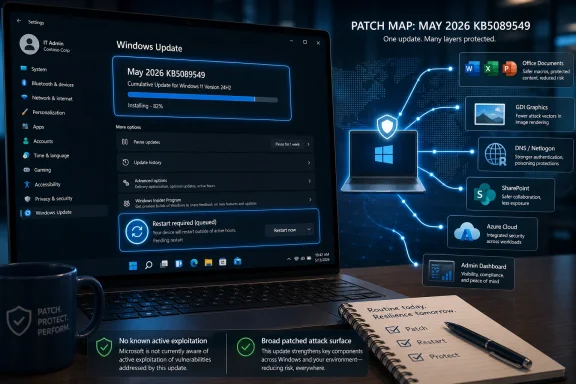
Microsoft’s May 12, 2026 Patch Tuesday release shipped Windows 11 cumulative update KB5089549 for versions 24H2 and 25H2, alongside fixes for 137 Microsoft-tracked vulnerabilities across Windows, Office, Azure, SharePoint, Dynamics 365, and related services. The Daily Express is right about the practical advice: if Windows Update is waiting, restart the PC. But the real story is less “red alert” than “this is exactly the kind of boring maintenance window attackers hope you skip.” May’s update is notable not because Microsoft saw active exploitation, but because the patched attack surface is broad, familiar, and easy to weaponize once defenders fall behind.
Consumer security coverage tends to flatten every Patch Tuesday into the same warning: update now, hackers are coming, restart your PC before disaster strikes. That framing is grating, especially for Windows users who have lived through years of forced reboots, half-installed cumulative updates, driver regressions, and vague “something didn’t go as planned” messages. But irritation at the headline should not become complacency about the patch.
This month’s release is large even by Microsoft standards. The reported tally varies slightly depending on whether a source is counting only Microsoft CVEs, severity labels, republished Chromium issues, or CVSS-based “critical” scores, but the common thread is clear: more than 130 Microsoft vulnerabilities were addressed, with dozens serious enough to deserve fast attention. Microsoft also says none of the vulnerabilities in this batch were known to be exploited in the wild at release time.
That last sentence is reassuring only if you read it narrowly. “No known exploitation” does not mean “low risk.” It means defenders have a chance to patch before the usual reverse-engineering race turns a Microsoft advisory into working exploit code.
For home users, the immediate instruction is mundane: open Windows Update, install the May cumulative update, and restart. For administrators, the instruction is more complicated: validate, stage, monitor, and deploy quickly enough that the patch does not become next week’s incident report.
But breathing room is not a vacation. Attackers read Patch Tuesday notes too, and the most useful vulnerabilities often become more dangerous after disclosure, not before it. Once a patch ships, researchers, criminal groups, and nation-state operators can compare old and new binaries, identify what changed, and determine whether the bug can be reproduced against unpatched systems.
That is why “not exploited yet” can be a narrow window rather than a safety certificate. In enterprise environments, the most dangerous period often begins after the patch lands publicly but before deployment reaches remote laptops, branch offices, development workstations, lab machines, and neglected servers. The machines that miss the first wave of patching become the easiest targets precisely because the vulnerability is now documented.
This is the awkward compact behind Patch Tuesday. Microsoft centralizes disclosure to make remediation predictable, but that predictability also gives attackers a monthly syllabus. The advantage goes to whichever side can move faster without breaking more than it fixes.
The Word vulnerability is described as a remote code execution flaw, with exploitation considered more likely by Microsoft in some reporting. That matters because Office documents remain one of the most durable delivery mechanisms in enterprise attacks. Even after years of macro hardening, protected view prompts, attachment filtering, and cloud detonation, document handling remains a massive parser exposed to email, chat, file shares, browser downloads, and collaboration platforms.
The GDI vulnerability is also notable because graphics handling bugs have a long history of turning “just opening a file” into code execution. In this case, exploitation reportedly involves a specially crafted Enhanced Metafile processed through Microsoft Paint or affected Windows graphics functionality. That sounds almost quaint until you remember that image and document previews are everywhere, and that users do not think of a picture file as an executable object.
Modern Windows has far more exploit mitigations than the Windows XP and Windows 7 eras that made file-parser vulnerabilities infamous. Address space layout randomization, control-flow protections, sandboxing, memory-safe components, and default security restrictions all raise the bar. But “raises the bar” is not “removes the bug,” and attackers only need one reliable path through a user’s normal workflow.
The uncomfortable point is that many of May’s most interesting fixes sit near human behavior. A malicious document, a rendered file, a connection to a hostile service, or a coerced authentication path is still more realistic than a glowing skull hacking through the firewall. Patch Tuesday is as much about reducing the blast radius of ordinary clicks as it is about sealing exotic kernel flaws.
The patched products span Windows components, Office, SharePoint, Azure services, Dynamics 365, Hyper-V, Windows DNS, Windows Netlogon, and other Microsoft infrastructure. That breadth is the real operational challenge. Microsoft is no longer merely the company that ships the operating system on the endpoint; it is the identity provider, document platform, cloud control plane, collaboration stack, development environment, browser vendor, and server substrate for a huge share of business computing.
That consolidation makes patching feel paradoxical. A single vendor can push integrated updates through Windows Update, Microsoft 365 channels, Azure service-side fixes, and enterprise management tools. At the same time, a single vendor’s monthly security bulletin can implicate everything from a receptionist’s laptop to a domain controller to a SaaS administration portal.
For home users, the task is mostly to let Windows Update do its job. For IT teams, the question is not just “Is Windows 11 patched?” but “Which Microsoft products in our estate require action, which were fixed server-side, which need administrator intervention, and which assets are invisible to our normal endpoint reporting?” That is where Patch Tuesday turns from a reboot prompt into governance.
The most dangerous systems are often the ones that are technically in scope but operationally out of sight. Old gold images, paused update rings, virtual desktop pools, developer machines with local admin rights, test servers excluded from maintenance policies, and line-of-business systems pinned to fragile dependencies all become soft spots. The CVE count matters less than whether an organization can identify and remediate those soft spots before attackers do.
This is not necessarily evidence that anyone is lying. It is evidence that vulnerability accounting is an editorial act. A vendor severity rating, a CVSS score, an exploitability assessment, and a practical enterprise risk rating are related but not identical.
A remote code execution flaw in an obscure service that is disabled by default may score dramatically while posing limited real-world risk for most endpoints. A lower-scored privilege escalation flaw may be more useful to attackers if it chains neatly with phishing or browser exploitation. A vulnerability in a cloud service may require no customer action if Microsoft patched it centrally, while a “mere” important bug in an on-premises server may demand immediate emergency maintenance.
That nuance rarely survives a consumer warning article. “137 bugs” is a big number. “Critical” sounds terrifying. “Restart now” is easy to understand. Yet for administrators, the job is to translate those public numbers into asset-specific priorities rather than simply panic at the top-line count.
The smarter reading is this: May 2026 is not a month to ignore simply because there were no zero-days, and it is not a month to treat every CVE as equally urgent simply because the total is large. It is a month for fast, risk-based patching, with special attention to exposed services, Office-heavy workflows, domain infrastructure, and endpoints used by high-risk staff.
Windows users have been trained to resent restarts because restarts often arrive at the worst possible time. They interrupt meetings, reset development environments, break concentration, and occasionally expose post-update problems that were not visible during download. Microsoft has improved active hours, restart notifications, and update orchestration over the years, but the social contract remains shaky.
Security teams know this too well. The dashboard says the update is pending. The user says the machine is too busy. The executive laptop has not rebooted in 19 days. The conference-room PC is awake but unmanaged. The kiosk device is “temporarily” excluded from policy until the vendor certifies an application that has not been updated in years.
This is how a patched vulnerability remains exploitable. Not because Microsoft failed to ship code, and not because administrators failed to approve it, but because the last mile depends on reboot behavior, maintenance windows, and organizational tolerance for inconvenience. In practice, the restart button is part of the security boundary.
For home users, the fix is simple enough: save work, install the update, and reboot before browsing, banking, gaming, or opening attachments. For managed environments, the fix is cultural as much as technical. If restart compliance is treated as optional hygiene rather than a measurable security control, Patch Tuesday will keep leaving gaps.
Domain infrastructure deserves particular scrutiny whenever Netlogon, DNS, or authentication-adjacent components appear in a Patch Tuesday release. Domain controllers are not just servers; they are trust anchors. A serious flaw in that neighborhood can turn a single exposed or reachable system into a much larger identity problem.
Office vulnerabilities require a different kind of concern. They are often bound to user interaction, but user interaction is not a meaningful barrier in a world of invoices, HR forms, shared documents, and Teams attachments. “The victim must open a file” is not comforting when opening files is the job.
Server-side applications such as SharePoint and Dynamics complicate the picture further. They may sit behind VPNs or identity controls, but they also store sensitive business data and often integrate with other services. A flaw that begins as application compromise can become credential exposure, lateral movement, or data theft if the surrounding environment is not segmented and monitored.
Virtualization flaws add another layer. Hyper-V is a core dependency for labs, development environments, VDI, security sandboxes, and production workloads. Even if a vulnerability is hard to exploit, the boundary it protects is valuable. Bugs at that layer attract serious attention because escaping or manipulating virtualization boundaries can produce outsized consequences.
The point is not that every organization should drop everything for every May CVE. It is that the names in this release map onto core enterprise habits: documents, identity, name resolution, virtualization, collaboration, and cloud administration. Attackers do not need novelty when the old paths still connect to the crown jewels.
But the scale of the monthly bundle also reveals the cost of Microsoft’s ubiquity. A single Patch Tuesday can touch personal PCs, enterprise endpoints, Office installations, cloud services, identity systems, developer tooling, and server roles. The patch machine is impressive because it can move fixes across that footprint; it is alarming because the footprint is so large that every month feels like a census of systemic dependency.
Windows 11’s cumulative update model amplifies that tension. On the consumer side, it simplifies life: install the latest cumulative update and you are broadly covered for the operating system. On the administrative side, cumulative updates can make validation feel like an all-or-nothing bet, especially where business-critical applications depend on old drivers, unusual middleware, or brittle endpoint security agents.
Microsoft has tried to reduce that friction with deployment rings, rollback tooling, hotpatching in specific enterprise scenarios, and more transparent known-issue documentation. Those tools help, but they do not erase the basic tradeoff. Delay too long and the organization becomes vulnerable. Move too fast without testing and the organization risks self-inflicted downtime.
That tradeoff is why the best patch programs are not merely fast. They are rehearsed. They know which systems can update immediately, which require smoke testing, which require vendor signoff, and which need compensating controls until they can be brought current. Patch Tuesday rewards organizations that did the boring inventory work before the advisory dropped.
The normal path is Settings, Windows Update, Check for updates, install what is offered, and restart. Users on Windows 11 24H2 or 25H2 should see KB5089549 as the cumulative update tied to this month’s security release. Some devices may already have downloaded it and may only be waiting for a reboot.
The usual caution still applies: back up important files, leave laptops plugged in, avoid interrupting the installation, and give the machine time to finish post-reboot configuration. If a PC is used for work, follow the organization’s update policy rather than forcing a manual install outside the management channel. Managed devices may receive the same fixes on a schedule controlled by IT.
What users should not do is treat the absence of active exploitation as permission to wait indefinitely. Attackers do not need to invent a zero-day if millions of machines remain unpatched against yesterday’s disclosure. Patch latency is one of the cheapest gifts defenders can give them.
The first wave should cover internet-exposed systems, high-value endpoints, administrator workstations, document-heavy business units, and infrastructure tied to identity or authentication. Domain controllers, DNS infrastructure, virtualization hosts, and collaboration servers deserve special review if the relevant components are present. Office updates should move quickly where users routinely handle external attachments.
The second wave is where many organizations get into trouble. It includes machines that are online irregularly, remote endpoints behind consumer routers, devices with failed update histories, and systems managed by exception. These are not glamorous assets, but they are often where attackers find their opening because nobody is watching them with the same urgency as production servers.
Administrators should also monitor for post-update issues without letting fear of regressions become a permanent excuse. Microsoft’s cumulative updates have had rough months, and skepticism is earned. But the correct response to that history is staged deployment with telemetry and rollback readiness, not indefinite deferral.
Patch management is sometimes described as hygiene, but hygiene undersells the strategic value. A well-run patch program denies attackers commodity paths, reduces incident response load, and buys time for deeper security work. A weak patch program turns every monthly advisory into a future compromise scenario.
 The Alarmist Headline Points at a Real Maintenance Problem
Consumer security coverage tends to flatten every Patch Tuesday into the same warning: update now, hackers are coming, restart your PC before disaster strikes. That framing is grating, especially for Windows users who have lived through years of forced reboots, half-installed cumulative updates, driver regressions, and vague “something didn’t go as planned” messages. But irritation at the headline should not become complacency about the patch.This month’s release is large even by Microsoft standards. The reported tally varies slightly depending on whether a source is counting only Microsoft CVEs, severity labels, republished Chromium issues, or CVSS-based “critical” scores, but the common thread is clear: more than 130 Microsoft vulnerabilities were addressed, with dozens serious enough to deserve fast attention. Microsoft also says none of the vulnerabilities in this batch were known to be exploited in the wild at release time.
That last sentence is reassuring only if you read it narrowly. “No known exploitation” does not mean “low risk.” It means defenders have a chance to patch before the usual reverse-engineering race turns a Microsoft advisory into working exploit code.
For home users, the immediate instruction is mundane: open Windows Update, install the May cumulative update, and restart. For administrators, the instruction is more complicated: validate, stage, monitor, and deploy quickly enough that the patch does not become next week’s incident report.
No Zero-Days Is Not the Same as No Urgency
The absence of zero-days is the headline Microsoft wanted this month, and fair enough. After months in which Patch Tuesday releases often arrived with at least one vulnerability already being abused or publicly disclosed, a zero-day-free release gives defenders breathing room. It also changes the tone from emergency response to disciplined patch management.But breathing room is not a vacation. Attackers read Patch Tuesday notes too, and the most useful vulnerabilities often become more dangerous after disclosure, not before it. Once a patch ships, researchers, criminal groups, and nation-state operators can compare old and new binaries, identify what changed, and determine whether the bug can be reproduced against unpatched systems.
That is why “not exploited yet” can be a narrow window rather than a safety certificate. In enterprise environments, the most dangerous period often begins after the patch lands publicly but before deployment reaches remote laptops, branch offices, development workstations, lab machines, and neglected servers. The machines that miss the first wave of patching become the easiest targets precisely because the vulnerability is now documented.
This is the awkward compact behind Patch Tuesday. Microsoft centralizes disclosure to make remediation predictable, but that predictability also gives attackers a monthly syllabus. The advantage goes to whichever side can move faster without breaking more than it fixes.
The Scariest Bugs Are the Ones Users Can Be Tricked Into Touching
Two vulnerabilities drew particular attention in security coverage: CVE-2026-40361 in Microsoft Word and CVE-2026-35421 in Windows Graphics Device Interface. Neither requires the kind of cinematic network intrusion that makes for easy headlines. They live in the world of documents, file formats, rendering paths, and user interaction — the old terrain where Windows compromise has always been profitable.The Word vulnerability is described as a remote code execution flaw, with exploitation considered more likely by Microsoft in some reporting. That matters because Office documents remain one of the most durable delivery mechanisms in enterprise attacks. Even after years of macro hardening, protected view prompts, attachment filtering, and cloud detonation, document handling remains a massive parser exposed to email, chat, file shares, browser downloads, and collaboration platforms.
The GDI vulnerability is also notable because graphics handling bugs have a long history of turning “just opening a file” into code execution. In this case, exploitation reportedly involves a specially crafted Enhanced Metafile processed through Microsoft Paint or affected Windows graphics functionality. That sounds almost quaint until you remember that image and document previews are everywhere, and that users do not think of a picture file as an executable object.
Modern Windows has far more exploit mitigations than the Windows XP and Windows 7 eras that made file-parser vulnerabilities infamous. Address space layout randomization, control-flow protections, sandboxing, memory-safe components, and default security restrictions all raise the bar. But “raises the bar” is not “removes the bug,” and attackers only need one reliable path through a user’s normal workflow.
The uncomfortable point is that many of May’s most interesting fixes sit near human behavior. A malicious document, a rendered file, a connection to a hostile service, or a coerced authentication path is still more realistic than a glowing skull hacking through the firewall. Patch Tuesday is as much about reducing the blast radius of ordinary clicks as it is about sealing exotic kernel flaws.
Windows 11 Is Only One Piece of a Microsoft-Wide Patch Surface
The Express article frames the issue around Windows 11 users, which is understandable for a consumer audience. KB5089549 is the visible update many readers will see, and Windows Update will be the route by which most home PCs receive protection. But May’s release is not a Windows 11-only event.The patched products span Windows components, Office, SharePoint, Azure services, Dynamics 365, Hyper-V, Windows DNS, Windows Netlogon, and other Microsoft infrastructure. That breadth is the real operational challenge. Microsoft is no longer merely the company that ships the operating system on the endpoint; it is the identity provider, document platform, cloud control plane, collaboration stack, development environment, browser vendor, and server substrate for a huge share of business computing.
That consolidation makes patching feel paradoxical. A single vendor can push integrated updates through Windows Update, Microsoft 365 channels, Azure service-side fixes, and enterprise management tools. At the same time, a single vendor’s monthly security bulletin can implicate everything from a receptionist’s laptop to a domain controller to a SaaS administration portal.
For home users, the task is mostly to let Windows Update do its job. For IT teams, the question is not just “Is Windows 11 patched?” but “Which Microsoft products in our estate require action, which were fixed server-side, which need administrator intervention, and which assets are invisible to our normal endpoint reporting?” That is where Patch Tuesday turns from a reboot prompt into governance.
The most dangerous systems are often the ones that are technically in scope but operationally out of sight. Old gold images, paused update rings, virtual desktop pools, developer machines with local admin rights, test servers excluded from maintenance policies, and line-of-business systems pinned to fragile dependencies all become soft spots. The CVE count matters less than whether an organization can identify and remediate those soft spots before attackers do.
The Numbers Are Messier Than the Warning Suggests
One reason Patch Tuesday coverage often sounds inconsistent is that the numbers are not as straightforward as they appear. Some outlets reported 137 vulnerabilities with 31 critical. Others reported 30 critical and 103 important. Some security firms separated Microsoft CVEs from republished third-party issues such as Chromium-based Edge fixes. Others focused on CVSS base scores, where only a smaller subset crossed the conventional “critical” threshold.This is not necessarily evidence that anyone is lying. It is evidence that vulnerability accounting is an editorial act. A vendor severity rating, a CVSS score, an exploitability assessment, and a practical enterprise risk rating are related but not identical.
A remote code execution flaw in an obscure service that is disabled by default may score dramatically while posing limited real-world risk for most endpoints. A lower-scored privilege escalation flaw may be more useful to attackers if it chains neatly with phishing or browser exploitation. A vulnerability in a cloud service may require no customer action if Microsoft patched it centrally, while a “mere” important bug in an on-premises server may demand immediate emergency maintenance.
That nuance rarely survives a consumer warning article. “137 bugs” is a big number. “Critical” sounds terrifying. “Restart now” is easy to understand. Yet for administrators, the job is to translate those public numbers into asset-specific priorities rather than simply panic at the top-line count.
The smarter reading is this: May 2026 is not a month to ignore simply because there were no zero-days, and it is not a month to treat every CVE as equally urgent simply because the total is large. It is a month for fast, risk-based patching, with special attention to exposed services, Office-heavy workflows, domain infrastructure, and endpoints used by high-risk staff.
The Restart Is Still the Weak Link
Microsoft can publish the patch, Windows Update can download it, and endpoint management tools can schedule it, but the update is not fully applied until the machine actually completes installation and reboots where required. That is why the Daily Express advice, stripped of its tabloid voltage, lands on the right operational verb: restart.Windows users have been trained to resent restarts because restarts often arrive at the worst possible time. They interrupt meetings, reset development environments, break concentration, and occasionally expose post-update problems that were not visible during download. Microsoft has improved active hours, restart notifications, and update orchestration over the years, but the social contract remains shaky.
Security teams know this too well. The dashboard says the update is pending. The user says the machine is too busy. The executive laptop has not rebooted in 19 days. The conference-room PC is awake but unmanaged. The kiosk device is “temporarily” excluded from policy until the vendor certifies an application that has not been updated in years.
This is how a patched vulnerability remains exploitable. Not because Microsoft failed to ship code, and not because administrators failed to approve it, but because the last mile depends on reboot behavior, maintenance windows, and organizational tolerance for inconvenience. In practice, the restart button is part of the security boundary.
For home users, the fix is simple enough: save work, install the update, and reboot before browsing, banking, gaming, or opening attachments. For managed environments, the fix is cultural as much as technical. If restart compliance is treated as optional hygiene rather than a measurable security control, Patch Tuesday will keep leaving gaps.
The Enterprise Risk Is Hiding in the Familiar Names
The vulnerabilities that deserve the fastest enterprise attention are not always the ones that sound most dramatic. Word, GDI, DNS, Netlogon, Hyper-V, SharePoint, and Dynamics are familiar names, and familiarity can dull urgency. Yet those are exactly the components attackers understand and defenders struggle to standardize across large environments.Domain infrastructure deserves particular scrutiny whenever Netlogon, DNS, or authentication-adjacent components appear in a Patch Tuesday release. Domain controllers are not just servers; they are trust anchors. A serious flaw in that neighborhood can turn a single exposed or reachable system into a much larger identity problem.
Office vulnerabilities require a different kind of concern. They are often bound to user interaction, but user interaction is not a meaningful barrier in a world of invoices, HR forms, shared documents, and Teams attachments. “The victim must open a file” is not comforting when opening files is the job.
Server-side applications such as SharePoint and Dynamics complicate the picture further. They may sit behind VPNs or identity controls, but they also store sensitive business data and often integrate with other services. A flaw that begins as application compromise can become credential exposure, lateral movement, or data theft if the surrounding environment is not segmented and monitored.
Virtualization flaws add another layer. Hyper-V is a core dependency for labs, development environments, VDI, security sandboxes, and production workloads. Even if a vulnerability is hard to exploit, the boundary it protects is valuable. Bugs at that layer attract serious attention because escaping or manipulating virtualization boundaries can produce outsized consequences.
The point is not that every organization should drop everything for every May CVE. It is that the names in this release map onto core enterprise habits: documents, identity, name resolution, virtualization, collaboration, and cloud administration. Attackers do not need novelty when the old paths still connect to the crown jewels.
Microsoft’s Patch Machine Is Both a Strength and a Liability
There is a reason Patch Tuesday still exists: predictability helps. Administrators can reserve windows, vendors can test dependencies, security teams can prepare communications, and users can learn the rhythm. In a chaotic software world, the monthly cadence remains one of Microsoft’s better institutional habits.But the scale of the monthly bundle also reveals the cost of Microsoft’s ubiquity. A single Patch Tuesday can touch personal PCs, enterprise endpoints, Office installations, cloud services, identity systems, developer tooling, and server roles. The patch machine is impressive because it can move fixes across that footprint; it is alarming because the footprint is so large that every month feels like a census of systemic dependency.
Windows 11’s cumulative update model amplifies that tension. On the consumer side, it simplifies life: install the latest cumulative update and you are broadly covered for the operating system. On the administrative side, cumulative updates can make validation feel like an all-or-nothing bet, especially where business-critical applications depend on old drivers, unusual middleware, or brittle endpoint security agents.
Microsoft has tried to reduce that friction with deployment rings, rollback tooling, hotpatching in specific enterprise scenarios, and more transparent known-issue documentation. Those tools help, but they do not erase the basic tradeoff. Delay too long and the organization becomes vulnerable. Move too fast without testing and the organization risks self-inflicted downtime.
That tradeoff is why the best patch programs are not merely fast. They are rehearsed. They know which systems can update immediately, which require smoke testing, which require vendor signoff, and which need compensating controls until they can be brought current. Patch Tuesday rewards organizations that did the boring inventory work before the advisory dropped.
Home Users Should Not Overthink This One
For individual Windows 11 users, there is little benefit in parsing CVSS scores or arguing over whether the correct critical count is 30 or 31. The practical answer is to install the May cumulative update unless there is a known compatibility issue affecting your specific hardware or software. Most users are at greater risk from delaying security updates than from installing them.The normal path is Settings, Windows Update, Check for updates, install what is offered, and restart. Users on Windows 11 24H2 or 25H2 should see KB5089549 as the cumulative update tied to this month’s security release. Some devices may already have downloaded it and may only be waiting for a reboot.
The usual caution still applies: back up important files, leave laptops plugged in, avoid interrupting the installation, and give the machine time to finish post-reboot configuration. If a PC is used for work, follow the organization’s update policy rather than forcing a manual install outside the management channel. Managed devices may receive the same fixes on a schedule controlled by IT.
What users should not do is treat the absence of active exploitation as permission to wait indefinitely. Attackers do not need to invent a zero-day if millions of machines remain unpatched against yesterday’s disclosure. Patch latency is one of the cheapest gifts defenders can give them.
Administrators Need Prioritization, Not Theater
In enterprise environments, “restart every PC now” is not a plan. It is a slogan. Real patch response starts with knowing which assets are affected, which vulnerabilities matter most to the environment, and which deployment rings can move without unacceptable operational risk.The first wave should cover internet-exposed systems, high-value endpoints, administrator workstations, document-heavy business units, and infrastructure tied to identity or authentication. Domain controllers, DNS infrastructure, virtualization hosts, and collaboration servers deserve special review if the relevant components are present. Office updates should move quickly where users routinely handle external attachments.
The second wave is where many organizations get into trouble. It includes machines that are online irregularly, remote endpoints behind consumer routers, devices with failed update histories, and systems managed by exception. These are not glamorous assets, but they are often where attackers find their opening because nobody is watching them with the same urgency as production servers.
Administrators should also monitor for post-update issues without letting fear of regressions become a permanent excuse. Microsoft’s cumulative updates have had rough months, and skepticism is earned. But the correct response to that history is staged deployment with telemetry and rollback readiness, not indefinite deferral.
Patch management is sometimes described as hygiene, but hygiene undersells the strategic value. A well-run patch program denies attackers commodity paths, reduces incident response load, and buys time for deeper security work. A weak patch program turns every monthly advisory into a future compromise scenario.
The Lesson From May Is Written in the Reboot Queue
The May release is not a once-in-a-decade emergency, and pretending otherwise risks alert fatigue. But it is a clean example of why Windows security is won or lost in ordinary operations rather than dramatic announcements. The fixes are available, the exploit race has likely begun, and the remaining question is how quickly users and organizations can close the gap.- Windows 11 users on supported versions should install the May 2026 cumulative update and complete the required restart rather than leaving the update pending.
- The lack of known zero-day exploitation reduces immediate panic, but it does not remove the risk that attackers will build exploits from the released patches.
- The most concerning flaws are not limited to Windows 11 itself; Office, graphics handling, identity-adjacent services, server products, and cloud-connected Microsoft components all matter.
- Enterprises should prioritize exposed systems, administrator devices, document-heavy workflows, domain infrastructure, and machines with a history of failed or delayed updates.
- The conflicting public counts around “critical” vulnerabilities are less important than the shared conclusion that this is a broad, high-priority security release.
- Restart compliance should be treated as a measurable part of security posture, not as an annoying afterthought.
References
- Primary source: Daily Express
Published: Tue, 19 May 2026 06:30:00 GMT
All Windows 11 users placed on red alert and urged to restart PCs now
Microsoft has pushed out an update which fixes a number of 'critical' issues, with all users urged to check settings and restart (contains affiliate links)www.express.co.uk - Related coverage: pcworld.com
Microsoft's May updates patch 120 security flaws in Windows and Office | PCWorld
This month's Patch Tuesday addressed 120 vulnerabilities across Windows, Office, and cloud services, including critical issues in Word.www.pcworld.com - Related coverage: windowscentral.com
Microsoft issues SECOND emergency out of band update for Windows 11 to address disastrous Patch Tuesday bugs — KB5078127 released globally | Windows Central
Another out of band update has been issued to Windows 11 users to address a major bug that caused Outlook, Dropbox, and more to become inoperable after January's disastrous Patch Tuesday updates.www.windowscentral.com - Related coverage: itpro.com
Microsoft patches six zero-days targeting Windows, Word, and more – here’s what you need to know | IT Pro
Patch Tuesday update targets large number of vulnerabilities already being used by attackerswww.itpro.com
