

Microsoft’s May 2026 cumulative update for Windows 11, KB5089549, resolves a BitLocker recovery bug that could force some PCs to request a 48-digit recovery key after installing monthly updates. The fix matters less because the bug was widespread than because the failure mode was uniquely hostile: a normal security update could make a healthy computer look locked, broken, or hostile to its owner. Microsoft has narrowed the cause to certain TPM validation and BitLocker policy configurations, but the episode exposes a larger tension in modern Windows. The operating system is becoming more secure by default, and that means update reliability now depends on cryptographic state most users never knew existed.
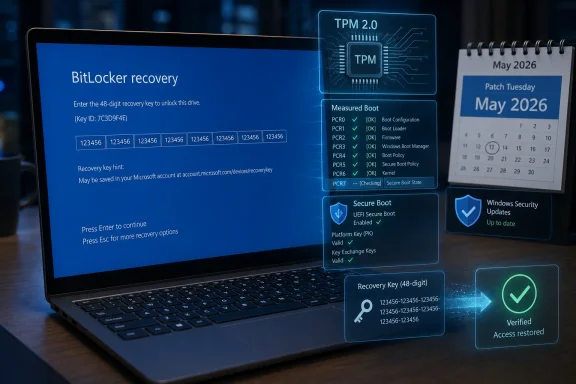
The immediate story is simple enough. Windows 11’s May 2026 Patch Tuesday release addresses a condition in which some devices could enter BitLocker recovery after boot files were updated, particularly on systems with certain Trusted Platform Module validation settings, including invalid PCR7 configurations. For affected Windows 11 users, the May update is meant to stop a monthly patch from turning the next reboot into a blue recovery-wall surprise.
That is good news, and it should not be minimized. BitLocker recovery is not a crash dialog, not a bad driver popup, and not the familiar “Windows is configuring updates” purgatory. It is a pre-boot security checkpoint, and if the user cannot produce the recovery key, the encrypted data is effectively out of reach.
But the bigger story is not merely that Microsoft fixed another update regression. It is that Windows has moved enough of its security model into the boot chain that an update can now collide with encryption policy, Secure Boot measurements, TPM behavior, OEM firmware assumptions, and enterprise Group Policy history before the user ever sees the desktop. That is a much more brittle place for consumer trust to live.
The recovery screen is doing its job in the narrow cryptographic sense. BitLocker is designed to challenge the user when the measured boot environment looks different from what the TPM expects. The problem is that the distinction between “your boot environment may have been tampered with” and “Windows Update legitimately changed boot files” is not meaningful to a parent opening a laptop before work, a student before an exam, or a help desk facing a Monday morning ticket flood.
That shift is defensible. Laptops are lost, stolen, resold, repaired, and mishandled every day. Encrypting storage by default protects people from far more common threats than the average user imagines, especially when a device contains browser sessions, tax documents, health records, corporate credentials, saved passwords, synced files, and cached email.
Yet default encryption changes the social contract. If Microsoft enables protection automatically, Microsoft also inherits a larger duty to make recovery understandable, discoverable, and resilient. A feature that users knowingly deployed is one thing; a feature that arrives as part of the modern Windows security baseline must behave like public infrastructure.
This is where the BitLocker recovery key becomes both safety net and liability. In many consumer setups, the key is backed up to the user’s Microsoft account. In managed environments, it may be escrowed through Entra ID, Active Directory, Intune, or another management platform. That is sensible in theory, but in practice it assumes the person at the recovery screen knows which account was used, has another device available, can pass multifactor authentication, and is not locked out of the very ecosystem needed to retrieve the key.
The technical center of gravity appears to be PCR7, one of the TPM Platform Configuration Registers used in the measured boot process. BitLocker can bind protection to measurements of the boot environment, including Secure Boot-related state. If that measured state changes unexpectedly, BitLocker can require recovery because it cannot confidently unseal the key without user intervention.
That is security architecture doing what it was built to do. The uncomfortable part is that many “wrong” configurations in enterprise Windows are not reckless experiments. They are often fossils: a Group Policy set years ago for Windows 10, inherited settings from an imaging process, a workaround from a firmware era that no longer exists, or a hardening baseline copied forward long after the reason for it was forgotten.
In that sense, Microsoft is not just fixing a bug; it is colliding with decades of Windows administrative history. Enterprises rarely have pristine policy estates. They have layered exceptions, pilot remnants, vendor guidance, compliance templates, and emergency changes that became permanent because nobody had time to clean them up. A modern Windows update that assumes the recommended BitLocker posture will inevitably find machines that live outside the ideal diagram.
For a regular user, “only once” is a thin comfort. The first time is the entire disaster. The user has no desktop, no browser, no local files, no password manager, and often no idea whether the recovery screen is legitimate. The computer has gone from tool to locked box.
This is the difference between engineering severity and human severity. From Microsoft’s perspective, a one-time recovery prompt on a subset of misconfigured devices is a bounded known issue. From the user’s perspective, it is a boot-blocking incident that arrives without context after an update they were told was mandatory or strongly recommended.
The pre-boot environment is unforgiving by design. It cannot offer the full explanatory richness of Windows because Windows has not loaded yet. But that only raises the bar for preventing false or unnecessary trips into recovery in the first place. A security feature that depends on user confidence cannot repeatedly surprise users at the exact moment they are least able to verify what is happening.
That complexity has been visible throughout the recent update cycle. The April 2026 Windows 11 update drew attention not only for BitLocker recovery prompts but also for related installation oddities and other system-level changes. Around the same period, Microsoft also had to explain extra restarts tied to Secure Boot certificate transition work, a reminder that the boot chain is not static plumbing but an actively maintained security surface.
This is the price of defending Windows in 2026. Attackers target boot components, drivers, firmware trust paths, credential stores, and recovery mechanisms because those are high-value places to persist or bypass controls. Microsoft cannot leave those layers untouched just because they are delicate.
But the company also cannot treat user surprise as an acceptable side effect of hardening. Security updates are supposed to increase confidence. When they repeatedly produce symptoms indistinguishable from catastrophic failure, they erode the willingness of users and administrators to install them quickly.
The better lesson is that BitLocker cannot be treated as a set-and-forget checkbox. Its behavior depends on the TPM, Secure Boot, recovery key escrow, firmware updates, boot configuration, and policy choices. If an organization does not know how its BitLocker protectors are configured, it does not really know its encryption posture.
Administrators should read Microsoft’s “unrecommended policy” language as a nudge to audit rather than a scold to ignore. In particular, environments that manually define TPM platform validation profiles should revisit why those settings exist. If PCR selections were customized years ago, the current risk may be less about theoretical hardening and more about operational fragility.
There is also a lifecycle question. Devices move between management systems. Users are migrated from domain join to cloud join. Images are replaced by provisioning packages. Security baselines are revised. In that churn, recovery keys must remain escrowed, tested, and accessible to the right support staff at the right moment. A recovery process that exists only in documentation is not a recovery process.
The user suddenly has to know what a BitLocker recovery key is. They have to know whether they used a Microsoft account during setup. They have to find a second device, sign in, and identify the matching key among possibly several devices. If the PC was set up by a family member, purchased secondhand, repaired under another account, or used with a school or work identity, the situation becomes more ambiguous.
Microsoft’s consumer messaging around this remains too quiet for the reality it has created. If encryption is default, recovery readiness should be default too. Windows could do more during setup, during account security reviews, and before major boot-affecting updates to confirm that a recovery path exists and that the user understands where it lives.
There is a delicate balance here. Microsoft should not train users to write recovery keys on sticky notes or weaken encryption for convenience. But it can make recovery preparedness less obscure. A user should not learn about their recovery key for the first time while staring at a locked boot screen.
Still, the phrase “unrecommended” can do too much rhetorical work. Windows is not a clean-room appliance. It is an ecosystem of OEM firmware, old policies, management tools, user migrations, edition upgrades, and security guidance that changes over time. Microsoft benefits from that ecosystem’s flexibility, and it cannot entirely disown the messy configurations that flexibility produced.
A robust update should either handle old-but-common configurations gracefully or warn before pushing machines into a predictable recovery event. If Microsoft can detect the policy state well enough to describe it after the fact, administrators will reasonably ask whether Windows Update could have detected it before the reboot. Even a targeted release health warning or management dashboard signal could reduce chaos.
This is especially true because BitLocker recovery is not merely an inconvenience. It can disrupt critical work, trigger unnecessary device wipes, and cause data loss when users cannot retrieve keys. The fact that the encryption is working as designed does not soften the operational blast radius.
But it means the Windows boot stack is being touched more often and more deeply than many users realize. Boot files, signatures, revocation lists, certificate databases, and firmware expectations all become part of the monthly update story. A PC may reboot more than usual not because the update failed, but because the chain of trust is being moved into a new state.
This is healthy in the long run and unnerving in the short run. The boot process is where users most strongly expect determinism. Press power, see logo, enter desktop. Any deviation from that script feels severe because the machine is not yet available to explain itself.
Microsoft’s challenge is to make invisible security maintenance feel boring again. That is not easy. The company is simultaneously trying to retire old trust material, harden driver loading, keep Windows 10 and Server customers patched where applicable, push Windows 11 forward, and avoid breaking OEM-specific assumptions across a vast hardware base. But difficulty does not reduce accountability.
If a device has a BitLocker configuration likely to require recovery after a boot file update, Windows should surface that risk before the restart. In managed environments, the signal should be available to Intune, Windows Update for Business, and other administrative tooling. In consumer environments, Windows should confirm that the recovery key is backed up and tell the user, in plain language, how to retrieve it from another device.
There are reasons Microsoft may be cautious. Too many warnings lead users to ignore them. Too much detail can confuse or frighten people. And in security, previewing some conditions too explicitly can create its own risks.
Even so, the current model is too reactive. It lets the machine discover the problem at the worst possible moment: after update installation, during boot, outside the full operating system, with the user staring at a 48-digit demand. A preflight failure is annoying. A pre-boot recovery surprise is a trust event.
But “good update” now has a more complicated meaning. A patch can fix important vulnerabilities and still cause pain in edge cases. It can improve boot reliability for one class of machines while leaving related issues on other Windows versions or server platforms for a future release. It can be technically correct and still communicate poorly.
That is why Windows servicing coverage increasingly reads like aviation incident analysis. The interesting part is not only whether the plane landed, but which warning lights appeared, which redundant systems worked, which procedures were followed, and which passengers lost confidence. Microsoft operates Windows at a scale where even rare failures can become large human events.
For IT departments, the May update should not be viewed as permission to relax. It should be viewed as a deadline to clean up encryption policy before the next boot-chain maintenance wave arrives. Patch quality matters, but configuration quality matters too.
That means checking whether devices are using expected TPM protectors. It means confirming Secure Boot state. It means auditing Group Policy and MDM settings that define platform validation behavior. It means testing firmware and boot-related updates on representative hardware rather than assuming one clean VM tells the whole story.
It also means treating recovery keys like production credentials. They need controlled access, logging, retention, and regular verification. If the help desk cannot retrieve a key quickly for a legitimate user, the organization has converted encryption from a protection mechanism into an availability risk.
Consumers have a simpler but no less important job. They should know which Microsoft account holds their recovery key, verify that it exists before they need it, and avoid making firmware or boot configuration changes casually. That advice is boring, but boring is what you want from disk encryption.
For Windows enthusiasts, this is a reminder that modern PCs are less forgiving than the beige boxes of old. The boot path is measured, signed, sealed, and compared against previous state. That makes the platform harder to tamper with, but also harder to casually tinker with when firmware settings, bootloaders, or security policies are involved.
For sysadmins, the lesson is sharper. Any estate with inherited BitLocker policy should assume there are surprises hiding in it. The fact that a configuration has booted successfully for years does not mean it will survive the next round of boot file, certificate, firmware, or Secure Boot maintenance without drama.
For Microsoft, the fix should not be the end of the story. The company needs to make Windows better at predicting when its own security updates will provoke its own recovery mechanisms. A secure default is only successful if the recovery path is as carefully designed as the protection path.
Source: Windows Latest Microsoft confirms Windows 11 no longer triggers BitLocker recovery screen after monthly updates
 The Patch Fixes the Symptom, but the Scare Was the Product
The immediate story is simple enough. Windows 11’s May 2026 Patch Tuesday release addresses a condition in which some devices could enter BitLocker recovery after boot files were updated, particularly on systems with certain Trusted Platform Module validation settings, including invalid PCR7 configurations. For affected Windows 11 users, the May update is meant to stop a monthly patch from turning the next reboot into a blue recovery-wall surprise.That is good news, and it should not be minimized. BitLocker recovery is not a crash dialog, not a bad driver popup, and not the familiar “Windows is configuring updates” purgatory. It is a pre-boot security checkpoint, and if the user cannot produce the recovery key, the encrypted data is effectively out of reach.
But the bigger story is not merely that Microsoft fixed another update regression. It is that Windows has moved enough of its security model into the boot chain that an update can now collide with encryption policy, Secure Boot measurements, TPM behavior, OEM firmware assumptions, and enterprise Group Policy history before the user ever sees the desktop. That is a much more brittle place for consumer trust to live.
The recovery screen is doing its job in the narrow cryptographic sense. BitLocker is designed to challenge the user when the measured boot environment looks different from what the TPM expects. The problem is that the distinction between “your boot environment may have been tampered with” and “Windows Update legitimately changed boot files” is not meaningful to a parent opening a laptop before work, a student before an exam, or a help desk facing a Monday morning ticket flood.
BitLocker Has Quietly Become Part of the Default Windows Experience
For years, many Windows users thought of BitLocker as something for corporate laptops, regulated industries, and people who knew what the TPM acronym stood for. That mental model is obsolete. On modern Windows 11 hardware, especially after the 24H2 era, device encryption and BitLocker-backed protection are increasingly part of the baseline experience rather than an optional feature users deliberately turn on.That shift is defensible. Laptops are lost, stolen, resold, repaired, and mishandled every day. Encrypting storage by default protects people from far more common threats than the average user imagines, especially when a device contains browser sessions, tax documents, health records, corporate credentials, saved passwords, synced files, and cached email.
Yet default encryption changes the social contract. If Microsoft enables protection automatically, Microsoft also inherits a larger duty to make recovery understandable, discoverable, and resilient. A feature that users knowingly deployed is one thing; a feature that arrives as part of the modern Windows security baseline must behave like public infrastructure.
This is where the BitLocker recovery key becomes both safety net and liability. In many consumer setups, the key is backed up to the user’s Microsoft account. In managed environments, it may be escrowed through Entra ID, Active Directory, Intune, or another management platform. That is sensible in theory, but in practice it assumes the person at the recovery screen knows which account was used, has another device available, can pass multifactor authentication, and is not locked out of the very ecosystem needed to retrieve the key.
Microsoft’s Explanation Points to Policy Debt
Microsoft’s public framing has centered on “unrecommended” BitLocker Group Policy configurations and TPM validation settings. That wording is careful, and it matters. It suggests the bug did not randomly hit every Windows 11 machine, but rather systems whose BitLocker configuration deviated from the preferred modern path.The technical center of gravity appears to be PCR7, one of the TPM Platform Configuration Registers used in the measured boot process. BitLocker can bind protection to measurements of the boot environment, including Secure Boot-related state. If that measured state changes unexpectedly, BitLocker can require recovery because it cannot confidently unseal the key without user intervention.
That is security architecture doing what it was built to do. The uncomfortable part is that many “wrong” configurations in enterprise Windows are not reckless experiments. They are often fossils: a Group Policy set years ago for Windows 10, inherited settings from an imaging process, a workaround from a firmware era that no longer exists, or a hardening baseline copied forward long after the reason for it was forgotten.
In that sense, Microsoft is not just fixing a bug; it is colliding with decades of Windows administrative history. Enterprises rarely have pristine policy estates. They have layered exceptions, pilot remnants, vendor guidance, compliance templates, and emergency changes that became permanent because nobody had time to clean them up. A modern Windows update that assumes the recommended BitLocker posture will inevitably find machines that live outside the ideal diagram.
The First Reboot Is Where Trust Goes to Be Tested
Microsoft’s note that affected devices may need the recovery key only once is technically reassuring. Once entered, subsequent restarts should not trigger the same recovery screen as long as the policy configuration remains unchanged. For an administrator with the key escrowed and a known remediation process, that is manageable.For a regular user, “only once” is a thin comfort. The first time is the entire disaster. The user has no desktop, no browser, no local files, no password manager, and often no idea whether the recovery screen is legitimate. The computer has gone from tool to locked box.
This is the difference between engineering severity and human severity. From Microsoft’s perspective, a one-time recovery prompt on a subset of misconfigured devices is a bounded known issue. From the user’s perspective, it is a boot-blocking incident that arrives without context after an update they were told was mandatory or strongly recommended.
The pre-boot environment is unforgiving by design. It cannot offer the full explanatory richness of Windows because Windows has not loaded yet. But that only raises the bar for preventing false or unnecessary trips into recovery in the first place. A security feature that depends on user confidence cannot repeatedly surprise users at the exact moment they are least able to verify what is happening.
Windows Update Is Now Updating More Than Windows
The monthly cumulative update used to be understood as a bundle of operating system fixes. That description is still broadly true, but it no longer captures the practical experience of keeping a Windows PC current. Today’s update cadence interacts with Secure Boot policy, vulnerable driver blocklists, boot manager files, recovery environments, firmware assumptions, cloud account recovery, and device management state.That complexity has been visible throughout the recent update cycle. The April 2026 Windows 11 update drew attention not only for BitLocker recovery prompts but also for related installation oddities and other system-level changes. Around the same period, Microsoft also had to explain extra restarts tied to Secure Boot certificate transition work, a reminder that the boot chain is not static plumbing but an actively maintained security surface.
This is the price of defending Windows in 2026. Attackers target boot components, drivers, firmware trust paths, credential stores, and recovery mechanisms because those are high-value places to persist or bypass controls. Microsoft cannot leave those layers untouched just because they are delicate.
But the company also cannot treat user surprise as an acceptable side effect of hardening. Security updates are supposed to increase confidence. When they repeatedly produce symptoms indistinguishable from catastrophic failure, they erode the willingness of users and administrators to install them quickly.
The Enterprise Lesson Is Not “Turn Off BitLocker”
The wrong lesson from this episode would be to conclude that BitLocker is the problem. It is not. Disk encryption is one of the few security controls that provides clear, durable protection with little day-to-day user involvement when implemented correctly. Removing it because a recovery prompt appeared after an update is the equivalent of disabling seatbelts because the warning chime was annoying.The better lesson is that BitLocker cannot be treated as a set-and-forget checkbox. Its behavior depends on the TPM, Secure Boot, recovery key escrow, firmware updates, boot configuration, and policy choices. If an organization does not know how its BitLocker protectors are configured, it does not really know its encryption posture.
Administrators should read Microsoft’s “unrecommended policy” language as a nudge to audit rather than a scold to ignore. In particular, environments that manually define TPM platform validation profiles should revisit why those settings exist. If PCR selections were customized years ago, the current risk may be less about theoretical hardening and more about operational fragility.
There is also a lifecycle question. Devices move between management systems. Users are migrated from domain join to cloud join. Images are replaced by provisioning packages. Security baselines are revised. In that churn, recovery keys must remain escrowed, tested, and accessible to the right support staff at the right moment. A recovery process that exists only in documentation is not a recovery process.
Consumers Are Being Asked to Administer a Feature They Never Chose
For home users, the situation is stranger. Microsoft wants the security benefits of default encryption without forcing every user through an encryption seminar during setup. That is understandable; most people would not opt into the right thing if the explanation were frightening or tedious. But when something goes wrong, the abstraction collapses.The user suddenly has to know what a BitLocker recovery key is. They have to know whether they used a Microsoft account during setup. They have to find a second device, sign in, and identify the matching key among possibly several devices. If the PC was set up by a family member, purchased secondhand, repaired under another account, or used with a school or work identity, the situation becomes more ambiguous.
Microsoft’s consumer messaging around this remains too quiet for the reality it has created. If encryption is default, recovery readiness should be default too. Windows could do more during setup, during account security reviews, and before major boot-affecting updates to confirm that a recovery path exists and that the user understands where it lives.
There is a delicate balance here. Microsoft should not train users to write recovery keys on sticky notes or weaken encryption for convenience. But it can make recovery preparedness less obscure. A user should not learn about their recovery key for the first time while staring at a locked boot screen.
The “Unrecommended Configuration” Defense Only Goes So Far
Microsoft is on firmer ground when it says certain configurations are not recommended. Vendors have to define supported paths, especially for security features that depend on hardware-rooted trust. If an administrator overrides default TPM validation behavior, that choice can have consequences.Still, the phrase “unrecommended” can do too much rhetorical work. Windows is not a clean-room appliance. It is an ecosystem of OEM firmware, old policies, management tools, user migrations, edition upgrades, and security guidance that changes over time. Microsoft benefits from that ecosystem’s flexibility, and it cannot entirely disown the messy configurations that flexibility produced.
A robust update should either handle old-but-common configurations gracefully or warn before pushing machines into a predictable recovery event. If Microsoft can detect the policy state well enough to describe it after the fact, administrators will reasonably ask whether Windows Update could have detected it before the reboot. Even a targeted release health warning or management dashboard signal could reduce chaos.
This is especially true because BitLocker recovery is not merely an inconvenience. It can disrupt critical work, trigger unnecessary device wipes, and cause data loss when users cannot retrieve keys. The fact that the encryption is working as designed does not soften the operational blast radius.
Secure Boot’s Long Memory Is Catching Up With Everyone
The BitLocker episode also sits inside a broader transition around Secure Boot. Microsoft has been moving the ecosystem through certificate and trust updates that are necessary because old Secure Boot certificates are reaching the end of their planned life. That maintenance is unavoidable; trust anchors do not last forever.But it means the Windows boot stack is being touched more often and more deeply than many users realize. Boot files, signatures, revocation lists, certificate databases, and firmware expectations all become part of the monthly update story. A PC may reboot more than usual not because the update failed, but because the chain of trust is being moved into a new state.
This is healthy in the long run and unnerving in the short run. The boot process is where users most strongly expect determinism. Press power, see logo, enter desktop. Any deviation from that script feels severe because the machine is not yet available to explain itself.
Microsoft’s challenge is to make invisible security maintenance feel boring again. That is not easy. The company is simultaneously trying to retire old trust material, harden driver loading, keep Windows 10 and Server customers patched where applicable, push Windows 11 forward, and avoid breaking OEM-specific assumptions across a vast hardware base. But difficulty does not reduce accountability.
A Better Update Model Would Treat Recovery as a Preflight Failure
The lesson from KB5089549 should shape future servicing. Windows Update already performs compatibility checks for some feature updates, hardware requirements, safeguard holds, and known blockers. The same philosophy needs to apply more aggressively to boot-chain security changes.If a device has a BitLocker configuration likely to require recovery after a boot file update, Windows should surface that risk before the restart. In managed environments, the signal should be available to Intune, Windows Update for Business, and other administrative tooling. In consumer environments, Windows should confirm that the recovery key is backed up and tell the user, in plain language, how to retrieve it from another device.
There are reasons Microsoft may be cautious. Too many warnings lead users to ignore them. Too much detail can confuse or frighten people. And in security, previewing some conditions too explicitly can create its own risks.
Even so, the current model is too reactive. It lets the machine discover the problem at the worst possible moment: after update installation, during boot, outside the full operating system, with the user staring at a 48-digit demand. A preflight failure is annoying. A pre-boot recovery surprise is a trust event.
The May Update Is Also a Reminder That “Good Patch” Is Relative
Early reporting suggests KB5089549 is a relatively solid Windows 11 update, at least compared with some recent monthly releases. It addresses the BitLocker recovery issue, includes security fixes, and rolls forward other improvements. For many users, it may install quietly and be forgotten by lunchtime, which is the highest compliment a cumulative update can receive.But “good update” now has a more complicated meaning. A patch can fix important vulnerabilities and still cause pain in edge cases. It can improve boot reliability for one class of machines while leaving related issues on other Windows versions or server platforms for a future release. It can be technically correct and still communicate poorly.
That is why Windows servicing coverage increasingly reads like aviation incident analysis. The interesting part is not only whether the plane landed, but which warning lights appeared, which redundant systems worked, which procedures were followed, and which passengers lost confidence. Microsoft operates Windows at a scale where even rare failures can become large human events.
For IT departments, the May update should not be viewed as permission to relax. It should be viewed as a deadline to clean up encryption policy before the next boot-chain maintenance wave arrives. Patch quality matters, but configuration quality matters too.
The Real Fix Is an Inventory, Not a Press Release
The practical response is not dramatic. It is inventory, validation, and rehearsal. The organizations least likely to suffer from a future BitLocker recovery surprise are not the ones that never see weird update behavior; they are the ones that know exactly where their keys are and what their policies do.That means checking whether devices are using expected TPM protectors. It means confirming Secure Boot state. It means auditing Group Policy and MDM settings that define platform validation behavior. It means testing firmware and boot-related updates on representative hardware rather than assuming one clean VM tells the whole story.
It also means treating recovery keys like production credentials. They need controlled access, logging, retention, and regular verification. If the help desk cannot retrieve a key quickly for a legitimate user, the organization has converted encryption from a protection mechanism into an availability risk.
Consumers have a simpler but no less important job. They should know which Microsoft account holds their recovery key, verify that it exists before they need it, and avoid making firmware or boot configuration changes casually. That advice is boring, but boring is what you want from disk encryption.
The Blue Recovery Screen Has Become a Governance Test
The narrow message of KB5089549 is that Microsoft has patched a Windows 11 bug that could trigger BitLocker recovery after monthly updates. The broader message is that endpoint security now reaches so deep into the boot process that update governance must include encryption governance. Windows cannot be administered safely as though BitLocker, TPM, Secure Boot, and servicing are separate silos.For Windows enthusiasts, this is a reminder that modern PCs are less forgiving than the beige boxes of old. The boot path is measured, signed, sealed, and compared against previous state. That makes the platform harder to tamper with, but also harder to casually tinker with when firmware settings, bootloaders, or security policies are involved.
For sysadmins, the lesson is sharper. Any estate with inherited BitLocker policy should assume there are surprises hiding in it. The fact that a configuration has booted successfully for years does not mean it will survive the next round of boot file, certificate, firmware, or Secure Boot maintenance without drama.
For Microsoft, the fix should not be the end of the story. The company needs to make Windows better at predicting when its own security updates will provoke its own recovery mechanisms. A secure default is only successful if the recovery path is as carefully designed as the protection path.
The Next Patch Tuesday Should Not Require a Scavenger Hunt
The concrete takeaways from the May 2026 BitLocker fix are less about panic and more about preparation. KB5089549 appears to close the Windows 11-specific recovery trigger tied to certain TPM validation settings, but the event should push users and administrators to verify the assumptions that made the bug painful.- Windows 11 users should install the May 2026 cumulative update if they are eligible, because it includes Microsoft’s fix for the BitLocker recovery issue tied to boot file updates and certain TPM validation states.
- Administrators should audit BitLocker Group Policy and MDM settings that customize TPM platform validation, especially policies that omit or alter expected Secure Boot-related measurements.
- Organizations should confirm that recovery keys are escrowed correctly and retrievable before the next servicing incident, not during it.
- Consumers should verify which Microsoft account stores their device recovery key and make sure they can access that account from another device.
- Anyone managing fleets should treat boot-chain and Secure Boot changes as update-risk areas worthy of pilot rings, hardware diversity testing, and clear help desk runbooks.
Source: Windows Latest Microsoft confirms Windows 11 no longer triggers BitLocker recovery screen after monthly updates
