

Microsoft fixed a Windows 11 BitLocker recovery bug on May 12, 2026, after April’s security updates caused some managed PCs to ask for recovery keys at first reboot when they used a specific, discouraged TPM validation Group Policy configuration. The narrowness of the bug is the point, not an excuse. It shows how Windows security hardening now depends on choreography between firmware, bootloaders, certificates, TPM measurements, and enterprise policy baselines that may have been set years ago and forgotten. For home users, this was probably a scare story; for administrators, it was a reminder that the boot chain has become one of Windows Update’s most delicate blast zones.
The immediate headline is simple enough: Windows 11 version 24H2 and 25H2 systems received a cumulative update, KB5089549, that addresses an issue where some devices could enter BitLocker recovery after boot files were updated. Microsoft’s own wording points to systems with certain Trusted Platform Module validation settings, including invalid PCR7 configurations. That is precise, but it is not comforting in the way Microsoft probably hopes.
BitLocker recovery is not a normal error dialog. It is Windows saying that the pre-boot environment no longer looks like the environment it was told to trust. That is exactly what full-disk encryption is supposed to do when the boot chain changes unexpectedly, but it is operationally brutal when the change is caused by a vendor security update rather than an attacker, a motherboard swap, or a firmware reset.
The affected configuration was not the default consumer setup. Microsoft says the issue applies to a limited number of systems where BitLocker is enabled on the OS drive, a TPM platform validation policy explicitly includes PCR7, PCR7 binding is reported as “Not Possible,” the Windows UEFI CA 2023 certificate is present in the Secure Boot database, and the device is not already using the 2023-signed Windows Boot Manager. That is not the profile of a typical laptop bought at retail and signed into with a Microsoft account.
But enterprises are where Windows earns its reputation or loses it. A one-time BitLocker recovery prompt on a home machine is annoying; on a fleet of thousands, it becomes a help desk event, a recovery-key governance test, and a patch-management delay. Microsoft can call the policy “unrecommended,” but administrators will hear a different message: legacy security baselines have a way of becoming tomorrow’s outage.
That desire is not irrational. If you encrypt a device because you do not trust what might happen before Windows loads, it makes sense to bind encryption unlock behavior to the measurements that describe the boot environment. The problem is that Secure Boot is no longer a static detail buried in firmware setup screens; it is an actively serviced part of Windows platform security.
Microsoft’s recent push toward updated boot managers and newer Secure Boot certificates makes that conflict harder to avoid. When the OS updates boot files or shifts toward a newer signed boot component, PCR measurements can change. BitLocker sees that change not as a friendly Microsoft-authored maintenance event but as a difference from the sealed state it expects.
That is the great irony here. Enterprises that tried to be more explicit about what BitLocker should validate may have made themselves less resilient to the way Microsoft now services the boot stack. The policy was not recommended, but it was available, understandable, and in some environments probably inherited from older hardening guidance, audit templates, or well-meaning administrators who have long since moved on.
Microsoft’s recommended mitigation was to remove that Group Policy configuration before deploying the April updates, run policy refresh, suspend and resume BitLocker, and thereby allow Windows to rebind protectors using the default PCR profile. That is not a difficult sequence for a skilled endpoint administrator. It is, however, exactly the kind of sequence that becomes fraught when the update has already reached devices in the field.
That distinction matters technically, but it barely matters to the employee staring at a blue recovery screen before coffee. It also barely matters to the help desk if recovery keys are missing, stale, inaccessible, or trapped behind the same identity workflow the user cannot reach because their primary device will not boot. Encryption turns asset management from paperwork into infrastructure.
Microsoft says that in the affected Windows 11 scenario, the recovery key should need to be entered only once, with later restarts proceeding normally as long as the Group Policy does not change. That limits the damage. It does not eliminate the operational disruption, because the first reboot after Patch Tuesday is exactly when organizations expect predictable behavior at scale.
For security teams, the episode is uncomfortable because it punishes a class of configuration that sounds stricter than the default. For endpoint teams, it is uncomfortable because the fix involves touching BitLocker protectors and Group Policy before or during update rollout. For executives, it is uncomfortable because the visible symptom is indistinguishable from a lockout to anyone who does not live in Windows servicing notes.
This is why BitLocker recovery bugs feel larger than their affected population. They attack confidence in the update process at the precise boundary where security controls meet business continuity. A patch that fixes vulnerabilities but strands even a small subset of managed devices creates a credibility problem that cannot be solved by saying the devices were “unlikely” to be personal PCs.
That is progress, but it changes the risk equation. The security threats Microsoft is responding to are real: bootkits, vulnerable signed drivers, pre-OS tampering, downgrade paths, and certificate lifecycle problems do not politely stay outside the enterprise patch calendar. If Windows is going to defend the boot path, the boot path has to be serviced.
The catch is that the boot path is also where recovery is hardest. Once the machine is inside Windows, administrators have agents, remote tools, logs, scripts, remediation policies, and user communication channels. Before Windows loads, they have firmware behavior, BitLocker protectors, recovery keys, and the hope that the user can follow instructions.
That is why this bug lands differently from a Start menu glitch or a printer regression. It lives in the narrow corridor between “the update installed successfully” and “the device is usable again.” Microsoft fixed the Windows 11 side with May’s cumulative update, but the episode reinforces that Secure Boot transitions need enterprise-grade staging, not just release notes.
There is also a communications problem. The conditions Microsoft listed are specific enough for a senior endpoint engineer, but the phrase “unrecommended BitLocker Group Policy configuration” can sound like blame-shifting. Enterprises need to know not only that a setting is discouraged, but when a servicing change will turn that old setting into a recovery event.
That matters because mixed estates are the norm, not the exception. A business may have Windows 11 laptops, Windows 10 holdouts, and Windows Server systems running in roles where console access is slower, maintenance windows are tighter, and recovery-key handling is more sensitive. A BitLocker recovery prompt on a server is not just an inconvenience; it can be a remote-access and uptime problem.
Microsoft’s staged remediation is understandable from an engineering standpoint. Different Windows branches have different servicing baselines, boot components, and release channels. But administrators do not experience patching as a tidy product matrix. They experience it as a calendar full of risk decisions.
The practical result is that enterprises cannot treat KB5089549 as a universal “all clear.” Windows 11 clients that receive the May cumulative update may be past the specific fixed condition, but Windows 10 and Windows Server devices still need policy review, deployment sequencing, and recovery readiness. That creates one more reason to slow down April-update deployment in environments matching the affected criteria.
It also sharpens the strategic pressure around Windows 10’s long tail. As Windows 10 approaches the end of mainstream comfort, every servicing asymmetry becomes more visible. Organizations staying on older platforms may have valid reasons, but they should expect more moments where fixes, mitigations, and documentation arrive with uneven timing.
PCR7 is closely associated with Secure Boot policy. If an organization explicitly binds BitLocker behavior to PCR7, then changes in Secure Boot-related state can affect whether BitLocker considers the boot environment familiar. That is useful when the change is malicious or unauthorized. It is painful when the change is a legitimate Microsoft transition that the organization did not stage around.
Microsoft’s warning that affected devices had PCR7 binding reported as “Not Possible” is especially important. It suggests a mismatch between policy intent and platform reality: administrators configured BitLocker to care about something the system could not bind in the expected way. That is the kind of configuration drift that endpoint management tools may not surface loudly until an update exposes it.
The recommended audit path is therefore more than a workaround. Checking Group Policy for explicit PCR7 inclusion and using System Information to inspect PCR7 binding status should become a normal part of update readiness for organizations that customize BitLocker profiles. If the fleet contains devices where PCR7 is “Not Possible,” those systems deserve attention before boot-chain updates reach them.
The broader lesson is that security baselines should age out deliberately. A BitLocker policy that made sense for a Windows 10 deployment several years ago may not map cleanly onto Windows 11’s Secure Boot certificate transition. Administrators need lifecycle management for configuration assumptions, not just for operating systems.
This does not mean enterprises should blindly accept every Microsoft default. Defaults are compromises, and some organizations have threat models that require tighter controls. But if a control depends on low-level boot measurements, the organization owns the testing burden every time Microsoft changes the boot environment.
The phrase unrecommended configuration is doing a lot of work here. It tells administrators that Microsoft considers the custom policy outside the happy path, but it also hints at a larger platform direction. Windows security is increasingly designed around vendor-managed defaults, cloud-backed identity, hardware roots of trust, and automatic servicing. Manual hardening that fights those assumptions may still work, but it will need sharper governance.
For smaller IT teams, that may be a relief. The correct move is probably not to invent a custom PCR profile unless there is a clearly documented requirement and a test lab that mirrors real hardware. For larger enterprises, the lesson is not to abandon customization, but to treat it as code: documented, reviewed, versioned, tested, and retired when the platform changes.
The danger is that “default” can become a synonym for “opaque.” Microsoft still needs to explain boot-chain transitions clearly enough that administrators can predict which devices are in scope. The more Windows security relies on invisible firmware and TPM state, the more Microsoft’s documentation must translate those mechanics into deployable operational guidance.
The Windows 11 fix may tempt some organizations to move on quickly. That would be a mistake. The right postmortem is not only “install KB5089549” but “prove we can survive BitLocker recovery at scale.” The machines that did not trigger recovery this time may still reveal weaknesses in key storage, help desk authorization, user identity verification, or out-of-band communication.
Administrators should also remember that BitLocker recovery screens are not rare in principle. Firmware updates, TPM changes, Secure Boot changes, motherboard replacements, BIOS resets, and bootloader modifications can all produce recovery conditions. The April 2026 issue is notable because Windows Update was the trigger, but the underlying dependency on recovery readiness is permanent.
There is a cultural dimension here. Many organizations treat recovery keys like insurance documents: important, filed somewhere, and rarely tested. That is not good enough when the OS vendor is actively servicing the components that influence measured boot. A recovery key is part of the endpoint’s operational control plane.
The same applies to user education. Employees do not need a lecture on PCRs, but they should know that a BitLocker recovery screen is not automatically ransomware, that they should not post recovery keys in chat, and that there is an approved path for support. Security controls fail socially before they fail cryptographically.
That modernization is necessary. Old certificates and legacy trust paths do not last forever, and attackers pay attention to boot-time weaknesses because those weaknesses can undercut the operating system before its defenses are awake. Secure Boot cannot be a museum exhibit if it is expected to remain useful.
But modernization at this layer is hard because PCs are heterogeneous in the most inconvenient ways. Firmware quality varies by vendor and model. Enterprise fleets contain devices purchased across multiple years, configured by multiple teams, and patched on multiple cadences. A boot-chain change that is clean in Microsoft’s lab can still collide with a dusty BIOS, an old Group Policy, or a half-completed certificate rollout.
That is why the Windows 11 fix should not be read as the end of the story. It is a correction to one observed failure mode in a much longer transition. The more Microsoft updates Secure Boot components through normal servicing channels, the more important it becomes for IT teams to inventory firmware readiness and BitLocker bindings before changes arrive by cumulative update.
Microsoft has been trying to make Windows more secure by default, and that direction is broadly right. But security-by-default becomes fragile if administrators cannot see which defaults have changed, which old overrides are dangerous, and which devices are stuck between generations of trust. The boot chain is becoming a managed asset, whether organizations are ready or not.
Source: SC Media Microsoft addresses BitLocker recovery issue in Windows 11
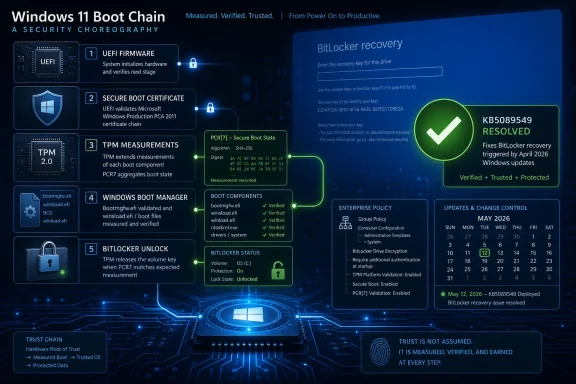 Microsoft Fixed the Symptom, but the Boot Chain Is the Story
The immediate headline is simple enough: Windows 11 version 24H2 and 25H2 systems received a cumulative update, KB5089549, that addresses an issue where some devices could enter BitLocker recovery after boot files were updated. Microsoft’s own wording points to systems with certain Trusted Platform Module validation settings, including invalid PCR7 configurations. That is precise, but it is not comforting in the way Microsoft probably hopes.BitLocker recovery is not a normal error dialog. It is Windows saying that the pre-boot environment no longer looks like the environment it was told to trust. That is exactly what full-disk encryption is supposed to do when the boot chain changes unexpectedly, but it is operationally brutal when the change is caused by a vendor security update rather than an attacker, a motherboard swap, or a firmware reset.
The affected configuration was not the default consumer setup. Microsoft says the issue applies to a limited number of systems where BitLocker is enabled on the OS drive, a TPM platform validation policy explicitly includes PCR7, PCR7 binding is reported as “Not Possible,” the Windows UEFI CA 2023 certificate is present in the Secure Boot database, and the device is not already using the 2023-signed Windows Boot Manager. That is not the profile of a typical laptop bought at retail and signed into with a Microsoft account.
But enterprises are where Windows earns its reputation or loses it. A one-time BitLocker recovery prompt on a home machine is annoying; on a fleet of thousands, it becomes a help desk event, a recovery-key governance test, and a patch-management delay. Microsoft can call the policy “unrecommended,” but administrators will hear a different message: legacy security baselines have a way of becoming tomorrow’s outage.
The “Unrecommended” Policy Was Still a Supported Trapdoor
The Group Policy at the center of the issue is “Configure TPM platform validation profile for native UEFI firmware configurations.” In plain English, it lets administrators decide which TPM Platform Configuration Registers BitLocker should care about when deciding whether the boot environment is trustworthy. PCR7 is tied to Secure Boot policy, which makes it attractive to security teams that want BitLocker to respond when the Secure Boot trust chain changes.That desire is not irrational. If you encrypt a device because you do not trust what might happen before Windows loads, it makes sense to bind encryption unlock behavior to the measurements that describe the boot environment. The problem is that Secure Boot is no longer a static detail buried in firmware setup screens; it is an actively serviced part of Windows platform security.
Microsoft’s recent push toward updated boot managers and newer Secure Boot certificates makes that conflict harder to avoid. When the OS updates boot files or shifts toward a newer signed boot component, PCR measurements can change. BitLocker sees that change not as a friendly Microsoft-authored maintenance event but as a difference from the sealed state it expects.
That is the great irony here. Enterprises that tried to be more explicit about what BitLocker should validate may have made themselves less resilient to the way Microsoft now services the boot stack. The policy was not recommended, but it was available, understandable, and in some environments probably inherited from older hardening guidance, audit templates, or well-meaning administrators who have long since moved on.
Microsoft’s recommended mitigation was to remove that Group Policy configuration before deploying the April updates, run policy refresh, suspend and resume BitLocker, and thereby allow Windows to rebind protectors using the default PCR profile. That is not a difficult sequence for a skilled endpoint administrator. It is, however, exactly the kind of sequence that becomes fraught when the update has already reached devices in the field.
BitLocker Recovery Is a Security Feature That Feels Like an Outage
The public reaction to BitLocker incidents often misses the central tension. BitLocker did not “forget” the key, and Windows did not necessarily corrupt encrypted data. The system asked for the recovery key because the measured boot environment no longer matched what BitLocker was configured to trust.That distinction matters technically, but it barely matters to the employee staring at a blue recovery screen before coffee. It also barely matters to the help desk if recovery keys are missing, stale, inaccessible, or trapped behind the same identity workflow the user cannot reach because their primary device will not boot. Encryption turns asset management from paperwork into infrastructure.
Microsoft says that in the affected Windows 11 scenario, the recovery key should need to be entered only once, with later restarts proceeding normally as long as the Group Policy does not change. That limits the damage. It does not eliminate the operational disruption, because the first reboot after Patch Tuesday is exactly when organizations expect predictable behavior at scale.
For security teams, the episode is uncomfortable because it punishes a class of configuration that sounds stricter than the default. For endpoint teams, it is uncomfortable because the fix involves touching BitLocker protectors and Group Policy before or during update rollout. For executives, it is uncomfortable because the visible symptom is indistinguishable from a lockout to anyone who does not live in Windows servicing notes.
This is why BitLocker recovery bugs feel larger than their affected population. They attack confidence in the update process at the precise boundary where security controls meet business continuity. A patch that fixes vulnerabilities but strands even a small subset of managed devices creates a credibility problem that cannot be solved by saying the devices were “unlikely” to be personal PCs.
Patch Tuesday Now Reaches Below the Operating System
Windows Update used to be understood mainly as an operating-system maintenance channel. That mental model is obsolete. Modern Windows servicing reaches into Secure Boot trust, vulnerable driver blocklists, boot managers, recovery environments, kernel hardening, and firmware-adjacent assumptions that determine whether the machine is considered safe enough to start.That is progress, but it changes the risk equation. The security threats Microsoft is responding to are real: bootkits, vulnerable signed drivers, pre-OS tampering, downgrade paths, and certificate lifecycle problems do not politely stay outside the enterprise patch calendar. If Windows is going to defend the boot path, the boot path has to be serviced.
The catch is that the boot path is also where recovery is hardest. Once the machine is inside Windows, administrators have agents, remote tools, logs, scripts, remediation policies, and user communication channels. Before Windows loads, they have firmware behavior, BitLocker protectors, recovery keys, and the hope that the user can follow instructions.
That is why this bug lands differently from a Start menu glitch or a printer regression. It lives in the narrow corridor between “the update installed successfully” and “the device is usable again.” Microsoft fixed the Windows 11 side with May’s cumulative update, but the episode reinforces that Secure Boot transitions need enterprise-grade staging, not just release notes.
There is also a communications problem. The conditions Microsoft listed are specific enough for a senior endpoint engineer, but the phrase “unrecommended BitLocker Group Policy configuration” can sound like blame-shifting. Enterprises need to know not only that a setting is discouraged, but when a servicing change will turn that old setting into a recovery event.
Windows 10 and Server Are Left in the Waiting Room
The Windows 11 fix is only part of the story. According to the reporting around Microsoft’s acknowledgment, Windows 10 and Windows Server systems are also affected by the broader issue, but the available fix discussed here landed for Windows 11 24H2 and 25H2 first. That leaves administrators with mixed estates in the awkward position of having a remedy for one lane and mitigations for the others.That matters because mixed estates are the norm, not the exception. A business may have Windows 11 laptops, Windows 10 holdouts, and Windows Server systems running in roles where console access is slower, maintenance windows are tighter, and recovery-key handling is more sensitive. A BitLocker recovery prompt on a server is not just an inconvenience; it can be a remote-access and uptime problem.
Microsoft’s staged remediation is understandable from an engineering standpoint. Different Windows branches have different servicing baselines, boot components, and release channels. But administrators do not experience patching as a tidy product matrix. They experience it as a calendar full of risk decisions.
The practical result is that enterprises cannot treat KB5089549 as a universal “all clear.” Windows 11 clients that receive the May cumulative update may be past the specific fixed condition, but Windows 10 and Windows Server devices still need policy review, deployment sequencing, and recovery readiness. That creates one more reason to slow down April-update deployment in environments matching the affected criteria.
It also sharpens the strategic pressure around Windows 10’s long tail. As Windows 10 approaches the end of mainstream comfort, every servicing asymmetry becomes more visible. Organizations staying on older platforms may have valid reasons, but they should expect more moments where fixes, mitigations, and documentation arrive with uneven timing.
The PCR7 Detail Is Not Trivia for Fleet Administrators
PCR7 sounds like the sort of acronym that should stay buried in a security architecture diagram. In this incident, it is the hinge. Platform Configuration Registers are TPM-held measurements that help establish what the system looked like during boot; BitLocker can use those measurements to decide whether to unlock the encrypted drive automatically.PCR7 is closely associated with Secure Boot policy. If an organization explicitly binds BitLocker behavior to PCR7, then changes in Secure Boot-related state can affect whether BitLocker considers the boot environment familiar. That is useful when the change is malicious or unauthorized. It is painful when the change is a legitimate Microsoft transition that the organization did not stage around.
Microsoft’s warning that affected devices had PCR7 binding reported as “Not Possible” is especially important. It suggests a mismatch between policy intent and platform reality: administrators configured BitLocker to care about something the system could not bind in the expected way. That is the kind of configuration drift that endpoint management tools may not surface loudly until an update exposes it.
The recommended audit path is therefore more than a workaround. Checking Group Policy for explicit PCR7 inclusion and using System Information to inspect PCR7 binding status should become a normal part of update readiness for organizations that customize BitLocker profiles. If the fleet contains devices where PCR7 is “Not Possible,” those systems deserve attention before boot-chain updates reach them.
The broader lesson is that security baselines should age out deliberately. A BitLocker policy that made sense for a Windows 10 deployment several years ago may not map cleanly onto Windows 11’s Secure Boot certificate transition. Administrators need lifecycle management for configuration assumptions, not just for operating systems.
Microsoft’s Default Path Is Becoming the Safer Path
There is an uncomfortable conclusion hiding in Microsoft’s workaround: stop overriding the PCR profile and let Windows choose the default. That will not please every hardening purist, but it reflects the reality of a platform where Microsoft controls both the servicing mechanism and much of the evolving boot trust model. When the vendor is actively rotating or updating boot components, bespoke validation settings can become liabilities.This does not mean enterprises should blindly accept every Microsoft default. Defaults are compromises, and some organizations have threat models that require tighter controls. But if a control depends on low-level boot measurements, the organization owns the testing burden every time Microsoft changes the boot environment.
The phrase unrecommended configuration is doing a lot of work here. It tells administrators that Microsoft considers the custom policy outside the happy path, but it also hints at a larger platform direction. Windows security is increasingly designed around vendor-managed defaults, cloud-backed identity, hardware roots of trust, and automatic servicing. Manual hardening that fights those assumptions may still work, but it will need sharper governance.
For smaller IT teams, that may be a relief. The correct move is probably not to invent a custom PCR profile unless there is a clearly documented requirement and a test lab that mirrors real hardware. For larger enterprises, the lesson is not to abandon customization, but to treat it as code: documented, reviewed, versioned, tested, and retired when the platform changes.
The danger is that “default” can become a synonym for “opaque.” Microsoft still needs to explain boot-chain transitions clearly enough that administrators can predict which devices are in scope. The more Windows security relies on invisible firmware and TPM state, the more Microsoft’s documentation must translate those mechanics into deployable operational guidance.
Recovery-Key Hygiene Is No Longer Optional Housekeeping
Every BitLocker recovery incident eventually becomes a recovery-key incident. If keys are escrowed properly in Microsoft Entra ID, Active Directory, a management platform, or another controlled repository, the event is disruptive but recoverable. If keys are missing or access workflows are confused, the event becomes a crisis.The Windows 11 fix may tempt some organizations to move on quickly. That would be a mistake. The right postmortem is not only “install KB5089549” but “prove we can survive BitLocker recovery at scale.” The machines that did not trigger recovery this time may still reveal weaknesses in key storage, help desk authorization, user identity verification, or out-of-band communication.
Administrators should also remember that BitLocker recovery screens are not rare in principle. Firmware updates, TPM changes, Secure Boot changes, motherboard replacements, BIOS resets, and bootloader modifications can all produce recovery conditions. The April 2026 issue is notable because Windows Update was the trigger, but the underlying dependency on recovery readiness is permanent.
There is a cultural dimension here. Many organizations treat recovery keys like insurance documents: important, filed somewhere, and rarely tested. That is not good enough when the OS vendor is actively servicing the components that influence measured boot. A recovery key is part of the endpoint’s operational control plane.
The same applies to user education. Employees do not need a lecture on PCRs, but they should know that a BitLocker recovery screen is not automatically ransomware, that they should not post recovery keys in chat, and that there is an approved path for support. Security controls fail socially before they fail cryptographically.
The Patch Is a Warning Shot for Secure Boot Modernization
The presence of the Windows UEFI CA 2023 certificate in Microsoft’s affected-conditions list is not a throwaway detail. It places this BitLocker episode inside a broader modernization of the Windows boot trust chain. Microsoft is moving the ecosystem toward newer signing infrastructure, and that movement inevitably touches firmware, boot managers, and BitLocker measurements.That modernization is necessary. Old certificates and legacy trust paths do not last forever, and attackers pay attention to boot-time weaknesses because those weaknesses can undercut the operating system before its defenses are awake. Secure Boot cannot be a museum exhibit if it is expected to remain useful.
But modernization at this layer is hard because PCs are heterogeneous in the most inconvenient ways. Firmware quality varies by vendor and model. Enterprise fleets contain devices purchased across multiple years, configured by multiple teams, and patched on multiple cadences. A boot-chain change that is clean in Microsoft’s lab can still collide with a dusty BIOS, an old Group Policy, or a half-completed certificate rollout.
That is why the Windows 11 fix should not be read as the end of the story. It is a correction to one observed failure mode in a much longer transition. The more Microsoft updates Secure Boot components through normal servicing channels, the more important it becomes for IT teams to inventory firmware readiness and BitLocker bindings before changes arrive by cumulative update.
Microsoft has been trying to make Windows more secure by default, and that direction is broadly right. But security-by-default becomes fragile if administrators cannot see which defaults have changed, which old overrides are dangerous, and which devices are stuck between generations of trust. The boot chain is becoming a managed asset, whether organizations are ready or not.
The Admin Lesson Hidden Behind One Blue Screen
For Windows 11 users already on the May cumulative update, the immediate fix is straightforward: KB5089549 addresses the BitLocker recovery issue for supported Windows 11 24H2 and 25H2 systems. For everyone managing Windows at scale, the more important work is preventive.- Organizations should audit whether the BitLocker TPM platform validation Group Policy is configured and whether PCR7 is explicitly included.
- Administrators should check affected hardware with System Information and pay special attention to devices where PCR7 binding is reported as “Not Possible.”
- Enterprises should remove the discouraged TPM validation profile configuration unless they have a current, documented reason to keep it.
- Teams should suspend and resume BitLocker as part of Microsoft’s recommended rebinding process when changing these policies.
- Mixed Windows estates should not assume that the Windows 11 cumulative update resolves exposure on Windows 10 or Windows Server.
- Help desks should verify that BitLocker recovery keys are escrowed, retrievable, and governed before the next boot-chain servicing event.
Source: SC Media Microsoft addresses BitLocker recovery issue in Windows 11
