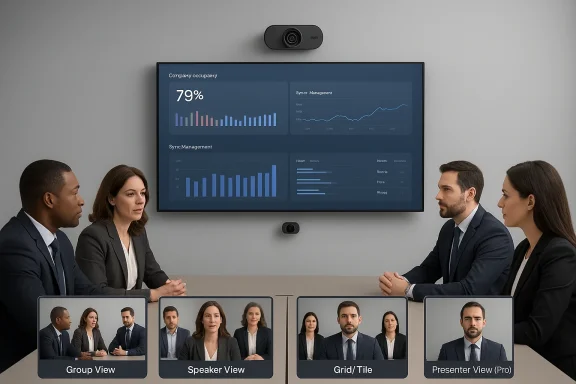
Logitech’s latest move pushes AI deeper into the meeting room: the company today unveiled two new flagship conference cameras — the Rally AI Camera and the Rally AI Camera Pro — that pack a 1‑inch imaging sensor, a wide 115° field of view, on‑device “RightSight 2” framing intelligence, and a Pro model that adds a second optical camera with 15x hybrid zoom, targeting large boardrooms, classrooms and town‑hall spaces with a focus on manageability and real‑world IT deployments.
The shift to hybrid work has kept enterprise buyers, facilities teams and AV integrators busy altering room configurations, buying better microphones and investing in cameras that do more than simply stream video. Logitech’s stra— into existing peripherals rather than chase standalone “AI gadgets” — is well documented and shapes how the company positions the Rally AI family as practical, deployable tools for hybrid meetings rather than experimental consumer toys.
Logitech frames the Rally AI Cameras as part of that continuity: incremental, software‑enabled intelligence added to proven hardware categories. The headline capabilities are cinematic framing, multi‑camera orchestration for platform features like Zoom Intelligent Director and Microsoft Teams’ multi‑camera view, and operational telemetry for facilities and IT teams via Logitech Sync. Those are the building blocks enterprises expect now: better remote experience for attendees, fewer on‑site configuration headaches, and the ability to measure room usage to inform real estate decisions.
Caveat: RightSight 2 is a decision system. As with any automated shot selection, the UX depends heavily on tuning: too many cuts, overly aggressive zooms, or poor speaker attribution (for example when two people overlap speech) will frustrate users. Logitech provides admin controls and the multi‑camera options to tune behaviour, but real‑world success depends on site testing and configuration.
Muse, in particular, shows Logitech’s move into adjacent spatial accessory markets: a 6‑DoF stylus with haptics and low latency sold as a complement to Apple’s Vision Pro rather than a competitor to an Apple system. The Signature Slim Solar+ K980 continues the sustainability and productivity story with an AI Launch key mapped to Copilot, Gemini or ChatGPT shortcuts. Theseul context for Rally AI: Logitech is pursuing a consistent, cross‑product thesis of incremental AI augmentation and managed enterprise distribution. ([logitech.com]— what Logitech got right
Industry press and reviewers have taken note: trade outlets report the pricing and positioning as competitive for large rooms and generally favorable toward the product’s imaging and integration choices, while advising careful pilot testing for the AI director features.
Where the product’s success will be decided is in the field: how well RightSight 2 handles diverse room acoustics, lighting and overlapping talkers; whether people‑counting and Sync telemetry deliver accurate, actionable signals for workplace planning; and how readily organizations can integrate these cameras into existing AV estates without ballooning TCO. If Logitech’s automation reduces manual camera work and measurably improves remote attendee experience — while meeting legal and privacy constraints — the Rally AI family will be a clear win for hybrid meeting quality.
However, buyers should treat promised downstream outcomes (like reduced real estate spend) as conditional benefits that require disciplined measurement. The technology is mature enough to be useful, but success requires governance, careful tuning and realistic expectations about what automated framing can and cannot do today.
Source: The Globe and Mail Logitech Upgrades Hybrid Meeting Experience With Rally AI Cameras
 Background
The shift to hybrid work has kept enterprise buyers, facilities teams and AV integrators busy altering room configurations, buying better microphones and investing in cameras that do more than simply stream video. Logitech’s stra— into existing peripherals rather than chase standalone “AI gadgets” — is well documented and shapes how the company positions the Rally AI family as practical, deployable tools for hybrid meetings rather than experimental consumer toys.Logitech frames the Rally AI Cameras as part of that continuity: incremental, software‑enabled intelligence added to proven hardware categories. The headline capabilities are cinematic framing, multi‑camera orchestration for platform features like Zoom Intelligent Director and Microsoft Teams’ multi‑camera view, and operational telemetry for facilities and IT teams via Logitech Sync. Those are the building blocks enterprises expect now: better remote experience for attendees, fewer on‑site configuration headaches, and the ability to measure room usage to inform real estate decisions.
What Logitech announced — the features spelled out
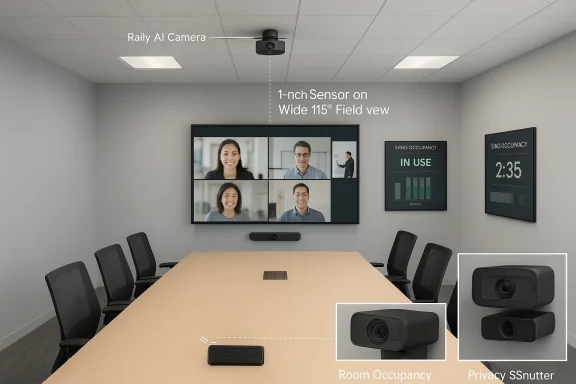
Both the Rally AI Camera and Rally AI Camera Pro share a number of base design decisions that matter for image quality and room coverage:- 1‑inch imaging sensor and custom optics designed for improved low‑light performance and high dynamic range.
- 115° diagonal field of view, intended to capture wide room configurations without extreme distortion.
- RightSight 2 AI framing: an evolution of Logitech’s framing tools that can adaptively switch between group, speaker, and grid compositions using filmmaking‑inspired shot selection logic.
- Flexible mounting: ceiling, TV/display, wall, and — notably — Logitech’s first in‑wall mounting option for a “nearly invisible” aesthetic and an automatic shutter to communicate privacy.
- Rally AI Camera Pro: dual‑camera architecture with a secondary optical camera delivering 15x hybrid zoom, hardware preset buttons for repeatable positions, and a Presenter View mode that keeps a moving presenter framed centrally even across large spaces. The Pro is pitched at lecture halls, auditoriums and large boardrooms where detail capture — whiteboard text, presenter gestures, or product demos — matters.
- RightSight 2 performs real‑time shot composition to frame either the whole group, the active speaker, or multiple people in tiled/grid layouts. That framing is usable in single‑camera setups and in multi‑camera configurations that feed platform features like Zoom Intelligent Director and Teams multiple camera views.
- Logitech Sync integration: cameras report occupancy and usage telemetry to Sync so workplace teams can see when rooms are used and automatically release ghost reservations — a capability Logitech explicitly markets as a tool to help reduce wasted real estate costs.
- Flexible connectivity: plug‑and‑play USB for short runs or a single Category cable via an optional Extension Kit for longer runs; the extension kit simplifies wiring in complex rooms.
RightSight 2: what it does, and why it matters
RightSight 2 is the headline AI capability for these devices. Logitech describes it as an intelligent director that adapts shot composition in real time using techniques inspired by moviemaking — switching perspective, selecting speaker close‑ups, arranging grid views when multiple active participants are present, and supporting multi‑camerFor organizations, the practical benefits promised are:- More equitable framing so remote participants see who’s in the room, not just the table edge.
- Automatic focus on speakers that reduces manual camera panning/tilting and the need for a dedicated operator.
- Multi‑camera orchestration that enables richer views across platforms that support director features.
Caveat: RightSight 2 is a decision system. As with any automated shot selection, the UX depends heavily on tuning: too many cuts, overly aggressive zooms, or poor speaker attribution (for example when two people overlap speech) will frustrate users. Logitech provides admin controls and the multi‑camera options to tune behaviour, but real‑world success depends on site testing and configuration.
Installation, manageability and the IT story
Logitech is selling these cameras as enterprise‑ready devices rather than one‑off consumer webcams. That positioning shows in three practical design choices:- Simple cabling options: USB for short runs and a single Cat cable through an Extension Kit for longer or concealed installations, which reduces field wiring complexity and the number of physical endpoints for IT to manage.
- Integrated telemetry: people‑counting and room usage metrics feed into Logitech Sync, offering facility teams a data feed to measure room utilization and automate reservation logic (release empty rooms). Logitech explicitly links this capability to potential real estate savings in its press materials — a plausible outcome but one that requires measurement and careful privacy handling.
- Fleet management and updates: Sync also centralizes firmware updates, troubleshooting and remote configuration, which is key for organizations that deploy cameras across hundreds of rooms. The promise of remote management lowers operational overhead and reduces truck rolls.
How the Rally AI family fits into Logitech’s broader product rhythm
Logitech has repeatedly emphasized an “AI‑inside” approach: rather than launch standalone AI wearables that require entirely new ecosystems, the company has added AI features to mice, keyboards and video devices to improve daily workflows. Recent product examples include the Muse digital pencil for Apple Vision Pro (launched October 2025) and the Signature Slim Solar+ K980 keyboard with LightCharge solar power and an AI Launch key. Both of those products reinforce Logitech’s strategy: make existing form factors smarter and more connected instead of betting the company on a new gadget category.Muse, in particular, shows Logitech’s move into adjacent spatial accessory markets: a 6‑DoF stylus with haptics and low latency sold as a complement to Apple’s Vision Pro rather than a competitor to an Apple system. The Signature Slim Solar+ K980 continues the sustainability and productivity story with an AI Launch key mapped to Copilot, Gemini or ChatGPT shortcuts. Theseul context for Rally AI: Logitech is pursuing a consistent, cross‑product thesis of incremental AI augmentation and managed enterprise distribution. ([logitech.com]— what Logitech got right
- Sensor and optics that matter: a 1‑inch sensor is a significant step up from typical small webcams and should deliver better low‑light performance and dynamic range for large spaces. Verified tech specs on Logitech’s productgrade imaging choices that support 4K capture modes and multiple resolution options.
- Designed for multi‑camera workflows: by supporting platform director tools and Teams’ multi‑camera view, Lodern hybrid experiences are produced from more than one angle. This makes integration with professional AV installations and production workflows easier.
- Operational tooling for IT and facilities: built‑in people detection feeding Sync is a pragmatic feature that transforms cameras into sensors for the workplace — useful for occupancy analytics and automations that reduce wasted room bookings. The manageability story is credible and lowers long‑term support overhead.
- Aesthetic and install flexibility: in‑wall mounting and subtle finishes reduce the visual footprint in executive boardrooms and event spaces, whichnt requirement for facilities that value design.
- Clear pricing and channel plan: Logitech published MSRP and seasonal availability windows, which helps procurement teams budget and plan pilots. The sub‑$3K positioning for large‑room cameras is competitive relative to full AV installs. (news.logitech.com
Risks and important caveats
- Privacy and governance: any camera that detects people and reports occupancy raises privacy, regulatory and employee‑trust questions. While edge processing reduces cloud exposure compared with cloud‑only camera directors, raw video and associated metadata still have to be governed with clear retention policies, consent notices and legal review. Logitech’s Sync telemetry is useful, but organizations must pair it with policy.
- UX friction from automated editing: automated shot switching and framing are only helpful when they produce stable, predictable outputs. If RightSight 2 is too aggressive or misattributes speakers, remote participants may be distracted or confused. Tunols are essential.
- Vendor lock‑in and portability: camera metadata and “organisational memories” generated by Teams Copilot or other agents may be hard to port if you change platforms. Buyers should ask how metadata, logs and agent outputs can be exported or migrated.
- Cost of a multi‑camera deployment: the per‑unit price is a headline, but a full multi‑camera installation includes mounts, cabling, audio integration, and AV engineering time. Total cost of ownership (TCO) modelling should include installation, firmware maintenance windows and possible cloud subscription costs for agent features.
- Bias and accessibility: automated detection and framing systems must be validated across diverse demographics and room scenarios to avoid biased shot selection or misdetection. Procurement teams should request vendor evidence of inclusive testing and accessibility evaluations.
- Overstated savings claims: Logitech’s suggestion that Sync data will reduce real estate costs is reasonable but conditional. Savings depend on organizational behaviour, policy changes, and the validity of occupancy measurements. Treat vendor ROI claims as hypotheses to be proven in pilots.
A buyer’s checklist — practical recommendations for IT and AV teams
- Start small: pilot the Rally AI Camera Pro in one or two large rooms where you can measure remote engagement, shot accuracy, and meeting participant satisfaction before scaling.
- Validate audio integration: test the camera with your existing audio systems (Rally Plus, pro audio codecs) to ensure lip‑sync and speaker attribution remain accurate.
- Create a privacy playbook: define retention, access controls, and signage for rooms with occupancy detection. Ensure legal and HR signoffs before enabling occupancy automations.
- Test multi‑camera flows: if you plan to use multiple cameras, test the full stack with Zoom Intelligent Director and Teams multi‑camera views in live meetings, not just lab demos.
- Plan for TCO: include mounts, wiring, extension kits, AV commissioning time, and firmware maintenance windows in procurement calculations.
- Measure and iterate: collect metrics — meeting lengths, camera switching incidents, remote participant feedback, room occupancy accuracy — and iterate configurations accordingly.
- Ask for interoperability and export guarantees: require documentation on how camera metadata and any agent outputs are stored and what export options exist if you change vendors.
Competitive landscape and industry context
Logitech’s Rally AI Cameras sit in a crowded but evolving category of intelligent collaboration hardware. Huddly, Poly, Microsoft’s Surface Hub camera ecosystem and a range of AV integrators have been shipping on‑device director systems and multi‑camera solutions — often focused on high‑end AV deployments with on‑prem inference to reduce latency and preserve privacy. Huddly’s Crew, for example, has emphasized distributed cameras that share metadata to make live editing decisions locally; that architecture highlights the tradeoffs between cloud orchestration and edge processing. Logitech’s entry differentiates on imaging hardware, a compact aesthetic (in‑wall mount) and the manageability story via Sync.Industry press and reviewers have taken note: trade outlets report the pricing and positioning as competitive for large rooms and generally favorable toward the product’s imaging and integration choices, while advising careful pilot testing for the AI director features.
Final analysis: what this means for hybrid meeting tech
Logitech’s Rally AI Cameras are a pragmatic, well‑engineered step in the direction many enterprises have asked for: higher‑quality optics, robust on‑device framing intelligence, multi‑camera orchestration and tools that make large room deployments easier to manage. The company’s product cadence — adding AI features into keyboards, mice and webcams rather than betting on singular new hardware categories — makes these launches credible and operationally sensible for procurement teams with real budgets and governance needs.Where the product’s success will be decided is in the field: how well RightSight 2 handles diverse room acoustics, lighting and overlapping talkers; whether people‑counting and Sync telemetry deliver accurate, actionable signals for workplace planning; and how readily organizations can integrate these cameras into existing AV estates without ballooning TCO. If Logitech’s automation reduces manual camera work and measurably improves remote attendee experience — while meeting legal and privacy constraints — the Rally AI family will be a clear win for hybrid meeting quality.
However, buyers should treat promised downstream outcomes (like reduced real estate spend) as conditional benefits that require disciplined measurement. The technology is mature enough to be useful, but success requires governance, careful tuning and realistic expectations about what automated framing can and cannot do today.
Bottom line
For enterprises that need higher‑fidelity video capture in large rooms, Logitech’s Rally AI Camera and Rally AI Camera Pro deliver credible advances: stronger sensors, cinematic framing logic, multi‑camera support and manageability that IT and facilities teams will appreciate. The pricing sits in a practical range for serious AV deployments, and the roadmap coherence — seen in adjacent launches like Muse and the Signature Slim Solar+ K980 — signals a sustained investment in smart peripherals rather than speculative gadgetry. That combination makes Logitech’s new cameras practical purchases for organizations ready to pilot modern, AI‑assisted hybrid meeting rooms — provided those organizations commit the governance, pilot design and integration testing the tech requires.Source: The Globe and Mail Logitech Upgrades Hybrid Meeting Experience With Rally AI Cameras