

If you’ve ever switched from a Mac back to a Windows PC and felt the text looked a little harsh, heavy, or “pixel‑snapped,” you’re not imagining things — and that nagging difference is exactly what the open‑source project MacType aims to fix, now with a 2025 set of releases that bring variable‑font support, improved loaders, and digitally signed installers that make it easier and safer to run on modern Windows 11 systems.
Windows’ native approach to on‑screen text has historically favoured hinting — snapping glyph outlines to the pixel grid so edges remain crisp at small sizes. That strategy made practical sense in an era of low‑DPI displays, but it can create a rigid appearance on modern high‑DPI screens where preserving the shape of the letter often reads better than enforcing pixel‑perfect edges. Microsoft’s DirectWrite and ClearType systems still expose subpixel rendering and hinting controls, but they operate inside that same design philosophy.
Apple’s text engine leans in the opposite direction: favoring the glyph’s intended geometry and smoothing where necessary to produce a more print‑like result, especially on high‑density panels. The human eye notices that difference quickly, particularly when switching back and forth between platforms or reading small, dense text for extended periods. This perceptual gap is the exact problem MacType aims to narrow — by replacing Windows’ rasteriser with a FreeType‑based renderer that emphasises glyph shape and adaptive anti‑aliasing.
Key technical points:
Profiles and tuning options include:
However, adoption is limited by a few structural barriers:
That doesn’t mean MacType is a zero‑risk, one‑click fix. Compatibility edge cases with browsers, anti‑cheat systems, and enterprise tooling mean a cautious rollout is still wise. But for anyone who reads long documents, works with CJK scripts, or owns an OLED monitor and can tolerate a bit of configuration, MacType represents a step change in how Windows text can look — and for many, the day‑to‑day difference is simply worth the setup time.
Source: MakeUseOf This open-source tool finally fixes Windows 11's worst font problem
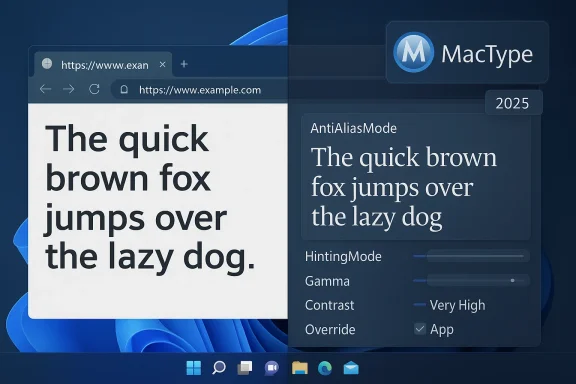 Background: why Windows text looks the way it does
Windows’ native approach to on‑screen text has historically favoured hinting — snapping glyph outlines to the pixel grid so edges remain crisp at small sizes. That strategy made practical sense in an era of low‑DPI displays, but it can create a rigid appearance on modern high‑DPI screens where preserving the shape of the letter often reads better than enforcing pixel‑perfect edges. Microsoft’s DirectWrite and ClearType systems still expose subpixel rendering and hinting controls, but they operate inside that same design philosophy.Apple’s text engine leans in the opposite direction: favoring the glyph’s intended geometry and smoothing where necessary to produce a more print‑like result, especially on high‑density panels. The human eye notices that difference quickly, particularly when switching back and forth between platforms or reading small, dense text for extended periods. This perceptual gap is the exact problem MacType aims to narrow — by replacing Windows’ rasteriser with a FreeType‑based renderer that emphasises glyph shape and adaptive anti‑aliasing.
What MacType is and how it works
MacType is an open‑source font‑rendering replacement that hooks into Windows’ text drawing APIs — GDI, GDI+, and DirectWrite — and supplies its own rendering pipeline based on FreeType and configurable parameters. Instead of applying a blanket filter, MacType intercepts font rendering at the API layer so most Win32 applications and many system UI elements can get a fresh rasteriser without per‑app changes. The project has been actively maintained and updated to support modern Windows builds and new font features.Key technical points:
- MacType replaces the system’s rasteriser for applications that draw text via GDI/GDI+/DirectWrite, effectively substituting FreeType as the glyph rasteriser.
- It’s configurable: profiles control hinting strength, anti‑aliasing mode, gamma, contrast, and other parameters so users can tune rendering to taste or display type.
- The engine can be deployed in several running modes (tray app, service, manual injection), letting you balance compatibility, privilege, and how much of the system you want altered.
What changed in 2025 and why it matters
The MacType maintainers pushed a series of meaningful updates in 2025 that directly addressed two long‑standing pain points: better support for modern fonts (including variable fonts) and more robust loaders with improved compatibility and digital signing.- Variable font support arrived as a dedicated release in April 2025, enabling modern variable OpenType fonts (for example, Noto Sans and the Microsoft variable system fonts) to render properly in GDI applications that previously either ignored axes or produced inconsistent results. That’s a notable step because Windows’ own handling of variable fonts in GDI‑based contexts remains inconsistent.
- In mid‑2025 the project released version 1.2025.6.9 (titled “IFEO Support”) which improved the loader/child‑process behaviour and compatibility across 32‑ and 64‑bit processes — important for stability when MacType hooks child processes or injects DLLs into launched applications. That release also marked the project’s continued attention to edge cases and ecosystem stability.
- Earlier in 2025 the project had begun shipping digitally signed installers and files, which alleviates a major practical barrier: antivirus and endpoint tools commonly flag DLL‑injection style behaviour as suspicious. The maintainers credited a donor and confirmed the signing process in release notes; signed assets reduce false positives and make deployment in managed environments less fraught.
Installation modes: how MacType integrates with Windows
During setup the MacType installer offers a few distinct ways to run, each with tradeoffs around coverage and system integration. Understanding those tradeoffs is essential before you install.- System Tray (recommended for most users): MacType runs as a tray application and starts with Windows. It’s the least intrusive and easiest to manage — you get quick access to profiles, an enable/disable toggle, and per‑app exclusion lists. Running with elevated privileges improves hooking into administrator‑level apps.
- Run as a Service: This mode gives broad coverage without requiring registry hacks, and it avoids some anti‑malware false positives because services run under the Service Control Manager. A few system UI elements may remain untouched in Service Mode, but the user‑visible apps you care about will typically be affected.
- Manual Injection / Launch Manually: Useful for selective testing, you can drag an executable onto a loader (MacLoader64.exe) to inject MacType for that process only. This is the least risky option for troubleshooting or for users who only want MacType applied to specific apps.
What you can tune — the MacType Tuner and profiles
MacType arrives with a profile gallery and a Tuner utility that lets you dial rendering parameters precisely. The common controls are designed for people who want the Mac‑like look without experimenting at the pixel level.Profiles and tuning options include:
- AntiAliasMode and HintingMode: select the anti‑aliasing method and the strength of autohinting or font hinting.
- Gamma and Contrast: adjust tonal response to make strokes feel lighter or darker without altering the font file.
- Font weight mapping and “BoldWeight”: compensate for fonts that have inconsistent weight metadata.
- Per‑application overrides: apply a softer profile to your browser and a crisper one to your code editor—useful because the ideal rendering for long prose is different from programming text.
Readability benefits: what you’ll notice day to day
Switching to MacType can produce subtle but cumulatively significant improvements:- Letters feel less “stuck to the grid” and more like continuous shapes, which reduces reading fatigue for long documents or code sessions.
- Non‑Latin scripts — especially CJK (Chinese, Japanese, Korean) — often look cleaner because FreeType’s approach to stroke anti‑aliasing can preserve fine strokes better than aggressive grid hinting. That’s not universal, but many users report sharper CJK rendering after switching.
- On OLED panels (especially PenTile/QD‑OLED), profiles tuned for matrix patterns reduce perceived fringing and weight inconsistency, which can be a major quality‑of‑life improvement. Several contributors worked on QD‑OLED profile integration.
Compatibility, risks, and caveats
MacType’s low‑level integration is its strength and also its primary risk vector. Replacing the rasteriser and injecting into processes means:- Not every app will be affected. Some modern apps (or apps that use GPU‑accelerated, sandboxed, or custom text renderers) won’t accept MacType’s hooks. The project lists common conflicts such as Google Chrome, certain Java apps, and WPS Office.
- Anti‑cheat and kernel‑level protections: Some games and protected apps refuse to launch if they detect DLL injection or a modified process image. In practice you can avoid this by using Service Mode, Manual Mode, or excluding games, but MacType can cause false positives or launch failures in environments with strict integrity checks. Community reports and discussions show mixed outcomes depending on the application and the deployment mode.
- Security/antivirus: Historically, DLL injection patterns look suspicious to endpoint protection. The project mitigated this by shipping signed installers and noting Service Mode as a less suspicious integration surface, but managed corporate environments should still review the code and signing details before rolling MacType broadly.
- System updates: Any tool that hooks into system APIs is sensitive to Windows updates. The maintainers have been responsive in 2025, but you should keep your MacType installation up to date and back up custom profiles before upgrading. The project explicitly warns users to back up profiles.
Step‑by‑step: how to try MacType safely
- Back up important work and create a system restore point. This gives you a quick recovery path if an incompatibility crops up.
- Download the latest signed installer from the official repository and check the release notes for the recommended mode. The project’s 2025 releases include signed assets to reduce AV false positives.
- Choose Tray Mode for initial testing, enable “Run with elevated privileges” if prompted, and pick a gentle profile like Clean Light or Clean Dark. This gives broad coverage without registry hacks.
- Test your commonly used apps (browser, code editor, Office suite). If something breaks, use the tray icon to toggle MacType off or exclude that app. If your games or security‑sensitive apps fail to launch, switch those to exclusion or try Service Mode.
- If you want advanced adjustments, open MacType Tuner and experiment with HintingMode, Gamma, Contrast, and AntiAliasMode. Save profile copies so you can revert quickly.
Critical analysis: strengths, adoption barriers, and future outlook
MacType’s strengths are technical and experiential. Technically, replacing the rasteriser with a FreeType‑backed engine and exposing fine‑grained tuning parameters addresses precisely the mismatch between modern font design and Windows’ long‑standing hinting bias. Experientially, it brings a consistently softer, more print‑like rendering that many users prefer for long reading sessions and multilingual work. The 2025 additions — variable font support and better loaders — demonstrate active maintenance and responsiveness to modern font technology.However, adoption is limited by a few structural barriers:
- Ecosystem friction: Because MacType uses process‑level hooking and DLL injection patterns, it collides with anti‑cheat systems, enterprise endpoint protection, and apps that intentionally harden process images. Those are not trivial barriers in corporate or gaming contexts.
- Complexity of optimal setup: Getting the “best” rendering can require profile selection, per‑app tuning, and careful gamma/contrast adjustments. Casual users may find the initial learning curve steeper than toggling ClearType. Curated profiles and community guides help, but there’s still a hands‑on element.
- Incomplete coverage: Some system UI elements and modern GPU‑accelerated apps escape MacType’s reach. That’s a functional limit of any approach that intercepts the traditional text APIs rather than controlling the entire compositor pipeline.
Practical recommendations
- Try it on a secondary machine or create a system restore point first. The tangible payoff is high for many users, but the integration model carries non‑zero risk.
- Start with Tray Mode and a gentle profile; use per‑app exclusions to resolve compatibility issues quickly.
- If you use a managed corporate device, consult your security/IT team: while the installer is now signed, enterprise policies vary and some endpoint platforms may still block injection behaviour.
- For OLED owners: test QD/OLED tuned profiles and compare them against ClearType alone — many users report visible improvements in fringing and stroke consistency.
Conclusion
MacType is the most mature, actively maintained open‑source solution for people frustrated by Windows 11’s native font rendering philosophy. By replacing the rasteriser used by GDI/GDI+/DirectWrite with a FreeType‑based engine and offering precise tuning via profiles and a Tuner UI, MacType delivers a more natural, print‑like reading experience — and its 2025 releases meaningful lowered two of the largest practical barriers: variable font compatibility and signed installers that reduce AV friction.That doesn’t mean MacType is a zero‑risk, one‑click fix. Compatibility edge cases with browsers, anti‑cheat systems, and enterprise tooling mean a cautious rollout is still wise. But for anyone who reads long documents, works with CJK scripts, or owns an OLED monitor and can tolerate a bit of configuration, MacType represents a step change in how Windows text can look — and for many, the day‑to‑day difference is simply worth the setup time.
Source: MakeUseOf This open-source tool finally fixes Windows 11's worst font problem
