

G‑STAR’s move to embed an AI assistant directly inside Microsoft Teams is a practical, culture-first example of how retailers can turn routine IT friction into a long‑term productivity platform—and a useful case study in designing enterprise AI that tries to be a colleague, not a gimmick.
G‑STAR, the Netherlands‑based denim and apparel brand known for design and sustainability, confronted an operational friction point that’s common but often underestimated: a high volume of routine IT requests across retail and corporate teams. Facing unclear, multilingual queries that consumed IT time and slowed employees, G‑STAR partnered with CloudNation and Microsoft to build Maia—an AI assistant running in the company’s own Azure tenant, powered by Azure OpenAI and Microsoft Foundry models, and surfaced inside Microsoft Teams, SharePoint, and the existing ticketing system.
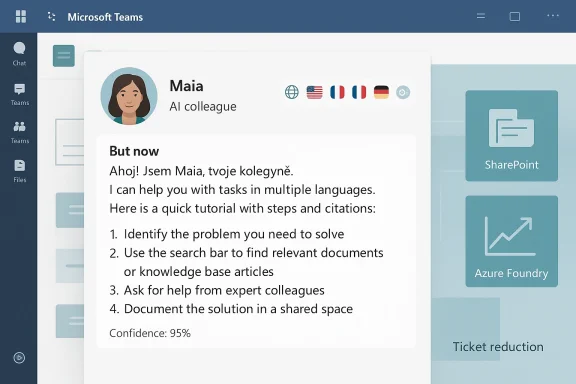
From the outset the project framed the assistant as a digital colleague rather than a chatbot. Maia was designed to answer common IT questions, guide employees through processes and tutorials, and act as a single entry point for company knowledge—supporting six languages, operating 24/7, and aiming for concrete performance targets such as reducing IT ticket volume by up to 40% and lifting resolution accuracy from roughly 60% toward 85% within a defined timeframe.
This article summarizes the implementation, verifies the platform choices and technical building blocks, and offers a critical analysis of the strengths, measurable benefits, and risks that IT leaders should weigh when deploying similar LLM‑based assistants inside Teams.
The strengths are clear: targeted problem selection, tenant control, partner expertise, multilingual support, and a cultural adoption program. Those choices increase the chance of achieving measurable ticket reduction and better employee self‑service.
At the same time, firms should treat the project as a long‑term program rather than a one‑off deployment. The main challenges—hallucination risk, privacy and compliance, ongoing model maintenance, and cost control—are solvable, but they require disciplined governance, human‑in‑the‑loop workflows, and continuous monitoring.
For IT leaders contemplating a similar path, the pragmatic playbook is straightforward: start narrow, prove impact with measurable KPIs, bake in provenance and audits, and scale only after governance and user training are mature. Do that, and an assistant like Maia can move from being an experiment to becoming a durable part of the employee experience—helping teams spend less time on repetitive tasks and more time on the creative, strategic work that defines a brand.
Source: Microsoft G‑STAR transforms workplace support with an AI assistant integrated in Microsoft Teams | Microsoft Customer Stories
 Background / Overview
G‑STAR, the Netherlands‑based denim and apparel brand known for design and sustainability, confronted an operational friction point that’s common but often underestimated: a high volume of routine IT requests across retail and corporate teams. Facing unclear, multilingual queries that consumed IT time and slowed employees, G‑STAR partnered with CloudNation and Microsoft to build Maia—an AI assistant running in the company’s own Azure tenant, powered by Azure OpenAI and Microsoft Foundry models, and surfaced inside Microsoft Teams, SharePoint, and the existing ticketing system.From the outset the project framed the assistant as a digital colleague rather than a chatbot. Maia was designed to answer common IT questions, guide employees through processes and tutorials, and act as a single entry point for company knowledge—supporting six languages, operating 24/7, and aiming for concrete performance targets such as reducing IT ticket volume by up to 40% and lifting resolution accuracy from roughly 60% toward 85% within a defined timeframe.
This article summarizes the implementation, verifies the platform choices and technical building blocks, and offers a critical analysis of the strengths, measurable benefits, and risks that IT leaders should weigh when deploying similar LLM‑based assistants inside Teams.
Why G‑STAR chose an assistant in Teams
G‑STAR’s design decision—embedding Maia inside Microsoft Teams rather than deploying a standalone website or external app—reflects several practical advantages:- Familiar interface: Teams is already the primary collaboration hub for many businesses. Placing Maia where employees work reduces adoption friction.
- Unified identity and permissions: Leveraging Microsoft 365 SSO, Graph APIs, and tenant controls keeps access and data governance consolidated under existing corporate policies.
- Integration surface: Teams supports bots, messaging extensions, tabs, and connectors—enabling direct hooks to SharePoint content, ticketing systems, and HR data without forcing employees into new workflows.
- Security posture: Running in G‑STAR’s Azure tenant and using enterprise Azure services preserves data ownership and simplifies compliance controls compared with third‑party SaaS agents.
The technical stack and architecture (verified)
G‑STAR’s publicly documented architecture centers on three verified elements:- Azure OpenAI (in Microsoft Foundry): Maia uses Azure OpenAI models accessed through Microsoft Foundry tooling to deliver language understanding, generation, and reasoning capabilities. Foundry provides a model and agent framework designed for enterprise deployment, including model choice, fine‑tuning paths, and responsible AI features.
- Microsoft Foundry tooling / models: Foundry supplies the integration patterns to host foundational and reasoning models securely in Azure, plus management and observability features that enterprises need to govern generative AI at scale.
- Microsoft Teams + SharePoint + ticketing integration: Maia is surfaced inside Teams and connects to SharePoint document stores and the existing ticket system so responses can include precise, permission‑aware information and be linked to formal IT workflows.
What Maia does today (features and user experience)
G‑STAR’s initial roll‑out focused on IT and retail operations and delivered a set of practical, measurable capabilities:- 24/7 multilingual self‑service: Maia supports six languages to reflect G‑STAR’s global footprint, addressing the core operational pain of language variability in support requests.
- Answers and how‑tos: Maia provides step‑by‑step tutorials, policy explanations, and quick troubleshooting guidance to reduce routine ticket volume.
- Ticket triage and escalation: Maia can route unresolved or high‑confidence errors into the company ticket system or escalate to IT staff as needed.
- Knowledge hub and search: By indexing SharePoint and other internal content, Maia acts as a single entry point for policy documents, asset libraries, and HR procedures.
- Persona and adoption design: G‑STAR invested in persona, tone, and a visual identity for Maia to avoid the “cold chatbot” feeling—helping adoption and trust.
Measurable goals and early KPI targets
G‑STAR’s internal targets are sensible and concrete, illustrating how to measure an AI assistant project:- Reduce routine IT ticket volume by up to 40% (early projection).
- Scale from an initial 200 active users toward 500 active users.
- Maintain engagement rates near 80% for active user sessions.
- Move resolution accuracy from around 60% to 85% within six months.
Strengths: what G‑STAR got right
- Tenant ownership and data control
- Building Maia inside G‑STAR’s Azure tenant keeps code, logs, and policies under the company’s control—critical for compliance and data residency.
- Surface the assistant where people work
- Embedding into Microsoft Teams reduces friction, increases visibility, and lets Maia participate in existing conversations and channels.
- Partner + vendor collaboration
- Involving CloudNation and Microsoft allowed access to implementation expertise and platform support while preserving local ownership.
- Multilingual support
- Native support for six languages addresses a frequent source of support friction in retail organizations.
- Measured rollout and adoption plan
- Starting with hard operational wins (IT and retail) before expanding to HR, finance, and legal reduces risk and demonstrates value.
- Persona and experience design
- Treating the assistant as a colleague through voice/tone and identity improves employee acceptance and reduces the “bot” stigma.
Risks and limitations: what can go wrong
- LLM hallucinations and factual accuracy
- Large language models can generate plausible but incorrect answers. If Maia synthesizes an inaccurate instruction (for example, a mis‑parsed IT step or an incorrect policy interpretation), employees may follow wrong guidance or file unnecessary escalations.
- Mitigation: Use retrieval provenance, cite the originating document, and attach confidence scores or “source links” so a human can verify.
- Data leakage and privacy
- Even inside a tenant, model prompts and interactions may include sensitive personal data. If logs or telemetry are mishandled, privacy obligations could be breached.
- Mitigation: Redact PII before sending contexts to models, limit telemetry retention, and use Azure governance controls and DLP policies.
- Cross‑jurisdiction compliance and data residency
- A global retail brand must track where model inference and storage occur. Processing outside a jurisdiction can create regulatory exposure.
- Mitigation: Configure the Azure region, review the model processing location, and apply EU/US data boundary controls as needed.
- Over‑reliance and deskilling
- Employees may stop learning procedures if they rely on Maia for every step. This can create problems when the assistant is offline or during edge cases.
- Mitigation: Use Maia to teach and link to formal training materials; incentivize understanding by routing complex cases to human champions.
- Operational cost and model drift
- LLM inference is not free. Running high‑quality models and storing embeddings for RAG patterns can incur recurring costs. Models also drift as business data changes, requiring re‑tuning and retraining.
- Mitigation: Monitor cost, use model selection strategies (smaller models for low‑risk tasks), and schedule re‑indexing and fine‑tuning cycles.
- Governance and auditability
- Without robust logging and human oversight, it’s hard to audit decisions made by an assistant or to demonstrate compliance.
- Mitigation: Keep auditable logs of prompts, retrieved documents, model responses, and escalation events; implement change control for knowledge sources.
Best practices — how to design a Teams‑native AI assistant (step‑by‑step)
- Define narrow, high‑value scopes first
- Start with clearly scoped tasks (e.g., password resets, device troubleshooting, scheduling) that are high‑volume and low‑risk.
- Choose the right model and hosting
- Use Azure OpenAI / Foundry models for centralized management and enterprise features. Consider smaller models for low‑risk tasks to lower cost and reduce latency.
- Build retrieval‑first: RAG over blind generation
- Index SharePoint, OneDrive, and ticketing knowledge into a searchable vector store. Always retrieve relevant documents and append those citations to responses.
- Enforce identity and permission checks
- Use Microsoft Graph to validate user permissions before returning or summarizing sensitive documents.
- Design for provenance
- Return the original document snippets and links (or references) and show a clear “confidence” indicator for generated answers.
- Human‑in‑the‑loop escalation
- When confidence is low or a request touches sensitive workflow, escalate to a human agent. Define SLAs for human follow‑up.
- Continuous monitoring and feedback loops
- Instrument conversation logs (with appropriate redaction) to measure accuracy, user satisfaction, and escalation rates. Use that data to tune prompts and retrain retrieval models.
- Privacy, retention, and DLP
- Apply enterprise DLP policies, redact PII before indexing, and define retention periods for logs and embeddings.
- Pilot, measure, iterate
- Run a controlled pilot, measure ticket reduction, time to resolution, and user satisfaction, then expand incrementally.
- Communicate and train users
- Provide onboarding, explain limitations, and publish clear guidance on when to rely on Maia and when to contact IT.
Governance checklist for IT and security teams
- Data Residency: Confirm model processing and storage locations are compliant with local regulations.
- Tenant Controls: Ensure the assistant is deployed in the corporate tenant with proper Azure AD service principals and least privilege.
- Content Approval: Implement an approval flow for knowledge sources to prevent outdated or incorrect materials from being returned.
- Logging & Auditing: Capture prompts, retrieval sources, and final responses in tamper‑evident logs for audit and compliance.
- Incident Response: Define procedures if Maia returns harmful, biased, or incorrect guidance.
- Model Safety: Apply content filters and the Azure Foundry / Responsible AI toolchain for safety checks.
- Cost Controls: Monitor inference and storage costs with budgets and alerts.
How to reduce hallucinations and improve answer quality
- Use RAG with vector search to ground responses in authoritative documents instead of only relying on model priors.
- Return document snippets and citations so employees can verify answers independently.
- Add an explicit "I might be wrong" pattern and provide a simple button to escalate to human support.
- Use fine‑tuning and instruction tuning to codify preferred answer formats and corporate tone.
- Implement a confidence threshold: if the model’s confidence is below a configured level, don’t attempt an authoritative answer—offer options or escalate.
- Regularly refresh indexes and retrain the retrieval pipeline as policies and procedures change.
Scalability and cost considerations
Maia’s ability to scale will depend on architecture choices:- Model selection: State‑of‑the‑art reasoning models cost more per token. Use them for complex reasoning tasks and cheaper models for simple FAQ responses.
- Caching and embeddings: Precompute embeddings for knowledge stores to reduce per‑query cost but account for reindexing overhead when content changes.
- Throttling and quotas: Implement per‑user and global quotas to control runaway costs during high usage.
- Operational overhead: Budget for engineering resources to maintain connectors, telemetry, and governance processes.
Cultural design: why persona matters
Choosing to humanize the assistant—giving Maia a name and a tone—matters for adoption. A friendly, consistent persona:- Lowers the barrier for use (employees feel comfortable asking questions).
- Signals that the assistant is a tool to augment work, not a surveillance or monitoring mechanism.
- Encourages employees to provide feedback, which improves the model and content quality.
What’s next for Maia — and similar assistants
G‑STAR’s roadmap includes sensible extensions that many organizations will mirror:- Voice interaction: Natural voice offers accessibility and a lower barrier in retail or back‑of‑store contexts.
- Specialized agents: Hiring and recruiting agents, reporting agents for analytics, and finance/expense agents that perform specific transactional tasks.
- Knowledge hub: Evolving Maia into a single point for cross‑departmental knowledge, booking, and transactional workflows.
- Improved observability: Tighter monitoring and model governance as the assistant’s remit grows.
Final assessment — realistic optimism
G‑STAR’s Maia is a well‑structured, measured implementation that demonstrates how a mid‑sized enterprise can leverage Azure OpenAI and Microsoft Foundry while preserving tenant ownership and integrating naturally into Microsoft Teams.The strengths are clear: targeted problem selection, tenant control, partner expertise, multilingual support, and a cultural adoption program. Those choices increase the chance of achieving measurable ticket reduction and better employee self‑service.
At the same time, firms should treat the project as a long‑term program rather than a one‑off deployment. The main challenges—hallucination risk, privacy and compliance, ongoing model maintenance, and cost control—are solvable, but they require disciplined governance, human‑in‑the‑loop workflows, and continuous monitoring.
For IT leaders contemplating a similar path, the pragmatic playbook is straightforward: start narrow, prove impact with measurable KPIs, bake in provenance and audits, and scale only after governance and user training are mature. Do that, and an assistant like Maia can move from being an experiment to becoming a durable part of the employee experience—helping teams spend less time on repetitive tasks and more time on the creative, strategic work that defines a brand.
Quick implementation checklist for IT teams (summary)
- Identify 3–5 high‑volume, low‑risk support tasks to automate.
- Choose Azure OpenAI / Foundry for managed model hosting and enterprise controls.
- Build a RAG pipeline that indexes SharePoint, OneDrive, and ticket data with proper permissions.
- Embed the assistant into Microsoft Teams as a bot/tab with SSO and Graph API checks.
- Implement redaction, DLP, and region‑appropriate data residency settings.
- Add provenance to every response and a human escalation path.
- Pilot with a small user group, measure ticket reduction and satisfaction, iterate.
- Expand functions and integrate transactional workflows only after governance is proven.
Source: Microsoft G‑STAR transforms workplace support with an AI assistant integrated in Microsoft Teams | Microsoft Customer Stories