

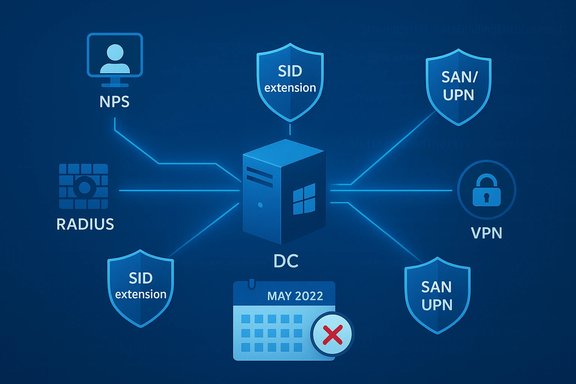
Microsoft pushed a set of emergency, out‑of‑band patches in May 2022 after a security hardening in the May 10 cumulative updates changed how domain controllers map client certificates to machine accounts — a change that briefly broke certificate‑based authentication for services such as Network Policy Server (NPS), RADIUS, Routing and Remote Access Service (RRAS), EAP and PEAP on affected domains.
The May 10, 2022 Patch Tuesday set included security hardenings that altered certificate‑to‑account mapping behavior on domain controllers. That change was intended to remove weak or ambiguous mapping methods in favor of strong mappings (for example, SID‑extension/ObjectSID and S4U‑based mappings), closing a potential impersonation vector — but in some real‑world environments it prevented legacy certificates from mapping successfully to machine accounts and therefore caused authentication failures. Microsoft acknowledged the regression and published technical guidance describing the scope and mitigation options. Within a week Microsoft issued out‑of‑band (OOB) fixes — eight separate KB packages covering Server 2022 back to Server 2008 SP2 — intended to restore expected authentication behavior for domain controllers and intermediary authentication servers (NPS, Radius proxies, CAs and web servers that forward certificates to DCs). Unlike routine cumulative updates, these OOB patches were published only to the Microsoft Update Catalog (and WSUS catalog import), not pushed via Windows Update automatically; admins had to download and deploy them manually.
Appendix — Quick reference: May 19, 2022 OOB KBs recommended for domain controllers (manual download via Microsoft Update Catalog)
Source: BetaNews Microsoft releases emergency patches for Windows authentication issues
 Background / Overview
The May 10, 2022 Patch Tuesday set included security hardenings that altered certificate‑to‑account mapping behavior on domain controllers. That change was intended to remove weak or ambiguous mapping methods in favor of strong mappings (for example, SID‑extension/ObjectSID and S4U‑based mappings), closing a potential impersonation vector — but in some real‑world environments it prevented legacy certificates from mapping successfully to machine accounts and therefore caused authentication failures. Microsoft acknowledged the regression and published technical guidance describing the scope and mitigation options. Within a week Microsoft issued out‑of‑band (OOB) fixes — eight separate KB packages covering Server 2022 back to Server 2008 SP2 — intended to restore expected authentication behavior for domain controllers and intermediary authentication servers (NPS, Radius proxies, CAs and web servers that forward certificates to DCs). Unlike routine cumulative updates, these OOB patches were published only to the Microsoft Update Catalog (and WSUS catalog import), not pushed via Windows Update automatically; admins had to download and deploy them manually. What went wrong: the certificate‑mapping hardening in plain terms
The intent: stronger, less ambiguous mappings
Historically Windows supported multiple certificate‑to‑account mapping methods: subject/issuer mapping, UPN mapping, and others that can be classified as weak. The May 2022 updates moved domain controllers toward strong mapping approaches to reduce impersonation risk — a defensible security objective. When a certificate lacks the metadata that strong mapping requires, authentication should either log a warning (during compatibility) or be denied (in full enforcement). Microsoft introduced a multi‑phase enforcement model so administrators could find and remediate incompatible certificates before long‑term enforcement.The practical failure: compatibility gap at scale
In real networks, many devices and intermediary systems (network controllers, RADIUS servers, certificate templates issued by older CAs) relied on weak mapping semantics. When the domain controller started enforcing the stricter mapping logic, some certificates could not be bound to machine accounts; those authentication flows then failed at the KDC or at intermediary authentication services. The observable symptoms included mass 802.1X Wi‑Fi failures, VPN authentication errors, NPS rejections and RADIUS denials. Rolling back the May 10 updates often restored service, but that left systems exposed to the vulnerabilities the updates fixed.Timeline and the patches that followed
- May 10, 2022: Microsoft published the May cumulative updates (the change that introduced the mapping enforcement behavior).
- May 12–16, 2022: Administrators and vendors reported authentication failures; Microsoft acknowledged an issue affecting domain controllers and started an investigation.
- May 19, 2022: Microsoft released out‑of‑band fixes for domain controllers and intermediary servers. These were distributed as individual KB packages (not via automatic Windows Update) and were posted on the Microsoft Update Catalog for manual download/import into WSUS or Configuration Manager. The principal OOB cumulative/standalone KBs included: KB5015013 (Windows Server 2022), KB5015020 (Windows Server version 20H2), KB5015018 (Windows Server 2019), KB5015019 (Windows Server 2016), KB5014986 (Windows Server 2012 R2), KB5014991 (Windows Server 2012), KB5014987 (Windows Server 2008 R2 SP1) and KB5014990 (Windows Server 2008 SP2). Microsoft advised installing the OOB fixes on all domain controllers and on intermediary application servers that forward client certificates.
Who was affected — and who was not
- Affected: Servers that are used as domain controllers, and intermediary authentication servers (NPS/RADIUS/CA/web servers that pass the client certificate to the DC for validation). These systems saw authentication failures when the May 10 updates were installed there.
- Not affected: Standalone client Windows devices and non‑domain‑controller Windows Servers generally were not expected to experience these certificate mapping authentication failures purely by having the May updates installed. The problem manifested only when the update altered behavior on a domain controller that performs the mapping.
The official mitigations and Microsoft’s recommendations
Microsoft prioritized a conservative, security‑forward remedy while minimizing operational disruption:- Preferred mitigation: manually map certificates to machine accounts in Active Directory where feasible. This ensures compatibility without weakening hardening.
- If manual mapping is impractical, Microsoft documented registry‑based mitigations and guidance under KB5014754 (Certificate‑based authentication changes on Windows domain controllers). These include registry toggles such as StrongCertificateBindingEnforcement and CertificateMappingMethods that control compatibility, enforcement mode, and which mapping methods Schannel will attempt. Microsoft explicitly warns these registry workarounds reduce security and should be temporary.
- OOB patches on May 19, 2022 restore the expected authentication behavior; Microsoft strongly recommended installing the out‑of‑band updates on all domain controllers and intermediary authentication servers and then removing any temporary workarounds (for example, resetting CertificateMappingMethods back to the hardened defaults).
Technical detail: registry keys and enforcement modes (what admins need to know)
The May hardening added telemetry and enforcement stages. Key settings and behavior include:- StrongCertificateBindingEnforcement (KDC): Controls the enforcement mode on domain controllers. Typical values:
- 0 = Disabled (not recommended)
- 1 = Compatibility mode (allow fallback, log warnings)
- 2 = Enforcement (deny when strong mapping cannot be established)
- CertificateMappingMethods (Schannel): A bitmask controlling which mapping methods Schannel tries; older defaults allowed multiple weak mappings (e.g., value 0x1F) while hardened defaults narrow the set. Temporarily restoring the old bitmask can be a stopgap but re‑enables weaker mapping methods.
Practical, prioritized remediation checklist for administrators
- Inventory domain controllers and intermediary authentication servers (NPS, RADIUS, CA, web proxies that forward client certificates). Prioritize those that process certificate authentication.
- Confirm update state:
- Determine whether the May 10, 2022 updates were installed on any domain controllers.
- Confirm whether the May 19, 2022 OOB fixes appropriate for each server SKU have been applied. These OOB packages are available in the Microsoft Update Catalog and must be imported to WSUS/ConfigMgr if you use those systems.
- If you used registry mitigations (CertificateMappingMethods = 0x1F or disabled enforcement), plan to remove them after the OOB patches are installed. Microsoft advised explicitly to remove temporary mitigations once the fixes are in place.
- For long‑term remediation, identify certificates that failed strong mapping and:
- Reissue certificates using templates that include SID extensions or proper SAN/UPN fields; or
- Configure explicit certificate‑to‑machine mappings in Active Directory where re‑issuance is infeasible.
- Test authentication paths end‑to‑end in a pilot environment (802.1X Wi‑Fi, VPN, RADIUS/NPS) before moving to full enforcement mode across production DCs. Use audit events introduced by the May updates to locate problematic certificates.
- Document and schedule a maintenance window to apply OOB KBs to domain controllers, then verify:
- Normal authentication flows are restored.
- Event logs no longer show "no strong mapping" entries for the same certificates.
- Any previously applied registry workarounds are reverted.
Deployment nuance: distribution channels, SSUs and compatibility
Because the May 19 fixes were published as OOB updates and combined servicing stack updates (SSUs/LCUs) for multiple SKUs, administrators must pay attention to prerequisites. Some KB pages require an SSU prerequisite or note that the LCU is combined with the SSU and cannot be uninstalled using wusa.exe. When importing packages into WSUS or deploying via Configuration Manager, ensure the correct SSU chain is present and tested before broad rollout. Failure to follow the install order can cause post‑update issues in some slipstreamed images or custom offline media. Administrators should also note that Microsoft deliberately did not deploy these OOB fixes through automatic Windows Update channels — this forced a manual, controlled rollout and gave IT teams the opportunity to verify impacts and rollback if needed. That manual distribution model is standard for targeted emergency fixes that affect core server roles.Strengths of Microsoft’s response — what worked
- Rapid acknowledgement and triage: Microsoft promptly documented the issue, produced mitigation guidance, and published a KB describing the root cause and temporary mitigations.
- Targeted OOB fixes: The May 19 patches were scoped to domain controllers and intermediary servers, allowing administrators to apply a surgical fix instead of exposing all endpoints. This limited the blast radius and avoided forcing a broad rollback of security updates.
- Clear guidance to remove temporary workarounds once the fix was in place, reinforcing the security rationale and reducing the risk of lingering insecure configurations.
Risks, trade‑offs and lessons learned
- Compatibility vs. security: The incident underscores the difficulty of tightening security on long‑lived platforms without breaking legacy deployments. Administrators must be prepared to re‑issue certificates and modernize certificate templates. Relying on registry fallbacks indefinitely reduces the value of the hardening and increases attack surface.
- Operational impact: Certificate mapping problems manifest as network wide outages (802.1X Wi‑Fi blackouts, VPN authentication failures), and the operational cost of restoring service can be high. Some organizations reported mixed restoration results and needed additional troubleshooting for heterogeneous CA ecosystems and intermediary devices. These real‑world complexities delayed full recovery for some customers.
- Human factors: Because the OOB fixes required manual download and deployment, organizations without strong patch automation or WSUS/ConfigMgr practices could lag in remediation. That lag left some environments exposed to the original security issues or continuing authentication outages.
- Residual uncertainty: Community reports indicated varied experiences during remediation — while many admins saw immediate recovery after installing the OOB KBs, others encountered residual mapping or CA compatibility issues that required additional work. Where community anecdotes differ, those variations often reflect environmental diversity; they should be treated cautiously until validated in lab tests. These community reports are useful but not universal indicators of outcome.
Recommended posture going forward (policy and operational takeaways)
- Treat certificate inventories and certificate templates as first‑class assets in your configuration management program. Reissue certificates where possible to embed strong mapping metadata (e.g., SID extension or appropriate SAN/UPN fields).
- Build a test harness for authentication flows (802.1X, VPN, RADIUS/NPS) into update rings to catch these compatibility regressions early. Include CA‑issued certificates and intermediary devices in validation tests.
- Use the auditing provided by KB5014754 to identify certificates that would fail under Full Enforcement and remediate them proactively before changing enforcement mode.
- Avoid permanent reliance on registry workarounds. If you use them as short‑term bridges, document timelines and trigger conditions for reverting to secure defaults after applying vendor fixes.
Final analysis: why this incident matters
This episode is a textbook example of the tension between proactive security hardening and operational compatibility in the Windows ecosystem. The intent behind the May 2022 certificate‑mapping changes was sound — remove weak, ambiguous mapping methods that can be abused for impersonation. The execution revealed how deeply operational legacy behaviors are embedded in enterprise environments. Microsoft’s fast release of OOB fixes and explicit guidance to revert temporary mitigations balanced security and reliability, but the event also reinforced several ongoing imperatives:- Inventory and modernize identity artifacts (certificates and templates) before enforcing stronger checks.
- Treat domain controllers and authentication servers as high‑priority patch targets that require careful, tested rollouts.
- Expect that even security fixes can introduce breaking changes; invest in pilot rings and verification tooling that include authentication scenarios.
Appendix — Quick reference: May 19, 2022 OOB KBs recommended for domain controllers (manual download via Microsoft Update Catalog)
- Windows Server 2022: KB5015013.
- Windows Server, version 20H2: KB5015020.
- Windows Server 2019: KB5015018.
- Windows Server 2016: KB5015019.
- Windows Server 2012 R2: KB5014986.
- Windows Server 2012: KB5014991.
- Windows Server 2008 R2 SP1: KB5014987.
- Windows Server 2008 SP2: KB5014990.
Source: BetaNews Microsoft releases emergency patches for Windows authentication issues
