

Microsoft released KB5089593 and KB5089591 on May 12, 2026, as Safe OS Dynamic Updates for Windows 11, updating the Windows Recovery Environment on supported 24H2, 25H2, and 26H1 systems while arriving alongside this month’s broader Patch Tuesday deployment packages. The packages are not glamorous, and that is precisely why they matter. They touch the layer of Windows most users only meet when everything else has already gone wrong. For administrators, imaging teams, and anyone who has ever depended on WinRE to undo a bad day, this is the plumbing update worth noticing.
Windows Recovery Environment has always lived in an odd place in the Windows story. It is not the desktop, not the Start menu, not Copilot, and not the thing Microsoft puts in launch videos. It is the recovery partition, the repair shell, the offline toolkit, the safety net that appears when Windows cannot complete the normal act of being Windows.
KB5089593 targets Windows 11 versions 24H2 and 25H2 and brings WinRE to version 10.0.26100.8455. KB5089591 targets Windows 11 version 26H1 and updates WinRE to version 10.0.28000.2110. Windows 11 version 23H2 also received its own recovery update, KB5087594, moving WinRE to version 10.0.22621.7077.
That spread tells the real story. Microsoft is not merely servicing one public Windows 11 branch; it is keeping multiple deployment lanes aligned at the recovery layer. Windows 11 24H2 and 25H2 sit on the current mainstream track, 23H2 remains in the field, and 26H1 is already visible as a targeted, hardware-optimized release path rather than a conventional feature update for every existing PC.
The recovery environment has become part of the servicing surface, not an afterthought. That is a healthy correction, but it also reflects how complicated Windows maintenance has become. The operating system is no longer a single thing that updates once a month; it is a constellation of boot files, setup components, language resources, optional features, recovery images, and deployment logic that all have to arrive in the right shape at the right time.
That matters because the Windows image on a USB stick, ISO, or deployment share is a snapshot. The PC it lands on is not. Between those two points, Microsoft may have revised the setup engine, fixed a migration blocker, updated recovery files, or changed how language packs and Features on Demand are preserved during upgrade.
Microsoft’s own deployment guidance frames Dynamic Update as a way to improve setup reliability and preserve language packs and optional features that might otherwise be lost or mishandled during an in-place upgrade. That is the kind of detail that sounds administrative until it breaks. A missing language pack is a user complaint; a missing optional component can become an application outage; a stale recovery image can turn a manageable incident into a desk-side recovery job.
The May 2026 batch therefore belongs less to the world of visible features and more to the world of operational hygiene. These packages are designed to make Windows Setup less brittle, especially when the starting point is not a clean consumer PC but a managed endpoint with corporate language settings, legacy dependencies, and deployment tooling layered on top.
That incident sharpened a long-standing truth: recovery tools are infrastructure. Nobody cares about them when they work, and everyone cares about them when they fail. A recovery environment that cannot accept input, cannot reset the machine, cannot repair startup, or cannot access the right image is not a secondary defect. It is a failure of the escape hatch.
KB5089593 and KB5089591 are not described by Microsoft as emergency repairs for that old failure. They are routine Safe OS Dynamic Updates with the usual understated language about improvements to Windows Recovery Environment. But routine is the point. Microsoft appears to be treating WinRE as something that needs regular servicing across supported versions, not merely as a static partition created at install time and ignored for years.
That is the right instinct. Modern Windows security work increasingly touches boot-time trust, recovery images, Secure Boot certificates, offline servicing, BitLocker flows, and reset behavior. If the recovery partition does not keep pace, it becomes a museum piece attached to a modern OS.
That does not mean KB5089593 or KB5089591 are themselves the whole Secure Boot certificate answer. They are WinRE updates, not a magic firmware refresh. But Microsoft’s support pages now place the recovery updates in the context of that broader certificate work, which is a clue about where the company thinks administrators should be looking.
A Windows recovery environment is not isolated from boot trust. It participates in the same ecosystem of signatures, boot loaders, recovery media, and offline repair paths that enterprise IT depends on when systems fail. If Secure Boot trust changes are mishandled, recovery is one of the places where the consequences could become painfully practical.
For home users, this may register as another automatic background update. For IT departments, it should register as a reminder to test recovery workflows before the certificate calendar becomes a production problem. A device that boots today is not necessarily a device whose recovery path is ready for tomorrow’s trust requirements.
Microsoft has described Windows 11 version 26H1 as a hardware-optimized release intended for next-generation silicon, not a normal feature update for existing devices through Windows Update. That is a notable distinction. It suggests 26H1 is less about giving today’s installed base a new annual feature package and more about enabling new hardware platforms that need an OS branch tuned before the broader 26H2-era story plays out.
That fits the industry moment. Windows is being pulled in two directions at once: maintaining continuity for the enormous x86 installed base while preparing for more specialized silicon, NPUs, and OEM-led platform differentiation. A recovery update for 26H1 may not mean your 25H2 desktop is about to be offered 26H1. It means Microsoft is already servicing the recovery layer for the systems that will ship with that branch.
For administrators, the practical reading is simple. Do not treat the existence of a 26H1 recovery update as a deployment signal for current fleets. Treat it as evidence that Microsoft’s Windows servicing matrix is becoming more segmented, with some releases tied more tightly to hardware enablement than to the old idea of a universal feature train.
That spread is a reminder that Windows 10 is not simply “over” in the operational sense, even if mainstream consumer support deadlines have reshaped the public narrative. Enterprises, servers, LTSC systems, embedded scenarios, and extended servicing arrangements keep older Windows code paths alive long after the retail upgrade story has moved on.
It also underscores why Microsoft’s recovery servicing cannot be judged only through the consumer Windows 11 lens. Recovery environments exist on server-adjacent platforms, long-lived branch deployments, and machines that may not be touched often because touching them is risky. Those are precisely the systems where a recovery failure can be expensive.
In that context, the May batch is not just a Windows 11 note. It is part of a cross-generational maintenance pass over Microsoft’s recovery estate. If the Windows desktop is the showroom, WinRE is the emergency stairwell. Microsoft is checking more than one building.
VBScript is deprecated, unloved, and deeply associated with an older Windows administration era. It is also still wired into real business processes, old installers, line-of-business workflows, and institutional scripts that nobody wants to own until they stop working. Moving VBScript into Feature on Demand status lets Microsoft signal eventual removal without detonating backward compatibility overnight.
Dynamic Update’s role in preserving Features on Demand during upgrades matters in exactly these cases. It is not just about language packs or clean setup aesthetics. It is about making sure that an in-place upgrade does not silently strand an organization because an old but necessary component disappeared in the migration.
This is the contradiction at the heart of Windows modernization. Microsoft wants a cleaner, more secure, more cloud-managed platform, but its customer base still runs the sedimentary history of corporate computing. The company can deprecate VBScript in principle; in practice, it has to preserve the mechanisms that keep VBScript-dependent estates from breaking on upgrade day.
But automatic installation does not remove the need for administrative awareness. WinRE updates have historically intersected with recovery partition sizing, BitLocker considerations, offline images, and deployment media maintenance. A package can be automatic on a consumer laptop and still require planning in a managed environment.
The practical distinction is between endpoint servicing and image servicing. If a fleet is updated in place, Windows Update may handle much of the work. If an organization maintains golden images, task sequences, offline WIMs, custom recovery partitions, or Configuration Manager deployment media, it needs to make sure the relevant Dynamic Update and Safe OS packages are reflected in that pipeline.
That is where these understated KB numbers can become visible. A help desk may never say “KB5089593” out loud, but it will feel the effects if newly deployed machines use stale recovery files or if in-place upgrades behave differently from lab builds. In Windows servicing, the unglamorous packages are often the ones that decide whether the glamorous deployment plan survives contact with hardware.
More importantly, Microsoft has reportedly acknowledged an installation failure scenario involving systems with critically low free space on the EFI System Partition and is mitigating the problem through Known Issue Rollback. That detail is revealing because it ties a headline cumulative update failure to the invisible boot and servicing real estate that most users never inspect.
The EFI System Partition is not where users store photos or games. It is a small, critical partition that holds boot-related components. If servicing assumes more free space than a machine has, especially on systems upgraded over many years or configured by older OEM layouts, the result can be a failed update that looks mysterious from the Settings app.
That makes the May 2026 servicing wave feel like two stories happening at once. On one track, Microsoft is updating the recovery environment to keep the safety net current. On the other, a cumulative update appears to be reminding everyone how fragile the boot and servicing substrate can be when old partition layouts meet new assumptions.
A serious Windows validation cycle should include WinRE access, input devices in recovery, BitLocker recovery behavior, Reset this PC, Startup Repair, offline command prompt access where policy allows it, and recovery media created from the current image. Those tests are not exciting. They are also exactly the ones administrators wish they had run before a widespread boot or update failure.
The Secure Boot certificate transition makes that discipline more urgent. Recovery and boot trust are converging into the same operational risk zone. If a fleet’s recovery partitions are stale, undersized, disabled, or inconsistent, the organization may not discover it until a certificate change, failed cumulative update, or disk issue exposes the gap.
This is where Microsoft’s automatic servicing story needs an enterprise footnote. Automatic updates are useful, but they are not a substitute for knowing what your recovery estate looks like. The bigger the fleet, the more dangerous it is to assume every machine’s hidden partitions are healthy simply because Windows Update says the visible OS is current.
But Windows is increasingly defined by the parts users do not see. Setup reliability, image freshness, recovery integrity, Secure Boot trust, optional feature preservation, and servicing rollback all sit beneath the desktop experience. When those layers work, Windows feels boring in the best possible way. When they fail, the Start menu is irrelevant.
The May 2026 recovery updates are therefore a reminder of where Microsoft’s hardest Windows work now lives. The company is not just building features; it is maintaining a complex, aging, hardware-diverse installed base while trying to move the platform toward stricter security and more segmented hardware support. That work is messy by design.
For WindowsForum readers, the message is not panic. It is attention. Recovery updates deserve a place in the same mental bucket as cumulative updates, firmware updates, and deployment media refreshes. They are part of the operational system, not an accessory to it.
Source: Windows Report https://windowsreport.com/microsoft-releases-kb5089593-and-kb5089591-winre-updates-for-windows-11/
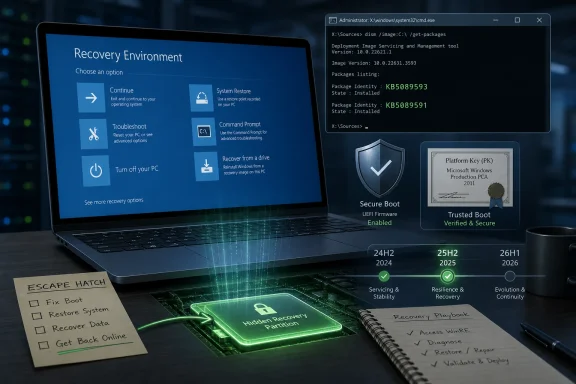 Microsoft Is Servicing the Parachute, Not the Plane
Windows Recovery Environment has always lived in an odd place in the Windows story. It is not the desktop, not the Start menu, not Copilot, and not the thing Microsoft puts in launch videos. It is the recovery partition, the repair shell, the offline toolkit, the safety net that appears when Windows cannot complete the normal act of being Windows.KB5089593 targets Windows 11 versions 24H2 and 25H2 and brings WinRE to version 10.0.26100.8455. KB5089591 targets Windows 11 version 26H1 and updates WinRE to version 10.0.28000.2110. Windows 11 version 23H2 also received its own recovery update, KB5087594, moving WinRE to version 10.0.22621.7077.
That spread tells the real story. Microsoft is not merely servicing one public Windows 11 branch; it is keeping multiple deployment lanes aligned at the recovery layer. Windows 11 24H2 and 25H2 sit on the current mainstream track, 23H2 remains in the field, and 26H1 is already visible as a targeted, hardware-optimized release path rather than a conventional feature update for every existing PC.
The recovery environment has become part of the servicing surface, not an afterthought. That is a healthy correction, but it also reflects how complicated Windows maintenance has become. The operating system is no longer a single thing that updates once a month; it is a constellation of boot files, setup components, language resources, optional features, recovery images, and deployment logic that all have to arrive in the right shape at the right time.
Dynamic Update Is Where Windows Setup Learns to Stop Trusting the ISO
The phrase Dynamic Update sounds like one more servicing label in a catalog already overrun with them. In practice, it is one of the mechanisms that keeps Windows installation media from aging the moment it is downloaded. During installation or an in-place upgrade, Dynamic Update lets Windows Setup pull newer setup files, compatibility fixes, Safe OS updates, drivers, and other components before the actual upgrade proceeds.That matters because the Windows image on a USB stick, ISO, or deployment share is a snapshot. The PC it lands on is not. Between those two points, Microsoft may have revised the setup engine, fixed a migration blocker, updated recovery files, or changed how language packs and Features on Demand are preserved during upgrade.
Microsoft’s own deployment guidance frames Dynamic Update as a way to improve setup reliability and preserve language packs and optional features that might otherwise be lost or mishandled during an in-place upgrade. That is the kind of detail that sounds administrative until it breaks. A missing language pack is a user complaint; a missing optional component can become an application outage; a stale recovery image can turn a manageable incident into a desk-side recovery job.
The May 2026 batch therefore belongs less to the world of visible features and more to the world of operational hygiene. These packages are designed to make Windows Setup less brittle, especially when the starting point is not a clean consumer PC but a managed endpoint with corporate language settings, legacy dependencies, and deployment tooling layered on top.
WinRE Has Become Too Important to Be Treated as Invisible
The timing of these recovery updates is awkward for Microsoft because WinRE has recently been a little too visible. In late 2025, Microsoft had to issue an out-of-band fix after a Windows 11 update broke USB keyboard and mouse input inside the recovery environment on some systems. That was not a cosmetic regression. It meant users could reach the place meant to save the PC, then find themselves unable to use it.That incident sharpened a long-standing truth: recovery tools are infrastructure. Nobody cares about them when they work, and everyone cares about them when they fail. A recovery environment that cannot accept input, cannot reset the machine, cannot repair startup, or cannot access the right image is not a secondary defect. It is a failure of the escape hatch.
KB5089593 and KB5089591 are not described by Microsoft as emergency repairs for that old failure. They are routine Safe OS Dynamic Updates with the usual understated language about improvements to Windows Recovery Environment. But routine is the point. Microsoft appears to be treating WinRE as something that needs regular servicing across supported versions, not merely as a static partition created at install time and ignored for years.
That is the right instinct. Modern Windows security work increasingly touches boot-time trust, recovery images, Secure Boot certificates, offline servicing, BitLocker flows, and reset behavior. If the recovery partition does not keep pace, it becomes a museum piece attached to a modern OS.
The Secure Boot Clock Makes Recovery Updates Less Optional Than They Look
One reason these updates deserve more attention than their terse descriptions invite is the looming Secure Boot certificate transition. Microsoft has warned that Secure Boot certificates used by most Windows devices begin expiring from June 2026, and devices that are not prepared could face boot or trust-chain complications.That does not mean KB5089593 or KB5089591 are themselves the whole Secure Boot certificate answer. They are WinRE updates, not a magic firmware refresh. But Microsoft’s support pages now place the recovery updates in the context of that broader certificate work, which is a clue about where the company thinks administrators should be looking.
A Windows recovery environment is not isolated from boot trust. It participates in the same ecosystem of signatures, boot loaders, recovery media, and offline repair paths that enterprise IT depends on when systems fail. If Secure Boot trust changes are mishandled, recovery is one of the places where the consequences could become painfully practical.
For home users, this may register as another automatic background update. For IT departments, it should register as a reminder to test recovery workflows before the certificate calendar becomes a production problem. A device that boots today is not necessarily a device whose recovery path is ready for tomorrow’s trust requirements.
Windows 11 26H1 Shows Up, but Not as the Upgrade Most Users Are Waiting For
The presence of KB5089591 for Windows 11 version 26H1 will catch eyes because version numbers have become a kind of Windows Kremlinology. A new version string invites speculation about the next big feature update, the next wave of AI PCs, and the next round of hardware requirements. This time, the boring interpretation is probably the correct one.Microsoft has described Windows 11 version 26H1 as a hardware-optimized release intended for next-generation silicon, not a normal feature update for existing devices through Windows Update. That is a notable distinction. It suggests 26H1 is less about giving today’s installed base a new annual feature package and more about enabling new hardware platforms that need an OS branch tuned before the broader 26H2-era story plays out.
That fits the industry moment. Windows is being pulled in two directions at once: maintaining continuity for the enormous x86 installed base while preparing for more specialized silicon, NPUs, and OEM-led platform differentiation. A recovery update for 26H1 may not mean your 25H2 desktop is about to be offered 26H1. It means Microsoft is already servicing the recovery layer for the systems that will ship with that branch.
For administrators, the practical reading is simple. Do not treat the existence of a 26H1 recovery update as a deployment signal for current fleets. Treat it as evidence that Microsoft’s Windows servicing matrix is becoming more segmented, with some releases tied more tightly to hardware enablement than to the old idea of a universal feature train.
The Windows 10 Recovery Updates Are a Reminder That October Was Not the End of the Story
The same Patch Tuesday wave also included recovery updates for Windows 10. KB5087593 updates WinRE to version 10.0.19041.7290 for Windows 10 versions 21H2 and 22H2. KB5087592 targets Windows 10 version 1809 and Windows Server 2019, moving WinRE to version 10.0.17763.8751. KB5087590 updates Windows 10 version 1607 and Windows Server 2016 recovery components to version 10.0.14393.9138.That spread is a reminder that Windows 10 is not simply “over” in the operational sense, even if mainstream consumer support deadlines have reshaped the public narrative. Enterprises, servers, LTSC systems, embedded scenarios, and extended servicing arrangements keep older Windows code paths alive long after the retail upgrade story has moved on.
It also underscores why Microsoft’s recovery servicing cannot be judged only through the consumer Windows 11 lens. Recovery environments exist on server-adjacent platforms, long-lived branch deployments, and machines that may not be touched often because touching them is risky. Those are precisely the systems where a recovery failure can be expensive.
In that context, the May batch is not just a Windows 11 note. It is part of a cross-generational maintenance pass over Microsoft’s recovery estate. If the Windows desktop is the showroom, WinRE is the emergency stairwell. Microsoft is checking more than one building.
The VBScript Footnote Says More About Enterprise Windows Than Microsoft Might Like
One of the quieter notes around the Dynamic Update story is that VBScript remains available as a Feature on Demand in Windows 11 version 24H2. That detail looks almost quaint in 2026, like finding a fax machine in a data center. But it captures the bargain Microsoft keeps making with enterprise customers.VBScript is deprecated, unloved, and deeply associated with an older Windows administration era. It is also still wired into real business processes, old installers, line-of-business workflows, and institutional scripts that nobody wants to own until they stop working. Moving VBScript into Feature on Demand status lets Microsoft signal eventual removal without detonating backward compatibility overnight.
Dynamic Update’s role in preserving Features on Demand during upgrades matters in exactly these cases. It is not just about language packs or clean setup aesthetics. It is about making sure that an in-place upgrade does not silently strand an organization because an old but necessary component disappeared in the migration.
This is the contradiction at the heart of Windows modernization. Microsoft wants a cleaner, more secure, more cloud-managed platform, but its customer base still runs the sedimentary history of corporate computing. The company can deprecate VBScript in principle; in practice, it has to preserve the mechanisms that keep VBScript-dependent estates from breaking on upgrade day.
Automatic Installation Is Convenient Until You Are the One Debugging the Partition
Microsoft says these Setup and Recovery updates are available through Windows Update and install automatically. For most users, that is the correct model. No one should have to manually hunt for a recovery environment package to make sure Reset this PC or Startup Repair is using current bits.But automatic installation does not remove the need for administrative awareness. WinRE updates have historically intersected with recovery partition sizing, BitLocker considerations, offline images, and deployment media maintenance. A package can be automatic on a consumer laptop and still require planning in a managed environment.
The practical distinction is between endpoint servicing and image servicing. If a fleet is updated in place, Windows Update may handle much of the work. If an organization maintains golden images, task sequences, offline WIMs, custom recovery partitions, or Configuration Manager deployment media, it needs to make sure the relevant Dynamic Update and Safe OS packages are reflected in that pipeline.
That is where these understated KB numbers can become visible. A help desk may never say “KB5089593” out loud, but it will feel the effects if newly deployed machines use stale recovery files or if in-place upgrades behave differently from lab builds. In Windows servicing, the unglamorous packages are often the ones that decide whether the glamorous deployment plan survives contact with hardware.
KB5089549 Casts a Shadow Over an Otherwise Routine Servicing Wave
The recovery updates landed alongside this month’s Patch Tuesday rollout, and that context matters because Windows 11 KB5089549 has already drawn reports of installation failures. Some users have described failed installs around the reboot phase, rollbacks, and assorted error codes. Reporting has also pointed to complaints of degraded network performance on some systems, though those reports appear narrower and less settled.More importantly, Microsoft has reportedly acknowledged an installation failure scenario involving systems with critically low free space on the EFI System Partition and is mitigating the problem through Known Issue Rollback. That detail is revealing because it ties a headline cumulative update failure to the invisible boot and servicing real estate that most users never inspect.
The EFI System Partition is not where users store photos or games. It is a small, critical partition that holds boot-related components. If servicing assumes more free space than a machine has, especially on systems upgraded over many years or configured by older OEM layouts, the result can be a failed update that looks mysterious from the Settings app.
That makes the May 2026 servicing wave feel like two stories happening at once. On one track, Microsoft is updating the recovery environment to keep the safety net current. On the other, a cumulative update appears to be reminding everyone how fragile the boot and servicing substrate can be when old partition layouts meet new assumptions.
The Lesson for IT Is to Test the Escape Route, Not Just the Arrival Gate
Most Windows update testing focuses on whether the machine boots, whether applications launch, whether VPN works, and whether the user can print, authenticate, and get through the day. That is sensible, but it is incomplete. The May recovery updates argue for testing what happens when the normal path fails.A serious Windows validation cycle should include WinRE access, input devices in recovery, BitLocker recovery behavior, Reset this PC, Startup Repair, offline command prompt access where policy allows it, and recovery media created from the current image. Those tests are not exciting. They are also exactly the ones administrators wish they had run before a widespread boot or update failure.
The Secure Boot certificate transition makes that discipline more urgent. Recovery and boot trust are converging into the same operational risk zone. If a fleet’s recovery partitions are stale, undersized, disabled, or inconsistent, the organization may not discover it until a certificate change, failed cumulative update, or disk issue exposes the gap.
This is where Microsoft’s automatic servicing story needs an enterprise footnote. Automatic updates are useful, but they are not a substitute for knowing what your recovery estate looks like. The bigger the fleet, the more dangerous it is to assume every machine’s hidden partitions are healthy simply because Windows Update says the visible OS is current.
The Real May Patch Tuesday Story Is Hiding Below the Desktop
There is a temptation to treat KB5089593 and KB5089591 as minor entries in the Microsoft Update Catalog. They do not ship a flashy interface change. They do not promise a new productivity feature. They do not give Windows enthusiasts a new toggle to debate.But Windows is increasingly defined by the parts users do not see. Setup reliability, image freshness, recovery integrity, Secure Boot trust, optional feature preservation, and servicing rollback all sit beneath the desktop experience. When those layers work, Windows feels boring in the best possible way. When they fail, the Start menu is irrelevant.
The May 2026 recovery updates are therefore a reminder of where Microsoft’s hardest Windows work now lives. The company is not just building features; it is maintaining a complex, aging, hardware-diverse installed base while trying to move the platform toward stricter security and more segmented hardware support. That work is messy by design.
For WindowsForum readers, the message is not panic. It is attention. Recovery updates deserve a place in the same mental bucket as cumulative updates, firmware updates, and deployment media refreshes. They are part of the operational system, not an accessory to it.
The KB Numbers Worth Writing on the Whiteboard
For administrators and power users, this release is less about memorizing every package than understanding which layer each one touches. The recovery environment is not the visible OS build, but it can determine whether the visible OS is recoverable when an update, driver, or boot problem goes sideways.- KB5089593 updates the Windows Recovery Environment for Windows 11 versions 24H2 and 25H2 to version 10.0.26100.8455.
- KB5089591 updates the Windows Recovery Environment for Windows 11 version 26H1 to version 10.0.28000.2110.
- KB5087594 updates the Windows Recovery Environment for Windows 11 version 23H2 to version 10.0.22621.7077.
- The Windows 10 recovery updates cover supported 22H2, 21H2, 1809, 1607, Windows Server 2019, and Windows Server 2016 lines.
- Dynamic Update remains important for in-place upgrades because it helps refresh setup components and preserve language packs and Features on Demand.
- KB5089549 reports are a reminder to check EFI System Partition health and not assume update failures are always caused by the visible Windows installation.
Source: Windows Report https://windowsreport.com/microsoft-releases-kb5089593-and-kb5089591-winre-updates-for-windows-11/
