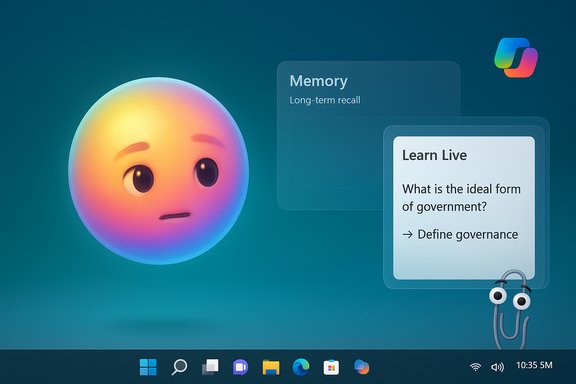
Microsoft’s Copilot just got a face: an animated, expressive avatar called Mico that appears in voice interactions and aims to make AI on the PC feel more like a helpful companion than a cold tool.
Microsoft’s Copilot Fall Release reframes the company’s consumer AI strategy around what it calls human‑centered AI, emphasizing productivity, creativity, and social collaboration rather than attention‑grabbing engagement. The centerpiece of the consumer rollout is Mico, a simple, blob‑shaped avatar that listens, reacts, and changes color to reflect conversational context when you use Copilot’s voice mode. This update is one of a dozen new Copilot features that also include long‑term memory, group chats for up to 32 participants, a “real talk” conversational style that can push back on bad assumptions, improved health responses, and richer integrations with cloud services.
The feature set is being delivered as a staged rollout: the Copilot Fall Release and Mico are live in the United States and are being expanded quickly to other English‑language markets in the coming weeks. Some capabilities, such as health features and certain early experiments, are explicitly region‑restricted during the initial release. Device and platform compatibility may vary by feature.
Key characteristics:
General steps to see Mico:
Benefits:
Use cases:
Pros:
Advantages:
Recommendations:
Best practice:
Implication:
Important points to know:
Why the Easter egg matters:
If executed well, users will gain a more conversational, context‑aware assistant that shortens the gap between thought and action on the PC. If executed poorly — with defaults that favor convenience over privacy, or with inconsistent regional rollouts and compatibility claims — user trust could erode quickly.
The company’s stated philosophy — to “build AI that empowers human judgment” — is an encouraging guiding principle. The real test will be whether Microsoft’s defaults, UI affordances, and admin controls consistently put user control first as these features scale beyond early adopters.
For users, the takeaway is pragmatic: try Mico if you want a warmer, voice‑driven Copilot experience, but treat the new memory and connector features like any service that stores personal context — review settings, minimize permissions, and keep sensitive information out of remembered data. For organizations, the rollout reinforces the need to update governance and endpoint controls as AI surfaces become part of routine workflows.
Finally, anyone still clinging to Windows 10 should be conscious that support has changed and that new Copilot experiences will continue to be developed with modern platforms in mind. The future of the PC interface is voice, context, and collaboration — Mico simply gives that future a face.
Source: GB News Meet Mico, the new face of Copilot AI on your Windows PC and the successor to much-loathed Clippy
 Background / Overview
Microsoft’s Copilot Fall Release reframes the company’s consumer AI strategy around what it calls human‑centered AI, emphasizing productivity, creativity, and social collaboration rather than attention‑grabbing engagement. The centerpiece of the consumer rollout is Mico, a simple, blob‑shaped avatar that listens, reacts, and changes color to reflect conversational context when you use Copilot’s voice mode. This update is one of a dozen new Copilot features that also include long‑term memory, group chats for up to 32 participants, a “real talk” conversational style that can push back on bad assumptions, improved health responses, and richer integrations with cloud services.The feature set is being delivered as a staged rollout: the Copilot Fall Release and Mico are live in the United States and are being expanded quickly to other English‑language markets in the coming weeks. Some capabilities, such as health features and certain early experiments, are explicitly region‑restricted during the initial release. Device and platform compatibility may vary by feature.
What is Mico?
A visual identity for voice interactions
Mico is an optional visual layer for Copilot’s voice mode. It’s not a photorealistic avatar — it’s an abstract, animated presence designed to convey listening, emotion, and responsiveness in a lightweight way. It animates while Copilot listens, shows subtle expressions while the system reasons, and can adjust colors and motion to match conversational tone.Key characteristics:
- Expressive but minimal: simple animations, color shifts, and shape changes rather than humanlike faces.
- Voice‑mode centric: appears by default during Copilot voice sessions unless the user opts out.
- Customizable and optional: users can disable the avatar if they find it distracting.
A nod to the past — with an Easter egg
The design intentionally channels a playful connection to Microsoft’s old Office assistant, Clippy. There’s a lighthearted Easter egg: repeatedly tapping the avatar in some builds can transform Mico into the familiar paperclip. That move is clearly an exercise in nostalgia — a way to acknowledge a bygone era without repeating the same user experience mistakes.Where Mico appears and how to use it
Platforms and entry points
Mico shows up in Copilot’s voice interactions across Microsoft’s consumer surfaces where voice mode is available. The primary, most integrated experience is on modern Windows devices with the Copilot app and Copilot voice mode enabled. Other Copilot endpoints (mobile apps and the web Copilot experience inside browsers) will receive similar conversational features, but availability and exact behavior may differ by platform and region.General steps to see Mico:
- Ensure Copilot is installed and up to date on your device.
- Enable Copilot’s voice mode (and the wake‑word option if available and desired).
- Start a voice session; the Mico avatar should appear and animate during the conversation.
- If Mico is distracting, disable the avatar in Copilot settings.
The Copilot Fall Release: features that matter
Long‑term memory and personalization
Copilot now offers a Memory & Personalization facility that can remember user preferences, ongoing projects, and personal details you authorize. Memories are editable and deletable by users. The intent is to reduce repetition and maintain conversational continuity across sessions.Benefits:
- Faster follow‑ups without re‑explaining context.
- Personalized suggestions tied to your long‑running tasks and calendar events.
- Long‑term memory expands the attack surface for privacy and data‑leak incidents if misconfigured.
- Users must actively manage and audit stored memories to avoid unwanted retention of sensitive details.
Groups: collaborative Copilot sessions
Copilot Groups lets up to 32 people join a shared AI session where Copilot keeps everyone aligned, tallies votes, summarizes threads, and helps split tasks. It’s a collaboration layer aimed at classrooms, study groups, and small teams.Use cases:
- Group brainstorming and co‑editing.
- Synchronous planning with a thread that the AI can summarize after a debate.
- Shared sessions raise questions around access control, link sharing, and the potential for data leakage between participants.
“Real Talk” conversational style
The “real talk” mode is an optional tone modifier that makes Copilot more willing to challenge assumptions and take a firmer stance when a user’s reasoning appears faulty. This is an explicit move away from uniformly agreeable assistants toward one that can nudge users to think differently.Pros:
- Encourages critical thinking.
- Helps prevent the illusions of correctness when a model hallucinates.
- Tone and pushback must be calibrated carefully; poorly tuned responses can frustrate users or be misread as adversarial.
Learn Live and tutoring
A voice‑first tutoring mode — Learn Live — is designed to guide learners interactively instead of simply providing answers. Copilot uses voice, visuals, and questioning techniques to scaffold learning.Advantages:
- Active learning scaffolding, not just answers.
- Potential classroom and personal tutoring applications.
- Educational content must be accurate and sourced; the AI must avoid overconfident errors.
- Access and moderation are critical where minors are involved.
Privacy, data, and compliance
Memory management and user control
The system provides controls for editing, viewing, and deleting memories. These controls are necessary but not sufficient; users should treat stored memories like a personal notes database and audit them periodically.Recommendations:
- Review Memory & Personalization settings after enabling them.
- Remove any highly sensitive data (financial credentials, personal identifiers) from stored memories.
- Use platform privacy dashboards to see which connectors (OneDrive, Gmail, Google Drive) are linked.
Connectors and cross‑service access
Copilot’s connectors let it reason over content stored across cloud services. That’s powerful — it can surface an old email, summarize a file in OneDrive, or merge calendar context — but it increases the number of third‑party systems that hold permissioned access to your Copilot context.Best practice:
- Grant the minimum permissions needed.
- Periodically review and revoke connectors not in active use.
Local vs cloud processing
Some elements of the voice activation pipeline (wake‑word spotting) may run locally to reduce telemetry and latency, while full conversational processing is cloud‑based. This hybrid model aims to balance privacy and performance but means that once the session is active, content is processed in the cloud under whatever Microsoft policies govern Copilot.Implication:
- Users who need strong local‑only processing should avoid enabling cloud voice flows or should use devices with on‑device acceleration options if available.
Security and Windows 10 end of support
Windows 10 lifecycle and upgrade choices
The ecosystem context matters. Standard support for Windows 10 concluded in mid‑October 2025. That cessation means Windows 10 will not receive routine free security updates unless a user enrolls in an extended support scheme. Microsoft has provided options to extend critical security updates for a limited period, with conditions that vary by region and enrollment path.Important points to know:
- Extended security updates (ESU) are available as a consumer option for a limited time, often with enrollment requirements such as syncing settings to a cloud backup.
- Pricing and qualifiers differ by region; some markets have special enrollment rules.
- Staying on an unsupported OS increases exposure to new vulnerabilities and reduces eligibility for new features like Copilot Fall Release components.
The nostalgia factor: does bringing Clippy back matter?
The Clippy Easter egg is a safe, playful nod rather than a resurrection of the old Office assistant. Mico is intentionally nonintrusive by design; it’s an optional, small visual presence that can be turned off.Why the Easter egg matters:
- It signals Microsoft understands its history and user sentiment.
- It’s a marketing-friendly easter egg that helps conversations about Copilot spread.
- Clippy’s historical failure was not simply about personality — it was about intrusiveness and poor context sensitivity. Mico’s long‑term acceptance will depend on how well Microsoft lets users control attention and data.
Critical analysis: strengths, opportunities, and risks
Strengths and potential upside
- Improved discoverability and presence: Voice + an expressive avatar can lower the barrier to using AI features, making help feel more immediate and friendly.
- Productivity multipliers: Memory, connectors, and agentic actions (when responsibly permissioned) can speed complex workflows and reduce friction across apps.
- Social and educational value: Groups and Learn Live offer new collaborative and pedagogical affordances that can be genuinely useful for teams and learners.
- Human‑centered rhetoric backed by controls: The release emphasizes user control — memory deletion, disabling the avatar, and permissioned connectors — which is the right design direction for adoption at scale.
Risks, ambiguities, and regulatory exposure
- Privacy and data leakage: Long‑term memory and cross‑service connectors make it easy to accumulate sensitive context. Misconfiguration or unclear defaults could expose data.
- Anthropomorphism and emotional design pitfalls: Mico’s warmth improves engagement but risks encouraging undue trust or social attachment, particularly among vulnerable populations or children.
- Moderation and misinformation: “Real talk” is a valuable capability, but the system’s ability to adjudicate disputed facts or provide safe pushback is only as good as its grounding. In high‑stakes domains (health, legal, financial), the assistant must remain conservative and cite sources.
- Platform fragmentation and compatibility claims: Messaging that suggests Mico or specific Copilot features are “Windows 11‑only” is oversimplified. Copilot is a multi‑surface product; feature availability varies by endpoint, device hardware, and region. Users on older OSes may find feature gaps.
- Enterprise and compliance complexity: Organizations must consider data residency, audit trails, and legal discovery if Copilot memory and group sessions are allowed on managed devices.
- Attention economy concerns: Any visual avatar is a potential attention sink. Microsoft’s promise to build “AI that gives you back time” must be demonstrated by default settings that favor minimalism and user control.
Practical advice for users and IT pros
For everyday users (personal & small business)
- If interested, try Mico in a private, low‑risk workflow first. Use it for drafting, summarizing, and learning tasks rather than sharing passwords or legal/medical details.
- Keep Copilot’s Memory & Personalization settings under review. Periodically delete memories you don’t want retained.
- Revoke unused connectors and only grant Copilot access to cloud services you trust.
- If you prefer a distraction‑free workspace, disable Mico in Copilot settings; voice mode and text interactions remain available without the avatar.
For IT administrators and privacy officers
- Evaluate whether Copilot Group sessions are permissible under your data governance policies before enabling them on managed endpoints.
- Define acceptable use: which apps or data types can be shared with Copilot Vision or Connectors.
- Audit and monitor Copilot access tokens and connectors; establish revocation processes.
- Treat Copilot memory as a new data store: include it in retention, deletion, and e‑discovery policies.
If you’re still on Windows 10
- Recognize that mainstream Windows 10 support has ended; apply mitigations immediately. Options include upgrading hardware to meet Windows 11 requirements, enrolling in an Extended Security Update program under your region’s rules, or migrating to a supported OS.
- Use official update/backup enrollment paths if you wish to receive any temporary consumer ESU offerings — free enrollment conditions sometimes require cloud backup or similar steps.
- Avoid relying on press summaries for precise pricing; verify costs and eligibility through the OS update settings or your Microsoft account page.
How this changes the PC experience
Mico represents a design bet: consumers are more likely to embrace AI when it feels human enough to be friendly but not human enough to mislead. The Copilot Fall Release advances several distinct ideas at once — shared AI sessions, persistent memory, a voice‑first assistant with a face, and more permissive cross‑service integrations.If executed well, users will gain a more conversational, context‑aware assistant that shortens the gap between thought and action on the PC. If executed poorly — with defaults that favor convenience over privacy, or with inconsistent regional rollouts and compatibility claims — user trust could erode quickly.
The company’s stated philosophy — to “build AI that empowers human judgment” — is an encouraging guiding principle. The real test will be whether Microsoft’s defaults, UI affordances, and admin controls consistently put user control first as these features scale beyond early adopters.
Conclusion
Mico is not a gimmick; it’s a deliberate attempt to humanize the next generation of desktop AI. It packages complex capabilities — voice, memory, connectors, group collaboration, and contextual vision — behind a simple avatar that can be turned off or ignored. The release is both an experiment in user interface design and a statement of product direction: Microsoft wants Copilot to be an assistant that feels personal, social, and capable without being coercive.For users, the takeaway is pragmatic: try Mico if you want a warmer, voice‑driven Copilot experience, but treat the new memory and connector features like any service that stores personal context — review settings, minimize permissions, and keep sensitive information out of remembered data. For organizations, the rollout reinforces the need to update governance and endpoint controls as AI surfaces become part of routine workflows.
Finally, anyone still clinging to Windows 10 should be conscious that support has changed and that new Copilot experiences will continue to be developed with modern platforms in mind. The future of the PC interface is voice, context, and collaboration — Mico simply gives that future a face.
Source: GB News Meet Mico, the new face of Copilot AI on your Windows PC and the successor to much-loathed Clippy