

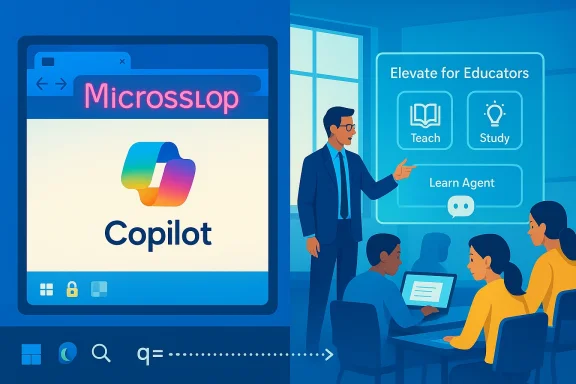
A skirmish of culture, security and policy is playing out across the Windows ecosystem this week — a prankish browser extension that renames Microsoft to “Microslop,” a technically sophisticated one‑click Copilot exploit researchers call Reprompt, and Microsoft’s public push to expand free AI access for teachers and students through its new Elevate initiative. Together these three stories illuminate the contradictory forces shaping modern computing: community backlash and theatrical protest, the real operational risks of tightly integrated AI assistants, and the vendor-level effort to reframe AI as a civic and educational good. The net effect is both a reputational headache and a strategic crossroads for Microsoft, IT administrators, educators and security teams alike.
Microsoft’s Copilot-first strategy — folding generative AI and assistant surfaces across Windows, Edge, Office and device marketing — has accelerated rapidly since the first “new Bing” experiments and the Build 2023 push to make Copilot a system-level assistant. That same speed is now producing three visible phenomena at once: a grassroots cultural backlash that has crystallized into the “Microslop” meme and even a browser extension that enforces the insult on pages a user visits; a high‑impact security disclosure where an authenticated Copilot Personal session could be coerced into leaking data with a single click; and a corporate education initiative that seeks to widen access to Copilot and related AI tools for educators and college students. Each story pulls on different threads — UX and defaults, security architecture and threat modeling, and social responsibility and access — but together they provide a compact case study of what happens when AI becomes central to core OS experiences.
Source: PCWorld https://www.pcworld.com/article/303...icrosoft-free-ai-training-educators-students]
 Background / Overview
Microsoft’s Copilot-first strategy — folding generative AI and assistant surfaces across Windows, Edge, Office and device marketing — has accelerated rapidly since the first “new Bing” experiments and the Build 2023 push to make Copilot a system-level assistant. That same speed is now producing three visible phenomena at once: a grassroots cultural backlash that has crystallized into the “Microslop” meme and even a browser extension that enforces the insult on pages a user visits; a high‑impact security disclosure where an authenticated Copilot Personal session could be coerced into leaking data with a single click; and a corporate education initiative that seeks to widen access to Copilot and related AI tools for educators and college students. Each story pulls on different threads — UX and defaults, security architecture and threat modeling, and social responsibility and access — but together they provide a compact case study of what happens when AI becomes central to core OS experiences.Microslop: meme, extension and what it signals
How a meme became a persistent protest
The “Microslop” label combines “Microsoft” with “slop” — a cultural shorthand for low‑quality, mass‑produced AI outputs — and rapidly moved from social posts to community tooling. Enthusiast forums and early reports document how the joke migrated into a lightweight browser extension that performs client‑side visual substitutions, replacing every on‑page appearance of “Microsoft” with “Microslop.” The extension’s developer explicitly describes the change as visual only — the underlying DOM and hyperlinks remain intact — and claims no telemetry is collected. That technical simplicity is precisely the point: the extension doesn’t need to be an advanced hack to be visible or meme‑worthy.Why Microslop stuck: more than trolling
Microslop isn’t just an internet gag. It compresses a number of real, reproducible grievances that many users and administrators report:- Reliability concerns: early Copilot suggestions sometimes return incorrect or lower‑quality workflows than the status quo, producing clips and posts that go viral.
- Intrusive defaults: persistent UI placements — taskbar entries, context menus, New Tab Page widgets — feel like nudges, especially when opt‑outs are hard to discover or reappear after servicing.
- Tone and optics: executive rhetoric that frames criticisms as “slop” without immediate operational fixes inflamed the cultural moment.
The extension’s technical profile and immediate risks
From a technical standpoint the extension is simple: a manifest and content script that performs string replacements on rendered pages. The developer’s claim that the extension does not send data is plausible given the code pattern described publicly and the fact the substitution is visual-only. Nevertheless, the extension raises a set of practical questions:- Trust and provenance: community‑published extensions vary in quality and intent. Even a seemingly innocuous extension could be updated to include telemetry later, or a malicious near‑clone could appear.
- Enterprise controls: organizations that care about brand perception or content fidelity may need to consider extension allowlists/deny‑lists and educate users about supply‑chain risks.
- Regulatory optics: public mockery is harmless technically, but scaling memes into distributed protest can increase procurement friction for an already‑sensitive vendor.
What Microslop exposes about product strategy
At its core, Microslop is a signalling mechanism: it tells procurement teams, IT admins and journalists that a segment of the installed base views Copilot’s rollout as rushed or poorly governed. Microsoft can treat the incident two ways:- Lean into it and fix the operational gaps that provoked the backlash — better opt‑outs, clearer admin policies, reliability metrics and transparent NPU/battery/telemetry tradeoffs.
- Dismiss it as fringe humor and risk the meme ossifying into a procurement-level talking point.
The Reprompt one‑click attack: anatomy, confirmation and mitigation
What researchers found
Security researchers at Varonis Threat Labs disclosed a conceptually simple but operationally powerful attack they named Reprompt. The core observation: many AI assistant UIs support deep links that prefill an assistant’s input field using a URL parameter (commonly the q parameter). Reprompt abuses that convenience in three linked ways:- Parameter‑to‑Prompt (P2P) injection — embed malicious instructions in the q parameter so Copilot ingests them as if the user typed them.
- Double‑request / repetition bypass — craft the payload to instruct the assistant to do it twice, circumventing safety logic that only applies to the initial request.
- Chain‑request orchestration — after the initial “innocuous” response, the attacker’s server issues further instructions to continue exfiltration, potentially persisting even after the user closes the chat window.
Independent confirmation and timeline
Independent reporting corroborates the key points:- Ars Technica described the attack and noted Microsoft’s patching activity, explaining how guardrails were applied mainly to the first request and could be skirted by repeating requests.
- Malwarebytes and several industry outlets summarized Varonis’ findings and reinforced that Copilot Personal — not Microsoft 365 Copilot — was affected, and that there was no confirmed mass in‑the‑wild exploitation.
Why Reprompt matters operationally
Reprompt is notable for several reasons:- Low attacker cost: one click on a legitimate URL delivered by email, chat or even web content is a trivial phish vector to distribute at scale.
- Bypasses traditional controls: exfiltration happens inside vendor‑hosted flows or via assistant‑driven fetches, making network egress and endpoint protections less effective.
- User session abuse: the attack leverages the victim’s active authentication context, sidestepping many re‑authentication protections that govern web APIs.
Practical mitigation steps
For administrators and defenders the immediate checklist is straightforward and urgent:- Ensure January 2026 Patch Tuesday updates are applied to endpoints and affected components. Microsoft’s public mitigations were deployed as part of those updates.
- Treat Copilot Personal differently from tenant‑managed Copilot instances: in enterprise contexts prefer Microsoft 365 Copilot (with Purview, tenant DLP and admin controls) and restrict or block Copilot Personal where governance is required.
- Educate users about deep‑link risks: treat unexpected Copilot links as untrusted, and verify before clicking.
- Implement email filtering and URL rewriting for links in untrusted channels, and monitor for anomalous Copilot‑hosted request patterns.
- Review login session lifetimes and consider more aggressive session isolation policies for consumer Copilot experiences on corporate devices.
Caveats and open questions
Varonis’ write‑up and multiple independent reports provide a credible and technically detailed account, but a few items merit caution:- The public material demonstrates the attack in lab conditions; defenders should treat the lack of confirmed mass exploitation as encouraging but not proof that the technique was never weaponized.
- Because mitigation details were rolled into routine security updates, verifying full remediation requires vendor confirmation and changelog inspection for the specific Copilot client components you run.
- The Reprompt chain relies on an architecture where the assistant can open URLs or fetch resources on behalf of a user; any change in that design pattern will alter future attack surfaces.
Microsoft Elevate: free AI access to teachers and students — promise and pitfalls
What Microsoft announced
Microsoft unveiled Microsoft Elevate for Educators, a set of programs and product changes intended to expand AI access, training and credentials for educators worldwide. The public materials and press release describe several concrete elements:- Free professional development, self‑paced courses, and new educator credentials aligned to an AI literacy framework.
- A limited‑time promotion offering eligible college students 12 months of Microsoft 365 Premium and LinkedIn Premium Career subscriptions (including Copilot features) at no cost.
- Education‑specific AI capabilities in the Microsoft 365 Copilot app — features such as Teach for lesson planning and a Study and Learn Agent preview aimed at personalized student support.
The benefits, short term and strategic
Microsoft’s move aims at several plausible, measurable benefits:- Improve access: free or heavily discounted Copilot and training lowers a practical barrier for educators and students who otherwise could not afford premium AI tools.
- Skills pipeline: connecting educators to industry‑recognised credentials can support a workforce pipeline that aligns K‑12 and higher‑education outcomes with employer expectations.
- Public relations and reciprocity: the program ties to Microsoft’s broader community investments around data centers and environmental stewardship, potentially easing local friction over AI infrastructure siting.
Risks and governance concerns
Free access is valuable, but it brings specific risks that schools and IT leaders must manage:- Academic integrity: AI tools used unsupervised can become a cheating vector. Training and classroom policies are essential complements to technology distribution.
- Privacy and data residency: student data, special education records and other sensitive data require careful contractual and technical safeguards; districts must verify that Microsoft’s education offerings meet local legal obligations.
- Equity paradox: hype and free pilot programs can unintentionally widen local inequality if better‑funded districts adopt more comprehensive rollouts while under‑resourced schools lack broadband, devices or staff time to implement training.
- Scope creep: an apparent “free” period that ends or converts to paid tiers may disrupt long‑term planning for schools reliant on the service.
Practical advice for educators and IT leaders
- Pilot with explicit objectives: run short, evaluated pilots that define learning outcomes, integrity checks and metrics (e.g., student mastery, time saved on lesson prep).
- Negotiate clarity on data handling: insist on explicit education‑grade contractual protections for student data and auditability of any third‑party model training claims.
- Invest in teacher time: free tools are only effective when teachers receive time and resources to integrate them; factor that into procurement decisions.
- Plan for continuity: avoid one‑off pilots that create brittle dependencies; document workflows and exit plans in case promotions end.
Cross‑cutting analysis: strengths, risks and what Microsoft must do next
Notable strengths across the three stories
- Microsoft is taking scale seriously: both in deployment (Copilot across Windows and Office) and in social investment (Elevate), the company is moving resources to make AI pervasive and accessible.
- Rapid vendor responsiveness: in the Reprompt instance, coordinated disclosure and a timely Patch Tuesday remediation show that security processes are in place and effective when researchers disclose responsibly.
- Community engagement creates early warning signals: the Microslop meme and community forums revealed real user frustrations that can be turned into product improvements if Microsoft listens.
The biggest risks
- Trust erosion: repeated reliability gaps, intrusive defaults and high‑visibility incidents create a negative feedback loop where enterprise buyers and regulators use the same shorthand criticisms that enthusiasts deploy.
- Attack surface growth: embedding assistants deeply into the OS and user flows raises non‑trivial security design questions; convenience features like prefilled deep links need threat modeling commensurate with their privileges.
- Uneven adoption outcomes: educational initiatives that do not address device, connectivity and support gaps could entrench advantages rather than democratize opportunity.
Concrete, measurable next steps Microsoft should prioritize
- Publish reproducible reliability metrics and independent benchmark results for Copilot features, including privacy, latency and hallucination rates at scale.
- Provide explicit, durable master admin controls for disabling Copilot components across device fleets, with documented server‑flag behaviors and rollback mechanisms.
- Treat deep‑link behaviors as untrusted inputs and instrument assistant flows with server‑side provenance checks, stronger output sanitization and enterprise audit logs for assistant‑driven actions.
- In education programs, commit to transparent data contracts, a clear transition plan for promo tiers, and funding for teacher time to ensure adoption yields outcomes rather than just headlines.
Conclusion
The three stories — a cheeky browser extension (Microslop), a sophisticated one‑click Copilot exploit (Reprompt), and a large educational outreach program (Elevate) — are not isolated curiosities. They are the visible outcomes of a single systemic change: AI is no longer an optional cloud add‑on, it’s an integrated surface in operating systems, productivity suites and schoolrooms. That integration delivers tremendous potential for productivity and learning, but also concentrates risk in new ways. The short‑term winners will be vendors and institutions that pair rapid innovation with rigorous governance, transparent metrics and cautious rollout discipline. For IT administrators, educators and security teams, the imperative is clear: treat AI features like any other critical capability — test them, lock them down where necessary, demand auditability, and fund the human systems (training, teacher time, incident response) that keep technology from becoming theatrical spectacle. If Microsoft and the broader ecosystem balance ambition with operational maturity, Copilot and related AI surfaces can be genuinely useful. If not, the Microslop meme will persist as a shorthand for the trust Microsoft must earn back.Source: PCWorld https://www.pcworld.com/article/303...icrosoft-free-ai-training-educators-students]
