

Microsoft is rolling out a significant governance upgrade for Organizational Data in the Microsoft 365 admin center, giving administrators finer control over who can use custom workforce attributes and whether sensitive data can flow to Workforce Insights delegates. Roadmap ID 564805 replaces an overly broad access model with policies that can target specific users or groups, enabling organizations to protect sensitive HR-derived information, conduct controlled pilots, and release new attributes in stages. The feature entered preview in June 2026 and is moving through general availability in July 2026 for Worldwide Standard Multi-Tenant customers.
Organizational Data in Microsoft 365 is the layer through which companies can bring workforce information from human resources and other authoritative systems into Microsoft 365 services. That information can describe reporting relationships, job functions, locations, employment categories, organizational levels, skills, and other characteristics that ordinary identity directory fields do not adequately capture.
Microsoft uses this data to improve experiences across products such as Microsoft 365 Profile, Viva Insights, People Skills, and the Workforce Insights agent. The same information can make AI-assisted workforce analysis substantially more useful because it gives Microsoft 365 Copilot additional business context beyond documents, messages, meetings, and directory records.
Even apparently ordinary fields can become sensitive when combined. Location, level, tenure, employment type, and managerial status may reveal the likely identity of individuals in small teams, particularly when a leader or delegate can repeatedly filter a dataset.
That ambiguity makes access policy design more important than the ingestion technology itself. The central governance question is no longer simply whether Microsoft 365 can import a field, but who can query it, whose records they can query, and whether they can pass that visibility to someone else.
This is a meaningful change in default posture. Microsoft describes it as a more conservative approach to sensitive organizational information, reflecting the principle that an imported attribute should not automatically become discoverable merely because it is technically available to a downstream service.
The distinction matters because two separate access dimensions are involved:
The new capability lets administrators begin with no broad release, validate an attribute with a controlled group, and widen access only after the organization confirms its accuracy and business purpose. That changes Organizational Data from a largely ingestion-centered feature into a more deliberate entitlement system.
Microsoft Entra data normally retains precedence when the same user-profile attribute exists in both sources, unless an administrator configures an override. Custom attributes behave differently because they often have no standard Entra equivalent and are intended for specific analytical or business experiences.
Administrators should therefore identify an authoritative owner for every imported field. A custom attribute should have:
Microsoft’s documentation has identified Workforce Insights as the principal consumer of these Organizational Data access policies. Other products may have their own configuration mechanisms, role assignments, privacy thresholds, or ingestion paths.
Administrators must consequently map the complete data journey. A restrictive Workforce Insights policy does not automatically revoke information previously exported to another analytics platform, stored in a data lake, included in a Power BI model, or exposed through an independent HR application.
A leader might use the agent to examine the distribution of job levels in a division, identify employees with particular skills, compare office locations, or understand the composition of a management chain. Custom attributes can make those queries much more specific to the business.
Consider the difference between these two questions:
The July update helps administrators separate the users who need general workforce insight from the smaller population that needs access to sensitive custom dimensions. Instead of treating all managers as equally entitled, an organization can align access with specific responsibilities.
Granular policies reduce the chance that a broadly deployed agent becomes an unintended discovery interface for sensitive HR classifications. They also allow administrators to test whether an attribute’s description produces accurate results before releasing it to a larger audience.
This is an important distinction for Microsoft 365 administrators. The security issue is not only raw record visibility. An AI agent can summarize, correlate, rank, and explain information faster than a user manually reviewing rows in a spreadsheet, magnifying both the benefit and the consequences of inappropriate access.
Delegation is practical because senior decision-makers often do not conduct detailed analysis themselves. It is also a potential route around carefully designed access restrictions if a leader can freely pass sensitive visibility to another person.
A company might permit delegates to access job titles, reporting structures, office locations, and skills while withholding compensation bands, talent-review categories, workplace attendance data, or confidential workforce-planning labels. Another tenant might permit selected HR delegates to see those attributes but prohibit general executive-assistant access.
The correct policy will depend on the organization’s operating model. What matters is that the decision can now be made centrally rather than being inferred from the leader’s own access.
Administrators should also account for role changes. A chief of staff who transfers to another division should not retain access indefinitely merely because an earlier delegation remains active.
A mature process should cover the full lifecycle:
An organization introducing a
Administrators should avoid reusing large, loosely maintained distribution groups merely because they already exist. A dedicated security group with an accountable owner is more defensible than a broad mailing list whose membership was designed for communication rather than confidential data access.
The Organizational Data Source Administrator role is particularly relevant. Microsoft provides this role so organizations can manage ingestion and related settings without giving every data operator the full powers of a Global Administrator.
A defensible model might assign responsibilities as follows:
Microsoft 365 teams should document the effective-access logic instead of looking at a single policy in isolation. Periodic testing with representative accounts is necessary because configuration screens do not always reveal how multiple roles, groups, and delegation paths combine in practice.
Automation will become increasingly important as the number of attributes grows. Organizations should look for export, reporting, or API capabilities that allow them to compare configured policies against an approved baseline and identify drift.
This reduces unnecessary data exposure and can simplify the interface. Users are less likely to encounter fields that have no meaning in their part of the organization.
The experience should communicate three distinct states wherever possible:
Organizations should avoid treating custom attributes as neutral metadata. Labels such as “future leader,” “low mobility,” “flight risk,” or “performance concern” can materially affect an employee if used in restructuring, promotion, or workforce-planning decisions.
Microsoft states that Viva Insights is not intended for employee tracking, profiling, or automated employment decision-making. Customers remain responsible for how they define attributes, how leaders interpret AI-generated output, and whether the resulting use complies with internal policy and applicable law.
However, least privilege is not achieved merely by selecting a smaller audience. Administrators must consider whether the field itself is necessary, whether the values are sufficiently accurate, and whether aggregated queries can still expose individuals.
Repeated queries can intensify this problem. A user may compare two nearly identical groups and infer the value associated with the one person who differs between them.
Organizations should test combinations of:
Group-based targeting can help implement regional policies, but identity groups should not become a substitute for legal analysis. Administrators must also consider cross-border access when a leader or delegate in one country queries employee data from another.
Contractors, contingent workers, acquired companies, and joint ventures deserve particular attention. Their records may enter the same tenant while remaining subject to different contractual or privacy obligations.
This places Microsoft in closer competition with human capital management vendors, workforce analytics platforms, enterprise search products, and AI assistants connected to corporate data. Microsoft’s advantage is its existing identity graph, collaboration footprint, administrative platform, and daily presence on Windows devices.
Roadmap ID 564805 improves Microsoft’s position by making controlled deployment more realistic. It lets customers demonstrate value with narrow audiences instead of accepting tenant-wide exposure as the price of experimentation.
The change also reflects a broader evolution in enterprise permissions. Traditional role-based access control often assumes that users in the same role need the same information. Modern AI scenarios require more contextual decisions involving the user, the attribute, the population, the purpose, and the possibility of delegation.
Microsoft will need to integrate these controls with the wider governance ecosystem. Customers will expect connections to Entra identity governance, access reviews, privileged identity management, audit capabilities, Purview controls, and security monitoring.
Teams should avoid making broad policy changes during the rollout without recording the existing configuration. A baseline provides evidence of what changed and makes troubleshooting easier if users report different access after the update.
Training should explain that access does not authorize every possible use. Leaders may be permitted to view an attribute for aggregate workforce planning while remaining prohibited from using it as the sole basis for an individual employment decision.
The most consequential future developments will involve visibility and automation rather than additional checkboxes.
Without that capability, troubleshooting will depend on manual policy inspection and test accounts. That approach does not scale to thousands of managers, hundreds of groups, and dozens of custom attributes.
Delegation also needs comprehensive auditability. Security and compliance teams will want records of assignment, revocation, policy changes, queries involving sensitive attributes, and administrative overrides.
A common policy framework could reduce duplicated administration, but it would also increase the consequences of a configuration error. Microsoft will need to make cross-application effects explicit before customers can safely treat Organizational Data policies as a central governance layer.
A secure default should require an explicit decision before a sensitive custom attribute reaches a broad audience. Microsoft should also warn administrators when they attempt to assign an unusually large group or enable non-public delegation across the tenant.
Microsoft’s granular Organizational Data controls arrive at the right moment, as AI-assisted workforce analysis shifts sensitive employee information from static reports into conversational tools capable of rapid correlation and interpretation. Targeting custom attributes to selected users and groups, combined with explicit controls over non-public delegation, gives administrators a practical way to reconcile useful workforce intelligence with least-privilege access. The organizations that benefit most will be those that treat the rollout not as permission to import more HR data indiscriminately, but as an opportunity to establish durable ownership, classification, testing, and review around every field placed within reach of Microsoft 365’s expanding AI layer.
 Background
Organizational Data in Microsoft 365 is the layer through which companies can bring workforce information from human resources and other authoritative systems into Microsoft 365 services. That information can describe reporting relationships, job functions, locations, employment categories, organizational levels, skills, and other characteristics that ordinary identity directory fields do not adequately capture.Microsoft uses this data to improve experiences across products such as Microsoft 365 Profile, Viva Insights, People Skills, and the Workforce Insights agent. The same information can make AI-assisted workforce analysis substantially more useful because it gives Microsoft 365 Copilot additional business context beyond documents, messages, meetings, and directory records.
Three classes of organizational attributes
Microsoft separates organizational information into broad categories according to how the fields are understood and used:- Public attributes contain information such as job title, department, office location, and work email that an organization generally permits employees to see.
- Confidential attributes use recognized Microsoft fields for more sensitive information, such as hourly rates, employment status, supervisor indicators, hire dates, or workplace attendance measures.
- Custom attributes are tenant-defined fields whose meaning depends on the organization, such as cost center, clearance category, succession status, badge-access pattern, role criticality, or business-unit classification.
Why custom fields create unusual risk
A custom field calledRegionCode might merely identify a sales territory. Another organization could use an identically named field to indicate a regulated operating jurisdiction, an employee-transfer plan, or an internal restructuring area.Even apparently ordinary fields can become sensitive when combined. Location, level, tenure, employment type, and managerial status may reveal the likely identity of individuals in small teams, particularly when a leader or delegate can repeatedly filter a dataset.
That ambiguity makes access policy design more important than the ingestion technology itself. The central governance question is no longer simply whether Microsoft 365 can import a field, but who can query it, whose records they can query, and whether they can pass that visibility to someone else.
What Microsoft Is Changing
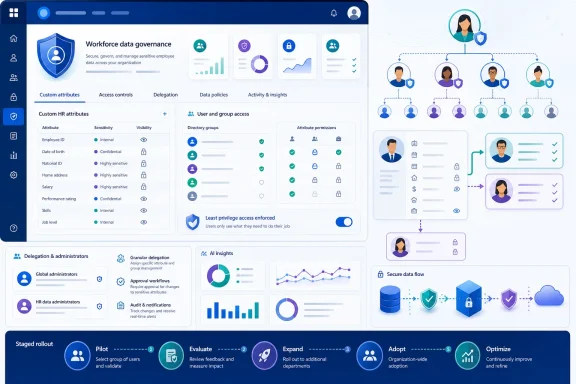
The July 2026 update introduces granular audience controls for custom attributes used with Organizational Data. Administrators can release those attributes to selected users or groups rather than making them broadly available to all employees or all managers covered by the previous policy choices.This is a meaningful change in default posture. Microsoft describes it as a more conservative approach to sensitive organizational information, reflecting the principle that an imported attribute should not automatically become discoverable merely because it is technically available to a downstream service.
Targeted users and groups
Administrators can use the new controls to identify a limited audience for an attribute. That audience could consist of individual leaders, a Microsoft Entra group, a pilot population, or a carefully selected collection of managers and workforce-planning personnel.The distinction matters because two separate access dimensions are involved:
- The audience determines which users are allowed to work with the attribute.
- The population scope determines which employee records those users are allowed to examine.
- The attribute policy determines which fields are exposed within that permitted population.
- The delegation rule determines whether the original user can extend access to an authorized assistant or analyst.
A safer release model
Previously, the available audience patterns could push administrators toward relatively broad choices such as all employees or a manager-oriented population. Those choices might be appropriate for a job title or office location but are far less comfortable for workforce-planning classifications, compensation-related groupings, or internal talent indicators.The new capability lets administrators begin with no broad release, validate an attribute with a controlled group, and widen access only after the organization confirms its accuracy and business purpose. That changes Organizational Data from a largely ingestion-centered feature into a more deliberate entitlement system.
How Organizational Data Reaches Microsoft 365
Organizations can import workforce data through supported connectors and secure file-based processes in the Microsoft 365 admin center. The imported records are associated with individual users, normally through a required work-email identifier, and can supplement information already held in Microsoft Entra ID and the Microsoft 365 user profile.Microsoft Entra data normally retains precedence when the same user-profile attribute exists in both sources, unless an administrator configures an override. Custom attributes behave differently because they often have no standard Entra equivalent and are intended for specific analytical or business experiences.
The importance of authoritative sources
The quality of access control cannot compensate for unreliable source data. If an HR export contains outdated reporting lines, incorrect employment categories, or ambiguous custom values, a tightly scoped policy will still deliver incorrect results to authorized users.Administrators should therefore identify an authoritative owner for every imported field. A custom attribute should have:
- A documented business definition.
- A named data owner.
- A known system of record.
- A refresh schedule.
- A retention expectation.
- An approved set of consumers.
- A classification reflecting its sensitivity.
RC3 means “revenue-critical role, tier three,” but an agent requires clear metadata to interpret the field consistently and avoid misleading output.Access policies are not universal controls
The Organizational Data access policies discussed in this rollout should not be confused with Microsoft Entra Conditional Access, Microsoft Purview sensitivity labels, or application permissions. They govern how supported downstream experiences use organizational attributes; they do not create a universal security boundary around every copy of the originating HR data.Microsoft’s documentation has identified Workforce Insights as the principal consumer of these Organizational Data access policies. Other products may have their own configuration mechanisms, role assignments, privacy thresholds, or ingestion paths.
Administrators must consequently map the complete data journey. A restrictive Workforce Insights policy does not automatically revoke information previously exported to another analytics platform, stored in a data lake, included in a Power BI model, or exposed through an independent HR application.
The Workforce Insights Connection
Workforce Insights is an AI-assisted experience designed to help authorized leaders understand organizational composition, search for employees, examine skills, identify workforce gaps, and support planning decisions. It can draw on Organizational Data, tenant-defined custom attributes, and People Skills information.A leader might use the agent to examine the distribution of job levels in a division, identify employees with particular skills, compare office locations, or understand the composition of a management chain. Custom attributes can make those queries much more specific to the business.
Better context creates greater sensitivity
The value of Workforce Insights grows as administrators add more detailed attributes. Unfortunately, sensitivity tends to increase at the same time.Consider the difference between these two questions:
- “How many software engineers are based in Seattle?”
- “Which Seattle software engineers are classified as retention risks and work in roles targeted for consolidation?”
The July update helps administrators separate the users who need general workforce insight from the smaller population that needs access to sensitive custom dimensions. Instead of treating all managers as equally entitled, an organization can align access with specific responsibilities.
Custom attributes as AI grounding data
When an agent processes a custom attribute, the field becomes part of the grounding context used to answer organizational questions. That does not mean the AI independently decides who should see the data; authorization should be enforced before the response is produced.Granular policies reduce the chance that a broadly deployed agent becomes an unintended discovery interface for sensitive HR classifications. They also allow administrators to test whether an attribute’s description produces accurate results before releasing it to a larger audience.
This is an important distinction for Microsoft 365 administrators. The security issue is not only raw record visibility. An AI agent can summarize, correlate, rank, and explain information faster than a user manually reviewing rows in a spreadsheet, magnifying both the benefit and the consequences of inappropriate access.
Delegation Becomes a Governance Decision
Workforce Insights allows leaders and managers to appoint delegates who can assist with organizational analysis. A delegate might be an executive assistant, chief of staff, HR business partner, workforce analyst, or operations manager who performs queries on behalf of a leader.Delegation is practical because senior decision-makers often do not conduct detailed analysis themselves. It is also a potential route around carefully designed access restrictions if a leader can freely pass sensitive visibility to another person.
Public and non-public data
The new admin controls let organizations decide whether leaders and managers may share non-public information with Workforce Insights delegates. That introduces an explicit governance boundary between routine organizational information and attributes that require closer handling.A company might permit delegates to access job titles, reporting structures, office locations, and skills while withholding compensation bands, talent-review categories, workplace attendance data, or confidential workforce-planning labels. Another tenant might permit selected HR delegates to see those attributes but prohibit general executive-assistant access.
The correct policy will depend on the organization’s operating model. What matters is that the decision can now be made centrally rather than being inferred from the leader’s own access.
Delegated access should not be invisible
Delegation is safest when it is treated as a formal entitlement rather than a convenience feature. Organizations should maintain visibility into who delegated access, which delegate received it, what scope was granted, and when the relationship should expire.Administrators should also account for role changes. A chief of staff who transfers to another division should not retain access indefinitely merely because an earlier delegation remains active.
A mature process should cover the full lifecycle:
- A leader identifies a legitimate business requirement for delegated analysis.
- The delegate’s role and required attribute scope are documented.
- An approved policy or group grants only the necessary access.
- The organization records or audits the delegation event.
- Access is reviewed after role changes and at regular intervals.
- The delegation is revoked when the business need ends.
Building a Staged Rollout
One of the most useful consequences of user- and group-level targeting is the ability to pilot an attribute before releasing it widely. Staged deployment is not only a change-management technique; it is a way to identify data-quality, privacy, and interpretation problems while the potential impact remains limited.An organization introducing a
CriticalRoleCategory field, for example, could first make it available to a workforce-planning team. After validating the terminology and output, it could expand access to selected HR leaders and later to approved business executives.A practical rollout sequence
A conservative deployment could proceed through the following stages:- Classify the attribute. Determine whether the field is public, internal, confidential, regulated, or otherwise restricted.
- Define the business purpose. Record the decisions or analyses the attribute is intended to support.
- Validate the source. Check completeness, freshness, allowed values, reporting relationships, and exception handling.
- Create a pilot group. Use a dedicated Microsoft Entra group whose ownership and membership can be reviewed.
- Restrict delegation. Prevent non-public fields from passing to delegates until the pilot establishes a justified need.
- Test representative queries. Include edge cases involving small teams, unusual reporting lines, missing values, and multiple filters.
- Review the output. Ask HR, privacy, security, and legal stakeholders to assess whether the results expose or imply more than intended.
- Expand deliberately. Add groups in controlled stages rather than replacing the pilot with an all-managers entitlement.
- Monitor and recertify. Review group membership, data owners, attribute definitions, and delegation settings on a recurring schedule.
Use groups rather than individual assignments
Direct user targeting can be appropriate for short tests or exceptional cases, but groups generally provide a more sustainable operating model. Group membership can follow role changes, approval workflows, access reviews, and automated identity-governance processes.Administrators should avoid reusing large, loosely maintained distribution groups merely because they already exist. A dedicated security group with an accountable owner is more defensible than a broad mailing list whose membership was designed for communication rather than confidential data access.
Effects on Enterprise Administrators
For Microsoft 365 administrators, the update introduces more control but also more configuration responsibility. Broad defaults are operationally simple; granular policies require decisions about audience design, ownership, exceptions, and lifecycle management.The Organizational Data Source Administrator role is particularly relevant. Microsoft provides this role so organizations can manage ingestion and related settings without giving every data operator the full powers of a Global Administrator.
Separation of duties
Large enterprises should separate the responsibilities of importing data, approving its use, managing access groups, and consuming the resulting insights. No single administrator should be able to introduce a sensitive field, define its meaning, grant themselves access, and use it without oversight.A defensible model might assign responsibilities as follows:
- HR data owners approve field definitions and source quality.
- Privacy or legal teams classify sensitive uses and geographic restrictions.
- Microsoft 365 administrators configure the supported access policies.
- Identity teams manage access-group membership and reviews.
- Security teams monitor privileged changes and investigate anomalies.
- Business leaders approve the users who need the resulting insights.
Configuration drift
Granular policies can become difficult to understand if administrators create numerous overlapping user and group assignments. A person may qualify through several groups, receive managerial access through the organizational hierarchy, and also hold application-specific permissions.Microsoft 365 teams should document the effective-access logic instead of looking at a single policy in isolation. Periodic testing with representative accounts is necessary because configuration screens do not always reveal how multiple roles, groups, and delegation paths combine in practice.
Automation will become increasingly important as the number of attributes grows. Organizations should look for export, reporting, or API capabilities that allow them to compare configured policies against an approved baseline and identify drift.
Effects on Managers and Employees
Managers stand to gain a more relevant Workforce Insights experience because administrators can release specialized attributes only to the leaders who need them. A sales executive might receive territory and account-coverage classifications, while an engineering leader receives role-family and skills-taxonomy fields.This reduces unnecessary data exposure and can simplify the interface. Users are less likely to encounter fields that have no meaning in their part of the organization.
Managers may see different datasets
Granular access means two leaders with superficially similar roles may receive different answers because their attribute entitlements differ. Microsoft 365 teams should explain this clearly so users do not interpret a missing field as evidence that the data does not exist.The experience should communicate three distinct states wherever possible:
- The organization does not collect the requested attribute.
- The attribute exists but is not available for the user’s population.
- The attribute exists, but the user is not authorized to access it.
Employee transparency still matters
Employees may never interact directly with the Organizational Data configuration, but they remain the subjects of the imported information. A technically correct access policy does not eliminate the need for transparent employee notices, lawful processing, purpose limitation, and appropriate retention.Organizations should avoid treating custom attributes as neutral metadata. Labels such as “future leader,” “low mobility,” “flight risk,” or “performance concern” can materially affect an employee if used in restructuring, promotion, or workforce-planning decisions.
Microsoft states that Viva Insights is not intended for employee tracking, profiling, or automated employment decision-making. Customers remain responsible for how they define attributes, how leaders interpret AI-generated output, and whether the resulting use complies with internal policy and applicable law.
Privacy, Security, and Compliance Implications
The update aligns with least-privilege principles by making it easier to limit access to the people with a legitimate need. It also supports purpose-based controls, because a tenant can establish separate groups for workforce planning, HR operations, finance, or regional management.However, least privilege is not achieved merely by selecting a smaller audience. Administrators must consider whether the field itself is necessary, whether the values are sufficiently accurate, and whether aggregated queries can still expose individuals.
Re-identification through small populations
A report may avoid displaying an employee’s name while still making the person obvious. If a team has one manager, one employee in a particular country, or one worker with a rare skill, a filtered result can reveal individual-level information through context.Repeated queries can intensify this problem. A user may compare two nearly identical groups and infer the value associated with the one person who differs between them.
Organizations should test combinations of:
- Small reporting teams.
- Rare job titles or skills.
- Narrow geographic filters.
- Unique employment categories.
- Seniority and compensation bands.
- Custom attributes associated with only a few people.
- Delegates who already possess contextual knowledge about the team.
Regional and contractual restrictions
Multinational organizations may face different rules for employee information across jurisdictions. A custom attribute accepted for workforce planning in the United States may require consultation, additional notice, or a different legal basis elsewhere.Group-based targeting can help implement regional policies, but identity groups should not become a substitute for legal analysis. Administrators must also consider cross-border access when a leader or delegate in one country queries employee data from another.
Contractors, contingent workers, acquired companies, and joint ventures deserve particular attention. Their records may enter the same tenant while remaining subject to different contractual or privacy obligations.
Competitive and Strategic Implications
Microsoft is positioning Microsoft 365 as more than a productivity suite. Organizational Data, People Skills, Microsoft 365 Copilot, and Workforce Insights together create a business-context layer that can support increasingly sophisticated workforce questions.This places Microsoft in closer competition with human capital management vendors, workforce analytics platforms, enterprise search products, and AI assistants connected to corporate data. Microsoft’s advantage is its existing identity graph, collaboration footprint, administrative platform, and daily presence on Windows devices.
Governance is part of the product value
Enterprise AI buyers increasingly judge products not only by what an agent can answer but by how reliably it refuses to answer unauthorized questions. A workforce assistant with excellent analytical capabilities but blunt access controls would be difficult to deploy around sensitive HR information.Roadmap ID 564805 improves Microsoft’s position by making controlled deployment more realistic. It lets customers demonstrate value with narrow audiences instead of accepting tenant-wide exposure as the price of experimentation.
The change also reflects a broader evolution in enterprise permissions. Traditional role-based access control often assumes that users in the same role need the same information. Modern AI scenarios require more contextual decisions involving the user, the attribute, the population, the purpose, and the possibility of delegation.
Microsoft must keep the controls understandable
Competitive strength will depend on manageability as much as granularity. If administrators cannot easily determine effective access, export policy configurations, review delegation, or trace an answer back to its authorized data sources, confidence will suffer.Microsoft will need to integrate these controls with the wider governance ecosystem. Customers will expect connections to Entra identity governance, access reviews, privileged identity management, audit capabilities, Purview controls, and security monitoring.
Strengths and Opportunities
The rollout gives organizations several immediate opportunities to improve the way they govern workforce information.- It supports least-privilege access. Administrators can limit custom fields to specific users or groups instead of accepting broad employee or manager audiences.
- It enables safer pilots. New attributes can be tested with a controlled population before becoming part of a wider Workforce Insights deployment.
- It improves delegation governance. Tenants can decide whether leaders may share non-public data with delegates rather than allowing that flow implicitly.
- It aligns access with business purpose. Different groups can receive the attributes appropriate to workforce planning, finance, HR operations, or regional leadership.
- It reduces accidental discovery. Sensitive tenant-defined fields are less likely to appear to users who have no reason to know that the classifications exist.
- It creates a path toward more useful AI. Organizations can enrich Workforce Insights without immediately exposing every new field to a broad managerial population.
- It encourages better data stewardship. Granularity forces administrators to identify owners, definitions, intended consumers, and review processes for custom attributes.
- It supports gradual organizational change. Companies can expand access as policies mature, users complete training, and data quality improves.
Risks and Concerns
Granular controls introduce their own operational and governance challenges, especially in tenants with complex organizational structures.- Policy complexity can obscure effective access. Overlapping groups, managerial rights, application roles, and delegate assignments may produce unexpected permissions.
- Group membership can become stale. A well-designed policy still fails if former role holders remain in the authorized group.
- Delegation can expand the audience. Leaders may appoint assistants or analysts whose access was not considered during the original policy design.
- Sensitive fields may be poorly named. Ambiguous attribute labels can result in incorrect AI interpretation or inconsistent human use.
- Small groups can expose individuals. Aggregated output may still permit re-identification when filters produce narrow populations.
- Source errors can become authoritative-looking insights. AI-generated summaries may cause leaders to trust stale or incorrect HR data more readily than they would trust a raw spreadsheet.
- Controls may not extend to every downstream system. Organizational Data policies should not be assumed to govern exports, independent analytics platforms, or every Microsoft 365 workload.
- Broadening access can become irreversible in practice. Even if a policy is later tightened, users may have copied, discussed, or acted on information they previously received.
- Preview and rollout behavior can change. Tenants should validate the exact controls visible in their own admin center as Microsoft completes general availability.
Recommended Administrative Preparation
Because the roadmap item is rolling out during July 2026, administrators should first confirm whether the updated controls have appeared in their tenant. Worldwide Standard Multi-Tenant availability does not guarantee that every organization receives the interface at the same moment.Teams should avoid making broad policy changes during the rollout without recording the existing configuration. A baseline provides evidence of what changed and makes troubleshooting easier if users report different access after the update.
A pre-deployment checklist
Before enabling additional custom attributes, Microsoft 365 administrators should complete the following work:- Inventory every custom attribute currently shared with Workforce Insights.
- Record the data owner, business purpose, classification, and source for each field.
- Identify which existing policies expose attributes to all employees or all managers.
- Review Microsoft Entra groups that could become targeted audiences.
- Confirm group owners and remove stale members.
- Document current Workforce Insights delegates and the reasons for their access.
- Decide whether non-public information may pass to delegates.
- Test policies with ordinary managers, senior leaders, delegates, and unauthorized users.
- Confirm that offboarding and role-change processes remove group and delegation access.
- Establish a recurring access review rather than treating the initial configuration as permanent.
Train leaders before widening access
Managers need guidance on appropriate use, especially when custom attributes reflect predictions, judgments, or planning assumptions rather than objective facts. A field produced by a model or talent-review process should not be presented as immutable truth.Training should explain that access does not authorize every possible use. Leaders may be permitted to view an attribute for aggregate workforce planning while remaining prohibited from using it as the sole basis for an individual employment decision.
What to Watch Next
The immediate question is how consistently the new controls appear across tenants as Microsoft completes the July 2026 general availability rollout. Administrators should compare the production interface with preview behavior and watch for changes to policy names, defaults, group-selection options, and delegate settings.The most consequential future developments will involve visibility and automation rather than additional checkboxes.
Effective-access reporting
Enterprises need a direct answer to a deceptively simple question: “Can this user access this attribute for this employee population, including through delegation?” Microsoft should provide reporting that resolves group membership, hierarchy-based rights, administrative roles, and delegate relationships into a clear effective-access view.Without that capability, troubleshooting will depend on manual policy inspection and test accounts. That approach does not scale to thousands of managers, hundreds of groups, and dozens of custom attributes.
Audit and identity-governance integration
Customers should watch for stronger integration with Microsoft Entra access reviews and lifecycle workflows. An attribute audience defined through an Entra group becomes far more manageable when membership is periodically certified, automatically adjusted after role changes, and removed when employment ends.Delegation also needs comprehensive auditability. Security and compliance teams will want records of assignment, revocation, policy changes, queries involving sensitive attributes, and administrative overrides.
Broader application support
Workforce Insights is the current focus of Organizational Data access policies, but Microsoft’s business-context strategy extends across Microsoft 365 Copilot, Viva, profiles, and skills experiences. Customers should watch whether the same granular policy model expands to additional applications.A common policy framework could reduce duplicated administration, but it would also increase the consequences of a configuration error. Microsoft will need to make cross-application effects explicit before customers can safely treat Organizational Data policies as a central governance layer.
Changes to default behavior
The roadmap language emphasizes a more conservative default approach, making the actual initial policy assigned to newly imported custom attributes especially important. Administrators should verify defaults rather than assuming that previous manager-level behavior continues unchanged.A secure default should require an explicit decision before a sensitive custom attribute reaches a broad audience. Microsoft should also warn administrators when they attempt to assign an unusually large group or enable non-public delegation across the tenant.
Microsoft’s granular Organizational Data controls arrive at the right moment, as AI-assisted workforce analysis shifts sensitive employee information from static reports into conversational tools capable of rapid correlation and interpretation. Targeting custom attributes to selected users and groups, combined with explicit controls over non-public delegation, gives administrators a practical way to reconcile useful workforce intelligence with least-privilege access. The organizations that benefit most will be those that treat the rollout not as permission to import more HR data indiscriminately, but as an opportunity to establish durable ownership, classification, testing, and review around every field placed within reach of Microsoft 365’s expanding AI layer.
References
- Primary source: Microsoft 365 Roadmap
Published: 2026-07-21T22:37:32.0478671Z
Loading…
www.microsoft.com - Official source: learn.microsoft.com
Loading…
learn.microsoft.com - Official source: cdn-dynmedia-1.microsoft.com
Slide 1: Microsoft Purview Data Governance Roadmap H1 CY2025
PDF documentcdn-dynmedia-1.microsoft.com