

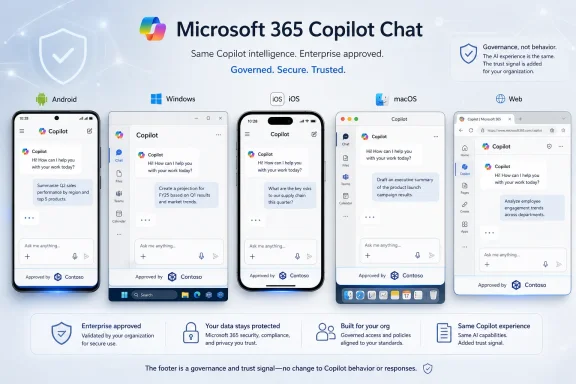
Microsoft is rolling out Roadmap ID 555852, a Microsoft 365 Copilot app update that adds an “Approved by” branded footer to the Chat screen across Android, desktop, iOS, Mac, and web, using the organization logo already configured in Microsoft 365 admin center theming. It is a small visual change with a larger administrative message: Microsoft wants Copilot to look less like a consumer chatbot dropped into work and more like a governed company surface. The footer does not change Copilot’s model behavior, permissions, or data boundaries, but it does change the trust signal presented to users at the exact moment they type business data into an AI box.
The new branded footer is not the kind of feature that will dominate a Microsoft keynote. There is no new model, no flashy agent builder, no workflow automation demo that turns a quarterly deck into a budget plan while everyone applauds. Instead, Microsoft is adding a static label — “Approved by” — beside an organization-approved logo at the bottom of the Microsoft 365 Copilot Chat screen.
That restraint is the point. Copilot has moved from experimental productivity toy to sanctioned enterprise surface, and the fight is no longer just about what the assistant can do. It is about whether employees believe they are in the right place, using the right tool, under the right policy.
For IT departments, this is familiar territory. The same logic that put company branding on sign-in pages, SharePoint portals, Teams backgrounds, and managed browsers is now being applied to AI chat. The interface is becoming part of the control plane.
Microsoft’s choice of wording matters. “Approved by” is not “powered by,” “secured by,” or “managed by.” It does not claim that every answer is correct, every prompt is safe, or every generated file is compliant. It says something narrower but operationally useful: this instance of Copilot is sanctioned by the organization whose logo appears next to the label.
But enterprise AI adoption is not decided only by model quality. It is decided by identity, trust, training, auditability, procurement, and the vague but very real question every employee asks before pasting company data into a prompt: Am I allowed to do this here?
That question has become harder as Microsoft’s Copilot branding has spread across consumer Windows, Edge, Bing, Microsoft 365, GitHub, Power Platform, Security, and assorted app surfaces. A user may see “Copilot” in several places, each with different account contexts, licensing terms, data access, retention assumptions, and administrative controls. To administrators, those distinctions are obvious. To normal users, they blur.
The branded footer is Microsoft’s attempt to reduce that blur inside the Microsoft 365 Copilot app. If the organization’s logo is visible directly in Chat, the user gets an immediate sign that this is the company-approved work experience, not a random AI sidebar or a personal account surface wearing similar colors.
That does not solve every confusion problem, but it addresses one of the most practical ones: visual certainty. In large organizations, especially those with mixed Windows fleets, mobile devices, BYOD policies, and web access, a small trusted marker can prevent a surprising amount of user hesitation — and, occasionally, user error.
For admins, the practical appeal is obvious. If the tenant already has approved branding for Microsoft 365 experiences, Copilot can inherit it rather than requiring another upload, another brand review, and another policy page. Microsoft is turning existing tenant identity into AI interface identity.
That reuse also fits the way Microsoft has been folding Copilot into Microsoft 365 rather than treating it as a separate destination. The Microsoft 365 Copilot app is increasingly positioned as the front door to work: chat, files, meetings, agents, pages, and increasingly brand-aware creation workflows. If the app is going to become a primary work hub, it needs the same administrative signals as other trusted hubs.
There is a subtle security-adjacent benefit here, though it should not be overstated. Users are often trained to look for organizational branding on sign-in pages to avoid phishing and account confusion. A branded Copilot footer is not an anti-phishing control in the strict sense, and attackers can imitate logos elsewhere. But inside a managed Microsoft 365 context, consistent branding can reinforce the idea that there is a correct place to use work AI.
The danger is that users may read more into the logo than Microsoft intends. “Approved by Contoso” could be interpreted as “everything Copilot says is approved by Contoso,” which is not true. The logo approves the channel, not the generated answer.
“Approved by” is short, plain, and bounded. It says the organization has approved the app experience, not that the prompt is compliant, the response is verified, or the output can be published without review. In the age of generative AI, that distinction is not pedantry. It is risk management.
Copilot’s enterprise appeal rests on Microsoft’s claim that it respects existing Microsoft 365 permissions and security boundaries. But even when access control works as designed, Copilot can surface information users technically have access to but did not realize they could see. It can generate summaries that omit nuance, draft language that sounds more authoritative than it is, and produce plausible answers from imperfect context.
A footer cannot fix any of that. It can only clarify where the user is. The rest remains a matter of data hygiene, permissions review, sensitivity labels, retention policies, user training, and sober expectations.
That is why the feature should be read as part of Microsoft’s broader adoption machinery. Enterprise AI is not only a technical deployment; it is a change-management campaign. The logo is a nudge that says: yes, this is the tool your company wants you to use. Now the company still has to explain how.
That is the reality of Microsoft 365 deployments in 2026. Even Windows-heavy organizations have executives on iPhones, field workers on Android devices, designers on Macs, contractors in browsers, and administrators trying to keep the whole estate coherent. A trust signal that appears only on one platform would be incomplete.
The cross-platform scope also reflects Copilot’s shift from novelty to infrastructure. Once AI chat becomes a place where employees summarize meetings, search files, draft customer messages, and interrogate business data, inconsistent branding becomes more than a design blemish. It becomes another source of help desk tickets and policy ambiguity.
Still, “rolling out” deserves the usual Microsoft 365 caveat. Features listed as generally available do not always appear everywhere at once, and tenant-level visibility can depend on release rings, client versions, account types, licensing, and the slow machinery of cloud deployment. Admins should expect a staged arrival rather than a magic switch flipping globally at midnight.
For organizations in Targeted Release, the feature may become visible earlier to selected users. For everyone else in Worldwide standard multi-tenant environments, the stated general availability window of June 2026 places this in the current rollout wave, with Microsoft’s roadmap entry updated on July 2, 2026.
There is Copilot as a consumer assistant. There is Copilot in Windows. There is Copilot in Edge. There is Microsoft 365 Copilot for work. There are Copilot agents, Copilot Studio, Security Copilot, GitHub Copilot, and more. Some experiences are grounded in organizational data; others are not. Some are covered by enterprise commitments; others live in different contexts.
That fragmentation makes visual governance valuable. The branded footer is a tiny piece of interface real estate, but it helps Microsoft answer a practical question: how do you make the enterprise Copilot feel like the enterprise Copilot when the word “Copilot” is everywhere?
This is also why Microsoft’s use of the existing Admin Center logo is smart. The company does not need a louder Copilot logo. Users already know they are in Copilot. What they need is tenant context.
For WindowsForum readers, the Windows angle is indirect but real. As Microsoft pushes Copilot deeper into Windows and Microsoft 365, the boundary between operating system assistant, browser assistant, and work assistant becomes harder to explain. A company-branded footer inside Microsoft 365 Copilot is one way of redrawing that boundary in the interface rather than burying it in documentation.
A company should be explicit about what “Approved by” means. It should mean the organization has authorized this Copilot experience for work use under its Microsoft 365 policies. It should not mean users can paste anything into it, trust every answer, or skip review for regulated content.
This is especially important in sectors where AI use intersects with legal privilege, health data, financial records, export-controlled information, customer confidentiality, or internal investigations. Employees often make risk decisions based on interface cues. If the cue says “approved,” the policy has to say approved for what.
The footer can be useful in user education. Training materials can show employees the approved Chat screen and contrast it with unsupported tools. Help desks can tell users to look for the organization logo. Security teams can fold it into acceptable-use guidance.
But the strongest deployments will connect the footer to broader controls. That includes reviewing SharePoint and OneDrive permissions, cleaning up overshared sites, configuring sensitivity labels, monitoring audit logs, and making sure Copilot licensing aligns with actual business need. A logo at the bottom of Chat should be the visible tip of a governance stack, not the stack itself.
When a generative assistant can compose, summarize, classify, and retrieve business information, the interface becomes part of compliance behavior. Users infer permission from presentation. If the tool looks official, they assume the organization has thought through the consequences.
That assumption is only partially fair. IT may approve Copilot as a platform while still restricting certain use cases. Legal may approve drafting internal summaries but not external statements. Security may approve prompts involving ordinary business documents but prohibit secrets, credentials, merger discussions, or sensitive personal data. The logo cannot encode those distinctions.
Microsoft’s fixed “Approved by” wording avoids some of the risk, but not all of it. The phrase is simple enough for a footer and ambiguous enough to require local explanation. That makes internal communication essential.
There is also a human-resources dimension. Employees may feel more comfortable using Copilot if it visibly carries the employer’s brand. That can accelerate adoption, which is exactly what Microsoft and many CIOs want. But faster adoption without clearer norms can produce messier incidents.
This is the paradox of enterprise AI branding: the better it works, the more governance it demands.
The first wave of Microsoft 365 Copilot was about proving that AI could operate inside the productivity suite. The next wave has been about expansion: more apps, more agents, more templates, more integration with organizational assets, more surfaces for chat. Features like the branded footer belong to the third phase: normalization.
Normalization is what happens when a product stops trying to convince the early adopters and starts accommodating the enterprise middle. That audience asks different questions. How will users know which Copilot to use? How do we explain approved AI? Can we make the experience feel like ours? Can we reduce confusion without building custom portals?
A branded footer answers those questions modestly. It does not make Copilot cheaper, smarter, or easier to audit. But it does make the sanctioned experience more legible.
It also shows Microsoft’s awareness that Copilot adoption depends on administrators as much as end users. The company needs IT departments to champion the tool, not merely tolerate it. Giving admins visible ownership of the experience is part of that bargain.
In a large deployment, small cues matter. Users open tickets when they cannot tell whether they are in a personal or work account. They paste content into the wrong window. They assume a Microsoft-branded tool is automatically sanctioned. They avoid approved tools because they are unsure whether AI use is allowed at all.
A footer will not eliminate those problems, but it gives IT a shared reference point. “Use the Copilot Chat screen that says Approved by our organization” is simpler than explaining account contexts, service plans, commercial data protection boundaries, and tenant branding in the same breath.
Endpoint teams should also view this in the broader context of Microsoft’s app sprawl. The Microsoft 365 Copilot app, Teams, Edge, Windows, Outlook, and mobile clients can all expose AI-adjacent experiences. The user journey is no longer neatly contained. Branding becomes one of several breadcrumbs that help users stay in the managed lane.
The practical next step is not complicated: check the organization logo configured in Microsoft 365 admin center theming. If it is outdated, low-resolution, politically contested, or inherited from a rebrand three acquisitions ago, Copilot may soon make that neglect more visible.
 Microsoft Turns a Footer Into a Governance Signal
The new branded footer is not the kind of feature that will dominate a Microsoft keynote. There is no new model, no flashy agent builder, no workflow automation demo that turns a quarterly deck into a budget plan while everyone applauds. Instead, Microsoft is adding a static label — “Approved by” — beside an organization-approved logo at the bottom of the Microsoft 365 Copilot Chat screen.That restraint is the point. Copilot has moved from experimental productivity toy to sanctioned enterprise surface, and the fight is no longer just about what the assistant can do. It is about whether employees believe they are in the right place, using the right tool, under the right policy.
For IT departments, this is familiar territory. The same logic that put company branding on sign-in pages, SharePoint portals, Teams backgrounds, and managed browsers is now being applied to AI chat. The interface is becoming part of the control plane.
Microsoft’s choice of wording matters. “Approved by” is not “powered by,” “secured by,” or “managed by.” It does not claim that every answer is correct, every prompt is safe, or every generated file is compliant. It says something narrower but operationally useful: this instance of Copilot is sanctioned by the organization whose logo appears next to the label.
Copilot’s Biggest Enterprise Problem Is Not Just Capability
Microsoft 365 Copilot has never lacked ambition. It sits across Word, Excel, PowerPoint, Outlook, Teams, OneDrive, SharePoint, and the Microsoft 365 Copilot app, all while promising to reason over work data with the security and permission model enterprises already use. The sales pitch is powerful because it meets workers where they already live.But enterprise AI adoption is not decided only by model quality. It is decided by identity, trust, training, auditability, procurement, and the vague but very real question every employee asks before pasting company data into a prompt: Am I allowed to do this here?
That question has become harder as Microsoft’s Copilot branding has spread across consumer Windows, Edge, Bing, Microsoft 365, GitHub, Power Platform, Security, and assorted app surfaces. A user may see “Copilot” in several places, each with different account contexts, licensing terms, data access, retention assumptions, and administrative controls. To administrators, those distinctions are obvious. To normal users, they blur.
The branded footer is Microsoft’s attempt to reduce that blur inside the Microsoft 365 Copilot app. If the organization’s logo is visible directly in Chat, the user gets an immediate sign that this is the company-approved work experience, not a random AI sidebar or a personal account surface wearing similar colors.
That does not solve every confusion problem, but it addresses one of the most practical ones: visual certainty. In large organizations, especially those with mixed Windows fleets, mobile devices, BYOD policies, and web access, a small trusted marker can prevent a surprising amount of user hesitation — and, occasionally, user error.
The Admin Center Becomes the Source of AI Identity
The implementation is notable because Microsoft is not introducing a new branding system just for Copilot. The feature uses the organization-supported logo already managed in Microsoft Admin Center theming settings. That is the quiet architectural decision that makes this more than cosmetic.For admins, the practical appeal is obvious. If the tenant already has approved branding for Microsoft 365 experiences, Copilot can inherit it rather than requiring another upload, another brand review, and another policy page. Microsoft is turning existing tenant identity into AI interface identity.
That reuse also fits the way Microsoft has been folding Copilot into Microsoft 365 rather than treating it as a separate destination. The Microsoft 365 Copilot app is increasingly positioned as the front door to work: chat, files, meetings, agents, pages, and increasingly brand-aware creation workflows. If the app is going to become a primary work hub, it needs the same administrative signals as other trusted hubs.
There is a subtle security-adjacent benefit here, though it should not be overstated. Users are often trained to look for organizational branding on sign-in pages to avoid phishing and account confusion. A branded Copilot footer is not an anti-phishing control in the strict sense, and attackers can imitate logos elsewhere. But inside a managed Microsoft 365 context, consistent branding can reinforce the idea that there is a correct place to use work AI.
The danger is that users may read more into the logo than Microsoft intends. “Approved by Contoso” could be interpreted as “everything Copilot says is approved by Contoso,” which is not true. The logo approves the channel, not the generated answer.
“Approved By” Is a Carefully Limited Promise
The fixed label is doing a lot of legal and product work. Microsoft could have allowed custom footer text, but it did not — at least in the described rollout. That matters because customizable language would invite organizations to overpromise, mislead, or create inconsistent experiences across tenants.“Approved by” is short, plain, and bounded. It says the organization has approved the app experience, not that the prompt is compliant, the response is verified, or the output can be published without review. In the age of generative AI, that distinction is not pedantry. It is risk management.
Copilot’s enterprise appeal rests on Microsoft’s claim that it respects existing Microsoft 365 permissions and security boundaries. But even when access control works as designed, Copilot can surface information users technically have access to but did not realize they could see. It can generate summaries that omit nuance, draft language that sounds more authoritative than it is, and produce plausible answers from imperfect context.
A footer cannot fix any of that. It can only clarify where the user is. The rest remains a matter of data hygiene, permissions review, sensitivity labels, retention policies, user training, and sober expectations.
That is why the feature should be read as part of Microsoft’s broader adoption machinery. Enterprise AI is not only a technical deployment; it is a change-management campaign. The logo is a nudge that says: yes, this is the tool your company wants you to use. Now the company still has to explain how.
The Cross-Platform Rollout Shows Where Microsoft Thinks Work Happens
The listed platforms — Android, desktop, iOS, Mac, and web — are almost as important as the feature itself. Microsoft is not treating Copilot Chat as a Windows-only or browser-only experience. It is treating it as a work surface that follows users across endpoints.That is the reality of Microsoft 365 deployments in 2026. Even Windows-heavy organizations have executives on iPhones, field workers on Android devices, designers on Macs, contractors in browsers, and administrators trying to keep the whole estate coherent. A trust signal that appears only on one platform would be incomplete.
The cross-platform scope also reflects Copilot’s shift from novelty to infrastructure. Once AI chat becomes a place where employees summarize meetings, search files, draft customer messages, and interrogate business data, inconsistent branding becomes more than a design blemish. It becomes another source of help desk tickets and policy ambiguity.
Still, “rolling out” deserves the usual Microsoft 365 caveat. Features listed as generally available do not always appear everywhere at once, and tenant-level visibility can depend on release rings, client versions, account types, licensing, and the slow machinery of cloud deployment. Admins should expect a staged arrival rather than a magic switch flipping globally at midnight.
For organizations in Targeted Release, the feature may become visible earlier to selected users. For everyone else in Worldwide standard multi-tenant environments, the stated general availability window of June 2026 places this in the current rollout wave, with Microsoft’s roadmap entry updated on July 2, 2026.
The Feature Is Small Because the Brand Problem Is Large
The Microsoft 365 Copilot app has inherited a branding challenge that Microsoft created for itself. “Copilot” now describes a family of experiences rather than a single product. That strategy gives Microsoft a unifying AI banner, but it also pushes complexity onto users and administrators.There is Copilot as a consumer assistant. There is Copilot in Windows. There is Copilot in Edge. There is Microsoft 365 Copilot for work. There are Copilot agents, Copilot Studio, Security Copilot, GitHub Copilot, and more. Some experiences are grounded in organizational data; others are not. Some are covered by enterprise commitments; others live in different contexts.
That fragmentation makes visual governance valuable. The branded footer is a tiny piece of interface real estate, but it helps Microsoft answer a practical question: how do you make the enterprise Copilot feel like the enterprise Copilot when the word “Copilot” is everywhere?
This is also why Microsoft’s use of the existing Admin Center logo is smart. The company does not need a louder Copilot logo. Users already know they are in Copilot. What they need is tenant context.
For WindowsForum readers, the Windows angle is indirect but real. As Microsoft pushes Copilot deeper into Windows and Microsoft 365, the boundary between operating system assistant, browser assistant, and work assistant becomes harder to explain. A company-branded footer inside Microsoft 365 Copilot is one way of redrawing that boundary in the interface rather than burying it in documentation.
Admins Should Treat the Footer as a Training Trigger
The worst way to respond to this feature is to merely upload a logo and call the Copilot rollout more trustworthy. Branding can support governance, but it cannot substitute for it. If anything, the new footer should prompt administrators to revisit the language they use when introducing Copilot to employees.A company should be explicit about what “Approved by” means. It should mean the organization has authorized this Copilot experience for work use under its Microsoft 365 policies. It should not mean users can paste anything into it, trust every answer, or skip review for regulated content.
This is especially important in sectors where AI use intersects with legal privilege, health data, financial records, export-controlled information, customer confidentiality, or internal investigations. Employees often make risk decisions based on interface cues. If the cue says “approved,” the policy has to say approved for what.
The footer can be useful in user education. Training materials can show employees the approved Chat screen and contrast it with unsupported tools. Help desks can tell users to look for the organization logo. Security teams can fold it into acceptable-use guidance.
But the strongest deployments will connect the footer to broader controls. That includes reviewing SharePoint and OneDrive permissions, cleaning up overshared sites, configuring sensitivity labels, monitoring audit logs, and making sure Copilot licensing aligns with actual business need. A logo at the bottom of Chat should be the visible tip of a governance stack, not the stack itself.
Branding Is Becoming a Compliance Surface
Enterprise software used to treat branding mostly as decoration. A company logo made the portal feel official, helped with user comfort, and satisfied communications departments. AI changes that calculation.When a generative assistant can compose, summarize, classify, and retrieve business information, the interface becomes part of compliance behavior. Users infer permission from presentation. If the tool looks official, they assume the organization has thought through the consequences.
That assumption is only partially fair. IT may approve Copilot as a platform while still restricting certain use cases. Legal may approve drafting internal summaries but not external statements. Security may approve prompts involving ordinary business documents but prohibit secrets, credentials, merger discussions, or sensitive personal data. The logo cannot encode those distinctions.
Microsoft’s fixed “Approved by” wording avoids some of the risk, but not all of it. The phrase is simple enough for a footer and ambiguous enough to require local explanation. That makes internal communication essential.
There is also a human-resources dimension. Employees may feel more comfortable using Copilot if it visibly carries the employer’s brand. That can accelerate adoption, which is exactly what Microsoft and many CIOs want. But faster adoption without clearer norms can produce messier incidents.
This is the paradox of enterprise AI branding: the better it works, the more governance it demands.
The Roadmap Entry Reveals Microsoft’s Copilot Maturity Phase
Roadmap ID 555852 is not a moonshot feature. It is a maturity feature. That distinction matters.The first wave of Microsoft 365 Copilot was about proving that AI could operate inside the productivity suite. The next wave has been about expansion: more apps, more agents, more templates, more integration with organizational assets, more surfaces for chat. Features like the branded footer belong to the third phase: normalization.
Normalization is what happens when a product stops trying to convince the early adopters and starts accommodating the enterprise middle. That audience asks different questions. How will users know which Copilot to use? How do we explain approved AI? Can we make the experience feel like ours? Can we reduce confusion without building custom portals?
A branded footer answers those questions modestly. It does not make Copilot cheaper, smarter, or easier to audit. But it does make the sanctioned experience more legible.
It also shows Microsoft’s awareness that Copilot adoption depends on administrators as much as end users. The company needs IT departments to champion the tool, not merely tolerate it. Giving admins visible ownership of the experience is part of that bargain.
The Windows Admin’s View Is Practical, Not Sentimental
For sysadmins and endpoint managers, the interesting question is not whether the footer is aesthetically pleasing. It is whether it reduces friction and risk.In a large deployment, small cues matter. Users open tickets when they cannot tell whether they are in a personal or work account. They paste content into the wrong window. They assume a Microsoft-branded tool is automatically sanctioned. They avoid approved tools because they are unsure whether AI use is allowed at all.
A footer will not eliminate those problems, but it gives IT a shared reference point. “Use the Copilot Chat screen that says Approved by our organization” is simpler than explaining account contexts, service plans, commercial data protection boundaries, and tenant branding in the same breath.
Endpoint teams should also view this in the broader context of Microsoft’s app sprawl. The Microsoft 365 Copilot app, Teams, Edge, Windows, Outlook, and mobile clients can all expose AI-adjacent experiences. The user journey is no longer neatly contained. Branding becomes one of several breadcrumbs that help users stay in the managed lane.
The practical next step is not complicated: check the organization logo configured in Microsoft 365 admin center theming. If it is outdated, low-resolution, politically contested, or inherited from a rebrand three acquisitions ago, Copilot may soon make that neglect more visible.
A Small Footer Carries a Bigger Deployment Checklist
The concrete value of this rollout is that it turns an abstract governance problem into something admins can inspect, explain, and support. The branded footer is not the strategy, but it is a useful forcing function for the strategy conversation that many organizations still need to have.- The feature uses the organization-supported logo already configured in Microsoft Admin Center theming rather than introducing a separate Copilot-only branding store.
- The footer appears in the Microsoft 365 Copilot app Chat screen with the fixed label “Approved by.”
- The rollout covers Android, desktop, iOS, Mac, and web for Worldwide standard multi-tenant cloud customers.
- The roadmap lists the feature as rolling out, with general availability targeted for June 2026 and the entry last updated on July 2, 2026.
- The footer confirms organizational approval of the Copilot experience, not the accuracy, compliance, or review status of individual AI-generated responses.
- Administrators should pair the visual cue with user guidance, permissions hygiene, sensitivity labeling, and clear acceptable-use policies.
References
- Primary source: Microsoft 365 Roadmap
Published: 2026-07-02T23:12:48.2177075Z
Microsoft 365 Roadmap | Microsoft 365
The Microsoft 365 Roadmap lists updates that are currently planned for applicable subscribers. Check here for more information on the status of new features and updates.www.microsoft.com
- Official source: support.microsoft.com
The Microsoft 365 app transition to the Microsoft 365 Copilot app | Microsoft Support
The Microsoft 365 (Office) app is now called the Microsoft 365 Copilot app. Get the details about the change and what it means to you.support.microsoft.com - Related coverage: kbworks.eu
M365 Copilot App: Add Your Company Logo to the Footer
Microsoft is adding a co-branding footer to the M365 Copilot app. Learn what it does, how to enable it as an admin, and why it matters for adoption.kbworks.eu - Official source: learn.microsoft.com
Microsoft 365 Copilot - Service Descriptions | Microsoft Learn
Learn about Microsoft 365 Copilot and its feature availability across plans.learn.microsoft.com - Related coverage: pupuweb.com
- Official source: devblogs.microsoft.com
Going beyond text in Microsoft 365 Copilot - Introducing SharePoint Copilot Apps - Microsoft 365 Developer Blog
Microsoft 365 Copilot is brilliant with words - but work isn't only words. Introducing SharePoint Copilot Apps: bring rich, interactive UX components straight into the Copilot canvas, built with any JavaScript stack your team already knows. Reuse your existing SPFx investments across...devblogs.microsoft.com
- Related coverage: windowscentral.com
Copilot app in Windows can now handle Gmail and Office docs | Windows Central
Microsoft expands Copilot in Windows 11 with third-party connectors to Gmail and Office 365 document creation tools, turning it into a true productivity hub.www.windowscentral.com - Official source: techcommunity.microsoft.com
