
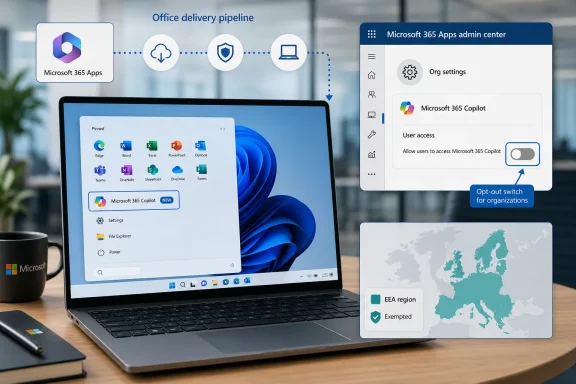
Microsoft is resuming automatic installation of the Microsoft 365 Copilot app from mid-June into mid-July 2026 on eligible Windows PCs that already run commercial Microsoft 365 desktop apps, while excluding European Economic Area tenants and leaving administrators an opt-out in the Microsoft 365 Apps admin center. The narrow mechanics matter because this is not a Windows Update surprise in the usual sense; it is Office acting as the delivery vehicle for Microsoft’s preferred AI front door. That distinction will not comfort users who wake up to a new Copilot entry in Start, but it explains why this rollout is harder to avoid than a Store app update and why enterprise admins should treat it as a Microsoft 365 change, not a Windows 11 change.
The latest Copilot installation push is best understood as a distribution decision masquerading as a convenience feature. Microsoft says automatic installation simplifies access to Microsoft 365 Copilot, and from Redmond’s point of view that is true: if the app is present, the user is one click closer to chat, agents, search, and whatever bundle of AI experiences Microsoft is packaging this quarter. But from the user’s point of view, “simplify” has become one of those platform words that often means remove friction for the vendor.
This rollout targets Windows devices with commercial Microsoft 365 desktop apps, not every Windows 11 PC on the planet. The prerequisite is Microsoft 365 Apps Version 2511 or later, with Current Channel and Monthly Enterprise Channel machines in scope and Semi-Annual Enterprise Channel machines left out of the automatic installation path. That channel distinction is a quiet but important reminder that Microsoft’s fastest update lanes are no longer just about getting Word and Excel fixes sooner; they are also the lanes where new product surfaces arrive first.
The app installs in the background and appears as a Start menu entry point. Microsoft’s documentation presents that as a low-impact event, which is technically fair if the app does not interrupt the user. But Start menu real estate, default availability, and system-wide provisioning are not neutral in 2026. They are how modern platforms teach users what the vendor thinks belongs in the workflow.
The most controversial part is not that Microsoft has an AI app. It is that the company continues to treat installation as an assumption and refusal as an administrative chore. A user or organization can decide not to use Copilot, but Microsoft is once again making the default state presence, not consent.
The June-to-July rollout suggests something less dramatic happened. Microsoft did not abandon the strategy; it adjusted the timing, the documentation, and the administrative controls. The company’s basic premise remains intact: Copilot should be installed broadly wherever Microsoft 365 productivity work is happening, and users who object can remove it afterward or rely on IT to block it beforehand.
That is a very Microsoft compromise. It offers a management switch, but only if the right person knows where to look before the deployment window closes. It allows uninstalling after the fact, but only after the app has already arrived. It exempts the EEA, but not because the company has developed a universal new respect for user choice; the exemption appears shaped by a regulatory environment that has made bundling and platform preference more legally expensive.
The result is an awkward split-screen product policy. In one market, automatic installation is too sensitive to enable. In another, it is framed as a helpful deployment convenience. That may be legally rational, but it is reputationally corrosive because it tells users outside Europe exactly how much their preference weighs when regulators are not standing behind them.
This is not happening in a vacuum. Microsoft has spent the last several years adjusting Windows, Edge, Teams, and cloud service behavior under pressure from European competition law and digital market rules. The company knows that tying services together, privileging first-party apps, and using dominant software footprints as distribution pipes can attract scrutiny. Copilot may be newer than Teams or Edge, but the pattern is old.
For users in the United States and other non-EEA markets, the practical lesson is blunt: the same installation behavior that is too legally delicate in Europe is still considered acceptable elsewhere. That does not mean Microsoft is breaking rules outside Europe. It does mean the global Windows and Microsoft 365 experience is increasingly fragmented by jurisdiction, with European users receiving defaults that look more respectful because regulators forced the issue.
There is a certain irony here. Microsoft has spent decades arguing that integrated experiences make computing easier. Now the company’s AI era is producing a map where integration depends not merely on product readiness but on legal geography. If the feature were purely a gift to users, the regional asymmetry would be harder to explain.
For years, many enterprise admins treated Store restrictions as a way to reduce consumer app drift on managed PCs. That approach was never a complete security model, but it was a recognizable control surface. Copilot’s deployment path demonstrates that Microsoft’s own productivity suite can now act as a parallel app delivery channel for strategic experiences, whether or not the Store is part of the local policy posture.
Microsoft would argue that this is necessary. Large organizations often disable the Store, and if Microsoft wants the Copilot app to be manageable across real-world fleets, it needs installers, Intune support, Configuration Manager compatibility, and CDN-based updates. From an enterprise deployment perspective, those are useful capabilities.
But usefulness does not erase the trust problem. When an organization blocks one installation path and the vendor supplies another for its own app, admins reasonably ask whether they are managing a platform or negotiating with it. The technical answer is that Microsoft has documented the behavior and provided an opt-out. The political answer is that documentation is not the same as restraint.
This is where Microsoft’s cloud-era admin sprawl bites. Copilot is not a single thing. There is a consumer Copilot app, a Microsoft 365 Copilot app, Copilot Chat, in-app Copilot experiences across Word and Excel, Teams integration, browser entry points, keyboard shortcuts, web endpoints, licensing gates, data-protection modes, and policy controls that live in different management portals. A user says “remove Copilot,” but the administrator hears a taxonomy problem.
The rollout also creates timing pressure. Administrators who do not want the app must clear the automatic installation setting before the deployment reaches eligible devices. That is not unusual in modern cloud administration, where message center posts and service changes arrive continuously. But it is exactly the sort of thing that makes IT pros resent vendor defaults: the penalty for missing a notice is another cleanup project.
Microsoft’s strongest defense is that it has not made Copilot unavoidable. The app can be blocked from automatic installation, manually removed, or managed through enterprise deployment tooling. The weakness in that defense is that it describes a control plane, not a user-centered default. Microsoft is saying, in effect, “you can stop us if you are organized enough.”
This is why automatic installation matters commercially. If the app exists on millions of work PCs, Microsoft gains a persistent place to explain, tease, route, and normalize AI features. Some users will have full Copilot capabilities. Others will see limited chat experiences, web-grounded responses, or prompts to use features their organization has not licensed. Either way, the app becomes part of the daily furniture.
The strategy is not irrational. Microsoft is under pressure to justify years of AI investment, premium Copilot pricing, data-center spending, and a corporate narrative built around AI as the next productivity platform. It cannot wait for every user to go looking for the app. It wants Copilot sitting where Office users already work, because that is how adoption curves are manufactured.
The danger is that Microsoft confuses installation with enthusiasm. Users can tolerate an app they requested behaving imperfectly. They are far less forgiving when an app they did not request arrives, claims space, and then asks them to trust it with work context, documents, email, meetings, and corporate memory. AI products have a higher trust threshold than calculators or note-taking tools; forced distribution spends that trust before the product has earned it.
But Windows users are not reacting to one icon. They are reacting to an accumulation of defaults: Edge promotions, OneDrive nudges, Microsoft account pressure, Teams bundling, Start menu recommendations, widgets, search advertising, and now AI entry points that seem to multiply faster than Microsoft can explain them. Copilot has become the symbol for a broader suspicion that Windows is no longer a neutral workspace but a merchandising surface for Microsoft’s current priorities.
That suspicion is especially strong among power users because they remember when Windows was judged mainly by compatibility, performance, control, and stability. Windows 11 has improved in many ways, but its most visible controversies often involve Microsoft inserting itself between the user and the task. Copilot is not the only offender, but it is the most strategically important one.
The automatic Microsoft 365 Copilot install also blurs the boundary between Windows and Office in ways that ordinary users will not parse. If the app appears on a Windows 11 PC, many will blame Windows, even if the installation path is Microsoft 365 Apps. Microsoft may care about that distinction in documentation. Users care that something new appeared without a clear invitation.
Microsoft has invested heavily in enterprise data protection messaging around Copilot. The company argues that Microsoft 365 Copilot respects tenant boundaries, permissions, and existing security controls. That matters, and it distinguishes the enterprise product from consumer-grade chatbots pasted into office workflows with no governance.
Still, the presence of the app can create operational ambiguity. A user may not know whether they are in consumer Copilot, Microsoft 365 Copilot Chat, a licensed Microsoft 365 Copilot experience, or a web fallback. If sign-in behavior redirects users based on identity type, that may be technically correct while still being confusing. In security, confusion is not a harmless user-interface defect; it is where bad assumptions form.
Admins also have to think about shared machines and multi-user devices. Microsoft’s documentation indicates that suite-based installation can provision the app system-wide, making it available to other users on the device. That may be desirable in a standard corporate fleet. It may be less desirable in specialized environments, labs, kiosks, regulated desktops, or virtual desktop deployments where image discipline is part of the control model.
The fight is over who decides when that layer appears. Microsoft wants Copilot to be ambient, visible, and default. Many users want AI to be deliberate, contextual, and optional. Those positions are not equally powerful because one of them is backed by the update channel of the world’s dominant productivity suite.
This tension explains the emotional temperature of Copilot news. People are not merely evaluating a feature. They are defending the principle that a PC should not become a rolling referendum on the vendor’s quarterly strategy. When Microsoft installs Copilot automatically, it collapses product marketing, platform control, and user workflow into the same event.
The tragedy for Microsoft is that Copilot might benefit from more restraint. AI assistants work best when users feel in control of the invocation. A blank prompt box is already intimidating enough; making the app feel imposed gives skeptics one more reason to treat it as spyware-adjacent bloat rather than a serious productivity tool. Microsoft needs trust more than it needs another icon.
Microsoft’s renewed Copilot auto-install push shows a company still convinced that AI adoption is too important to leave to discovery. That conviction may produce short-term reach, but it also sharpens the oldest Windows complaint in a new form: the PC belongs to the user until the next strategic priority ships. If Microsoft wants Copilot to become a durable productivity layer rather than the next symbol of platform overreach, it will need to prove that the assistant is worth inviting in — not merely easy to deliver.
 Microsoft Has Turned Office Into the Copilot Delivery System
The latest Copilot installation push is best understood as a distribution decision masquerading as a convenience feature. Microsoft says automatic installation simplifies access to Microsoft 365 Copilot, and from Redmond’s point of view that is true: if the app is present, the user is one click closer to chat, agents, search, and whatever bundle of AI experiences Microsoft is packaging this quarter. But from the user’s point of view, “simplify” has become one of those platform words that often means remove friction for the vendor.This rollout targets Windows devices with commercial Microsoft 365 desktop apps, not every Windows 11 PC on the planet. The prerequisite is Microsoft 365 Apps Version 2511 or later, with Current Channel and Monthly Enterprise Channel machines in scope and Semi-Annual Enterprise Channel machines left out of the automatic installation path. That channel distinction is a quiet but important reminder that Microsoft’s fastest update lanes are no longer just about getting Word and Excel fixes sooner; they are also the lanes where new product surfaces arrive first.
The app installs in the background and appears as a Start menu entry point. Microsoft’s documentation presents that as a low-impact event, which is technically fair if the app does not interrupt the user. But Start menu real estate, default availability, and system-wide provisioning are not neutral in 2026. They are how modern platforms teach users what the vendor thinks belongs in the workflow.
The most controversial part is not that Microsoft has an AI app. It is that the company continues to treat installation as an assumption and refusal as an administrative chore. A user or organization can decide not to use Copilot, but Microsoft is once again making the default state presence, not consent.
The Pause Was a Tactical Retreat, Not a Change of Philosophy
This story feels familiar because Microsoft has already backed away from a similar Copilot push once. Earlier plans to automatically install the Microsoft 365 Copilot app were paused after complaints and a stated technical issue. That pause was read by some as evidence that Microsoft had finally absorbed the backlash around AI bloat, forced entry points, and Windows 11’s increasingly crowded interface.The June-to-July rollout suggests something less dramatic happened. Microsoft did not abandon the strategy; it adjusted the timing, the documentation, and the administrative controls. The company’s basic premise remains intact: Copilot should be installed broadly wherever Microsoft 365 productivity work is happening, and users who object can remove it afterward or rely on IT to block it beforehand.
That is a very Microsoft compromise. It offers a management switch, but only if the right person knows where to look before the deployment window closes. It allows uninstalling after the fact, but only after the app has already arrived. It exempts the EEA, but not because the company has developed a universal new respect for user choice; the exemption appears shaped by a regulatory environment that has made bundling and platform preference more legally expensive.
The result is an awkward split-screen product policy. In one market, automatic installation is too sensitive to enable. In another, it is framed as a helpful deployment convenience. That may be legally rational, but it is reputationally corrosive because it tells users outside Europe exactly how much their preference weighs when regulators are not standing behind them.
Europe Gets the Quiet Version of User Choice
The European Economic Area carve-out is the most revealing detail in the rollout. Microsoft’s documentation says automatic installation through Microsoft 365 Apps does not apply to EEA tenants, and that EEA customers cannot enable that installation path in the same way non-EEA customers can. Manual deployment remains available, but the automatic suite-based route is treated differently.This is not happening in a vacuum. Microsoft has spent the last several years adjusting Windows, Edge, Teams, and cloud service behavior under pressure from European competition law and digital market rules. The company knows that tying services together, privileging first-party apps, and using dominant software footprints as distribution pipes can attract scrutiny. Copilot may be newer than Teams or Edge, but the pattern is old.
For users in the United States and other non-EEA markets, the practical lesson is blunt: the same installation behavior that is too legally delicate in Europe is still considered acceptable elsewhere. That does not mean Microsoft is breaking rules outside Europe. It does mean the global Windows and Microsoft 365 experience is increasingly fragmented by jurisdiction, with European users receiving defaults that look more respectful because regulators forced the issue.
There is a certain irony here. Microsoft has spent decades arguing that integrated experiences make computing easier. Now the company’s AI era is producing a map where integration depends not merely on product readiness but on legal geography. If the feature were purely a gift to users, the regional asymmetry would be harder to explain.
The Store Is Not the Only Door Anymore
One reason this rollout has irritated administrators is that it does not rely solely on the Microsoft Store’s familiar app-install pipeline. Microsoft 365 Apps can deliver the Microsoft 365 Copilot app through the suite installation mechanism, and the app can also update through Microsoft’s content delivery infrastructure. In environments where the Store is blocked, that distinction matters.For years, many enterprise admins treated Store restrictions as a way to reduce consumer app drift on managed PCs. That approach was never a complete security model, but it was a recognizable control surface. Copilot’s deployment path demonstrates that Microsoft’s own productivity suite can now act as a parallel app delivery channel for strategic experiences, whether or not the Store is part of the local policy posture.
Microsoft would argue that this is necessary. Large organizations often disable the Store, and if Microsoft wants the Copilot app to be manageable across real-world fleets, it needs installers, Intune support, Configuration Manager compatibility, and CDN-based updates. From an enterprise deployment perspective, those are useful capabilities.
But usefulness does not erase the trust problem. When an organization blocks one installation path and the vendor supplies another for its own app, admins reasonably ask whether they are managing a platform or negotiating with it. The technical answer is that Microsoft has documented the behavior and provided an opt-out. The political answer is that documentation is not the same as restraint.
The Admin Switch Exists, Which Means the Burden Has Moved
Microsoft’s opt-out lives in the Microsoft 365 Apps admin center under device configuration and modern apps settings. That placement is logical if you already live inside Microsoft’s management ecosystem. It is also easy to miss if your mental model is “Windows app appears on Windows PC, therefore Windows policy or Store policy should control it.”This is where Microsoft’s cloud-era admin sprawl bites. Copilot is not a single thing. There is a consumer Copilot app, a Microsoft 365 Copilot app, Copilot Chat, in-app Copilot experiences across Word and Excel, Teams integration, browser entry points, keyboard shortcuts, web endpoints, licensing gates, data-protection modes, and policy controls that live in different management portals. A user says “remove Copilot,” but the administrator hears a taxonomy problem.
The rollout also creates timing pressure. Administrators who do not want the app must clear the automatic installation setting before the deployment reaches eligible devices. That is not unusual in modern cloud administration, where message center posts and service changes arrive continuously. But it is exactly the sort of thing that makes IT pros resent vendor defaults: the penalty for missing a notice is another cleanup project.
Microsoft’s strongest defense is that it has not made Copilot unavoidable. The app can be blocked from automatic installation, manually removed, or managed through enterprise deployment tooling. The weakness in that defense is that it describes a control plane, not a user-centered default. Microsoft is saying, in effect, “you can stop us if you are organized enough.”
Copilot Is Becoming a Licensing Funnel With an Icon
The Microsoft 365 Copilot app is not merely a chatbot wrapper. It is an entry point into Microsoft’s AI productivity stack, where the experience varies depending on subscription, tenant configuration, and whether the user has a paid Microsoft 365 Copilot license. That makes the app both a tool and a sales surface.This is why automatic installation matters commercially. If the app exists on millions of work PCs, Microsoft gains a persistent place to explain, tease, route, and normalize AI features. Some users will have full Copilot capabilities. Others will see limited chat experiences, web-grounded responses, or prompts to use features their organization has not licensed. Either way, the app becomes part of the daily furniture.
The strategy is not irrational. Microsoft is under pressure to justify years of AI investment, premium Copilot pricing, data-center spending, and a corporate narrative built around AI as the next productivity platform. It cannot wait for every user to go looking for the app. It wants Copilot sitting where Office users already work, because that is how adoption curves are manufactured.
The danger is that Microsoft confuses installation with enthusiasm. Users can tolerate an app they requested behaving imperfectly. They are far less forgiving when an app they did not request arrives, claims space, and then asks them to trust it with work context, documents, email, meetings, and corporate memory. AI products have a higher trust threshold than calculators or note-taking tools; forced distribution spends that trust before the product has earned it.
The Windows 11 Backlash Is Really About Accumulated Defaults
On its own, one app appearing in Start is not the end of Windows as we know it. Enthusiasts can uninstall things. Admins can set policy. Most users will ignore what they do not use. Microsoft’s defenders are not wrong when they argue that the outrage can sound larger than the immediate technical impact.But Windows users are not reacting to one icon. They are reacting to an accumulation of defaults: Edge promotions, OneDrive nudges, Microsoft account pressure, Teams bundling, Start menu recommendations, widgets, search advertising, and now AI entry points that seem to multiply faster than Microsoft can explain them. Copilot has become the symbol for a broader suspicion that Windows is no longer a neutral workspace but a merchandising surface for Microsoft’s current priorities.
That suspicion is especially strong among power users because they remember when Windows was judged mainly by compatibility, performance, control, and stability. Windows 11 has improved in many ways, but its most visible controversies often involve Microsoft inserting itself between the user and the task. Copilot is not the only offender, but it is the most strategically important one.
The automatic Microsoft 365 Copilot install also blurs the boundary between Windows and Office in ways that ordinary users will not parse. If the app appears on a Windows 11 PC, many will blame Windows, even if the installation path is Microsoft 365 Apps. Microsoft may care about that distinction in documentation. Users care that something new appeared without a clear invitation.
Security Teams Will Ask a Different Set of Questions
For security-minded organizations, the central issue is not aesthetic clutter. It is governance. Any AI assistant attached to workplace productivity raises questions about data access, logging, retention, identity, sensitivity labels, plugin or agent behavior, and whether users understand which experience they are actually using.Microsoft has invested heavily in enterprise data protection messaging around Copilot. The company argues that Microsoft 365 Copilot respects tenant boundaries, permissions, and existing security controls. That matters, and it distinguishes the enterprise product from consumer-grade chatbots pasted into office workflows with no governance.
Still, the presence of the app can create operational ambiguity. A user may not know whether they are in consumer Copilot, Microsoft 365 Copilot Chat, a licensed Microsoft 365 Copilot experience, or a web fallback. If sign-in behavior redirects users based on identity type, that may be technically correct while still being confusing. In security, confusion is not a harmless user-interface defect; it is where bad assumptions form.
Admins also have to think about shared machines and multi-user devices. Microsoft’s documentation indicates that suite-based installation can provision the app system-wide, making it available to other users on the device. That may be desirable in a standard corporate fleet. It may be less desirable in specialized environments, labs, kiosks, regulated desktops, or virtual desktop deployments where image discipline is part of the control model.
The Real Fight Is Over Who Gets to Define “Productivity”
Microsoft’s argument for Copilot is that AI is becoming part of productivity, and therefore Microsoft 365 should make it available where productivity happens. That is not a fringe claim. Many workers already use AI tools to summarize, draft, translate, analyze, and search. The idea that Office should have an AI layer is obvious enough that Microsoft’s competitors are building similar layers.The fight is over who decides when that layer appears. Microsoft wants Copilot to be ambient, visible, and default. Many users want AI to be deliberate, contextual, and optional. Those positions are not equally powerful because one of them is backed by the update channel of the world’s dominant productivity suite.
This tension explains the emotional temperature of Copilot news. People are not merely evaluating a feature. They are defending the principle that a PC should not become a rolling referendum on the vendor’s quarterly strategy. When Microsoft installs Copilot automatically, it collapses product marketing, platform control, and user workflow into the same event.
The tragedy for Microsoft is that Copilot might benefit from more restraint. AI assistants work best when users feel in control of the invocation. A blank prompt box is already intimidating enough; making the app feel imposed gives skeptics one more reason to treat it as spyware-adjacent bloat rather than a serious productivity tool. Microsoft needs trust more than it needs another icon.
The June Rollout Leaves Admins With a Narrow Window and a Wider Lesson
For IT departments, this is not a philosophical debate to admire from afar. It is a change to inventory, communicate, and either accept or block. The immediate work is straightforward, but the larger lesson is that Microsoft 365 service changes now deserve the same vigilance once reserved for operating-system feature updates.- Eligible non-EEA Windows devices with commercial Microsoft 365 Apps on supported update channels can receive the Microsoft 365 Copilot app automatically during the June-to-mid-July 2026 rollout.
- Devices on the Semi-Annual Enterprise Channel are not in the automatic installation path described for the suite-based deployment.
- Administrators who want to prevent installation need to use the Microsoft 365 Apps admin center rather than assuming Microsoft Store controls are sufficient.
- The app’s arrival does not necessarily mean a user has a paid Microsoft 365 Copilot license, because the app is also an entry point for different Copilot and chat experiences.
- Organizations should document which Copilot surfaces are allowed, which are blocked, and which controls apply in Windows, Microsoft 365 Apps, Teams, Outlook, and the browser.
- The EEA exemption is a reminder that Microsoft’s defaults are not purely technical decisions; they are shaped by regulation, competition policy, and local legal risk.
Microsoft’s renewed Copilot auto-install push shows a company still convinced that AI adoption is too important to leave to discovery. That conviction may produce short-term reach, but it also sharpens the oldest Windows complaint in a new form: the PC belongs to the user until the next strategic priority ships. If Microsoft wants Copilot to become a durable productivity layer rather than the next symbol of platform overreach, it will need to prove that the assistant is worth inviting in — not merely easy to deliver.
References
- Primary source: Notebookcheck
Published: Mon, 22 Jun 2026 10:55:00 GMT
Loading…
www.notebookcheck.net - Related coverage: windowscentral.com
Microsoft’s AI strategy feels like a beta test — at the expense of Windows and Office | Windows Central
The future of Windows and Office potentially hangs in the balance as Microsoft pivots to AI.www.windowscentral.com - Official source: learn.microsoft.com
Deploy the Microsoft 365 Copilot App | Microsoft Learn
Enterprise and company IT Admins can use this guide to manage the deployment of the Microsoft 365 Copilot app to devices in their organization.learn.microsoft.com - Related coverage: notebookcheck.com
Loading…
www.notebookcheck.com - Related coverage: windowslatest.com
Microsoft says it won't auto install Microsoft 365 Copilot app on Windows 11, likely due to outrage over 'Microslop'
Microsoft says it’s taking a step back and temporarily disabling the automatic installation of Microsoft 365 Copilot on Windows 11. In September 2025, Microsoft confirmed it was auto-installing Microsoft 365 Copilot (formerly called Microsoft 365 / Office Hub) on Windows, and that was in... www.windowslatest.com
- Related coverage: techtimes.com
Microsoft Will Not Auto-Install M365 Copilot App on Windows 11 PCs
Microsoft is no longer automatically installing the Microsoft 365 Copilot app on Windows 11 PCs despite previous plans to make it default.www.techtimes.com
- Related coverage: pcworld.com
Microsoft is force-installing M365 Copilot again after a brief pause | PCWorld
Months after pausing due to bugs and user backlash, Microsoft is now resuming forced Copilot installs for Microsoft 365 users by July 1st.www.pcworld.com - Related coverage: techzine.eu
Microsoft resumes automatic rollout of Copilot on PCs - Techzine Global
Microsoft has resumed the automatic installation of the Microsoft 365 Copilot app on business Windows systems. www.techzine.eu
- Related coverage: windowsforum.com
Microsoft 365 Copilot Auto-Install Returns in June 2026: Admin Controls Tested | Windows Forum
Microsoft has resumed the automatic installation of the Microsoft 365 Copilot app on eligible commercial Windows PCs in June 2026, targeting devices with...windowsforum.com - Related coverage: techradar.com
Microsoft 365 Copilot will be automatically installed on 365 Clients in October | TechRadar
Microsoft is pushing the Copilot app on more userswww.techradar.com - Related coverage: tomshardware.com
Microsoft will force install the Copilot AI app for users with desktop versions of 365 apps like Word and Excel — coming October, with no way to opt out for personal users | Tom's Hardware
More bloatware added to Windows, courtesy of Microsoft 365.www.tomshardware.com - Related coverage: ema.europa.eu
Data protection notice_Template
</rdf:Alt> </dc:description> <dc:creator> <rdf:Seq> <rdf:li>testwww.ema.europa.eu
- Official source: microsoft.com
</rdf:Alt> </dc:title> <dc:description> <rdf:Alt> <rdf:li xml:lang="x-default"/> </rdf:Alt> </dc:description> <dc:creator> <rdf:Seq> <rdf:li>Lukas V
</rdf:Alt> </dc:description> <dc:creator> <rdf:Seq> <rdf:li>Lukas Velushwww.microsoft.com
- Official source: download.microsoft.com
Microsoft Security Copilot – Purchasing guide
</rdf:Alt> </dc:description> <dc:creator> <rdf:Seq> <rdf:li>Joey Caparasdownload.microsoft.com
- Related coverage: spscc.edu