

Microsoft’s own service advisory confirms that a logic error in Microsoft 365 Copilot allowed the assistant to process and summarize email messages labeled “Confidential” in users’ Sent Items and Drafts folders — and that the company began rolling a server-side fix in early February 2026.
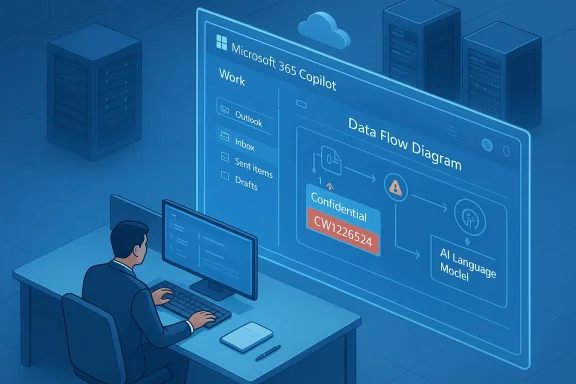
In late January 2026, enterprise administrators and threat-hunting teams began reporting anomalous behavior in the Microsoft 365 Copilot “Work” chat: Copilot Chat returned summaries and conversational answers that referenced email content users had explicitly labeled as confidential. Microsoft logged the incident under internal tracking code CW1226324, described the root cause as a code/logic error and said the issue was first detected around January 21, 2026. The problem specifically involved messages stored in Sent Items and Drafts being included in Copilot’s retrieval set even when sensitivity labels and Data Loss Prevention (DLP) policies were configured to exclude them.
Because Copilot’s value depends on having access to organizational data, this incident raises two separate, critical questions: (1) How did Copilot read confidential emails that DLP and sensitivity labels were supposed to prevent it from touching? and (2) What happened to the content that was processed — was it only summarized in-session, or could it have been stored or used beyond the immediate summary? Microsoft says it deployed a fix in early February and is contacting subsets of affected tenants to confirm remediation as the rollout “saturates,” but the company has not published a full impact metric, a tenant-level forensic export, or a public post‑incident root‑cause report. Those gaps are the core of the trust and compliance problem organizations now face.
What Microsoft has not publicly disclosed in a transparent, tenant-accessible way:
That said, whether specific tenants’ content was stored, forwarded, or used for training remains unverifiable from public information at this time. Microsoft’s general enterprise privacy commitments state that organizational data accessed via Microsoft Graph and Copilot is not used to train foundation models without explicit permission — but the company has not published a tenant‑level disposition report tied to CW1226324 that proves this incident did not produce logs or cached artifacts that were persisted beyond ephemeral processing. Until Microsoft produces tenant-level evidence or a detailed public forensic report, claims about retention and secondary use must be treated cautiously.
Key governance failures evident here:
For enterprises, the path forward requires three complementary elements:
For security teams and compliance officers, the takeaway is twofold:
Ending the era of opaque AI operations will require stronger engineering guarantees from platform providers, better admin tooling for customers, and an updated governance framework that treats LLMs as first-class elements of enterprise data policy rather than black‑box conveniences.
Source: Times Now Did Microsoft Copilot AI Read Your Private Emails Without Permission? Company Responds
 Background / Overview
In late January 2026, enterprise administrators and threat-hunting teams began reporting anomalous behavior in the Microsoft 365 Copilot “Work” chat: Copilot Chat returned summaries and conversational answers that referenced email content users had explicitly labeled as confidential. Microsoft logged the incident under internal tracking code CW1226324, described the root cause as a code/logic error and said the issue was first detected around January 21, 2026. The problem specifically involved messages stored in Sent Items and Drafts being included in Copilot’s retrieval set even when sensitivity labels and Data Loss Prevention (DLP) policies were configured to exclude them.Because Copilot’s value depends on having access to organizational data, this incident raises two separate, critical questions: (1) How did Copilot read confidential emails that DLP and sensitivity labels were supposed to prevent it from touching? and (2) What happened to the content that was processed — was it only summarized in-session, or could it have been stored or used beyond the immediate summary? Microsoft says it deployed a fix in early February and is contacting subsets of affected tenants to confirm remediation as the rollout “saturates,” but the company has not published a full impact metric, a tenant-level forensic export, or a public post‑incident root‑cause report. Those gaps are the core of the trust and compliance problem organizations now face.
What happened, in plain terms
The narrow technical failure
At its core, this was not an external attack or a phishing exploit; it appears to be a server-side logic error in Copilot’s processing pipeline. Copilot’s workflows generally follow two steps:- Retrieve content from Microsoft 365 services (mailboxes, SharePoint, OneDrive, etc.) via the Microsoft Graph and internal retrieval/indexing systems.
- Provide that content as contextual input to the large language model (LLM) to generate summaries, answers, or drafting assistance.
Why Sent Items and Drafts matter
Although the bug reportedly affected only two folder types, those folders often hold the most sensitive content:- Sent Items contain finalized communications and attachments that may include contract wording, legal communications, executive strategy, or personally identifying information.
- Drafts frequently include unredacted or work-in-progress content that was never meant to be distributed.
Microsoft’s public posture — what it said and what it didn’t
Microsoft acknowledged the incident in its advisory language: messages with confidential labels were being incorrectly processed by Microsoft 365 Copilot Chat, a code issue allowed items in Sent Items and Drafts to be included, and a server-side remediation began in early February. The company has said it is monitoring rollout telemetry and contacting subsets of tenants to validate remediation as the fix propagates through its global environment.What Microsoft has not publicly disclosed in a transparent, tenant-accessible way:
- A global count of affected tenants or the number of confidential items processed.
- Tenant-level forensic exports or a standardized audit artifact that would allow customers to determine definitively whether specific messages from their tenant were indexed or summarized during the exposure window.
- Clear statements about whether the content that Copilot processed was persisted beyond ephemeral processing (beyond what is necessary to generate the summary), or whether any logs or cached context were retained for troubleshooting, analytics, or debugging purposes.
- A full post-incident technical root-cause analysis showing the exact code path or policy enforcement gap that allowed the behavior.
Cross-checking the facts
Multiple independent technical outlets and enterprise IT advisories reported the same central facts: detection around January 21, 2026; internal tracking under CW1226324; folder-specific retrieval of Sent Items and Drafts despite confidentiality labels; and a server-side remediation started in early February. Independent reporting also emphasized that Microsoft had not given a comprehensive account of scope or forensic output, leaving administrators to rely on service telemetry and audit logs to evaluate exposure. Where dates, tracking codes, and the folder scope are concerned, those points are corroborated across vendor advisories and reporting from security and enterprise IT publications.That said, whether specific tenants’ content was stored, forwarded, or used for training remains unverifiable from public information at this time. Microsoft’s general enterprise privacy commitments state that organizational data accessed via Microsoft Graph and Copilot is not used to train foundation models without explicit permission — but the company has not published a tenant‑level disposition report tied to CW1226324 that proves this incident did not produce logs or cached artifacts that were persisted beyond ephemeral processing. Until Microsoft produces tenant-level evidence or a detailed public forensic report, claims about retention and secondary use must be treated cautiously.
The security and privacy implications
Immediate operational risks
- Confidentiality violations: Messages that organizations relied on labels to protect could have been summarized and surfaced to users who shouldn’t have seen them.
- Regulatory exposure: For organizations bound by privacy regimes such as GDPR, HIPAA, or sector-specific rules (financial services, government), unauthorized processing of confidential data could trigger notification obligations, contractual breaches, or regulatory scrutiny.
- Loss of auditability: If Microsoft has not provided a reliable, tenant-specific audit trail for the exposure window, organizations cannot conclusively demonstrate what data left their control — a major issue for incident response and compliance.
Governance and contractual risks
- Trust erosion with cloud AI: The incident underscores the difficulty of delegating enforcement of sensitivity policies to integrated cloud AI features without independently verifiable evidence that controls function as expected.
- Contract and SLA gaps: Customers who relied on contractual promises about data handling and model training may now demand clearer service guarantees, audit rights, and contractual remedies for incidents that expose sensitive content.
- Insurance and liability: Cyber insurance and legal liability assessments may be complicated by a lack of transparent evidence about the scope and retention of processed content.
Long-term platform risk
- Adoption hesitation: Organizations evaluating Copilot for enterprise productivity will now factor this incident into adoption decisions — particularly regulated organizations and government customers that require air-tight data sovereignty and auditability.
- Increased regulatory attention: Expect privacy regulators and public-sector security teams to scrutinize integrated AI assistants more aggressively, including possible demands for mandatory notifications, transparency obligations, or certification processes.
What administrators should do now (practical, prioritized steps)
If you manage Microsoft 365 at an organization, take the following actions immediately to assess and reduce risk.- Verify advisory status and timeline for your tenant.
- Check your Microsoft 365 admin center and service health dashboard for the CW1226324 advisory and any tenant-specific messages.
- Request a tenant-level forensic export from Microsoft Support.
- Open a support ticket and ask for logs and telemetry related to Copilot Chat retrieval and indexing for the period Jan 21 – Feb [relevant remediation date]. Ask specifically for evidence showing whether items from your tenant’s Sent Items or Drafts were indexed or summarized.
- Audit unified logs and Purview/DLP telemetry.
- Review Microsoft Purview sensitivity label operations and DLP alerts for the exposure window. Look for any retrieval activity that correlates with Copilot or Graph queries.
- Temporarily limit Copilot access for high‑risk groups.
- Consider disabling Copilot Chat or restricting the Work tab for executives, legal, HR, or other high-risk groups until you receive remediation confirmation and forensic evidence.
- Re-evaluate label application and folder hygiene.
- Ensure that documents intended to be confidential are not primarily stored in Drafts or Sent Items without an additional retention or carriage control. Train users on safe composition and storage patterns if appropriate.
- Update incident response and notification plans.
- Consult legal/compliance teams to determine whether breach notification rules apply given the level of risk and any customer or personal data that might have been processed.
- Ask Microsoft for a post-incident report and audit bundle.
- Request a formal post-incident analysis that includes the root cause, the fix applied, the roll‑out timeline for your tenant, and a standard audit package you can use for regulators or auditors.
- Document mitigation and communications.
- Record actions taken and what evidence you have; prepare client or stakeholder communications in case audit or legal teams require them.
What end users and knowledge workers should know and do
- Assume that any confidential content placed in email Drafts or Sent Items between January 21, 2026 and early February 2026 may have been read and summarized by Copilot in some tenants.
- Stop using Copilot Chat or “Summarize” workflow for any content that contains regulated personal data, trade secrets, legal correspondence, or client-confidential information until your admin confirms remediation.
- When in doubt, don’t paste sensitive content into Copilot prompts and avoid enabling connectors or features that move data between services without review.
- If you are an executive or custodian of privileged communications (legal, medical, HR), flag any exposure concerns immediately to your security or legal team.
Why this isn’t just a bug — it’s a governance problem
Technical bugs happen. What makes this incident more consequential is the intersection of automated AI workflows, delegated enforcement of sensitivity labels, and limited post-incident transparency. Organizations increasingly rely on cloud providers to enforce DLP and sensitivity labels across a complex stack. When enforcement fails on the provider side, customers need rapid, verifiable evidence to determine exposure and comply with laws and contracts.Key governance failures evident here:
- Opaque incident reporting: A high-quality post-incident report should include timelines, code-path detail, list of affected services and features, and tenant-level remediation status.
- Lack of tenant-level audit exports by default: Enterprises need standardized forensic artifacts they can download or request on short notice to meet legal and regulatory obligations.
- Insufficient contractual audit rights for AI features: Many enterprise contracts were not designed for LLM-era features that can digest and summarize entire mailboxes; contract language on data handling and auditability must evolve.
What Microsoft could and should do next
To restore trust and give customers the tools they need to validate exposure, Microsoft should consider the following actions:- Publish a full post-incident root-cause analysis for CW1226324 that explains the code path failure and what checks were missed in retrieval and label enforcement.
- Deliver a tenant-level audit package for any customer who requests it that includes timestamps, retrieval queries, and a list of any items summarized or processed by Copilot during the exposure period.
- Commit to explicit evidence of non-retention: state whether any content was persisted beyond ephemeral processing and, if so, provide details about retention, deletion, and scope.
- Improve transparency on model training and retention by mapping incident categories to data handling: i.e., clarify whether content processed during an incident can ever be used for training or model improvement.
- Offer compensating controls for sensitive workloads — e.g., allow customers to opt-out per tenant of specific Copilot retrieval paths, or allow a hard “no indexing of Sent Items/Drafts” policy that cannot be overridden server-side without tenant opt-in.
- Expand their contractual evidence and audit clauses to cover the AI-era scenarios where provider-side logic enforcements are critical to compliance.
Broader context: AI assistants, DLP and the trust problem
This incident is one of a series of high-profile events that underscore an enduring truth: integrating LLM-based assistants into enterprise workflows creates new control and auditing challenges. Previous incidents — zero-click exfiltration techniques, prompt-injection attack vectors, and other Copilot‑era security advisories earlier in 2025 and 2026 — demonstrate attackers and defenders are looking for ways to trick retrieval, bypass audit trails, or abuse conversational contexts.For enterprises, the path forward requires three complementary elements:
- Technical controls: Stronger enforcement at retrieval time, hardened indexing flows, robust testing for policy enforcement paths, and improved runtime telemetry.
- Operational controls: Clear configuration defaults, vendor-supplied audit bundles, and conservative rollout policies for AI features in regulated tenants.
- Legal and governance controls: Contracts and SLAs that mandate transparency, tenant-level evidence, and defined remediation timelines for issues that affect confidentiality.
Recommendations for CIOs, CISO, and compliance officers
- Treat integrated AI features like a new class of data processor and update your risk register accordingly.
- Revise vendor contracts and procurement checklists to require:
- Tenant-level forensic exports within a guaranteed timeframe.
- Clear evidence that processed data is not used to train external models.
- Audit and indemnity clauses covering unintended processing of labeled content.
- Execute tabletop exercises that simulate an AI-assisted data leak and test your notification and forensic capabilities.
- Establish minimum-privilege defaults: disable Copilot Chat or restrict the Work tab for sensitive groups until you can validate safety controls.
- Engage Microsoft (or any cloud AI vendor) proactively for transparency and ask for proof-of-fix and post-incident forensics when issues are announced.
Closing analysis — balancing convenience and control
Microsoft 365 Copilot represents a transformational productivity capability: quick summaries, contextual drafting, and automated triage can save time and reduce cognitive load. But this incident shows the practical consequences when policy enforcement and AI retrieval logic diverge. The upside of Copilot is real; the downside is systemic when confidentiality controls fail and the vendor does not provide clear, auditable evidence to assuage risk.For security teams and compliance officers, the takeaway is twofold:
- Operationalize skepticism: assume cloud AI features can and will fail at scale, and require vendor-provided, auditable artifacts as part of normal incident response.
- Demand structural transparency: technological promises about “data not used to train” are meaningful only when paired with audit evidence and contractual rights.
Ending the era of opaque AI operations will require stronger engineering guarantees from platform providers, better admin tooling for customers, and an updated governance framework that treats LLMs as first-class elements of enterprise data policy rather than black‑box conveniences.
Source: Times Now Did Microsoft Copilot AI Read Your Private Emails Without Permission? Company Responds
