

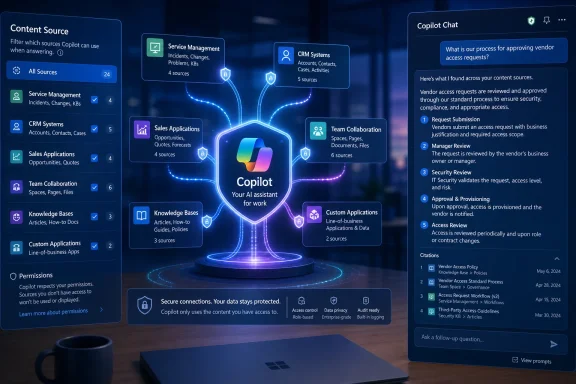
Microsoft is preparing a meaningful usability upgrade for Microsoft 365 Copilot connectors: a new Content Source filter intended to make external knowledge sources easier to find and use within Microsoft 365 Copilot, with Copilot Chat optionally included in the experience. The feature is listed as in development under Microsoft 365 Roadmap ID 502541, with general availability currently targeted for September 2026 for worldwide standard multi-tenant environments on the web.
Microsoft 365 Copilot has steadily become more useful as organizations connect it to data that lives beyond SharePoint, OneDrive, Teams, and Exchange. The challenge is that greater access to enterprise data can create a discovery problem of its own.
A user may know that valuable information exists somewhere in the company’s connected systems, but not know whether it is stored in a project-management platform, CRM, knowledge base, IT service desk, document repository, or custom line-of-business application. Even when Copilot can technically access that material, users need a practical way to understand which connected source is informing an answer or where they should direct their search.
The planned Content Source filter appears designed to reduce that ambiguity. Rather than treating all connected enterprise content as one opaque pool, Microsoft 365 Copilot is expected to provide a clearer mechanism for discovering and selecting connector-backed sources.
That is an important shift. In an enterprise environment, the difference between asking Copilot to search “everything” and asking it to focus on a specific trusted source can determine whether a response is useful, current, compliant, and easy to verify.
A connector can surface content from widely used services such as:
For example, an employee might ask Copilot to summarize a product issue, identify the latest internal policy, compare support trends, or locate project decisions. If the organization has deployed the right connectors, the answer could potentially draw on material from several connected platforms.
Synced connectors ingest and index eligible external content into Microsoft’s data infrastructure. This model can support richer retrieval and semantic indexing, helping Copilot understand context beyond exact keyword matches. It is well suited to comparatively stable content such as documentation, knowledge articles, document stores, policy repositories, and structured records that benefit from search indexing.
Federated connectors, by contrast, retrieve data in real time from the original source. This approach is valuable when information changes frequently, must remain in the source platform, or needs to reflect live operational status. Federated connectors increasingly rely on Model Context Protocol (MCP)-based approaches to allow Copilot to use external tools and data sources dynamically.
Both models can be useful, but they introduce a visibility problem. A user may not always know whether an answer came from indexed data, a live connected system, Microsoft 365 content, or some combination of those sources.
A Content Source filter could make that distinction more understandable in day-to-day Copilot use.
In practical terms, such filters could help users narrow their Copilot experience to particular external systems, categories of connected content, or named sources. The result may be less guesswork when querying enterprise data.
Consider the same question asked across departments:
The new Content Source filter is therefore not merely a cosmetic navigation enhancement. It could become a critical control for search precision, answer confidence, and effective Copilot adoption.
A Content Source filter should help convert a technically capable connector deployment into a more navigable employee experience.
The final experience may vary by tenant configuration, connector type, product surface, licensing state, and rollout stage. Organizations should avoid assuming that every user will automatically see the same filtering controls in every Copilot surface the moment the roadmap item reaches general availability.
Still, including Copilot Chat would be strategically important.
Bringing connector source discovery into chat could reduce friction in several ways:
A Content Source filter supports a broader trend in enterprise AI: moving from a single, generic assistant toward a more contextual assistant that can operate across approved knowledge domains.
However, an AI assistant only saves time when it can find the correct content quickly. If a user has to experiment with five prompts to make Copilot look in the right place, the productivity benefit shrinks.
Source filtering can help turn an open-ended request into a more targeted task. A user could potentially move from “What is the current procedure?” to “Find the current procedure from our official IT knowledge source,” with less ambiguity in between.
A source-aware Copilot experience can better respect those distinctions. It lets the user decide whether they need broad enterprise context or a focused answer from a system of record.
That is especially valuable in large organizations where duplicate content is common. A document in SharePoint may describe a process, while the authoritative current procedure exists in ServiceNow or another specialized platform. Filtering by content source can reduce the chance that a user receives a technically related but operationally outdated answer.
That effort is difficult to justify if employees cannot easily discover the resulting source within Copilot.
A clear Content Source filter could make deployed connectors more visible to the people they are meant to serve. It may also give IT teams a cleaner way to communicate that a specific business system is now available through Microsoft 365 Copilot.
For example, an enterprise might want employees to use:
Users also need to understand:
Microsoft 365 Copilot connectors are designed to respect source-level access controls where configured. In a properly deployed environment, users should only be able to discover content that they are authorized to access.
But that protection depends on the connector configuration, the underlying source system, identity mapping, and permission model.
A filter may help someone choose a source, but it should not grant access to information that person lacks permission to view. Security must remain rooted in the source system’s permissions and in the connector’s configuration.
This distinction is essential. A source picker can improve usability, but it cannot compensate for an overly broad connector deployment or poorly maintained access control lists.
Sensitive material may include:
A Content Source filter may make it easier to select a system, but the selected system can still contain stale, duplicated, incomplete, or poorly tagged data. Copilot may retrieve information from the intended source and still produce an answer that needs human validation.
Organizations should continue to improve:
For users, a synced source can feel similar to an extension of enterprise search. The benefit is that familiar internal knowledge becomes more available through natural-language prompts.
The potential limitation is freshness. Even with recurring synchronization, the source content may not reflect a change made moments ago. Administrators should be clear about refresh behavior for each connected platform.
A filter that identifies a source as live or federated could be particularly valuable. Users may have different expectations when querying a current ticket status, inventory level, customer record, or project milestone than when searching a documentation archive.
However, federated access can introduce other variables:
For each source, identify:
Examples include:
Administrators should verify that:
For a support platform, users may learn prompts such as:
For decisions involving finance, customer commitments, legal obligations, security changes, personnel matters, or production operations, users should validate the underlying information before acting. A source filter can improve confidence, but it does not remove the need for professional judgment.
When the feature begins appearing, IT teams should watch for several details.
The answer may depend on the Copilot surface, connector support, and the evolving product design. A source filter that covers only a subset of connectors may still be useful, but IT teams will need to explain those boundaries clearly.
The availability of filters in another Microsoft 365 Copilot experience does not necessarily mean the identical controls will appear in every chat interface.
Before broad rollout, organizations should review source labels and descriptions. A connector named “Prod-KB-External-01” may make sense to IT, but it does little for a user looking for “Engineering Knowledge Base” or “Customer Support Articles.”
Clear naming, accurate descriptions, and consistent ownership will be part of the feature’s real-world success.
The value of Microsoft 365 Copilot does not come only from generating fluent text. It comes from grounding that text in the right organizational knowledge, applying the right permissions, and helping employees understand which systems are contributing to their work.
As Copilot gains access to more external content, it needs better ways to expose that breadth without becoming confusing. Content Source filters are a logical answer to that need.
They could help transform connectors from a background administrative capability into an understandable part of the Copilot experience. Instead of hoping that Copilot searches the right place, users may gain a more direct way to locate and prioritize the source that matters.
For users, the feature could mean more focused prompts, less application switching, and greater confidence that Copilot is consulting the right business system. For administrators, it creates an opportunity to make connector investments more visible, reinforce authoritative sources, and improve AI adoption through clearer workflows.
The feature will not solve poor permissions, outdated content, fragmented ownership, or weak governance. Those foundational issues remain. But when paired with properly configured connectors and a disciplined content strategy, source-level filtering could make Microsoft 365 Copilot substantially more useful as a practical enterprise knowledge tool.
 Overview: A Small Filter With Potentially Large Consequences
Microsoft 365 Copilot has steadily become more useful as organizations connect it to data that lives beyond SharePoint, OneDrive, Teams, and Exchange. The challenge is that greater access to enterprise data can create a discovery problem of its own.A user may know that valuable information exists somewhere in the company’s connected systems, but not know whether it is stored in a project-management platform, CRM, knowledge base, IT service desk, document repository, or custom line-of-business application. Even when Copilot can technically access that material, users need a practical way to understand which connected source is informing an answer or where they should direct their search.
The planned Content Source filter appears designed to reduce that ambiguity. Rather than treating all connected enterprise content as one opaque pool, Microsoft 365 Copilot is expected to provide a clearer mechanism for discovering and selecting connector-backed sources.
That is an important shift. In an enterprise environment, the difference between asking Copilot to search “everything” and asking it to focus on a specific trusted source can determine whether a response is useful, current, compliant, and easy to verify.
Background: What Copilot Connectors Bring to Microsoft 365
Microsoft 365 Copilot connectors extend Copilot beyond data stored natively in Microsoft 365. They allow organizations to connect external platforms and business systems so employees can discover, summarize, and reason over information that would otherwise remain isolated.A connector can surface content from widely used services such as:
- ServiceNow
- Salesforce
- Confluence
- Google services
- Box
- Azure services
- MediaWiki
- Enterprise websites
- Custom internal applications
- Specialized knowledge repositories
- Industry-specific line-of-business systems
For example, an employee might ask Copilot to summarize a product issue, identify the latest internal policy, compare support trends, or locate project decisions. If the organization has deployed the right connectors, the answer could potentially draw on material from several connected platforms.
Synced and Federated Connector Models
Microsoft’s Copilot connector architecture now spans two broad models, each with different trade-offs.Synced connectors ingest and index eligible external content into Microsoft’s data infrastructure. This model can support richer retrieval and semantic indexing, helping Copilot understand context beyond exact keyword matches. It is well suited to comparatively stable content such as documentation, knowledge articles, document stores, policy repositories, and structured records that benefit from search indexing.
Federated connectors, by contrast, retrieve data in real time from the original source. This approach is valuable when information changes frequently, must remain in the source platform, or needs to reflect live operational status. Federated connectors increasingly rely on Model Context Protocol (MCP)-based approaches to allow Copilot to use external tools and data sources dynamically.
Both models can be useful, but they introduce a visibility problem. A user may not always know whether an answer came from indexed data, a live connected system, Microsoft 365 content, or some combination of those sources.
A Content Source filter could make that distinction more understandable in day-to-day Copilot use.
What the Content Source Filter Is Expected to Address
The roadmap entry is concise, so Microsoft has not yet published a detailed user-interface specification, final workflow, or full list of supported connector scenarios. Still, the announced direction is clear: Microsoft wants to improve the discovery of Copilot connector sources through one or more Content Source filters.In practical terms, such filters could help users narrow their Copilot experience to particular external systems, categories of connected content, or named sources. The result may be less guesswork when querying enterprise data.
The Discovery Problem in Enterprise AI
Enterprise AI succeeds only when people can find information they trust. A generic answer is often not enough, particularly in organizations with many systems that serve different purposes.Consider the same question asked across departments:
- A sales leader may need the answer grounded in Salesforce.
- A support manager may want current incident information from ServiceNow.
- An engineering team may need approved technical decisions from Confluence.
- A compliance officer may need only policy content from an official document repository.
- A project manager may need open work items and delivery milestones from a connected planning platform.
The new Content Source filter is therefore not merely a cosmetic navigation enhancement. It could become a critical control for search precision, answer confidence, and effective Copilot adoption.
Better Source Awareness
A well-designed filter can help users answer basic but important questions before they even write a prompt:- Which external systems are available in this tenant?
- Which sources are connected to Copilot?
- Which source contains the information needed for a specific task?
- Is a source intended for general company knowledge or a specialized team workflow?
- Which connected source is most authoritative for the question at hand?
A Content Source filter should help convert a technically capable connector deployment into a more navigable employee experience.
Optional Copilot Chat Support Could Be Especially Important
The roadmap language indicates that the improved discovery experience may optionally add chat alongside the Content Source filters. The word “optionally” is significant because it suggests that Microsoft may be designing the capability with different deployment or administrative choices in mind.The final experience may vary by tenant configuration, connector type, product surface, licensing state, and rollout stage. Organizations should avoid assuming that every user will automatically see the same filtering controls in every Copilot surface the moment the roadmap item reaches general availability.
Still, including Copilot Chat would be strategically important.
Why Chat Is the Natural Place for Source Filters
For many employees, Microsoft 365 Copilot Chat is the most direct and familiar entry point for AI-assisted work. It is where users pose quick questions, request summaries, draft content, investigate issues, and iterate on answers.Bringing connector source discovery into chat could reduce friction in several ways:
- Users could select a relevant source before prompting.
This would make it easier to focus a query on the system most likely to contain the answer. - Prompts could become more concise.
Instead of repeatedly typing “search our ServiceNow knowledge base” or “use our Confluence documentation,” users may be able to establish the intended context through a filter. - Results may become easier to validate.
If users consciously choose a source, they have better visibility into where Copilot is expected to look. - Organizations could reinforce trusted workflows.
Teams could direct employees toward authoritative systems rather than relying on informal, outdated, or duplicated information. - The experience could make connectors more visible.
Many companies invest time in connector deployment only to find that employees do not know the capability exists. Discovery controls can improve the return on that investment.
Why This Matters for Windows and Microsoft 365 Users
For Windows users working in Microsoft 365 environments, Copilot increasingly acts as an interface across work applications rather than a standalone chat tool. The quality of that interface depends heavily on whether it can surface the right content at the right time.A Content Source filter supports a broader trend in enterprise AI: moving from a single, generic assistant toward a more contextual assistant that can operate across approved knowledge domains.
Less Time Spent Switching Between Applications
Windows users often work across a crowded set of browser tabs, desktop applications, Teams conversations, Microsoft 365 documents, and internal portals. Connector-backed Copilot experiences promise to reduce this context switching.However, an AI assistant only saves time when it can find the correct content quickly. If a user has to experiment with five prompts to make Copilot look in the right place, the productivity benefit shrinks.
Source filtering can help turn an open-ended request into a more targeted task. A user could potentially move from “What is the current procedure?” to “Find the current procedure from our official IT knowledge source,” with less ambiguity in between.
Better Alignment With Departmental Workflows
Different teams often maintain separate systems for valid reasons. Engineering documentation, sales data, HR policies, legal material, customer support records, and service operations should not all be treated as interchangeable.A source-aware Copilot experience can better respect those distinctions. It lets the user decide whether they need broad enterprise context or a focused answer from a system of record.
That is especially valuable in large organizations where duplicate content is common. A document in SharePoint may describe a process, while the authoritative current procedure exists in ServiceNow or another specialized platform. Filtering by content source can reduce the chance that a user receives a technically related but operationally outdated answer.
The Benefits for IT Administrators and AI Governance Teams
The feature is primarily about user discovery, but its effects could extend into administration, governance, and adoption planning.Making Connector Investments More Visible
Deploying a Microsoft 365 Copilot connector requires meaningful work. Administrators may need to evaluate the data source, configure authentication, establish permissions, coordinate with application owners, validate data quality, and test user access.That effort is difficult to justify if employees cannot easily discover the resulting source within Copilot.
A clear Content Source filter could make deployed connectors more visible to the people they are meant to serve. It may also give IT teams a cleaner way to communicate that a specific business system is now available through Microsoft 365 Copilot.
Supporting More Intentional AI Usage
AI governance is not only about restricting access. It is also about helping users select the right data source for the task.For example, an enterprise might want employees to use:
- A controlled compliance repository for policy questions
- A support platform for active service status
- A CRM for account details
- A product knowledge base for technical guidance
- A project-management system for delivery tracking
Strengthening Training and Adoption Programs
Copilot deployment programs often focus on prompt-writing tips. Those are useful, but they are incomplete when enterprise connectors are involved.Users also need to understand:
- Which sources are available
- What type of content each source contains
- When each source should be selected
- What information should not be requested from a specific system
- How access permissions affect results
- How to verify output before acting on it
Security, Permissions, and Oversharing Risks Remain Central
A Content Source filter can improve discoverability, but it does not eliminate the need for careful connector governance. In some ways, making sources more visible increases the importance of getting permissions right before broad rollout.Microsoft 365 Copilot connectors are designed to respect source-level access controls where configured. In a properly deployed environment, users should only be able to discover content that they are authorized to access.
But that protection depends on the connector configuration, the underlying source system, identity mapping, and permission model.
Source Selection Is Not a Security Boundary by Itself
Organizations should not treat a user-facing filter as a substitute for access control.A filter may help someone choose a source, but it should not grant access to information that person lacks permission to view. Security must remain rooted in the source system’s permissions and in the connector’s configuration.
This distinction is essential. A source picker can improve usability, but it cannot compensate for an overly broad connector deployment or poorly maintained access control lists.
The Risk of “Visible to Everyone” Configurations
Administrators must remain cautious about any deployment model that makes connector content broadly accessible across the organization. There are legitimate cases for company-wide knowledge bases, but not every external system should be exposed with the same scope.Sensitive material may include:
- Customer records
- Financial information
- Security incident details
- Human resources documentation
- Legal work product
- Product roadmaps
- Internal investigations
- Privileged operational data
- Regulated industry information
Data Quality Can Still Undermine Good Retrieval
There is another risk: discoverability does not equal trustworthiness.A Content Source filter may make it easier to select a system, but the selected system can still contain stale, duplicated, incomplete, or poorly tagged data. Copilot may retrieve information from the intended source and still produce an answer that needs human validation.
Organizations should continue to improve:
- Content ownership
- Document lifecycle practices
- Metadata quality
- Record retention
- Version control
- Access reviews
- De-duplication processes
- Knowledge-base maintenance
- Clear identification of systems of record
How Synced and Federated Sources May Shape the Experience
The Content Source filter arrives at a moment when Microsoft’s connector story is expanding beyond traditional indexed content. This makes the feature more important, but also more complicated.Synced Sources: Stable, Searchable, and Semantically Indexed
Synced connectors are generally appropriate for content that can be ingested and periodically refreshed. They can give Copilot access to searchable enterprise material and may support semantic retrieval across documents, records, and knowledge repositories.For users, a synced source can feel similar to an extension of enterprise search. The benefit is that familiar internal knowledge becomes more available through natural-language prompts.
The potential limitation is freshness. Even with recurring synchronization, the source content may not reflect a change made moments ago. Administrators should be clear about refresh behavior for each connected platform.
Federated Sources: Live Data With Different Expectations
Federated connectors can retrieve information from a source at query time rather than copying that content into Microsoft 365. This approach is appealing for live operational data, systems with strict data residency requirements, or scenarios where information changes too quickly for periodic indexing.A filter that identifies a source as live or federated could be particularly valuable. Users may have different expectations when querying a current ticket status, inventory level, customer record, or project milestone than when searching a documentation archive.
However, federated access can introduce other variables:
- Authentication prompts
- Source-system availability
- API limitations
- Rate limits
- Response latency
- Connector-specific tool behavior
- Differing user permissions between systems
What Organizations Should Do Before September
Because the roadmap item remains in development and the delivery window is still subject to change, organizations do not need to wait for the feature to begin preparing. In fact, the best preparation is largely the same work that makes any Copilot connector deployment successful.1. Inventory Existing Connectors
Start by cataloging every connector that has been deployed or is being evaluated.For each source, identify:
- Business owner
- Technical owner
- Connector model
- Data classification
- Intended audience
- Permission model
- Authentication approach
- Refresh or retrieval pattern
- Known content-quality issues
- User scenarios it supports
2. Identify the System of Record for Common Questions
Organizations should map high-value employee questions to the most authoritative source.Examples include:
- “What is the current travel policy?” → Official policy repository
- “What is the status of this service incident?” → IT service-management platform
- “What did we agree with this customer?” → CRM or approved account documentation
- “What is the approved technical architecture?” → Engineering knowledge base
- “Which milestones are at risk?” → Project-management system
3. Review Permissions Before Increasing Visibility
A connector should be reviewed not only at deployment but also when its discoverability expands.Administrators should verify that:
- Source permissions remain accurate
- Identity mappings are functioning as intended
- Departed users no longer retain access
- Sensitive repositories are appropriately segmented
- Administrative groups are not over-broad
- External sharing policies align with organizational requirements
- Connector visibility matches the intended audience
4. Build Source-Specific Prompt Guidance
Generic prompt training is not enough. Create examples based on each major connector source.For a support platform, users may learn prompts such as:
- Summarize open incidents affecting this service.
- Identify recurring issues reported over the past month.
- Find the latest approved workaround for this error.
- Explain the approved deployment process for this application.
- Summarize the current architecture decision for this component.
- Compare the documented requirements for two product versions.
5. Establish Validation Expectations
Employees should be trained to treat Copilot as an accelerator rather than an unquestionable authority.For decisions involving finance, customer commitments, legal obligations, security changes, personnel matters, or production operations, users should validate the underlying information before acting. A source filter can improve confidence, but it does not remove the need for professional judgment.
What to Watch During Rollout
The roadmap’s general availability target is September 2026, but Microsoft 365 roadmap dates should always be treated as planning guidance rather than contractual delivery guarantees. Features can change scope, roll out in phases, vary by tenant, or arrive later than initially expected.When the feature begins appearing, IT teams should watch for several details.
Availability and Scope
The roadmap identifies:- Product: Microsoft Copilot for Microsoft 365
- Platform: Web
- Release ring: General Availability
- Cloud instance: Worldwide standard multi-tenant
- Target availability: September 2026
Which Connector Types Appear
One of the most important practical questions will be whether the filter treats synced and federated connectors identically.The answer may depend on the Copilot surface, connector support, and the evolving product design. A source filter that covers only a subset of connectors may still be useful, but IT teams will need to explain those boundaries clearly.
Whether Chat Integration Is Enabled
Because the roadmap describes chat as optional, organizations should determine whether Copilot Chat support requires a separate configuration, a specific user experience setting, or a staged enablement decision.The availability of filters in another Microsoft 365 Copilot experience does not necessarily mean the identical controls will appear in every chat interface.
User Experience and Naming
Connector names matter. If users see vague, duplicated, or overly technical names in a Content Source filter, discovery could become more difficult instead of easier.Before broad rollout, organizations should review source labels and descriptions. A connector named “Prod-KB-External-01” may make sense to IT, but it does little for a user looking for “Engineering Knowledge Base” or “Customer Support Articles.”
Clear naming, accurate descriptions, and consistent ownership will be part of the feature’s real-world success.
The Larger Strategic Message
This roadmap item may look modest next to headline-grabbing AI features, but it addresses one of the hardest problems in enterprise Copilot deployments: context.The value of Microsoft 365 Copilot does not come only from generating fluent text. It comes from grounding that text in the right organizational knowledge, applying the right permissions, and helping employees understand which systems are contributing to their work.
As Copilot gains access to more external content, it needs better ways to expose that breadth without becoming confusing. Content Source filters are a logical answer to that need.
They could help transform connectors from a background administrative capability into an understandable part of the Copilot experience. Instead of hoping that Copilot searches the right place, users may gain a more direct way to locate and prioritize the source that matters.
Conclusion
Microsoft 365 Roadmap ID 502541 signals a practical but potentially high-impact improvement for organizations using Copilot connectors. The planned Content Source filter is intended to improve discovery of external connector sources in Microsoft 365 Copilot, with optional Copilot Chat inclusion, and is currently targeted for general availability in September 2026.For users, the feature could mean more focused prompts, less application switching, and greater confidence that Copilot is consulting the right business system. For administrators, it creates an opportunity to make connector investments more visible, reinforce authoritative sources, and improve AI adoption through clearer workflows.
The feature will not solve poor permissions, outdated content, fragmented ownership, or weak governance. Those foundational issues remain. But when paired with properly configured connectors and a disciplined content strategy, source-level filtering could make Microsoft 365 Copilot substantially more useful as a practical enterprise knowledge tool.