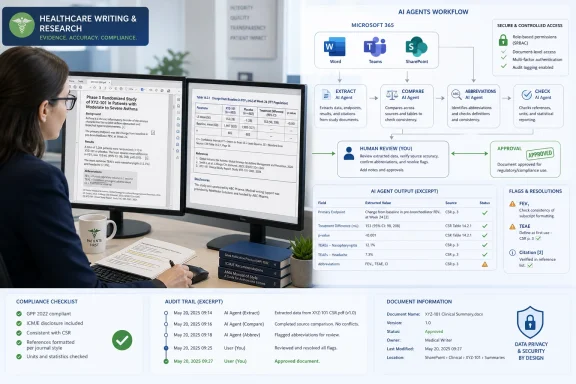
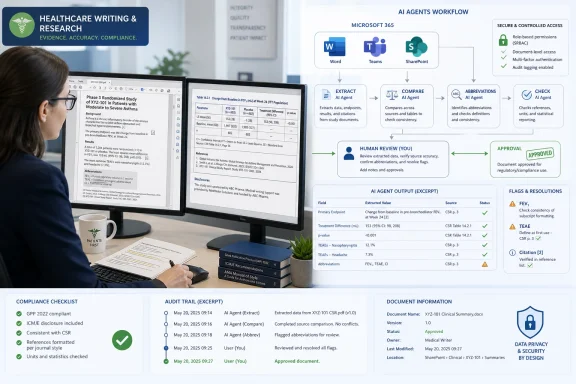
Cactus Life Sciences, a medical communications agency operating across the United States, Europe, the United Kingdom, India, and Japan, has adopted Microsoft 365 Copilot and custom Microsoft agents to speed scientific writing, document review, project coordination, and secure analysis of sensitive pharmaceutical data. The move is not a flashy “AI replaces experts” story. It is a more useful case study in where enterprise AI is actually landing: inside regulated workflows, under existing identity controls, and close enough to the work that adoption does not require a cultural transplant. For Windows and Microsoft 365 shops, the lesson is blunt: Copilot’s most credible enterprise pitch is no longer chat, but governed automation embedded in the daily grind.
The first wave of generative AI in the workplace was sold through spectacle. A prompt became a memo, a meeting became a summary, and a blank slide became a deck. That was enough to make executives listen, but not enough to persuade regulated businesses to pour sensitive client material into a black box.
Cactus Life Sciences is interesting precisely because its work is not low-stakes content generation. The company helps pharmaceutical and biotechnology clients turn clinical and scientific data into communications for healthcare professionals, payers, and patients. That work depends on accuracy, traceability, and careful handling of proprietary information.
Microsoft’s customer story says CLS has more than 350 professionals, most of them scientific writers with advanced science degrees. These are not users who need an AI tool to sound clever in an email. They need a system that can reduce repetitive work without damaging the scientific judgment that clients are paying for.
That distinction matters. In medicine-adjacent communications, the expensive part is not merely drafting sentences; it is knowing what should be said, what must not be overstated, and what evidence supports the claim. AI can help with the scaffolding, but the final product still lives or dies on human review.
That is the less glamorous side of knowledge work. Before a scientific writer can produce a polished output, someone has to find the relevant material, extract structured details, reconcile versions, and keep the project moving. Every step can be governed, documented, and professionally performed while still consuming too many hours.
This is where Copilot and agents fit into Microsoft’s current argument. The value proposition is not simply that an employee can ask a chatbot to summarize a document. It is that a company can decompose a workflow into smaller repeatable tasks and attach AI assistance to each step.
CLS says it began with more than 30 automation agents aligned to key workflows. That number is more revealing than any generic productivity claim. It suggests the company did not treat AI as a single assistant dropped onto everyone’s desktop, but as a set of workflow-specific helpers built around known pain points.
CLS framed security as non-negotiable, and Microsoft’s story predictably leans into enterprise-grade authentication, built-in protections, and dedicated project environments. That is also where Microsoft has a structural advantage over many standalone AI tools. Most corporate users already live in Entra ID, Teams, Outlook, Word, SharePoint, and the broader Microsoft 365 compliance stack.
That does not make the risks disappear. It does, however, change the adoption calculus. If an organization already trusts Microsoft 365 as the system of record for documents, mail, meetings, and access control, then adding Copilot inside that environment is easier to defend than exporting sensitive work to disconnected AI services.
The important caveat is that “inside Microsoft 365” is not a magic shield. Permissions still matter. Overshared SharePoint sites still matter. Poorly governed Teams sprawl still matters. Copilot can only respect the access model it is given, which means organizations with messy information architecture may find that AI exposes their governance problems rather than solves them.
Agents are the modern version of that instinct. They are more flexible than a macro and more conversational than a script, but the organizational logic is similar: identify a repeatable task, encode enough of the process to make it reliable, and let humans spend less time moving information from one place to another.
CLS describes decomposing workflows and building agents to accelerate each step, with AI supporting the labor-intensive parts rather than owning the task. That is the right framing. In regulated knowledge work, the safest near-term AI pattern is not autonomy for its own sake; it is constrained assistance around well-understood operations.
The phrase agentic AI has been abused almost beyond usefulness, but this case shows why vendors keep using it. A chatbot answers a prompt. An agent is supposed to participate in a process. Microsoft wants customers to see Copilot less as a writing aid and more as an operating layer across Microsoft 365.
Scientific communications are not generic office output. A hallucinated citation, an overbroad efficacy claim, or a missed safety nuance can create real professional and legal trouble. Even when the final audience is not a regulator, the underlying material often comes from clinical, regulatory, and scientific sources that demand precision.
That is why the human role does not shrink into ceremonial approval. It becomes more concentrated. Writers and project leads spend less time hunting, formatting, extracting, and triaging, but they must spend more focused attention on validation, interpretation, and quality.
This is the part of AI adoption that procurement decks tend to undersell. If automation reduces grunt work but increases the need for expert review, the organization must design for that. Otherwise, the time saved upstream can reappear downstream as review fatigue, ambiguous accountability, or quiet overtrust in machine-generated outputs.
CLS employees adopted automation in familiar Microsoft tools, which is exactly the point. A workflow improvement that lives in Word, Outlook, Teams, SharePoint, or the Microsoft 365 agent framework has less friction than one that requires users to change context, upload files elsewhere, or learn a separate operational ritual.
For IT departments, familiarity also changes support and governance. Admins already know how to think about Microsoft 365 licensing, identity, conditional access, retention, data loss prevention, and eDiscovery. Adding AI to that environment is still complicated, but it fits an existing mental model.
The risk for customers is lock-in. Once agents are mapped to Microsoft 365 workflows, business logic can become deeply entangled with Microsoft’s licensing, security, and data fabric. That may be acceptable, even desirable, for companies already standardized on Microsoft, but it should be understood as a strategic commitment rather than a casual productivity upgrade.
Every organization has workflows where experts spend too much time preparing to do the work they were hired to do. Lawyers review large document sets before making legal judgments. Financial analysts reconcile data before producing investment or risk analysis. Engineers search through specifications before making design decisions. Security teams sift noise before investigating real incidents.
The common thread is not that AI replaces domain expertise. It is that AI can compress the preparatory labor around expertise. That is where the return on investment is more plausible than the vague promise of “everyone gets 20 percent more productive.”
Regulated industries may actually be better positioned to implement AI responsibly because they already understand process control. They know what approvals, audit trails, and documentation are for. Less regulated companies may move faster at first, but they may also discover later that they automated workflows they never properly understood.
That is a necessary evolution. Once a company has dozens of agents, as CLS does, the problem becomes less about whether any one of them is useful and more about whether the organization can govern the whole system. Who owns an agent? Who approves changes? What data can it access? How is output reviewed? When is it retired?
Those questions sound administrative, but they are central to whether enterprise AI becomes durable. A poorly governed agent estate could become the next version of shadow IT, except with access to sensitive documents and the ability to generate plausible text at scale. The same convenience that makes agents useful also makes them dangerous when ownership is unclear.
Microsoft’s answer is to fold agent governance into the Microsoft 365 security and management story. That is sensible, but customers should not confuse platform capability with completed governance. The tools can enforce rules only after the organization has decided what the rules are.
CLS is the kind of customer story Microsoft wants because it reframes the purchase. The buyer is not paying for novelty; the buyer is funding process acceleration in a business where skilled scientific labor is valuable. If agents reduce time spent on search string creation, document triage, extraction, and coordination, the case becomes more concrete.
Still, ROI will vary widely. A company with clean data, disciplined permissions, and well-mapped processes will get more from Copilot than a company hoping AI will compensate for organizational chaos. The same agent framework that helps one team move faster can produce disappointing results in another if the underlying workflow is poorly defined.
That is why the phrase “phased approach” matters. CLS did not appear to bet the whole operation on a single grand deployment. It introduced agents around key workflows, giving the organization a way to learn where AI helped, where it needed guardrails, and where human review remained central.
That has practical consequences for admins. Identity hygiene, device compliance, information protection, and SharePoint governance are no longer background chores. They directly shape what AI can see and do. A Copilot deployment can make neglected Microsoft 365 administration suddenly visible to executives because the AI experience depends on it.
It also changes the user support burden. Help desks will not only answer “Why can’t I open this file?” They will answer “Why did Copilot find that file?”, “Why can’t this agent access this workspace?”, and “Why did this summary omit something I expected?” AI turns permissions and content organization into user-facing experience.
The organizations that succeed will treat Copilot readiness as an infrastructure project, not a training webinar. Users need prompt guidance, but admins need data governance, sensitivity labels, lifecycle management, and clear escalation paths. Otherwise, the shiny assistant becomes another layer of confusion over an already messy collaboration estate.
That restraint is what makes the deployment credible. The best enterprise AI use cases often look boring because they attack boring costs: inbox overflow, document review, data extraction, search preparation, repetitive coordination, and first-pass synthesis. These are not glamorous tasks, but they are everywhere.
There is a lesson here for IT leaders under pressure to “do something with AI.” The strongest starting point is usually not the most futuristic scenario. It is the workflow everyone already knows is painful, measurable, and bounded enough to improve without betting the company.
CLS’s use of more than 30 agents also suggests that value may come from many small interventions rather than one massive transformation. That is how enterprise software often wins: not by replacing work wholesale, but by sanding down enough friction that the cumulative effect becomes hard to ignore.
For buyers, the question is not “Can Copilot write?” It is whether Copilot and its agents can safely participate in the workflows where time, expertise, and coordination costs are highest.
 Microsoft’s AI Story Is Moving From Demo Magic to Operational Plumbing
The first wave of generative AI in the workplace was sold through spectacle. A prompt became a memo, a meeting became a summary, and a blank slide became a deck. That was enough to make executives listen, but not enough to persuade regulated businesses to pour sensitive client material into a black box.Cactus Life Sciences is interesting precisely because its work is not low-stakes content generation. The company helps pharmaceutical and biotechnology clients turn clinical and scientific data into communications for healthcare professionals, payers, and patients. That work depends on accuracy, traceability, and careful handling of proprietary information.
Microsoft’s customer story says CLS has more than 350 professionals, most of them scientific writers with advanced science degrees. These are not users who need an AI tool to sound clever in an email. They need a system that can reduce repetitive work without damaging the scientific judgment that clients are paying for.
That distinction matters. In medicine-adjacent communications, the expensive part is not merely drafting sentences; it is knowing what should be said, what must not be overstated, and what evidence supports the claim. AI can help with the scaffolding, but the final product still lives or dies on human review.
The Real Bottleneck Was Not Creativity, but Coordination
The CLS deployment starts from a familiar enterprise problem: manual workflows that are defensible but slow. Scientific writers were managing large volumes of abstracts, search strings, and document review. Project managers were coordinating work through overloaded inboxes across distributed teams.That is the less glamorous side of knowledge work. Before a scientific writer can produce a polished output, someone has to find the relevant material, extract structured details, reconcile versions, and keep the project moving. Every step can be governed, documented, and professionally performed while still consuming too many hours.
This is where Copilot and agents fit into Microsoft’s current argument. The value proposition is not simply that an employee can ask a chatbot to summarize a document. It is that a company can decompose a workflow into smaller repeatable tasks and attach AI assistance to each step.
CLS says it began with more than 30 automation agents aligned to key workflows. That number is more revealing than any generic productivity claim. It suggests the company did not treat AI as a single assistant dropped onto everyone’s desktop, but as a set of workflow-specific helpers built around known pain points.
Security Is the Price of Admission, Not a Feature Bullet
For a medical communications agency handling proprietary pharmaceutical data, “try this new AI tool” is not a neutral sentence. It raises immediate questions about access, retention, model training, auditability, identity, permissions, and client confidentiality. In this market, security is not a differentiator after the fact; it is the prerequisite for even beginning the conversation.CLS framed security as non-negotiable, and Microsoft’s story predictably leans into enterprise-grade authentication, built-in protections, and dedicated project environments. That is also where Microsoft has a structural advantage over many standalone AI tools. Most corporate users already live in Entra ID, Teams, Outlook, Word, SharePoint, and the broader Microsoft 365 compliance stack.
That does not make the risks disappear. It does, however, change the adoption calculus. If an organization already trusts Microsoft 365 as the system of record for documents, mail, meetings, and access control, then adding Copilot inside that environment is easier to defend than exporting sensitive work to disconnected AI services.
The important caveat is that “inside Microsoft 365” is not a magic shield. Permissions still matter. Overshared SharePoint sites still matter. Poorly governed Teams sprawl still matters. Copilot can only respect the access model it is given, which means organizations with messy information architecture may find that AI exposes their governance problems rather than solves them.
Agents Are Becoming the New Macros
There is a useful historical analogy hiding in Microsoft’s agent push. For decades, Office power users automated work with macros, templates, mail merges, scripts, and later Power Automate flows. Much of enterprise productivity has always depended on semi-formal automation built by people close to the business process.Agents are the modern version of that instinct. They are more flexible than a macro and more conversational than a script, but the organizational logic is similar: identify a repeatable task, encode enough of the process to make it reliable, and let humans spend less time moving information from one place to another.
CLS describes decomposing workflows and building agents to accelerate each step, with AI supporting the labor-intensive parts rather than owning the task. That is the right framing. In regulated knowledge work, the safest near-term AI pattern is not autonomy for its own sake; it is constrained assistance around well-understood operations.
The phrase agentic AI has been abused almost beyond usefulness, but this case shows why vendors keep using it. A chatbot answers a prompt. An agent is supposed to participate in a process. Microsoft wants customers to see Copilot less as a writing aid and more as an operating layer across Microsoft 365.
The Human Expert Is Still the Control Plane
The most important sentence in Microsoft’s CLS story may be the least theatrical one: AI supports the labor-intensive parts; it does not own the task. That is the difference between a credible deployment and a boardroom fantasy.Scientific communications are not generic office output. A hallucinated citation, an overbroad efficacy claim, or a missed safety nuance can create real professional and legal trouble. Even when the final audience is not a regulator, the underlying material often comes from clinical, regulatory, and scientific sources that demand precision.
That is why the human role does not shrink into ceremonial approval. It becomes more concentrated. Writers and project leads spend less time hunting, formatting, extracting, and triaging, but they must spend more focused attention on validation, interpretation, and quality.
This is the part of AI adoption that procurement decks tend to undersell. If automation reduces grunt work but increases the need for expert review, the organization must design for that. Otherwise, the time saved upstream can reappear downstream as review fatigue, ambiguous accountability, or quiet overtrust in machine-generated outputs.
Microsoft’s Advantage Is Familiarity, Not Just Model Quality
Copilot’s strongest enterprise argument has never been that Microsoft alone has access to capable models. The broader AI market has plenty of strong models, and many specialist tools can outperform general-purpose assistants in narrow tasks. Microsoft’s advantage is that it controls the work surface where millions of employees already spend their day.CLS employees adopted automation in familiar Microsoft tools, which is exactly the point. A workflow improvement that lives in Word, Outlook, Teams, SharePoint, or the Microsoft 365 agent framework has less friction than one that requires users to change context, upload files elsewhere, or learn a separate operational ritual.
For IT departments, familiarity also changes support and governance. Admins already know how to think about Microsoft 365 licensing, identity, conditional access, retention, data loss prevention, and eDiscovery. Adding AI to that environment is still complicated, but it fits an existing mental model.
The risk for customers is lock-in. Once agents are mapped to Microsoft 365 workflows, business logic can become deeply entangled with Microsoft’s licensing, security, and data fabric. That may be acceptable, even desirable, for companies already standardized on Microsoft, but it should be understood as a strategic commitment rather than a casual productivity upgrade.
Regulated Industries Are Teaching the Rest of the Market How to Use AI
There is a temptation to view life sciences as a special case. The data is sensitive, the expertise is narrow, and the compliance stakes are higher than in many office environments. But the pattern CLS is following is relevant well beyond medical communications.Every organization has workflows where experts spend too much time preparing to do the work they were hired to do. Lawyers review large document sets before making legal judgments. Financial analysts reconcile data before producing investment or risk analysis. Engineers search through specifications before making design decisions. Security teams sift noise before investigating real incidents.
The common thread is not that AI replaces domain expertise. It is that AI can compress the preparatory labor around expertise. That is where the return on investment is more plausible than the vague promise of “everyone gets 20 percent more productive.”
Regulated industries may actually be better positioned to implement AI responsibly because they already understand process control. They know what approvals, audit trails, and documentation are for. Less regulated companies may move faster at first, but they may also discover later that they automated workflows they never properly understood.
Copilot’s Enterprise Test Is Governance at Scale
Microsoft has spent the last year pushing Copilot beyond individual productivity into a broader platform story involving agents, Copilot Studio, Microsoft 365 E7, and Agent 365. The message is clear: AI in the enterprise will not be a single assistant but a managed population of agents, permissions, policies, and usage patterns.That is a necessary evolution. Once a company has dozens of agents, as CLS does, the problem becomes less about whether any one of them is useful and more about whether the organization can govern the whole system. Who owns an agent? Who approves changes? What data can it access? How is output reviewed? When is it retired?
Those questions sound administrative, but they are central to whether enterprise AI becomes durable. A poorly governed agent estate could become the next version of shadow IT, except with access to sensitive documents and the ability to generate plausible text at scale. The same convenience that makes agents useful also makes them dangerous when ownership is unclear.
Microsoft’s answer is to fold agent governance into the Microsoft 365 security and management story. That is sensible, but customers should not confuse platform capability with completed governance. The tools can enforce rules only after the organization has decided what the rules are.
The ROI Debate Is Shifting From Licenses to Workflows
Early Copilot skepticism often centered on cost. A per-user AI license is easy to question when the output is a better meeting summary or a faster first draft. The economics become more interesting when AI is tied to repeatable workflows that consume expensive expert time.CLS is the kind of customer story Microsoft wants because it reframes the purchase. The buyer is not paying for novelty; the buyer is funding process acceleration in a business where skilled scientific labor is valuable. If agents reduce time spent on search string creation, document triage, extraction, and coordination, the case becomes more concrete.
Still, ROI will vary widely. A company with clean data, disciplined permissions, and well-mapped processes will get more from Copilot than a company hoping AI will compensate for organizational chaos. The same agent framework that helps one team move faster can produce disappointing results in another if the underlying workflow is poorly defined.
That is why the phrase “phased approach” matters. CLS did not appear to bet the whole operation on a single grand deployment. It introduced agents around key workflows, giving the organization a way to learn where AI helped, where it needed guardrails, and where human review remained central.
The Quiet Windows Angle Is the Workplace Stack Around the PC
For WindowsForum readers, this story is not just about a cloud service. Microsoft 365 Copilot is part of a broader shift in what the Windows workplace is becoming. The PC is still the endpoint, but more of the intelligence, policy, and context lives in the Microsoft cloud wrapped around it.That has practical consequences for admins. Identity hygiene, device compliance, information protection, and SharePoint governance are no longer background chores. They directly shape what AI can see and do. A Copilot deployment can make neglected Microsoft 365 administration suddenly visible to executives because the AI experience depends on it.
It also changes the user support burden. Help desks will not only answer “Why can’t I open this file?” They will answer “Why did Copilot find that file?”, “Why can’t this agent access this workspace?”, and “Why did this summary omit something I expected?” AI turns permissions and content organization into user-facing experience.
The organizations that succeed will treat Copilot readiness as an infrastructure project, not a training webinar. Users need prompt guidance, but admins need data governance, sensitivity labels, lifecycle management, and clear escalation paths. Otherwise, the shiny assistant becomes another layer of confusion over an already messy collaboration estate.
The Best AI Deployments Will Look Boring From the Outside
The CLS case is not dramatic in the way AI marketing often wants to be. There is no claim that medical writers vanished, no grand declaration that scientific communications have been reinvented overnight, and no suggestion that a model is now the final authority on clinical evidence.That restraint is what makes the deployment credible. The best enterprise AI use cases often look boring because they attack boring costs: inbox overflow, document review, data extraction, search preparation, repetitive coordination, and first-pass synthesis. These are not glamorous tasks, but they are everywhere.
There is a lesson here for IT leaders under pressure to “do something with AI.” The strongest starting point is usually not the most futuristic scenario. It is the workflow everyone already knows is painful, measurable, and bounded enough to improve without betting the company.
CLS’s use of more than 30 agents also suggests that value may come from many small interventions rather than one massive transformation. That is how enterprise software often wins: not by replacing work wholesale, but by sanding down enough friction that the cumulative effect becomes hard to ignore.
The Cactus Case Shows Where Copilot Is Becoming Serious
The CLS deployment is worth watching because it captures Microsoft’s enterprise AI strategy in miniature: bring AI into familiar tools, bind it to existing security controls, customize it through agents, and sell the result as governed acceleration rather than experimental magic. That does not make Copilot automatically worth the cost for every organization, but it does clarify the test.For buyers, the question is not “Can Copilot write?” It is whether Copilot and its agents can safely participate in the workflows where time, expertise, and coordination costs are highest.
- CLS is using Microsoft 365 Copilot and custom agents to assist with sensitive scientific and pharmaceutical communications work, not to remove expert review from the process.
- The deployment began with more than 30 automation agents mapped to specific workflows, which suggests a process-by-process adoption model rather than a generic chatbot rollout.
- Security and data governance are central to the case because CLS handles proprietary pharmaceutical information across distributed teams.
- The most credible value comes from reducing manual preparation, extraction, review, and coordination work so scientific experts can spend more time on quality and interpretation.
- Microsoft’s strategic advantage is that Copilot sits inside the Microsoft 365 environment many enterprises already use for identity, documents, communications, and compliance.
- The same deployment pattern will expose weak permissions, overshared content, and poor information architecture in organizations that treat governance as an afterthought.
References
- Primary source: Microsoft
Published: Thu, 21 May 2026 20:29:29 GMT
Cactus Life Sciences advances secure medical communication with Microsoft 365 Copilot | Microsoft Customer Stories
Cactus Life Sciences used Microsoft Copilot to modernize workflows, free scientific writers for higher-value work, and maintain strict data security.www.microsoft.com
- Official source: blogs.microsoft.com
Introducing the First Frontier Suite built on Intelligence + Trust - The Official Microsoft Blog
Today Microsoft is announcing: Wave 3 of Microsoft 365 Copilot Expanded model diversity with Claude and next-gen OpenAI models available today General availability of Agent 365 on May 1 for $15 per user General availability of the new Microsoft 365 E7: The Frontier Suite on May 1 for $99 per...blogs.microsoft.com - Official source: adoption.microsoft.com
Microsoft 365 Copilot and Agents for all users – Microsoft Adoption
 adoption.microsoft.com
- Official source: news.microsoft.com
Introducing the Frontier Suite - Source EMEA
 news.microsoft.com
- Official source: techcommunity.microsoft.com
Computer-using agents in Microsoft Copilot Studio are now generally available | Microsoft Community Hub
The next chapter of enterprise AI isn't about chatting with assistants—it's about agents that actually do the work. techcommunity.microsoft.com
- Official source: learn.microsoft.com
Secure and govern Microsoft 365 Copilot agents | Microsoft Learn
Learn how to secure and govern Microsoft 365 Copilot agents by using Microsoft Purview to protect grounding data and interactions.learn.microsoft.com
- Related coverage: techradar.com
Microsoft 365 confirms new premium tier focused on AI and productivity | TechRadar
Microsoft adds new E7 plan to cope with AI usagewww.techradar.com - Official source: cdn-dynmedia-1.microsoft.com