

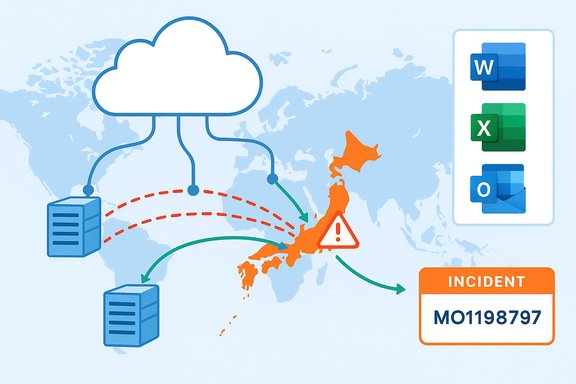
Microsoft has confirmed it is investigating a regional service disruption that affected Microsoft 365 workloads and Microsoft Copilot users in Japan on December 18, 2025, logging the event under incident identifier MO1198797 and directing administrators to the Microsoft 365 admin center for tenant‑level updates.
Microsoft 365 is a suite of cloud‑hosted productivity services—including Exchange Online, SharePoint Online, OneDrive, Teams, and the integrated generative AI assistant Copilot—that many enterprises rely on for day‑to‑day work. Copilot, embedded across Office apps and accessible via web and in‑app surfaces, is increasingly considered mission‑critical by businesses that use it for drafting, summarization, meeting recaps, and automation. Recent incidents make that dependency clear: outages in one region can ripple through workflows and raise operational risk for organizations that have not implemented resilient fallbacks. On December 18, Microsoft’s public status messaging acknowledged user reports of impact in Japan and advised IT administrators to consult incident MO1198797 in the Microsoft 365 admin center for updates. Subsequent status updates from Microsoft indicated the company had identified a traffic routing problem that caused a portion of supporting infrastructure for Japanese user traffic to become unhealthy and that mitigation steps were underway to rebalance traffic across healthy infrastructure.
Typical remediation and hardening actions include:
Enterprises must combine vigilant monitoring of Microsoft 365 service health with pragmatic fallbacks: documented manual procedures, tested sign‑in resilience, and contingency planning for Copilot‑dependent workflows. At the same time, providers must continue to harden autoscaling and routing automation and to deliver substantive post‑incident analysis so customers can measure, learn, and adapt. The recent string of Copilot and Microsoft 365 incidents is a call to action for both vendors and customers to close gaps in resilience before the next regionally concentrated failure impacts business operations.
Source: Windows Report Microsoft Investigates Microsoft 365 and Copilot Issues Impacting Users in Japan
 Background
Microsoft 365 is a suite of cloud‑hosted productivity services—including Exchange Online, SharePoint Online, OneDrive, Teams, and the integrated generative AI assistant Copilot—that many enterprises rely on for day‑to‑day work. Copilot, embedded across Office apps and accessible via web and in‑app surfaces, is increasingly considered mission‑critical by businesses that use it for drafting, summarization, meeting recaps, and automation. Recent incidents make that dependency clear: outages in one region can ripple through workflows and raise operational risk for organizations that have not implemented resilient fallbacks. On December 18, Microsoft’s public status messaging acknowledged user reports of impact in Japan and advised IT administrators to consult incident MO1198797 in the Microsoft 365 admin center for updates. Subsequent status updates from Microsoft indicated the company had identified a traffic routing problem that caused a portion of supporting infrastructure for Japanese user traffic to become unhealthy and that mitigation steps were underway to rebalance traffic across healthy infrastructure. What we know: chronology and symptoms
Incident timeline (high level)
- Around 00:00 UTC on December 18, 2025, monitoring telemetry and customer reports began indicating access and sign‑in failures for Microsoft 365 services, with Copilot experiences degraded or unreachable for some users in Japan.
- Microsoft opened incident MO1198797 and posted updates to the Microsoft 365 admin center and its public status channel, advising that engineers were investigating and applying mitigation actions.
- Microsoft operational messages later described the root issue as traffic routing that left a portion of Japan‑serving infrastructure unhealthy; engineers implemented traffic rebalancing across healthy infrastructure pools to restore availability. Early public reports indicated service recovery after the mitigations.
User‑facing symptoms
Affected users reported the following common behaviors during the incident:- Sign‑in failures or timeouts when accessing Microsoft 365 web portals or desktop apps.
- Copilot panes failing to load inside Word, Excel, Outlook, Teams, or returning generic fallback messages or timeouts.
- Intermittent access to email, Teams chats, file sync and SharePoint contents for some tenants in the region.
Technical diagnosis (what Microsoft reported and what it implies)
Microsoft’s public messaging shifted from initial investigation to a more specific preliminary cause: traffic routing that left a subset of infrastructure handling Japan traffic in an unhealthy state. The immediate mitigation described—rebalancing traffic across healthy infrastructure—is a standard operational response intended to restore availability while more durable fixes are applied.Why traffic routing matters
Traffic routing is the mechanism that ensures user requests are delivered to appropriate cloud regions, datacenter clusters, and service front ends. A routing fault can produce regional isolation of traffic, funneling excessive load into specific nodes or causing flows to hit unhealthy backends. When that happens:- Autoscaling mechanisms may not respond correctly if routing hides capacity in other regions.
- Load balancers may concentrate traffic on a subset of instances that either fail or become saturated.
- End‑users in the affected topology see access failures even though the global service may have spare capacity elsewhere.
What this does not prove (caution)
Public incident summaries are intentionally concise. The surface‑level finding of a “traffic routing issue” does not automatically identify whether the root cause was a software bug in the routing layer, a third‑party network provider problem, misconfiguration, or a combination involving autoscaling and load‑balancer policy interactions. Microsoft’s message confirmed mitigations and recovery steps but did not (publicly) release a full post‑mortem with deeper causal detail at the time of the initial updates. Until a formal post‑incident report is published, any attribution beyond the described routing failure should be treated as provisional.How this incident compares with recent Copilot outages
December 2025 has seen multiple Copilot service incidents. Notably, Microsoft logged incident CP1193544 on December 9 after Copilot availability problems across the United Kingdom and parts of Europe. That event’s preliminary telemetry suggested an unexpected surge in request traffic that strained autoscaling and combined with load‑balancing issues to produce regional impact; mitigation required manual capacity scaling and targeted load‑balancer adjustments. The Japan incident’s routing problem is different in mechanism but comparable in effect: customers in a specific region were unable to access Copilot and related Microsoft 365 workloads. Both episodes underline two recurring operational vulnerabilities for distributed cloud services:- Autoscaling and capacity management can be outpaced by rapid, concentrated request surges or incorrectly routed traffic.
- Routing and load balancing complexity in a globally distributed infrastructure can introduce single‑region failure modes even when global capacity exists.
Business impact: immediate and systemic risks
Immediate impact on enterprises
Short interruptions to Microsoft 365 and Copilot can create tangible friction:- Disrupted communications (Outlook and Teams) and delayed decision cycles during outages.
- Interrupted workflows where Copilot automations generate or modify documents, create meeting summaries, or perform spreadsheet analysis.
- Productivity loss in areas that depend on Copilot for time‑sensitive tasks such as report drafting or data extraction.
Systemic and longer‑term risks
Repeated interruptions highlight deeper strategic questions for IT leaders:- Vendor dependency: heavy reliance on a single SaaS provider or a narrow set of cloud regions increases exposure to regional outages.
- Operational coupling: embedding generative AI into core workflows without robust local fallbacks can turn a convenience feature into a single point of failure.
- Compliance and data sovereignty: when services are restored via traffic rebalancing across other regions, data residency assurances or local processing guarantees may become momentarily complicated for regulated workloads.
Guidance for administrators and IT teams
Microsoft’s immediate, public guidance during MO1198797 was to monitor the Microsoft 365 admin center and apply tenant‑level mitigations if prompted. Administrators can and should take a set of practical actions to harden resilience and reduce day‑one disruption during future incidents.1. Monitor Microsoft 365 service health continually
- Subscribe to the Microsoft 365 admin center alerts for your tenant and region.
- Follow official status channel updates and bookmark incident identifiers (e.g., MO1198797) for quick reference.
2. Prepare operational fallback procedures
- Define manual processes for critical workflows that currently rely on Copilot (for example, standard templates for meeting notes, manual spreadsheet macros, or local script automation).
- Train staff on offline or degraded‑mode processes for email and file access (cached mail profiles, local copies of critical files).
3. Validate identity and sign‑in resilience
- Ensure robust multi‑factor authentication (MFA) and fallback authentication methods in case conditional access policies interact poorly with regional service failures.
- Test conditional access policies and sign‑in flows under simulated network partitions.
4. Architect for geographic redundancy where appropriate
- For mission‑critical data, consider multi‑region redundancy or tenant configurations that tolerate regional failover.
- Evaluate Microsoft 365 Local and sovereign cloud options if data residency and local processing are central to your business continuity strategy.
5. Keep communications ready
- Draft incident templates for internal and external communications so teams know how to escalate and inform stakeholders quickly.
- Maintain status pages and communication channels to reduce confusion during outages.
Technical remediation options Microsoft will likely consider (and what to expect in a post‑mortem)
When cloud providers face routing or autoscaling incidents, the forensic and remediation path commonly includes several steps, and independent reporting on recent Copilot outages suggests Microsoft followed similar playbooks during December events.Typical remediation and hardening actions include:
- Rebalancing traffic across healthy front‑end pools to restore immediate availability.
- Applying targeted restarts and load‑balancer rule adjustments to remove unhealthy nodes and prevent re‑entrance of bad routing paths.
- Reviewing autoscaling policies and thresholds to ensure rapid scale‑up under sudden traffic surges.
- Auditing routing layer software and third‑party network dependencies to close gaps exposed by the incident.
Strengths revealed by Microsoft’s operational response
While outages are undesirable, Microsoft’s measured handling of MO1198797 demonstrates several operational strengths:- Transparent incident tracking: using incident identifiers in the Microsoft 365 admin center gives administrators a targeted reference for tenant‑level impacts and updates.
- Rapid mitigation actions: publicly reported traffic rebalancing indicates engineers had access to and executed remediation controls quickly to restore availability.
- Active monitoring and telemetry: the company’s ability to detect the routing‑related unhealthy state and the related telemetry that guided mitigation are consistent with mature cloud operations.
Risks and areas where improvement is needed
No single provider is immune to outages. That said, the December incidents reveal area(s) Microsoft and its customers need to keep addressing:- Autoscaling and capacity planning: repeated service stress from traffic surges indicates autoscaling behavior must be robust under unexpected demand spikes and routing anomalies. The December 9 event (CP1193544) highlighted autoscaling strain; the Japan incident built on similar themes with routing.
- Load balancing and routing complexity: modern multi‑region architectures add resilience but also introduce failure modes; continuous investment in automated, resilient routing policies is critical.
- Transparent post‑incident analysis: administrators and customers benefit from rapid, detailed post‑mortems that explain root causes and concrete remediation steps. Public reports following prior incidents have tended to be high level; deeper technical disclosure would help enterprise risk management.
- Operator dependency: organizations treating Copilot as mission‑critical must understand the operational trade‑offs and implement contingency processes accordingly.
Practical recommendations for enterprise policy and procurement
For IT leaders negotiating contracts or managing SaaS risk, outages such as MO1198797 should inform procurement and operational policy:- Negotiate clearer service level objectives (SLOs) and operational transparency clauses for critical AI‑enabled features.
- Include runbooks and periodic outage drills that simulate region‑specific failures affecting Copilot and other AI layers.
- Assess options for multi‑vendor redundancy on critical workflows where possible (for example, local document generation templates or alternative automation platforms).
- Review and test backup processes for meeting minutes, legal documents, finance outputs, and any data pipelines that rely on Copilot‑generated content.
What to watch next
Administrators and customers should monitor three things in the days after an incident like MO1198797:- The Microsoft 365 admin center for final incident updates and any published post‑incident report.
- Communications about changes to autoscaling, routing or load‑balancer logic that Microsoft might announce as permanent fixes.
- Any related events from third‑party networking providers or shared cloud components that could indicate upstream causes.
Conclusion
The Japan region incident logged as MO1198797 reminds organizations that even the most widely deployed cloud productivity stacks are vulnerable to regional routing and capacity issues. Microsoft’s rapid detection and traffic‑rebalancing mitigations restored availability for many customers, but the episode amplifies the operational questions around autoscaling, routing complexity, and the systemic risks of embedding generative AI into core workflows.Enterprises must combine vigilant monitoring of Microsoft 365 service health with pragmatic fallbacks: documented manual procedures, tested sign‑in resilience, and contingency planning for Copilot‑dependent workflows. At the same time, providers must continue to harden autoscaling and routing automation and to deliver substantive post‑incident analysis so customers can measure, learn, and adapt. The recent string of Copilot and Microsoft 365 incidents is a call to action for both vendors and customers to close gaps in resilience before the next regionally concentrated failure impacts business operations.
Source: Windows Report Microsoft Investigates Microsoft 365 and Copilot Issues Impacting Users in Japan
