

Microsoft said on Monday, June 1, 2026, that it was investigating Microsoft 365 Copilot app load and timeout errors after users began reporting access problems in the morning and outage reports peaked shortly before noon Eastern time. The incident was not the largest Microsoft cloud disruption of the year, but it landed on the product Microsoft most wants workers to treat as an everyday interface. That makes the outage more than a blip on a status page. It is a reminder that AI productivity software is now part of the availability conversation, not an optional experiment running beside it.
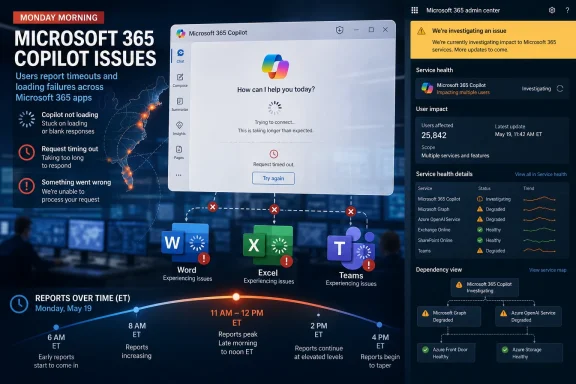
The reported Copilot disruption followed the familiar arc of a modern SaaS incident: users noticed first, outage-tracking sites quantified the complaints, and Microsoft acknowledged that some people were seeing load and timeout failures. According to user reports collected by Downdetector and summarized by multiple outlets, the problem began around 9 a.m. Eastern, peaked at just over 500 reports before noon, and then declined into the early afternoon.
That curve suggests a contained incident rather than a day-long platform collapse. But treating it as minor misses the real change in Microsoft’s product strategy. Copilot is not being sold as a novelty pane for people who like experimenting with chatbots; it is being woven into Word, Excel, PowerPoint, Outlook, Teams, the Microsoft 365 app, Edge, Windows workflows, and enterprise knowledge systems.
The outage therefore matters because Microsoft has asked customers to move Copilot from the edge of their workflow to the center of it. When a conventional help-me-write bot goes down, the workaround is obvious: type the paragraph yourself. When a service becomes the front door to files, meetings, summaries, drafts, search, automations, and business context, the blast radius becomes harder to describe in the old language of “the app is down.”
That kind of failure is especially corrosive for AI tools because their value proposition is immediacy. Copilot promises to reduce friction: summarize this meeting, draft this email, analyze this spreadsheet, find the thread I forgot, turn this outline into slides. If the assistant itself becomes the friction, the mental bargain collapses quickly.
Traditional productivity apps can degrade gracefully. Word can still open a local document. Excel can still calculate a workbook. Outlook can still cache mail under some configurations. But cloud-grounded AI features often depend on a chain of identity, app shell, model routing, permissions, connectors, content retrieval, and response generation. A spinner in the Copilot app can represent failure anywhere in that chain.
This is why a modest outage report count can understate the practical effect. Many users do not file a report when an AI assistant hangs; they shrug, close the pane, and go back to manual work. For Microsoft, that behavior is dangerous in a different way. The opposite of adoption is not outrage. It is quiet nonuse.
For enterprise customers, Microsoft 365 Copilot is the most consequential version because it sits close to the actual work. It can operate across emails, meetings, files, chats, and business data where permissions allow. Microsoft’s pitch is not merely that Copilot can generate text. The pitch is that it can understand organizational context well enough to make work faster.
That pitch raises the availability bar. If Copilot is just another optional feature, downtime is annoying. If Copilot is a productivity layer on top of Microsoft 365, downtime becomes an operational concern. If Copilot becomes the way employees increasingly search, summarize, draft, and navigate the Microsoft cloud, downtime becomes a dependency failure.
This is the uncomfortable part for Microsoft. The company is trying to persuade businesses that AI assistants should become trusted colleagues in the software stack. But trust in enterprise software is not built only through benchmark demos and keynote videos. It is built through boring reliability on ordinary Mondays.
The Copilot app is supposed to unify the assistant experience. It gives Microsoft a place to concentrate chat, work context, files, agents, and cross-app entry points. It also gives IT departments something concrete to deploy, govern, explain, and support.
But the app-centric approach creates a perception problem when loading fails. If Copilot embedded in Word is slow, the user may blame the feature. If the Copilot app itself does not load, the user blames Copilot as a whole. The shell becomes the service in the user’s mind.
That is one reason Microsoft’s recent Copilot packaging and deployment choices have received so much scrutiny from administrators. The more Microsoft treats Copilot as a default workplace surface, the more admins will judge it like Teams, Outlook, OneDrive, or SharePoint. Nobody gives a strategic platform extra grace because it happens to be new.
That ambiguity makes support harder. Help desks need to determine whether the problem is local network filtering, browser state, identity, licensing, service health, tenant policy, data connector failure, or Microsoft’s back end. Users, meanwhile, see a single failure: the assistant did not help.
There is also a psychological difference. A human worker can route around an unavailable tool if the failure is clear. But AI assistance often sits inside the early stage of thought: brainstorming, summarizing, searching, composing, triaging. When the assistant fails there, the user may not have an artifact to recover. The lost work is invisible.
This is why Copilot reliability cannot be measured only by uptime in the conventional sense. Microsoft also has to care about latency, session continuity, context retrieval, graceful degradation, useful error messages, and whether users can understand what failed. An assistant that technically loads but cannot retrieve history or times out during ordinary prompts is not meaningfully available.
For Copilot, that standard is still evolving. Microsoft is selling AI as an accelerant for office work, but many organizations are still figuring out how to measure whether that acceleration is real. Outages complicate that calculation because they expose a dependency that did not exist in the same way before.
A CIO can justify Copilot licensing if the tool reliably saves time across enough employees. But if employees learn that Copilot is sometimes unavailable, slow, or inconsistent at exactly the moments they try to build habits around it, the return-on-investment math becomes softer. AI adoption is not only about features. It is about repetition.
There is a second risk for admins: expectation drift. Once executives and departments begin to assume AI assistance is part of standard work, IT inherits the support burden. “Copilot is down” becomes a ticket category. “Copilot gave me a timeout” becomes a productivity complaint. “Copilot cannot find my meeting notes” becomes a permissions investigation. The technology may be new, but the support model becomes very familiar.
The problem is that Copilot’s business role is no longer standard. If Microsoft wants customers to put AI at the center of work, the company needs communications that distinguish between a cosmetic app issue and a failure that prevents users from accessing grounded work assistance. “Some users may be experiencing app load and timeout errors” may be accurate, but it does not tell an admin what business functions are likely to be affected.
Were Word and Excel embedded Copilot experiences impacted? Were Teams meeting recaps affected? Were consumer Copilot and Microsoft 365 Copilot affected in the same way? Were only the desktop and web app shells failing? Were prompts being accepted but not completed? Were chat histories unavailable? These distinctions matter in environments where Copilot is being piloted, audited, or deployed at scale.
Microsoft does not need to publish every internal diagnostic detail. But as AI services become production dependencies, customers will expect incident reporting that maps technical failures to user-visible scenarios. The old cloud-status shorthand is becoming too thin for the AI layer.
That dynamic can make vendors look reactive even when engineering teams are already deep into mitigation. Users see a graph, social posts, and complaints before they see an official explanation. The information vacuum fills itself.
For Microsoft, the problem is heightened by the scale and fragmentation of the Microsoft 365 estate. A user may not know whether they are using consumer Copilot, Copilot Pro, Microsoft 365 Copilot, Copilot Chat, the Windows Copilot experience, or a tenant-governed work assistant. They know only that the thing branded Copilot did not load.
This branding simplicity is powerful in marketing and messy in outage analysis. A single name can hide multiple services, licensing states, identity contexts, and back-end paths. When trouble starts, the brand gets the blame before the architecture gets explained.
That makes Copilot less like a single product and more like a coordination layer. Coordination layers are useful precisely because they abstract complexity. They are risky because they inherit complexity.
When Copilot fails, the user may be encountering an issue in the app shell, service routing, model availability, content grounding, authentication, tenant configuration, network security, browser compatibility, or a downstream Microsoft 365 dependency. From a support standpoint, that is a large surface area for a feature that many users still perceive as “the chatbot.”
This is where Microsoft’s enterprise credibility can help. The company knows how to run large-scale cloud services, communicate through admin centers, and support regulated customers. But Copilot compresses many dependencies into a conversational interface, and that interface can make complex failures look arbitrary. The better the magic trick, the worse it feels when the trapdoor jams.
Not every Copilot failure has the same cost. If an employee cannot generate a first draft of a low-stakes email, the damage is small. If a sales team cannot summarize customer history before calls, the cost rises. If an analyst cannot use Copilot-assisted data exploration during a deadline window, the failure becomes material. If executives build board-prep or incident-response workflows around AI summaries, the dependency becomes even sharper.
Organizations piloting Copilot should therefore document where it is genuinely useful and where it is merely convenient. They should decide which workflows can tolerate outages and which require fallback procedures. The worst strategy is to let Copilot become operationally important without admitting that it has become operationally important.
Microsoft, for its part, has to make that planning easier. Admins need clearer health signals, better tenant-level diagnostics, and guidance that separates local configuration issues from Microsoft-side degradation. Copilot cannot become a serious enterprise layer if troubleshooting it feels like reading tea leaves from a spinner.
Enterprise use is less forgiving. Work accounts bring data boundaries, compliance rules, retention policies, sensitivity labels, conditional access, auditing, and licensing constraints. A user’s prompt may look simple while the service behind it performs a complicated permissions-aware retrieval across organizational content.
When an outage hits, consumer expectations and enterprise requirements collide. Users want the assistant to “just work.” Admins need to know whether the issue affects confidential data access, regulated workflows, specific geographies, specific tenants, or only certain clients. Executives want to know whether a costly AI subscription is dependable enough to keep funding.
This tension is not unique to Microsoft, but Microsoft feels it more acutely because it owns so much of the productivity stack. The company is not merely adding AI to someone else’s workflow. It is adding AI to the workflow it already dominates.
This matters because many workers remain skeptical of AI tools. Some worry about accuracy. Some dislike prompt-writing. Some do not know when Copilot is worth using. Some tried it once, received a mediocre answer, and never returned. For that population, an outage is not a temporary inconvenience; it is confirmation of a suspicion.
Microsoft’s challenge is to make Copilot boringly dependable before users decide it is optional clutter. The company can improve models, add agents, redesign interfaces, and bundle features into more plans, but none of that matters if the user’s learned behavior is to ignore the icon.
There is a lesson here from Teams. Teams became unavoidable not because every user loved it, but because organizations standardized on it for meetings and chat. Copilot is different. It cannot rely only on mandated presence. It must produce enough individual value that users voluntarily reach for it. Reliability is part of that persuasion.
That means admins should decide who monitors Copilot health, where users report issues, how help desks distinguish service degradation from licensing or browser problems, and what fallback guidance is sent during incidents. They should also keep a careful eye on the difference between Microsoft 365 Copilot, Copilot Chat, consumer Copilot, and any app-specific Copilot experiences in use.
There is also a governance angle. If departments are using Copilot to accelerate work, IT should understand which departments rely on it most. A legal team using Copilot for document review assistance has a different risk profile from a marketing team using it for draft copy. A finance team using it around spreadsheet analysis has a different tolerance for ambiguity and delay than a casual user asking it to rewrite a paragraph.
The point is not to slow adoption with bureaucracy. The point is to prevent invisible dependency. The most dangerous systems in enterprise IT are often the ones that become essential before anyone writes them into the operational map.
Copilot is trying to join that club faster than almost any previous Microsoft productivity product. Its marketing promises are broader, its licensing is more visible, and its cultural symbolism is larger. It is not just another app; it is Microsoft’s argument that the next era of work will be mediated by AI.
That raises the stakes for incidents that might otherwise be forgettable. A timeout in a young AI assistant is not catastrophic. A timeout in the future interface to Microsoft 365 is a warning light. The same event can be both technically limited and strategically revealing.
Microsoft’s advantage is that it can integrate Copilot more deeply than almost anyone else can. Microsoft’s burden is that deep integration turns every reliability issue into evidence in a larger trial: whether AI belongs in the core workflow yet.
 Copilot’s Outage Was Small Enough to Dismiss and Important Enough Not To
The reported Copilot disruption followed the familiar arc of a modern SaaS incident: users noticed first, outage-tracking sites quantified the complaints, and Microsoft acknowledged that some people were seeing load and timeout failures. According to user reports collected by Downdetector and summarized by multiple outlets, the problem began around 9 a.m. Eastern, peaked at just over 500 reports before noon, and then declined into the early afternoon.That curve suggests a contained incident rather than a day-long platform collapse. But treating it as minor misses the real change in Microsoft’s product strategy. Copilot is not being sold as a novelty pane for people who like experimenting with chatbots; it is being woven into Word, Excel, PowerPoint, Outlook, Teams, the Microsoft 365 app, Edge, Windows workflows, and enterprise knowledge systems.
The outage therefore matters because Microsoft has asked customers to move Copilot from the edge of their workflow to the center of it. When a conventional help-me-write bot goes down, the workaround is obvious: type the paragraph yourself. When a service becomes the front door to files, meetings, summaries, drafts, search, automations, and business context, the blast radius becomes harder to describe in the old language of “the app is down.”
The Morning Started With Spinners, Timeouts, and a Very Modern Kind of Silence
The most telling reports were not dramatic error codes. They were mundane complaints about the experience simply not arriving. Users described Copilot not loading, spinning endlessly, failing to retrieve chat history, or timing out before the session became useful.That kind of failure is especially corrosive for AI tools because their value proposition is immediacy. Copilot promises to reduce friction: summarize this meeting, draft this email, analyze this spreadsheet, find the thread I forgot, turn this outline into slides. If the assistant itself becomes the friction, the mental bargain collapses quickly.
Traditional productivity apps can degrade gracefully. Word can still open a local document. Excel can still calculate a workbook. Outlook can still cache mail under some configurations. But cloud-grounded AI features often depend on a chain of identity, app shell, model routing, permissions, connectors, content retrieval, and response generation. A spinner in the Copilot app can represent failure anywhere in that chain.
This is why a modest outage report count can understate the practical effect. Many users do not file a report when an AI assistant hangs; they shrug, close the pane, and go back to manual work. For Microsoft, that behavior is dangerous in a different way. The opposite of adoption is not outrage. It is quiet nonuse.
Microsoft Has Made Copilot Too Strategic to Be Treated Like a Sidecar
Microsoft’s Copilot push has always been unusually broad. The company has used the same brand for consumer chat, Microsoft 365 assistance, Windows features, GitHub development tools, Security Copilot, and role-specific business assistants. That branding strategy gives Microsoft a single banner for AI, but it also creates a single reputational surface.For enterprise customers, Microsoft 365 Copilot is the most consequential version because it sits close to the actual work. It can operate across emails, meetings, files, chats, and business data where permissions allow. Microsoft’s pitch is not merely that Copilot can generate text. The pitch is that it can understand organizational context well enough to make work faster.
That pitch raises the availability bar. If Copilot is just another optional feature, downtime is annoying. If Copilot is a productivity layer on top of Microsoft 365, downtime becomes an operational concern. If Copilot becomes the way employees increasingly search, summarize, draft, and navigate the Microsoft cloud, downtime becomes a dependency failure.
This is the uncomfortable part for Microsoft. The company is trying to persuade businesses that AI assistants should become trusted colleagues in the software stack. But trust in enterprise software is not built only through benchmark demos and keynote videos. It is built through boring reliability on ordinary Mondays.
The App Was the Weak Point Users Could See
Reports indicated that the majority of complaints centered on the Copilot app, with fewer reports involving the website and a smaller share involving login. That distinction matters because Microsoft has been nudging users toward app-shaped Copilot experiences rather than treating AI as a loose collection of embedded buttons.The Copilot app is supposed to unify the assistant experience. It gives Microsoft a place to concentrate chat, work context, files, agents, and cross-app entry points. It also gives IT departments something concrete to deploy, govern, explain, and support.
But the app-centric approach creates a perception problem when loading fails. If Copilot embedded in Word is slow, the user may blame the feature. If the Copilot app itself does not load, the user blames Copilot as a whole. The shell becomes the service in the user’s mind.
That is one reason Microsoft’s recent Copilot packaging and deployment choices have received so much scrutiny from administrators. The more Microsoft treats Copilot as a default workplace surface, the more admins will judge it like Teams, Outlook, OneDrive, or SharePoint. Nobody gives a strategic platform extra grace because it happens to be new.
AI Changes the Meaning of an Outage
A mail outage is easy to understand. Messages do not send. Calendars do not load. A storage outage is similarly concrete. Files fail to open or sync. AI outages are stranger because they can present as delay, partial context loss, empty history, failed grounding, generic “something went wrong” messages, or a model that answers but cannot reach the material it is supposed to reason over.That ambiguity makes support harder. Help desks need to determine whether the problem is local network filtering, browser state, identity, licensing, service health, tenant policy, data connector failure, or Microsoft’s back end. Users, meanwhile, see a single failure: the assistant did not help.
There is also a psychological difference. A human worker can route around an unavailable tool if the failure is clear. But AI assistance often sits inside the early stage of thought: brainstorming, summarizing, searching, composing, triaging. When the assistant fails there, the user may not have an artifact to recover. The lost work is invisible.
This is why Copilot reliability cannot be measured only by uptime in the conventional sense. Microsoft also has to care about latency, session continuity, context retrieval, graceful degradation, useful error messages, and whether users can understand what failed. An assistant that technically loads but cannot retrieve history or times out during ordinary prompts is not meaningfully available.
The Enterprise Risk Is Less About One Monday Than the Pattern It Suggests
No cloud vendor escapes outages. Microsoft, Google, Amazon, Apple, OpenAI, and every other operator of planetary-scale systems will have bad mornings. The standard should not be impossible perfection. The standard should be whether the vendor’s architecture, communications, and customer controls match the importance of the service being sold.For Copilot, that standard is still evolving. Microsoft is selling AI as an accelerant for office work, but many organizations are still figuring out how to measure whether that acceleration is real. Outages complicate that calculation because they expose a dependency that did not exist in the same way before.
A CIO can justify Copilot licensing if the tool reliably saves time across enough employees. But if employees learn that Copilot is sometimes unavailable, slow, or inconsistent at exactly the moments they try to build habits around it, the return-on-investment math becomes softer. AI adoption is not only about features. It is about repetition.
There is a second risk for admins: expectation drift. Once executives and departments begin to assume AI assistance is part of standard work, IT inherits the support burden. “Copilot is down” becomes a ticket category. “Copilot gave me a timeout” becomes a productivity complaint. “Copilot cannot find my meeting notes” becomes a permissions investigation. The technology may be new, but the support model becomes very familiar.
Microsoft’s Status Language Still Lags the Product’s Ambition
Microsoft’s public acknowledgement reportedly said it was investigating an issue where some users may experience app load and timeout errors when accessing Microsoft 365 Copilot. That is standard incident language: scoped, cautious, and designed not to overstate the impact before engineers know more.The problem is that Copilot’s business role is no longer standard. If Microsoft wants customers to put AI at the center of work, the company needs communications that distinguish between a cosmetic app issue and a failure that prevents users from accessing grounded work assistance. “Some users may be experiencing app load and timeout errors” may be accurate, but it does not tell an admin what business functions are likely to be affected.
Were Word and Excel embedded Copilot experiences impacted? Were Teams meeting recaps affected? Were consumer Copilot and Microsoft 365 Copilot affected in the same way? Were only the desktop and web app shells failing? Were prompts being accepted but not completed? Were chat histories unavailable? These distinctions matter in environments where Copilot is being piloted, audited, or deployed at scale.
Microsoft does not need to publish every internal diagnostic detail. But as AI services become production dependencies, customers will expect incident reporting that maps technical failures to user-visible scenarios. The old cloud-status shorthand is becoming too thin for the AI layer.
The Downdetector Era Rewards the First Observable Truth
One reason this story moved quickly is that user-reported outage platforms have become the informal early-warning system for cloud services. Downdetector is not a perfect measure of scope, and report counts should never be confused with affected-user totals. Still, spikes in reports often capture the first observable truth: something changed for real users before the vendor has finished writing its incident note.That dynamic can make vendors look reactive even when engineering teams are already deep into mitigation. Users see a graph, social posts, and complaints before they see an official explanation. The information vacuum fills itself.
For Microsoft, the problem is heightened by the scale and fragmentation of the Microsoft 365 estate. A user may not know whether they are using consumer Copilot, Copilot Pro, Microsoft 365 Copilot, Copilot Chat, the Windows Copilot experience, or a tenant-governed work assistant. They know only that the thing branded Copilot did not load.
This branding simplicity is powerful in marketing and messy in outage analysis. A single name can hide multiple services, licensing states, identity contexts, and back-end paths. When trouble starts, the brand gets the blame before the architecture gets explained.
Copilot Is Becoming a New Tier in the Microsoft 365 Dependency Stack
For years, enterprise Microsoft reliability planning has revolved around Exchange Online, SharePoint Online, OneDrive, Teams, Entra ID, Intune, and the Office desktop apps. Copilot increasingly sits across those services rather than beside them. It depends on identity to know who you are, permissions to know what you can see, Microsoft Graph to understand work context, app integrations to surface itself, and AI infrastructure to generate responses.That makes Copilot less like a single product and more like a coordination layer. Coordination layers are useful precisely because they abstract complexity. They are risky because they inherit complexity.
When Copilot fails, the user may be encountering an issue in the app shell, service routing, model availability, content grounding, authentication, tenant configuration, network security, browser compatibility, or a downstream Microsoft 365 dependency. From a support standpoint, that is a large surface area for a feature that many users still perceive as “the chatbot.”
This is where Microsoft’s enterprise credibility can help. The company knows how to run large-scale cloud services, communicate through admin centers, and support regulated customers. But Copilot compresses many dependencies into a conversational interface, and that interface can make complex failures look arbitrary. The better the magic trick, the worse it feels when the trapdoor jams.
The Productivity Pitch Needs an Availability Budget
Microsoft has spent much of the Copilot era arguing that the assistant can save time. That framing is natural because licensing costs are visible and productivity gains are harder to prove. But the outage discussion suggests another metric customers should demand: an availability budget for AI-assisted workflows.Not every Copilot failure has the same cost. If an employee cannot generate a first draft of a low-stakes email, the damage is small. If a sales team cannot summarize customer history before calls, the cost rises. If an analyst cannot use Copilot-assisted data exploration during a deadline window, the failure becomes material. If executives build board-prep or incident-response workflows around AI summaries, the dependency becomes even sharper.
Organizations piloting Copilot should therefore document where it is genuinely useful and where it is merely convenient. They should decide which workflows can tolerate outages and which require fallback procedures. The worst strategy is to let Copilot become operationally important without admitting that it has become operationally important.
Microsoft, for its part, has to make that planning easier. Admins need clearer health signals, better tenant-level diagnostics, and guidance that separates local configuration issues from Microsoft-side degradation. Copilot cannot become a serious enterprise layer if troubleshooting it feels like reading tea leaves from a spinner.
The Consumerization of Enterprise AI Cuts Both Ways
Copilot’s interface borrows from consumer AI: a chat box, a prompt, an answer, a history. That familiarity lowers the training burden. It also encourages users to expect the service to behave like a consumer web app, where a refresh, a retry, or a wait often seems good enough.Enterprise use is less forgiving. Work accounts bring data boundaries, compliance rules, retention policies, sensitivity labels, conditional access, auditing, and licensing constraints. A user’s prompt may look simple while the service behind it performs a complicated permissions-aware retrieval across organizational content.
When an outage hits, consumer expectations and enterprise requirements collide. Users want the assistant to “just work.” Admins need to know whether the issue affects confidential data access, regulated workflows, specific geographies, specific tenants, or only certain clients. Executives want to know whether a costly AI subscription is dependable enough to keep funding.
This tension is not unique to Microsoft, but Microsoft feels it more acutely because it owns so much of the productivity stack. The company is not merely adding AI to someone else’s workflow. It is adding AI to the workflow it already dominates.
The Real Competition Is the User’s Habit
The outage also highlights an underrated competitive factor in AI software: habit formation. Users do not become loyal to an assistant because it exists. They become loyal because it reliably helps at the moment of need. Every failed load is a broken repetition.This matters because many workers remain skeptical of AI tools. Some worry about accuracy. Some dislike prompt-writing. Some do not know when Copilot is worth using. Some tried it once, received a mediocre answer, and never returned. For that population, an outage is not a temporary inconvenience; it is confirmation of a suspicion.
Microsoft’s challenge is to make Copilot boringly dependable before users decide it is optional clutter. The company can improve models, add agents, redesign interfaces, and bundle features into more plans, but none of that matters if the user’s learned behavior is to ignore the icon.
There is a lesson here from Teams. Teams became unavoidable not because every user loved it, but because organizations standardized on it for meetings and chat. Copilot is different. It cannot rely only on mandated presence. It must produce enough individual value that users voluntarily reach for it. Reliability is part of that persuasion.
Administrators Should Treat Copilot Like a Service, Not a Feature
For IT departments, the practical response to Monday’s disruption is not panic. It is classification. Copilot should be treated as a cloud service with dependencies, incident response expectations, and user communications, not as a decorative feature inside Office.That means admins should decide who monitors Copilot health, where users report issues, how help desks distinguish service degradation from licensing or browser problems, and what fallback guidance is sent during incidents. They should also keep a careful eye on the difference between Microsoft 365 Copilot, Copilot Chat, consumer Copilot, and any app-specific Copilot experiences in use.
There is also a governance angle. If departments are using Copilot to accelerate work, IT should understand which departments rely on it most. A legal team using Copilot for document review assistance has a different risk profile from a marketing team using it for draft copy. A finance team using it around spreadsheet analysis has a different tolerance for ambiguity and delay than a casual user asking it to rewrite a paragraph.
The point is not to slow adoption with bureaucracy. The point is to prevent invisible dependency. The most dangerous systems in enterprise IT are often the ones that become essential before anyone writes them into the operational map.
Microsoft’s AI Cloud Has to Earn the Same Trust as Its Old Cloud
Microsoft has a long history of turning new layers into enterprise defaults. SharePoint became the document substrate. Teams became the meeting room. OneDrive became the sync layer. Entra ID became the identity gate. Each of those services had painful moments, but customers learned how to administer, monitor, and survive them.Copilot is trying to join that club faster than almost any previous Microsoft productivity product. Its marketing promises are broader, its licensing is more visible, and its cultural symbolism is larger. It is not just another app; it is Microsoft’s argument that the next era of work will be mediated by AI.
That raises the stakes for incidents that might otherwise be forgettable. A timeout in a young AI assistant is not catastrophic. A timeout in the future interface to Microsoft 365 is a warning light. The same event can be both technically limited and strategically revealing.
Microsoft’s advantage is that it can integrate Copilot more deeply than almost anyone else can. Microsoft’s burden is that deep integration turns every reliability issue into evidence in a larger trial: whether AI belongs in the core workflow yet.
The Monday Spinner Gave IT a Checklist
The June 1 Copilot disruption should not be exaggerated into a defining failure, but it should be used as a prompt for more serious planning. If an organization is paying for Copilot or preparing to expand it, Monday’s incident is a useful reminder that AI assistance needs the same operational discipline as the rest of Microsoft 365.- Microsoft acknowledged that some users were encountering Microsoft 365 Copilot app load and timeout errors on Monday, June 1, 2026.
- User reports described failures to load, connection timeouts, spinning sessions, and missing or inaccessible chat history.
- Downdetector-style report counts show user pain quickly, but they do not establish the total number of affected users or the exact technical scope.
- The incident matters because Microsoft is positioning Copilot as a daily productivity layer, not merely an optional chatbot.
- IT departments should define fallback paths, support ownership, and health-monitoring practices before Copilot becomes a quiet business dependency.
- Microsoft needs incident communications for Copilot that explain affected user scenarios more clearly than generic app-load language can.
References
- Primary source: crn.com
Published: Mon, 01 Jun 2026 17:28:00 GMT
Loading…
www.crn.com - Independent coverage: aol.com
Published: 2026-06-01T17:08:07.453004
Loading…
www.aol.com - Independent coverage: Asbury Park Press
Published: Mon, 01 Jun 2026 16:00:00 GMT
Loading…
www.app.com - Related coverage: support.nhs.net
- Related coverage: windowscentral.com

Microsoft is moving the best Copilot features in Office behind a paywall
The "free" access to Copilot inside Word and Excel is ending as Microsoft splits the assistant into "Basic" and "Premium" tiers. www.windowscentral.com
- Related coverage: bleepingcomputer.com

Microsoft fixes outage affecting MFA setup, MySignIn service
Microsoft is working to address an ongoing incident preventing customers from setting up multi-factor authentication (MFA) or accessing the My Sign-Ins platform.www.bleepingcomputer.com

- Related coverage: isdown.app
Loading…
isdown.app - Official source: learn.microsoft.com
Loading…
learn.microsoft.com - Related coverage: feministfutures.socialsciences.ucsb.edu
Loading…
feministfutures.socialsciences.ucsb.edu - Related coverage: oregon.gov
Loading…
www.oregon.gov - Related coverage: it.uw.edu
Loading…
it.uw.edu